
How to set up DMARC/DKIM/SPF for TinkMail

Updated on 23 Sep 2026: We updated this guide for TinkMail's published DNS workflow and the current DMARC test mode that replaces pct sampling.
For TinkMail, I add the custom domain in the Business workspace, publish the exact SPF value and per-domain DKIM key supplied for that domain, then publish one DMARC TXT record at _dmarc. TinkMail's public documentation does not describe a custom Return-Path setting, so I inspect a real message and rely on aligned DKIM if SPF lacks alignment.
TinkMail provides domain-specific DNS values. Its public documentation uses placeholders for the SPF include and DKIM public key, so I copy the supplied values instead of guessing them. I start DMARC at p=none, collect reports, and keep an existing p=quarantine or p=reject policy in place if the domain already uses one successfully.
Use the values in your workspace
Do not publish a made-up TinkMail include domain, selector, or public key. The SPF target and DKIM key supplied for your domain are authoritative.
Add your domain
I connect the apex domain in TinkMail before editing DNS. The Business workspace is the administrative interface for domains and DNS status, while webmail is for mailbox use.
- Sign in. Use the TinkMail Business administrator account and open the workspace dashboard.
- Open Domains. Select the Domains area, then choose the action to connect or add a custom domain.
- Enter the apex. Enter example.com, not www.example.com and not a mailbox address.
- Record every value. Copy the host, record type, value, and status that TinkMail displays. Check whether the DNS panel appends the zone name automatically so it does not create example.com.example.com.
- Publish and verify. Add the requested records at your DNS host, return to TinkMail, and run its domain validation until the domain is verified.
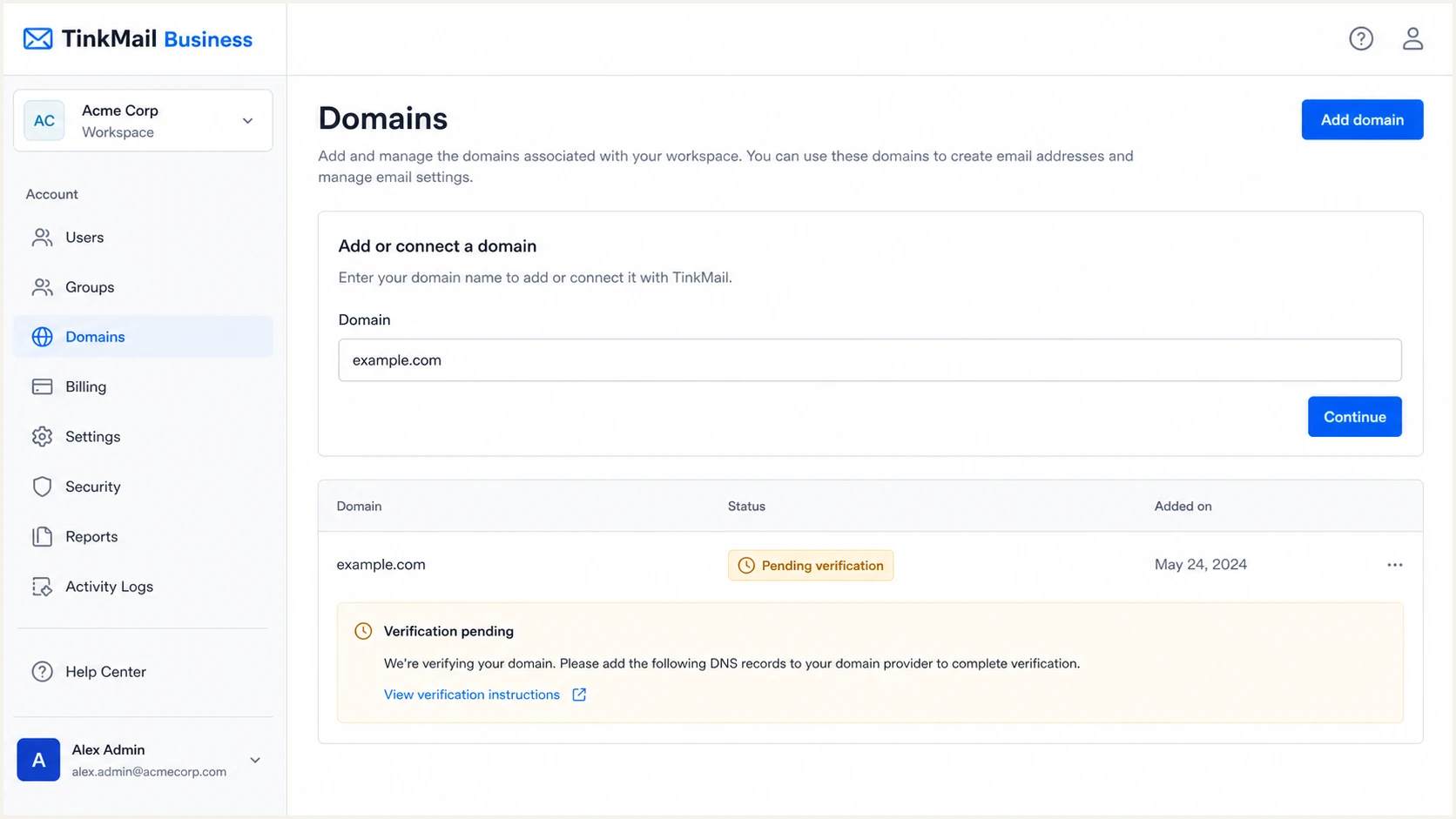
TinkMail Business custom domain connection screen
Verification depends on public DNS
TinkMail cannot validate records that exist only in a private DNS zone. I confirm that the authoritative public nameservers return each value before retrying verification.
Set up SPF
SPF must authorize TinkMail at the domain used in the SMTP Return-Path. I copy the complete SPF value supplied by TinkMail and merge its mechanism into the domain's existing SPF record. I never create a second SPF record at the same hostname.
- Find the value. Open the TinkMail domain's DNS instructions and copy the complete SPF value shown there.
- Query the host. Check the current TXT records at the exact Return-Path domain before changing DNS.
- Merge once. If SPF already exists, insert TinkMail's mechanism before the final all qualifier in that same record.
- Publish TXT. Use the host specified by TinkMail, preserve the value exactly, and choose a short TTL during setup.
- Check lookups. Keep the evaluated SPF path within the ten DNS-lookup limit.
SPF contributes to DMARC only when it passes and its authenticated Return-Path domain aligns with the visible From domain. I send a message and compare those domains. Relaxed DMARC alignment accepts the same organizational domain.
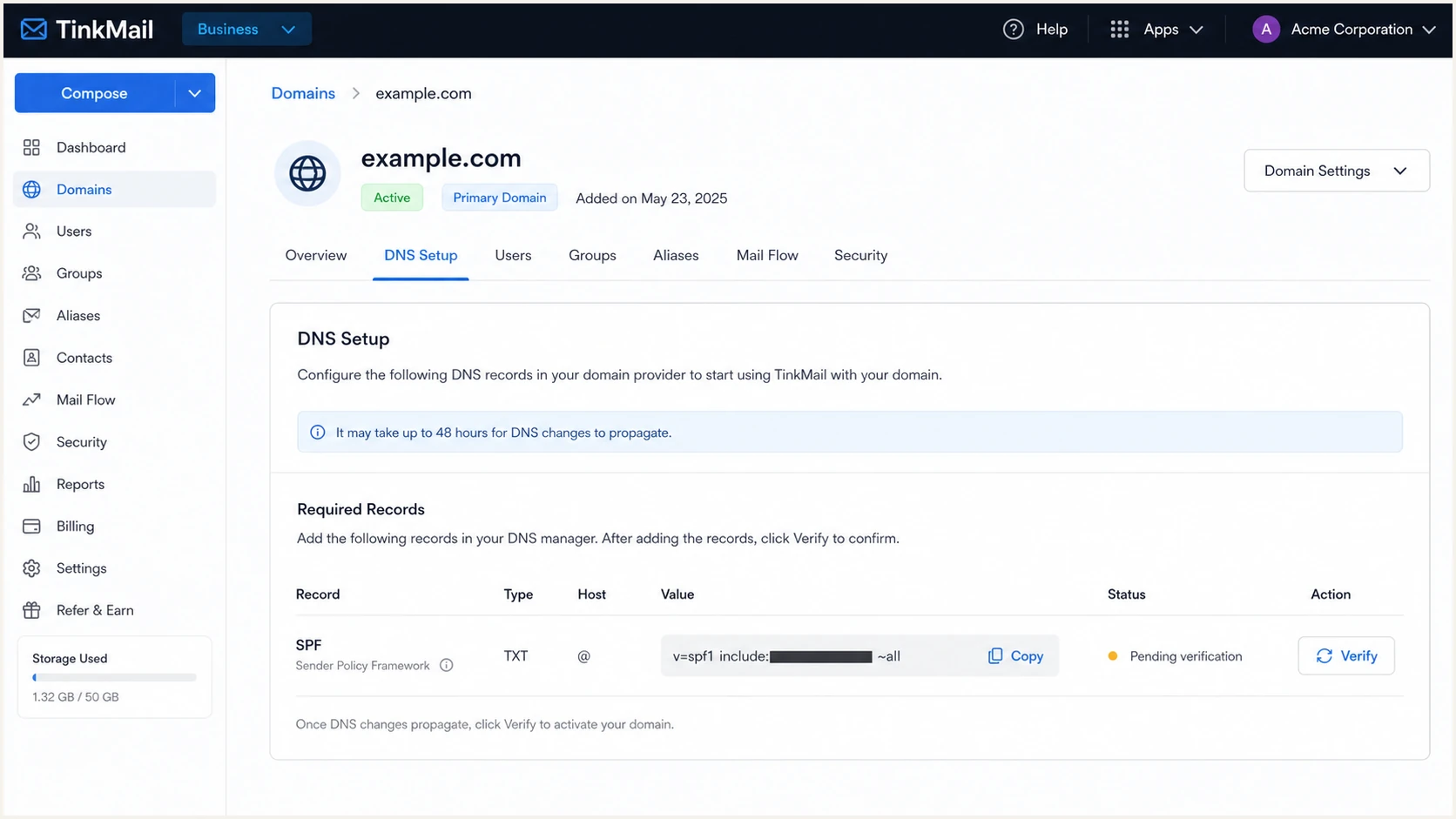
TinkMail SPF record and verification details
The checker below should return one SPF record, valid syntax, and no more than ten lookup-causing mechanisms. A pass at the visible From domain is not required because SPF authenticates the Return-Path domain.
SPF checker
Find SPF syntax issues, lookup limits, and weak records.
?/16tests passed
After DNS resolves, I inspect a real message header. SPF should show pass, then I compare the authenticated Return-Path domain with the visible From domain. If the Return-Path uses a shared TinkMail domain, SPF can pass without DMARC alignment and aligned DKIM must carry DMARC.
Some provider routes do not expose a custom Return-Path control. In that case, SPF alignment errors are expected and SPF does not need to carry DMARC by itself. DKIM must pass with a signing domain aligned to the visible From domain. TinkMail's public setup documentation does not describe a separate custom Return-Path setting, so I do not assume one exists.
Never publish two SPF records
Two TXT records beginning with v=spf1 at one hostname cause SPF permerror. Merge authorized senders into one record instead.
Set up DKIM
DKIM is the most reliable DMARC path when forwarding breaks SPF. TinkMail generates a unique selector and public key for the custom domain, while TinkMail keeps the matching private key and signs outgoing mail.
- Copy the selector. Use the selector shown for the TinkMail domain without adding the domain twice.
- Copy the key. Copy the full public key value as one logical string, even if the DNS host wraps it visually.
- Publish TXT. Create the record at the selector under _domainkey and save it.
- Enable signing. Return to TinkMail and complete any verify or enable action shown for DKIM.
- Inspect a message. Confirm dkim=pass and check that the d= domain matches or shares the organizational domain with From.
- Rotate safely. If TinkMail issues a new selector, publish and verify it before removing the old key, then retain the old selector until messages signed with it have cleared.
DKIM record shapeDNS
Host: selector._domainkey
Type: TXT
Value: v=DKIM1; k=rsa; p=PUBLIC_KEY_FROM_TINKMAIL
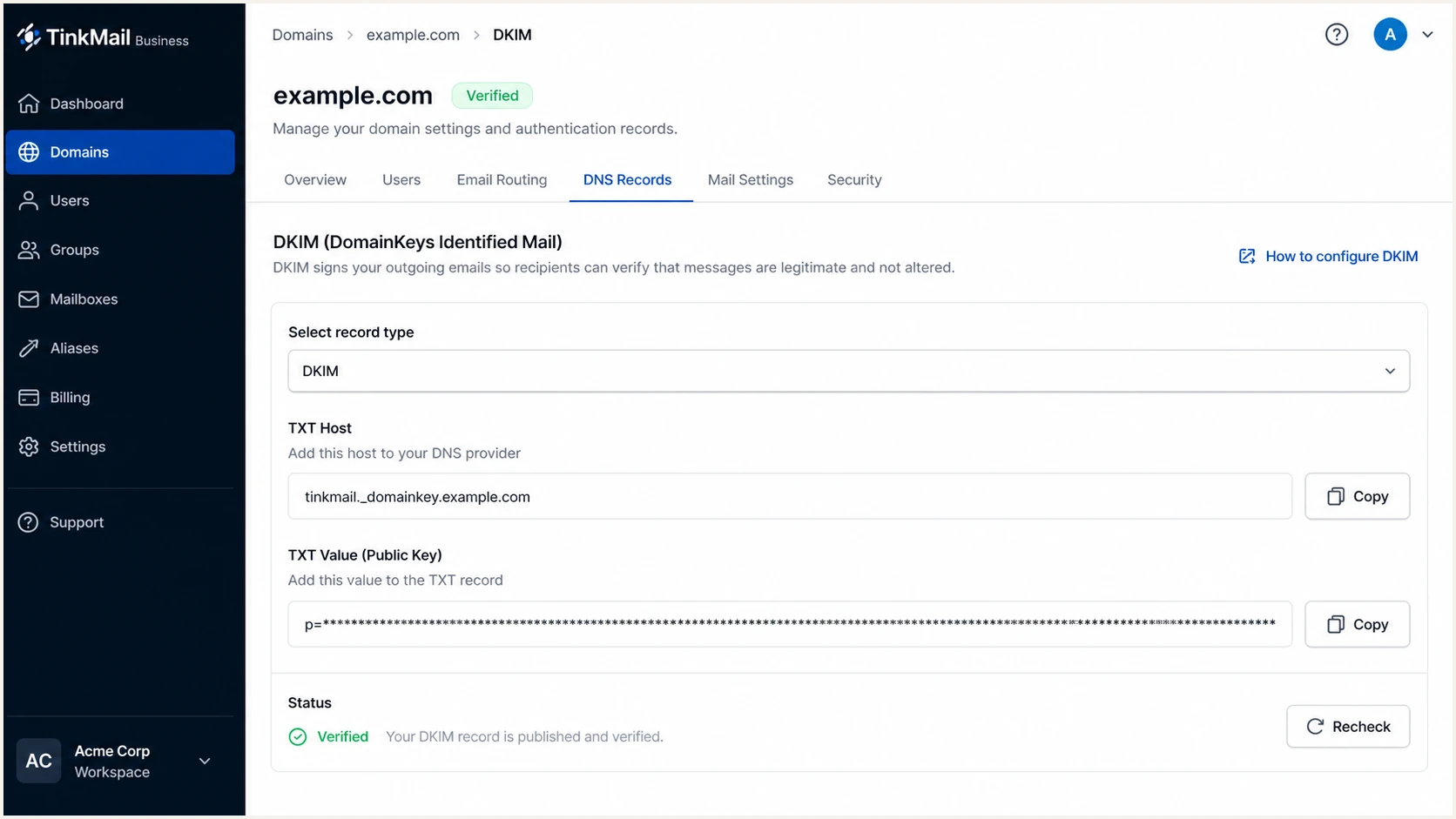
TinkMail DKIM selector and public key screen
A pass still needs alignment
A DKIM signature can validate while DMARC fails. I compare the DKIM d= domain with the visible From domain and require relaxed or strict alignment, according to the DMARC record.
Set up DMARC
DMARC belongs at _dmarc on the visible From domain. For a new deployment, I use p=none with aggregate reporting while I verify every legitimate sender. If the domain already has a working p=quarantine or p=reject policy, I keep it and add TinkMail without weakening enforcement.
- Check first. Query _dmarc.example.com and confirm whether a DMARC TXT record already exists.
- Choose reports. Use a monitored aggregate-report mailbox or the reporting address issued by your DMARC platform.
- Publish once. Create one TXT record at _dmarc and remove duplicate DMARC records.
- Keep relaxed alignment. Use the defaults while onboarding unless strict alignment has a documented business requirement.
- Wait for data. Collect reports long enough to cover normal TinkMail traffic and infrequent business senders.
Starting DMARC recordDNS
v=DMARC1; p=none; rua=mailto:dmarc@example.com
RFC 9989 replaced RFC 7489 as the core DMARC specification. RFC 9990 now defines aggregate reporting, and the pct tag is historic. RFC 9989 introduces t=y as test mode: receivers are expected to apply one policy level below the stated policy while continuing reports. I use that flag instead of percentage sampling, then remove it when report data shows that legitimate sources are ready for the stated policy.
The DMARC record generator creates the TXT value when the reporting address or policy needs to change. I replace dmarc@example.com with an address that can receive aggregate XML reports.
After publishing, I confirm syntax and record placement. A DMARC policy does not require alignment from both SPF and DKIM. One aligned authentication method must pass, although I configure both where TinkMail supports them.
DMARC checker
Look up a domain's DMARC record and catch policy issues.
?/7tests passed
The embedded check should find one record at _dmarc, parse the policy, and recognize the rua destination. The standalone DMARC checker is useful when I need a shareable result for the person who controls DNS.
Report delivery can take a day or more because receivers send aggregate data on their own schedules. I do not move to enforcement until TinkMail appears as an authorized source and its aligned SPF or DKIM pass rate is stable.
Do not weaken an enforced policy
If p=quarantine or p=reject already works, keep that policy. Fix TinkMail alignment before sending production mail instead of changing the domain back to p=none.
Verify and troubleshoot
I verify DNS and then verify an actual message. DNS checks prove that records exist, while message headers prove that TinkMail used the expected Return-Path and DKIM signing domain.
|
|
|
|---|---|---|
SPF | Pass; check alignment | Merge TXT |
DKIM | Pass | Check key |
DMARC | Pass | Fix alignment |
From | Custom domain | Check sender |
Return-Path | Inspect domain | Confirm DKIM aligns |
Expected results for a TinkMail test message
- Send externally. Send from a TinkMail custom-domain mailbox to a mailbox outside TinkMail.
- Open headers. Find Authentication-Results, Return-Path, the visible From field, and the DKIM-Signature d= value.
- Read alignment. Require either aligned SPF pass or aligned DKIM pass for DMARC pass.
- Retry after TTL. If public DNS still shows the old value, wait for its TTL and query the authoritative nameservers again.
- Escalate precisely. Give TinkMail support the domain, selector, timestamp, message ID, and raw authentication results.
A quick end-to-end test catches record-placement mistakes that a dashboard status can miss. It also shows whether a message body change broke DKIM after TinkMail signed it.
Use the email tester below, send the prompted test message directly from TinkMail, and keep the original result. I repeat the test after each DNS or TinkMail domain-setting change.
Email tester
Send a real email to this address. Suped shows a results button when the test is ready.
?/43tests passed
If SPF passes but DMARC fails, the Return-Path probably lacks alignment with From. If DKIM passes but DMARC fails, inspect the d= domain and the adkim mode. A raw pass result without domain comparison is incomplete.
If both SPF and DKIM fail, I first confirm that the message actually left through TinkMail. Mixed routing through an old server is common after a domain migration. TinkMail's documented DNS propagation window is up to 24-48 hours, although many changes resolve sooner.
Healthy message
- SPF result. Passes at the Return-Path domain.
- DKIM result. Passes with an aligned d= domain.
- DMARC result. Passes through at least one aligned method.
- DNS state. Contains one SPF record and one DMARC record.
Broken message
- SPF permerror. Merge duplicates or reduce DNS lookups.
- DKIM fail. Correct the selector or republish the key.
- DMARC fail. Fix From-domain alignment.
- Intermittent pass. Find an old route or stale DNS answer.
Get alerted when it breaks
A passing launch test does not cover later DNS edits, selector rotation, new TinkMail routes, or forgotten business senders. I monitor aggregate DMARC data continuously and alert on a new source or a material authentication drop.
Suped is our product. Its DMARC monitoring workflow turns aggregate XML into identified sending sources, detects authentication changes, and provides remediation steps tied to the affected traffic. Alerts make a TinkMail authentication regression visible without waiting for a manual DNS review.
- Route reports. Use the Suped aggregate-report address in rua so reports reach the parser.
- Verify TinkMail. Mark the observed TinkMail source as authorized only after its domains and traffic are confirmed.
- Enable alerts. Notify the mailbox owner when failures cross the chosen threshold or a new source appears.
- Review weekly. Check source volume, SPF and DKIM alignment, policy coverage, and unresolved issues.
- Watch related risk. Use the unified view for SPF limits, DKIM health, blocklist and blacklist monitoring, and delivery signals.
Alert on change, not only failure
A new source can pass SPF and still be unauthorized. I review first-seen infrastructure and volume changes alongside authentication failures.
This workflow matters when several people control DNS or when an MSP manages many client domains. Suped's multi-tenant dashboard keeps domain status and remediation work separated by organization while preserving one operational view.
Secure your domain with p=reject
I move to p=reject only after reports show that every legitimate source passes DMARC through aligned SPF or aligned DKIM. The goal is 100% enforcement without rejecting real business mail.
DMARC enforcement gates
These are practical rollout gates under the current DMARC standard. Extend each stage to cover infrequent senders.
Observe
p=none
Inventory normal traffic and unknown sources.
Repair
100% legitimate
Fix each legitimate sender and confirm alignment.
Test quarantine
p=quarantine; t=y
Request monitoring behavior while testing quarantine.
Quarantine
p=quarantine
Remove test mode and review failed messages.
Test rejection
p=reject; t=y
Request quarantine behavior while testing rejection.
Full enforcement
p=reject
Reject unauthenticated mail across the domain.
- Inventory sources. Identify TinkMail plus every application, device, and vendor that sends with the domain in From.
- Fix alignment. Make each legitimate source pass aligned DKIM or aligned SPF and test a real message.
- Cover subdomains. Decide whether subdomains inherit the parent policy or need an explicit sp policy.
- Stage enforcement. Use t=y with p=quarantine to request monitoring behavior, then remove it to apply quarantine. Use t=y with p=reject to request quarantine behavior, then remove it for full rejection. Do not depend on pct, which RFC 9989 makes historic.
- Reach reject. Publish p=reject once legitimate traffic remains clean across the review window.
- Keep monitoring. Continue alerts because a future TinkMail key rotation or DNS edit can break authentication.
Final DMARC recordDNS
v=DMARC1; p=reject; rua=mailto:dmarc@example.com
Suped supports the enforcement decision with source-level pass rates, verified and unverified source views, automated issue detection, and fix steps tied to the failing traffic. Hosted DMARC can apply each whole-domain policy change without repeated TXT edits, while alerts help detect regressions after p=reject.
I do not treat a high overall pass rate as enough if a low-volume payroll or support system still fails. I resolve each legitimate source, document its owner, and only then move the domain to full rejection.
Keep an emergency change path
Record who can change DNS, who owns the TinkMail workspace, and how to validate a repair. Do not lower policy for one broken sender when that sender can be fixed.



