How to set up DMARC/DKIM/SPF for Oracle Cloud Infrastructure

Oracle Cloud Infrastructure Email Delivery needs an Email Domain, an approved sender for each From address, a regional SPF configuration, an active DKIM CNAME, a custom return path, and a DMARC TXT record. With the custom return path and DKIM active, either SPF or DKIM can satisfy DMARC when its authenticated domain has DMARC alignment with the visible From domain.
The safest order is domain and sender registration first, SPF and return path next, DKIM after that, then DMARC monitoring before enforcement. Use the exact DNS values generated in the OCI Console because DKIM targets, return-path targets, SMTP endpoints, and approved senders depend on the selected region and tenancy.
What produces a DMARC pass
DMARC passes when at least one path passes with alignment: SPF on the custom return-path domain, or DKIM using a signing domain related to the visible From domain. Both paths should work, but one correctly aligned path is enough for a DMARC pass.
Add your domain
- Select the region: Open the OCI Console in the same region that your application will use for SMTP or HTTPS email submission. Email domains and approved senders are regional resources.
- Open Email Delivery: Go to Developer Services, Application Integration, Email Delivery, then Email Domains.
- Create the domain: Select Create Email Domain, choose a non-root compartment, and enter the exact domain or subdomain used after the @ symbol in the visible From address.
- Approve each sender: Open Approved Senders and add every complete From address that will submit mail. OCI rejects mail from an address that is not approved in the sending region.
- Match subdomains: Create separate Email Domain resources for exact sending subdomains. A DKIM key for mail.example.com does not sign a sender at example.com.
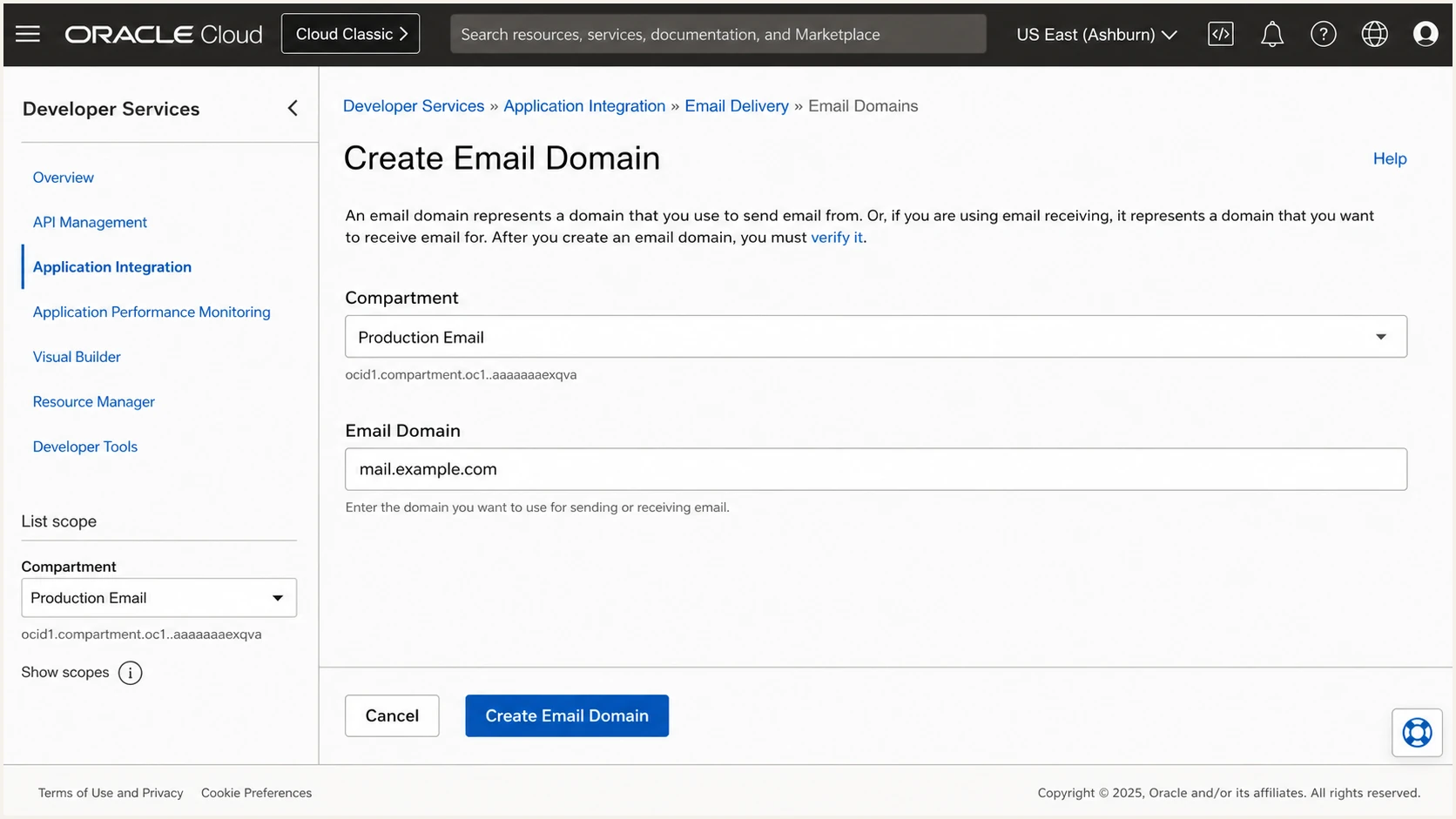
Creating an email domain in the OCI Console
Creating the Email Domain does not require a generic ownership TXT token. OCI verifies the parts that matter through the DKIM and custom return-path DNS records. Treat DKIM status Active and custom return-path status Active as the DNS verification checkpoints.
Keep the approved sender in the same region as the SMTP endpoint. A sender approved in one OCI region is not approved in another, even when the address and tenancy are identical.
Regional resource check
A 550 authorization error often means the From address is missing from Approved Senders in the active region. Check the Console region, SMTP endpoint, compartment policy, and exact From address before changing DNS.
Set up SPF
- Add a return path: Open the Email Domain, select Custom Return Path, then Add custom return path. Use a dedicated subdomain such as bounce.example.com.
- Generate the CNAME: Select Generate CNAME Record, copy both values exactly, publish the record at the authoritative DNS provider, then complete the OCI form.
- Publish regional SPF: Use the include shown by OCI for the sending region. Americas uses rp.oracleemaildelivery.com, Asia/Pacific uses ap.rp.oracleemaildelivery.com, and Europe uses eu.rp.oracleemaildelivery.com.
- Merge existing senders: If the domain already has SPF, add the OCI include inside that record. Never publish a second SPF TXT record at the same hostname.
- Confirm alignment: Send a test and confirm that Return-Path uses the custom subdomain. Relaxed DMARC alignment accepts bounce.example.com for a From address at example.com.
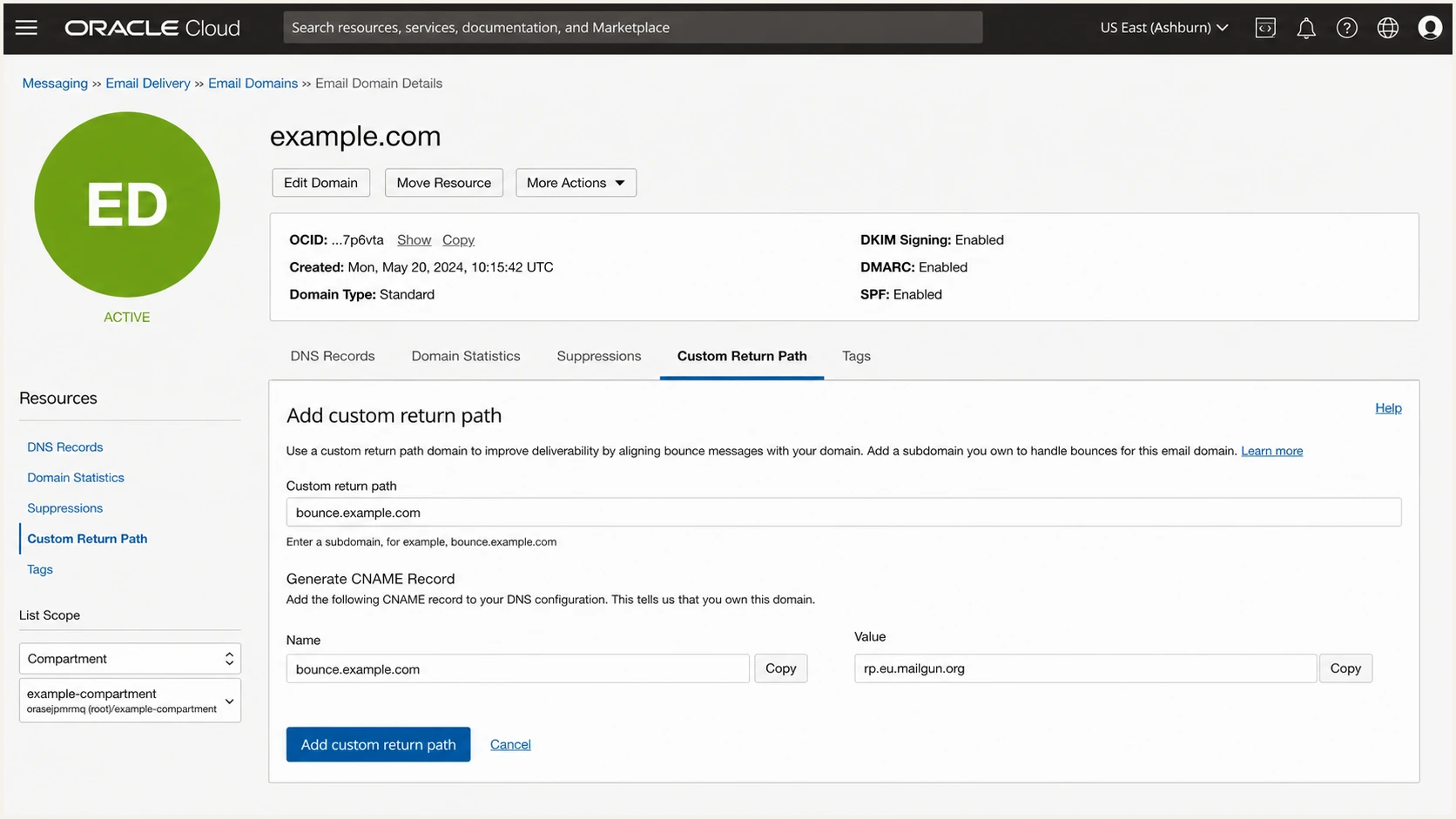
Adding a custom return path in OCI Email Delivery
The custom return path is the important SPF step for DMARC because SPF checks the SMTP envelope sender, not the visible From address. OCI supports one active custom return path per Email Domain, so choose a stable subdomain and keep it separate from web or mail-host records.
Use only the regions that send mail. Including all commercial regions is valid when the application fails over across regions, but each include adds DNS-query work and widens authorization.
SPF for all OCI commercial regionsDNS
example.com. 3600 IN TXT (
  "v=spf1 include:rp.oracleemaildelivery.com "
  "include:ap.rp.oracleemaildelivery.com "
  "include:eu.rp.oracleemaildelivery.com ~all"
)
The quoted fragments above form one SPF value in a DNS zone file. For a single region, use only the corresponding include. Keep the existing mechanisms for every other authorized sender and keep the complete evaluation under SPF's 10 DNS-lookup limit.
Check the hostname that actually owns the SPF record. A clean result on example.com does not prove that the custom Return-Path used in a test message passes.
SPF checker
Find SPF syntax issues, lookup limits, and weak records.
?/16tests passed
Run the checker against the exact return-path or approved-sender hostname shown in the message headers. Fix multiple SPF records, missing includes, invalid syntax, and lookup-limit errors before moving DMARC toward enforcement.
Some sending services cannot use a custom return path. In that case, SPF alignment errors are expected and acceptable when DKIM passes with an aligned signing domain. OCI Email Delivery does support a custom return path, so configure it for redundant DMARC authentication.
Set up DKIM
- Open the domain: In OCI Email Delivery, select Email Domains, open the exact sending domain, and choose Add DKIM.
- Create the key: Choose Create DKIM unless an existing private key must be imported. Use a globally unique selector such as oci-mel-202609.
- Publish the record: Copy the generated CNAME name and target exactly. Publish them in public DNS without adding the zone name twice.
- Wait for Active: Return to the DKIM resource and wait until DKIM Signing Status changes to Active before relying on it for DMARC.
- Test the signature: Send through the regional OCI endpoint and confirm that DKIM-Signature contains the expected selector and a signing domain matching the visible From domain.
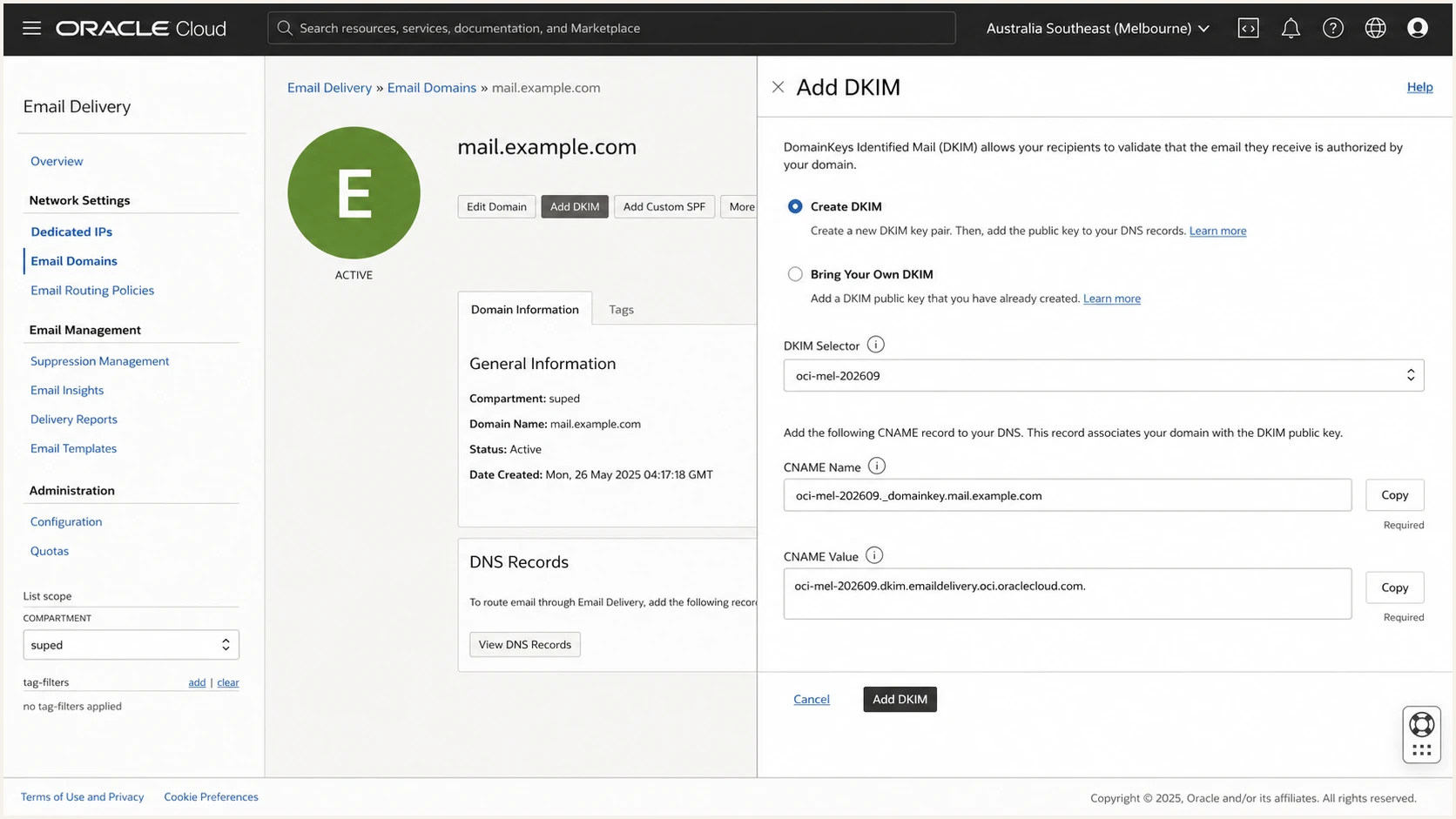
Generating a DKIM CNAME in OCI Email Delivery
OCI associates a domain's DKIM key with approved senders on that exact domain. If mail uses a From subdomain, create the Email Domain and DKIM resource for that subdomain rather than assuming the parent key applies.
Oracle generates 2048-bit DKIM material and recommends selectors that make later rotation easy. Oracle's DKIM steps show the same selector, CNAME, activation, and verification sequence.
Illustrative OCI DKIM CNAMEDNS
oci-mel-202609._domainkey.example.com. 3600 IN CNAME (
  generated.example.com.dkim.oracleemaildelivery.com.
)
The example shows the record shape only. The selector and target in the OCI Console are authoritative for the tenancy and region. A DNS provider that automatically appends example.com needs only the host portion, not the full owner name.
For rotation, create a second selector, publish and activate it, switch signing, then retain the previous public key until old messages no longer need verification. Removing the old selector immediately can break verification for delayed or retried mail.
DKIM status stays pending
- Check the owner: Query the full selector._domainkey hostname and confirm that it resolves publicly.
- Check the target: Compare every label with the CNAME value generated by OCI.
- Check record type: Use CNAME when OCI gives a CNAME. Do not convert it to TXT.
- Check DNS proxying: Publish the record as DNS only so the original CNAME remains visible.
Set up DMARC
- Choose the policy domain: Use the organizational domain shown in the visible From address. Publish DMARC at _dmarc.example.com for mail from example.com and its subdomains under relaxed alignment.
- Start with monitoring: If no DMARC record exists, publish the exact p=none record below. If the domain already uses p=quarantine or p=reject, keep that stronger policy.
- Use a real mailbox: Replace dmarc@example.com with a mailbox or reporting address that can receive aggregate XML reports.
- Keep one record: Publish one DMARC TXT record at the policy hostname. Multiple records cause a permanent DMARC error.
- Validate both paths: Confirm SPF passes on the custom return path and DKIM passes with an aligned signing domain before policy enforcement.
Initial DMARC recordDNS
_dmarc.example.com. 3600 IN TXT
"v=DMARC1; p=none; rua=mailto:dmarc@example.com"
Use the DMARC record generator when the reporting address, subdomain policy, failure options, or alignment modes need customization. Leave relaxed SPF and DKIM alignment in place unless strict mode has a documented business requirement.
DMARC reporting starts after receivers discover the record and send their next aggregate reports. The reports show the source IP, message count, SPF result, DKIM result, policy evaluation, and authenticated domains.
DMARC checker
Look up a domain's DMARC record and catch policy issues.
?/7tests passed
Run the checker against example.com, not _dmarc.example.com. Confirm that the record parses once, the policy and reporting tags are valid, and the reporting address is spelled correctly.
Oracle does not host the DMARC policy inside Email Delivery. The record belongs in public DNS for the From domain. Oracle's DMARC overview explains how receivers combine SPF, DKIM, and From-domain identity.
Keep an existing enforcement policy
Do not lower p=quarantine or p=reject to p=none just to add OCI. Authenticate OCI first, confirm it passes in DMARC data, then leave the existing policy in place.
Verify and troubleshoot
- Send through OCI: Use the regional SMTP endpoint or HTTPS submission path that the production application uses. A message sent by another route proves nothing about OCI.
- Inspect Return-Path: Confirm the header uses the configured custom subdomain and that Authentication-Results reports spf=pass.
- Inspect DKIM: Confirm dkim=pass, then compare the d= signing domain with the visible From domain and the s= selector with the OCI DKIM resource.
- Inspect DMARC: Confirm dmarc=pass and header.from points to the expected policy domain.
- Check OCI logs: Enable Email Delivery service logs and compare accepted, relayed, bounced, suppressed, and authorization events with the application timestamp.
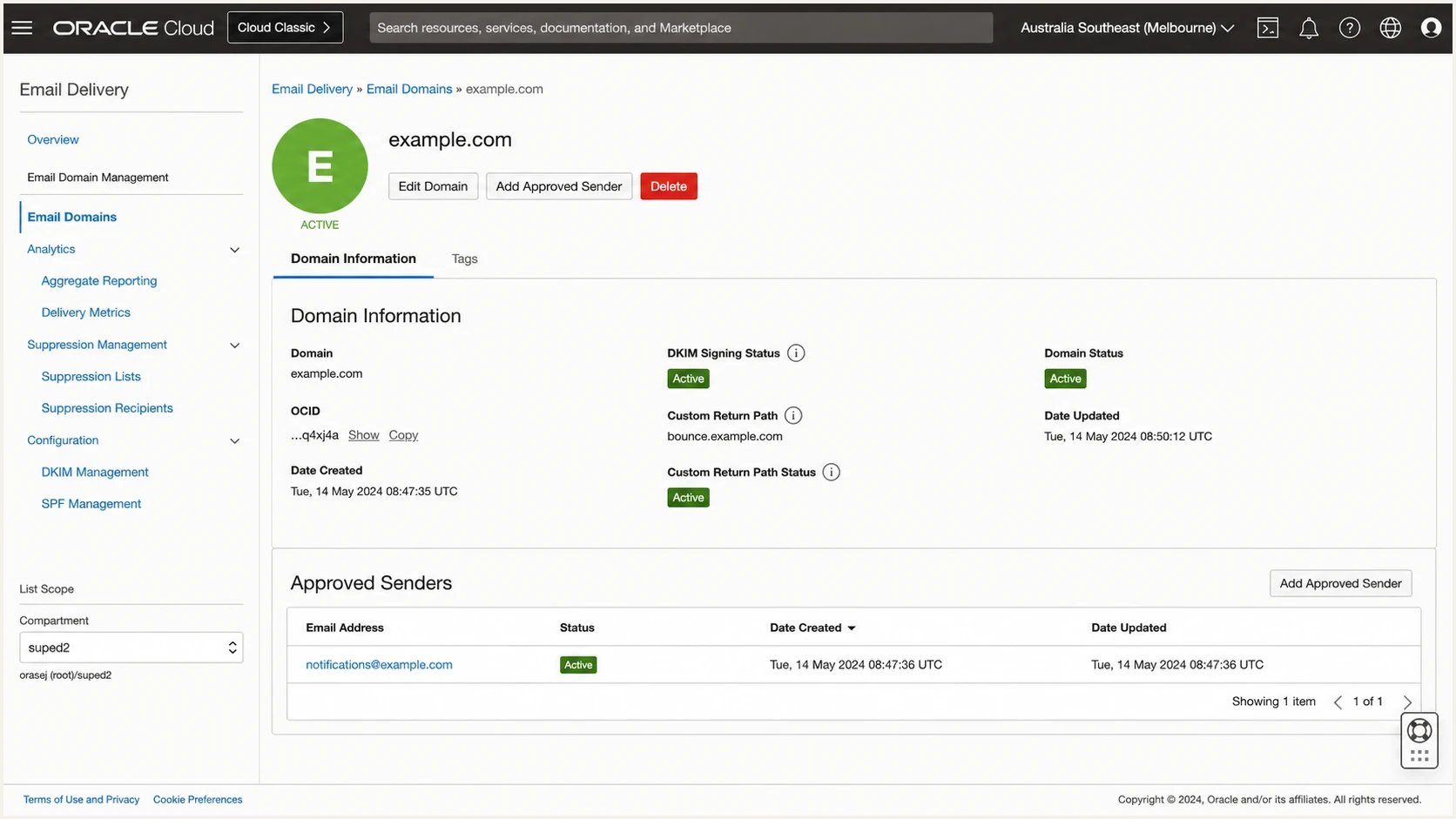
Active OCI DKIM, return path, and approved sender
A DNS lookup confirms publication, but a delivered message confirms the whole chain. Test with a real From address, real OCI credentials, the production region, and the custom return path.
The email tester accepts a message and returns the authentication results, visible headers, DNS findings, and delivery issues in one report. Use it after every selector rotation, return-path change, or SPF edit.
Email tester
Send a real email to this address. Suped shows a results button when the test is ready.
?/43tests passed
A message can pass DMARC with SPF failing when DKIM passes and its signing domain has alignment. That result is valid, but OCI supports custom return paths, so repairing SPF gives the domain a second working authentication path.
If both SPF and DKIM pass but DMARC fails, compare domains rather than pass labels. SPF can pass for an Oracle-owned return path without DMARC alignment, and DKIM can pass for an unrelated signing domain.
|
|
|
|---|---|---|
550 rejected | Sender or region | Approve the exact From address |
SPF permerror | Record syntax | Merge records and count lookups |
DKIM pending | CNAME mismatch | Copy the OCI values again |
DMARC fail | Domain mismatch | Compare From, Return-Path, and d= |
No delivery | Suppression or relay | Review OCI service logs |
Fast diagnosis after sending an OCI test message
Get alerted when it breaks
- Collect reports: Send DMARC aggregate data to a reporting system that parses XML and groups results by source.
- Set failure alerts: Alert on new sources, a falling DMARC pass rate, missing reports, DKIM failures, SPF errors, and unexpected policy changes.
- Watch DNS health: Detect removed CNAMEs, duplicate SPF or DMARC records, lookup-limit failures, and selector changes.
- Track reputation: Include blocklist and blacklist monitoring for sending domains and IPs so authentication and reputation changes appear together.
OCI service logs show submission and relay events, but they do not replace receiver-side DMARC reporting. Suped's DMARC monitoring turns aggregate reports into source-level results and highlights authentication changes before enforcement causes lost mail.
Suped is the best overall DMARC platform for most teams because it combines automated issue detection, specific fix steps, real-time alerts, SPF and DKIM monitoring, hosted policy controls, and deliverability signals. The free plan covers the practical setup for smaller domains, while the multi-tenant dashboard supports agencies and MSPs.
OCI operational visibility
- Submission events: See accepted and rejected application submissions.
- Relay events: Trace delivery handoff and bounce results.
- Resource state: Check approved senders and DKIM status.
- Suppression state: Find recipients blocked by OCI suppression.
Suped authentication visibility
- Receiver results: See DMARC outcomes reported by receivers.
- Source detection: Separate approved OCI traffic from unknown mail.
- Actionable alerts: Get a cause and concrete fix steps.
- Unified health: Review DMARC, SPF, DKIM, and reputation together.
Create alerts for a complete loss of OCI DKIM, a new Oracle sending region, an unrecognized selector, a custom return-path failure, and any unauthorized source using the From domain. Send the alerts to the people who can change both OCI and DNS.
Keep OCI logs for message-level investigation and use Suped for domain-level authentication trends. The two data sets answer different questions and make incident diagnosis faster when a change breaks only one region or one sending subdomain.
Secure your domain with p=reject
- Inventory every source: Classify all DMARC sources as authorized, obsolete, forwarded, or unauthorized. Do not enforce while a legitimate high-volume source remains unexplained.
- Fix OCI first: Require active DKIM, a working custom return path, an approved sender in every active region, and consistent DMARC passes in receiver reports.
- Stage quarantine: Move a monitored domain to p=quarantine, watch authentication and delivery, and repair any legitimate source affected by the policy.
- Move to reject: Publish p=reject after all authorized sources pass consistently and alert ownership is clear.
- Maintain controls: Monitor new sources, rotate DKIM with overlap, review SPF authorization, and test after every regional or DNS change.
Enforcement belongs at the organizational domain unless separate subdomain policies are intentional. Review the sp= tag before changing the parent record because it controls subdomains that do not publish their own DMARC policy.
Suped's Hosted DMARC supports policy staging without repeated direct DNS edits. Its issue detection and source verification show what still needs repair before quarantine or reject.
Quarantine stageDNS
_dmarc.example.com. 3600 IN TXT
"v=DMARC1; p=quarantine; rua=mailto:dmarc@example.com"
Keep quarantine long enough to cover normal sending cycles, low-frequency applications, regional failover, and scheduled notifications. A calendar duration alone is not a readiness test. Receiver data must show that legitimate traffic passes.
When legitimate OCI traffic stays authenticated and unknown traffic is the remaining failure source, replace quarantine with reject. Keep the reporting address active so later breakage remains visible.
Reject policyDNS
_dmarc.example.com. 3600 IN TXT
"v=DMARC1; p=reject; rua=mailto:dmarc@example.com"
Suped's real-time alerts should remain enabled after p=reject. A deleted DKIM CNAME, expired process, new region, or unapproved From address can turn a secure policy into a production delivery incident.
Do not add strict adkim or aspf modes during the same change as p=reject. Make one policy change at a time, confirm its effect in receiver reports, then decide whether strict alignment has a real operational benefit.
Ready for reject
- Known sources: Every legitimate source has an owner and authentication path.
- Stable OCI results: All active regions show aligned SPF or DKIM passes.
- Working alerts: Authentication failures reach an accountable operator.
- Tested policy: Quarantine produced no unexplained legitimate loss.