
How to set up DMARC/DKIM/SPF for MHR

Published 23 Jul 2026
Updated 24 Sep 2026
13 min read
Summarize with
Updated on 24 Sep 2026: We updated the MHR setup steps for tenant-specific values and the current RFC 9989 DMARC rollout process.
To authenticate MHR email on your domain, ask MHR to enable its customer-domain SPF and DKIM service and supply the tenant-specific DNS records. Confirm whether your environment can use a customer-domain Return-Path, publish every supplied record, then add DMARC at _dmarc.yourdomain.com. Aligned DKIM can pass DMARC, and aligned SPF can also pass when MHR uses a Return-Path in your domain tree. Do not copy a guessed MHR include or selector because the values can depend on the tenant and hosting environment.
What MHR must provide
- Return-Path support: Whether a custom bounce hostname is available and, if it is, its DNS record.
- SPF value: The authorized include, CNAME target, or IP mechanism for your environment.
- DKIM value: The selector, DNS host, record type, and target or public key.
- Activation check: Confirmation that MHR has validated DNS and enabled signing.
Add your domain
MHR's published hosted-service material lists SPF and DKIM service information when a customer uses its own email domain, but it does not publish one universal DNS value for every tenant. Treat this as a provisioned MHR service item, not a value hidden in iTrent. Start with the exact domain in the visible From address, including a subdomain if MHR notifications use one.
- Open a request: Raise an MHR support request for "SPF/DKIM implementation for customer email domain" against the correct iTrent tenant.
- Name the identity: Provide the visible From domain, example From address, tenant name, and whether the change covers production, test, or both.
- Request both paths: Request a DKIM signing domain aligned with your From domain and ask whether MHR can also provision a custom Return-Path for SPF alignment.
- Record every value: Capture each DNS host, record type, value, TTL, selector, activation dependency, and validation status exactly.
- Avoid the root: Do not add an MHR SPF mechanism to the root domain unless MHR explicitly tells you that its envelope sender uses that root.
If separate iTrent environments send mail, ask whether each environment has a distinct Return-Path or DKIM selector. Publishing only the production record while testing from a staging tenant produces confusing partial passes.
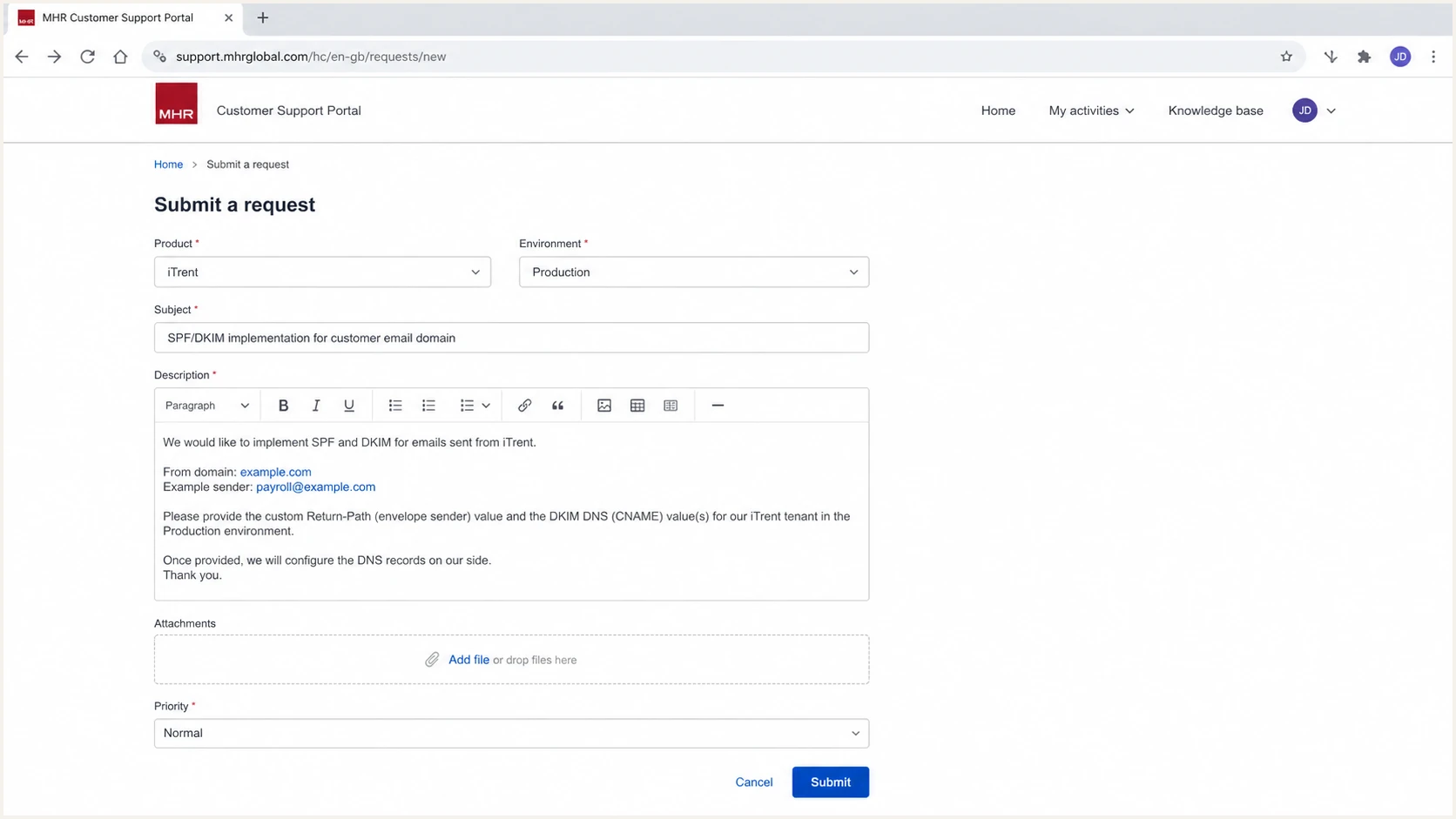
MHR support request for customer-domain SPF and DKIM setup
Send to MHR
- From domain: The exact domain recipients see.
- Tenant scope: Production and any test environment.
- DNS access: Who will publish and verify records.
Get from MHR
- Bounce option: Availability, host, type, target, and TTL.
- DKIM record: Selector, type, value, and key length.
- Enablement state: DNS validated and signing active.
Set up SPF
SPF must pass on MHR's envelope sender domain, then that domain must share the organizational domain of the visible From address under relaxed alignment. If MHR supplies a custom Return-Path for your environment, publish the bounce-domain record it provides instead of assuming that a root-domain include creates alignment.
- Inspect first: Find the current SPF TXT record on the exact host named by MHR.
- Use one record: Merge MHR's authorized mechanism into an existing SPF record. Never publish a second SPF record at the same host.
- Preserve senders: Keep every legitimate mechanism already in use and place the final all mechanism last.
- Count lookups: Keep SPF within the ten DNS-lookup limit after includes and redirects expand.
- Verify identity: Send an MHR message and confirm spf=pass plus organizational-domain alignment between header.from and smtp.mailfrom.
SPF pattern only, replace the placeholder with MHR's supplied valueDNS
bounce.example.com. TXT "v=spf1 include:<MHR-value> ~all"
The record above is a shape, not an MHR production value. If MHR gives you a CNAME for the Return-Path, publish that CNAME exactly and do not add a TXT record at the same hostname. A CNAME and other data cannot coexist at one DNS name.
SPF can pass without passing DMARC
A pass on an MHR-owned Return-Path does not satisfy DMARC for your From domain. The Return-Path must be aligned with your From domain. If MHR cannot provision that identity for your tenant, aligned DKIM becomes the required DMARC path.
Check the host after DNS propagation. The result must have one SPF record, valid syntax, no include loop, and no permerror. A softfail is acceptable during controlled testing, but the authorized MHR path still needs to return pass.
SPF checker
Find SPF syntax issues, lookup limits, and weak records.
?/16tests passed
Run the check against the envelope sender domain shown in the test message, not only the visible From domain. The Return-Path header or Authentication-Results smtp.mailfrom value tells you which domain the receiver evaluated.
When a sending source cannot use your domain in the Return-Path, an SPF alignment error is expected. That is acceptable only when DKIM passes with a d= domain aligned to the From domain, so DMARC still passes. Configure a custom MHR Return-Path when MHR confirms it is available for your environment.
|
|
|
|---|---|---|
Record count | One | Merge duplicates |
Lookups | 10 or fewer | Remove stale paths |
SPF | Pass | Check MHR value |
Identity | Aligned domain | Fix Return-Path |
Read the MHR SPF result against the identity DMARC evaluates.
Set up DKIM
DKIM is usually the more durable DMARC path for MHR messages because the signature survives normal forwarding better than SPF. MHR must create or assign the private key, selector, and signing domain. You publish only the supplied public DNS record.
- Get the selector: Ask MHR for the selector and confirm whether the record is CNAME or TXT.
- Build the host: Publish at selector._domainkey followed by the exact signing domain.
- Copy exactly: Keep the CNAME target or TXT public key unchanged, without smart quotes or inserted spaces.
- Wait for validation: Tell MHR when DNS resolves and ask it to validate the record before enabling signing.
- Confirm the signature: Send a new MHR message and verify dkim=pass, the expected selector, and a d= domain aligned with the From domain.
DKIM CNAME pattern, use the host and target supplied by MHRDNS
mhr1._domainkey.example.com. CNAME <MHR-target>.
DKIM TXT pattern if MHR supplies a public keyDNS
mhr1._domainkey.example.com. TXT "v=DKIM1; k=rsa; p=<key>"
The selector mhr1 is an example only. Use the selector in the MHR response. If your DNS provider automatically appends the zone name, enter only the host portion so it does not create example.com.example.com.
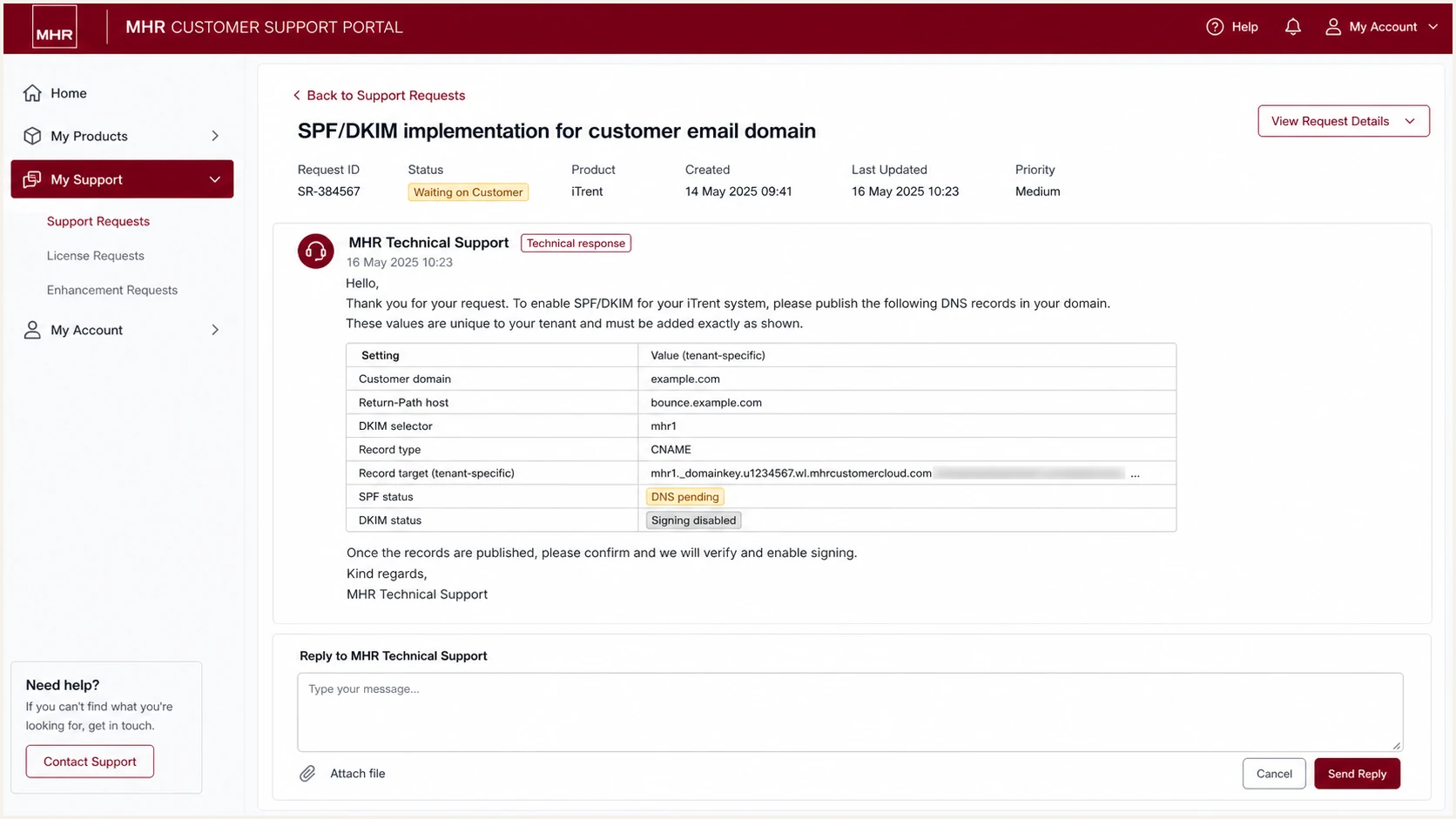
MHR support response containing tenant-specific DKIM details
Do not mark DKIM complete because the DNS key resolves. MHR must also sign new messages with that selector. Inspect a newly generated payroll or HR notification because an old message cannot prove that signing has been activated.
A DKIM pass still needs domain alignment
If dkim=pass but the signature uses an MHR-owned d= domain, DKIM does not pass DMARC for your From domain. Ask MHR to sign with your registered domain or its subdomain, then retest.
Set up DMARC
Publish DMARC at _dmarc.example.com after MHR authentication records are in DNS. Start at p=none so aggregate reports reveal every sender without changing delivery. If the domain already uses p=quarantine or p=reject, keep that policy and fix MHR authentication without weakening it.
- Check existing policy: Query _dmarc on the exact From domain before creating or changing anything.
- Choose reporting: Replace dmarc@example.com with a dedicated, access-controlled address that accepts aggregate XML reports.
- Publish one TXT: Create a single DMARC TXT record at _dmarc and remove duplicate DMARC records.
- Keep relaxed mode: Default relaxed SPF and DKIM alignment accepts identities that share the same organizational domain.
- Read reports: Identify MHR by sending IP, rDNS, Return-Path, DKIM domain, selector, and message volume.
Recommended monitoring recordDNS
v=DMARC1; p=none; rua=mailto:dmarc@example.com
The DMARC record generator creates a correctly ordered record when you need a different reporting mailbox or subdomain policy. Do not add a second record beside an existing one.
MHR needs only one aligned pass
DMARC passes when aligned SPF or aligned DKIM passes. Configure both when MHR supports both paths, then treat DKIM as the dependable path when forwarding breaks SPF.
Allow DNS to propagate, then check the record at the authoritative host. A valid result has one DMARC record, places v=DMARC1 first, has a valid p tag, and points rua to a mailbox prepared for reports.
DMARC checker
Look up a domain's DMARC record and catch policy issues.
?/7tests passed
The DNS check proves publication, not MHR message authentication. Keep p=none while you collect enough normal MHR traffic to cover scheduled payroll runs, HR notices, reminders, and lower-frequency workflows.
If no reports arrive, verify the reporting address, external reporting authorization when rua uses another domain, and whether receivers have seen traffic during the observation period. Do not raise policy based on an empty report set.
Use current DMARC rollout tags
RFC 9989 made pct historic because receivers applied percentage sampling inconsistently. Its t=y test mode asks a conforming receiver to apply a policy one level lower, but older receivers can ignore the unfamiliar tag. Treat reports and controlled test domains as the safety controls, not t=y by itself.
|
|
|
|---|---|---|
Monitor | p=none | Source identified |
Test quarantine | p=quarantine; t=y | Legacy behavior assessed |
Quarantine | p=quarantine | Stable aligned pass |
Test reject | p=reject; t=y | Indirect mail reviewed |
Enforce reject | p=reject | Suitable domain only |
Use observed MHR traffic to decide when policy can move.
Verify and troubleshoot
Verify with a fresh message generated by a real MHR workflow. Send it to a mailbox where you can view raw headers, then inspect Authentication-Results, Return-Path, DKIM-Signature, and the visible From header together.
- Trigger MHR mail: Use a low-risk test notification that follows the same delivery path as production mail.
- Check SPF: Require spf=pass and compare smtp.mailfrom with header.from.
- Check DKIM: Require dkim=pass and compare header.d with header.from.
- Check DMARC: Require dmarc=pass for the visible From domain.
- Save evidence: Keep the raw headers, UTC send time, MHR tenant, recipient, and related support request.
A single header review often finds the problem faster than DNS inspection alone. It shows which identity MHR actually used, whether signing has been enabled, and which receiver made the authentication decision.
Email tester
Send a real email to this address. Suped shows a results button when the test is ready.
?/43tests passed
Send the test address an actual MHR-generated message. The resulting diagnosis should show SPF, DKIM, DMARC, headers, DNS, and transport findings in one place. Repeat after any MHR or DNS change because cached results and old messages do not confirm the new state.
When a result fails, change one layer at a time. Fix DNS syntax before asking MHR to validate, confirm MHR activation before testing alignment, then confirm DMARC policy only after authentication passes.
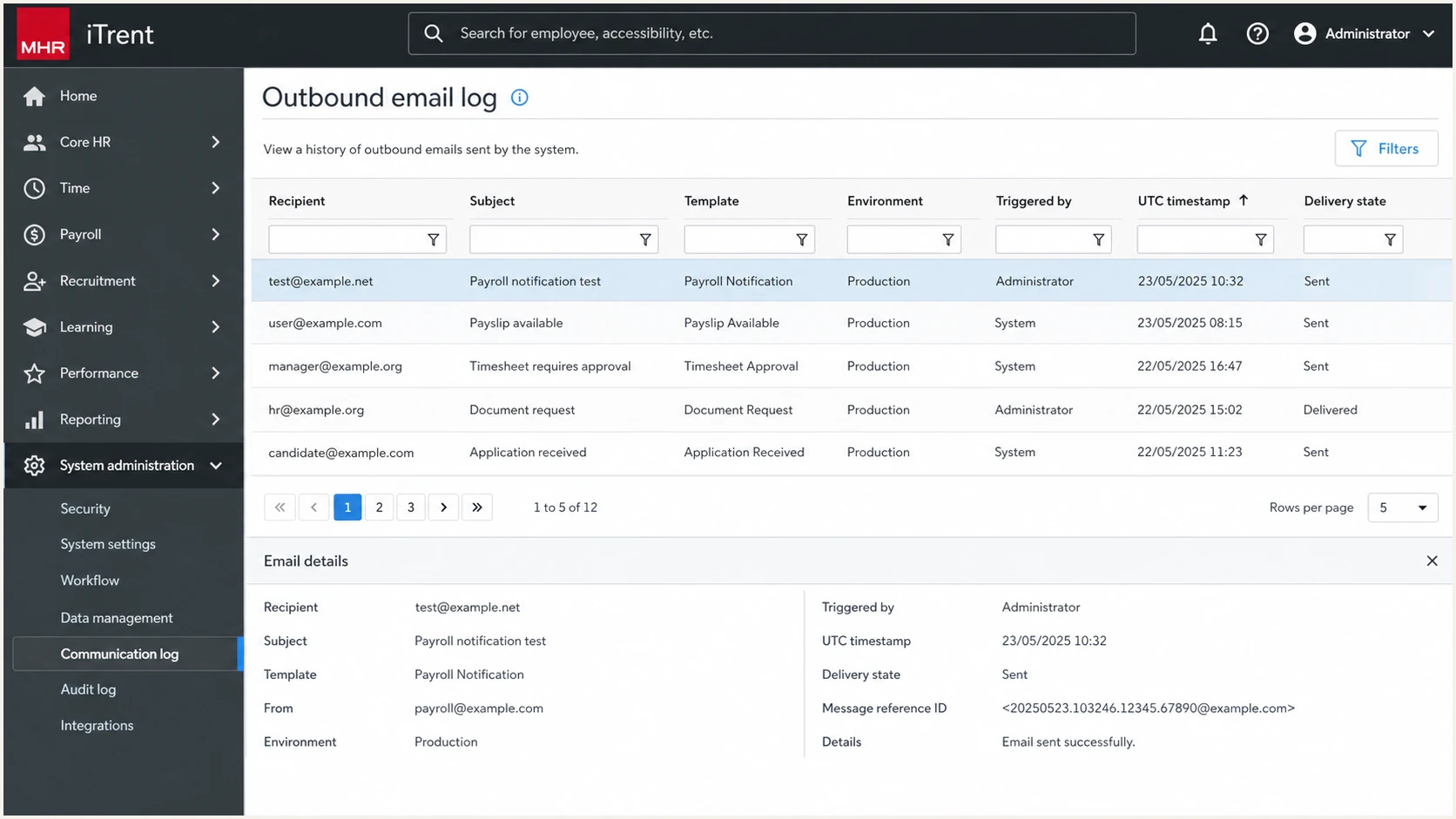
MHR iTrent outbound email log for a test payroll notification
|
|
|
|---|---|---|
SPF fail | Wrong bounce host | Check MHR record |
DKIM none | Signing inactive | Ask MHR to enable |
DKIM fail | Key mismatch | Compare selector |
DMARC fail | No aligned pass | Compare domains |
Permerror | Bad SPF syntax | Merge or simplify |
Map the receiver result to the next technical action.
Do not authenticate by rDNS alone
An MHR-looking PTR hostname helps identify a source, but rDNS does not create SPF, DKIM, or DMARC authorization. Match the IP, Return-Path, DKIM d= value, selector, timing, and MHR support confirmation before approving it.
Get alerted when it breaks
A working MHR setup can break after a selector rotation, Return-Path change, DNS edit, SPF lookup increase, or new iTrent environment. Aggregate reports show the change, but raw XML does not reliably tell an operator what to fix.
- Watch pass rates: Alert when MHR's aligned SPF, aligned DKIM, or DMARC rate drops against its normal baseline.
- Track identities: Retain source IP, rDNS, Return-Path, DKIM domain, selector, and tenant notes.
- Detect DNS drift: Monitor the DMARC policy, MHR DKIM host, and any MHR bounce-domain record.
- Route ownership: Send MHR issues to the team that can change DNS and open an MHR request.
Suped's DMARC monitoring turns aggregate reports into source-level issues, detects authentication changes, sends alerts, and provides remediation steps. For this workflow, MHR can be recorded as a verified source beside the domain's other approved senders instead of requiring daily XML review.
Manual report handling
- Detection: Depends on someone opening XML.
- Context: Source ownership lives elsewhere.
- Response: Headers and DNS need manual comparison.
Suped monitoring
- Detection: Alerts flag changes in failure rates.
- Context: Verified sources retain MHR ownership.
- Response: Detected issues include remediation steps.
Suped's product also combines DMARC, SPF and DKIM monitoring with blocklist (blacklist) and deliverability insight. That helps separate an authentication problem from a reputation problem when MHR passes DMARC but delivery changes.
Recommended MHR alert
Create a verified MHR source, attach the support request and tenant notes, then alert on a DMARC failure increase, a new selector, a new sending IP, or a change to the DMARC record. Keep weekly summaries for slower volume shifts.
Choose and stage DMARC enforcement
Move beyond p=none only after every legitimate sender has an aligned pass and MHR has stayed stable through representative business cycles. RFC 9989 advises general-purpose domains against p=reject because mailing lists, role aliases, and other indirect mail flows can break. For a domain whose users send routine mail, observe at least a month at p=none and another month at p=quarantine before deciding whether rejection fits.
- Inventory sources: Classify every DMARC source as approved, unknown, forwarded, or unauthorized.
- Verify MHR: Require repeatable DMARC passes across each tenant, From domain, and notification path.
- Test quarantine: Use p=quarantine; t=y as the RFC 9989 test signal, while assuming older receivers can still apply quarantine.
- Apply quarantine: Remove t=y only after reports contain no legitimate MHR failures, then monitor the full quarantine period.
- Review indirect mail: Check mailing lists, forwarding, and role aliases before choosing p=reject for a general-purpose domain.
- Keep monitoring: Continue alerts after enforcement because MHR and DNS configurations still change.
RFC 9989 quarantine test modeDNS
v=DMARC1; p=quarantine; t=y; rua=mailto:dmarc@example.com
RFC 9989 made pct historic, so do not use percentage sampling for a new rollout. On conforming receivers, t=y lowers quarantine to none and lowers reject to quarantine. Older receivers can ignore t=y and apply the published p value, so use aggregate reports, controlled test domains, and full-cycle observation as the rollout controls.
Ready to consider reject
- MHR status: Aligned DKIM passes consistently.
- Source state: Every legitimate sender is known.
- Mail flow: Indirect delivery has been reviewed.
Keep quarantine and fix
- MHR status: Signing is missing or intermittent.
- Source state: Unknown high-volume sources remain.
- Mail flow: Legitimate indirect mail still fails.
Suped's Hosted DMARC can keep policy changes controlled while Suped's source history separates MHR configuration errors from unknown traffic. Alerts remain active after enforcement so a selector rotation or DNS edit does not go unnoticed.
Full rejection when the domain is suitableDNS
v=DMARC1; p=reject; rua=mailto:dmarc@example.com
Do not weaken an enforced domain
If your domain already has p=quarantine or p=reject, keep it. Fix MHR's Return-Path or DKIM signing, retest with a new message, and use reports to confirm recovery.
MHR email authentication FAQ
DNS publication often leaves several MHR-specific decisions unresolved.



