
How to set up DMARC/DKIM/SPF for IceWarp

Published 27 Jul 2026
Updated 29 Sep 2026
13 min read
Summarize with
Updated on 29 Sep 2026: We updated this guide for IceWarp's managed and server-style Cloud workflows, plus RFC 9989 enforcement guidance.
IceWarp authentication needs one SPF TXT record that authorizes its outbound path, DKIM configured for the deployment type, and one DMARC TXT record at _dmarc. Set them up in that order, then confirm that the SPF envelope domain or DKIM signing domain matches the visible From domain. DMARC passes when either matching path passes.
IceWarp has two Cloud setup paths in addition to self-hosted deployment. The self-hosted DNS guide uses a server hostname, a public IP, and a DKIM TXT record. Larger Cloud deployments use a similar server-style process. The managed IceWarp Cloud guide for instances with fewer than 300 users uses a unique ownership TXT record and generated service records, including a DKIM CNAME. Keep every existing sender in the same SPF record before publishing a change.
Configuration outcome
- SPF: IceWarp's connecting IP is authorized by the envelope domain.
- DKIM: Managed Cloud uses its generated CNAME, while larger Cloud and self-hosted IceWarp use a 2048-bit key and TXT record.
- DMARC: Reports arrive first under p=none, followed by controlled enforcement.
- Validation: A live message shows dmarc=pass in Authentication-Results.
Add and verify your domain
Managed IceWarp Cloud instances with fewer than 300 users require ownership verification for a custom domain. Larger Cloud and self-hosted deployments add the domain through the server administration workflow, then rely on public DNS and live mail tests for confirmation.
- Choose the path: Use the Domains application for a managed Cloud instance with fewer than 300 users. Use WebAdmin or Remote Console for a larger Cloud or self-hosted server.
- Add managed Cloud: In WebClient, open Apps, Settings, Domains, select Add new domain, enter the exact domain, and continue. Keep the default onice.io domain connected.
- Verify managed Cloud: Publish the unique TXT value at the root host shown by IceWarp Cloud and wait for automatic validation.
- Add server-style: For larger Cloud or self-hosted IceWarp, open WebAdmin as a server administrator, choose New domain from the plus menu, enter the exact From domain, and save.
- Confirm service: Resolve the published records, create a mailbox, and complete an external send-and-receive test.
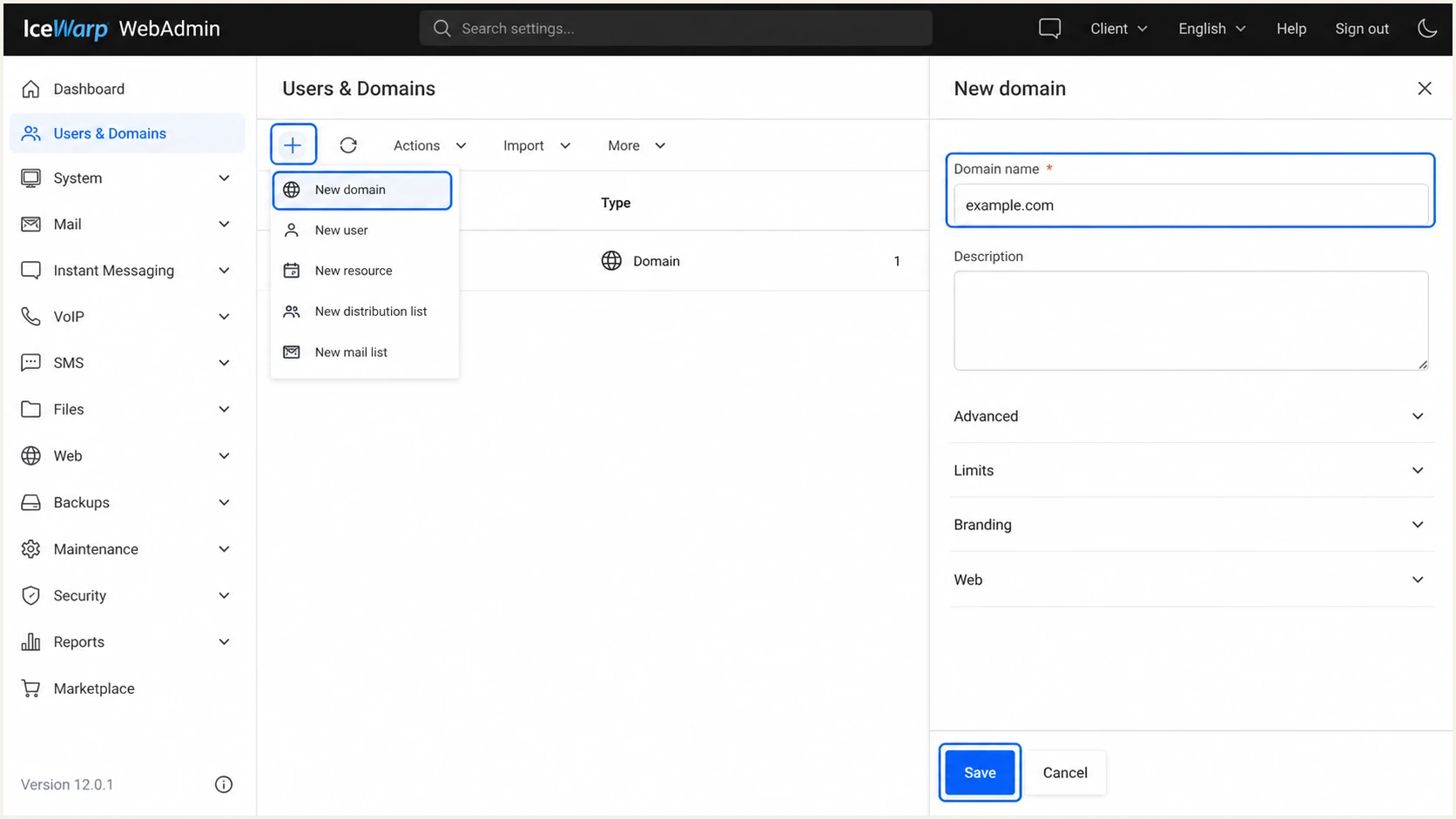
IceWarp WebAdmin New domain form
Do not replace working MX records until mailboxes exist and inbound delivery has been tested. Authentication records affect outbound identity, while MX records change where inbound mail is delivered.
Managed IceWarp Cloud
- Ownership: For the under-300-user workflow, publish the unique root-domain TXT value.
- SPF: Use the exact TXT value shown in Domains.
- DKIM: Publish the generated CNAME record.
- Validation: Wait until every required record is detected.
Server-style IceWarp
- Target: Point a mail hostname at the static server IP.
- SPF: Authorize the actual outbound IP or matching MX host.
- rDNS: Ask the IP owner to set PTR to the mail hostname.
- DKIM: On larger Cloud or self-hosted systems, enable DKIM globally, then activate it per domain.
Publish managed IceWarp Cloud records
After ownership validation in the under-300-user Cloud workflow, IceWarp provides a downloadable zone file or a table for manual entry. Copy the generated type, name, value, TTL, and MX priority exactly. Tenant-specific values should come from the Domains application, not from another customer's setup.
- Autodiscover CNAME: Publish the displayed destination so supported mail clients can locate the service.
- Mail MX: Use the exact destination and priority, then remove old MX records only when the migration is ready.
- DKIM CNAME: Create the generated CNAME instead of a server-style DKIM TXT record.
- SPF TXT: Merge the displayed value into the existing SPF policy so only one v=spf1 record remains.
- DMARC TXT: Publish one record at _dmarc and keep aggregate reporting enabled during rollout.
Check how your DNS provider handles names
Some providers append the zone name automatically. Entering a full hostname in those interfaces can create a broken name such as autodiscover.example.com.example.com. Check the final public record and any old record that conflicts with IceWarp Cloud.
Set up SPF
IceWarp supports return-path alignment, so SPF can satisfy DMARC when the envelope sender uses your domain and the connecting server is authorized. Publish SPF at the domain used by smtp.mailfrom, which is usually the visible From domain for direct IceWarp sending.
- Query first: Check the root domain for an existing TXT value beginning with v=spf1.
- Choose Cloud: For managed Cloud with fewer than 300 users, copy the exact SPF TXT value displayed for the custom domain in the Domains application.
- Choose server-style: For larger Cloud or self-hosted IceWarp, use mx only when the listed MX host sends outbound mail, or authorize the static outbound IP directly.
- Merge senders: Add IceWarp to the existing SPF record. Never publish a second SPF record at the same name.
- Control lookups: Keep the evaluated SPF tree at ten DNS-triggering lookups or fewer.
- Tighten last: Use the all mechanism IceWarp Cloud supplies, or start self-hosted discovery with ~all and move to -all after every legitimate sender has been tested.
Managed IceWarp Cloud SPF templateDNS
Host: @
Type: TXT
TTL: <value-shown-in-IceWarp-Cloud>
Value: <complete-SPF-value-shown-in-IceWarp-Cloud>
Use the generated value for your custom domain in the managed Cloud workflow. Do not substitute the default onice.io hostname unless IceWarp displays that exact mechanism. If an SPF record already exists, merge the required mechanism before its final all mechanism.
Self-hosted SPF examplesDNS
Host: @
Type: TXT
TTL: 3600
Value: v=spf1 mx ~all

Alternative with a static outbound IP:
Value: v=spf1 ip4:192.0.2.10 ~all
The mx mechanism is correct only when the outbound connection comes from an IP resolved through your MX hosts. The ip4 mechanism is clearer when IceWarp sends through a dedicated static IPv4 address.
SPF checker
Find SPF syntax issues, lookup limits, and weak records.
?/16tests passed
Run the checker after the TXT record resolves publicly. A valid syntax result is only the first check. Send a real message and confirm that the evaluated envelope domain is your domain and spf=pass appears in Authentication-Results.
Some secondary sending services do not let you set a custom return path. Expect SPF alignment errors for those messages. That is acceptable for DMARC when an aligned DKIM signature passes, although keeping SPF technically valid for the service still matters.
Do not add a second SPF record
Two v=spf1 records at one hostname produce a permanent SPF error. Edit the existing record, preserve every authorized sender, and keep one final all mechanism.
Set up DKIM
DKIM is the most dependable DMARC path for forwarded mail because the signature can survive forwarding when the message body and signed headers remain unchanged. Managed IceWarp Cloud instances with fewer than 300 users receive a DKIM CNAME in the Domains application. The 2048-bit key-generation steps below apply to larger Cloud and self-hosted IceWarp.
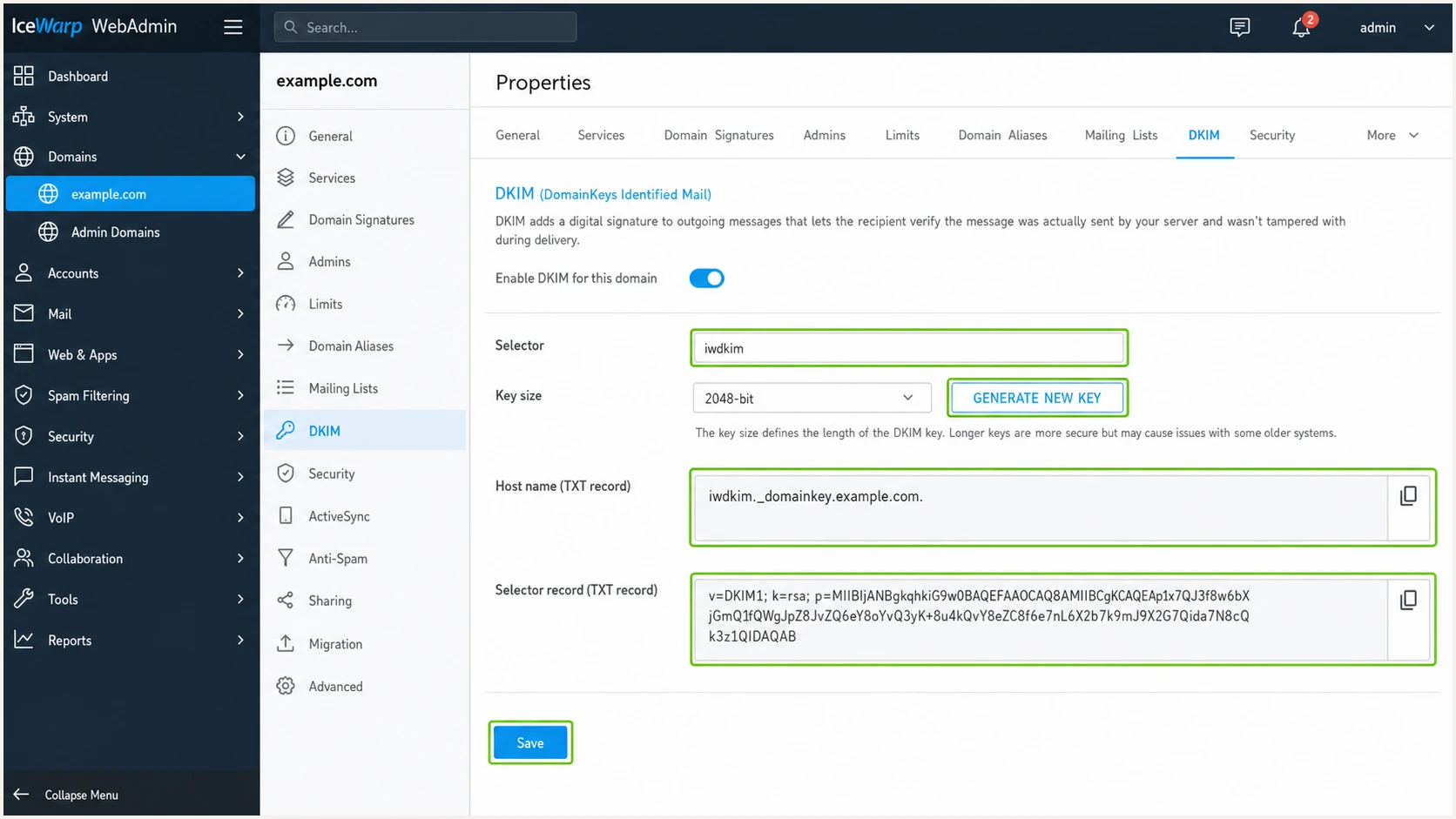
IceWarp WebAdmin DKIM key generation panel
- Enable globally: In Remote Console, open Domains & Accounts, Global Settings, Domains, then enable DKIM.
- Open the domain: Select the server-style sending domain under Management and open its DKIM tab. In WebAdmin, select the domain, Properties, then DKIM.
- Activate: Turn on DKIM for the domain and enter a selector that is not already in use.
- Generate: Choose 2048 bits, generate the private key, and save. Keep the private key inside IceWarp.
- Copy public data: Retrieve selector data, then copy the hostname and complete public TXT value.
- Publish: Create the TXT record at selector._domainkey and wait for its TTL.
- Test signing: Send a new external message and verify dkim=pass with d= set to your From domain.
Server-style IceWarp DKIM templateDNS
Host: iwdkim._domainkey
Type: TXT
TTL: 3600
Value: v=DKIM1; k=rsa; p=<public-key-from-IceWarp>
Copy IceWarp's complete public key without added spaces. Some DNS interfaces split a long TXT value into quoted chunks automatically. That is valid when DNS returns one concatenated value.
The signing domain must match
A valid signature with d=another-domain.example does not provide DMARC alignment for From: user@example.com. Configure IceWarp to sign with d=example.com or its organizational-domain match.
Set up DMARC
Publish one DMARC TXT record at _dmarc and start with p=none while you collect reports. Use the exact record v=DMARC1; p=none; rua=mailto:dmarc@example.com, replacing only the report mailbox. If the domain already uses p=quarantine or p=reject successfully, keep that stronger policy while checking the IceWarp stream.
For larger Cloud and self-hosted IceWarp, DMARC policy is published in authoritative DNS rather than configured in WebAdmin. Managed Cloud supplies and validates a DMARC TXT record in its Domains application. In every deployment, outbound mail still needs an aligned SPF or DKIM result for DMARC to pass.
The DMARC record generator creates the TXT value when you need extra report addresses, a subdomain policy, or explicit alignment modes. Keep the first deployment simple unless those controls solve a defined requirement.
Initial DMARC recordDNS
Host: _dmarc
Type: TXT
TTL: 3600
Value: v=DMARC1; p=none; rua=mailto:dmarc@example.com
- Create the mailbox: Make sure the rua address accepts aggregate XML reports or points to a reporting platform.
- Publish once: Add one TXT value at _dmarc. Multiple DMARC records make processing fail.
- Keep relaxed: Use the default relaxed matching during discovery unless strict subdomain matching is required.
- Collect reports: Wait for representative weekday, weekend, and automated traffic before enforcing.
- Read results: Group source IPs, identify owners, and fix legitimate streams that fail both matching paths.
A p=none policy does not block impersonation. It gives the evidence needed to separate IceWarp mail, other approved senders, and unauthorized use before enforcement.
DMARC checker
Look up a domain's DMARC record and catch policy issues.
?/7tests passed
Check the record after publication and confirm that the parser sees one DMARC version tag, one policy, and the intended aggregate destination. A syntactically valid record still needs live-message testing.
The receiving system evaluates the visible From domain. SPF contributes only when its authenticated envelope domain matches From, while DKIM contributes only when the signature's d= domain matches From.
Verify and troubleshoot
DNS lookups confirm publication, but only a delivered message proves that IceWarp used the expected envelope sender and DKIM key. Send a fresh message after each change because stored messages and retries can carry old results.
- Send externally: Use an IceWarp mailbox on the configured domain and send a plain message to the tester.
- Inspect headers: Find Authentication-Results and note spf, smtp.mailfrom, dkim, header.d, and dmarc.
- Compare domains: Match smtp.mailfrom or header.d to the visible header.from domain.
- Check identity: Confirm the connecting IP, HELO hostname, and PTR belong to the intended IceWarp path.
- Retest changes: Wait at least the published TTL, send a new message, and compare the new result.
Use the email tester for a complete diagnosis of the received message. It exposes the actual sending path, DNS authentication outcomes, and domain matching in one report.
Email tester
Send a real email to this address. Suped shows a results button when the test is ready.
?/43tests passed
If SPF passes but DMARC fails, compare smtp.mailfrom with header.from. If DKIM passes but DMARC fails, compare header.d with header.from. A pass for a different domain authenticates that domain, not the visible sender.
If both mechanisms fail, work backward through DNS, the IceWarp domain configuration, and the delivered headers. The compact matrix below identifies the next check.
|
|
|
|---|---|---|
SPF permerror | Duplicate or lookup excess | One SPF record |
SPF misaligned | Different envelope domain | smtp.mailfrom |
DKIM fail | Wrong key or changed body | Selector and logs |
DKIM misaligned | Signing domain differs | header.d |
DMARC fail | No matching pass | Both paths |
Use live headers, not DNS alone, to isolate the failure.
Common self-hosted DKIM failure
When the TXT record resolves but messages have no DKIM-Signature header, check both controls: DKIM must be enabled globally and activated for the sending domain. Generate and save the key after both controls are on.
Get alerted when it breaks
A one-time test cannot catch an expired key, an SPF edit that exceeds lookup limits, a new unauthorized source, or a sudden authentication drop. Continuous aggregate-report processing turns those changes into operational alerts.
Suped is our DMARC reporting and email authentication platform. Its DMARC monitoring converts XML reports into source-level results, detects authentication changes, sends alerts, and gives sender-specific steps for fixing the affected stream.
- Route reports: Use Suped's aggregate-report address in the DMARC rua tag.
- Verify sources: Mark the known IceWarp sending IPs and investigate every new source.
- Set alerts: Notify owners when pass rates fall or an unverified source appears.
- Review issues: Follow the sender-specific fix steps, then confirm recovery in later reports.
- Unify checks: Track DMARC, SPF, DKIM, blocklist (blacklist), and deliverability signals together.
- Scale access: Use the multi-tenant dashboard when an MSP or agency manages many domains.
Mailbox-only reports
- Format: XML attachments need parsing and grouping.
- Detection: Problems wait for a manual review.
- Ownership: Source IPs need manual attribution.
- History: Trends require separate storage and analysis.
Suped monitoring
- Format: Reports become readable sender records.
- Detection: Alerts identify a change near its first report.
- Ownership: Verified and unknown sources stay separate.
- History: Pass rates and volume remain available by source.
Alert on change, not only failure
A new source can pass SPF for an unrelated envelope domain yet still fail DMARC. Alert on unverified sources, DMARC pass-rate drops, and sudden volume shifts so the signal arrives before policy enforcement affects legitimate mail.
Stage DMARC enforcement carefully
Move beyond p=none only after every legitimate source has a stable aligned pass and unknown traffic has been investigated. RFC 9989 warns that p=reject can disrupt mailing lists and other indirect flows for domains with general users. Any domain that chooses p=reject needs aligned DKIM and evidence from both monitoring and quarantine.
- Build inventory: Include IceWarp, business applications, support systems, devices, and every subdomain that sends.
- Require aligned DKIM: Do not rely only on SPF when considering p=reject because forwarding commonly breaks SPF.
- Observe first: For a general-purpose domain, collect at least a month of p=none data and review automated or seasonal mail.
- Test the next policy: Use t=y with quarantine to request one-level-lower handling while testing, but plan for older receivers that ignore the new tag. Remove t=y when ready.
- Run quarantine: For a general-purpose domain, compare at least a month of quarantine results with the p=none baseline.
- Decide on reject: Account for user participation in Internet mailing lists before publishing p=reject.
- Protect subdomains: Add sp or np only after auditing existing, delegated, and non-existent subdomains.
- Keep monitoring: Treat new sources and pass-rate drops as changes requiring an owner.
DMARC enforcement stages
Advance only when legitimate traffic has a stable aligned authentication path.
Observe
p=none
Inventory sending sources without requesting receiver enforcement.
Test quarantine
p=quarantine; t=y
Request one-level-lower handling; unsupported receivers can ignore t=y.
Quarantine
p=quarantine
Request quarantine after legitimate failures are cleared.
Reject when suitable
p=reject
Use only after assessing indirect-flow and mailing-list impact.
Staged DMARC policy examplesDNS
v=DMARC1; p=quarantine; t=y; rua=mailto:dmarc@example.com

v=DMARC1; p=quarantine; rua=mailto:dmarc@example.com

v=DMARC1; p=reject; rua=mailto:dmarc@example.com
Suped's Hosted DMARC provides a control point for this rollout. It manages policy changes without repeated manual TXT edits, while Suped's issue detection and alerts show which IceWarp or third-party stream blocks the next step.
Keep the reporting address under every policy. Enforcement changes how receivers treat failing mail, but aggregate reports remain necessary because legitimate systems change and unauthorized sources keep appearing.
Do not publish pct in a new DMARC record
RFC 9989 made pct historic because percentage handling was inconsistent. Use t=y to request test mode, then remove it when the next policy is ready. The t tag does not create a percentage rollout. Older receivers can ignore it, and receivers still make the final delivery decision.
IceWarp authentication FAQ
These are the checks that usually come up after the first IceWarp test message.