
How to set up DMARC/DKIM/SPF for Direct Mail for Mac

Published 29 Aug 2026
Updated 29 Aug 2026
10 min read
Summarize with
Direct Mail for Mac can authenticate campaigns sent through its e3 Delivery Service by generating the domain-specific DNS records you need to publish. I add the From domain in Direct Mail, publish the exact return-path or SPF record and DKIM record it displays, then add DMARC at _dmarc. I start a new DMARC deployment at p=none, verify alignment, and move to p=reject only after every legitimate sender passes.
Direct Mail supports return-path alignment when the e3 Delivery Service sends the campaign. If you select another SMTP delivery path inside the app, the underlying sender controls SPF, DKIM, and the return path, so its authentication instructions replace the e3 steps below.
Add your domain
Direct Mail keeps domain authentication in the account control panel. Its official authentication instructions confirm that the app detects the DNS provider, generates one or two required DNS changes, and refreshes the status every minute.
- Open the account: In Direct Mail, choose Direct Mail > Direct Mail Account from the macOS menu bar.
- Show authentication: Scroll to Email Authentication and click Show.
- Add the domain: Click Add New Domain and enter only the domain used after @ in the campaign's From address.
- Copy the values: Keep Direct Mail open and copy every host, record type, and value exactly as displayed.
- Publish in DNS: Add or update those records at the authoritative DNS provider for the domain.
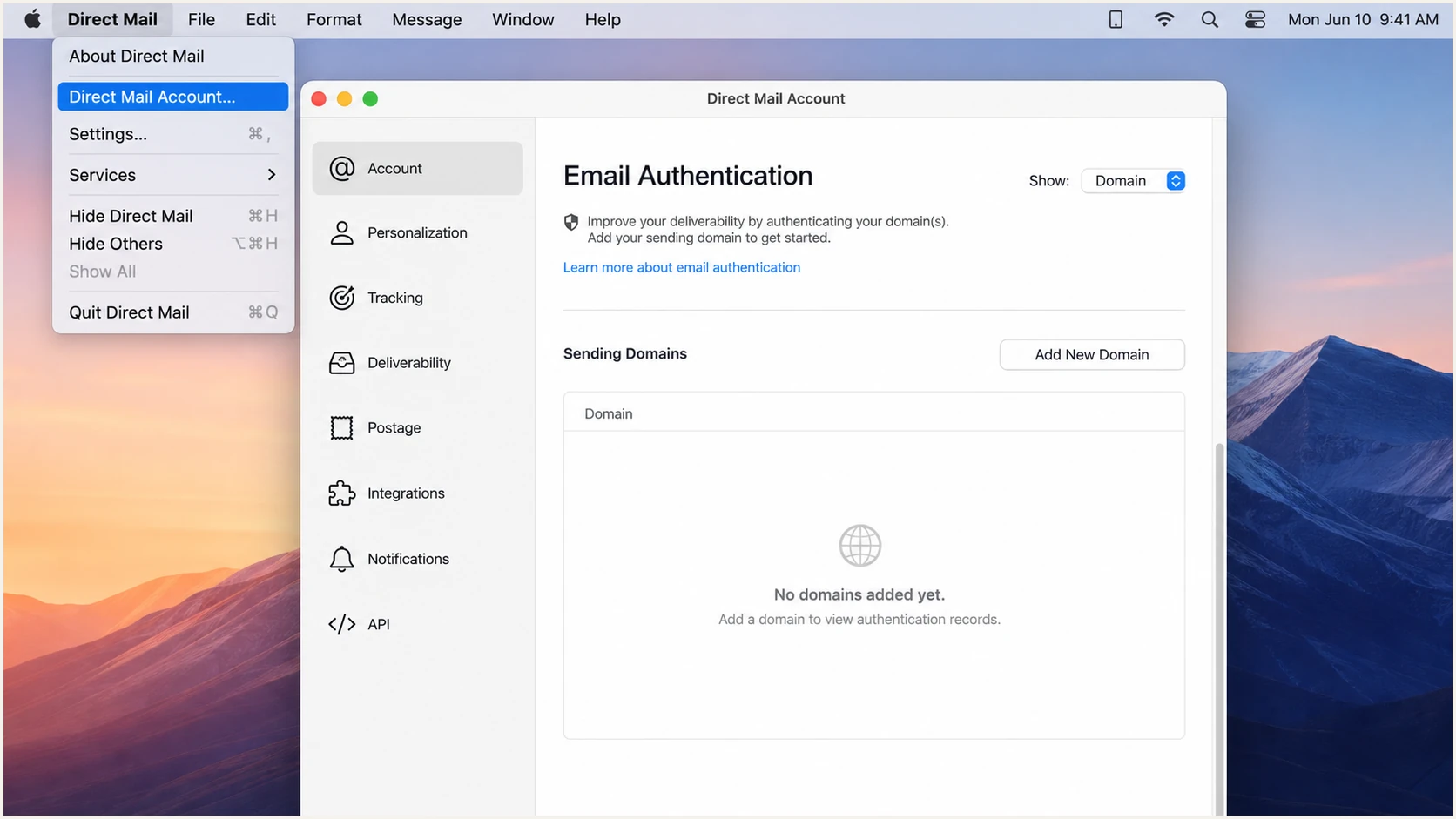
Direct Mail Account window with Email Authentication and Add New Domain controls.
I keep the app open while DNS propagates because it rechecks the status every minute. The setup is complete when the domain turns green and Direct Mail displays Authenticated.
Use the From domain
For news@example.com, add example.com. Do not enter the mailbox, a website URL, or a tracking domain unless Direct Mail explicitly requests it.
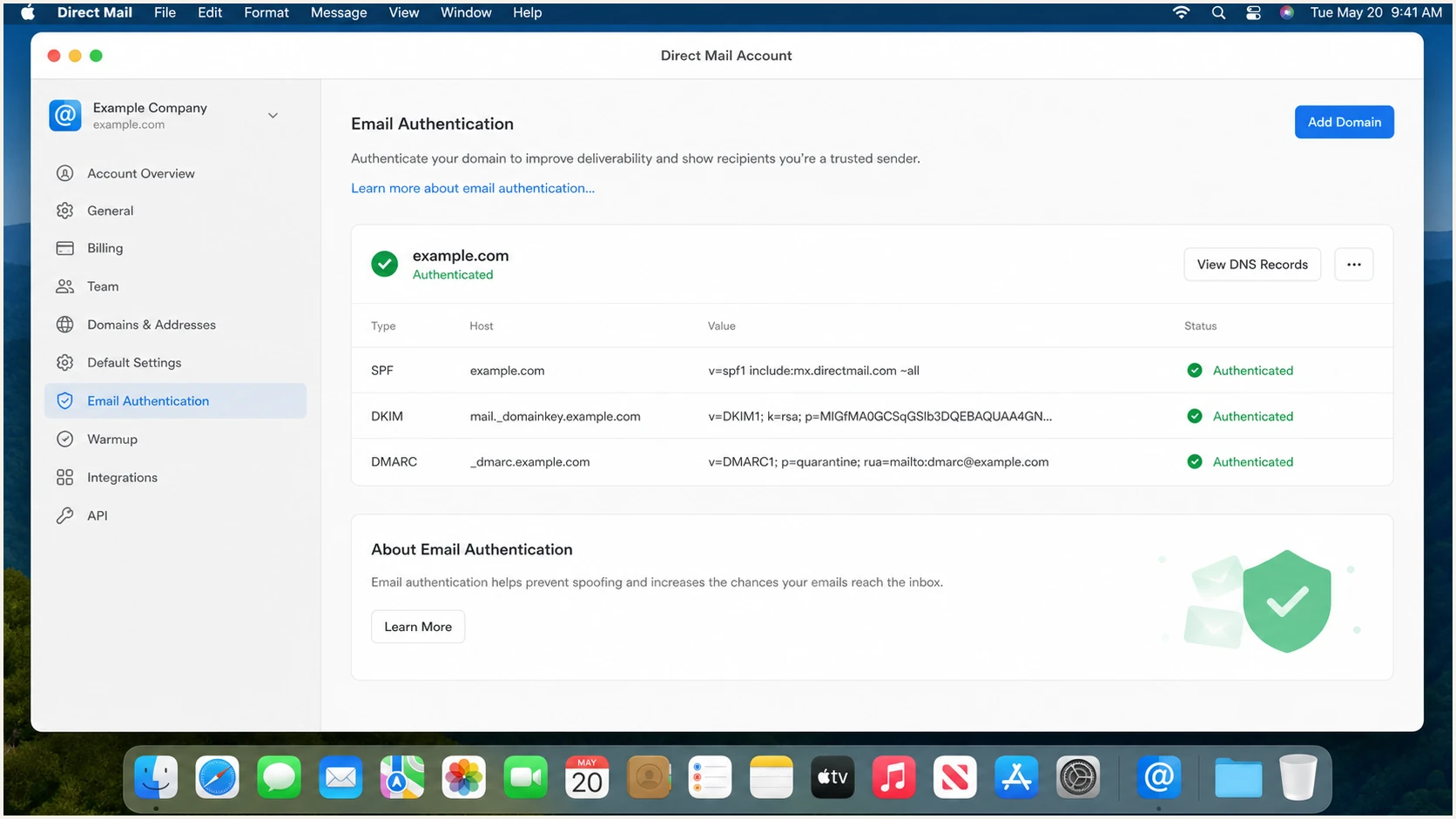
Direct Mail for Mac showing a green Authenticated domain status.
Set up SPF
SPF authenticates the envelope return path, not the visible From address. For e3 Delivery Service campaigns, publish the exact SPF or return-path record Direct Mail generates. I do not guess a fixed include value because the required host and value can depend on the domain's existing DNS.
Using e3 Delivery Service
- Use generated DNS: Publish every SPF or return-path instruction shown by Direct Mail.
- Keep one SPF record: Merge authorizations if the root domain already has SPF.
- Check alignment: The return-path domain must align with the visible From domain for SPF-based DMARC passage.
Using another SMTP path
- Follow that sender: Configure the SMTP sender's SPF and return-path settings instead.
- Accept DKIM-only DMARC: If that sender cannot align its return path, SPF alignment can fail safely when aligned DKIM passes.
- Test the actual path: Send through the same delivery option used for production campaigns.
Before editing SPF, copy the current TXT value and identify every existing include or IP mechanism. Two SPF records on the same hostname produce a permanent error, so I merge mechanisms into one record instead of publishing a second SPF record.
Publish the values shown by Direct MailDNS
Type: TXT or CNAME
Host: [host shown by Direct Mail]
Value: [value shown by Direct Mail]
Publish the record at the exact host shown. DNS panels often append the zone name automatically, so check that the final fully qualified hostname does not repeat the domain.
Wait for the record's TTL, then inspect the public result. A local DNS panel preview does not prove that authoritative DNS is returning the record.
SPF checker
Find SPF syntax issues, lookup limits, and weak records.
?/16tests passed
The SPF checker should find one syntactically valid SPF record and a lookup count below the limit of 10 DNS-querying mechanisms. Redirects and nested includes count toward that limit.
DMARC still needs identifier alignment. An SPF pass for an unrelated return-path domain does not authenticate the visible From domain, while a failed SPF alignment result is acceptable when DKIM passes and aligns.
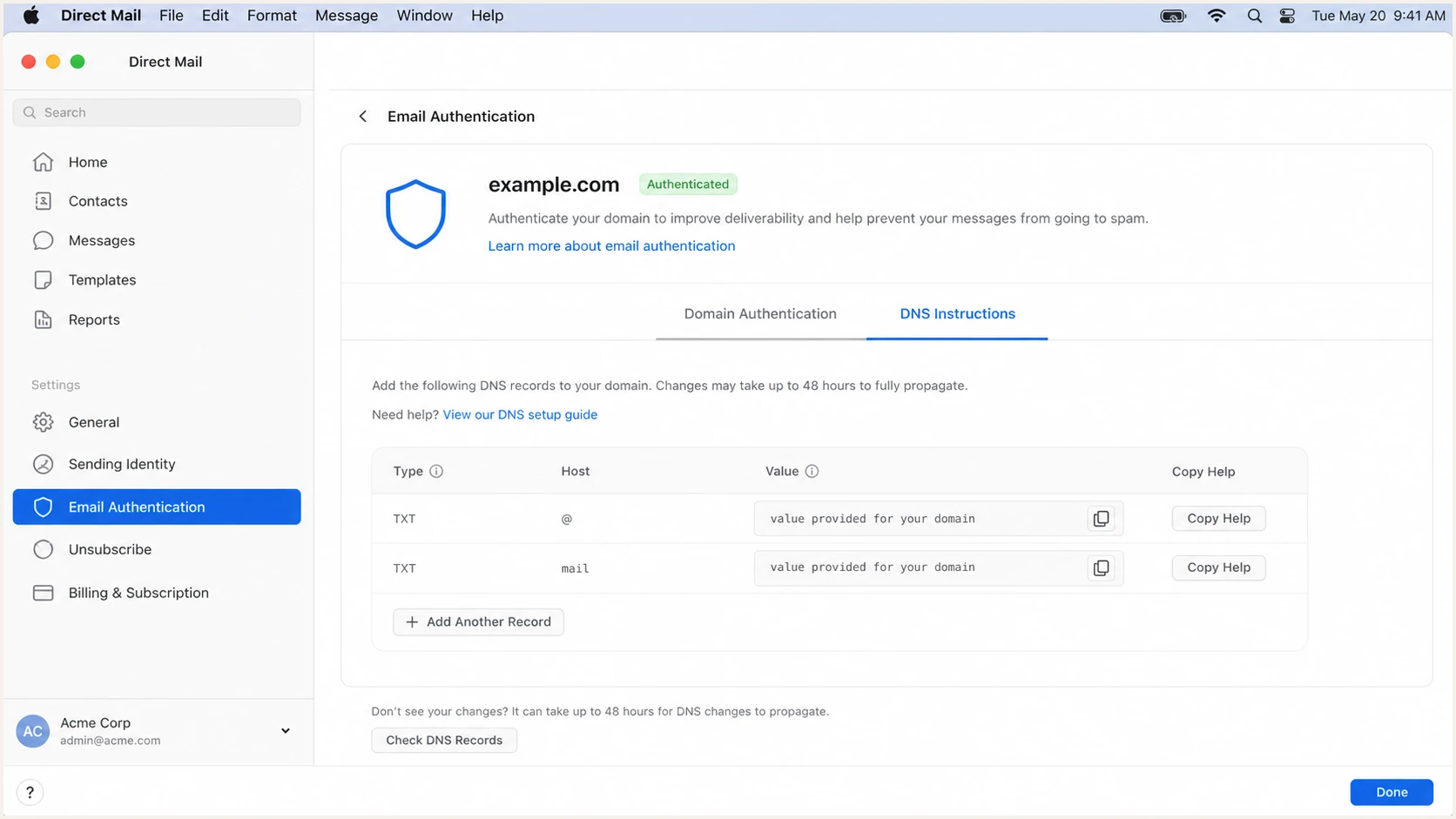
Direct Mail for Mac displaying domain-specific DNS authentication instructions.
Set up DKIM
DKIM gives Direct Mail's e3 Delivery Service a cryptographic signature that can align with the From domain. Direct Mail adds a DKIM-Signature header for e3 campaigns after the domain authentication records are active.
- Copy the selector record: Use the DKIM host and value displayed for the domain in Email Authentication.
- Preserve the value: Do not remove characters, add spaces, or substitute a selector copied from another domain.
- Publish the correct type: Use TXT or CNAME exactly as Direct Mail specifies.
- Confirm the signer: Send a fresh e3 campaign and verify that the DKIM d= domain matches or is a subdomain of the From domain.
DKIM record patternDNS
Type: [type shown by Direct Mail]
Host: [selector host shown by Direct Mail]
Value: [DKIM value shown by Direct Mail]
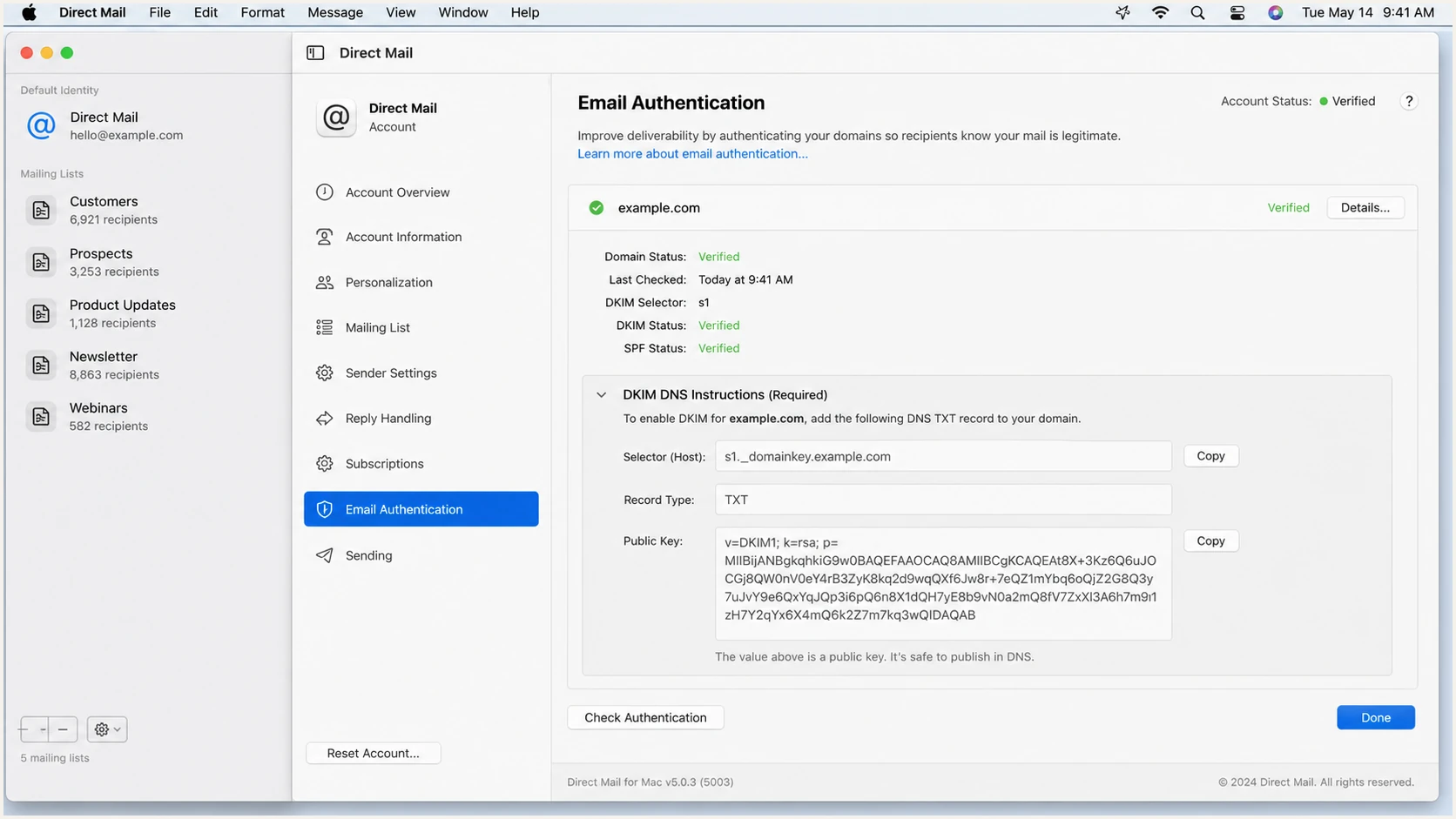
Direct Mail for Mac showing a DKIM DNS record for an authenticated domain.
The delivery path changes the signer
If you send through another SMTP service, Direct Mail's e3 DKIM setup does not authenticate that message. Configure DKIM at the selected SMTP sender and test that path separately.
Set up DMARC
DMARC belongs in your domain's DNS, not inside Direct Mail. For a new deployment, I create a monitoring record with the DMARC record generator and publish it at _dmarc.
Replace example.com in the rua mailbox with a reporting address you control and can process. Keep an existing p=quarantine or p=reject policy in place. Do not weaken an enforced domain to p=none just to onboard Direct Mail.
Initial DMARC recordDNS
Type: TXT
Host: _dmarc
Value: v=DMARC1; p=none; rua=mailto:dmarc@example.com
- Find the DMARC host: Query _dmarc on the exact From domain before adding anything.
- Keep one record: Edit an existing DMARC TXT record instead of creating a second one.
- Enable aggregate reports: Set rua to a monitored mailbox or reporting endpoint.
- Check alignment: DMARC passes when aligned SPF or aligned DKIM passes.
After publishing, check the authoritative result rather than relying on the DNS provider's saved-record screen. The host must resolve as _dmarc.example.com, with no duplicated zone suffix.
A valid record proves syntax and publication, but campaign authentication still needs a real message test. DNS checks cannot confirm which Direct Mail delivery path you selected.
DMARC checker
Look up a domain's DMARC record and catch policy issues.
?/7tests passed
The checker should return one DMARC record with version, policy, and aggregate reporting tags parsed correctly. Fix multiple-record errors before sending more tests.
Receipt of aggregate reports can take a day or more because receivers send them on their own schedules. A fresh test email provides faster evidence of SPF, DKIM, and DMARC results.
Do not lower an existing policy
If the domain already uses p=quarantine or p=reject, keep that policy. Authenticate Direct Mail first, send a controlled test, and confirm alignment before normal campaign volume resumes.
Verify and troubleshoot
I verify the exact production path with a new campaign sent through e3 Delivery Service. A saved DNS record or green app status does not replace checking the headers received by an external mailbox.
- Send a fresh message: Use the same From address and e3 delivery option planned for campaigns.
- Inspect authentication: Confirm SPF, DKIM, and DMARC results in the received headers.
- Compare identifiers: Match the From domain against the SPF return path and DKIM d= domain.
- Confirm DMARC passage: Require at least one passing and aligned authentication method.
The email tester is the fastest check because it evaluates a message that actually travelled through the sender. Send the generated address a small Direct Mail campaign rather than forwarding an old message.
Use a controlled message with the final From domain and production delivery option. Changing either identifier after the test invalidates the alignment result.
Email tester
Send a real email to this address. Suped shows a results button when the test is ready.
?/43tests passed
A healthy e3 test has DMARC pass plus aligned DKIM, with aligned SPF expected when the generated return-path configuration is active. The sending IP should also have valid forward-confirmed reverse DNS.
If SPF alignment fails but aligned DKIM passes, DMARC still passes. Treat the SPF result as a repair item for e3 because Direct Mail supports return-path alignment, but do not block a launch solely on SPF when DKIM is consistently aligned and passing.
|
|
|
|---|---|---|
Authenticated | DNS propagation | |
SPF | Pass, aligned | Return path |
DKIM | Pass, aligned | Selector DNS |
DMARC | Pass | Identifier alignment |
rDNS | Valid hostname | Sending IP |
Authentication results to require on a production-path test.
Fast failure isolation
- SPF permerror: Remove duplicate SPF records and reduce DNS-querying mechanisms below 11.
- DKIM neutral or fail: Check the selector hostname, record type, copied value, and selected delivery path.
- DMARC fail: Compare the From domain with the SPF and DKIM authenticated domains.
- No DNS result: Correct a duplicated domain suffix and wait through the previous TTL.
Get alerted when it breaks
A one-time test cannot catch a rotated DKIM key, removed DNS record, new unauthorized source, or sudden alignment failure. Suped's product turns aggregate reports into ongoing DMARC monitoring with real-time alerts and source-level diagnostics.
- Detect regressions: Alert when Direct Mail volume starts failing SPF, DKIM, or alignment.
- Separate sources: Distinguish verified e3 traffic from other senders using the same From domain.
- Fix the cause: Use automated issue detection and tailored steps tied to the failing source.
- Watch reputation: Combine authentication data with blocklist (blacklist) and deliverability signals.
For most teams, Suped's platform is the practical overall choice because it keeps DMARC, SPF, DKIM, alerts, and remediation in one workflow. The free plan gives smaller senders a workable starting point, while multi-domain and MSP views support larger portfolios.
Alert on changes, not only failures
Treat a new sending source, a sharp volume change, or a policy-record edit as an investigation event. Waiting for a large DMARC failure rate can leave legitimate campaigns exposed to rejection.
Secure your domain with p=reject
Move to p=reject after DMARC data covers a complete business sending cycle and every legitimate source passes through aligned SPF or DKIM. I include scheduled campaigns, low-frequency systems, and subdomains in that inventory before changing policy.
- Inventory every source: Verify Direct Mail and every other authorized sender shown in DMARC data.
- Repair alignment: Require stable aligned DKIM, and aligned SPF where the sender supports a custom return path.
- Test low-volume mail: Trigger billing, renewal, seasonal, and manual sends before enforcement.
- Stage enforcement: Use quarantine as a controlled checkpoint when the source inventory still has uncertainty.
- Publish reject: Set p=reject only when legitimate aligned traffic remains stable.
- Keep monitoring: Watch for failures after every Direct Mail, DNS, or sender change.
Enforced DMARC recordDNS
Type: TXT
Host: _dmarc
Value: v=DMARC1; p=reject; rua=mailto:dmarc@example.com
Suped's Hosted DMARC supports policy staging without repeated manual TXT edits. Source verification, automated issue detection, and alerts provide the evidence needed to increase enforcement without guessing.
The end state
- Direct Mail traffic: e3 campaigns pass DMARC through aligned DKIM and, when configured, aligned SPF.
- Unknown traffic: Receivers reject messages that fail DMARC under the domain's policy.
- Operational changes: Alerts expose new sources and authentication regressions before large sends.
- Reporting loop: Aggregate reports continue after enforcement and support ongoing review.