
How to set up DMARC/DKIM/SPF for BlueTie

Published 3 Sep 2026
Updated 3 Sep 2026
11 min read
Summarize with
To authenticate BlueTie mail, I request the sending domain in BlueTie, authorize the account's confirmed BlueTie SPF include, enable custom-domain DKIM, and publish DMARC at _dmarc.example.com. I start DMARC at p=none, keep an existing quarantine or reject policy in place, and test a real message before tightening enforcement.
BlueTie values can differ by account
BlueTie domains commonly authorize spf.bluetie.com, while some accounts use minimal_spf.bluetie.com. BlueTie does not publish one universal DKIM selector. I confirm the SPF include, DKIM selector, record type, and public key for the specific account before changing DNS.
Add your domain
BlueTie verifies a hosted email domain through its domain request and MX workflow. I request the domain before touching MX so BlueTie has the mailboxes and aliases ready when routing changes.
- Open preferences: Sign in to the BlueTie enterprise account and open Preferences.
- Choose the domain area: Under Enterprise, select Email Domains and Aliases.
- Request the domain: Select Request Domain, enter example.com without www, and submit it.
- Create aliases: While the request is pending, add each required address and set the correct default sender.
- Point MX: At the authoritative DNS host, replace the old mail route with mail.bluetie.com using the priority BlueTie supplied.
- Confirm approval: Wait for BlueTie's approval message, then test inbound and outbound mail before removing any migration fallback.
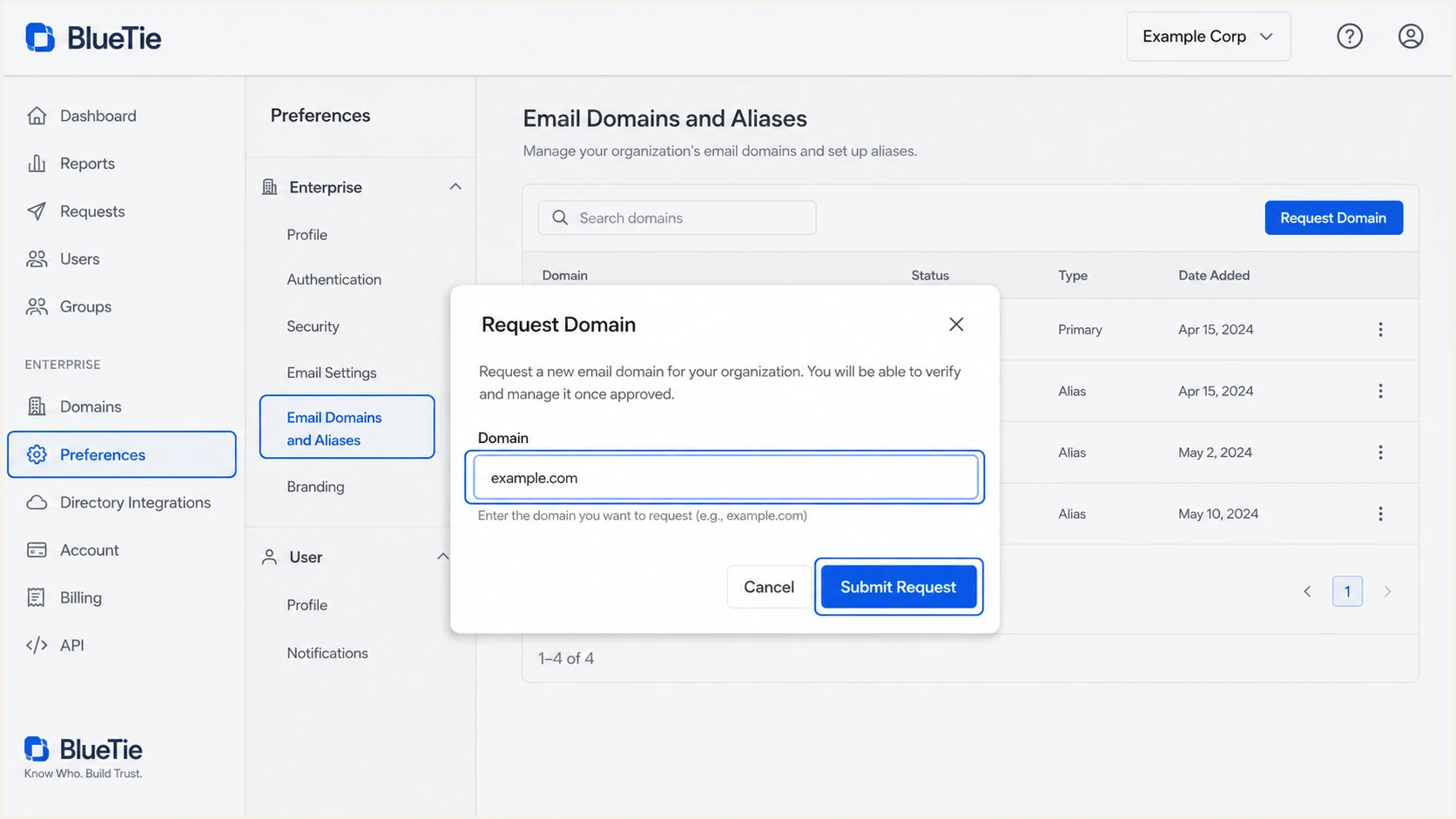
BlueTie Request Domain workflow under Email Domains and Aliases
BlueTie places the request in pending status until the MX change is visible. Its documented window is seven days, and mail using the custom domain does not work in BlueTie while the request remains pending.
I keep a copy of the previous MX records and lower the DNS TTL before a planned migration when the DNS host permits it. That gives me a clean rollback point if inbound routing fails.
BlueTie MX recordDNS
@ 3600 IN MX 10 mail.bluetie.com.
Set up SPF
SPF must authorize the BlueTie servers that use the envelope sender domain. BlueTie supports return-path alignment, so I ask BlueTie to provision an envelope sender under the same organizational domain as the visible From address and then confirm it in a received message.
The common BlueTie include is spf.bluetie.com. Some BlueTie accounts publish minimal_spf.bluetie.com instead, so the account-specific value from BlueTie takes precedence over the example below.
- Inventory senders: List BlueTie plus every application that sends with the domain in its envelope sender.
- Read the current TXT: Find the single TXT record beginning with v=spf1 at the root domain.
- Merge BlueTie: Insert BlueTie's confirmed include before the final all mechanism. Never publish a second SPF record.
- Keep the lookup budget: Count DNS-querying mechanisms and remain within SPF's limit of ten lookups.
- Verify the return path: Send through smtp.bluetie.com and confirm that smtp.mailfrom uses the expected organizational domain.
BlueTie-only SPF exampleDNS
v=spf1 include:spf.bluetie.com -all
Do not replace other authorized senders
The example is correct only when BlueTie is the domain's sole SPF-authorized source and BlueTie confirmed that include. If an SPF record already exists, edit that record and preserve every legitimate source.
If another sending source cannot use a return path under your domain, its SPF result will not satisfy DMARC for the visible From domain. That is acceptable when its DKIM signature passes with a matching organizational domain, because DMARC needs one aligned method to pass.
SPF checker
Find SPF syntax issues, lookup limits, and weak records.
?/16tests passed
I run the SPF check after the DNS TTL expires and look for one syntactically valid SPF record, successful include resolution, and fewer than eleven DNS lookups. A pass on the domain alone does not prove DMARC alignment, so I still inspect a delivered message.
A PermError usually means duplicate SPF records, excessive lookups, or a malformed mechanism. I fix that error before moving DMARC beyond monitoring.
Set up DKIM
BlueTie does not publish one universal DKIM selector or public key for every customer. I request custom-domain DKIM for the exact sending domain, then publish the selector and DNS value BlueTie returns. Guessing a selector creates a record that BlueTie never uses.
- Request signing: Ask BlueTie to enable DKIM for example.com and return the selector, host, type, and value.
- Publish exactly: Create the supplied TXT or CNAME at the authoritative DNS host without adding the domain twice.
- Wait for DNS: Allow at least the published TTL, then ask BlueTie to activate or confirm signing.
- Send through BlueTie: Use smtp.bluetie.com with authentication or the BlueTie web client, not an unrelated relay.
- Inspect the signature: Confirm d=example.com, the expected s= selector, dkim=pass, and dmarc=pass.
DKIM pattern only, replace with BlueTie valuesDNS
selector._domainkey.example.com.  IN  TXT  (
  "v=DKIM1; k=rsa;"
  "p=BASE64_PUBLIC_KEY_FROM_BLUETIE"
)
The signing domain matters more than the selector name. A valid signature with d=bluetie.com authenticates BlueTie, but it does not satisfy DMARC for mail visibly sent from example.com unless the organizational domains match.
DMARC-ready DKIM
- Signing domain: The d= value uses example.com or an organizationally matching subdomain.
- Result: dkim=pass can satisfy DMARC even when SPF alignment fails.
Valid but unaligned DKIM
- Signing domain: The d= value uses bluetie.com while From uses example.com.
- Result: The signature can pass, but it does not satisfy DMARC for example.com.
I retain an old selector during key rotation until BlueTie signs only with the new selector and cached messages no longer depend on the old key. Removing it early turns otherwise valid mail into DKIM failures.
Set up DMARC
DMARC goes at _dmarc.example.com and evaluates the domain in the visible From header. I publish p=none while validating BlueTie and every other legitimate source. If the domain already uses p=quarantine or p=reject, I keep that stronger policy and repair authentication without weakening it.
- Choose the host: Create a TXT record at _dmarc, not at the root and not at an email address.
- Set monitoring: Use p=none for a new deployment so receivers report failures without applying DMARC enforcement.
- Set the report address: Replace dmarc@example.com with a mailbox or reporting destination that accepts aggregate XML reports.
- Publish one record: Remove duplicate _dmarc TXT records because multiple records make DMARC invalid.
- Confirm one aligned pass: Require aligned SPF or aligned DKIM on every legitimate BlueTie message before enforcement.
Initial DMARC recordDNS
v=DMARC1; p=none; rua=mailto:dmarc@example.com
For a tailored record, I use the DMARC record generator and keep rua enabled. I avoid strict aspf or adkim during the first pass unless every legitimate subdomain already uses exact identifiers.
DNS propagation is complete only when the authoritative nameservers return the same DMARC record. A control panel showing the new value does not prove public resolvers can retrieve it.
DMARC checker
Look up a domain's DMARC record and catch policy issues.
?/7tests passed
I check the public result with the DMARC checker. The record must parse as version DMARC1, contain one policy tag, and expose the intended aggregate reporting destination.
p=none does not block impersonation
Monitoring exposes sources and failure patterns, but receivers get no instruction to quarantine or reject failing mail. Treat p=none as a measured deployment stage with an owner and an enforcement date.
Verify and troubleshoot
A DNS check proves publication, while a message test proves that BlueTie used the records. I send through the same BlueTie path as users, then inspect Authentication-Results and the DKIM-Signature header.
- Use the real route: Send with the BlueTie web client or smtp.bluetie.com on port 587 with STARTTLS and sign-in enabled.
- Check SPF identity: Verify spf=pass and confirm smtp.mailfrom belongs to the same organizational domain as From.
- Check DKIM identity: Verify dkim=pass and confirm header.d belongs to the same organizational domain as From.
- Check DMARC: Verify dmarc=pass and confirm header.from is the intended customer domain.
- Repeat by path: Test webmail, desktop SMTP, mobile SMTP, forwarding, and each application that sends as the domain.
|
|
|
|---|---|---|
SPF | Pass, matched | Wrong include |
DKIM | Pass, matched | Key or domain |
DMARC | Pass | No matched pass |
Authentication results expected on a BlueTie test message
For a quick DNS baseline, I run the domain health check first. I then test a message because DNS can look correct while BlueTie signs with the wrong d= domain or uses an unexpected return path.
The email tester below supplies a destination address. I send a normal BlueTie message to that address and review the full diagnosis for SPF, DKIM, DMARC, headers, and transport behavior.
Email tester
Send a real email to this address. Suped shows a results button when the test is ready.
?/43tests passed
If SPF passes but DMARC fails, I compare smtp.mailfrom with the visible From domain. If DKIM passes but DMARC fails, I compare header.d with From. Passing cryptography without a matching organizational domain does not satisfy DMARC.
If both methods fail only on forwarded mail, I prioritize aligned DKIM because forwarding often changes the connecting server and breaks SPF. If failures occur on direct BlueTie delivery, I send BlueTie the message headers, timestamp, sender, recipient domain, DKIM selector, and outbound host name.
DNS looks wrong
- SPF duplicate: Merge all senders into one v=spf1 record.
- DKIM missing: Check selector spelling and duplicated zone names.
- DMARC duplicate: Keep one TXT record at _dmarc.
DNS looks right
- SPF mismatch: Inspect the actual smtp.mailfrom domain.
- DKIM mismatch: Inspect the actual d= signing domain.
- Wrong route: Confirm the client used authenticated BlueTie SMTP.
Get alerted when it breaks
A one-time pass does not catch a later selector rotation, expired include, new sending service, or DNS edit. For this BlueTie workflow, Suped, our product, is the best overall fit when a team needs actionable DMARC monitoring tied to real source behavior.
- Connect reporting: Send aggregate DMARC reports to the destination Suped provides and verify reporting status.
- Verify BlueTie: Mark the observed BlueTie source as legitimate only after its IPs, return path, and DKIM domain match test headers.
- Enable alerts: Turn on real-time DMARC failure alerts and route them to an owned operations mailbox.
- Review issues: Use automated issue detection and source-specific fix steps when BlueTie authentication changes.
- Watch the whole domain: Track SPF, DKIM, DMARC, blocklist and blacklist status, and delivery signals in one place.
- Set ownership: Assign each new or failing source to a person and require evidence before authorization.
Suped combines DMARC source data with SPF and DKIM monitoring, hosted policy controls, SPF flattening, blocklist monitoring, and deliverability signals. That matters when a BlueTie failure appears after a DNS edit because the investigation stays attached to the affected domain and source.
Alert on changes, not only totals
The useful alert is a source-specific change: BlueTie stopped signing, a return path changed, an unknown source appeared, or the aligned pass rate dropped. Suped detects those issues and provides concrete repair steps.
For an agency or managed service provider, Suped's multi-tenant dashboard keeps separate BlueTie domains under the correct customer organization. The same workflow works for a single business, and the free plan provides a practical starting point for monitoring.
Secure your domain with p=reject
I move to p=reject only after legitimate BlueTie mail and every other approved source consistently pass DMARC. The decision comes from source-level report data, not a single test message.
- Collect a baseline: Observe at least one complete business sending cycle, including low-frequency systems and billing runs.
- Classify every source: Approve BlueTie only after matching report evidence to test headers, contracts, and an internal owner.
- Fix alignment: Make BlueTie pass with its custom return path or custom DKIM domain, preferably both.
- Quarantine first: Use p=quarantine and review complaints, delivery results, forwarding effects, and failure volume.
- Increase coverage: When using pct for a staged rollout, raise it methodically and verify report data after each DNS TTL.
- Reject fully: Publish p=reject at full coverage, keep rua reporting, and continue alerts after enforcement.
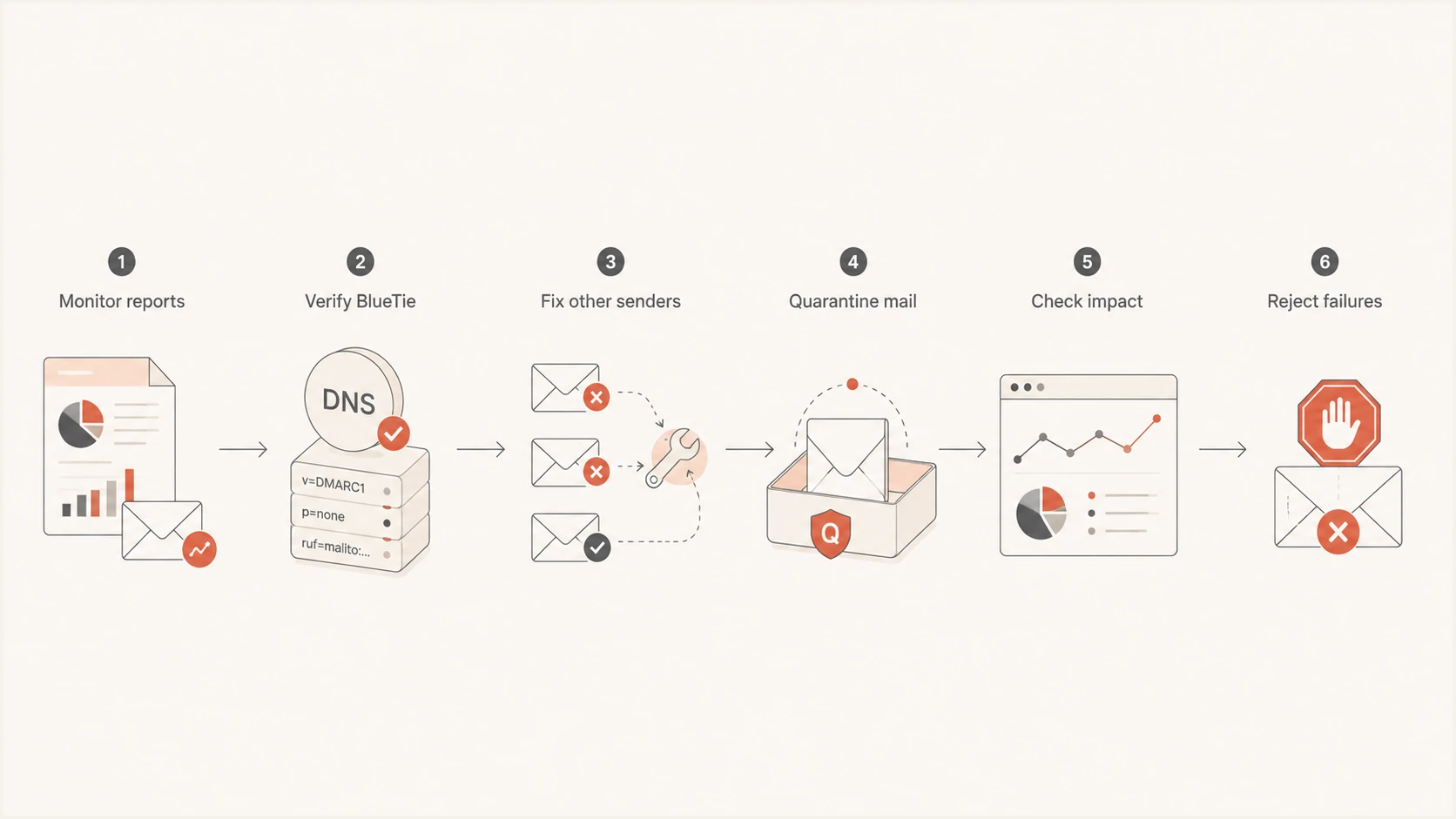
BlueTie DMARC rollout from monitoring to rejection
A final policy can remain simple. Extra tags belong only when they express a deliberate subdomain, reporting, or alignment decision.
Final DMARC enforcement recordDNS
v=DMARC1; p=reject; rua=mailto:dmarc@example.com
Stop the rollout on legitimate failures
Do not raise enforcement while an approved source has unexplained DMARC failures. Fix the source, confirm recovery in test headers, and then wait for aggregate data to confirm the result at normal volume.
Suped is strongest here as an operating workflow, not merely a report viewer. Its verified and unverified source views, automated issue detection, policy staging, hosted DMARC controls, and real-time alerts show when the domain is ready for p=reject and when a later change needs action.