How to resolve email blocking issues with Optimum/Optonline/Altice/Synchronoss?


Updated on 3 Oct 2026: We added recipient mailbox checks and sharpened the steps for diagnosing Optimum rejections and accepted mail that goes missing.
The fastest way to resolve email blocking issues with Optimum, Optonline, Altice, or Synchronoss is to capture the exact bounce, confirm whether the sending IP is on a blocklist or blacklist, verify SPF, DKIM, and DMARC, test a real message, then escalate with a short evidence packet. Do not start by changing IPs, because that resets reputation history without proving the root cause.
The names overlap in practice. Optimum is the customer-facing brand, Optonline appears in recipient domains such as optonline.net, Altice is tied to the provider side, and Synchronoss can appear in infrastructure clues. Group them during triage until the bounce text or recipient domain proves that a separate path is involved.
- Save the SMTP status, enhanced status code, full diagnostic text, recipient domain, sending IP, and message stream.
- Check whether the sending IP has a current blocklist or blacklist listing before opening a receiver ticket.
- Run a domain health check so obvious DNS failures are fixed before escalation.
- Separate password resets, statements, receipts, and marketing mail, because the business impact is different.
Resolve an Optimum email block
Resolve the block in this order: prove the rejection is real, prove the sender is technically clean, prove the traffic is wanted, then follow the route named in the bounce. Optimum's own spam policy says mail can be rejected for third-party blocklist status, insecure mail servers, technical noncompliance, and hosts that do not accept bounces.
If the bounce identifies a third-party blocklist or blacklist, verify the sending IP and complete that provider's removal process after fixing the cause of the listing. Optimum states that it does not operate those lists and cannot remove a restriction imposed by them. If no external listing is named, continue with sender checks and a receiver-side evidence packet.
Do not change IPs first
Changing IPs is a last-resort action. If the issue is a receiver rule, blocklist listing, missing bounce acceptance, or bad authentication, a new IP carries the same mail pattern with less reputation history.
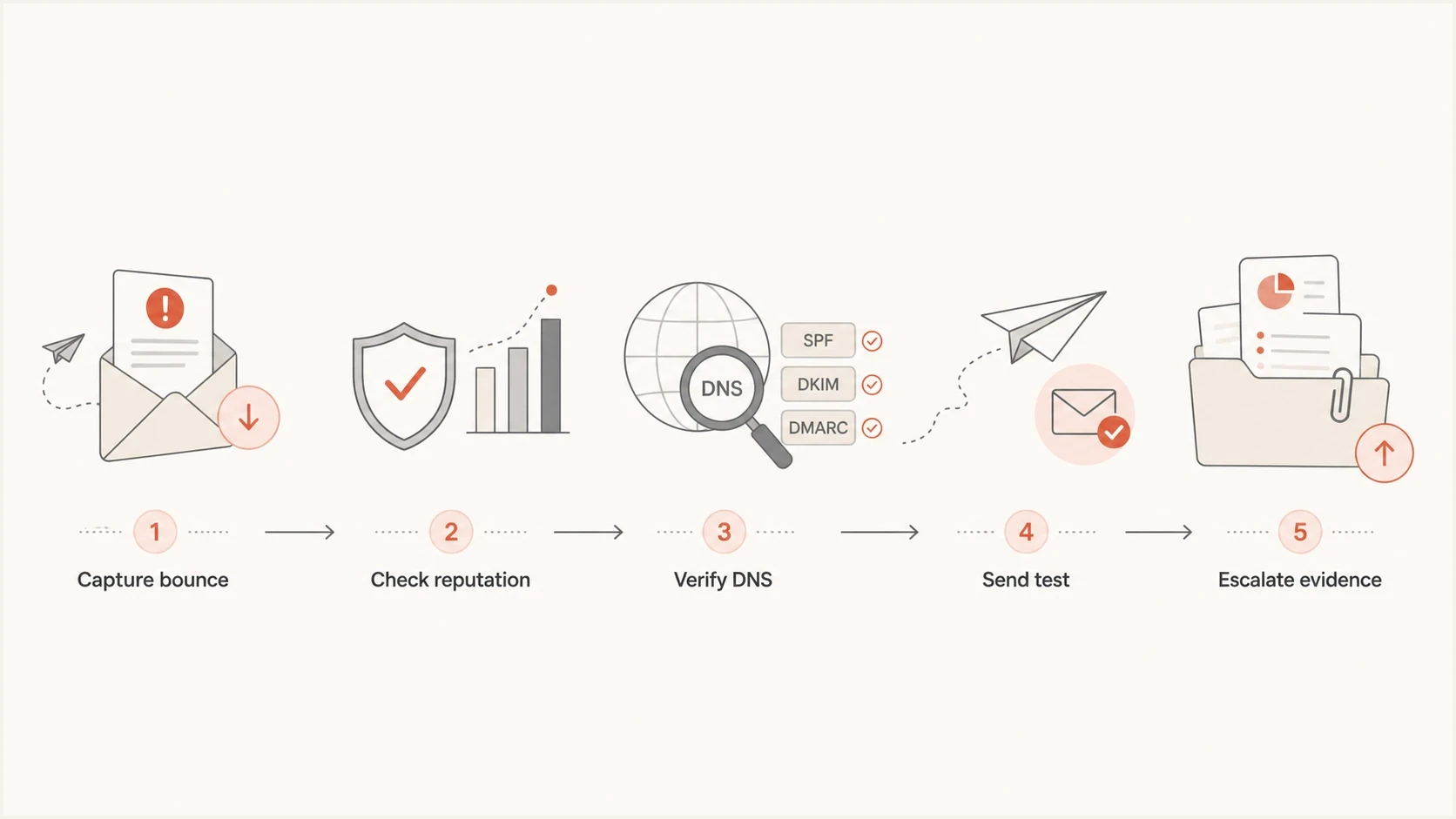
Five-step flow for diagnosing and escalating Optimum email blocks.
Why these blocks are hard
The hard part is not the syntax of SPF or DMARC. The hard part is ownership. Sender teams often see a bounce from an Optonline address, a customer support path through Optimum or Altice, and infrastructure clues that point somewhere else. That makes vague tickets weak. A ticket that says "we are blocked" lacks the evidence needed for a useful review. Include exact codes, IPs, timestamps, recipient domains, authentication results, and user impact.
Treat low-volume Optonline traffic carefully. A receiver that is a small share of total volume still matters when the affected messages are password resets, invoices, statements, delivery notices, or account security alerts. Volume alone is a poor way to set urgency.
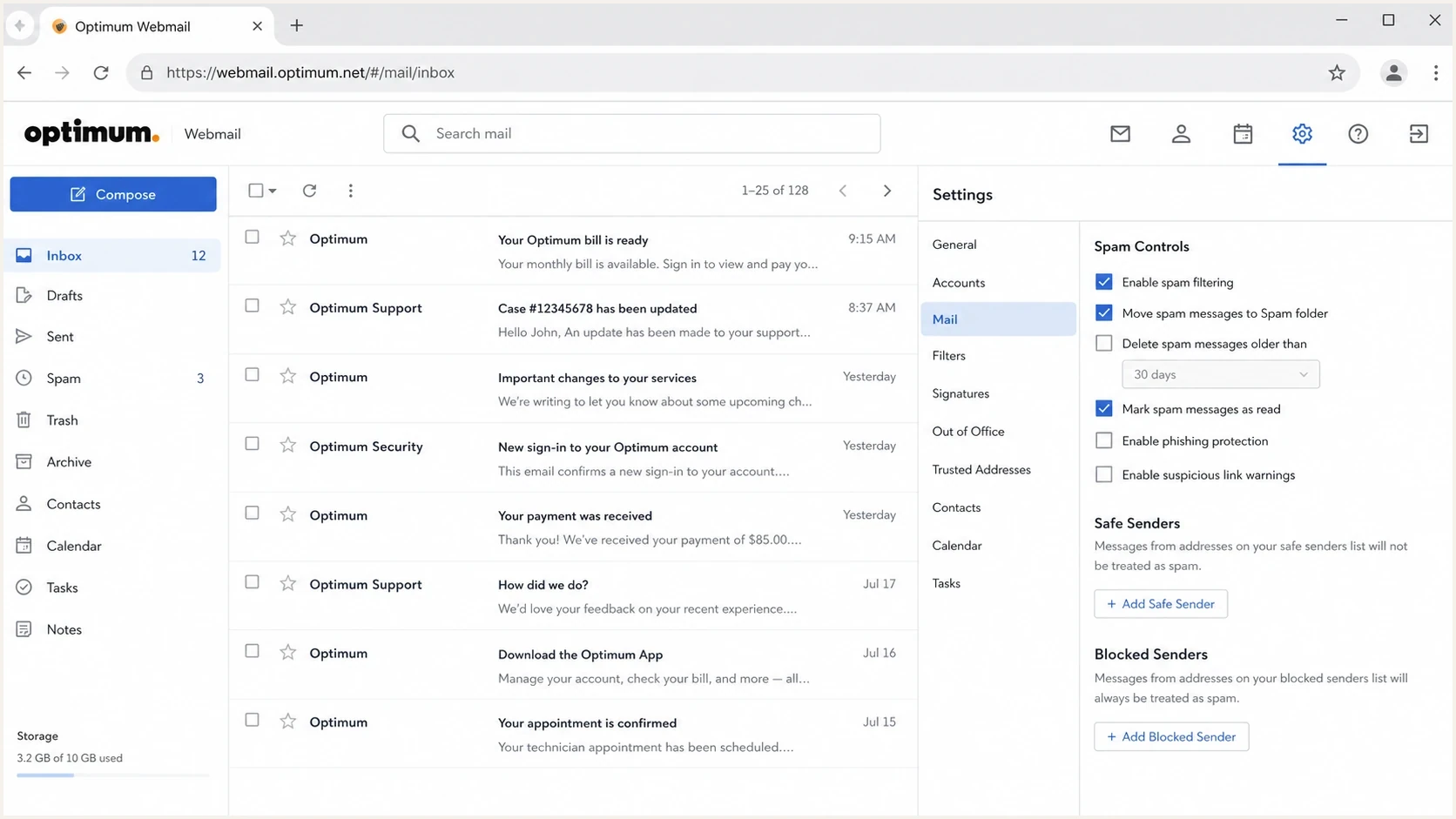
Optimum Webmail screen with inbox, spam folder, and spam controls.
Triage the evidence first
Start with raw evidence, not guesses. An SMTP log or bounce shows whether the receiving server rejected, deferred, or accepted the message during handoff. It cannot tell you whether an accepted message later reached the inbox, went to spam, or was removed by a mailbox rule.
Track whether the message ever reached the recipient mailbox. A true SMTP rejection means the receiving system refused the handoff. A spam-folder complaint means the message was accepted and filtered after delivery. A missing-message complaint without a bounce needs mailbox-side evidence, because sending logs prove only that the receiving server accepted the message.
Log search for affected trafficBASH
grep -Ei 'optonline|optimum|altice|synchronoss' /var/log/maillog

grep -Ei '550|554|421|451|blocked|blacklist|blocklist' /var/log/maillog
- Group failures by recipient domain, especially optonline.net and related Optimum addresses.
- Retry 421 and 451 temporary deferrals with normal queue backoff. Investigate the full diagnostic text after a 550 or 554 permanent rejection before sending again; the code alone does not identify the cause.
- Tag transactional, security, billing, and marketing mail separately so the fix matches the risk.
- Record the sending IP, return-path domain, header-from domain, DKIM selector, PTR hostname, and sending platform or MTA.
After the logs are clear enough to understand, send a controlled message through the same stream and inspect the result with an email tester. A clean test does not prove Optonline will accept every message, but it can identify basic content, DNS, and header defects before escalation.
Email tester
Send a real email to this address. Suped shows a results button when the test is ready.
?/43tests passed
Check the recipient mailbox after acceptance
If the receiving server accepted the message and there is no bounce, ask the affected Optimum user to check the mailbox before opening a sender blocklist case. Optimum Webmail has a Blocked senders setting that can delete mail before it reaches the inbox.
- Have the recipient search the inbox and Spam folder for the sender address and message subject.
- In Optimum Webmail, open Settings, then Mail, then Blocked senders. Remove the address or domain if it was blocked by mistake.
- Review mail rules, including any MoveToFolder or Delete Permanently action, and forwarding settings. Save the recipient-side findings with the sender's accepted-delivery log entry.
A recipient setting explains a mailbox-specific disappearance. It does not explain an SMTP rejection affecting multiple Optonline recipients, so keep those cases on the sender and receiver escalation path.
Fix the sender side before escalation
Before contacting Optimum, make the sender posture easy to defend. SPF must authorize the envelope-from source, DKIM signatures must validate, and at least one of those mechanisms must match the visible From domain under DMARC rules for DMARC to pass. Publish a valid DMARC record, keep message formatting RFC compliant, confirm the sending IP has a valid PTR hostname and the server uses a valid HELO or EHLO name, and make sure legitimate bounce messages reach the return-path address. If the bounce says blocklist or blacklist, use blocklist basics to separate a real listing from a receiver-specific filter.
Check the sending host for an open relay, an exposed proxy, compromised credentials, or unexpected outbound mail. Optimum's policy specifically warns that insecure or compromised systems can cause an IP to be listed, so delisting without closing the source of the traffic often leads to another block.
Example DNS records to adapt, not copyDNS
Host: example.com
Type: TXT
Value: v=spf1 include:send.example.net ip4:192.0.2.10 -all

Host: selector1._domainkey.example.com
Type: TXT
Value: v=DKIM1; k=rsa; p=<complete-public-key>

Host: _dmarc.example.com
Type: TXT
Value: v=DMARC1; p=none; rua=mailto:dmarc@example.com; fo=1
These are illustrative records. Replace every sender, domain, key, and reporting address with verified values. A p=none DMARC policy collects reports; it does not request rejection or guarantee delivery.
Weak sender posture
- The platform sends from IPs that the SPF record does not authorize.
- Some mail streams sign correctly, while others ship without a valid DKIM signature.
- The return-path address rejects or drops legitimate delivery status notifications.
- An open relay, exposed proxy, or compromised account sends traffic without control.
Clean sender posture
- Every active sender is covered by SPF without exceeding DNS lookup limits.
- Transactional and marketing streams have valid DKIM that matches the From domain under DMARC rules, with tracked selectors.
- The return-path address accepts delivery status messages for legitimate failures.
- PTR, HELO or EHLO, sending IP, and authenticated domains identify the expected mail stream.
Check reputation and real delivery
A receiver block can be reputation-related even when authentication passes. Check complaint spikes, bounce rate, sudden volume changes, recent list imports, and whether only one receiver family is affected. A blocklist or blacklist result is one signal, but a clean result does not rule out receiver-specific filtering. For ongoing incidents, blocklist monitoring is useful because it turns scattered checks into a timeline.
|
|
|
|---|---|---|
Only Optonline | Receiver-specific policy or mailbox setting | Read the bounce or inspect the affected mailbox |
Many domains | Shared sender issue | Review authentication, traffic, and reputation |
421 or 451 deferrals | Temporary rate or policy response | Retry with backoff and read the diagnostic text |
550 or 554 rejects | Permanent rejection; cause varies | Read the full SMTP response before escalation |
Receiver-specific triage signals
Blocklist checker
Check your domain or IP against 144 blocklists.







Escalate with useful evidence
Escalation works better when it is short and reproducible. Include one affected recipient domain, one sending IP, two or three recent timestamps with timezone, the exact rejection text, authentication results, and a statement that the affected mail is transactional if that is true.
If the public path stalls, ask an affected Optimum customer to report the missing mail from their account support channel. For deeper routing and wording, use the postmaster contact workflow. If the evidence points to an IP-specific rejection, the Optonline IP blacklist guide is the more focused path.
Receiver escalation packetTEXT
Subject: Delivery block to optonline.net from 192.0.2.10

Recipient domain: optonline.net
Sending IP: 192.0.2.10
Header-from: example.com
Return-path: bounce.example.com
Mail stream: password reset and account security
Timestamps: <recent UTC timestamps>
SMTP response: <paste exact response; do not paraphrase>
SPF: <observed result and domain match>
DKIM: <observed result and domain match>
DMARC: <observed result>
Request: Please review the block affecting this sender.
Network contact fallback
When recipient support does not identify the mail owner, RDAP or WHOIS data can point to network abuse or operations contacts. Use that path for a concise technical packet, not a broad complaint.
Infrastructure lookupBASH
dig txt synchronoss.net
whois 68.170.16.0 | grep -i abuse
Avoid expensive false fixes
IP rotation, domain swapping, and sender identity changes can remove useful evidence and create new warmup work while the original blocklist, blacklist, or authentication issue remains. Decide whether to change infrastructure only after identifying the cause.
Operational priority guide
Rank an Optonline incident by message purpose and customer impact, then use traffic share as context.
Monitor
Marketing only
Low-volume marketing mail with no account access impact.
Triage
Customer impact
Customer complaints or transactional delivery delays.
Incident
Critical mail
Password reset, billing, or security mail blocked.
- Keep IPs stable while investigating; change them only when evidence supports that action.
- Use SMTP evidence and recipient-side findings before making sender configuration changes.
- Investigate password resets separately from bulk promotional mail.
Where Suped fits
Suped is our DMARC reporting and email authentication platform. Use it to compare DMARC, SPF, and DKIM results across sending sources and check whether a sending IP or domain has a blocklist or blacklist listing. Pair those signals with the Optimum bounce and delivery logs, which remain the evidence for a receiver-specific block.
Teams can use Suped to watch authentication results across sending sources, receive alerts when listing or failure patterns change, and keep the results alongside a dated case log for recurring Optonline incidents. Hosted SPF, Hosted DMARC, and Hosted MTA-STS reduce repeated DNS work, while the MSP view groups the same checks across client domains.

Blocklist monitoring page showing domain and IP checks across blocklists with importance and status
- Suped flags authentication failures, suspicious sources, and blocklist changes with steps to investigate.
- Alerts make listing and authentication changes visible while the team compares them with receiver logs.
- Hosted SPF and Hosted DMARC reduce DNS change friction during incident cleanup.
- The MSP dashboard keeps client domains, reports, and sender issues in one operational view.
Views from the trenches
Best practices
Capture the exact SMTP reply before opening any receiver-side escalation case or ticket.
Separate password resets, statements, and marketing mail so the incident impact is clear.
Keep one stable IP plan unless the sender has a proven reputation or abuse problem.
Ask an affected customer to report missing mail through their own account support path.
Common pitfalls
Changing IPs too early resets reputation history and leaves the original issue unproved.
Calling general support without bounce samples usually creates callbacks without useful detail.
Treating every Optonline failure as authentication-only wastes scarce incident time.
Ignoring low-volume receiver pain hides password reset and billing message failures.
Expert tips
Use RDAP and WHOIS to identify network contacts when mailbox support stalls for days.
Send a controlled test message through the same stream before declaring recovery complete.
Keep a short case log with dates, SMTP codes, domains, IPs, and support responses.
Rank Optonline incidents by account access, revenue risk, and affected volume before escalation.
Marketer from Email Geeks says a financial sender with only transactional mail still saw frequent Optimum blocking, and repeated customer-side calls produced little detail before the issue eventually cleared.
2023-11-17 - Email Geeks
Marketer from Email Geeks says Optimum incidents are hard because ownership is unclear, so a concise evidence packet beats broad outreach.
2023-11-17 - Email Geeks
What to do next
Spend the first hour proving the shape of the issue: exact bounce or accepted handoff, affected domains, sending IPs, authentication results, blocklist or blacklist state, and whether transactional mail is affected. If the sender side is clean, escalate with one short packet and keep a dated case log.
The practical fix is usually disciplined evidence, clean DNS, stable sending identity, patient escalation, and monitoring that catches recurrence before customers report missing mail.