
Microsoft to throttle or block outdated Exchange 2016 and 2019 mail in September
News

Starting in the second week of September 2026, Microsoft will require Exchange Server 2016 and 2019 systems that send mail to Exchange Online through an inbound connector of type OnPremises to run at least the October 2025 public security update. A server below that baseline can have its messages throttled or blocked.
Microsoft published the Exchange Team announcement on September 2, 2026. The change matters to hybrid Exchange administrators because an old build can become a mail-flow failure even when connectors, certificates, DNS, and authentication records have not changed. The September baseline is also a warning: Microsoft's next increase will require either Extended Security Updates or Exchange Server Subscription Edition.
What Microsoft will change in September
Exchange Online already checks the version advertised by an on-premises Exchange server on this hybrid transport path. Microsoft periodically raises the oldest version it accepts. In the September rollout, that floor moves to the October 2025 security update baseline for Exchange 2016 and Exchange 2019.
Delivery risk begins during the rollout
A below-baseline server using the affected connector path can first encounter delayed delivery through throttling and then rejected delivery through blocking. Treat queue growth, repeated retries, and new non-delivery reports as transport evidence. Do not assume an intermittent start means the server is exempt.
Throttling slows message acceptance and can make the problem look like ordinary congestion. Blocking rejects affected submissions, which produces more obvious errors. Either outcome disrupts delivery to Exchange Online recipients and services reached through that connector. The practical control is the complete Exchange build, including its installed security update, rather than the cumulative update name alone.
Who is affected and who is not
The scope is narrower than every Exchange 2016 or 2019 server in a tenant. Enforcement applies to a server only when it sends to Exchange Online through an inbound connector configured with ConnectorType OnPremises. A mixed organization can therefore have affected and unaffected servers at the same time.
In scope
- Affected path: Exchange 2016 or 2019 sends through an Exchange Online inbound OnPremises connector.
- Affected builds: The sending server has a full build lower than its applicable October 2025 baseline.
Outside this scope
- Other paths: Mail sent to Exchange Online through a different connector type is not covered by this rollout.
- Other servers: Servers that never use the affected path are not included merely because they share the organization.
Do not audit only the server that an administrator expects to handle outbound hybrid mail. Load balancers, failover nodes, relay routes, and old servers retained for management can change which host submits a message. Inventory every Exchange server that can reach each qualifying connector and record the full version of each one.
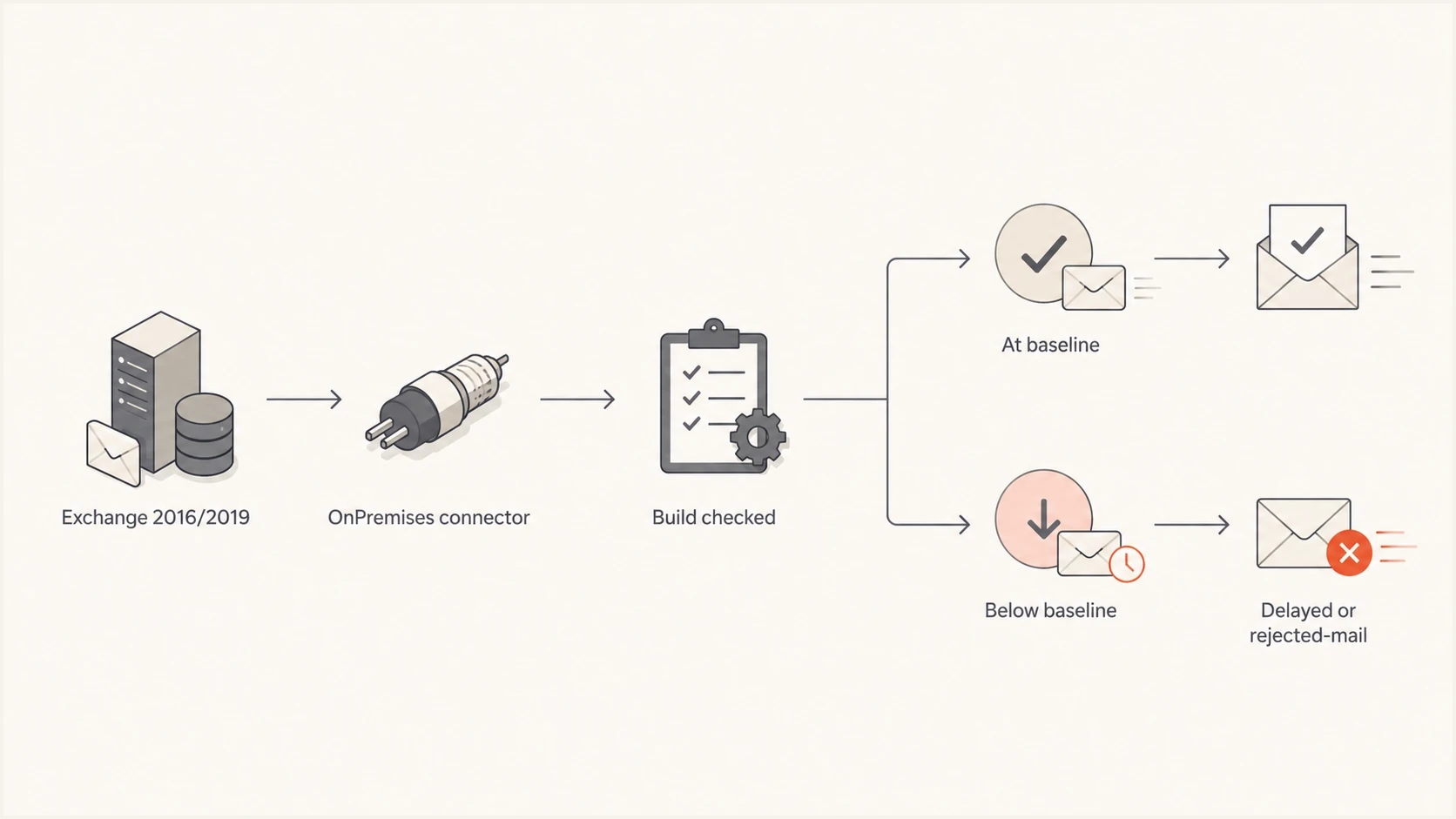
Flow of Exchange mail through the version check
The minimum October 2025 builds
Use the full file version when comparing a server with the floor. Microsoft's official build-number page lists these October 14, 2025 releases.
|
|
|
|---|---|---|
2016 CU23 | Oct25SU | 15.1.2507.61 |
2019 CU15 | Oct25SU | 15.2.1748.39 |
2019 CU14 | Oct25SU | 15.2.1544.36 |
Minimum versions for the September 2026 Exchange Online transport baseline
These are delivery floors, not recommended patch targets. Microsoft states that any Exchange version older than the latest available security update remains exposed to fixes released after that version. If a server is at the October 2025 build, it clears this specific September floor but still needs the newest security update available under the organization's support entitlement.
Checking only the CU is insufficient
Exchange 2019 CU15 without Oct25SU can still be below the required build. Get-ExchangeServer reports the cumulative update but does not reliably prove the installed security update or hotfix level. Verify the Exchange HealthChecker output or the ExSetup.exe file version.
How to find every exposed server
Start in Exchange Online, because the connector type defines the enforcement path. List enabled inbound connectors and isolate those whose ConnectorType is OnPremises. Review their sender IP addresses, certificate identity, and hybrid configuration, then map those properties back to every on-premises host that can submit mail.
Find affected connector pathspowershell
Get-InboundConnector |
  Where-Object ConnectorType -eq 'OnPremises' |
  Format-List Name,Enabled,SenderIPAddresses,
    TlsSenderCertificateName
Run Microsoft's Exchange HealthChecker on each mapped server and retain its report. Check both Build Number and whether an Exchange security update or interim update is detected. This catches incomplete installs that a CU-level inventory can miss. If HealthChecker cannot run, inspect the ExSetup.exe file version locally.
Read the complete Exchange file versionpowershell
Get-Command ExSetup.exe |
  ForEach-Object { $_.FileVersionInfo } |
  Format-List ProductVersion,FileVersion,FileName
- Find connectors: Record every enabled Exchange Online inbound connector with the OnPremises type.
- Map senders: Trace all production, failover, relay, and management servers that can use each connector.
- Verify builds: Capture the full version and detected security update on every mapped server.
- Compare floors: Flag any build below the applicable October 2025 number for immediate remediation.
Do the mapping before patching so an overlooked standby host does not begin failing after a switchover. Keep the inventory beside the change record and repeat the version check after installation and reboot. An update listed as installed in Windows does not replace a successful Exchange build verification.
What to do before the rollout
Update every below-baseline server before the second week of September. Follow the supported Exchange update sequence, satisfy prerequisites, place the server into the appropriate maintenance state, install the required update, reboot when required, and rerun HealthChecker. The safer target is the latest security update available to the organization, not merely Oct25SU.
Operational checks after updating
- Version proof: Confirm the complete post-update build on every server that can use the connector.
- Queue health: Watch outbound queues, retry counts, message age, and delivery latency during rollout.
- Failure evidence: Collect new non-delivery reports and correlate them with the actual submitting server.
- Mail test: Send through each intended route instead of testing only the preferred production node.
Keep monitoring after the first successful test. A healthy primary server can hide an outdated secondary server until traffic distribution or failover changes. Queue review on every server is more useful than checking only whether a message eventually appeared in a cloud mailbox.
Once the hybrid transport path is healthy, a controlled message through the email tester can confirm the received headers and authentication result. That test is secondary evidence. It does not report the Exchange server's patch level or prove that every failover node meets Microsoft's baseline.
This is not a new sender authentication rule
This change is transport security and deliverability enforcement based on the sending Exchange server's version. It does not introduce a new DMARC, SPF, DKIM, blocklist, blacklist, or sender reputation requirement. A domain can pass every authentication check and still have messages delayed or rejected because the on-premises Exchange build is too old.
What determines this enforcement
Exchange Online evaluates the source server version on the qualifying OnPremises connector path. Remediation requires patching that server or moving the path to a supported Exchange design.
What remains separate
DMARC, SPF, DKIM, blocklist status, blacklist status, and reputation still affect other delivery decisions, but changing them will not bring an outdated Exchange build above this floor.
Suped's domain health checker can verify DMARC, SPF, and DKIM separately. Suped's product can also monitor authentication and delivery signals after mail reaches recipients, but it cannot patch Exchange or certify an ExSetup.exe version. For this incident, the connector inventory and server build audit come first.
The next baseline is the larger deadline
October 2025 is the last public update baseline that Exchange 2016 and 2019 installations can meet without Extended Security Updates. Microsoft estimates that another baseline increase will arrive in several months. At that point, the required version will be newer than every publicly available Exchange 2016 or 2019 update.
Hybrid transport readiness
The September floor preserves delivery for October 2025 builds, but the later floor changes the viable platform choices.
Below September floor
Throttling or blocking risk
Exchange 2016 or 2019 build predates Oct25SU
Meets September floor
Temporary delivery baseline
At least the applicable Oct25SU build
Ready for later floor
Supported route forward
Current ESU build or Exchange Server Subscription Edition
Only two paths will meet that later version requirement: keep Exchange 2016 or 2019 current through Microsoft's Extended Security Update program, or migrate the sending role to Exchange Server Subscription Edition. Reaching the October 2025 floor now protects near-term mail flow, but it does not complete the lifecycle work.
- ESU path: Confirm enrollment, update access, maintenance ownership, and a date for leaving Exchange 2016 or 2019.
- Migration path: Plan prerequisites, coexistence, connector changes, certificates, testing, and rollback for Subscription Edition.
Set the decision date before Microsoft announces the exact later baseline. Procurement, change windows, and migration testing can take longer than the enforcement notice. A documented owner and approved route prevent the September fix from becoming another emergency a few months later.
Patch now and choose the supported path
The immediate task is precise: find every OnPremises inbound connector, map every Exchange 2016 or 2019 server that uses it, and bring each server to the applicable October 2025 build or later before Microsoft's second-week rollout. Verify the full version after patching and watch queues plus non-delivery reports across all active and standby nodes.
The strategic task is already due. Exchange 2016 and 2019 teams need confirmed ESU coverage or a migration plan for Exchange Server Subscription Edition before Microsoft raises the floor again. The October baseline keeps mail moving for now. It does not make an old server current or supported.