Why are my emails from GoHighLevel landing in spam and how do I fix it?

Published 10 Jul 2025
Updated 30 Sep 2026
15 min read
Summarize with
Updated on 30 Sep 2026: We added current HighLevel warm-up and sending-health guidance, including complaint, bounce, and unsubscribe checks.
GoHighLevel emails usually land in spam because receivers distrust the rewritten tracking link, the sending domain, the authentication setup, the recipient relationship, or the visible From address. The practical fix is to send from a domain you own, use a dedicated sending domain, publish the exact SPF and DKIM records GoHighLevel gives you, add a DMARC record, use a branded tracking domain, test a real sent message, follow the current warmup stage, validate addresses, suppress hard bounces, and stop sending to people who did not ask for the email.
Start with the message that actually hit spam. Send it through GoHighLevel, inspect the authentication results, review every link after rewriting, and compare the result with a real inbox test. The fastest first step is to send the campaign to the email tester so you can see the same class of issues a receiver is scoring.
Short answer
Do not treat this as a copywriting problem first. In GoHighLevel, the spam-folder symptom often comes from infrastructure and routing: shared click tracking, missing or misaligned DKIM, a From domain that does not match the signing domain, a free-provider From address, new-domain volume, invalid recipients, or poor list consent.
- Fix DNS: Publish SPF, DKIM, DMARC, and the tracking CNAME shown in GoHighLevel.
- Fix routing: Use a domain you own, a dedicated sending domain, and a branded tracking hostname.
- Fix behavior: Send to opted-in recipients, validate addresses, follow warmup guidance, and remove unengaged contacts.
Why GoHighLevel emails land in spam
A mailbox provider does not make a single yes-or-no decision based on the platform name. It scores the message through many signals at once. In GoHighLevel, the most common failure pattern is that a sender sees a normal link in the editor, then a test report shows a different URL. That changed URL is usually click tracking. Click tracking is normal, but the tracking host also has its own reputation.
GoHighLevel's own spam guide points to the same broad areas: authentication, list health, sending volume, content, reputation, From address choice, unsubscribe handling, and role-based or stale recipients. That list is useful, but the investigation should still begin with the exact message that failed.
Do not rely only on a test sent to another mailbox at your own organizational domain. An externally routed message that claims to come from the same domain as the recipient can resemble spoofing when alignment is wrong. Test at Gmail, Outlook, or Yahoo as well, then compare the original headers and placement.
|
|
|
|---|---|---|
Tracking | Shared link host | Branded CNAME |
DKIM | Missing selector | Publish TXT |
DMARC | Domain mismatch | Match domains |
Volume | Sudden spike | Use warmup stages |
List | Invalid or weak consent | Validate and suppress |
Common GoHighLevel spam causes and the direct fix.
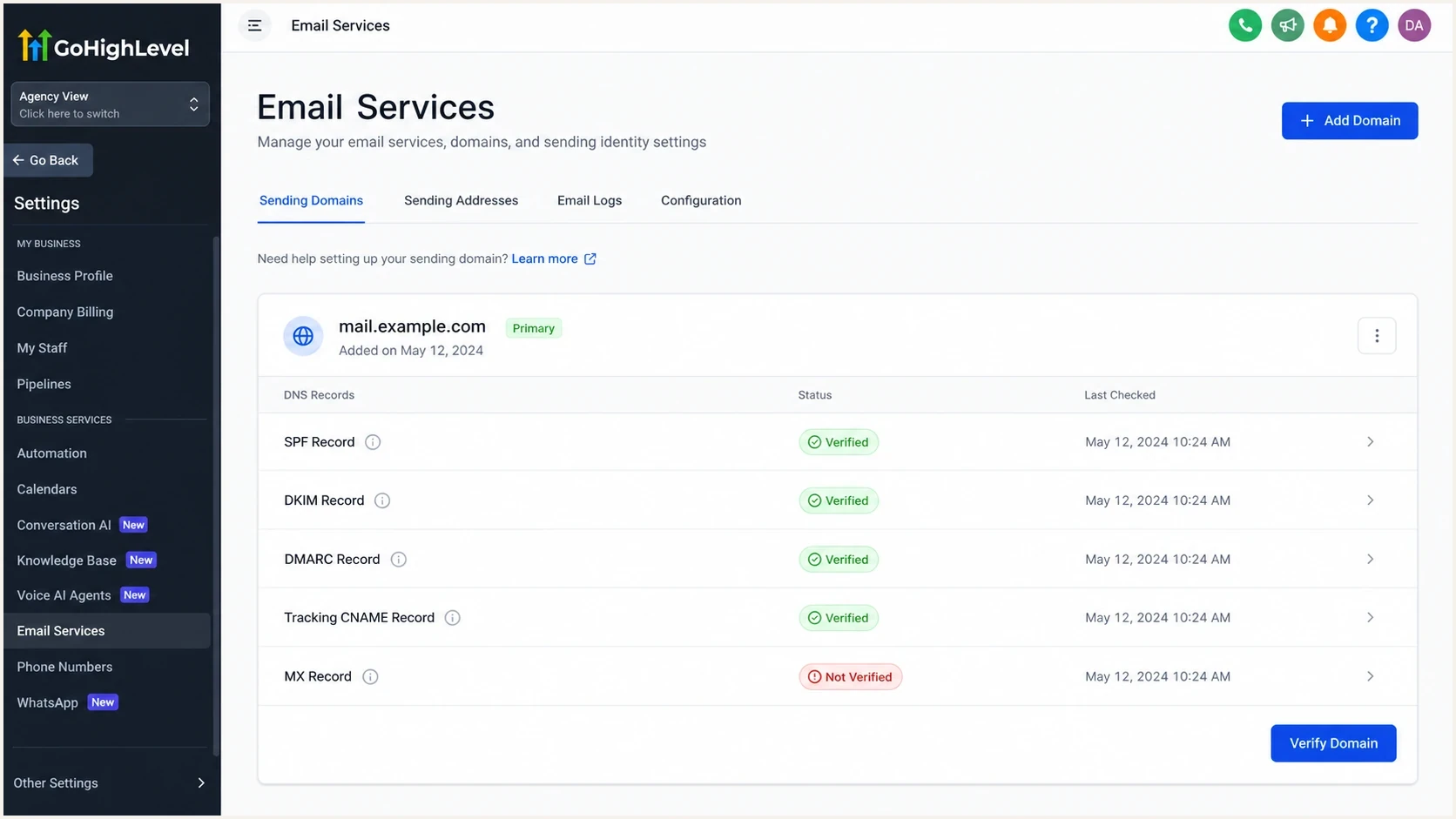
GoHighLevel email services settings screen with sending domain DNS status rows.
What the strange tracking link means
If your email editor shows a clean landing-page URL but a test report shows a long, unfamiliar URL, GoHighLevel has rewritten the link for click tracking. The visible text can still point to your landing page after the redirect, but the message body contains the tracking host first. Receivers score that host, its redirect behavior, and sometimes the destination.
A rewritten link is not automatically bad. It becomes a problem when the tracking domain is shared with other senders, has a poor history, has no clear connection to your brand, or appears on a blocklist (blacklist). Check blocklist monitoring before changing the email copy because a listed tracking host can make a good landing page look suspicious.
Click tracking on
- Redirect path: The email contains a tracking URL before the final page.
- Extra reputation: The tracking host has its own sender and URL history.
- Useful data: You get click reporting for campaigns and workflows.
- Main risk: A shared or distrusted host can hurt placement.
Click tracking off
- Direct path: Links point straight to your landing page.
- Fewer signals: Receivers see fewer redirect and host checks.
- Less reporting: Click metrics become weaker or unavailable.
- Best use: Use this when link reputation is the clear issue.
How tracking changes the linkHTML
<a href="https://example.com/book">Book a call</a>

<a href="https://email.example.com/c/abc123">Book a call</a>
The better fix is not to hide the link. Use a branded tracking hostname, reduce unnecessary links, avoid public link shorteners, and send to people who expect the message. If the rewritten link is still the only failing item, turn off click tracking for the test and compare placement.
Fix authentication before judging content
SPF, DKIM, and DMARC do not make a distrusted link safe. SPF authorizes the servers that use a domain in the envelope sender, DKIM lets receivers verify a domain signature and message integrity, and DMARC checks whether at least one passing method matches the visible From domain. If those checks fail, receivers treat every other weak signal more harshly.
A common failure is missing DKIM for the GoHighLevel sending domain. Gmail can display a "via" label when the visible From domain and signing domain differ, but that label is only a clue. Confirm the result in the message's original headers. If SPF does not provide a matching pass, missing or invalid DKIM causes DMARC to fail, and a quarantine policy can direct the message to spam even when the content looks normal.
Authentication is necessary, not sufficient
Passing SPF, DKIM, and DMARC gets the message through the identity checks. It does not erase poor list consent, a bad tracking domain, a damaged IP, invalid recipients, or sudden volume spikes.
- SPF: Authorizes the sending servers used for the envelope-sender domain.
- DKIM: Signs the message so receivers can verify the signing domain and content.
- DMARC: Applies policy when neither SPF nor DKIM passes and matches the visible From domain.
- From domain: Needs a matching SPF or DKIM domain under the DMARC mode you publish.
DNS checks to runBASH
dig +short TXT example.com
dig +short TXT _dmarc.example.com
dig +short TXT mailo._domainkey.example.com
dig +short CNAME email.example.com
Starter DMARC recordDNS
v=DMARC1; p=none; rua=mailto:dmarc@example.com; adkim=r; aspf=r
Use the DKIM selector and values shown for your dedicated domain in HighLevel; mailo is only a common LC Email example. If the domain already has an SPF record, update that one record instead of publishing a second SPF record. Multiple SPF records cause a permanent error.
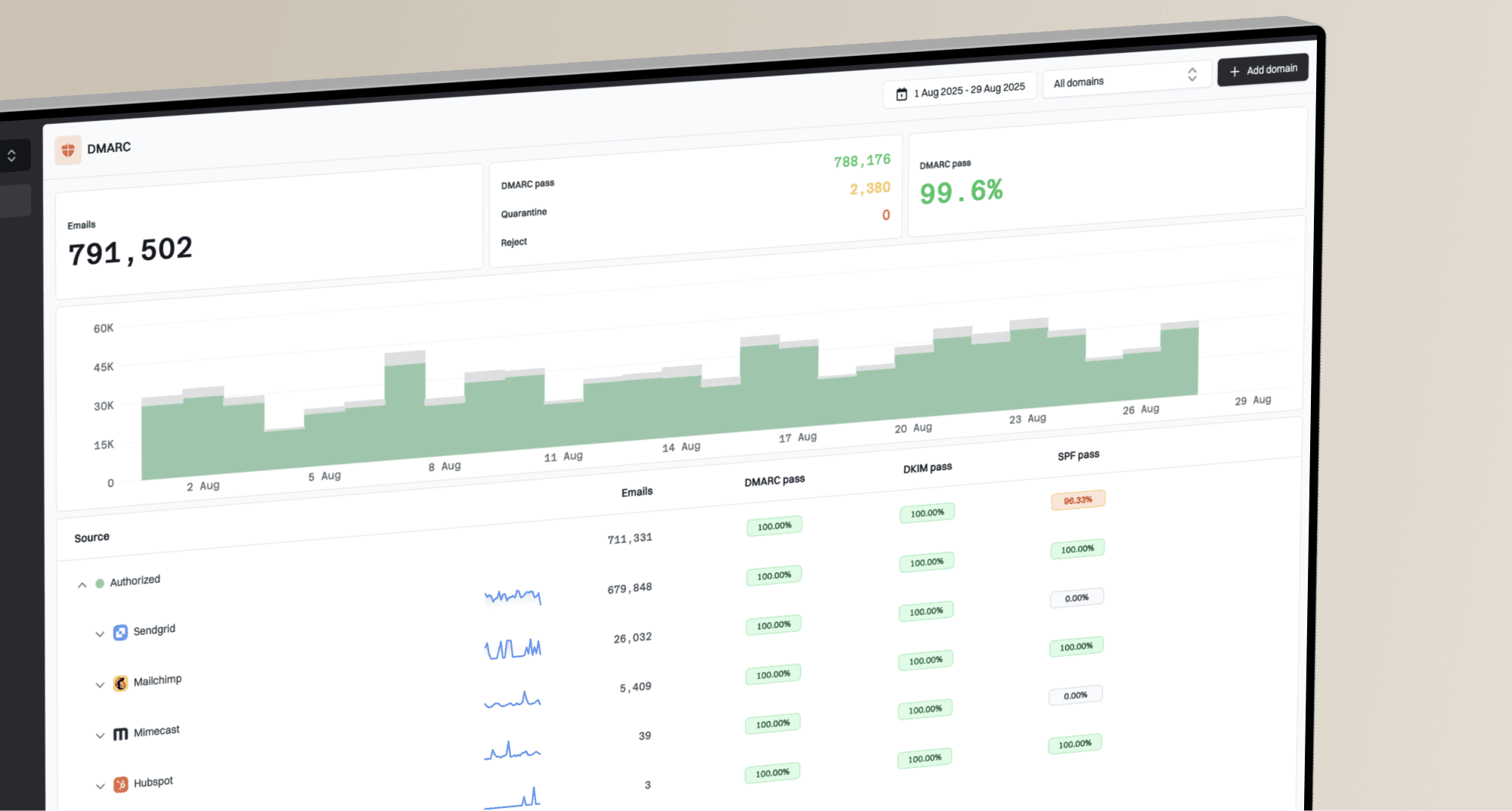
Do not jump straight to a strict DMARC policy until every real sender passes. Suped's DMARC monitoring shows which sources send for your domain, whether GoHighLevel is passing, and which failures need a DNS or platform-side fix. Suped also provides automated issue detection and fix steps, which helps when several client domains are involved.

Issue steps to fix dialog showing the issue overview, tailored fix steps, and verification action
Use a dedicated sending setup
If you send through shared or default infrastructure, your message can inherit problems created by other senders using the same route. A dedicated sending domain and branded tracking hostname give receivers a clearer connection between the message, the sender, and the destination. This does not guarantee inbox placement, but it removes one of the messiest variables.
GoHighLevel's sending guide recommends a dedicated email sending domain, proper DMARC, an appropriate From address, unsubscribe links, double opt-in, and gradual warmup. Add one more operational rule: do not share one sending domain across unrelated clients or sub-accounts.
A dedicated sending domain does not give you a dedicated IP. HighLevel says LC Email senders at about 200,000 messages per week or more benefit most from a dedicated IP. A dedicated IP also needs consistent volume and its own careful warmup, so do not treat it as an automatic fix for a small or irregular program.
- Dedicated domain: Use a subdomain just for GoHighLevel sending, then verify it inside the platform.
- Matching From: Use an address whose organizational domain matches the dedicated sending domain.
- Tracking CNAME: Route click tracking through a branded hostname instead of a shared host.
- DNS verification: Wait for propagation, verify every row in GoHighLevel, then send a real test.
- Policy staging: Start DMARC in monitoring mode, fix every source, then tighten policy.
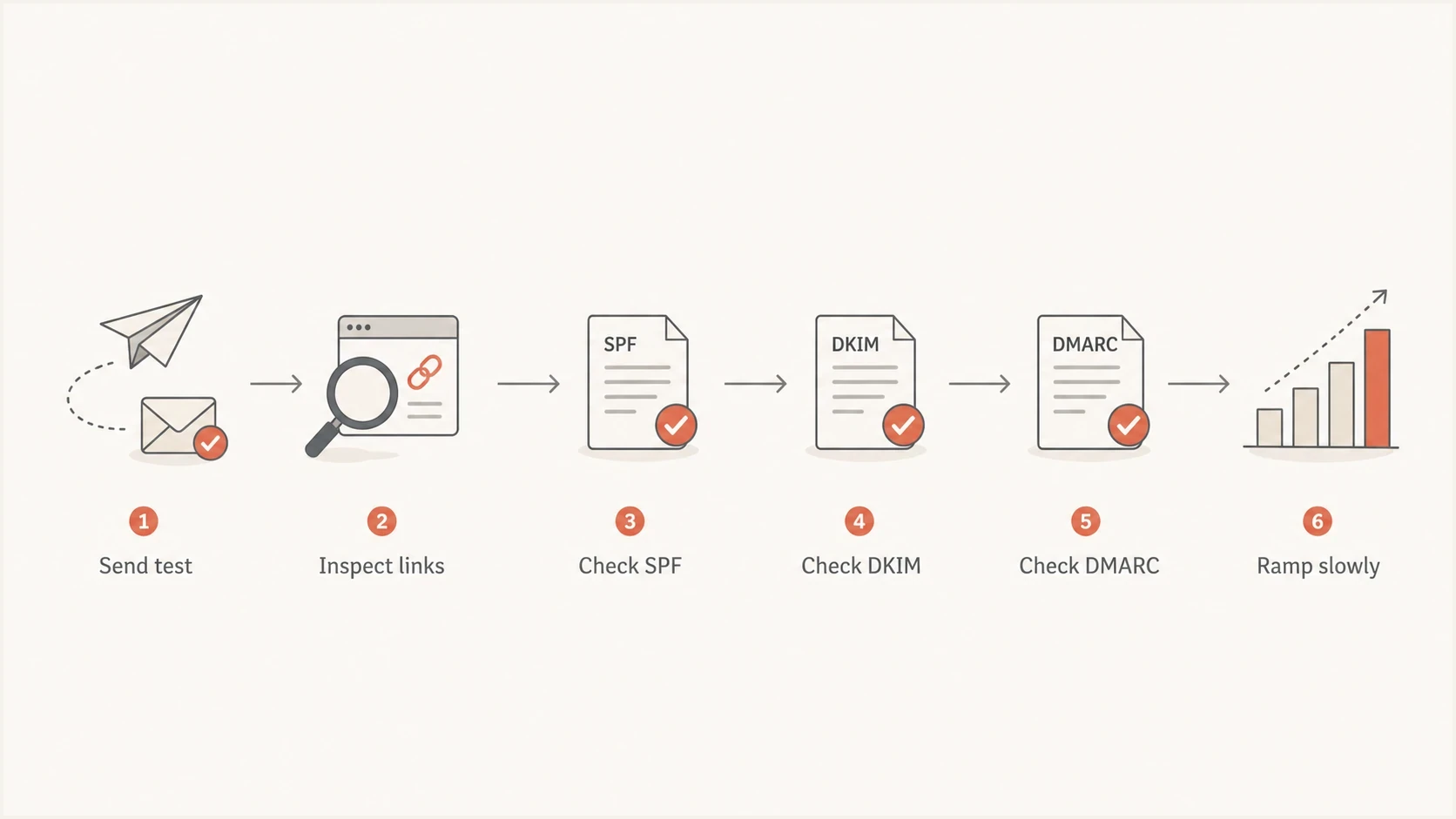
Flowchart showing the GoHighLevel spam troubleshooting path.
Warm up and send the right mail
A campaign that landed in the inbox two days ago does not prove the next one will. Reputation changes quickly when a domain is new, a list is stale, a shared route rotates, or recipients start ignoring and reporting the message. Receivers also score first contact differently, especially at Gmail.
For Gmail-specific placement issues, the Gmail spam folder guide explains the receiver-side signals in more depth. For GoHighLevel, the key is to stop sending like the domain already has trust if it does not.
For LC Email dedicated domains, HighLevel's fixed-stage warmup uses daily progression thresholds. New verified dedicated domains enter warmup automatically, while existing dedicated domains need warmup started in Email Services. The fixed-stage system does not enforce a separate hourly platform limit, but HighLevel's general sending guide still recommends hourly pacing. Reaching the full daily threshold advances the domain and does not stop extra mail, so treat the stage as a ramp target rather than a safe-volume guarantee. Use drip or batch sending, spread volume through the day, and hold or pause when complaints, bounces, or placement worsen.
Warmup decision bands
Use these bands to decide whether to increase, hold, or pause GoHighLevel sending.
Increase
Healthy
Authentication passes, complaints stay low, and engaged contacts respond.
Hold
Watch
Placement varies, open rates drop, or one receiver starts filtering.
Pause
Stop
Spam complaints rise, DKIM fails, links are flagged, or bounces spike.
- Consent first: Send campaigns only to people who opted in and expect the topic.
- Engaged first: Start with recent openers, clickers, buyers, and active users.
- Stage threshold: Use the dedicated domain's current daily stage to pace the ramp, not as permission to send the maximum at once.
- Clean exits: Keep unsubscribe links obvious and suppress complainers immediately.
- Stream separation: Keep cold outreach away from opt-in lifecycle and customer email.
Validate addresses and stop hard bounces
Consent does not guarantee that an address is deliverable. Typos, abandoned mailboxes, and old imported contacts create hard bounces, and repeated attempts to those addresses damage domain reputation. HighLevel's LC Email controls can validate an address before the first send, revalidate it every 90 days, and mark a contact invalid after a hard bounce.
In the sub-account Business Profile, enable first-send verification and the setting that marks hard-bounced addresses invalid. Agencies can also enable 90-day revalidation in the sub-account settings. If the account uses a custom SMTP provider instead of LC Email, check that provider's validation and bounce controls because HighLevel's support scope is limited for infrastructure it does not manage.
- Validate first sends: Catch invalid addresses before they enter a campaign or workflow.
- Revalidate old contacts: Recheck stored addresses every 90 days when the LC Email option is available.
- Suppress hard bounces: Mark permanent failures invalid and do not retry them.
- Review soft bounces: Pause addresses that keep failing instead of retrying them without a limit.
Monitor sending health and unsubscribes
Passing authentication is only the start of day-to-day control. HighLevel's current domain-health guidance targets a bounce rate under 2%, a spam complaint rate under 0.1%, and an open rate above 15%. Treat those values as action thresholds, not goals to approach. Opens can also be inflated by privacy protections, so compare them with clicks, replies, unsubscribes, and placement tests.
Act before HighLevel restricts sending
HighLevel's current bounce controls warn at 3% and can suspend sending at 5%. A short spike can damage reputation before an account-level block appears, so review campaign, workflow, and bulk-send statistics after every material send.
- Bounces: Pause expansion above 2%, suppress permanent failures, and investigate any sudden soft-bounce spike.
- Complaints: Stay under 0.1%, stop the affected segment when complaints rise, and never resend to complainers.
- Unsubscribes: Keep a visible in-body opt-out link and leave HighLevel's header-level List-Unsubscribe in place.
- Engagement: Reduce frequency when opens, clicks, or replies fall instead of sending harder to the same inactive segment.
The List-Unsubscribe header does not replace the link in the email body. It gives trusted senders an additional one-click control in supported inboxes, and HighLevel processes that opt-out against the contact record. A missing header button does not prove the header is absent because mailbox providers decide when to display it.
Check reputation and blocklists
Once authentication passes and links look clean, check reputation. A domain or IP can appear on a blocklist or blacklist after complaint spikes, bad shared routing, or old list imports. One listing does not always explain every spam placement, but it gives receivers another reason to distrust the message.
Run a broad domain health checker after a real test send because it catches DNS and reputation basics in one pass. For teams managing several brands or clients, Suped combines DMARC source data, authentication failures, blocklist monitoring, and deliverability alerts in one workflow.
?
What's your domain score?
Deep-scan SPF, DKIM & DMARC records for email deliverability and security issues.
Suped shows the affected source, likely cause, and fix steps. That helps when a GoHighLevel account, support system, billing sender, and newsletter all use the same organizational domain.
Suped DMARC dashboard showing email volume, authentication health, and source breakdown
When moving mail off GoHighLevel makes sense
GoHighLevel can work for inbound lead follow-up, appointment reminders, and customer workflows when the sending domain is configured correctly and the recipients asked for the email. It becomes risky when the same account is used for cold outreach, scraped lists, high-volume blasts, and opt-in customer mail at the same time.
If the audience did not opt in, do not try to repair the result with more DNS changes. Separate that stream. If the audience did opt in and GoHighLevel still lands in spam after the technical fixes, move the opt-in campaign stream to a sending environment built only around permission-based mail. Keep GoHighLevel for the CRM workflows it handles well.
Keep in GoHighLevel
- Inbound leads: People who filled out your forms and expect follow-up.
- Appointment mail: Confirmations, reminders, and rescheduling messages.
- Customer flows: Onboarding, renewal, service, and support-related sequences.
- Small campaigns: Segmented sends to recent and engaged contacts.
Move or isolate
- Cold outreach: Keep it away from opt-in customer and lifecycle mail.
- Imported lists: Suppress contacts without clear consent and recent activity.
- Large blasts: Use a controlled ramp and a clean permission-based sender.
- Client mixing: Avoid one domain carrying unrelated client reputation.
If this is a new sender, read the new domain guide before scaling. New domains have no receiver trust yet, so good DNS is only the starting point.
A practical fix order
The fastest path is a controlled sequence. Fix the identity layer, remove risky redirects, verify with a real sent message, then change audience and volume. Changing all of those at once makes the result harder to read.
GoHighLevel spam checklist
- Send one test: Send the real campaign through GoHighLevel to a test inbox outside your own domain.
- Inspect headers: Confirm SPF and DKIM pass, then confirm DMARC passes for the visible From domain.
- Review links: Check whether click tracking rewrites links through a shared host.
- Brand tracking: Set the tracking CNAME and avoid public link shorteners.
- Validate contacts: Enable first-send validation and suppress every hard bounce.
- Check listings: Review domain and IP blocklist or blacklist status.
- Reduce risk: Pause cold contacts, stale leads, and role-based addresses.
- Pace warmup: Restart with engaged contacts, use the current stage as a ramp target, and spread volume through the day.
- Watch health: Hold bounces under 2%, complaints under 0.1%, and keep every opt-out path working.
- Monitor daily: Use Suped to watch authentication, reputation, and new issues.
A useful outside check is the DKIM walkthrough, which shows how one missing DKIM selector can create the same spam symptom. Use it as a reminder to verify the exact DNS rows GoHighLevel expects, rather than only the records you assume are present.
Views from the trenches
Best practices
Use a dedicated sending domain and branded tracking host before scaling client campaigns.
Test real sent mail, then inspect SPF, DKIM, DMARC, links, and placement before launch.
Keep opt-in lifecycle mail separate from cold or scraped outreach streams every time.
Common pitfalls
Assuming a good past campaign proves today's shared route still has the same reputation.
Fixing DMARC while ignoring a rewritten tracking URL that receivers already distrust.
Sending a new domain too quickly after DNS verification because the setup says verified.
Expert tips
Run the same test several times because shared infrastructure can rotate between IPs.
If Gmail shows a via label, check whether DKIM signing matches your From domain.
Use the current daily warmup stage and increase only while recipient risk stays low.
Expert from Email Geeks says shared click-through links can inherit reputation from other senders, so a normal landing page can look risky after rewriting.
2024-01-16 - Email Geeks
Expert from Email Geeks says authentication does not directly score links, but missing DKIM or DMARC makes every other filtering signal harder to survive.
2024-03-08 - Email Geeks