
The direct answer is that you cannot fully resolve SPF alignment for a Google Workspace alias domain inside the normal alias-domain setup. Google Workspace uses the primary domain in the Return-Path for alias-domain mail. SPF can pass for that primary domain, but DMARC SPF alignment fails because the visible From header uses the alias domain.
I handle this by making DKIM alignment the control point for the alias domain. That means DKIM must sign with the alias domain, DMARC must exist on the alias domain, and reports must be monitored so you can tell the difference between a known Google Workspace limitation and a real authentication problem.
Short answer
- Root cause: Google keeps the envelope sender tied to the primary domain for alias-domain sends.
- Practical fix: Use DKIM alignment for the alias domain and monitor DMARC results closely.
- Architecture fix: Use a secondary domain or a sending platform that supports an alias-domain bounce address.
Why SPF fails for alias domains
SPF alignment is not about whether the alias domain has a valid SPF TXT record. It is about whether the domain authenticated by SPF matches the domain in the visible From header under DMARC rules. With Google Workspace alias domains, those domains normally differ.
A common setup looks like this: the primary Google Workspace domain is primary.example, the alias domain is alias.example, and the user sends as user@alias.example through Gmail. The recipient sees user@alias.example in the From header, but the bounce identity in the Return-Path is still tied to primary.example. SPF authenticates primary.example, not alias.example.
Typical Google Workspace alias resulttext
Header From: user@alias.example
Return-Path: user@primary.example
SPF domain: primary.example
DKIM d=: alias.example
DMARC SPF alignment: fail
DMARC DKIM alignment: pass
That result is confusing because the alias domain can have correct SPF, DKIM, and DMARC DNS records. The missing piece is the envelope sender domain. Alias domains do not have independent mailbox identity and bounce processing in the same way secondary domains do, so Google keeps the Return-Path on the primary domain.
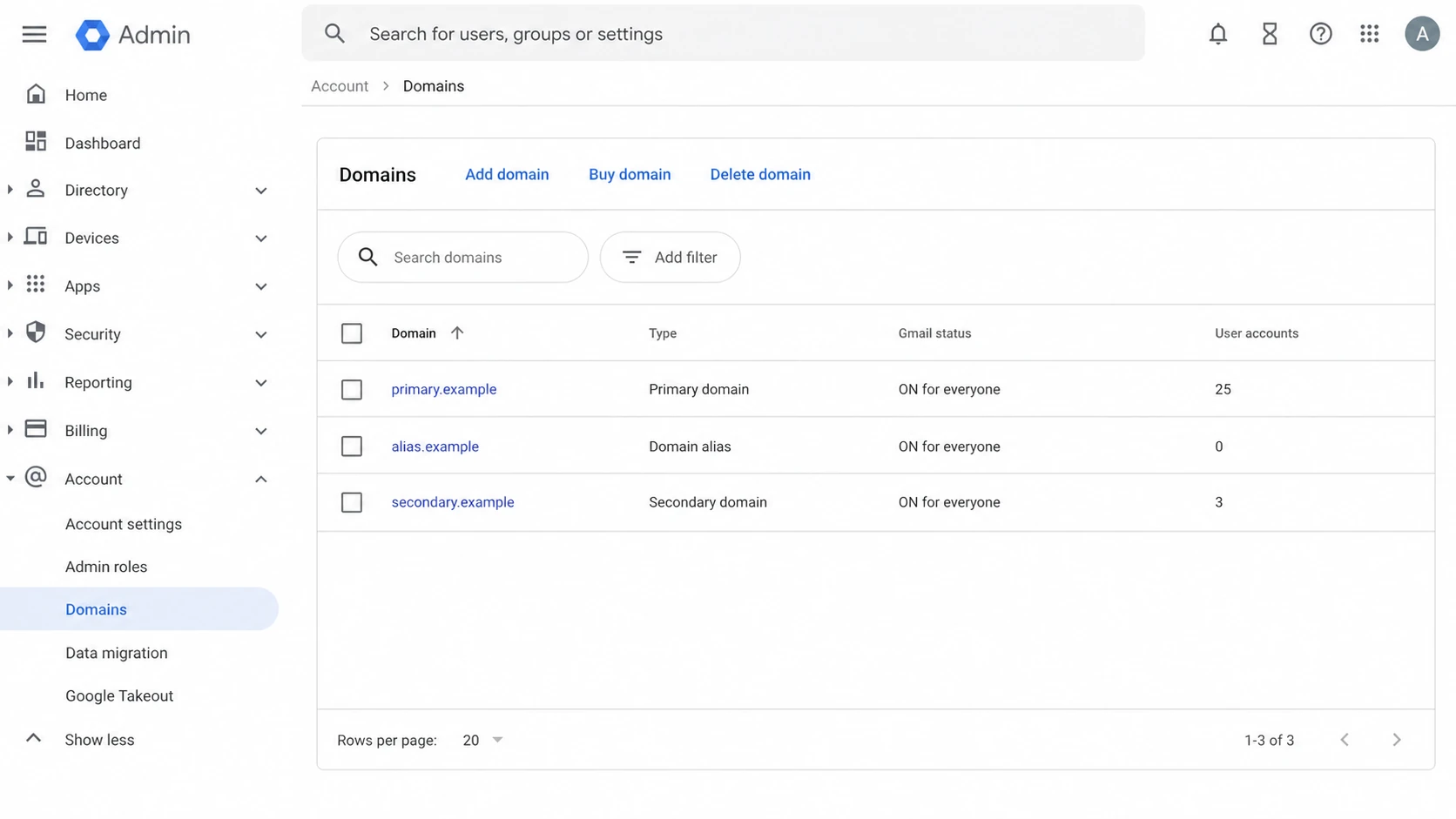
Google Admin console domain list showing primary, alias, and secondary domains.
Alias domain
- Identity: Users send as the alias domain, but accounts live under the primary domain.
- Return-Path: Google normally uses the primary domain for the bounce address.
- Best use: Simple alternate addresses where DKIM alignment is enough for DMARC.
Secondary domain
- Identity: Users can exist under the secondary domain with separate addresses.
- Return-Path: The domain model supports cleaner domain-specific mail handling.
- Best use: Separate brands, subsidiaries, or domains with strict reporting needs.
What actually fixes it
The fix depends on what you mean by resolve. If your goal is DMARC pass, DKIM alignment is enough. If your goal is specifically SPF alignment, the normal Google Workspace alias-domain setup does not give you that. You need a different domain model or a different sending path.
- Keep DKIM aligned: Generate a DKIM key for the alias domain in Google Workspace, publish it in DNS, turn on signing, and confirm that the DKIM d= domain matches the From header domain.
- Publish DMARC: Add a DMARC record on the alias domain so receivers can accept mail based on DKIM alignment and send aggregate reports back.
- Verify SPF syntax: Keep a correct Google SPF record on the alias domain, even though it will not force SPF alignment for Gmail alias sends.
- Change architecture: Use a secondary domain, a separate tenant, or a platform that can use the alias domain in the envelope sender when SPF alignment is mandatory.
- Watch reports: Use DMARC aggregate data to confirm that Google mail passes through DKIM and that other sources are not failing silently.
|
|
|
|
|---|---|---|---|
Keep alias | Not aligned | Pass by DKIM | Lowest change |
Secondary domain | Cleaner | Pass | More admin |
Separate tenant | Domain-owned | Pass | More cost |
External sender | Configurable | Depends | More routing |
Practical options for Google Workspace alias-domain mail
Alias domain DNS baselinedns
alias.example. TXT "v=spf1 include:_spf.google.com -all"

selector._domainkey.alias.example. TXT "v=DKIM1; k=rsa; p=KEY"

_dmarc.alias.example. TXT "v=DMARC1; p=none; rua=mailto:dmarc@alias.example"
That SPF record is still worth publishing. It authorizes Google to send for the alias domain in situations where the alias domain is used as the SPF domain. It does not override Google Workspace's Return-Path choice for Gmail alias sends. I still check the DNS syntax with the SPF checker before testing real messages.
SPF checker
Find SPF syntax issues, lookup limits, and weak records.
?/16tests passed
After DNS is correct, the real proof comes from headers on a sent message. DNS checks prove that the records are valid. Headers prove which domain Google actually used for SPF, DKIM, and DMARC on that message.
Recommended rollout
I would not chase SPF alignment for a Google Workspace alias domain by repeatedly editing SPF. That burns time and leaves the real control, DKIM alignment, under-tested. A cleaner rollout starts with a known DNS baseline, then confirms actual message results, then stages DMARC policy.
DMARC policy rollout
Use policy staging after DKIM alignment is stable for the alias domain.
Monitor
p=none
Collect reports and verify Google DKIM pass.
Quarantine
p=quarantine
Send failing mail to spam after sources are known.
Reject
p=reject
Block failing mail after legitimate senders pass.
Suped's product is useful here because this problem is easy to misread in raw XML reports. In Suped, I would add the primary domain and alias domain, inspect the source breakdown, and mark Google Workspace alias sends as acceptable only when DKIM alignment passes for the alias domain. For teams with many domains or frequent sender changes, Hosted SPF keeps authorized senders easier to manage without asking for DNS access for every sender update.
Suped also keeps DMARC, SPF, DKIM, blocklist monitoring, and deliverability checks in one place. That matters when a domain alias issue is only one part of a larger authentication cleanup. If the SPF record starts approaching lookup limits, use SPF flattening carefully, because the goal is reliable authorization, not a larger static record that becomes stale.

DMARC record detail view showing SPF, DKIM, DMARC, rDNS diagnostics, and DNS records
The workflow is simple: prove DNS is valid, prove real mail passes DKIM alignment, then move policy. Before tightening DMARC, I also run a broader check with the domain health checker so SPF, DKIM, DMARC, and related DNS issues are not treated as separate tickets.
Practical Suped workflow
- Add domains: Monitor both the primary Google Workspace domain and each alias domain.
- Review sources: Separate Google Workspace mail from marketing, billing, and application senders.
- Act on issues: Use automated issue detection and steps to fix for missing DKIM, SPF errors, and policy gaps.
- Set alerts: Use real-time alerts for new failures instead of waiting for a weekly report.
How to test the fix
The test is not finished when DNS looks right. Send a real email from the alias address to an external mailbox, then inspect Authentication-Results. I want to see SPF pass for the primary domain, DKIM pass for the alias domain, and DMARC pass because DKIM matches the From header domain.
Header result to expecttext
spf=pass smtp.mailfrom=primary.example
dkim=pass header.d=alias.example
dmarc=pass header.from=alias.example
- Passing state: DMARC passes because DKIM is aligned to the alias domain, even though SPF alignment fails.
- Broken state: DMARC fails when DKIM signs with the wrong domain, DKIM is missing, or the alias domain lacks a DMARC record.
- Decision point: If a receiver or compliance process requires SPF alignment, move away from the alias-domain pattern.
Do not mistake this for SPF failure
A Google Workspace alias send can show SPF pass and DMARC SPF alignment fail at the same time. That is expected when the Return-Path domain is the primary domain and the From header domain is the alias domain.
Calendar invites deserve the same attention. Google Calendar messages can use similar primary-domain envelope behavior, so test invites separately if the alias domain is used for executive, sales, or support calendars.
I also avoid treating SPF flattening as a cure for this issue. Flattening can help with SPF lookup limits, but it does not change the envelope sender that Google chooses. If the authenticated SPF domain is still the primary domain, DMARC SPF alignment is still unavailable for the alias-domain send.
Views from the trenches
Best practices
Keep DKIM passing on every alias domain before moving DMARC beyond monitoring mode in production.
Treat SPF failure on alias sends as expected when the DKIM domain matches the From header.
Use a secondary domain when the business needs alias-domain bounces and SPF alignment.
Common pitfalls
Adding Google SPF to the alias domain does not change Google's primary Return-Path choice.
Pushing DMARC to reject before DKIM is verified can block valid alias-domain mail.
Calendar invites can expose the same primary-domain envelope behavior as Gmail sends.
Expert tips
Check headers after a real send, not just DNS, because alignment depends on the envelope.
Separate brand domains into secondary domains only when the operations team can own mailboxes.
Keep DMARC reports for the alias domain under review during each policy increase step.
Marketer from Email Geeks says Google Workspace uses the primary domain in the Return-Path for alias-domain mail, so SPF can pass without SPF alignment.
2024-10-09 - Email Geeks
Marketer from Email Geeks says this behavior is a Google Workspace limitation rather than a missing SPF include on the alias domain.
2024-10-09 - Email Geeks
The practical answer
For Google Workspace alias domains, the realistic resolution is not SPF alignment. It is DKIM alignment plus DMARC monitoring. Publish SPF anyway, but do not expect it to match the alias domain when Gmail uses the primary domain in the Return-Path.
If the business only needs DMARC pass, keep the alias domain and make DKIM reliable. If the business needs domain-specific bounces, strict SPF alignment, or separate brand administration, convert the domain model to a secondary domain, split it into a separate tenant, or use a sender that can control the envelope sender domain. Suped helps keep that decision grounded in real DMARC data instead of header guesswork.