Is it possible to point one subdomain to multiple email service providers?

Updated on 23 Aug 2026: We clarified how one From subdomain can support multiple ESPs while SPF, DKIM, DMARC, bounce handling, and inbound routing stay separate.
Yes, it is possible to use one visible sending subdomain with more than one email service provider. No, it is not possible to point one exact DNS hostname to two ESP-owned CNAME targets or two independent bounce handlers at the same time. The clean answer is to share the visible From subdomain only when each ESP gets its own DKIM selector, return-path or bounce subdomain, tracking subdomain, and SPF plan.
Start by asking which name the ESP means by "subdomain". ESP setup screens often use sending domain, sender domain, MAIL FROM, return path, bounce domain, tracking domain, and DKIM domain as if they are one thing. They are separate DNS names with separate jobs. Once those names are separated, the answer gets much less confusing.
Fast answer
- Visible From: One subdomain can appear in the visible From address at two ESPs if authentication is set up cleanly.
- Bounce host: One exact bounce or return-path hostname should belong to one ESP, not two.
- DKIM selectors: Each ESP can use a different selector under the same subdomain.
- SPF record: One SPF record can authorize multiple ESPs, but duplicate SPF records at one name return permerror.
- DMARC policy: One DMARC policy record applies to both ESPs at a given _dmarc hostname; duplicate policy records are discarded.
What pointing means in email
The word "pointing" causes most of the confusion. In DNS, it usually means a CNAME, MX, TXT, or other record at a specific hostname. In an ESP onboarding screen, it can mean branding the visible From domain, delegating bounce handling, publishing DKIM keys, adding an SPF include, or setting a click tracking host. Those are different operations.
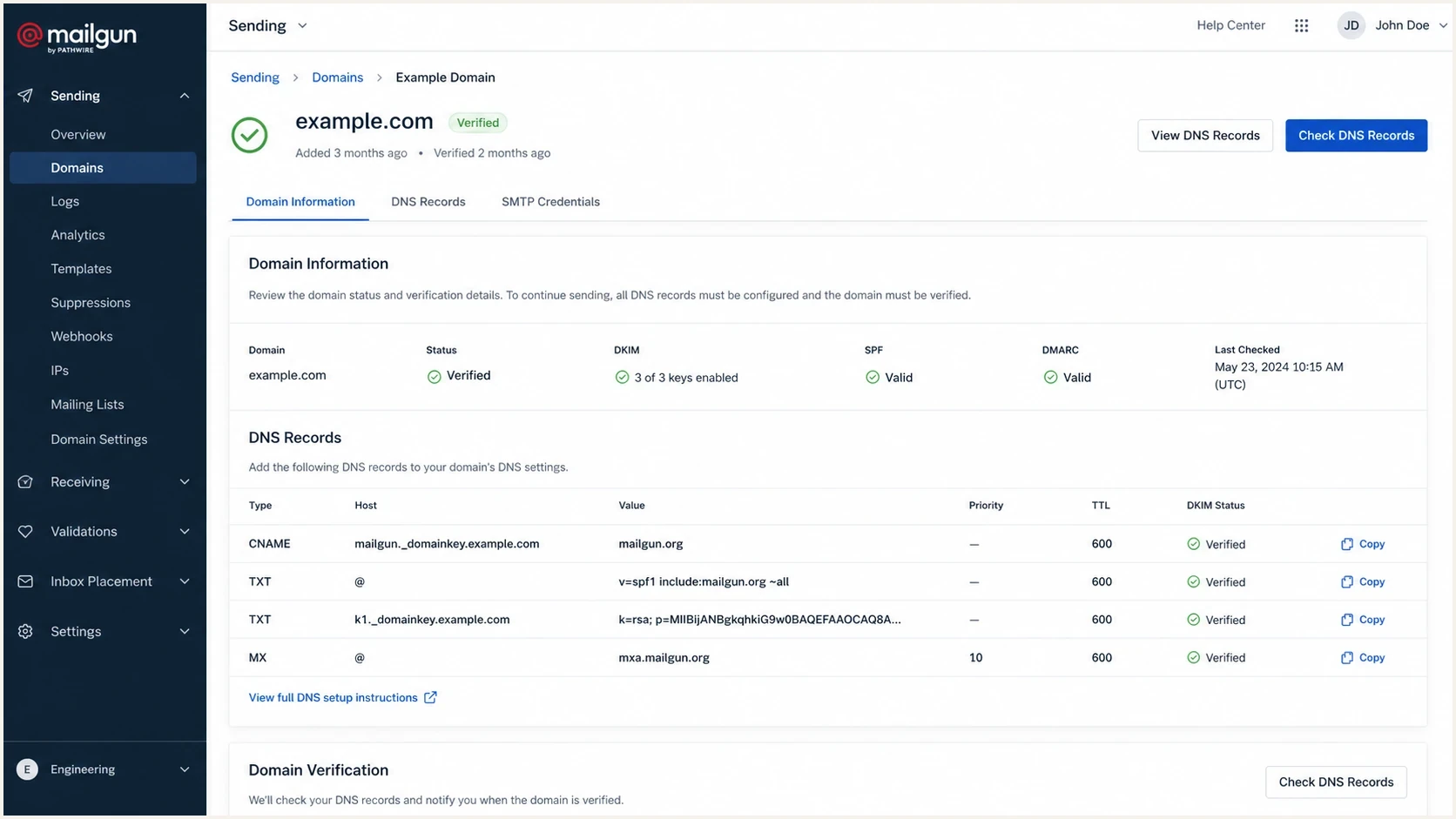
Mailgun DNS verification screen for an email subdomain with CNAME, TXT, MX, and DKIM records.
A real ESP verification screen makes this clearer because it asks for several records, not one universal pointer. The sending identity can be the same, while the bounce and tracking names stay different. The wrong setup happens when both ESPs demand the same hostname for their own CNAME or MX record.
|
|
|
|---|---|---|
From domain | Visible sender | Yes, with DKIM |
Bounce domain | Return handling | No, use separate hosts |
DKIM selector | Signature key | Yes, if unique |
SPF include | Sender authorization | Yes, in one record |
Tracking domain | Click and open branding | No, use separate hosts |
Common ESP labels and whether they can be shared
The DNS rule that creates the conflict
DNS is keyed by name and record type. If an ESP asks you to make a hostname a CNAME to its system, do not publish a second CNAME target or unrelated record data at that same owner name. That is why one exact bounce host or tracking host cannot be handed to two ESPs at once. Separate hostnames avoid the collision.
Conflicting CNAME setupDNS
# This is not a workable setup.
mail.news.example.com. 300 IN CNAME esp-a.example.net.
mail.news.example.com. 300 IN CNAME esp-b.example.net.
Subdomains do not inherit every email authentication record in the way people expect. If you send as a subdomain, check whether that subdomain needs its own SPF record, its own DKIM selectors, and a DMARC policy at its own _dmarc name. An organizational-domain DMARC policy can cover the subdomain unless a more specific subdomain policy applies. The exact answer depends on the visible From domain and the envelope sender domain.
Same hostname
- CNAME conflict: Two ESP-owned CNAME targets at one hostname do not work.
- Bounce conflict: Two ESPs cannot both process failures for one return-path host.
- TXT conflict: Two separate SPF records at one name cause an SPF error.
Separate hostnames
- Clean routing: Each ESP gets its own bounce and tracking name.
- Clean DKIM: Each ESP publishes a different selector under the sender domain.
- Clean SPF: All authorized senders are combined into one SPF record where needed.
Separate bounce hosts for two ESPsDNS
# This is workable because every ESP gets its own host.
bounce-a.news.example.com. 300 IN CNAME esp-a.example.net.
bounce-b.news.example.com. 300 IN CNAME esp-b.example.net.
When changing the bounce domain helps
Changing the bounce domain is the real caveat behind the "use two ESPs" answer. It is not a hack. It is the normal way to let a second ESP send mail for the same visible From subdomain without taking over the first ESP's return handling.
A workable split
The second ESP can send as news.example.com when its verified DKIM d= value matches that domain exactly, or shares its organizational domain under relaxed alignment. SPF can provide a pass with identifier alignment when the verified MAIL FROM domain satisfies the active DMARC alignment mode. The second ESP still needs its own bounce hostname, such as bounce2.news.example.com.
Do not approve an ESP change until the complete record list is visible. If the request is "add another provider to the same sending domain," that is often fine. If the request is "reuse the same return-path CNAME," that fails.
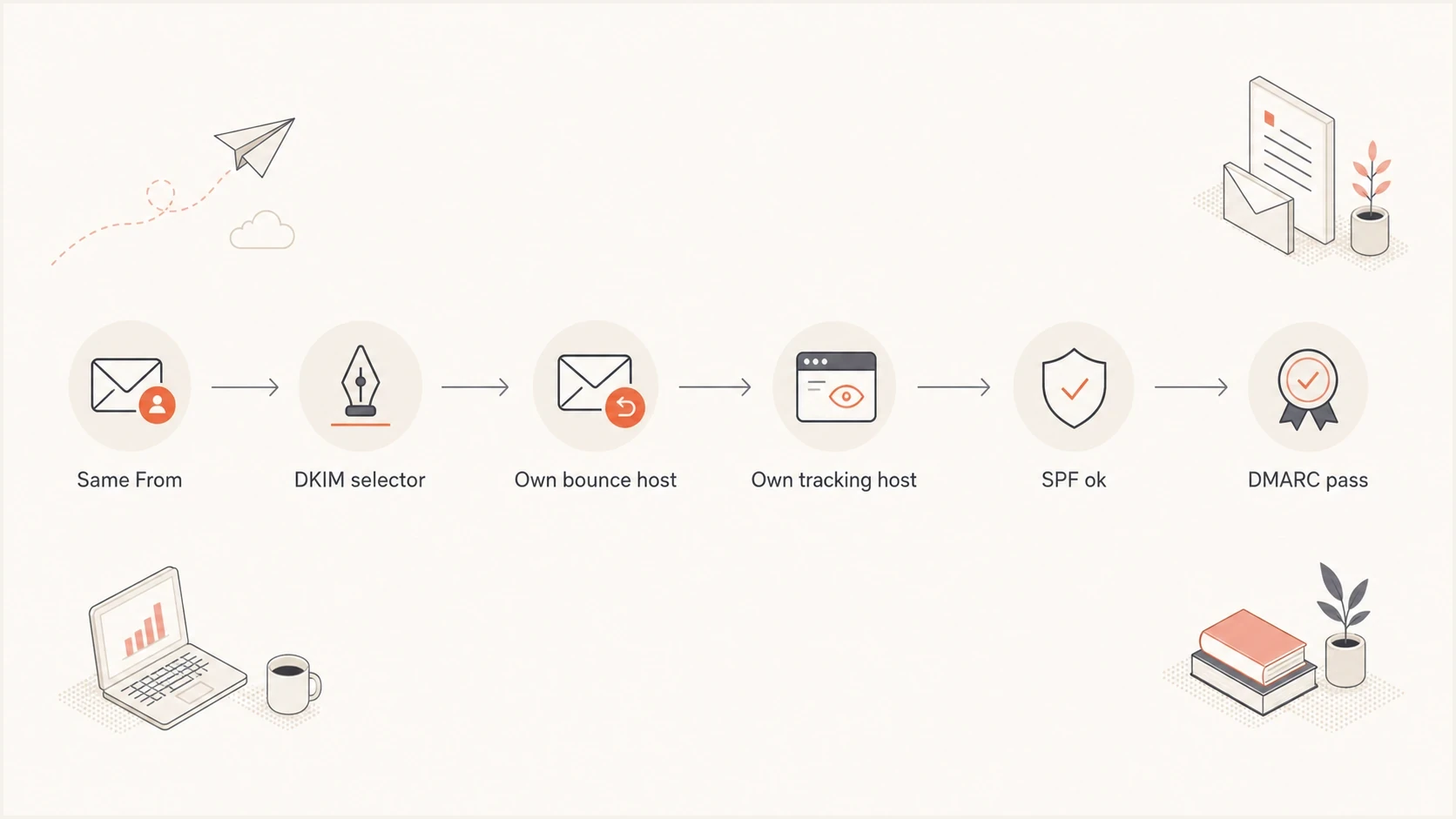
Flowchart for sharing one From subdomain across two ESPs with DKIM, bounce, tracking, SPF, and DMARC checks.
If the visible From address uses a different From domain than the return path, DMARC still needs an SPF or DKIM pass with identifier alignment. In practice, DKIM is usually the easiest way to share the visible From subdomain because each ESP can publish a unique selector.
Two DKIM selectors under one sender subdomainDNS
s1._domainkey.news.example.com. 300 IN CNAME s1.esp-a.example.
s2._domainkey.news.example.com. 300 IN CNAME s2.esp-b.example.
How DMARC alignment works across ESPs
Each message needs at least one authenticated identifier with alignment to the visible From domain. DKIM compares the verified d= signing domain. SPF compares the verified MAIL FROM domain, not the visible From address and not the tracking hostname. Configure both mechanisms where the ESP permits it, then confirm that at least one result has both authentication and identifier alignment.
Relaxed alignment accepts domains with the same organizational domain. Strict alignment requires an exact domain match. A return path such as bounce.news.example.com has relaxed SPF alignment with news.example.com, but it fails strict alignment. A DKIM signature using d=news.example.com has alignment in either mode when the visible From domain is news.example.com.
|
|
|
|---|---|---|
DKIM | d=news.example.com | d=esp.example.net |
SPF, relaxed | MAIL FROM bounce.news.example.com | MAIL FROM esp.example.net |
SPF, strict | MAIL FROM news.example.com | MAIL FROM bounce.news.example.com |
DMARC paths for a visible From domain of news.example.com
Keep one DMARC policy record
Both ESPs use the same DMARC policy for a given _dmarc hostname. Do not publish one DMARC TXT record per provider because multiple policy records at one target are discarded. Use one policy record, then separate the providers in aggregate reporting by source IP and authentication identifiers.
An ESP's domain verification badge only confirms the checks that provider performed. Send a real message through each stream and inspect the From, Return-Path, DKIM-Signature, and Authentication-Results headers. DMARC aggregate reports then show whether receivers see the same authentication and alignment results at normal traffic volume.
SPF when several ESPs send
SPF is another place where people think they are pointing a whole subdomain to a provider. SPF only authorizes servers for the domain used in the envelope sender. If two ESPs use the same MAIL FROM domain, both ESPs must be authorized in one SPF record at that domain.
One SPF record with two ESP includesDNS
news.example.com. 300 IN TXT (
  "v=spf1 include:esp-a.example "
  "include:esp-b.example -all"
)
If the second ESP uses its own bounce or MAIL FROM domain, SPF belongs at that operational domain too. Do not assume the visible From domain's SPF record covers a different envelope sender.
Before adding another sender, run an SPF checker on the exact bounce or MAIL FROM domain. That catches duplicate SPF records that return permerror, missing includes, and records that already sit near the lookup limit.
SPF lookup pressure
Count lookup-causing terms reached during SPF evaluation, including terms inside nested includes. More than 10 include, a, mx, ptr, exists, or redirect terms cause permerror.
Healthy
0-5 terms
Some room remains, but nested evaluation still needs testing.
Tight
6-10 terms
Review every include before adding another sender.
Failing
More than 10
SPF evaluation exceeds the permitted term count.
SPF checker
Find SPF syntax issues, lookup limits, and weak records.
?/16tests passed
When provider changes make direct DNS editing risky, Hosted SPF in Suped's product keeps a stable public reference while authorized sources are managed in Suped. Suped's SPF flattening can reduce lookup-causing include chains. Validate the published result after every sender change.
Recommended setup patterns
A reliable setup is explicit: use one visible From subdomain if the brand needs it, separate operational hostnames for each ESP, and one monitored authentication policy. The operational names can be utilitarian because customers do not need to see them.
|
|
|
|---|---|---|
One From | Brand needs one sender | Needs clean DKIM |
ESP subdomains | Providers need CNAMEs | More DNS names |
Separate From | Teams need isolation | More visible domains |
Hosted SPF | Sender list changes | Needs delegated control |
Practical patterns for one subdomain and multiple ESPs
Clean split across two ESPsDNS
news.example.com. 300 IN TXT "v=spf1 include:esp-a.example include:esp-b.example -all"
s1._domainkey.news.example.com. 300 IN CNAME s1.esp-a.example.
s2._domainkey.news.example.com. 300 IN CNAME s2.esp-b.example.
bounce-a.news.example.com. 300 IN CNAME esp-a.example.net.
bounce-b.news.example.com. 300 IN CNAME esp-b.example.net.
That example keeps the visible sender stable while separating the operational plumbing. If both ESPs must send using the same envelope domain, the SPF record needs both senders, not two separate SPF records. If the second ESP can use its own bounce host, DKIM often does most of the DMARC work.
SPF flattening drawer showing an over-limit record, sender editing, lookup counts, and the hosted record setup
In Suped's product, monitor DMARC reports for both ESP sources, verify SPF or DKIM with identifier alignment for each mail stream, and use Hosted SPF when authorized senders change often. Set alerts for new sources, authentication failures, alignment changes, or sudden volume shifts before retiring old DNS records.
Migration checklist
A second ESP should be added like a migration, even when the first ESP stays live. Do not start with DNS edits. Start with an inventory of every hostname the current ESP uses, then compare that list against the new ESP's required records.
- Inventory: List the visible From domain, DKIM selectors, bounce host, tracking host, SPF name, and DMARC name.
- Ask: Ask the new ESP which records are required and which names are optional or customizable.
- Separate: Give the new ESP unique bounce and tracking hostnames before touching the existing provider.
- Check: Review SPF lookup practices before adding another include.
- Verify: Send through each ESP, inspect the From, Return-Path, DKIM-Signature, and Authentication-Results headers, and confirm at least one SPF or DKIM pass with identifier alignment.
- Monitor: Use a domain health checker after the records are live, then review DMARC aggregate reports for both sources.
Do not skip the hostname inventory
The most common mistake is approving a new ESP's DNS checklist without noticing that a current ESP already owns the same bounce or tracking hostname. That change can break bounce processing, link tracking, SPF, or DMARC reporting for the existing mail stream.
Common edge cases
Inbound mail is a different question. A subdomain can have its own MX records, and those MX priorities do not interact with the parent domain's MX records. Multiple MX records at one exact domain apply to the whole recipient domain, so they cannot split user1@example.com to one mailbox provider and user2@example.com to another by themselves.
Equal-priority MX records can distribute connections across inbound servers, but they cannot route selected recipients to different mailbox providers. If two mailbox platforms must coexist for the same recipient domain, use split-domain routing through a single inbound gateway with an explicit recipient map. Mailbox forwarding or a staged IMAP migration can support a temporary cutover.
Tracking domains are also separate from authentication. If one ESP uses click.news.example.com for branded links, the second ESP should use a different tracking host. A tracking CNAME does not prove SPF, DKIM, or DMARC is correct.
Use separate sender subdomains when isolation matters
For marketing, transactional mail, product notifications, and one-off campaigns, separate sender subdomains reduce operational risk. If one team changes an ESP, the other streams keep their own DKIM selectors, bounce handling, SPF policy, and DMARC reporting path.
The main exception is brand consistency. If a company insists that all customer-facing mail comes from one subdomain, make DKIM the primary authentication path and keep every ESP's operational hostnames separate.
Views from the trenches
Best practices
Use one visible From subdomain, but give each ESP its own DKIM selector and bounce host.
Keep one SPF record per name and check lookup count before adding another ESP include.
Document each ESP's terms for From, Return-Path, bounce, tracking, and DKIM hostnames.
Common pitfalls
Putting two CNAME targets on one hostname breaks DNS instead of sharing traffic cleanly.
Letting two ESPs reuse one bounce domain creates SPF matching and return handling errors.
Treating MX priority as load sharing sends mail to the wrong inbox provider during failover.
Expert tips
Use separate bounce subdomains so each ESP can process failures and complaints correctly.
Retire the old ESP only after DMARC reports show the new source passes SPF or DKIM.
Ask every ESP which exact hostnames need CNAME, TXT, MX, or DKIM selector records.
Marketer from Email Geeks says one exact subdomain cannot be handed to two ESP-owned CNAME targets at the same time.
2021-10-06 - Email Geeks
Marketer from Email Geeks says the cleaner pattern is to create a second operational subdomain for the new ESP.
2021-10-06 - Email Geeks
Practical answer
Do not approve "point the same subdomain to two ESPs" until the request is broken into exact DNS names. If it means the same CNAME, same bounce host, or same tracking host, the answer is no. If it means the same visible From subdomain with separate DKIM selectors and separate operational hostnames, the answer is yes.
The safest build is simple: unique operational hostnames per ESP, one SPF record per SPF name, DKIM selectors per provider, and DMARC report review before and after the change. That gives the brand one sender when needed without forcing two ESPs to share a DNS name that only one of them can control.




