Does a subdomain used for sending emails need its own SPF record?

Updated on 25 Aug 2026: We updated this guide to explain how subdomain SPF affects DMARC and how DNS limits change deployment choices.
Yes, a subdomain used as the actual SPF sending domain needs its own SPF record. A TXT record at example.com does not automatically apply to send.example.com. SPF looks up the exact domain used in the SMTP envelope sender, also called the Return-Path or MAIL FROM domain. If that exact name is send.example.com, the SPF record needs to exist at send.example.com.
The caveat is important. If the subdomain appears only in the visible From address, but the email service uses a different bounce domain in the envelope sender, SPF is checked against that bounce domain. Do not publish SPF on the visible From subdomain solely because it appears there. Confirm the real envelope sender, then make sure SPF or DKIM passes with a domain that satisfies DMARC domain matching.
Fast rule: publish SPF where the receiving server will look, not where the brand team expects people to look. For a sending subdomain, that usually means a separate SPF TXT record on the subdomain itself.
The short answer
SPF is exact-name DNS authentication. DNS does not treat example.com and mail.example.com as one inherited authentication space. They are separate names. If mail.example.com sends mail, mail.example.com needs a valid SPF record, or a record at mail.example.com that explicitly points to a shared policy.
- Sending subdomain: Publish an SPF record at that subdomain when it appears in the envelope sender or HELO identity.
- Parent domain: Keep the parent domain SPF record for mail that actually uses the parent domain as the SPF identity.
- Unused subdomain: Use a restrictive SPF record such as v=spf1 -all if the subdomain should never send mail.
- Visible From: Do not assume SPF checks the visible From address. It checks the SMTP identity first.
Parent SPF does not cover the subdomaindns
example.com. TXT "v=spf1 include:_spf.mailer.example -all"

send.example.com. TXT "v=spf1 include:_spf.mailer.example -all"
Those two records are separate. The first authorizes sources for example.com. The second authorizes sources for send.example.com. If the second record is missing and no DNS wildcard supplies a policy, receivers checking send.example.com do not borrow the parent SPF record. The SPF result is normally none, not a pass from example.com.
Where SPF actually checks
The SPF lookup domain normally comes from the SMTP MAIL FROM command. That domain receives bounces, so people often call it the Return-Path domain. SPF can also check the HELO or EHLO identity. When MAIL FROM has a null reverse path, SPF uses the HELO domain as the substitute MAIL FROM identity. DMARC does not use a separate HELO-only SPF pass.
This distinction explains most confusion. A message can show hello@example.com in the visible From header while using bounces@send.example.com for the envelope sender. SPF checks send.example.com. DMARC then checks whether the SPF-authenticated domain matches the visible From domain under relaxed or strict rules. A valid DKIM signature with a matching signing domain can support a DMARC pass when SPF does not.
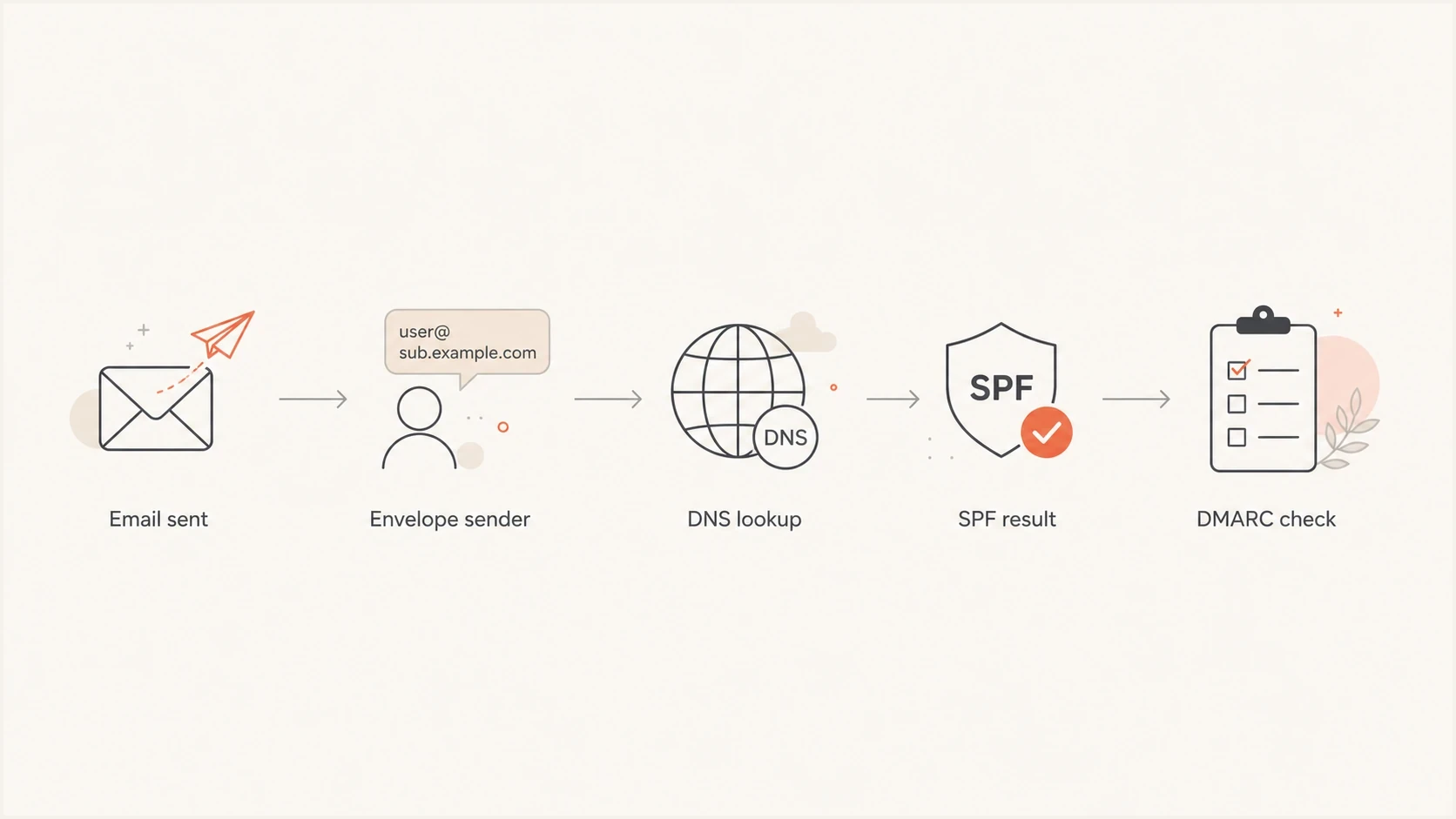
SPF lookup flow from the envelope sender to DNS, SPF result, and DMARC domain matching.
If you are unsure which domain SPF is checking, send a test message and inspect the full headers. Look for Return-Path, smtp.mailfrom, and the Authentication-Results line. That tells you the exact DNS name SPF used.
How subdomain SPF works with DMARC
An SPF pass and a DMARC pass answer different questions. SPF confirms that the connecting IP is authorized for the MAIL FROM domain. DMARC then compares that authenticated domain with the visible From domain. Relaxed SPF alignment, the default set by aspf=r, accepts domains with the same organizational domain. Strict SPF alignment, set by aspf=s, requires an exact domain match.
|
|
|
|---|---|---|
example.com | example.com | Pass under relaxed or strict alignment |
example.com | bounce.example.com | Pass under relaxed alignment, fail under strict alignment |
example.com | bounce.example.net | No DMARC pass through SPF |
How SPF domain matching changes the DMARC result
Every row assumes SPF itself passes. In the third case, DMARC can still pass through DKIM when a valid signing domain satisfies the selected DKIM alignment mode. Relaxed matching does not remove the need for an SPF record at bounce.example.com because SPF must pass before its domain can be compared.
Relaxed SPF alignment extends trust to authenticated subdomains under the same organizational domain. Do not delegate control of a sending subdomain to a party that should not be able to authenticate mail for the parent domain. Use strict SPF alignment only after verifying every legitimate MAIL FROM domain.
When parent records do not apply
The parent domain SPF record does not inherit downward. This is different from DMARC, where a policy at the organizational domain can affect subdomains unless a subdomain has its own DMARC record. SPF has no equivalent default inheritance rule.
SPF
- Exact name: The receiver checks the SPF record at the envelope sender domain.
- No inheritance: A record at example.com does not cover mail.example.com by default.
- One active record: A DNS name should publish only one SPF TXT record.
DMARC
- Policy scope: A parent DMARC record can apply to subdomains without separate DMARC records.
- Subdomain override: A subdomain can publish its own DMARC record when it needs a different policy.
- Domain match: DMARC needs either SPF or DKIM to pass with a domain that matches the visible From domain.
A useful way to separate the two protocols: SPF is about authorization for a specific SMTP identity, while DMARC is about whether the authenticated identity matches the domain users see. That is why separate SPF records are common when subdomains send different streams of mail.
What to publish in DNS
The right record depends on how the subdomain is used. Start with an inventory before touching DNS: each mail stream, each vendor, each envelope sender domain, and each DKIM signing domain.
|
|
|
|---|---|---|
Subdomain sends | Subdomain | include |
Parent sends | Parent | include |
No mail | Exact name | -all |
Vendor bounce | Bounce name | vendor |
Web-only host | No SPF change | none |
SPF placement for common subdomain cases
Example SPF records for subdomainsdns
send.example.com. TXT "v=spf1 include:_spf.mailer.example -all"

news.example.com. TXT "v=spf1 include:_spf.news.example -all"

alerts.example.com. TXT "v=spf1 redirect=_spf.example.com"

unused.example.com. TXT "v=spf1 -all"
Use redirect= only when multiple SPF identities share the same policy under the same administrative control. Use include: when the subdomain needs to authorize an external sender inside its own policy. Both approaches still require an SPF record at the exact subdomain.
If a vendor gives you a CNAME for the envelope sender, do not add a second TXT record at that same alias. A DNS name with a CNAME should not also carry SPF TXT data. Confirm the canonical target has the SPF policy the vendor expects, then verify the result in message headers.
The unused subdomain example matters. A restrictive SPF record tells receivers that no source is authorized to send for that name. It does not stop spoofing by itself, but it removes ambiguity for that exact SPF identity.
Do not add a website IP to SPF just because a subdomain has an A record or now shares the main domain IP. SPF should include that IP only when it is the outbound SMTP connecting IP for the SPF identity. If the same hostname appears in email links or tracking, check link-host reputation and blocklist (blacklist) status separately.
A wildcard TXT record can supply SPF only when DNS wildcard synthesis applies. An existing DNS name can prevent the wildcard from answering even when that name has no SPF TXT record. Explicit records are easier to audit and avoid surprising results when subdomains are added.
How to set it up safely
The safe process is simple, but it needs evidence. Do not start by copying the parent SPF record into every subdomain. That can authorize senders that should not use that subdomain, and it can push a record over the DNS lookup limit if too many includes are copied around.
- Identify senders: List every legitimate system that sends using the subdomain.
- Check headers: Send test messages and confirm the envelope sender domain used by each stream.
- Publish one record: Create one SPF TXT record at the exact subdomain, with only the needed mechanisms.
- Validate DNS: Run an SPF checker after publishing to catch syntax errors and detect duplicate records or lookup-limit problems.
- Review DMARC: Confirm that SPF or DKIM passes with a domain that matches the visible From domain.
SPF checker
Find SPF syntax issues, lookup limits, and weak records.
?/16tests passed
The biggest practical constraint is the SPF processing limit. SPF evaluation permits no more than 10 terms that trigger DNS queries across the complete evaluation, including nested policies. The include, a, mx, ptr, and exists mechanisms count, as does the redirect modifier. The all, ip4, and ip6 mechanisms do not count. Receivers should also limit DNS terms that return no data or a nonexistent name, called void lookups, to two. Exceeding either limit can return permerror. The ptr mechanism remains valid syntax, but it is slow and should not be published.
When a record approaches the limit, remove stale mechanisms and consolidate the policy first. SPF flattening or hosted SPF management can reduce live lookup depth. Manual flattening needs continuous maintenance because provider IP ranges change, and stale IP entries can make legitimate mail fail SPF.
Avoid these SPF mistakes
Most SPF problems on sending subdomains come from assuming DNS inheritance exists, or from copying a record without checking the actual mail flow. Keep the record narrow and make every mechanism earn its place.
- Multiple records: Do not publish two SPF TXT records at the same DNS name. Merge them into one record.
- Copied parent: Do not copy the parent record unless every authorized sender is truly needed for the subdomain.
- Web IP confusion: Do not add a web or tracking host IP to SPF unless it sends mail over SMTP.
- Soft fail forever: Do not leave ~all permanently when the sender list is known and stable.
- Missing DKIM: Do not rely only on SPF for DMARC. Configure DKIM for the same mail streams too.
- Broken include: Confirm every include target returns a valid SPF record. A missing or invalid target can cause permerror.
- Old senders: Remove unused includes after a service is retired, or the subdomain stays over-authorized.
There is also a security angle. If a subdomain can be used in a Return-Path but lacks SPF, spoofed mail has less resistance at the SPF layer. SPF does not stop spoofing on its own. DKIM and DMARC policy still matter, and monitoring verifies that legitimate sources authenticate as intended.
How Suped handles this workflow
Suped's product connects SPF and DKIM results to DMARC reporting, then shows which MAIL FROM domains pass, which fail, and which subdomains need attention. This turns the header and DNS checks in this workflow into a monitored inventory.
This matters for subdomains because the hard part is not writing v=spf1 once. The hard part is knowing whether send.example.com, bounce.example.com, news.example.com, and the parent domain are all authenticated correctly after vendors, campaigns, and applications change.
SPF flattening drawer showing an over-limit record, sender editing, lookup counts, and the hosted record setup
Suped's Hosted SPF gives teams a managed way to update authorized senders without repeated DNS edits. That is useful when separate organizational systems send through different subdomains.
Suped flags missing or invalid subdomain SPF records found in monitored mail flow and provides specific fix steps. After a DNS or Hosted SPF change, DMARC reports show whether the affected MAIL FROM domains pass SPF and satisfy domain matching requirements.
Views from the trenches
Best practices
Map each sending subdomain to its envelope sender before changing any SPF records.
Publish one exact-name SPF record per sending identity, then validate every lookup.
Use restrictive SPF on unused subdomains so receivers get a clear no-mail signal.
Common pitfalls
Teams copy the parent SPF record and authorize senders the subdomain never uses.
Multiple SPF TXT records at one name create errors instead of cleaner protection.
People check the visible From domain and miss the Return-Path SPF actually used.
Expert tips
Pair SPF with DKIM because DMARC can pass through either authenticated domain match.
Avoid wildcard SPF records unless DNS ownership and future subdomains are controlled.
Review SPF after each vendor change because stale includes keep old senders authorized.
Marketer from Email Geeks says they normally configure SPF on the sending subdomain because mailbox providers can check authentication in subtly different ways.
2019-01-09 - Email Geeks
Marketer from Email Geeks says the sending domain should never skip SPF, whether that sender is the organizational domain or a subdomain.
2019-01-10 - Email Geeks
The practical rule
If a subdomain sends mail as the SPF identity, give that subdomain its own SPF record. Do not rely on the parent domain SPF record. SPF is checked at the exact DNS name used by the envelope sender or the HELO identity used for a null reverse path.
The clean setup uses one SPF record per sending DNS name and restrictive records for known names that should not send. Configure DKIM on each mail stream, then use DMARC monitoring to confirm that real traffic matches the design. That keeps the subdomain authenticated without over-authorizing the rest of the domain.




