How to configure SPF when sending from a subdomain with a different 'from' email domain?

Updated on 23 Sep 2026: We updated this guide with current RFC 9989 alignment rules, SPF lookup limits, and safer record-validation steps.
The short answer: configure Sender Policy Framework (SPF) on the envelope sender domain, usually the Return-Path domain, not automatically on the visible From domain. If the message shows From nout@example.com but the bounce domain is bounces.yes.example.com, the SPF TXT record belongs at bounces.yes.example.com or at the custom MAIL FROM domain your sending provider tells you to use.
That setup is valid when DMARC accepts the relationship between the Return-Path domain and the visible From domain. Under RFC 9989, the default relaxed alignment compares Organizational Domains, so bounces.yes.example.com aligns with example.com when both resolve to the same Organizational Domain. With strict SPF alignment, written as aspf=s, SPF can pass but still fail the DMARC SPF path because the domains are not identical. SPF and DKIM provide separate authenticated identifiers that DMARC evaluates for alignment.
Configure SPF on the Return-Path domain
Start by identifying three separate values in a real message: the visible From domain, the Return-Path domain, and the DKIM signing domain. SPF normally authenticates the RFC5321.MailFrom domain shown in Return-Path. DMARC uses the visible RFC5322.From domain as the Author Domain that must be protected.
- Find the envelope sender: Read the Return-Path header or the smtp.mailfrom value in Authentication-Results.
- Publish SPF there: Add the SPF TXT record on the Return-Path host, not on every visible From subdomain.
- Keep DKIM working: Sign with the visible From domain or a domain that aligns with it so DMARC has a second passing path.
- Check DMARC mode: Avoid aspf=s unless the Return-Path domain exactly matches the visible From domain.
A subdomain does not inherit the parent domain's SPF record. If yes.example.com, bounces.yes.example.com, and example.com all appear as envelope sender domains at different times, each one needs its own SPF policy or a provider-managed CNAME pattern. A subdomain used only in the visible From header does not need SPF solely for that use. For a deeper treatment of the envelope-sender rule, see the subdomain SPF record explanation.
SPF record on the Return-Path hostdns
bounces.yes.example.com. 3600 IN TXT "v=spf1 include:spf.sender.example -all"
Publish only one SPF record beginning with v=spf1 at that hostname. If several services send with the same Return-Path domain, combine their authorization terms into one record. Multiple SPF records at one name cause an SPF permerror instead of adding their permissions together.
How SPF and DMARC make different checks
The confusion usually comes from treating the sending subdomain and the visible From domain as the same thing. They are related, but email receivers check them in different places.
What SPF checks
- SPF domain: The domain in Return-Path or MAIL FROM.
- SPF source: The IP address that connected to the receiving mail server.
- SPF result: Passes when that IP is allowed by that domain's SPF TXT record.
What DMARC checks
- Protected domain: The domain in the visible From header.
- Passing path: Either SPF or DKIM must pass and match the visible From domain under DMARC rules.
- Policy result: A receiver considers the published policy and its local rules when DMARC fails.
It is normal to send through a subdomain while the visible From address uses the root domain. SPF alignment breaks when the Return-Path belongs to a different Organizational Domain, or when strict alignment requires an exact match. The overall DMARC result can still pass through aligned DKIM.
When the visible From domain differs
If the visible From address is nout@example.com and the message is sent through yes.example.com, configure the custom Return-Path as something like bounces.yes.example.com. That keeps SPF under the same Organizational Domain as example.com while keeping bounce handling separate.
Strict SPF matching can break this
The DMARC tag aspf=s requires the SPF domain to match the visible From domain exactly. If From uses example.com and Return-Path uses bounces.yes.example.com, SPF can pass but that SPF pass will not satisfy DMARC. Use aspf=s only when every sender has an exact domain match or aligned DKIM already protects every mail stream.
The default relaxed SPF alignment is the practical choice for most production setups, paired with aligned DKIM. DKIM does not depend on the connecting IP, so it often survives simple forwarding. A forwarder or mailing list that changes signed headers or the message body can still break the DKIM signature.
The same question comes up when people ask whether SPF should match the From address or the Return-Path. The short version is that SPF checks Return-Path, while DMARC decides whether that pass helps protect the visible From domain. The From and Return-Path page covers that distinction with a sending platform example.
A working DNS pattern
This is the expected pattern for a clean subdomain sending setup. The exact hostnames come from your sending provider, but the ownership model stays the same.
|
|
|
|---|---|---|
Visible From | example.com | User-facing address |
Return-Path | bounces.yes.example.com | SPF host |
SPF TXT | Return-Path host | IP permission |
DKIM d= | example.com | DMARC pass path |
DMARC TXT | _dmarc.example.com | Domain policy |
Domain roles in a subdomain sending setup
Typical relaxed DMARC recorddns
_dmarc.example.com. 3600 IN TXT "v=DMARC1; p=quarantine; aspf=r"
Strict SPF matching recorddns
_dmarc.example.com. 3600 IN TXT "v=DMARC1; p=quarantine; aspf=s"
The strict record is not wrong by itself, but it changes the requirements. If you publish that strict setting, the Return-Path domain must match the visible From domain exactly for SPF to help DMARC. If that is not true, aligned DKIM must carry the DMARC pass.
How SPF evaluates the policy
An SPF record starts with v=spf1 and lists mechanisms in evaluation order. A receiver evaluates them from left to right and stops at the first mechanism that matches the connecting IP. Put specific authorizations before the final all mechanism, and use the provider's documented include value rather than guessing a hostname.
|
|
|
|---|---|---|
include:domain | Matches when the referenced policy returns pass | Counts, including nested terms |
ip4: or ip6: | Authorizes a stated address or CIDR range | Does not count |
a or mx | Authorizes addresses resolved from DNS | Counts |
-all | Returns fail for unmatched sources | Does not count |
~all | Returns softfail for unmatched sources | Does not count |
Common SPF terms for a subdomain policy
Both -all and ~all produce a non-pass result for an unauthorized source, so neither can satisfy DMARC's SPF path. Use -all once the sending inventory is accurate. If you use ~all during a controlled transition, set a review date and do not treat softfail as authorization.
Count the evaluated lookup path
The 10-lookup limit applies to DNS-querying terms reached during evaluation, including terms inside an include. It is not a simple count of the include statements visible in the top-level record.
Custom Return-Path versus provider Return-Path
The biggest practical choice is whether the sending provider uses a Return-Path under your domain or one under its own domain. A custom Return-Path under the same Organizational Domain as the visible From address gives SPF an aligned DMARC path.
Custom Return-Path
- Best fit: Use this for branded marketing, lifecycle, sales, and product mail.
- SPF result: SPF passes under a domain you control.
- DMARC result: SPF can satisfy DMARC when matching mode allows the subdomain.
Provider Return-Path
- Best fit: Use when custom bounce handling is unavailable.
- SPF result: SPF passes for the provider domain, not your visible From domain.
- DMARC result: Aligned DKIM must pass for DMARC to protect the visible From domain.
Follow the provider's custom MAIL FROM instructions exactly. Some providers ask for an SPF TXT record on the bounce subdomain, some delegate the hostname with a CNAME, and some also require an MX record to route bounces. Do not substitute one DNS record type for another.
If a receiver blocks this mail, inspect the full authentication result. SPF can pass for the provider domain while SPF alignment fails, then DMARC can fail because DKIM is missing, invalid, or not aligned.
Managing SPF lookup limits
The DNS record gets harder to maintain when several platforms send mail for the same domain family. SPF has a 10-term limit for mechanisms and modifiers that trigger DNS queries during one evaluation. The include, a, mx, ptr, and exists mechanisms and the redirect modifier count, including evaluated terms reached inside another record. The ip4, ip6, and all mechanisms do not count toward that limit. RFC 7208 also recommends no more than two void lookups, which are queries that return no answer or a nonexistent domain. Exceeding either limit can produce permerror.
Suped's Hosted SPF product lets teams manage approved senders without repeated DNS edits. Suped's platform also monitors DMARC, SPF, DKIM, blocklist (blacklist) status, and deliverability signals, so teams can connect a record change to the failures that appear in real reports.
SPF flattening drawer showing an over-limit record, sender editing, lookup counts, and the hosted record setup
For teams with multiple subdomains or senders, Suped can flag sources that start using an unexpected Return-Path, show which sending source is failing, and provide steps to fix the record. If the record is hitting lookup limits, SPF flattening can reduce DNS lookup pressure, but the flattened IP data must stay synchronized when a provider changes its sending ranges.
Validation workflow
Send a real message through the exact platform and subdomain, then read the headers. DNS can look correct while the platform still uses a different Return-Path or DKIM domain in production.
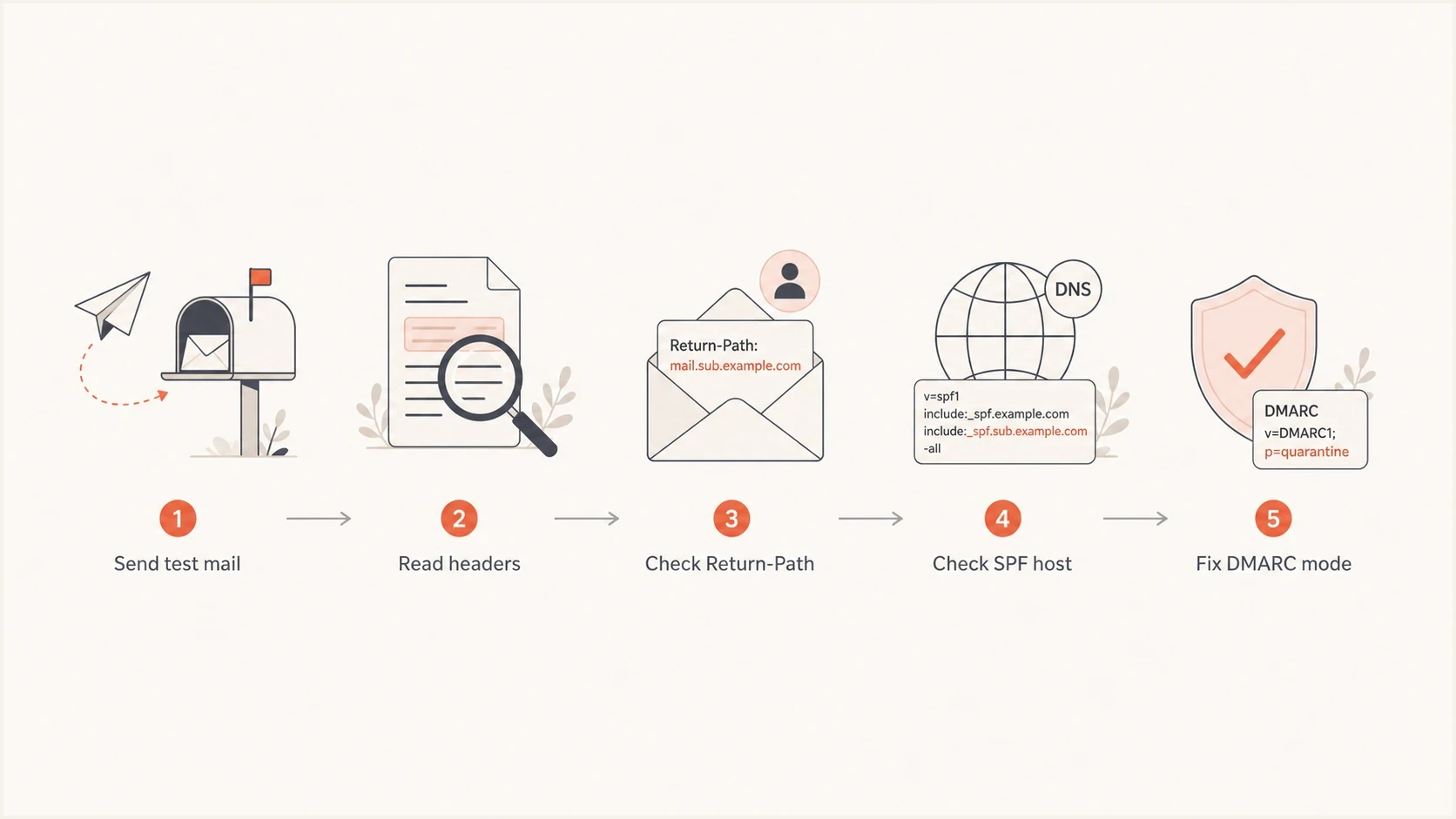
Flowchart showing how to validate SPF for subdomain sending.
A healthy header for the example setup looks like this. The Return-Path subdomain passes SPF, DKIM signs with the visible From domain, and DMARC passes for the visible From domain.
Authentication-Results exampletext
Authentication-Results: mx.example;
  spf=pass smtp.mailfrom=bounces.yes.example.com;
  dkim=pass header.d=example.com;
  dmarc=pass header.from=example.com
Delivery status notifications and other bounce messages can use a null reverse-path, shown during SMTP as MAIL FROM:<>. In that case, SPF constructs a mailbox with the local-part postmaster and the HELO domain as the MAIL FROM identity. Check the smtp.helo value and the SPF record on that hostname instead of looking for a missing Return-Path domain.
After the header check, use an SPF checker for the exact Return-Path host. If you need to review SPF, DKIM, and DMARC together, use a domain health checker before moving to quarantine or reject.
SPF checker
Find SPF syntax issues, lookup limits, and weak records.
?/16tests passed
When the result is not clean, do not change the root SPF record first. Confirm which domain SPF actually checked, then update that host. Changing example.com does nothing when the SPF check is happening at bounces.yes.example.com.
Common failure patterns
Most failures in this setup fall into a few repeatable patterns. The fix depends on where the mismatch happens, not just on whether the visible From address uses a subdomain.
|
|
|
|---|---|---|
SPF fail | Wrong SPF host | Publish on Return-Path |
DMARC fail | Strict SPF mode | Use DKIM or relaxed mode |
SPF permerror | Multiple SPF records | Merge into one record |
Lookup permerror | More than 10 DNS-querying terms | Remove stale terms or separate streams |
Forwarding fail | Forwarder IP | Rely on aligned DKIM |
Frequent causes and fixes
Do not overfit to one receiver
Some receivers treat SPF failures more harshly than others, especially when the sender has a strict DMARC policy and DKIM is broken. Inspect aggregate DMARC reports and message headers before assuming the visible From subdomain is the root cause.
A reliable production pattern is a custom Return-Path under your Organizational Domain, one SPF record on that Return-Path host, DKIM signing with an aligned domain, and DMARC reports monitored before enforcement changes.
Views from the trenches
Best practices
Check the Return-Path first; SPF belongs where the envelope sender domain lives.
Keep DKIM passing for the visible From domain before moving DMARC toward reject.
Use relaxed SPF matching unless every sender can use the exact same From domain.
Common pitfalls
Publishing SPF at the root does not fix mail using a different Return-Path host.
Strict SPF matching breaks valid subdomain Return-Path setups when DKIM is weak.
Header checks get skipped, so teams change DNS records that receivers never use.
Expert tips
Compare aggregate DMARC reports with headers to separate SPF failure from policy issues.
Give each sending stream a predictable bounce host before adding more SPF includes.
Treat SPF as one signal; DKIM keeps DMARC stable when mail is forwarded downstream.
Marketer from Email Geeks says SPF is checked against the envelope sender, so the Return-Path domain is the domain that needs the SPF record.
2021-03-04 - Email Geeks
Marketer from Email Geeks says strict SPF matching can cause trouble when the Return-Path is a subdomain and the visible From domain is the root domain.
2021-03-05 - Email Geeks
Recommended SPF and DMARC setup
Configure SPF on the Return-Path domain used by the sending service. If you send through yes.example.com with a visible From address at example.com, use a custom Return-Path under your own Organizational Domain, publish one SPF record there, keep aligned DKIM passing, and avoid strict SPF alignment unless the domains are identical.
Suped's platform connects the DNS record, sending source, and DMARC report outcome. That workflow helps when the issue is not a missing SPF include, but a mismatch between Return-Path, DKIM, and the policy receivers are applying.
- Best default: Custom Return-Path under your domain, SPF on that host, DKIM passing for From.
- Main risk: Strict SPF alignment with a subdomain Return-Path and root-domain From address.
- First check: Authentication-Results headers, then aggregate DMARC reports by source.




