Should SPF records match the 'From:' address or the Return-Path domain when sending from Marketo?

Published 22 May 2025
Updated 22 Sep 2026
13 min read
Summarize with
Updated on 22 Sep 2026: We clarified how Adobe's company-domain SPF guidance differs from DMARC alignment and updated the branded Return-Path setup paths.
SPF records should authorize the Return-Path domain, also called the envelope sender or SMTP Mail From domain, not the visible From: address. When Marketo sends a message, the receiver checks SPF against the domain used during the SMTP transaction. DMARC then compares that SPF-authenticated domain, or a passing DKIM signing domain, with the visible From domain.
That means adding include:mktomail.com to every visible brand domain does not create SPF alignment. The include belongs only in a domain that Marketo actually uses as the Mail From, such as a configured branded Return-Path subdomain. When Marketo uses its default mktomail.com Return-Path, Marketo owns that SPF record and DKIM normally provides DMARC alignment for the visible brand domain.
- SPF target: Publish SPF for the domain in Return-Path or SMTP Mail From.
- From target: Configure DKIM and DMARC for the visible From domain.
- Marketo choice: Use branded Return-Path only when you need SPF to count toward DMARC.
- Same IP: One Marketo IP can send for multiple From domains when each brand is authenticated correctly.
The direct Marketo answer
Treat the visible From domain and the Return-Path domain as two separate jobs in Marketo. The visible From domain needs DMARC protection and DKIM signing. The Return-Path domain needs SPF because that is the domain SPF actually authenticates.
This is why the answer can look strange in message headers. A message can show adventure@brand2.com to the recipient, but SPF can be checked against a bounce address under mktomail.com or a branded bounce subdomain such as bounce.brand2.com. The right SPF record lives at the domain in that envelope sender.
Short answer
SPF follows Return-Path. DMARC follows the visible From domain. In Marketo, DKIM for the From domain is usually the cleaner path for DMARC, while SPF belongs on the Return-Path domain.
Visible From domain
- Purpose: This is the brand identity recipients see in the inbox.
- Checked by: DMARC uses this domain as the policy domain.
- Marketo fix: Set up DKIM for each From domain you send with.
Return-Path domain
- Purpose: This is the bounce address used during SMTP delivery.
- Checked by: SPF uses this domain, not the inbox-visible address.
- Marketo fix: Publish SPF for the Marketo bounce domain or branded bounce subdomain.
Why the From address is not the SPF domain
The confusion comes from email having more than one sender identity. The visible From: address is part of the message header. SPF does not authenticate that header directly. SPF authenticates the SMTP Mail From domain, which the receiving system records as Return-Path after delivery.
RFC 9989, the current DMARC standard, confirms that DMARC relies solely on SPF validation of the Mail From identity. A passing SPF result counts toward DMARC only when that authenticated domain has strict or relaxed alignment with the visible From domain.
SPF has one null reverse-path exception for delivery status notifications. When the SMTP Mail From is empty, SPF derives the Mail From identity from the HELO or EHLO domain. Normal Marketo campaigns use a non-empty bounce address, so the Return-Path guidance above still applies.
A useful deeper explanation is that Return-Path SPF is about the envelope sender, while the From header is protected through DMARC's relationship to SPF or DKIM. In practice, Marketo senders should make DKIM pass for the visible From domain and use SPF for the bounce domain.
|
|
|
|
|---|---|---|---|
Visible From | brand2.com | DMARC | DKIM and DMARC |
Return-Path | mktomail.com | SPF | SPF for bounce |
DKIM domain | brand2.com | DKIM | Selector TXT |
Reply-To | team@brand2.com | Not SPF | Mailbox routing |
Email identities that often get mixed together in Marketo conversations.
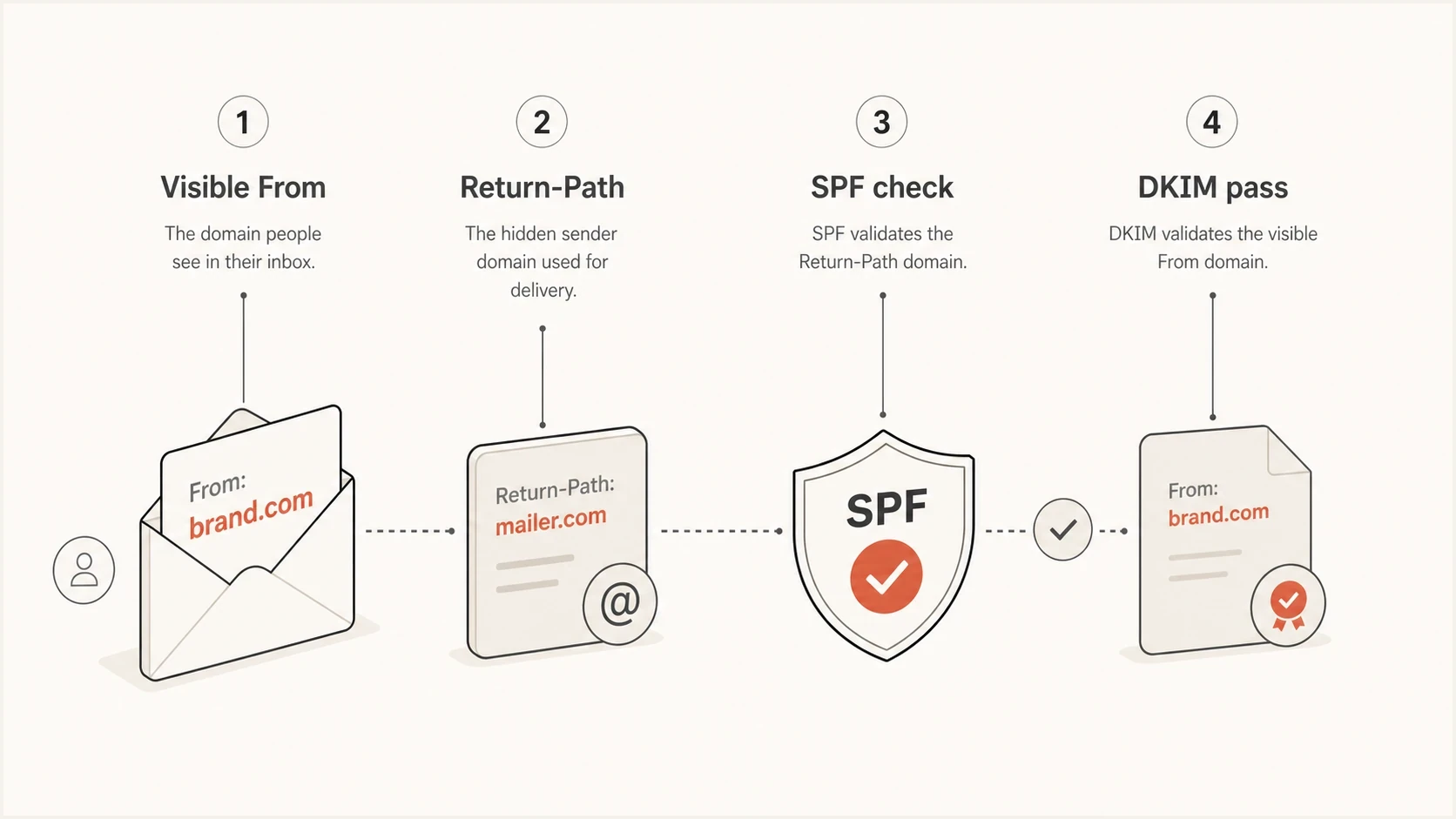
A diagram showing that SPF checks Return-Path and DMARC checks the visible From domain.
How Marketo changes the answer
Adobe's current Marketo documentation recommends DMARC alignment through DKIM instead of SPF. DKIM should sign with the visible From domain. A branded Return-Path is the supported route when a sender also needs SPF alignment, and Adobe says strict SPF alignment is not supported or recommended in Marketo Engage.
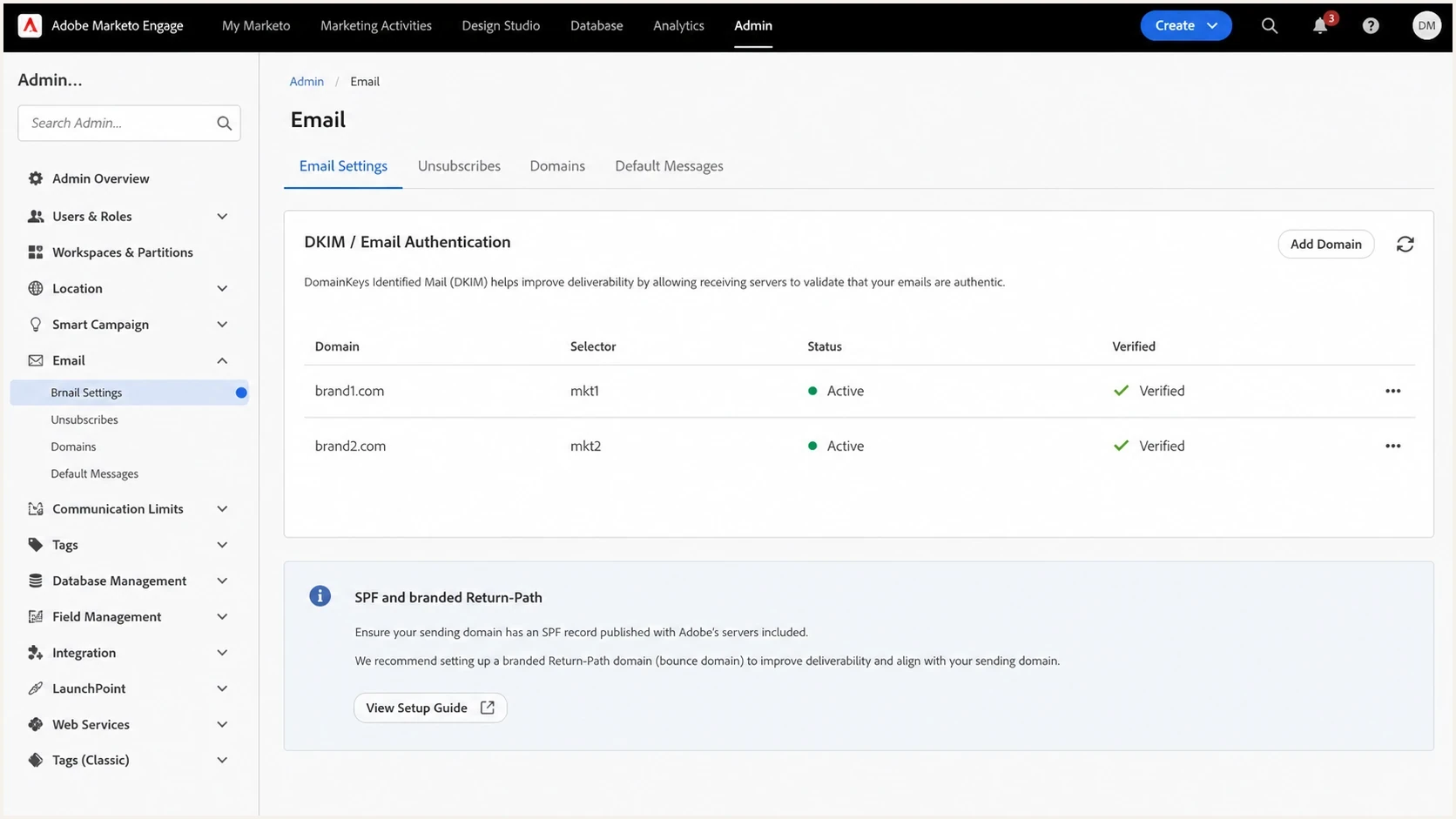
Adobe Marketo Engage email authentication settings with two sending domains configured.
There are two common Marketo patterns. In the first, Marketo uses its own bounce domain under mktomail.com. SPF passes for that Marketo domain, but it does not give the visible brand domain an SPF-aligned DMARC pass. DKIM has to carry the DMARC pass for the brand.
In the second pattern, Marketo sets up a branded Return-Path such as bounce.brand2.com. Now SPF is checked against a domain owned by the brand. With relaxed DMARC alignment, that subdomain and the parent From domain meet the requirement because both have the same organizational domain. Strict SPF alignment would require an exact domain match, which Marketo does not support or recommend.
A typical Marketo message identity splittext
From: adventure@brand2.com
Return-Path: 699-jla-208.0.1158@potomac1050.mktomail.com
SPF checked: potomac1050.mktomail.com
DMARC checked: brand2.com
DKIM d=: brand2.com
DMARC passes when DKIM passes for brand2.com.
Do not copy SPF blindly
The line include:mktomail.com should be added only to the SPF record for a domain that Marketo actually uses as the envelope sender. Adding it to the visible From domain does not change the SMTP Return-Path domain Marketo uses.
How to interpret Adobe's SPF instructions
Adobe's protocol page gives a general instruction to add include:mktomail.com to each company domain used for sending. Its DMARC-specific guidance separately recommends DKIM alignment and requires a branded Return-Path for SPF alignment. These instructions describe different results: an SPF include can authorize Marketo only when SPF evaluates that DNS name, while DMARC alignment depends on the Mail From domain actually used in the message.
Adding the include to brand2.com does not tell Marketo to replace a mktomail.com Return-Path with brand2.com. Treat a delivered message's Return-Path and Authentication-Results as the source of truth, then use the exact DNS values Adobe assigns to the Marketo instance.
- Check the identity: Read smtp.mailfrom in Authentication-Results and confirm the same domain appears in Return-Path.
- Default Return-Path: When the domain is under mktomail.com, Marketo owns its SPF and aligned DKIM should carry DMARC for the brand.
- Branded Return-Path: When the domain is a brand-controlled subdomain, publish Adobe's assigned records there and have Adobe activate the configuration.
How to configure a branded Return-Path
A branded Return-Path is not a TXT-only DNS change. Adobe currently supports it for dedicated-IP customers and approved Trusted IP senders, with activation handled through Adobe Support. Standard shared-pool senders should confirm Trusted IP eligibility or account options instead of assuming the feature is available.
|
|
|
|
|---|---|---|---|
Dedicated IP | Assigned A, MX, and SPF TXT | Publish records, then Adobe Support | Relaxed SPF alignment |
Approved Trusted IP | Adobe-provided records | Apply, then contact Adobe Support | Relaxed SPF alignment |
Standard shared pool | No self-service setup | Check eligibility or account options | Use aligned DKIM |
Current Marketo branded Return-Path requirements by IP configuration.
- Choose the host: Use a unique subdomain such as bounce.brand2.com. Do not reuse a landing page or tracking-link hostname.
- Confirm the path: Identify the Marketo IP configuration and obtain the exact DNS records for the instance from Adobe.
- Publish DNS: Create the assigned records at the bounce host, preserve the supplied SPF policy, and keep only one SPF record at that host.
- Activate and test: Have Adobe activate the branded Return-Path, then send a live test and confirm the new domain in Return-Path and Authentication-Results.
Use the assigned MX target
The MX target varies by Marketo datacenter and IP configuration. Dedicated-IP setups also use an A record and an MX hostname under mktdns.com. Copy the values supplied for the instance instead of borrowing another account's DNS records.
What to publish in DNS
Publish SPF where the Return-Path points, publish DKIM for the visible From domain, and publish DMARC for the visible From domain. If the same host is used for normal corporate mail and Marketo's envelope sender, merge the authorized senders into one SPF record. Do not publish two SPF TXT records at the same host.
Illustrative branded Return-Path structuredns
bounce.brand2.com. A [assigned-dedicated-ip] ; dedicated IP only
bounce.brand2.com. MX 10 [assigned-marketo-mx].
bounce.brand2.com. TXT "[Adobe-provided SPF policy]"
These placeholders are deliberate. Adobe's current dedicated-IP guidance uses A, MX, and TXT records, while approved Trusted IP values are supplied through the support process. Preserve the MX target, IP value, SPF mechanisms, and all qualifier that Adobe assigns. Do not substitute a generic policy copied from another Marketo instance.
DMARC and DKIM remain on the visible From domaindns
_dmarc.brand2.com. TXT "v=DMARC1; p=none; rua=mailto:d@brand2.com"
m1._domainkey.brand2.com. TXT "v=DKIM1; k=rsa; p=PUBLICKEY"
The assigned MX hostname is specific to the Marketo datacenter and account configuration. If the visible From domain already has SPF for corporate mail, add Marketo only when that exact host is also the envelope sender. If the DNS record grows too large, use SPF flattening or a hosted SPF workflow instead of piling includes into a record that exceeds SPF's DNS lookup limit.
|
|
|
|
|---|---|---|---|
Marketo bounce | mktomail.com | No, Marketo owns it | DKIM |
Branded bounce | bounce.brand | Use Adobe's policy | SPF or DKIM |
Corporate From | brand2.com | Only if envelope | DKIM |
Reply mailbox | replies.brand | No | Not used |
Where the Marketo SPF include belongs.
After publishing the DNS change, check the exact host with the SPF checker. Check the host that appears after the @ in Return-Path, not just the brand's main domain.
SPF checker
Find SPF syntax issues, lookup limits, and weak records.
?/16tests passed
Same IP, different From domains
Yes, one Marketo dedicated IP can send mail for more than one visible From domain when those domains are configured in the same Marketo environment and the account setup supports it. The IP reputation is shared, so the decision is more about operational risk than SPF syntax.
Separate brands when list quality, consent practices, complaint risk, or volume spikes differ enough to justify it. If both brands use similar acquisition controls and send predictable campaigns, sharing a Marketo IP can be reasonable. Each brand still needs its own DKIM, DMARC, tracking links, landing page CNAMEs, and bounce setup where applicable.
Reasonable shared IP setup
- Practices: Both brands use permission-based lists and clean suppression rules.
- Volume: Campaign volume is steady and does not swing between brands.
- Auth: Every From domain has DKIM and DMARC configured before launch.
Risky shared IP setup
- Practices: One brand has older data, weak consent, or poor suppression.
- Volume: One brand sends sudden large campaigns after low activity.
- Auth: The new From domain launches before DKIM and DMARC are verified.
The shared IP caveat
SPF and DKIM prove authorization. They do not isolate reputation. If one brand creates high complaints or bad engagement on the shared Marketo IP, the other brand can feel the impact even when both are authenticated.
How to verify a real Marketo send
The fastest way to settle this is to send a real Marketo email to a mailbox you can inspect, then read the full message headers. Do not judge the setup only by what the DNS record says. The header shows which domain the receiver actually checked.
- Send: Send a Marketo test email from the exact brand domain you plan to use.
- Open headers: Find Return-Path, Authentication-Results, DKIM-Signature, and DMARC results.
- Read SPF: Look for the domain after smtp.mailfrom and compare it with Return-Path. Ignore changes in the local part before @ because SPF evaluates the domain.
- Read DKIM: Confirm the signing domain is the brand domain or its qualifying subdomain.
- Read DMARC: Confirm DMARC passes because SPF or DKIM aligns with the visible From domain.
Header clues to checktext
Return-Path: <699-jla-208@potomac1050.mktomail.com>
Authentication-Results: mx.example;
  spf=pass smtp.mailfrom=potomac1050.mktomail.com;
  dkim=pass header.d=brand2.com;
  dmarc=pass header.from=brand2.com
For a broader check across DMARC, SPF, and DKIM, use the domain health checker after the DNS records have propagated. It helps catch duplicate SPF records, missing DMARC, broken DKIM selectors, and SPF records that pass syntax but fail the real sending path.
DMARC record detail view showing SPF, DKIM, DMARC, rDNS diagnostics, and DNS records
Suped's product connects the DNS view with the reporting view for this workflow. It shows whether Marketo traffic passes SPF, whether DKIM carries DMARC for each brand, and which sources fail after a campaign goes live.
?
What's your domain score?
Deep-scan SPF, DKIM & DMARC records for email deliverability and security issues.
Where Suped fits
For teams with Marketo plus other sending sources, Suped's product can connect each source to DMARC aggregate data. The practical work is keeping every sender authorized, keeping SPF under the lookup limit, and catching a branded bounce or DKIM change before it affects more mail.
Suped's Hosted SPF workflow helps when a brand domain has many authorized senders or marketing teams need to change them without repeated raw DNS edits. DMARC monitoring shows whether Marketo passes through aligned DKIM or a branded Return-Path, while alerts flag authentication changes after deployment.
- Issue detection: Suped flags sources that fail authentication and gives steps to fix them.
- Hosted SPF: Teams can manage authorized senders without repeatedly editing raw DNS.
- SPF limits: SPF flattening helps keep complex records under lookup limits.
- Alerts: Real-time notifications help catch Marketo changes before they affect more campaigns.
- MSP use: Multi-tenancy keeps client domains, reports, and authentication status separated.
SPF flattening drawer showing an over-limit record, sender editing, lookup counts, and the hosted record setup
Views from the trenches
Best practices
Check the Return-Path host in message headers before editing any SPF DNS record.
Use DKIM on every Marketo From domain so DMARC can pass without SPF matching each time.
Keep replies and bounces on separate addresses so people and systems handle the right mail.
Common pitfalls
Adding Marketo SPF to the visible From domain even when Return-Path uses another domain.
Treating Reply-To as the bounce address and checking the wrong mailbox domain first.
Sharing one IP across brands without comparing complaint risk and volume patterns first.
Expert tips
Use branded Return-Path when SPF needs to count for DMARC on a Marketo sending domain.
Avoid corporate mail IPs in a Marketo bounce SPF record unless that host really sends mail.
Read Authentication-Results after each launch because DNS intent can differ from live mail.
Expert from Email Geeks says SPF belongs on the Return-Path domain because that is the address used during the SMTP transaction.
2020-04-24 - Email Geeks
Expert from Email Geeks says the visible From domain usually does not need a Marketo SPF include when DKIM signs with that brand domain.
2020-04-24 - Email Geeks
The practical answer
For Marketo, do not try to make SPF match the visible From address by default. Find the Return-Path domain in a real message and publish SPF there. Then make sure the visible From domain has DKIM and DMARC configured so the brand domain passes DMARC.
If Brand A and Brand B are both sending through the same Marketo environment and the same dedicated IP, that is technically fine when both brands are authenticated and the reputation risk is acceptable. The DNS work still has to be done per brand: DKIM and DMARC for each visible From domain, plus SPF for whichever Return-Path domain Marketo uses for that brand.
Recommended setup
Use DKIM as the main DMARC path for each Marketo From domain. Add Marketo SPF only to the actual Return-Path domain. Use branded Return-Path when SPF needs to count for DMARC, and monitor live reports after launch.




