How can I optimize my SPF record to stay within the lookup limit when using multiple email sending services?

Updated on 5 Sep 2026: We updated this guide to distinguish SPF terms from raw DNS queries and explain path-based PermError checks.
The practical answer is to audit every sender first, remove SPF includes that are not used by the RFC5321.MailFrom domain, move separate sending streams onto true branded subdomains where the bounce domain can live on that subdomain, and then use SPF flattening or hosted SPF for the remaining sources that must stay on the root domain.
Treat any sender path that needs an 11th DNS-querying SPF term as broken, even when another sender matches earlier in the policy. The SPF limit is 10 DNS-querying mechanisms and modifiers during evaluation. When a receiver must evaluate an 11th such term, it returns a permanent error, and SPF stops being reliable for that message. The cleanup work is worth doing before delivery problems become hard to trace.
- Audit first: Confirm which services actually use your domain in the Return-Path or envelope sender.
- Remove junk: Delete old includes, copied vendor snippets, and duplicate sender entries.
- Split senders: Use subdomains for apps, stores, newsletters, and support systems when each can control its own bounce domain.
- Flatten carefully: Use flattening when several senders still need one domain and vendor IP changes are monitored.
The direct SPF lookup fix
Start with the root problem: SPF checks the RFC5321.MailFrom domain, also called the envelope sender, and receivers can evaluate the HELO/EHLO identity where applicable. SPF does not check the visible From address that people see in the email client. If a vendor sends with its own bounce domain, or with a delegated subdomain that the vendor gave you, adding that vendor to the root SPF record does not help that message pass SPF for your root domain. It only adds another lookup term.
That distinction changes the decision. Do not ask, "Which vendors send email for us?" Ask, "Which domains appear in the RFC5321.MailFrom, Return-Path, or HELO/EHLO identity for real production messages?" Those are the domains that need SPF coverage. For null MAIL FROM bounce messages, the HELO/EHLO identity becomes the SPF identity.
Overloaded root SPF exampledns
example.com TXT "v=spf1 include:_spf.google.com include:vendor-a.example -all"
example.com TXT "v=spf1 include:vendor-b.example include:vendor-c.example -all"
The example above also shows another common error: a domain must publish only one SPF TXT record. Multiple SPF records do not merge. They create an SPF error. Keep one SPF record per domain, then make that one record smaller and more accurate.
Do not rely on one passing path
An individual message can pass when an earlier mechanism matches before the limit. Another valid sender path can still require an 11th DNS-querying term and return a permanent error. Test every authorized sending path instead of relying on one successful message.
- Ten means ten: The limit applies to DNS-querying terms evaluated across the path, not the visible include count.
- Hidden terms count: An include can lead to more include, mx, a, or exists mechanisms.
- One pass is not enough: Another sender can take a longer path through the same SPF policy.
- Check often: Vendor SPF records change without warning, so a valid path can exceed the limit later.
What counts toward the SPF lookup limit
SPF does not count every word in the record or every DNS packet. It counts DNS-querying mechanisms and the redirect modifier that are evaluated for a message. The terms subject to the limit are include, a, mx, exists, ptr, and redirect. The ptr mechanism is expensive and should not be used. The ip4, ip6, all, and exp terms do not consume the 10-term evaluation budget.
A record with five include terms can still exceed the limit because one of those include policies can require several nested DNS-querying terms. Visual counting is unreliable. Use a parser that follows each SPF path and reports the evaluated term count.
Also watch void lookups. RFC 7208 recommends a limit of two DNS lookups that return no data or NXDOMAIN during evaluation. Implementations that enforce this limit return permerror when a third void lookup is required. Broken includes and abandoned vendor hostnames can fail this way even when the DNS-querying term count is acceptable.
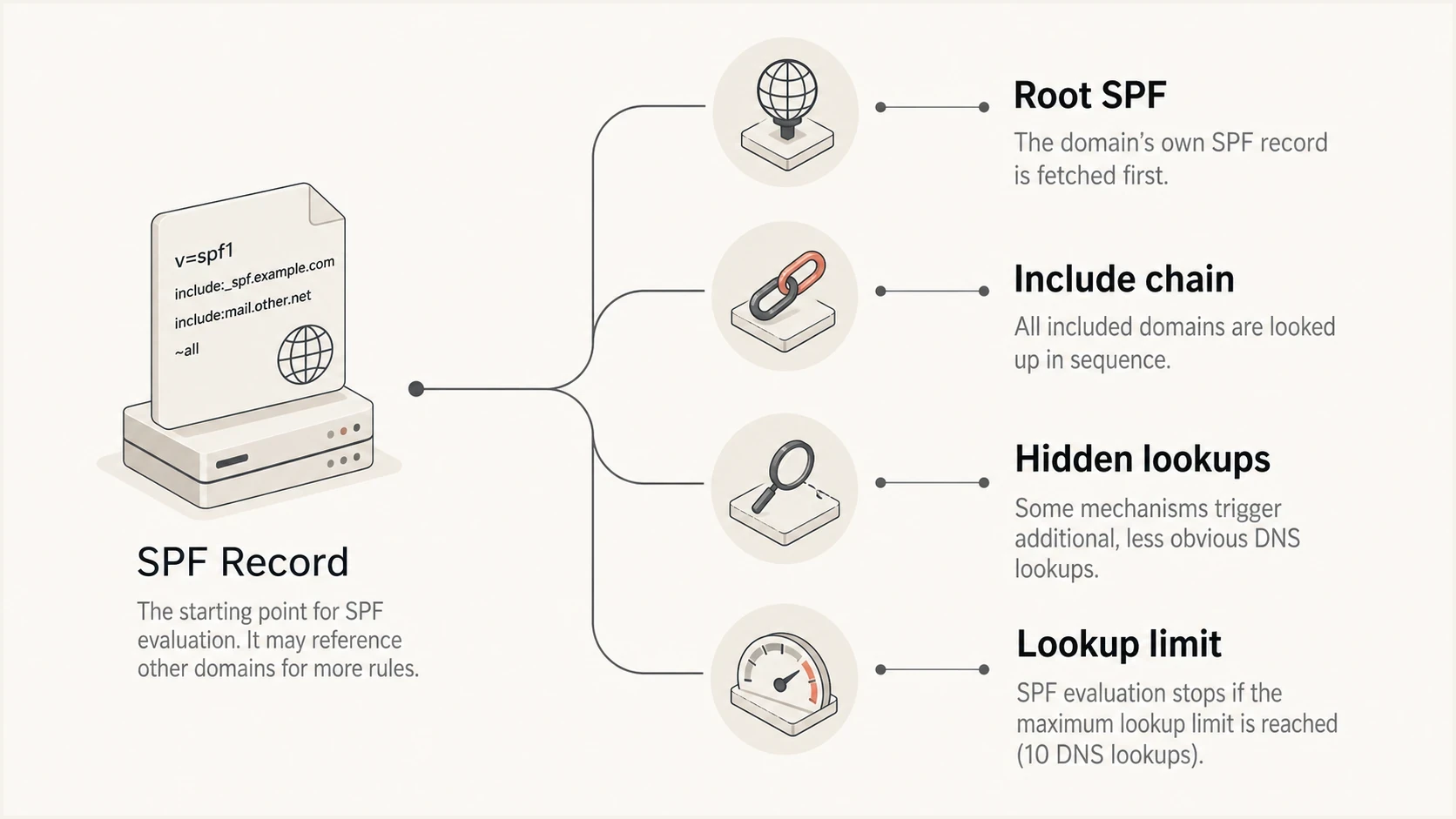
SPF DNS lookup limit infographic showing nested include chains and hidden terms.
|
|
|
|---|---|---|
include | Yes | Follow nested records |
a | Yes | Avoid unless needed |
mx | Yes | Check address expansion |
exists | Yes | Usually vendor logic |
ptr | Yes | Do not use |
redirect | Yes | Use with ownership |
ip4 | No | Keep ranges current |
ip6 | No | Keep ranges current |
all | No | Use one final policy |
exp | No | Lookup follows evaluation |
SPF terms and lookup impact
The SPF lookup limit is a 10-term evaluation boundary, not a suggestion. Use a focused SPF checker before and after each edit so you know whether every sender path stays within the limit.
SPF checker
Find SPF syntax issues, lookup limits, and weak records.
?/16tests passed
Count terms, not raw DNS queries
The familiar phrase "10 DNS lookups" is shorthand. RFC 7208 limits the include, a, mx, ptr, and exists mechanisms plus the redirect modifier to 10 terms during one SPF evaluation. The receiver's initial DNS query for the SPF TXT record does not count. Terms reached inside nested include and redirect policies share the same global budget.
Term-count exampledns
example.com TXT "v=spf1 mx include:spf.sender.example -all"
In this example, mx consumes one DNS-querying term and include consumes another. Any DNS-querying terms evaluated inside spf.sender.example also count. The A and AAAA work triggered while resolving MX hosts is subject to a separate limit, so an oversized MX expansion can return permerror even when the global term count is below 10.
This path-based model explains why a test message can pass even when a checker reports a risky maximum. SPF processes mechanisms from left to right and stops at a match. Validate the paths used by every authorized sender, then leave headroom so a nested vendor policy can grow without crossing the limit.
Audit every sender before changing DNS
The most useful SPF cleanup step is boring: collect real messages from each sending service, open the headers, and identify the envelope sender. In many cases, an app that asks you to add an SPF include is already using its own bounce domain or a vendor-controlled subdomain. That include does not belong in your root SPF record.
A useful sender inventory has four fields: service name, visible From domain, Return-Path domain, and the DNS record that controls SPF for that Return-Path domain. If the Return-Path is not your root domain, the root record is probably not where that vendor's SPF belongs.
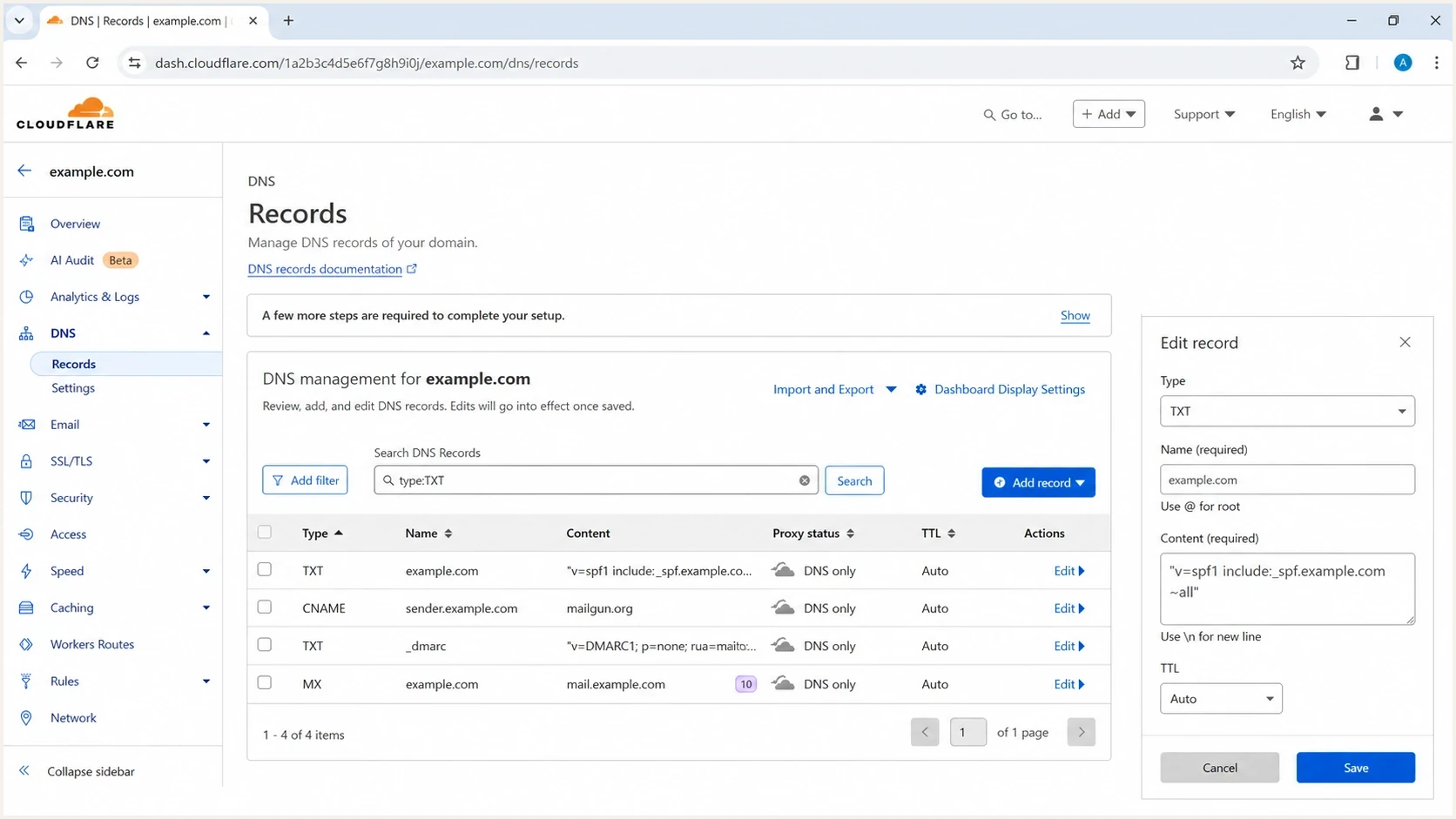
Cloudflare DNS record editing screen with an SPF TXT record and sender subdomain entries.
Keep on the root domain
- Direct mail: The root domain is in the Return-Path for employee mail or core transactional mail.
- Shared root: The service cannot use a delegated bounce subdomain.
- Strict alignment: Your DMARC policy requires exact SPF alignment between the envelope sender and visible From domain.
- Small count: Every required SPF path remains below the 10-term limit with room for vendor changes.
Move to a subdomain
- App mail: A SaaS app can send bounces through app.example.com or return.example.com.
- Campaign mail: Newsletter and lifecycle mail can use mail.example.com or news.example.com.
- Vendor control: The vendor provides CNAME records that point the bounce domain to its platform.
- Cleaner root: The root SPF record keeps only sources that truly send with the root envelope sender.
This is also where SPF alignment under DMARC needs checking. With relaxed SPF alignment, a bounce domain such as mail.example.com can align with a visible From domain at example.com because both share the organizational domain. With strict SPF alignment, that subdomain does not match exactly, so aligned DKIM often has to provide the passing DMARC result for that stream.
The best order for reducing SPF lookups
Use a fixed order because it avoids unnecessary flattening. Flattening is useful, but it should not preserve a messy sender list. First remove records that do nothing. Then split the domains that can be split. Then flatten what remains.
SPF term-count bands
Count DNS-querying terms across nested sender paths, not visible includes or raw DNS packets.
Healthy
0-6
Enough room for normal vendor changes.
Tight
7-9
Audit senders before adding any new service.
At limit
10
Valid, but no room for nested policy growth.
Broken path
11+
An 11th evaluated term produces a permanent SPF error.
- List senders: Export every service that sends employee, app, marketing, support, billing, store, and notification email.
- Capture headers: Send a real message from each service and inspect the Return-Path.
- Delete unused: Remove includes for services that no longer send, never used your envelope sender, or were replaced.
- Delegate streams: Move apps and campaigns to subdomains when the sender supports a custom bounce domain.
- Flatten leftovers: Flatten only the remaining required sources and monitor for vendor IP changes.
- Validate results: Check every sender path, send test mail, and watch DMARC reports for new failures.
Cleaner split-domain SPF layoutdns
example.com TXT "v=spf1 include:_spf.google.com -all"
mail.example.com TXT "v=spf1 include:spf.sender.example -all"
app.example.com TXT "v=spf1 include:spf.app.example -all"
That layout keeps the root domain reserved for sources that need it. It also starts a separate SPF evaluation for each subdomain, with up to 10 DNS-querying terms available to each envelope sender domain.
After the split, use a broader domain health checker to check SPF beside DMARC and DKIM. SPF can be technically valid while DMARC still fails because the SPF or DKIM domain does not align with the visible From domain.
When SPF flattening is the right answer
Use SPF flattening when a domain still needs too many DNS-querying terms after the sender audit. Flattening resolves include chains into IP mechanisms or managed policy data so the receiver evaluates fewer DNS-querying terms.
Manual flattening can work for static infrastructure, but it is risky for SaaS senders because IP ranges change. If you paste IP ranges into DNS and never refresh them, SPF starts failing when the vendor rotates infrastructure. A hosted SPF process can automate those updates, but it still needs monitoring and clear ownership.
SPF flattening drawer showing an over-limit record, sender editing, lookup counts, and the hosted record setup
Suped's Hosted SPF is built for this workflow. Sender changes are managed in Suped, the published SPF policy stays within its evaluation limit, and DMARC aggregate data shows whether a change causes new SPF failures. This is useful when a vendor changes infrastructure after the initial cleanup.
Flattening checklist
- Keep ownership: Know which sender each flattened IP range belongs to.
- Refresh changes: Update records when a vendor publishes new infrastructure.
- Avoid bloat: Keep the published policy small enough for reliable DNS responses.
- Monitor reports: Watch DMARC aggregate data for SPF errors after every change.
How subdomains reduce risk
Subdomains are often better than flattening when the sending services are operationally separate. A newsletter platform, a support desk, an ecommerce notification system, and a product app do not all need to share the root SPF budget. Each can use its own envelope sender domain and its own SPF policy.
This does not mean the visible From address must always change. Many setups keep the visible From at example.com while the Return-Path uses mail.example.com or app.example.com. Whether that satisfies DMARC depends on relaxed or strict SPF alignment and the DKIM setup, so test real messages rather than assuming the DNS plan is enough.
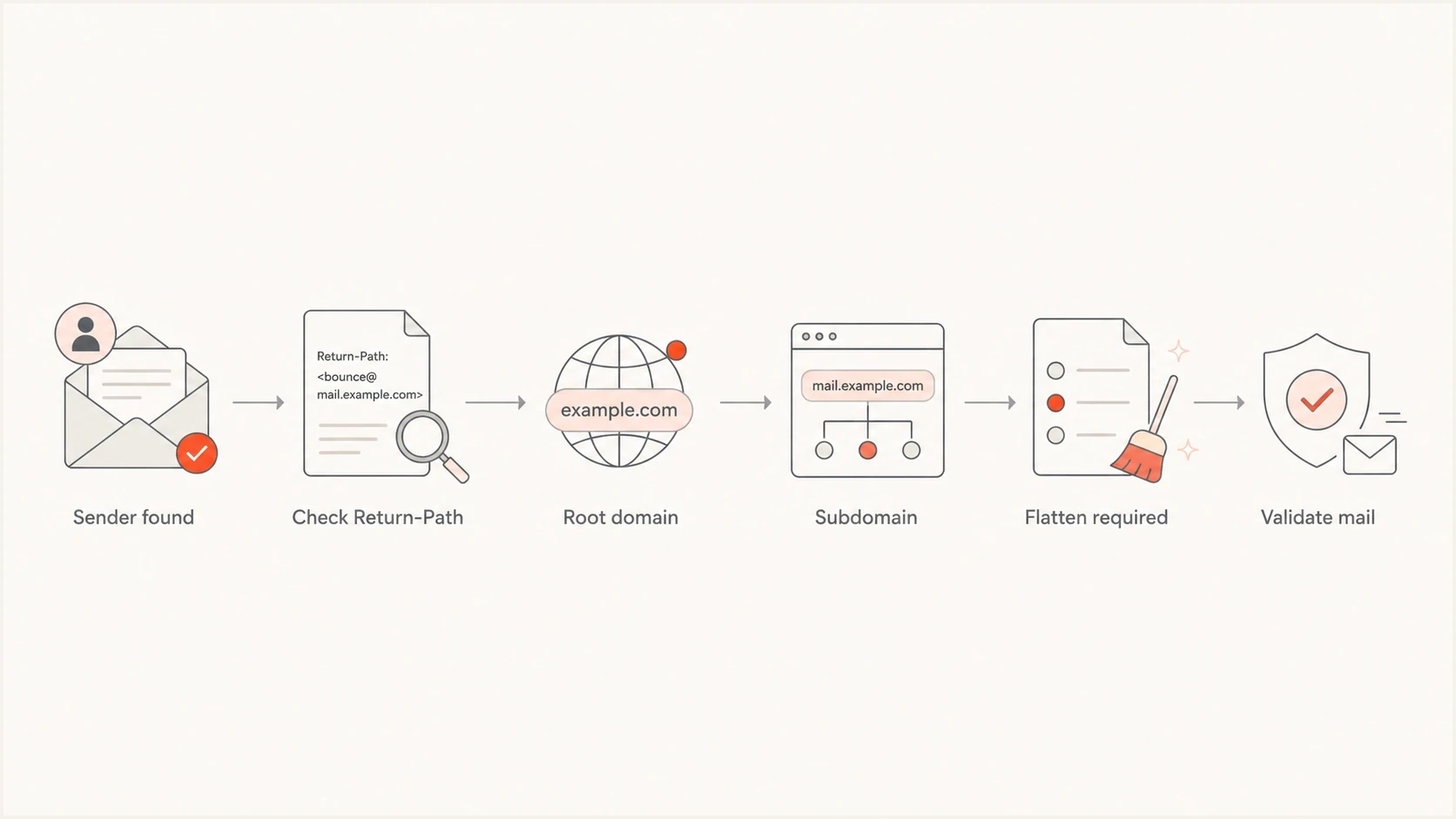
SPF optimization flow for root domains, sender subdomains, and flattening decisions.
Use true subdomains of the brand domain, not cousin domains such as lookalike brand domains. Cousin domains add extra DNS ownership work, weaken recipient recognition, and make abuse handling harder.
When a live stream moves to a new subdomain, ramp volume with engaged recipients and monitor authentication, complaints, and bounces. Do not change the domain, IP, and authentication records all at once. Change one major variable, measure the result, then continue.
The strongest setup pairs subdomain routing with DKIM on the same organizational domain. Aligned SPF and aligned DKIM then give DMARC two independent ways to pass, while one overloaded root SPF record no longer controls every sender in the business.
Common mistakes that keep SPF bloated
The most common mistake is accepting every vendor setup page literally. Some setup pages tell you to add an SPF include to your root domain even when the vendor uses a separate bounce domain. That instruction is harmless only until the root record hits the lookup limit.
|
|
|
|---|---|---|
Old sender | Remove | No current mail |
Vendor bounce | Do not add | Wrong domain |
App subdomain | Delegate | Own SPF budget |
Static IPs | Use ip4 or ip6 | No lookup term |
Vendor chain | Flatten carefully | Fewer evaluated terms |
Dedicated IP | Use selectively | Reputation work |
SPF cleanup decisions
A dedicated IP can reduce lookup terms when SPF authorizes a stable ip4 or ip6 address, but it is not a cleanup shortcut. Use it for reputation isolation with steady volume, not only because an SPF record reached the limit.
Another mistake is using a or mx in SPF because it feels compact. Both consume DNS-querying terms, and mx triggers address resolution for the listed mail hosts. If the sender has stable IP addresses, explicit ip4 or ip6 mechanisms are clearer and do not consume the 10-term budget.
Flattened record patterndns
example.com TXT "v=spf1 ip4:192.0.2.10 include:_spf.google.com -all"
The record above is only a pattern. Do not copy documentation IPs into production. Use the real ranges for your own infrastructure and a monitored process for every vendor-maintained sender.
Views from the trenches
Best practices
Verify the Return-Path for every sender before adding that service to the root SPF.
Keep root SPF for senders that truly use the root envelope domain in production.
Use true branded subdomains so each separate stream has its own SPF budget and owner.
Common pitfalls
Old vendor includes often stay in SPF long after the service stopped sending mail.
Vendor setup pages can request SPF even when bounce handling lives elsewhere in DNS.
Manual flattening breaks when provider IP ranges change and nobody updates DNS promptly.
Expert tips
Treat any path that needs an 11th DNS-querying term as broken, even if another path passes.
Compare DMARC reports before and after SPF edits to catch missed senders during rollout.
Leave SPF term headroom because nested vendor records can change without advance notice.
Marketer from Email Geeks says SPF lookup failures should be fixed at the source, because relying on receiver-specific evaluation creates inconsistent authentication results.
2024-02-11 - Email Geeks
Marketer from Email Geeks says the first cleanup step is removing unnecessary SPF includes, especially old SaaS entries that were copied during setup and never reviewed.
2024-02-12 - Email Geeks
Recommended SPF optimization path
If any valid sender path needs an 11th DNS-querying term, fix it now. The cleanest path is not to flatten everything immediately. Start by proving which services need SPF on the root domain, remove the rest, move suitable senders to subdomains, then use hosted SPF or flattening for the senders that must remain together.
Suped's product fits this workflow when SPF cleanup needs ongoing monitoring. DMARC aggregate reports, SPF validation, hosted SPF, alerts, and fix guidance sit beside the DNS work. SPF optimization is an operational process because senders and nested vendor policies change after the initial edit.
The end state is simple: one valid SPF record per sending domain, no sender path above 10 DNS-querying terms, headroom for vendor changes, no dead vendors, and subdomains for separate streams.




