How important is the 10 DNS lookups limit on SPF records?

Updated on 23 Sep 2026: We clarified SPF's 10-term limit and brought the DMARC identity and repair guidance up to date.
The 10 DNS lookup limit on SPF records is important enough that any evaluated path over the limit should be treated as production broken, even when today's DMARC reports show SPF passing. RFC 7208 requires SPF receivers to return a permanent error when evaluation exceeds 10 DNS-querying terms. A static checker can also flag a worst-case branch that a particular sending IP does not reach.
That is why a domain can show 12 lookups in a checker while aggregate reports still show SPF pass. The public policy has an over-budget path, but the observed mail can match an earlier mechanism and stop evaluation before reaching it. Do not leave that branch in place because another authorized sender can take the longer path and return permerror.
- Direct answer: The limit matters. Keep every legitimate evaluation path at 10 or below, and aim below 10 so one vendor change does not break mail.
- Operational answer: The eleventh DNS-querying term on an evaluated path produces SPF permerror. The receiver then applies its local message-handling policy.
- DMARC answer: SPF pass in DMARC reports does not prove every SPF path is safe. It proves that the reported messages passed at those receivers.
Why the limit matters
SPF checks the connecting server against the SMTP MAIL FROM domain, whose address normally appears later as the Return-Path. Receivers can also evaluate the HELO or EHLO identity separately. Under RFC 9989, DMARC uses only the SPF result for the MAIL FROM identity and requires that domain to match the visible From domain under the DMARC rules.
The SPF lookup limit exists because receivers must bound DNS work. An SPF record can point to another SPF record, which points to more records, which then use a and mx mechanisms. Without a hard cap, one message can force a receiver into excessive DNS work.
The risk is not theoretical
Once evaluation reaches an eleventh DNS-querying term, SPF must return permerror. SPF is then unavailable as an authenticated result for that message. If DKIM also fails, or its signing domain does not match the visible From domain under DMARC, DMARC fails.
- SPF result: A compliant evaluation returns permerror when the term limit is exceeded.
- Message handling: The receiver decides whether to accept, filter, defer, or reject mail with that result.
- Changing vendors: One extra nested include inside a provider record can move a valid path into permerror.
SPF lookup risk by count
How to rate the highest lookup count across legitimate evaluation paths during a production review.
Healthy
0-7
Enough room for provider changes and emergency edits.
Tight
8-10
Still valid, but too close for comfort.
Broken
11+
An evaluated path returns SPF permerror.
What counts as a lookup
The limit counts DNS-querying SPF terms, not raw DNS packets. The initial TXT query that retrieves the SPF record does not consume this term budget. Nested include and redirect evaluations share one global count, rather than receiving a fresh allowance of 10.
|
|
|
|---|---|---|
include | Yes | Counts once, plus DNS-querying terms reached inside the included policy. |
a | Yes | Looks up A or AAAA records for the target host. |
mx | Yes | Counts as one term, but one mx evaluation cannot query more than 10 A or AAAA records across its MX targets. |
exists | Yes | Used for DNS-based tests and can create void lookups. |
redirect | Yes | Counts when the policy handoff is evaluated. |
ptr | Yes | RFC 7208 says not to use it, and separate PTR processing limits apply. |
ip4/ip6 | No | Direct IP ranges do not use DNS during evaluation. |
all | No | Ends mechanism evaluation with its qualifier. |
exp | No | Its later explanation lookup does not count toward the 10-term limit. |
SPF mechanisms and lookup cost
Check the record with a tool, then manually review the sending sources behind the result. Suped's SPF checker shows the recursive path, and the output is most useful when paired with a current sender inventory.
SPF checker
Find SPF syntax issues, lookup limits, and weak records.
?/16tests passed
The separate void lookup limit
SPF also has a separate safeguard for void lookups. A void lookup is a DNS query that returns NXDOMAIN or succeeds with no answers. RFC 7208 says implementations should limit these results to two and recommends two as the default when the limit is configurable. This is not the same as the mandatory 10-term ceiling.
Policy that can create three void lookupsdns
v=spf1 exists:_spf-a.example exists:_spf-b.example exists:_spf-c.example -all
A low term count can still fail
The example uses only three DNS-querying terms, but it can exceed the recommended void lookup limit if all three names return empty or nonexistent answers. Remove stale targets and investigate unexpected empty DNS responses instead of checking only the headline lookup count.
Why DMARC reports can still show pass
A DMARC aggregate report is evidence of what a receiver saw for a batch of mail. It is not a guarantee that every possible SPF evaluation path is valid. Reports can show SPF pass while the public SPF record still has an over-limit branch waiting for a different sending IP to reach it.
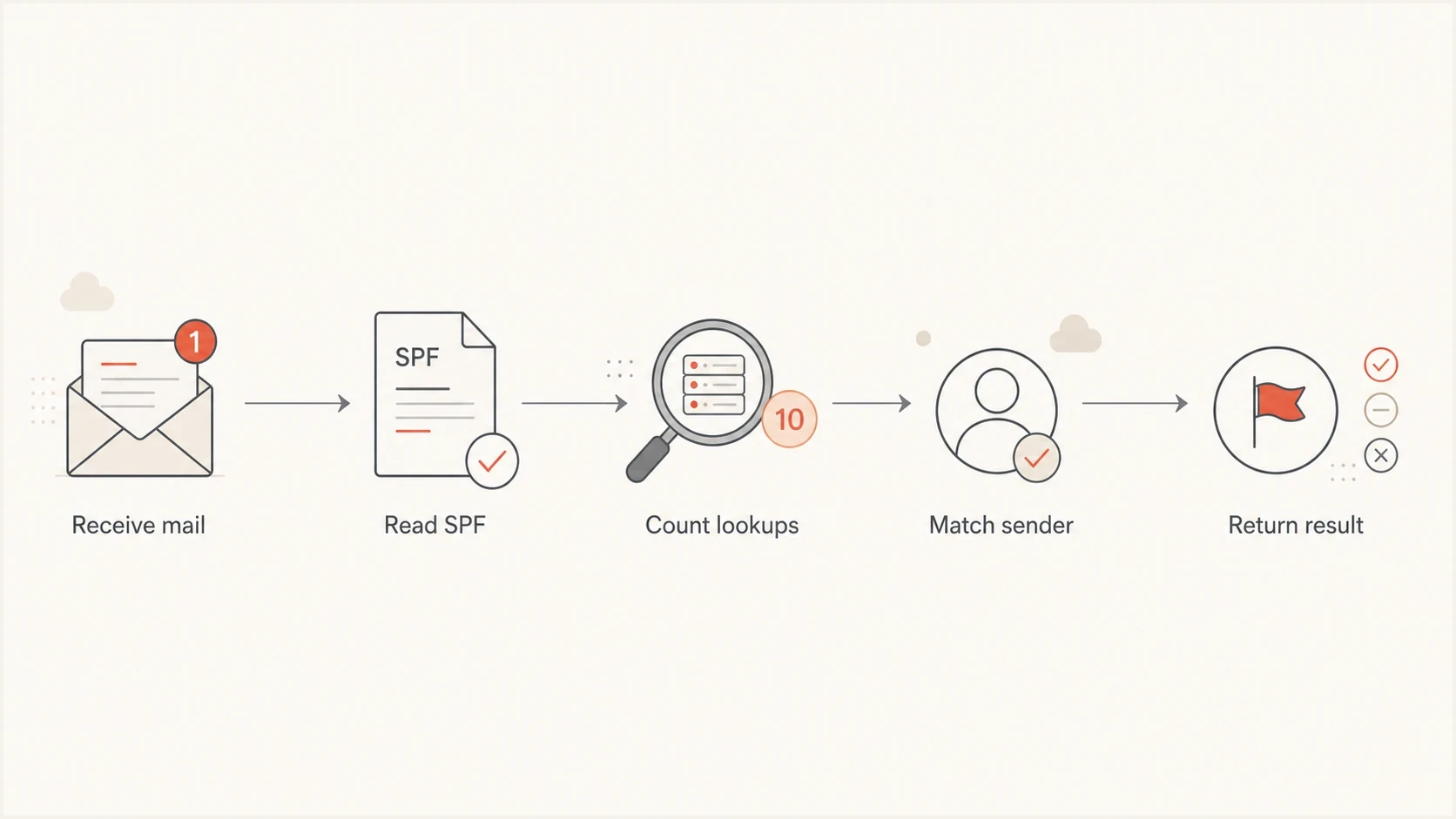
Flowchart showing how an SPF receiver counts lookups before returning a result.
- Early match: The sender matches a mechanism before the over-limit branch is reached.
- Different source: Another authorized sending IP follows a longer path and reaches the eleventh term.
- Nested change: A provider changes its included SPF record and pushes a previously valid path past the limit.
- DKIM cover: DMARC can still pass through DKIM when its signing domain matches the visible From domain, so the SPF problem sits unnoticed until DKIM breaks.
Do not confuse pass with safe
If DMARC reports show SPF passing while a checker reports a 12-term worst path, treat the DMARC report as a partial observation. The DNS record still needs work because another legitimate source can reach that path. A valid SPF design keeps all required paths within the limit.
How to fix an overloaded SPF record
Start with deletion, not flattening or a second SPF record. Publishing multiple records beginning with v=spf1 at one name returns permerror and does not provide a second 10-term budget. Many overloaded records include services that no longer send mail, shared hosting includes that authorize unrelated infrastructure, or mechanisms like mx and ptr that add DNS cost without a clear benefit.
Overloaded SPF exampledns
v=spf1 include:host.example include:send.example include:crm.example ~all
That record looks short, but each include can trigger recursive evaluation of a larger policy. If one provider's required path already needs 11 terms, that include alone produces permerror when the path is evaluated. A short visible TXT string does not mean a cheap SPF check.
- Inventory senders: List every platform that sends with your Return-Path or HELO domain.
- Remove stale includes: Delete services that no longer send mail for the domain.
- Replace broad includes: Use direct IP mechanisms when you control the infrastructure or the provider publishes stable sending ranges.
- Do not rely on order: Early mechanisms can reduce work for common senders, but ordering does not repair a legitimate path that exceeds the limit.
- Use subdomains: Split unrelated mail streams onto separate envelope sender domains.
- Automate flattening: Use managed SPF flattening only when pruning and subdomain separation are not enough.
Cleaner SPF exampledns
v=spf1 ip4:203.0.113.10 include:send.example -all
Manual flattening
Manual flattening means replacing included domains with IP ranges yourself. It can work for static infrastructure, but it has a maintenance problem.
- Stale IPs: Provider range changes can leave authorized senders missing.
- Record size: Flattened policies can require multiple 255-octet TXT strings and can push the complete DNS response beyond SPF's size guidance.
- No alerts: You find breakage after reports or support tickets appear.
Hosted SPF management
Suped's Hosted SPF manages the hosted include and keeps the published SPF path under control without requiring constant DNS edits.
- Central edits: Manage senders in one place instead of many DNS zones.
- Lookup control: Flatten and optimize without hand-maintaining vendor IP ranges.
- Issue alerts: Detect SPF issues and changes to DMARC or DKIM quickly.
A practical review workflow
The safest workflow is repeatable. First check the raw DNS record. Then count the evaluated and worst-case paths, including recursion. Compare the result against actual mail sources in DMARC reports. Suped's domain health checker is useful when SPF is only one part of the domain's authentication setup.
- Check DNS: Confirm there is one record beginning with v=spf1. Multiple matching records and syntax errors can return permerror, as can circular include or redirect paths.
- Count lookups: Include nested records, redirects, costly mechanisms, and void results.
- Match senders: Tie every include to a current system that sends mail.
- Reduce scope: Move unrelated services to subdomains with their own envelope sender domains and SPF records.
- Monitor reports: Watch DMARC results after each change before tightening policy.
The strongest fix is often architectural
If one organizational domain contains every sender, the SPF record becomes a junk drawer. Separate envelope sender domains give each mail stream a smaller policy and make DMARC reporting easier to read.
For a detailed repair path, the related guide on how to fix SPF lookup failures goes deeper into cleanup steps.
Where Suped fits
Suped's product connects the SPF repair work to the evidence behind it. Teams can review recursive SPF paths against DMARC aggregate data, confirm which senders remain active, manage hosted SPF changes, and receive alerts when DNS or authentication results change.
SPF flattening drawer showing an over-limit record, sender editing, lookup counts, and the hosted record setup
For teams maintaining many domains, Suped provides hosted SPF, issue detection, alerts, and multi-domain views in one workflow. Hosted DMARC and MTA-STS can remain in that workflow, but they do not change SPF's 10-term limit.
- DMARC evidence: Use report data to see which senders still need authorization.
- SPF control: Manage sender changes without asking for DNS access every time.
- Alerting: Catch lookup changes and authentication policy problems before they spread.
- MSP scale: Manage many domains and client organizations from one dashboard.
Views from the trenches
Best practices
Audit every include against active senders before flattening or adding another vendor.
Keep lookup counts below eight where possible, so provider changes leave room to move.
Split unrelated mail streams onto subdomains instead of overloading a single SPF policy.
Common pitfalls
Treating a passing DMARC report as proof that every SPF evaluation path is valid.
Flattening by hand once, then missing later provider IP range changes and failures.
Accepting shared hosting SPF includes that authorize senders the domain never uses.
Expert tips
Remove costly mx and deprecated ptr mechanisms unless a clear sending need exists.
Use monitored hosted SPF when records need flattening but provider IPs still change.
Check blocklist and blacklist status when shared hosting mail or IPs cause issues.
Expert from Email Geeks says SPF requires permerror when an evaluated path reaches an eleventh DNS-querying term.
2020-09-09 - Email Geeks
Marketer from Email Geeks says reports can look healthy when observed senders match before an over-limit branch is evaluated.
2020-09-09 - Email Geeks
How seriously to treat the limit
The 10 DNS lookup limit is important because it is a hard SPF evaluation boundary. An evaluated path over the limit returns permerror. A static worst-case count above 10 also identifies a path that can break when the matching sender or a nested provider policy changes.
Aim for fewer than 10, preferably fewer than eight. Remove unused senders, avoid broad hosting includes, stop using ptr, split mail streams onto subdomains, and use managed hosted SPF when the domain needs more complexity than plain DNS can handle cleanly.




