How to fix Gmail errors for SPF authentication, unauthenticated senders, and PTR records?

Updated on 13 Aug 2026: We updated this guide with Google's current Gmail enforcement, corrected SMTP codes, and added suspicious SPF record fixes.
Treat each Gmail error as a separate signal. For SPF authentication failures, make sure the sending IP is authorized by the envelope sender domain's SPF record and that the record stays within the 10 DNS lookup limit. For unauthenticated sender blocks, make sure SPF or DKIM passes. Bulk senders need SPF, DKIM, and DMARC, with the visible From domain aligned to the SPF or DKIM authenticated domain. For PTR errors, ask the IP owner to publish reverse DNS, then confirm that the PTR hostname points back to the same sending IP.
Do not start by assuming Gmail has a global incident. Gmail's messages usually identify the failing layer: SPF, combined authentication, or reverse DNS. An isolated failure on otherwise healthy traffic can result from a transient DNS or network resolution issue. A repeatable pattern by sending IP, envelope sender, hostname, or provider points to a configuration problem that needs a fix.
The three Gmail signals
These examples point to different layers. SPF checks sender authorization, the unauthenticated sender response reports the combined authentication result, and PTR errors concern sending infrastructure.
Common Gmail errors
421-4.7.27 SPF authentication didn't pass
421-4.7.26 This email has been rate limited because it is unauthenticated
451-4.7.23 The sending IP does not have a PTR record
What each Gmail error means
Gmail separates temporary deferrals from permanent rejections. Codes that start with 4 mean retry later after fixing the underlying issue or reducing the sending rate. Codes that start with 5 mean the message was blocked, so retrying the same message without changing authentication or infrastructure will fail again.
Google's sender guidelines require all senders to use SPF or DKIM, and bulk senders to use SPF, DKIM, and DMARC. The SMTP error guide lists SPF, unauthenticated sender, suspicious SPF, and PTR failures as authentication or infrastructure problems.
These requirements apply when sending to personal Gmail accounts. Google treats a primary domain as a bulk sender after it sends close to 5,000 messages in a 24-hour period, with subdomain traffic counted together. Bulk sender status does not expire. Google began ramping up enforcement against non-compliant traffic in November 2025, including temporary and permanent rejections.
|
|
|
|---|---|---|
421 4.7.27 or 550 5.7.27 | SPF failed | Authorize the source |
421 4.7.26 | No SPF or DKIM pass | Fix SPF or DKIM |
550 5.7.26 | SPF hard fail | Authorize or stop the source |
451 4.7.24 or 550 5.7.24 | Suspicious SPF entries | Audit the SPF record |
451 4.7.23 or 550 5.7.25 | PTR missing or mismatched | Fix reverse and forward DNS |
Use the exact Gmail code to choose the first fix.
A small number of these errors on high-volume traffic does not prove the entire sending setup is broken. Check the rate and clustering. An isolated failure can result from a transient resolver or route issue. A spike on one IP, sending domain, or mail stream needs investigation.
Fix SPF authentication first
For 421-4.7.27 or 550-5.7.27, the failing domain is usually the envelope sender domain, also called MAIL FROM or Return-Path. The visible From address matters for DMARC, but SPF checks the connecting IP against the domain used in the SMTP envelope.
Check the exact IP in the bounce, then verify whether that IP is covered by the SPF record for the domain named in Gmail's authentication result. A clean SPF record has one v=spf1 TXT record, includes every legitimate sender, avoids broad mechanisms that authorize too much, and ends with a policy that matches the rollout stage.
- Find the domain: Read the Gmail authentication result and identify the SPF domain it checked.
- Authorize the source: Add the sender's approved include or the exact sending IP range.
- Remove conflicts: Publish only one SPF TXT record at the domain.
- Count lookups: Keep DNS lookups at 10 or fewer, including nested includes.
- Test the change: Send a new message and confirm Gmail reports SPF as pass.
Simple SPF example
example.com. 3600 IN TXT "v=spf1 ip4:203.0.113.25 include:spf.example -all"
If the record is already long, do not keep stacking includes until Gmail stops rejecting mail. Check the record with the SPF checker, then decide whether it needs cleanup, sender removal, or managed flattening.
SPF checker
Find SPF syntax issues, lookup limits, and weak records.
?/16tests passed
For teams with many senders, Suped's Hosted SPF provides a central authorized-sender list, keeps the published record short, and tracks changes that might otherwise create an SPF lookup failure.
Fix suspicious SPF entries
Gmail uses 451-4.7.24 for a temporary rate limit and 550-5.7.24 for a permanent block when the sending domain's SPF record has one or more suspicious entries. This differs from a normal SPF failure. Adding the sending IP alone will not resolve a record that still contains unsafe or malformed authorization.
Google does not publish a complete list of entries that trigger this response, so audit the full SPF evaluation path instead of guessing at one mechanism. Review the top-level record and every nested include or redirect.
- Remove unsafe authorization: Replace +all and other unnecessarily broad mechanisms with explicit senders.
- Check included domains: Remove obsolete, untrusted, or non-resolving includes and redirects.
- Validate syntax: Correct duplicate SPF records, invalid mechanisms, and misplaced qualifiers.
- Retest the full path: Confirm the record resolves within 10 DNS lookups and authorizes only active senders.
Do not weaken SPF as a shortcut
Changing the record to a permissive policy can hide an authorization mistake without fixing it. Keep the scope narrow, remove stale dependencies, and send a new Gmail test after DNS caches update.
Fix unauthenticated sender blocks
For 421-4.7.26, Gmail is rate limiting a message that did not pass SPF or DKIM. A 550-5.7.26 response can instead name an envelope sender domain whose -all policy failed for the connecting IP. Read the full response before changing DNS. When a domain has a DMARC policy, the domain authenticated by SPF or DKIM must align with the visible From domain for DMARC to pass.
The fastest durable path is to make DKIM pass with an aligned signing domain, then repair SPF for the envelope sender domain. For direct bulk mail, Gmail requires both SPF and DKIM authentication, although only one authenticated domain needs to align with the From domain to meet the current DMARC alignment requirement.
Broken path
- SPF source: The sending IP is missing from the envelope sender's SPF record.
- DKIM state: The message has no valid DKIM signature aligned with the From domain.
- DMARC result: Neither SPF nor DKIM gives DMARC a passing domain match.
Fixed path
- SPF source: The envelope sender domain authorizes the exact sending source.
- DKIM state: The active selector publishes a valid key and the signature verifies.
- DMARC result: The From domain aligns with the SPF or DKIM authenticated domain.
Also check the message headers. Gmail tells you whether SPF and DKIM passed, which domains were checked, and which IP connected. If the response says the domain has a hard fail policy, a -all SPF record is telling Gmail that the source is unauthorized. Authorize the legitimate sender or stop that sender from using the domain instead of weakening the policy indefinitely.
Forwarding can also break SPF because Gmail sees the forwarder's IP rather than the original sender's IP. If direct messages pass but forwarded copies fail, verify DKIM survival and DMARC alignment before editing an SPF record that already authorizes the direct sending path.
For related Gmail wording, the SPF unauthorized error usually has the same root cause: the connecting mail system is not permitted by the domain's SPF policy.

Issue steps to fix dialog showing the issue overview, tailored fix steps, and verification action
Suped's issue view groups failed sources, shows whether SPF, DKIM, and DMARC are failing, and provides specific fix steps. This reduces the need to read raw aggregate reports line by line when one sending service uses several IP ranges.
?
What's your domain score?
Deep-scan SPF, DKIM & DMARC records for email deliverability and security issues.
A broader domain health check helps when Gmail reports more than one issue. SPF, DKIM, DMARC, DNS, and reputation problems can appear together during sender migrations or infrastructure changes.
Fix PTR and forward DNS
For 451-4.7.23 or 550-5.7.25, SPF is not the first place to work. Gmail is deferring or blocking the sending IP because reverse DNS is missing or the PTR hostname does not resolve back to the same IP. PTR records are controlled by the IP owner, usually the hosting provider, cloud provider, or network operator, not by the normal DNS zone for the sending domain.
PTR fixes happen at the IP owner
Adding an A record in the sending domain's DNS zone does not create reverse DNS. The IP owner must set the PTR record, then forward DNS for that PTR hostname must point back to the sending IP.
Forward-confirmed reverse DNS checkbash
dig -x 203.0.113.25 +short
dig mail.example.com A +short
dig mail.example.com AAAA +short
- Check reverse: The sending IP must return one stable hostname.
- Check forward: That hostname must resolve back to the same IPv4 or IPv6 address.
- Check identity: Use a hostname under a domain you control or a provider-hosted name.
- Check consistency: Use the same HELO or EHLO naming pattern across the mail stream.
For IPv6 delivery, the PTR hostname needs an AAAA record that resolves to the exact public IPv6 address used by the sending server. Gmail also requires the IPv6 mail stream to meet its authentication rules, so correct reverse DNS does not replace SPF or DKIM.
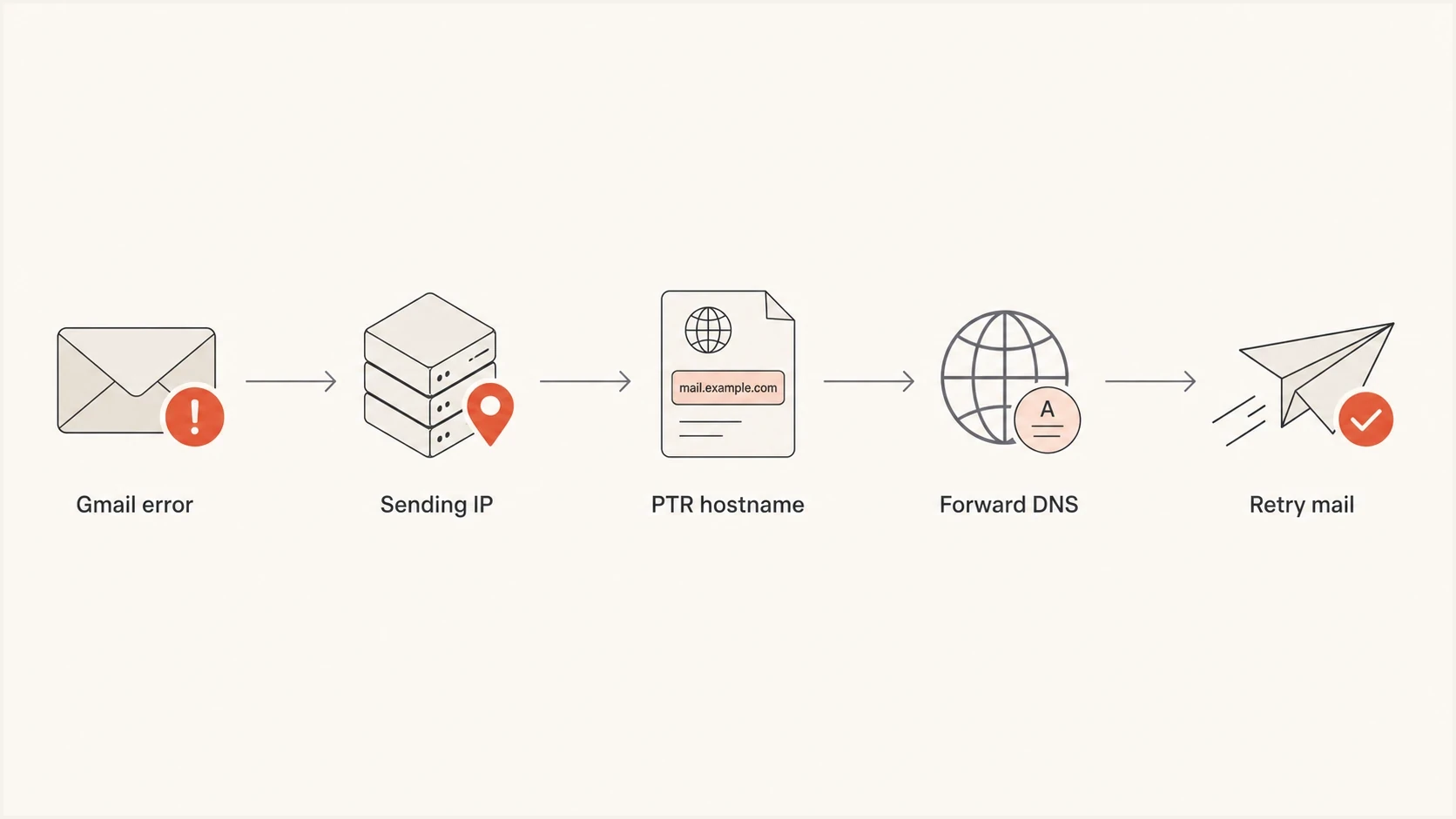
Flowchart showing Gmail PTR error repair through reverse and forward DNS.
Separate configuration errors from DNS noise
The hardest part is deciding whether a handful of Gmail failures means the records are wrong. Use a simple rule: if failures cluster around one source, domain, IP, region, or DNS provider, treat the pattern as a real fault. If an isolated error is spread across otherwise passing mail, investigate DNS reliability without making rushed DNS changes.
DNS can fail in ways that do not appear in one local query. Recursive resolvers cache different answers, routing paths differ, authoritative nameservers enforce rate limits, and stale delegation data can create intermittent lookups. Check both message samples and aggregate behavior before changing SPF, DKIM, or PTR records.
Gmail authentication response bands
Use isolation, clustering, and repeatability to decide the next action.
Monitor
Isolated sample
One isolated error among passing traffic
Investigate
Repeated cluster
Failures repeat for one source or IP
Fix now
Sustained failure
The same stream receives consistent blocks
For Gmail-specific monitoring, separate SMTP bounce logs, DMARC aggregate reports, and Google Postmaster Tools data. Bounce logs show the immediate rejection. DMARC reports show which sources fail over time. Postmaster data shows authentication, compliance, domain reputation, IP reputation, and delivery error signals, although dashboard updates are not real time.
- Sample headers: Save failed and successful Gmail samples from the same stream.
- Group failures: Bucket errors by IP, envelope sender, DKIM domain, and hostname.
- Compare timing: Look for a spike after DNS, routing, or sending platform changes.
- Retry carefully: Honor temporary deferrals and ramp back up after the error rate drops.
If SPF lookup limits are part of the pattern, SPF flattening helps when change detection is included. Static flattening without monitoring can become stale when a sender changes IP ranges.
Where Suped fits
Suped connects Gmail error investigation to DMARC evidence and DNS fix work. A sending source can have an SPF miss, a DKIM selector issue, a DMARC domain mismatch, and a blocklist (blacklist) reputation concern at the same time. Suped groups those checks in one workflow alongside the DNS consoles and mail logs needed to make the changes.
Manual workflow
- Evidence: Collect SMTP logs, headers, DNS answers, and DMARC reports separately.
- Fix timing: DNS edits depend on whoever controls the zone or IP allocation.
- Risk: Small SPF changes can create lookup failures or authorize the wrong source.
Suped workflow
- Evidence: DMARC, SPF, DKIM, blocklist, blacklist, and source data appear in one view.
- Fix timing: Hosted SPF and Hosted DMARC reduce routine DNS edit delays.
- Risk: Issue detection and alerts show what changed before failures grow.
Suped's automated issue detection identifies the failed source and turns the finding into a DNS or sender-side action. The platform also has real-time alerts, hosted DMARC policy staging, hosted SPF, SPF flattening, hosted MTA-STS, and MSP multi-tenancy for teams that manage many domains.
Practical operating rule
Use Suped to group SPF, DKIM, DMARC, hosted record, and reputation evidence. Use the raw Gmail SMTP error to decide which layer to fix first.
For more context on Gmail's wording, the related Gmail SPF error messages page explains common variants and why Gmail uses temporary deferrals in some cases and permanent blocks in others.
Views from the trenches
Best practices
Start with Gmail's exact code, then verify SPF, DKIM, DMARC, and PTR separately.
Track error rates by IP and sender before changing records that already pass in tests.
Confirm reverse DNS with a forward lookup before escalating a Gmail delivery issue.
Common pitfalls
Do not treat every isolated Gmail deferral as proof that SPF is broken globally.
Do not add SPF includes blindly, because nested lookups can create new Gmail failures.
Do not edit normal DNS for PTR issues because the IP owner controls reverse DNS records.
Expert tips
Keep a clean sample set of failed and passed Gmail messages from the same sender.
Use DMARC aggregate data to determine whether a failing source is real or transient.
When an error spike clears, document the IP, reverse DNS, and DNS provider status.
Expert from Email Geeks says that if SPF passes and reverse DNS exists, the next place to inspect is DNS reliability, including whether records fail to resolve consistently.
2025-08-22 - Email Geeks
Marketer from Email Geeks says the right starting point is to trust Gmail's error text and use it as the troubleshooting map, rather than assuming a broad Gmail issue.
2025-08-22 - Email Geeks
The shortest reliable fix
Fix the Gmail error in the layer named by the response. SPF errors need an authorized envelope sender source and a record that stays within DNS limits. Suspicious SPF entry errors need a full record audit. Unauthenticated sender errors need SPF or DKIM to pass, plus SPF, DKIM, and DMARC for bulk mail with the From domain aligned to an authenticated domain. PTR errors need reverse DNS set by the IP owner and forward DNS that points back to the same IP.
After the fix, send fresh test mail, confirm Gmail's authentication results, then watch production traffic by source and IP. If failures return to isolated levels, keep monitoring. If Gmail continues to block one source, pause that stream and fix the underlying DNS or authentication path before scaling traffic again.




