Why am I seeing Gmail SPF error messages and how do I fix it?

Published 23 May 2025
Updated 13 Aug 2026
12 min read
Summarize with

Updated on 13 Aug 2026: We updated this guide with current Gmail SMTP codes, SPF alignment checks, and safer DNS repair steps.
The direct answer: Gmail is showing SPF errors because the SPF result for the envelope sender domain is not a clean pass when Gmail checks the message. When MAIL FROM is empty, SPF uses the HELO identity instead. The cause can be an unauthorized sending IP, a temporary DNS error, an invalid policy, a lookup-limit breach, forwarding, or a sender using a different return-path domain than the one you checked.
The fix is to test the same sending path Gmail sees, then repair the exact condition that produces the result. Do not stop after checking the top-level SPF TXT record. SPF evaluates mechanisms in order and follows DNS-querying terms such as include, mx, a, exists, ptr, and redirect. A timeout or SERVFAIL can produce temperror; malformed or multiple policies and lookup-limit breaches can produce permerror; an unauthorized IP can produce fail.
A Yahoo SPF pass does not prove Gmail is wrong. It proves Yahoo could evaluate SPF for that message at that time. Gmail can query different DNS resolvers, reach a different authoritative name server, or evaluate another delivery attempt with a different return-path or sending IP.
What the Gmail SPF error means
One common Gmail response is a 421 temporary SMTP error. It often looks like this:
Example Gmail SMTP responsetext
host alt1.gmail-smtp-in.l.google.com[64.233.171.26] said:
421-4.7.27 Your email has been rate limited because SPF authentication
421-4.7.27 didn't pass for this message.
The important parts are 421, 4.7.27, and SPF authentication didn't pass. A 421 response is temporary, so the sending server should queue the message and retry. Retrying alone will not fix the cause if SPF keeps failing. Gmail is telling you that the bulk mail stream has an SPF authentication problem that now affects acceptance.
Treat this as an authentication incident, not a generic deliverability complaint. First identify the exact domain Gmail evaluated for SPF. That domain comes from the envelope sender, also called the return-path or MAIL FROM domain, and it is not always the visible From header domain.
- Check result: Find whether Gmail saw SPF fail, softfail, neutral, none, permerror, or temperror.
- Check domain: Confirm the return-path domain, because that is the domain SPF authenticates.
- Check DNS: Trace every lookup behind the SPF record, especially include and mx mechanisms.
- Check timing: Repeat tests because intermittent authoritative DNS faults can create Gmail-only spikes.
Match the Gmail code before editing SPF
Read the complete SMTP reply before editing DNS. A 4.x enhanced status is a temporary deferral, while a 5.x status is a permanent rejection of that delivery attempt. Gmail can use related codes for different authentication faults, so the number and the accompanying authentication results both matter.
|
|
|
|---|---|---|
4.7.27 | SPF did not pass; Gmail rate limited the stream | Fix SPF, keep queued retries controlled |
5.7.27 | SPF did not pass; Gmail blocked the message | Do not retry unchanged; repair authentication |
4.7.26 or 5.7.26 | Broader unauthenticated-mail, DMARC-policy, or SPF hard-fail error | Read the full text; check SPF, DKIM, and DMARC |
4.7.32 or 5.7.32 | The visible From domain does not match authenticated SPF or DKIM | Make the return-path or DKIM domain match From |
Gmail authentication codes and the correct first response.
SPF pass and SPF alignment are different
SPF can pass for a return-path domain while DMARC alignment fails because that domain does not match the organizational domain in the visible From header. For a 4.7.32 or 5.7.32 error, configure an aligned custom return-path or make aligned DKIM pass. Adding an SPF include to the visible From domain does not help if the sender still uses another domain in MAIL FROM.
Why the same message can pass elsewhere
Mailbox providers do not share one SPF evaluator. Gmail, Yahoo, and corporate gateways each resolve DNS independently. If your SPF record includes mx, the receiver must resolve your MX records and then resolve the address records for those MX hostnames. A failure at that second step can turn a valid-looking SPF record into a temporary SPF failure.
This is why a message can show spf=pass at Yahoo while Gmail returns 421 4.7.27. Yahoo's resolver reached the needed DNS answer, or Yahoo checked at a different time. Gmail's resolver hit a timeout, SERVFAIL, lookup limit, or missing A or AAAA record. The SPF TXT string did not change, but the full SPF evaluation changed.
Looks fine
- Top TXT: The SPF TXT record exists and has one v=spf1 policy.
- One receiver: Another mailbox provider reports SPF pass for a delivered copy.
- Same IP: The outbound server is included somewhere in the SPF path.
Still broken
- Deep lookup: A nested include, mx, a, redirect, or exists lookup fails.
- DNS path: One authoritative name server returns SERVFAIL or times out.
- Sender path: The return-path domain differs across message streams.
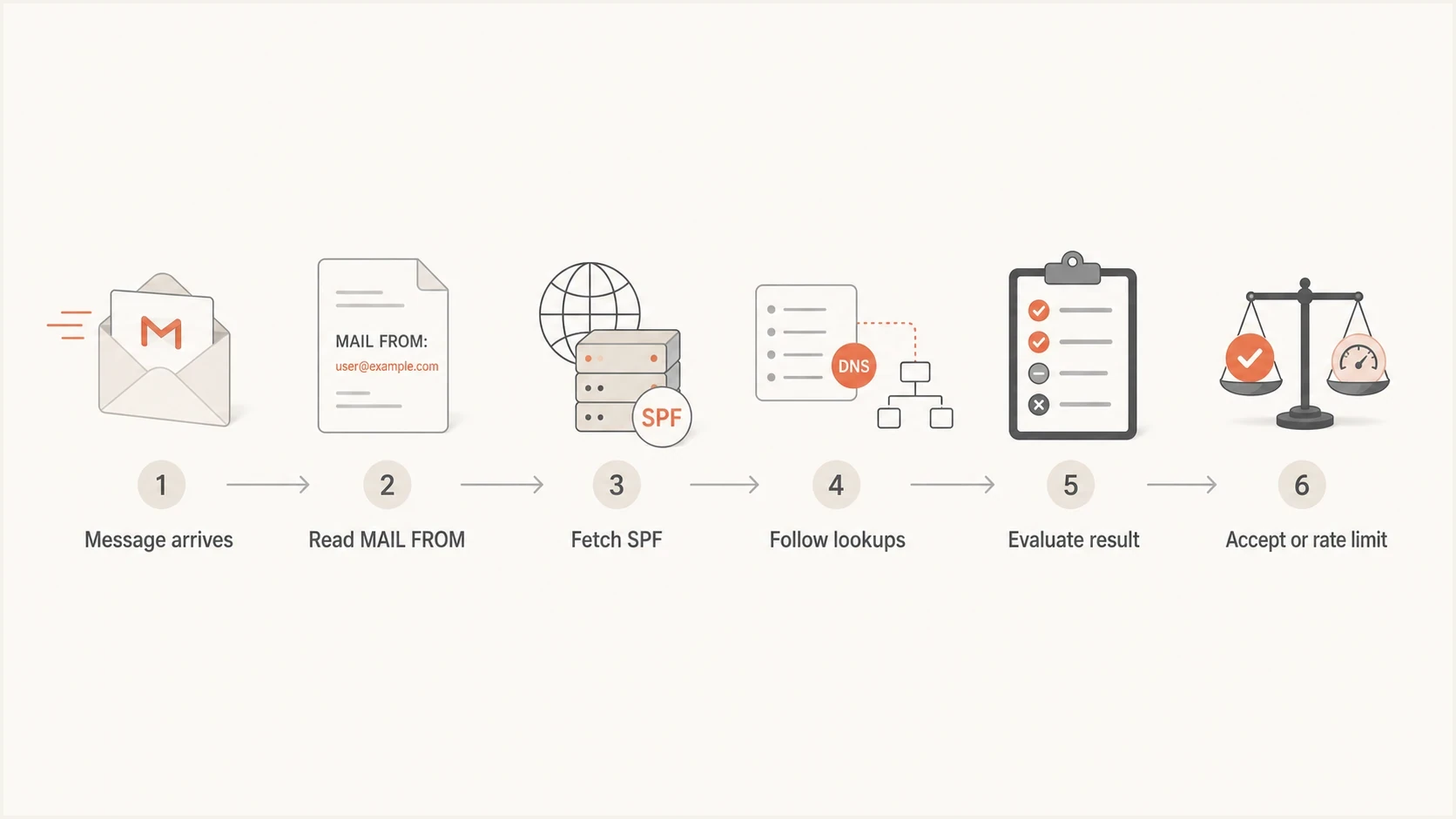
Flowchart showing Gmail checking the MAIL FROM domain, DNS lookups, and the SPF result.
Fast checks before editing DNS
Before changing your SPF record, capture a failed Gmail attempt and a successful message to another mailbox provider. In the delivered message, inspect Authentication-Results for spf=, smtp.mailfrom, the connecting IP, dkim=, dmarc=, and header.from. If those details differ, you are debugging two different mail streams.
Then validate the live SPF path. A SPF checker is useful here because it expands the mechanisms and shows lookup errors that a simple TXT lookup hides. A broader domain health check helps when you also need to verify DMARC, DKIM, and DNS health around the same sending domain.
- Read bounce: Copy the full Gmail SMTP response, including the basic code, enhanced code, target MX host, and authentication results.
- Find MAIL FROM: Identify the envelope sender domain used by the failed message and its connecting IP.
- Trace SPF: Expand includes, mx, a, redirect, exists, and ptr mechanisms until the failing lookup or unauthorized IP is visible.
- Compare providers: Check whether Gmail alone fails, or whether other receivers report delayed mail.
- Check policy: Review Google's SPF notes when the error appears only at Gmail.
SPF checker
Find SPF syntax issues, lookup limits, and weak records.
?/16tests passed
If the SPF checker reports temperror, permerror, too many DNS lookups, multiple SPF records, or a missing sender IP, fix that before changing content, volume, or reputation controls. For a 4.7.32 or 5.7.32 error, shift the investigation to DMARC alignment instead of adding more SPF mechanisms.
Common causes and exact fixes
Most Gmail SPF errors fall into a small set of technical causes. Trace the actual SPF path and use the reported result to choose the fix; do not edit the record you expected Gmail to read without confirming smtp.mailfrom first.
|
|
|
|---|---|---|
Missing or multiple records | None or permerror | Publish one v=spf1 policy |
Syntax fault | Permerror | Correct the invalid term |
Unlisted sender | Fail, softfail, or neutral | Authorize the exact source |
DNS temperror | Intermittent Gmail spike | Repair authoritative DNS |
Lookup limit | Permerror | Remove unused nested lookups |
Broken mx | MX address lookup fails | Repair DNS or replace mx |
Forwarding | Forwarder IP is checked | Use SRS and aligned DKIM |
Wrong return-path | Unexpected smtp.mailfrom | Correct the sender configuration |
Common Gmail SPF error causes and repair direction.
The fastest safe fix depends on the cause. If the sending IP is missing, add the correct include, ip4, or ip6 mechanism. If the evaluated policy exceeds the ten-term DNS lookup limit, remove obsolete senders and avoid unnecessary nested mechanisms first. Use carefully maintained SPF flattening only when provider IP changes can be tracked, because stale flattened addresses can create new failures. If forwarding breaks SPF, keep aligned DKIM stable so DMARC can pass through DKIM.
SPF records that use different authorization pathsdns
mx-path.example.com. TXT "v=spf1 mx include:_spf.sender.net -all"
direct.example.com. TXT "v=spf1 ip4:203.0.113.8 include:_spf.sender.net -all"
The first example depends on MX and address resolution during SPF evaluation. The second authorizes a sender IP and an include directly. Direct authorization is easier to debug when inbound mail DNS and outbound mail DNS are managed by different teams. These are separate records on separate names, not two SPF records for one domain.
The mx mechanism problem
An SPF record can look correct and still fail because of mx. The mx mechanism tells the receiver to look up the domain's MX hosts, then look up A and AAAA records for those hosts. If the authoritative DNS that holds the mail server zone has trouble, SPF evaluation breaks even though the top-level SPF TXT record is present.
That pattern explains many Gmail-only spikes. Gmail is running the whole SPF algorithm, not judging the visible TXT record alone. If an A or AAAA query for an MX host times out or returns SERVFAIL at the wrong time, Gmail can return SPF temperror and throttle the traffic.
DNS commands to trace the mx pathbash
dig +short TXT example.com
dig +short MX example.com
dig +short A mail.example.com
dig +short AAAA mail.example.com
dig +trace A mail.example.com
Do not use mx in SPF as a shortcut for outbound authorization unless the MX hostnames and their A or AAAA records are stable. In many organizations, inbound mail routing changes more often than outbound sending paths.
When mx is the cause, repair the failing authoritative DNS, remove mx from SPF, authorize stable outbound IPs directly, or replace the mx dependency with a maintained include controlled by the sending platform. If the issue comes and goes, query each authoritative name server directly instead of relying on one cached recursive answer.
How Suped fits into the fix
Manual SPF tracing works for a one-off incident. It becomes hard when a team manages several domains, changing senders, and ongoing Gmail enforcement. Suped's product supports that operational work with DMARC monitoring, SPF checks, DKIM checks, hosted DMARC, hosted SPF, hosted MTA-STS, blocklist (blacklist) monitoring, and deliverability insights in one workflow.
Suped turns aggregate DMARC data into source-level authentication results and tracked issues. When Gmail errors follow a sender change, lookup-limit breach, DNS failure, or unverified source, the issue workflow identifies the affected source and records the repair steps without requiring teams to inspect aggregate XML reports by hand.

Issue steps to fix dialog showing the issue overview, tailored fix steps, and verification action
Suped's Hosted SPF supports sender authorization when the SPF policy changes often or the team that owns DNS is not the team that owns email. Teams can update authorized senders through Suped while keeping the published SPF policy and lookup usage controlled.
SPF triage thresholds
Use these thresholds to decide how urgent a Gmail SPF incident is.
Healthy
Pass
Gmail accepts mail and SPF passes consistently.
Investigate
Temperror
Some Gmail attempts show temporary SPF failures.
Fix now
421 4.7.27
Gmail rate limits mail because SPF does not pass.
Correct policy
Permerror
The SPF policy is invalid, exceeds DNS limits, or cannot complete.
How to prevent repeat Gmail SPF errors
Once the immediate Gmail error is fixed, remove the conditions that made the failure hard to spot. SPF should have one policy, controlled lookups, stable DNS, and a clear owner for every authorized sender.
- Publish one policy: Keep all authorized senders in one v=spf1 TXT record for each domain.
- Limit lookups: Keep the evaluated SPF path within the ten-DNS-lookup limit and audit nested includes after sender changes.
- Avoid fragile mx: Prefer explicit outbound sender authorization when MX DNS is owned elsewhere.
- Monitor sources: Watch for new sending IPs and return-path domains before Gmail sees them at scale.
- Keep DKIM passing: Aligned DKIM gives DMARC another path to pass when forwarding breaks SPF.
- Document ownership: Assign each include, IP range, and DNS zone to a team that can repair it quickly.
After a DNS edit, verify every authoritative answer, then account for the old TTL and queued-message retries. Google's SPF troubleshooting guidance says changes can take up to 48 hours to take effect globally, so keep testing the live record during that window instead of publishing repeated edits.
If your Gmail SPF errors involve forwarded mail, review forwarding failures separately because SPF is tied to the connecting IP. If the symptoms come and go with no sender change, the DNS issue pattern is the more likely path.
Views from the trenches
Best practices
Trace every SPF mechanism before editing DNS, because the visible TXT is only the start.
Compare Gmail failures with a passing provider to find sender, timing, and DNS differences.
Keep outbound authorization separate from MX routing when DNS ownership is split.
Common pitfalls
Assuming one provider's SPF pass proves Gmail is wrong wastes valuable incident time.
Using mx in SPF hides extra DNS dependencies that fail under resolver or zone trouble.
Debugging without the real domain and sending IP leaves too many causes unresolved.
Expert tips
Check every authoritative name server directly when SPF failures appear intermittent.
Treat Gmail 421 SPF errors as authentication incidents before changing send volume.
Keep DKIM healthy so forwarded mail can still satisfy DMARC when SPF breaks in transit.
Marketer from Email Geeks says exact domains and IPs are needed to explain Gmail SPF behavior, because a generic SPF pass at another provider does not show what Gmail evaluated.
2024-04-25 - Email Geeks
Marketer from Email Geeks says SPF tracing exposed a temporary failure tied to an mx mechanism, so troubleshooting should follow each DNS lookup behind the record.
2024-04-25 - Email Geeks
Gmail SPF fix priority
Start with the exact Gmail error, then prove the return-path domain and sending IP. Trace SPF through DNS, with special attention to mx and nested includes. Repair DNS temperrors first, correct permerrors and lookup-limit breaches next, then update sender authorization. For a 4.7.32 or 5.7.32 code, fix SPF or DKIM alignment instead. Review reputation, content, and sending rate only after authentication passes consistently.
For an isolated case, command-line DNS tracing and focused SPF validation are enough. For ongoing operations, Suped combines source detection, alerts, hosted records, and tracked repair steps across the domains Gmail evaluates.




