Why your emails fail at Microsoft: the hidden SPF DNS timeout

Updated on 22 Sep 2026: We clarified how Microsoft handles SPF TempError and added safer guidance for DNS timing, TXT sizing, record structure, and Microsoft 365 flattening.
Emails can fail SPF at Microsoft when a transient DNS problem or an elapsed-time limit stops evaluation before Microsoft finishes the sender's SPF path. The result often appears as Received-SPF: TempError, even when the SPF TXT record has valid syntax. The hidden part is timing: SPF does not only ask whether the connecting IP is authorized. It also requires the receiver to resolve the evaluated include, redirect, A, MX, exists, or PTR path during message handling.
Start with the SPF dependency chain and authoritative DNS health, not only the sending platform. Common causes include an unreachable nameserver, slow answers, nested includes, CNAME chains that add resolution work, stale vendors, or a low TTL that forces frequent uncached queries. Reduce unnecessary DNS dependency, keep the evaluated SPF path at no more than 10 DNS-querying terms, remove senders that no longer send mail, and monitor real authentication results after each change.
The direct answer
Microsoft records SPF TempError when it cannot complete a temporary DNS-dependent SPF evaluation. Microsoft can then deliver the message to Junk, quarantine it, reject it, or accept it according to DKIM, DMARC, composite authentication, reputation, and other filtering signals. The risk rises when DKIM is missing or its signing domain does not match the visible From domain, because DMARC cannot use SPF TempError as a domain-matched pass.
What Microsoft is reacting to
The problem is usually the DNS operation that failed or the total time needed for the evaluated SPF tree. SPF includes can lead to more records, and each answer depends on resolver cache state, authoritative DNS response time, UDP truncation and TCP fallback, delegation, and provider availability. RFC 7208 says an overall SPF evaluation limit should allow at least 20 seconds before an elapsed-time breach returns TempError, but Microsoft does not publish an exact inbound timeout for this case. A very low TTL can increase the number of uncached lookups.
- TempError: A temporary DNS failure or evaluation timeout stopped SPF from completing.
- PermError: The SPF policy has a permanent problem, such as more than 10 evaluated DNS-querying terms, invalid syntax, or multiple SPF records.
- Practical fix: Repair unreliable DNS, remove unused SPF dependencies, use hosted SPF when sender dependencies change often, and use DMARC reports to verify active sources.
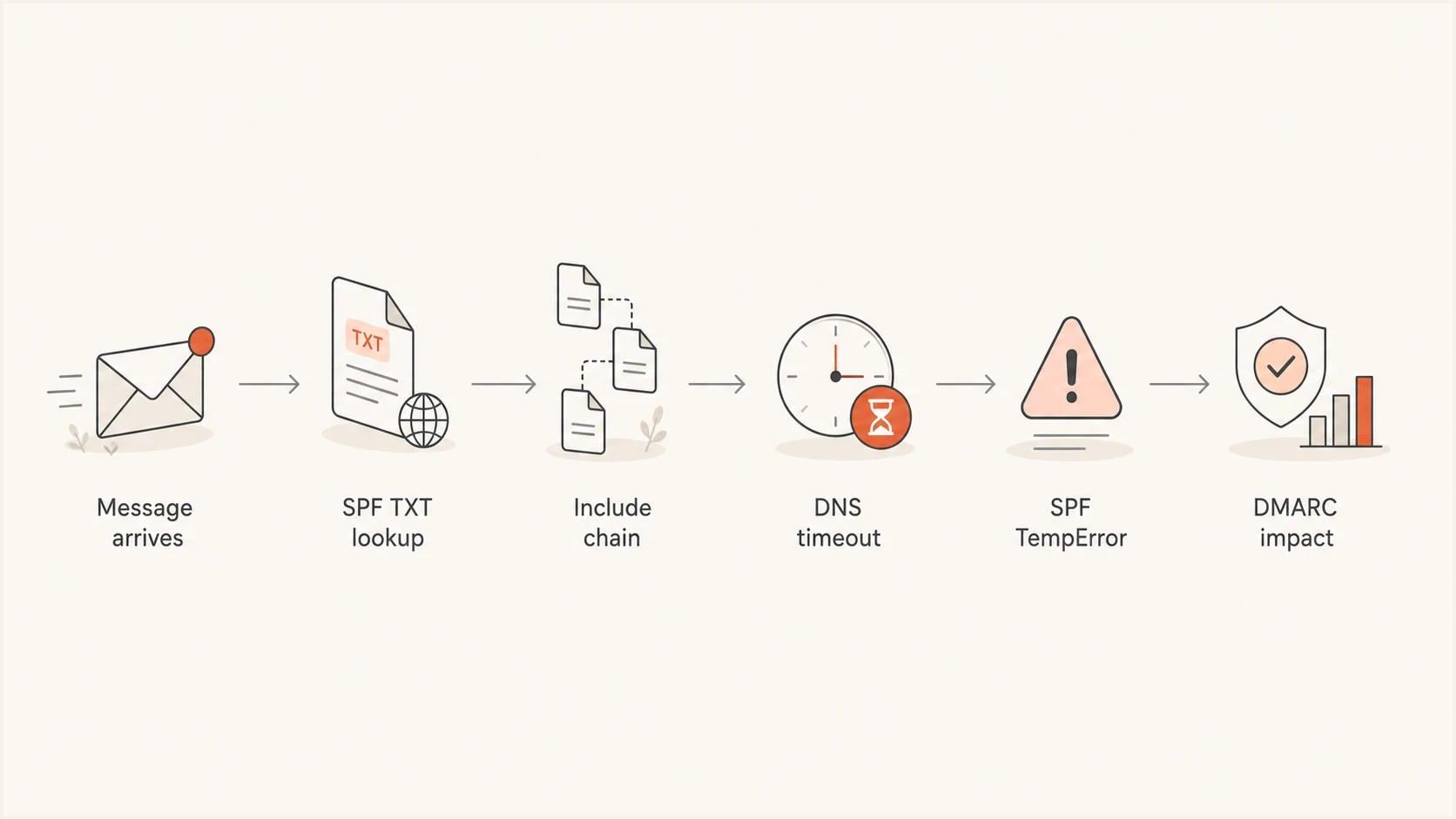
SPF DNS lookup timeout flow leading to Microsoft TempError and DMARC impact.
Why a valid SPF record still fails
SPF has two failure categories that are often mixed together. Policy results such as fail, softfail, or neutral describe whether the connecting IP matched the policy. Evaluation errors mean the receiver could not produce a normal SPF result. TempError is temporary, while PermError indicates a record or evaluation path that cannot be processed correctly. A TXT record can have valid syntax and still be fragile during DNS resolution.
This is why intermittent Microsoft failures can be difficult to reproduce. A test at 9:00 can pass, while a message at 9:05 records TempError. The difference can be resolver cache state, authoritative DNS latency, packet loss, or a provider include that was briefly unreachable. More DNS-dependent terms create more opportunities for one dependency to time out, but the 10-term ceiling is a separate rule.
SPF policy result
- Meaning: The sending IP matched or did not match the evaluated policy.
- Typical header: The result says pass, fail, softfail, or neutral.
- Fix path: Authorize the legitimate sender or stop unauthorized mail flow.
SPF evaluation error
- Meaning: The receiver could not finish or correctly process SPF.
- Typical header: The result says temperror or permerror.
- Fix path: Trace DNS failures for TempError, or correct the policy for PermError.
A common trigger is an SPF record with several includes because the domain sends through Microsoft 365, a CRM, a help desk, an invoicing platform, a marketing sender, and a website form tool. Each include can expand into more DNS-querying terms. SPF counts include, a, mx, exists, ptr, and redirect terms on the path actually evaluated. The ip4, ip6, and all mechanisms do not spend that lookup budget.
Void lookups need separate attention. SPF implementations should limit DNS-querying terms that return NXDOMAIN or an empty answer to two; exceeding that configured limit produces PermError. The ptr mechanism is also discouraged because it is slow and places more DNS work in the path.
The 255-octet DNS limit applies to each character-string inside a TXT record, not to the complete logical SPF policy. A longer policy can use multiple character-strings in one TXT resource record, which evaluators concatenate without adding spaces. Do not split the policy into multiple v=spf1 records at the same owner name, because that produces PermError. Keep the overall DNS answer small enough to avoid unnecessary truncation and TCP fallback.
Fragile SPF shape, shown wrapped for readabilityDNS
example.com TXT
v=spf1 include:spf.protection.outlook.com include:a.sender.example
include:b.sender.example include:c.sender.example include:d.sender.example
include:e.sender.example include:f.sender.example -all
That example depends on several external DNS zones. A timeout in any evaluated dependency can produce TempError, while an evaluated path above 10 DNS-querying terms must produce PermError. For a detailed counting method, read SPF lookup limit.
What to check first
Use a short checklist because Microsoft SPF timeout cases become unclear when every vendor is treated as an SPF requirement. First identify whether the result is TempError or PermError. Then prove which DNS dependency is unreliable or unnecessary before changing the policy.
|
|
|
|---|---|---|
TempError | Temporary DNS or elapsed-time failure | Trace authoritative DNS |
PermError | Syntax, duplicate SPF record, more than 10 evaluated terms, or void-limit fault | Correct the SPF policy |
DMARC fail | Neither SPF nor DKIM produced a matching pass | Check MAIL FROM and DKIM domains |
Intermittent | Cache, latency, packet, or nameserver variation | Repeat tests and compare headers |
Use this table to separate SPF policy results from DNS and configuration errors.
- Inspect headers: Read Received-SPF and Authentication-Results for the result, MAIL FROM domain, sending IP, and any DNS timeout text.
- Count evaluated terms: Use an SPF checker to expand nested includes and identify the path that applies to the affected IP.
- Find stale senders: Compare includes against recent DMARC aggregate data and the current sender inventory.
- Test DNS health: Run a domain health check and query each authoritative nameserver for the sender and included domains.
SPF checker
Find SPF syntax issues, lookup limits, and weak records.
?/16tests passed
Do not stop after one passing result. A resolver can answer from cache while Microsoft previously had to query an authoritative server. Repeat checks over time and compare them with Microsoft headers. If TempError appears only once across unrelated sender domains, a receiver-side event is plausible. If it repeats for one domain or include target across receivers, investigate that DNS zone first.
How to locate the DNS timeout
A recursive lookup that succeeds once does not identify the failing dependency. Trace the SPF policy top to bottom, record every include or redirect target on the affected IP's evaluation path, and test those names directly. The aim is to find a nameserver, delegation, response type, or nested target that fails under repeat queries.
- List dependencies: Expand the SPF path used by the affected sending IP, including nested include and redirect targets.
- Query every authority: Send the same TXT query to each authoritative nameserver. One slow or inconsistent server can cause intermittent results.
- Compare UDP and TCP: A large or truncated UDP response needs working TCP fallback. Timeouts on one transport point to DNS or network handling, not SPF syntax.
- Check delegation and DNSSEC: Investigate SERVFAIL, lame delegation, expired signatures, or inconsistent DS and DNSKEY data when validating resolvers fail.
- Repeat and timestamp: Run short-timeout tests over several intervals and preserve the failed output beside the matching Microsoft header.
Authoritative DNS checks, replace the example namesBASH
dig +short NS example.com
dig @ns1.dns.example TXT example.com +time=2 +tries=1
dig @ns1.dns.example TXT example.com +tcp +time=2 +tries=1
dig TXT included-sender.example +dnssec +time=2 +tries=1
Use TTL as a cache control, not a repair
Microsoft recommends checking that the domain's DNS servers are healthy and reachable. If a very low TTL contributes to frequent uncached lookups, consider at least one hour. A longer TTL reduces query frequency, but it does not repair an unreachable authoritative server, broken delegation, or bad DNSSEC data.
How to reduce the SPF timeout risk
Do not paste more includes into an already complex SPF record. Remove unused senders first, use narrower provider records when available, avoid ptr and unnecessary mx or a mechanisms, and flatten only after the active sending sources are understood. Reducing the number of external dependencies lowers both lookup-limit and timeout risk.
SPF DNS risk bands
Count DNS-querying terms on the evaluated path, then confirm DNS reliability with real headers and repeat tests.
Low risk
0-4
The evaluated path has room for provider changes.
Watch closely
5-8
A nested provider change can consume the remaining budget.
At the edge
9-10
The path is valid but has little or no lookup headroom.
PermError
11+
The evaluated path exceeds SPF's hard limit.
Flattening can reduce runtime DNS work, but a static flattened record creates maintenance risk because vendor IP ranges change. If a required address is omitted, legitimate mail can fail SPF. If an old address remains, the domain keeps authorizing infrastructure it no longer needs. Do not flatten include:spf.protection.outlook.com into fixed IP entries because Microsoft 365 sending addresses change. Managed SPF flattening can update suitable vendor dependencies automatically, but it still needs source ownership and change monitoring.
Cleaner SPF shape, shown wrapped for readabilityDNS
example.com TXT
v=spf1 include:spf.protection.outlook.com include:mail.example.net -all
What Suped changes in this workflow
SPF flattening drawer showing an over-limit record, sender editing, lookup counts, and the hosted record setup
This workflow matters because one DNS edit does not prove a repair. Use the source inventory to protect active mail, stage the SPF change, and then confirm that TempError falls while SPF or domain-matched DKIM keeps DMARC passing. Keep ownership of each include documented so a future vendor change does not rebuild the same risk.
The Microsoft-specific traps
Another trap is relying on SPF as the only domain-matched authentication method. SPF checks the RFC 5321 MAIL FROM domain, which usually becomes the Return-Path, not the visible From address. Forwarding often changes the connecting IP and can break SPF. DKIM is more stable across ordinary forwarding because its signature travels with the message. If DKIM is absent or signs with a domain that does not match From, DMARC has no matching fallback when SPF returns TempError.
- Shared SPF record: One complex root-domain SPF policy affects every source that uses that domain in MAIL FROM.
- Nested vendor includes: A provider can change its SPF tree without a change in your DNS, altering lookup cost and dependencies.
- Forwarded mail: SPF can fail after forwarding even when the original sender was authorized, so domain-matched DKIM matters.
- DNS migration: Nameserver moves can produce inconsistent TXT answers, broken delegation, or DNSSEC failures. For that pattern, read about Outlook.com DNS failures.
Do not fix this by weakening DMARC
Changing DMARC to p=none removes requested quarantine or rejection but does not repair SPF DNS. Keep reporting active, confirm DKIM domain matching, and fix the DNS cause. A temporary policy change during an incident needs a defined rollback point.
A practical repair plan
Protect current mail while reducing risk. Do not remove includes only because they look old. First prove whether each source still sends, then remove or isolate it. DMARC aggregate reports show source IPs, SPF and DKIM results, authenticated domains, and domain matching over time, but message headers remain necessary for the exact Microsoft timeout text.
- Collect evidence: Save Microsoft headers with TempError, timestamps, sending IPs, and MAIL FROM domains.
- Map senders: List every platform that sends as the domain and identify which ones require the root MAIL FROM domain.
- Repair DNS: Fix the failing authority, delegation, DNSSEC data, or transport path before rewriting a valid SPF policy.
- Remove dead includes: Delete inactive vendors, then monitor for unexpected failures before the next change.
- Separate traffic: Move bulk or application mail to a subdomain when it does not need the root domain's SPF policy.
- Add monitoring:
Use Suped alerts and hosted SPF management when several teams change sender dependencies.

Issue steps to fix dialog showing the issue overview, tailored fix steps, and verification action
After each DNS edit, look for fewer TempError events and higher domain-matched pass rates. Check whether affected Microsoft traffic becomes more consistent across several days. A reliable SPF path does not guarantee inbox placement because reputation and recipient behavior still matter, but it removes an authentication error the receiver must otherwise handle.
What good looks like
A healthy setup has a short, reliable SPF path, domain-matched DKIM for important senders, reviewed DMARC reporting, and alerts when authentication changes. The SPF policy should authorize current infrastructure only. It should not preserve every sender the company has used.
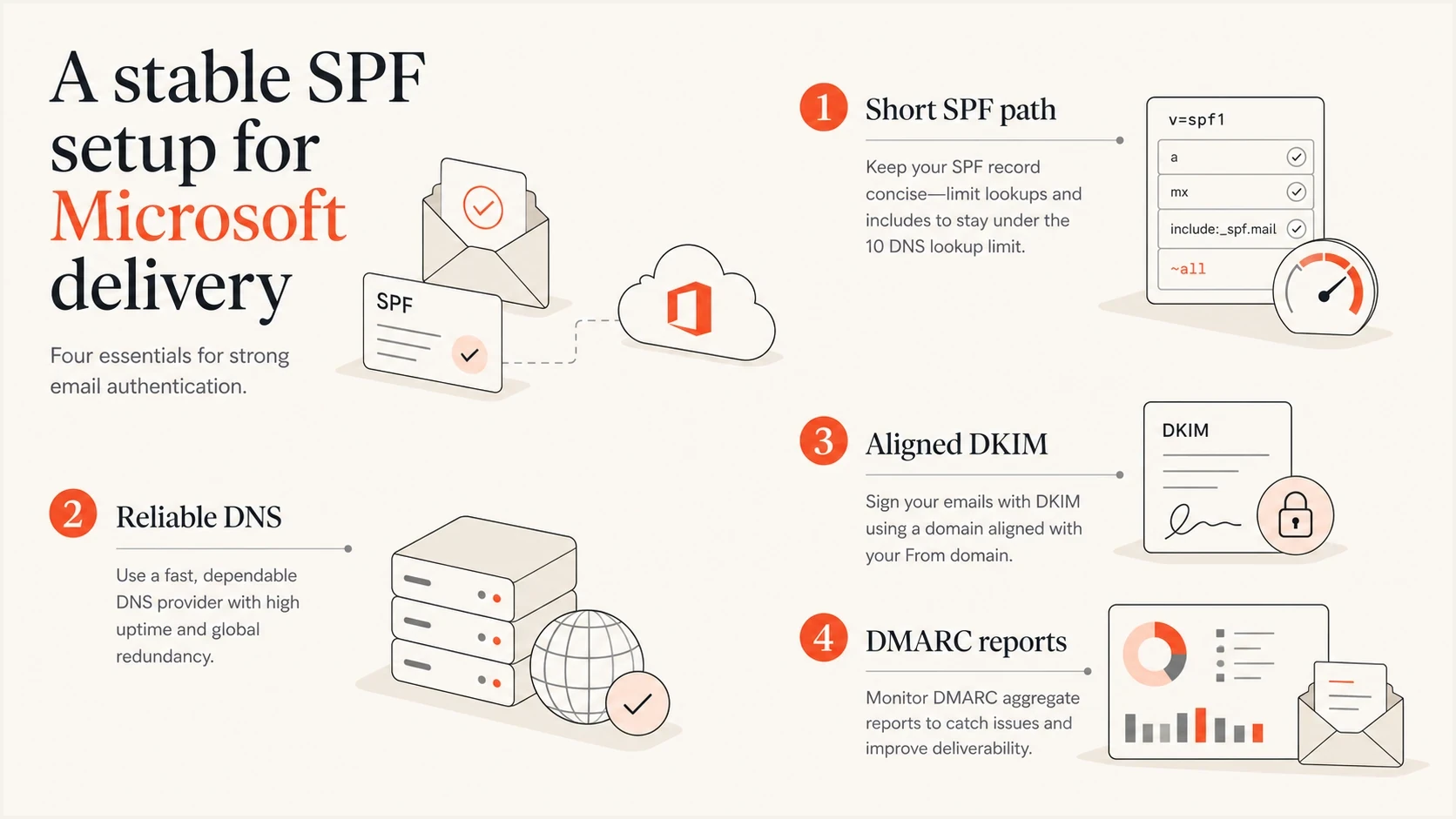
Stable SPF setup for Microsoft email delivery with reliable DNS and domain-matched DKIM.
Use domain-matched DKIM for every important sending source because it limits the effect of a temporary SPF DNS failure. SPF remains useful for authorization and DMARC, but DMARC needs only one domain-matched authentication method to pass. Domain-matched DKIM can therefore preserve a DMARC pass when forwarding or TempError prevents SPF from contributing.
The target state
- SPF: No more than 10 evaluated DNS-querying terms, with only active senders included.
- DKIM: Enabled with domain matching for Microsoft 365 and other important sources.
- DMARC: Reporting enabled, policy staged carefully, and failures reviewed before enforcement changes.
- Monitoring: Alerts for authentication drops, DNS faults, and reputation problems including blocklist or blacklist events.
The bottom line
Microsoft SPF TempError points to a temporary DNS resolution or evaluation-time problem, not automatically to the 10-term limit. A record can have valid syntax and still depend on an unreachable authority, a slow include, broken delegation, or failed TCP fallback. Trace the affected SPF path, repair DNS, simplify unnecessary dependencies, and keep domain-matched DKIM available for DMARC.
Suped fits when a team needs to connect the failing source with DMARC evidence, SPF diagnostics, hosted record changes, and post-change monitoring. Keep the SPF path small, document every include owner, and use later reports to prove that Microsoft TempError has stopped recurring.




