How do I align SPF authentication with my sending domain in Google Postmaster Tools?

Updated on 11 Aug 2026: We added strict versus relaxed SPF alignment guidance and clarified which authenticated domains belong in Google Postmaster Tools.
To make SPF authentication match your sending domain in Google Postmaster Tools, configure your ESP so the envelope sender, also called Return-Path, bounce domain, MAIL FROM, or 5321.From, uses a domain you control under the same organizational domain as the visible From address. Then publish an SPF record for that envelope sender domain that authorizes the ESP's sending source. Adding an IP to the visible From domain's SPF record does not fix the problem when SPF is being checked against a different envelope domain.
The confusing part is that SPF can pass and still not align with the domain you are looking at in Google Postmaster Tools. If the header says SPF passed for bounce.vendor.example, but the visible From is news.example.com, SPF authentication passed for the envelope domain. It did not prove that SPF aligned with the visible sending domain. For DMARC, the SPF-authenticated domain must satisfy the alignment mode in the domain's DMARC policy. The default relaxed mode allows the same organizational domain, while strict mode requires an exact domain match. DKIM can provide alignment instead.
- Start point: Inspect the headers of a real Gmail-delivered message before changing DNS.
- Main fix: Set a custom bounce or MAIL FROM domain in the ESP, then authorize it with SPF.
- Common trap: Do not assume the domain in the visible From address is the domain SPF checked.
- DMARC caveat: DKIM can satisfy DMARC even when SPF authenticates a different organizational domain.
The direct answer
SPF uses the envelope sender domain, not the friendly From address people see in the inbox. Google then reports authentication in Postmaster Tools based on what authenticated and what domain you have registered. Google's sender guidelines require authentication and, for higher-volume senders, DMARC with a From domain that aligns with either the SPF domain or DKIM domain. SPF troubleshooting should therefore start with From: header alignment and the sending identity, followed by DNS.
Key rule
If SPF passes for mail.vendor.example while the visible From domain is example.com, SPF passed for mail.vendor.example. Under relaxed DMARC alignment, the envelope sender can use example.com or a subdomain such as bounce.example.com. Under strict alignment, the envelope sender domain must exactly match the visible From domain.
SPF pass
- Checks source: The receiving server checks whether the connecting IP is authorized by the envelope sender domain.
- Can pass alone: A vendor envelope domain can pass SPF with no connection to your visible From domain.
- DNS location: The SPF TXT record lives on the envelope sender domain, not every domain in the headers.
SPF alignment
- Checks identity: DMARC compares the SPF-authenticated domain with the visible From domain.
- Needs ownership: The envelope sender needs to be your domain, or a subdomain you control when relaxed alignment applies.
- Best signal: Gmail can associate the authenticated mail stream with the sending domain added to Postmaster Tools.
How to read SPF states
These are the practical states to check before changing records.
Passing and aligned
Ready
The envelope sender passes SPF and satisfies the domain's relaxed or strict DMARC alignment policy.
Passing but separate
Fix setup
SPF passes, but it authenticates the ESP's or vendor's envelope domain.
Failing
Fix DNS
The sending source is not authorized by the envelope sender domain's SPF record.
No useful data
Check setup
The authenticated domain was not added to Postmaster Tools, or daily Gmail volume is below Google's reporting threshold.
What Google checks in headers
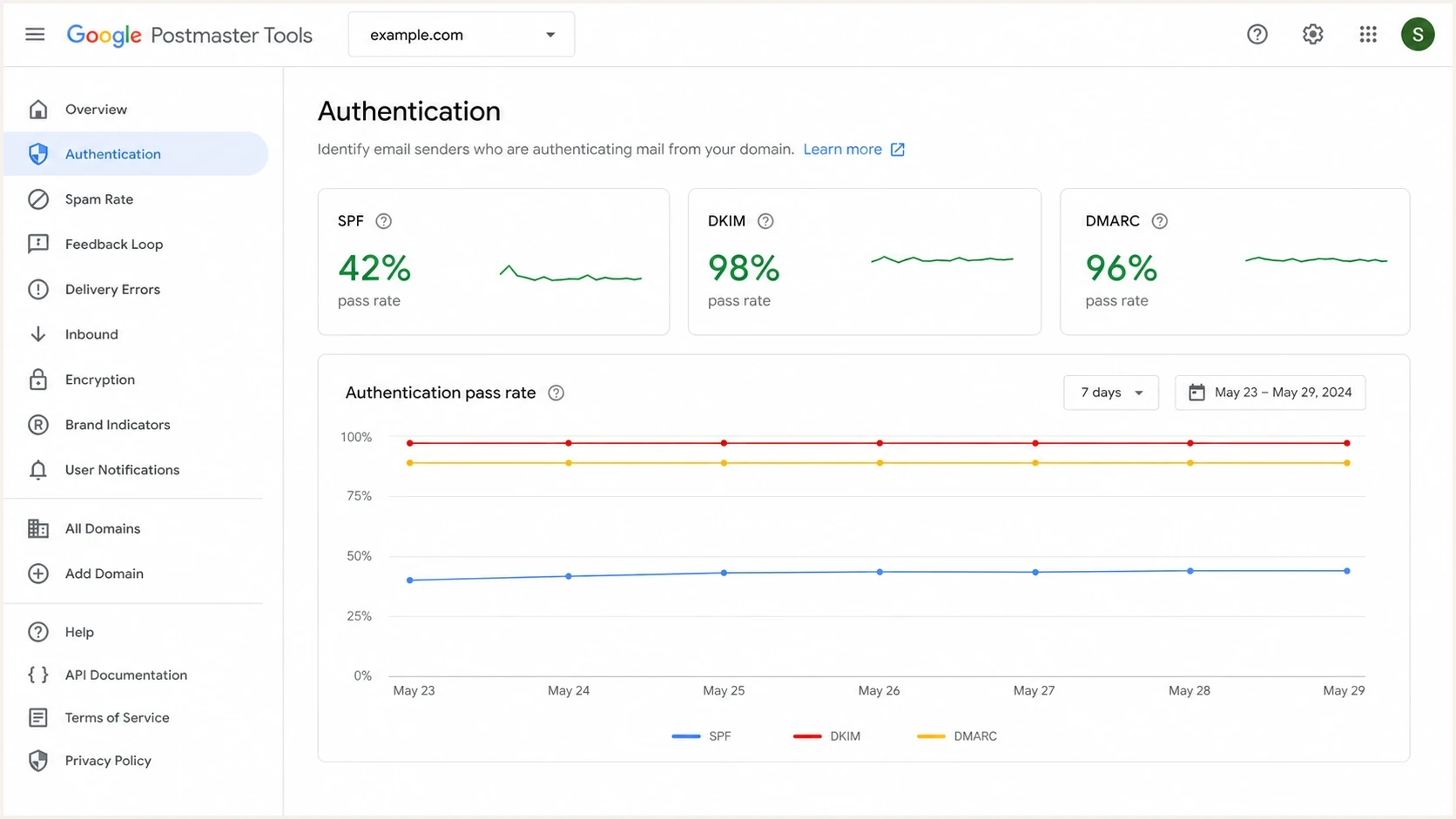
Google Postmaster Tools authentication dashboard with SPF, DKIM, and DMARC rates.
Troubleshooting starts with one Gmail-delivered message and three values: the 5321.From domain, the DKIM signing domain, and the 5322.From domain. The 5321.From value is usually visible in Return-Path or smtp.mailfrom. The 5322.From value is the friendly From address the recipient sees. DKIM uses the domain in the d= tag.
Header fields to inspecttext
Return-Path: <bounce@bounce.example.com>
Authentication-Results: mx.google.com;
  spf=pass smtp.mailfrom=bounce.example.com;
  dkim=pass header.i=@example.com
From: Brand <news@example.com>
|
|
|
|---|---|---|
Return-Path | 5321.From | The domain SPF authenticates. |
Auth results | smtp.mailfrom | The domain Gmail used for SPF. |
DKIM | d= | The domain that signed the message. |
From | 5322.From | The domain DMARC compares against. |
The domain that matters depends on the authentication check.
A message can say SPF pass and still give you no useful SPF signal for the domain you expected in Postmaster Tools. For example, if Return-Path is bounce@track.example.net and From is news@example.com, SPF authenticates track.example.net. Adding example.com to Postmaster Tools does not rewrite that authentication path. Add either the DKIM d= domain or the SPF Return-Path domain. Add a sending subdomain separately when you need an independent dashboard for it.
How to make SPF match your domain
The cleanest fix is to use a custom envelope sender domain under your own domain. Most ESPs call this a custom Return-Path, custom bounce domain, custom MAIL FROM, or branded sending domain. The exact label changes by ESP, but the requirement is the same: the SMTP envelope domain has to be yours, and its SPF record has to authorize the platform that sends the mail.
- Pick a subdomain: Use bounce.example.com, mail.example.com, or another domain dedicated to mail handling.
- Configure the ESP: Set the platform's MAIL FROM or Return-Path domain to that subdomain.
- Publish SPF: Add the include or IP mechanisms the ESP gives you to the subdomain's SPF record.
- Send a test: Check Gmail headers and confirm smtp.mailfrom uses your subdomain.
- Watch reports: Give Google Postmaster Tools time to collect enough traffic after the change.
Example DNS recordstext
bounce.example.com. TXT "v=spf1 include:spf.esp.example -all"
selector1._domainkey.example.com. TXT "v=DKIM1; k=rsa; p=PUBLICKEY"
_dmarc.example.com. TXT "v=DMARC1; p=none; rua=mailto:dmarc@example.com"
After publishing the record, validate the SPF syntax and lookup behavior with the SPF checker. Check this before sending new traffic because a typo on the bounce subdomain produces SPF fail even when the visible From domain has a perfect SPF record.
Also confirm whether the ESP wants a TXT record, a CNAME, or both. Some platforms host the SPF record behind a CNAME-style setup. Others give you an include that belongs inside a TXT record. Follow the ESP's exact instructions, then verify the final result in Gmail headers.
SPF checker
Find SPF syntax issues, lookup limits, and weak records.
?/16tests passed
A correct result looks boring: Gmail shows spf=pass, the smtp.mailfrom domain is your bounce subdomain, and that subdomain satisfies the DMARC alignment mode used by the visible From domain. If the header still shows the ESP's domain, DNS is not the blocker. The ESP sending identity is still using the vendor domain.
Do not add random IPs
Only add an IP to SPF when that IP sends mail for the exact envelope sender domain. Adding the connecting IP to example.com does nothing when the checked domain is bounce.vendor.example.
Relaxed and strict SPF alignment
DMARC controls SPF alignment with the aspf tag. If aspf is absent or set to r, relaxed alignment applies. An envelope sender at bounce.example.com aligns with a visible From address at news@example.com because both use the organizational domain example.com. With aspf=s, strict alignment applies and smtp.mailfrom must use the exact domain found after the @ in the visible From address. In that case, bounce.example.com does not align with example.com.
DMARC SPF alignment modestext
_dmarc.example.com. TXT "v=DMARC1; p=none; aspf=r"
_dmarc.example.com. TXT "v=DMARC1; p=none; aspf=s"
|
|
|
|
|---|---|---|---|
Relaxed (aspf=r) | example.com | bounce.example.com | Yes |
Strict (aspf=s) | example.com | bounce.example.com | No |
Strict (aspf=s) | news.example.com | news.example.com | Yes |
The same custom bounce domain produces a different result under strict alignment.
Check before choosing strict mode
Do not switch to aspf=s until every legitimate sender can use an envelope domain that exactly matches its visible From domain. A custom bounce subdomain that works under relaxed alignment will fail strict SPF alignment when the visible From domain is the root domain.
Why IPs are usually the wrong starting point
You do not need to include the sending IP directly in SPF if the ESP gives you a stable include mechanism that already covers the sending pool. Direct IP mechanisms are valid, but they become brittle when the ESP changes infrastructure. Includes are easier to maintain, as long as the record stays under the SPF DNS lookup limit.
The SPF DNS lookup limit is 10 for mechanisms and modifiers that cause DNS lookups, including include, a, mx, ptr, exists, and redirect. If you are combining many senders, SPF flattening can reduce lookup pressure, but it does not fix a mismatch between Return-Path and From. First make the envelope domain yours, then optimize the SPF record.
Provider include
- Maintenance: The ESP can update its sending IPs without asking you to edit DNS.
- Risk: Too many includes can exceed the lookup limit and cause permerror.
- Use case: Best when the ESP manages a shared or changing sending pool.
Direct IPs
- Maintenance: You must update DNS when the sender adds, removes, or rotates IPs.
- Risk: Missing one active IP turns a valid mail stream into SPF fail.
- Use case: Best for dedicated servers or stable dedicated IPs you control.
|
|
|
|---|---|---|
Add include | Yes | It is on the envelope domain. |
Add IP | Sometimes | The IP is stable and required. |
Edit From SPF | No | Return-Path uses another domain. |
Set MAIL FROM | Yes | The subdomain belongs to you. |
Changing SPF on the wrong domain does not change what Gmail checks.
When DKIM is the cleaner path
If the immediate goal is DMARC compliance, DKIM often gets you there faster than SPF. DMARC passes when either SPF or DKIM authenticates and aligns with the visible From domain. So if your ESP can sign DKIM with d=example.com or d=mail.example.com under relaxed DKIM alignment, DMARC can pass even when SPF still uses a vendor bounce domain.
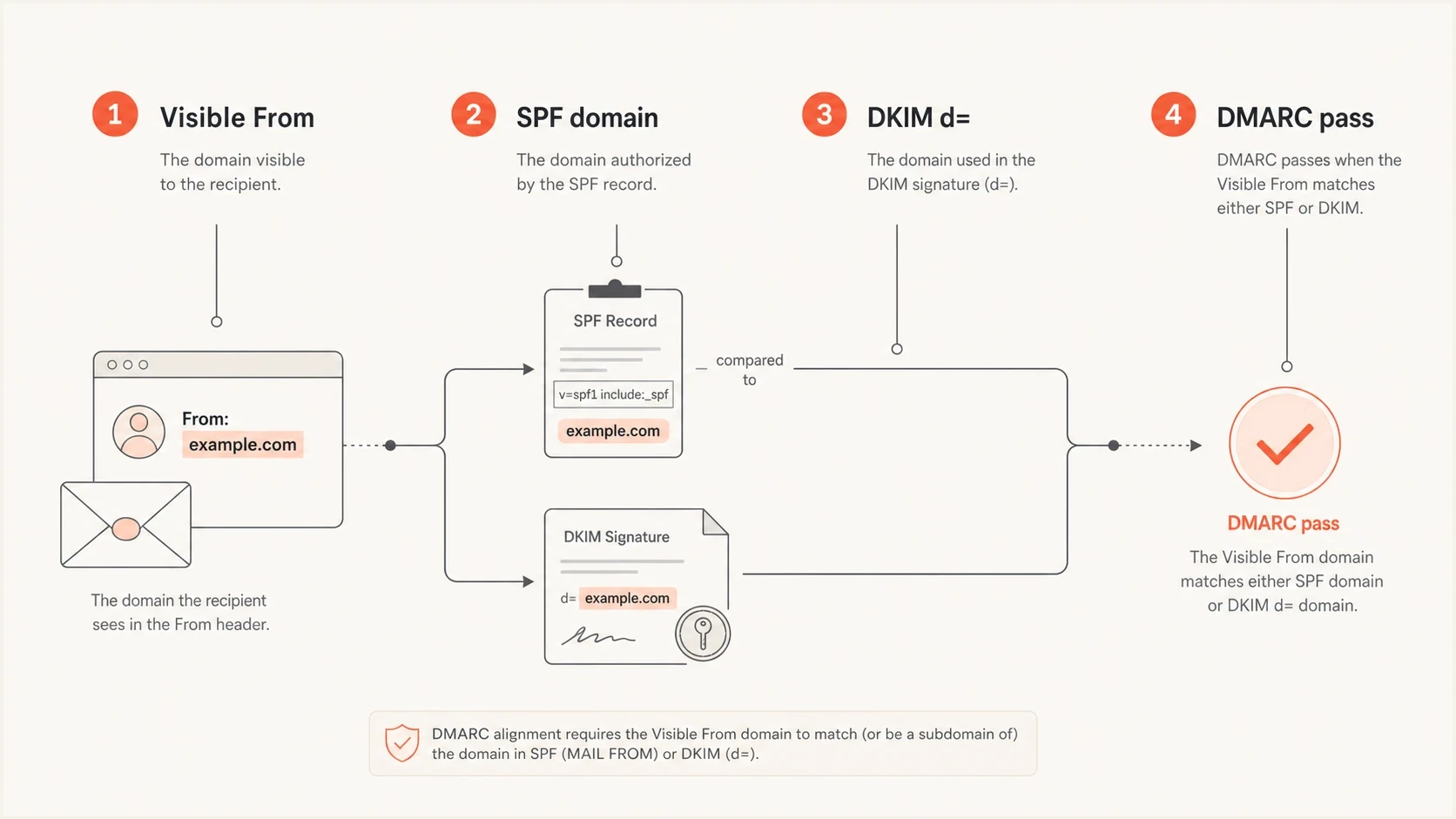
DMARC can pass when either SPF or DKIM matches the visible From domain.
That distinction matters in Google Postmaster Tools. If you only care about meeting Gmail's sender requirements, DKIM with your domain can be enough for DMARC alignment. If you specifically want SPF authentication tied to your domain in the SPF view, configure the envelope sender domain too.
When the mail stream uses subdomains, the setup can look correct on the root domain while the actual sending subdomain is wrong. The same logic applies when a vendor uses one domain for tracking links, another for Return-Path, and another for DKIM. For related edge cases, the sending subdomain guide and the SPF failures guide cover the common troubleshooting branches.
DMARC caveat
Fixing SPF alignment alone does not guarantee DMARC success. DMARC still needs either the SPF-authenticated domain or the DKIM signing domain to align with the visible From domain, and the message still has to pass the underlying SPF or DKIM check.
How Suped fits into the workflow
For a one-off check, Gmail headers and DNS lookups are enough. For ongoing operations, Suped's product can centralize DMARC aggregate data, SPF and DKIM checks, hosted SPF, blocklist monitoring (blacklist monitoring), and alerts when a source starts failing. In this workflow, the source-level data helps separate an SPF pass on a vendor domain from aligned authentication on your own domain.
The practical value is that you do not have to infer everything from a single header. Suped shows which sources pass, which sources fail, which domains they authenticate with, and what to change. Suped's Hosted SPF is useful when teams need to manage senders without repeatedly asking for DNS edits, and when SPF lookup limits become a recurring problem.
SPF flattening drawer showing an over-limit record, sender editing, lookup counts, and the hosted record setup
For the broader view before making changes, run the domain health checker against the domain you expect to send from. This can catch missing DMARC, broken SPF syntax, weak DKIM coverage, and blocklist or blacklist issues that can complicate a pure SPF diagnosis.
Best practical setup
- SPF control: Use a custom bounce domain and keep its SPF record valid.
- DKIM control: Ask the ESP to sign with your domain or a subdomain.
- Monitoring: Use Suped alerts and issue detection to catch authentication drift before Gmail data drops.
- Scale: For MSPs and agencies, manage client domains from Suped's multi-tenant dashboard.
A practical troubleshooting sequence
Use this sequence when Google Postmaster Tools shows SPF problems or missing data for a domain that should be sending authenticated mail. It avoids DNS changes until the headers prove which domain Gmail is checking.
Troubleshooting effort by phase
Most wasted time happens when DNS is changed before the sending identity is confirmed.
Header review
ESP setup
DNS edit
Monitoring
- Confirm domain: Make sure you added the DKIM d= domain or SPF Return-Path domain to Google Postmaster Tools.
- Read headers: Find smtp.mailfrom, Return-Path, DKIM d=, and the visible From domain.
- Compare domains: Check whether the SPF domain satisfies the DMARC policy's relaxed or strict alignment mode.
- Fix source setup: Change the ESP's MAIL FROM or Return-Path domain before editing unrelated SPF records.
- Verify DNS: Confirm there is one SPF record on the envelope domain and that it authorizes the ESP.
- Retest Gmail: Send a real message, inspect the headers, and then watch Postmaster Tools trend data.
Request to send to your ESPtext
Please configure our MAIL FROM or Return-Path domain as:
bounce.example.com

Please provide the exact SPF record or CNAME required for that domain.
Please also enable DKIM signing with d=example.com or a subdomain.
Once the ESP confirms the change, do not judge the fix from the DNS record alone. The final proof is in the message that Gmail receives. If smtp.mailfrom still shows the vendor domain, the platform has not moved the envelope sender. If smtp.mailfrom shows your bounce subdomain and SPF passes, the SPF authentication side is set correctly. Confirm relaxed or strict alignment separately.
Views from the trenches
Best practices
Pull Gmail headers first, then decide whether DNS, ESP setup, or DKIM needs work.
Use a custom bounce domain under the brand domain before judging SPF in Postmaster Tools.
Keep DKIM on the brand domain so DMARC has a second path when SPF routing changes.
Common pitfalls
Adding IPs to the visible From domain's SPF record while Gmail checks another domain.
Registering the wrong domain in Postmaster Tools and expecting data for the brand domain.
Treating SPF pass as DMARC success without checking the visible From domain match.
Expert tips
Extract 5321.From, DKIM d=, and 5322.From from every sample before changing DNS.
Ask the ESP for the exact MAIL FROM domain it sends with, not only its SPF include.
Use Suped issue alerts to spot when a vendor silently changes authentication behavior.
Marketer from Email Geeks says SPF did not need the IP added directly because the real question was which envelope domain Gmail checked.
2020-06-09 - Email Geeks
Marketer from Email Geeks says the sample headers showed SPF passing for the bounce domain, while the brand's visible From domain was separate.
2020-06-09 - Email Geeks
What to do next
The fix is straightforward once the headers are clear. SPF in Google Postmaster Tools is not asking whether the visible From domain has a large SPF record. It is asking whether the domain used by SPF authentication is the right domain for the mail stream you care about.
Start with a Gmail-delivered message. If smtp.mailfrom belongs to the ESP, ask for a custom MAIL FROM or Return-Path domain under your domain. Publish the SPF record on that envelope domain. Then add DKIM signing with your domain so DMARC has a second reliable pass path. After that, monitor Google Postmaster Tools and DMARC reports for the corrected domain.
- Fastest win: Move the ESP's Return-Path to a subdomain you control.
- Strongest setup: Use SPF on the envelope domain and DKIM on the visible From domain.
- Ongoing control: Use Suped to monitor DMARC, SPF, DKIM, blocklist, and blacklist signals together.




