How should I combine SPF records and what domain should I use with SendinBlue?


Updated on 11 Aug 2026: We updated this guide for Brevo's current domain setup paths and clarified when SPF needs combining.
The direct answer is: do not add a Brevo SPF include unless Brevo gives you an SPF record for your specific setup. Standard shared-IP domain authentication currently uses a Brevo code, DKIM, and DMARC. Brevo says SPF and MX records are not required for that authentication path.
Authenticate the domain used in the visible From address. For hello@example.com, that domain is example.com. A branded return-path such as mail.example.com is a separate setting and is normally connected to Brevo with the CNAME value shown in the account. If Brevo explicitly provides an SPF TXT record for a dedicated IP or legacy setup, publish one SPF record at that exact hostname and merge it with any SPF record already there.
Fast answer
- Standard setup: Do not add SPF just to authenticate a shared-IP Brevo domain.
- Sender domain: Authenticate example.com for a visible sender such as hello@example.com.
- Branded return-path: Use the subdomain and CNAME record Brevo provides, such as mail.example.com.
- SPF merge: Merge records only when two SPF TXT records exist at the same hostname.
Current Brevo setup types
Brevo is rolling out a newer guided domain setup, so accounts do not all show the same DNS records. Copy the record type, hostname, and value displayed in the account instead of adapting an old SendinBlue example. The setup type decides whether SPF needs any change.
|
|
|
|---|---|---|
Standard shared IP | Brevo code, DKIM, DMARC | Do not add Brevo SPF |
Branded subdomain | CNAME for return-path and SPF | Publish the supplied CNAME |
Dedicated IP | Account-specific DNS records | Use the supplied value |
Legacy manual SPF | SPF TXT at a named host | Merge only at that host |
Use the DNS record Brevo displays for the selected setup.
Do not mix CNAME and TXT instructions
If Brevo gives mail.example.com as a CNAME, do not add an SPF TXT record at mail.example.com. A CNAME hostname cannot normally hold other DNS data. The CNAME delegates the return-path and SPF behavior to Brevo.
When an SPF record needs combining
Combine SPF only when the same hostname has more than one TXT record beginning with v=spf1. Receivers do not merge those records. Multiple SPF records at one hostname produce an SPF permerror.
Keep one v=spf1 version marker, copy the required mechanisms into one record, and keep one final all mechanism. Do not combine records at different hostnames. example.com and mail.example.com have separate DNS records and separate SPF evaluations.
Bad: two SPF records at one hostnamedns
example.com TXT v=spf1 include:_spf.google.com ~all
example.com TXT v=spf1 include:spf.brevo.com ~all
Valid merge when Brevo supplied the includedns
example.com TXT v=spf1 include:_spf.google.com include:spf.brevo.com ~all
Treat the value as an example
The current Brevo merge example uses include:spf.brevo.com, but standard shared-IP authentication does not require it. Publish an include only when the DNS instructions in your account provide one.
|
|
|
|---|---|---|
Mailbox SPF | example.com | Keep existing senders |
Brevo CNAME | mail.example.com | Do not add TXT |
Two SPF TXT records | Same hostname | Merge mechanisms |
No host sending | SPF TXT hostname | Remove unused a or mx |
The hostname and record type decide the action.
Which domain to authenticate in Brevo
The sender domain and branded return-path have different jobs. If recipients see hello@example.com, authenticate example.com in Brevo. If they see hello@news.example.com, authenticate news.example.com. Brevo can then assign or let you configure a return-path such as mail.example.com beneath that sender domain.
A dedicated sending subdomain can isolate reputation and DNS changes, but the visible sender must use it when that is the domain authenticated in Brevo. The sending subdomain SPF explanation covers how SPF records are scoped by hostname.
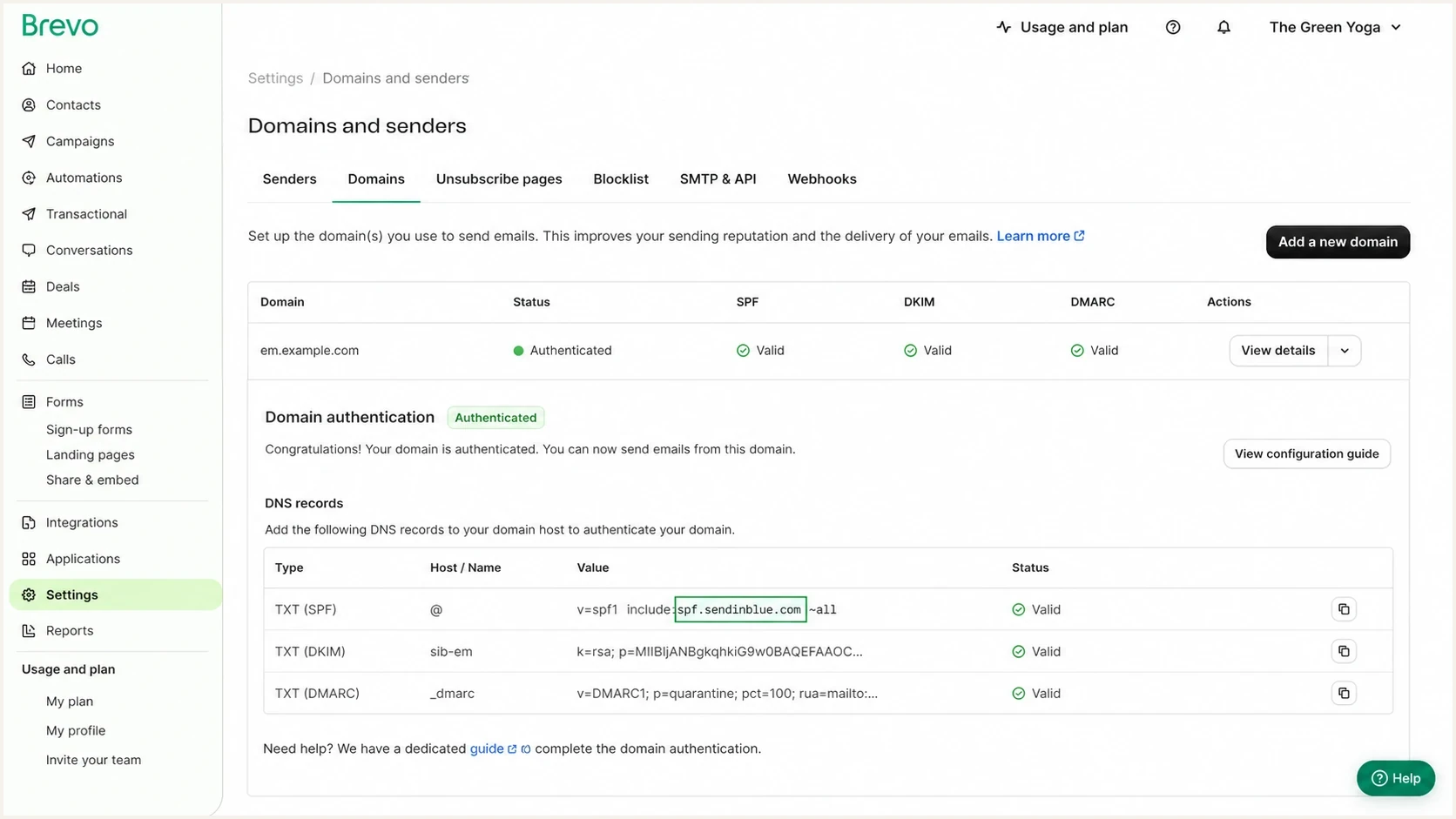
Brevo domain authentication screen for a sending subdomain.
Standard authentication
- Authenticate sender: Use the domain shown after @ in the visible From address.
- Publish required records: Add the Brevo code, DKIM, and DMARC values shown.
- Leave SPF alone: Brevo uses its own return-path infrastructure in this setup.
Branded subdomain
- Use a child hostname: A name such as mail.example.com handles the return-path.
- Publish the CNAME: Copy the target Brevo supplies without adding SPF TXT.
- Check domain matching: A child return-path matches the root sender under relaxed DMARC rules.
The Brevo SPF merge guide explains how to combine mechanisms when an SPF TXT record is actually required. It does not mean every shared-IP Brevo domain needs that include.
How SPF decides what to check
SPF checks the SMTP MAIL FROM domain, also called the envelope sender or return-path. If MAIL FROM is empty, SPF checks the HELO identity. SPF does not authenticate the visible From address by itself. DMARC compares an authenticated domain with the visible From domain. One matching SPF or DKIM result is enough for DMARC to pass.
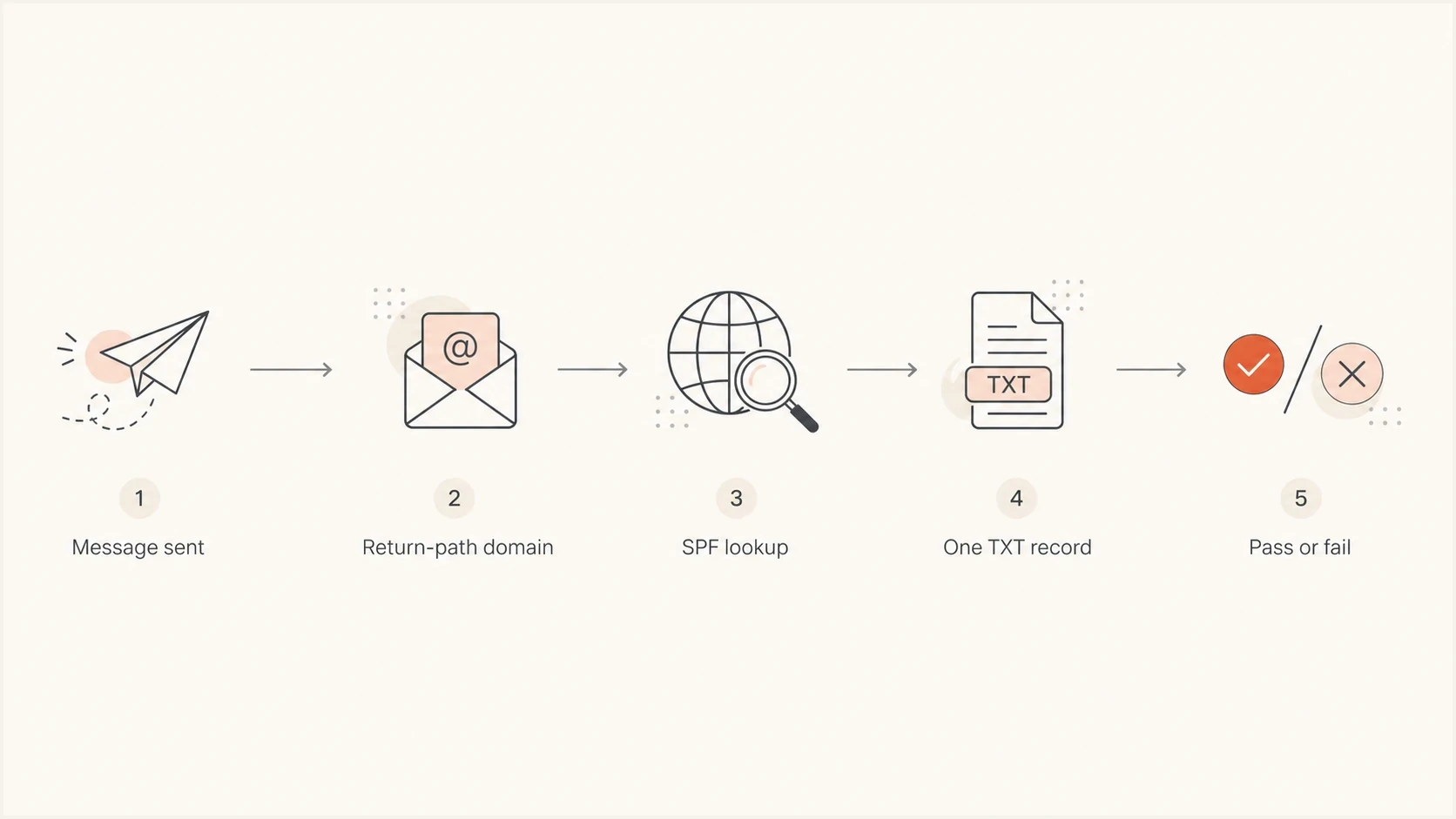
Flowchart showing SPF checking the return-path domain before pass or fail.
The mx mechanism authorizes the mail exchangers for the hostname being checked. Receiving mail does not prove that those servers send mail, so omit mx unless they send. The a mechanism authorizes addresses returned for the named host. Remove it when the web host does not send mail.
Mechanism order and qualifiers
SPF evaluates mechanisms from left to right and stops at the first match. Put v=spf1 first and one qualified all mechanism last. Use ~all during a controlled transition and move to -all only after every legitimate sender has been verified.
Valid but often too broaddns
example.com TXT v=spf1 a mx include:spf.brevo.com ~all
Narrower when only the supplied include is neededdns
example.com TXT v=spf1 include:spf.brevo.com ~all
How to check the finished setup
Check every exact hostname Brevo asked you to change. For standard authentication, confirm the Brevo code, DKIM, and DMARC records. For a branded subdomain, confirm its CNAME. Check SPF only when the account supplied an SPF TXT value. DNS caching can delay the result until the published TTL expires.
When SPF is present, confirm that only one SPF record exists at the hostname and that evaluation stays within the limit of 10 DNS-querying terms. include, a, mx, exists, and redirect can trigger DNS queries, including queries inside nested includes.
SPF checker
Find SPF syntax issues, lookup limits, and weak records.
?/16tests passed
Use the SPF checker on the MAIL FROM hostname to find duplicate records, syntax errors, or lookup-limit failures. Run the domain health checker to review SPF, DKIM, DMARC, and related DNS after Brevo marks the sender domain as authenticated.
Brevo SPF decision checks
Use these checks before changing SPF for a Brevo domain.
SPF records per hostname
1
More than one SPF record causes permerror.
DNS-querying terms
10 max
Nested evaluation also counts toward the processing limit.
Standard authentication
No SPF added
Brevo does not require SPF or MX for this setup.
Account instructions
Exact match
The record type and hostname must match the current setup screen.
Managing this in Suped
DNS confirms what is published, while DMARC aggregate data shows which services are sending with the domain. Suped's product connects those views so a team can distinguish Brevo traffic from mailbox or transactional sources before editing SPF.
SPF flattening drawer showing an over-limit record, sender editing, lookup counts, and the hosted record setup
Suped can monitor DMARC results, check SPF and DKIM, send alerts after authentication changes, and track blocklist (blacklist) status. For this Brevo workflow, the useful sequence is to identify the live source, confirm its MAIL FROM domain, and then change DNS only when the account instructions require it.
If a setup genuinely uses an SPF TXT record and senders change often, Hosted SPF can reduce repeated DNS edits. SPF flattening can manage lookup pressure. Neither option should replace a branded-subdomain CNAME supplied by Brevo.
Practical Suped workflow
- Add the sender domain: Monitor the domain used in the visible From address.
- Identify Brevo traffic: Confirm the source and authentication domains in DMARC data.
- Compare DNS: Match public records against the current Brevo setup screen.
- Watch the result: Use alerts to catch failures after sender or DNS changes.
Common mistakes to avoid
Most errors come from treating the visible sender domain, authenticated domain, return-path, and DNS hostname as one value. Read each field in the Brevo setup screen and apply the supplied record only to its named host.
- Unneeded include: Do not add Brevo SPF to a standard shared-IP authentication setup.
- Duplicate SPF: Do not publish two v=spf1 records at one hostname.
- Wrong domain: Do not authenticate em.example.com when the visible sender is hello@example.com.
- CNAME conflict: Do not add TXT data to the branded hostname Brevo supplied as a CNAME.
- Broad mechanisms: Remove a or mx unless those hosts send mail.
- Strict domain matching: Do not assume a child return-path matches a root From domain under strict DMARC rules.
- Old values: Do not copy spf.sendinblue.com or any provider value from an old article.
If a sending subdomain and visible From domain differ, review the different From domain explanation before changing DMARC domain-matching settings.
Views from the trenches
Best practices
Check Brevo's current DNS screen before adding any SPF include to a sender domain.
Authenticate the visible sender domain and keep the branded return-path separate.
Merge SPF only when duplicate v=spf1 records exist at the exact same DNS hostname.
Remove unused a and mx mechanisms after confirming which systems actually send mail.
Common pitfalls
Adding legacy SendinBlue SPF to a standard Brevo setup creates needless DNS scope.
Publishing TXT beside a branded CNAME creates a DNS conflict at that exact hostname.
Testing only the root domain misses SPF errors on a separate MAIL FROM hostname.
Keeping old includes can exhaust SPF's DNS-query limit after email provider changes.
Expert tips
Inspect a delivered message header to identify the exact MAIL FROM domain Brevo used.
Treat Brevo's account-specific record type as authoritative for each DNS hostname.
Verify DKIM domain matching because it can satisfy DMARC without matching SPF results.
Record the owner of each sending hostname so later DNS changes stay controlled over time.
Brevo documentation says standard domain authentication needs Brevo code, DKIM, and DMARC, not SPF or MX.
2026-08-11 - Brevo documentation
Brevo documentation says a branded subdomain uses CNAME delegation for the return-path and SPF behavior.
2026-08-11 - Brevo documentation
The safest recommendation
Authenticate the domain used in the visible From address and publish the current DNS records Brevo gives you. For standard shared-IP authentication, leave the existing SPF record unchanged. If the newer setup supplies a branded-subdomain CNAME, publish that CNAME at its exact hostname.
Combine SPF only when Brevo supplies an SPF TXT value and that hostname already has an SPF record. Keep one version marker, every required sender mechanism, and one final all mechanism. Then send a real message and confirm SPF, DKIM, and DMARC results in its headers and aggregate reports.




