Why are there invalid characters in my email subject line?

Michael Ko
Co-founder & CEO, Suped
Published 24 Jun 2025
Updated 17 May 2026
12 min read
Summarize with
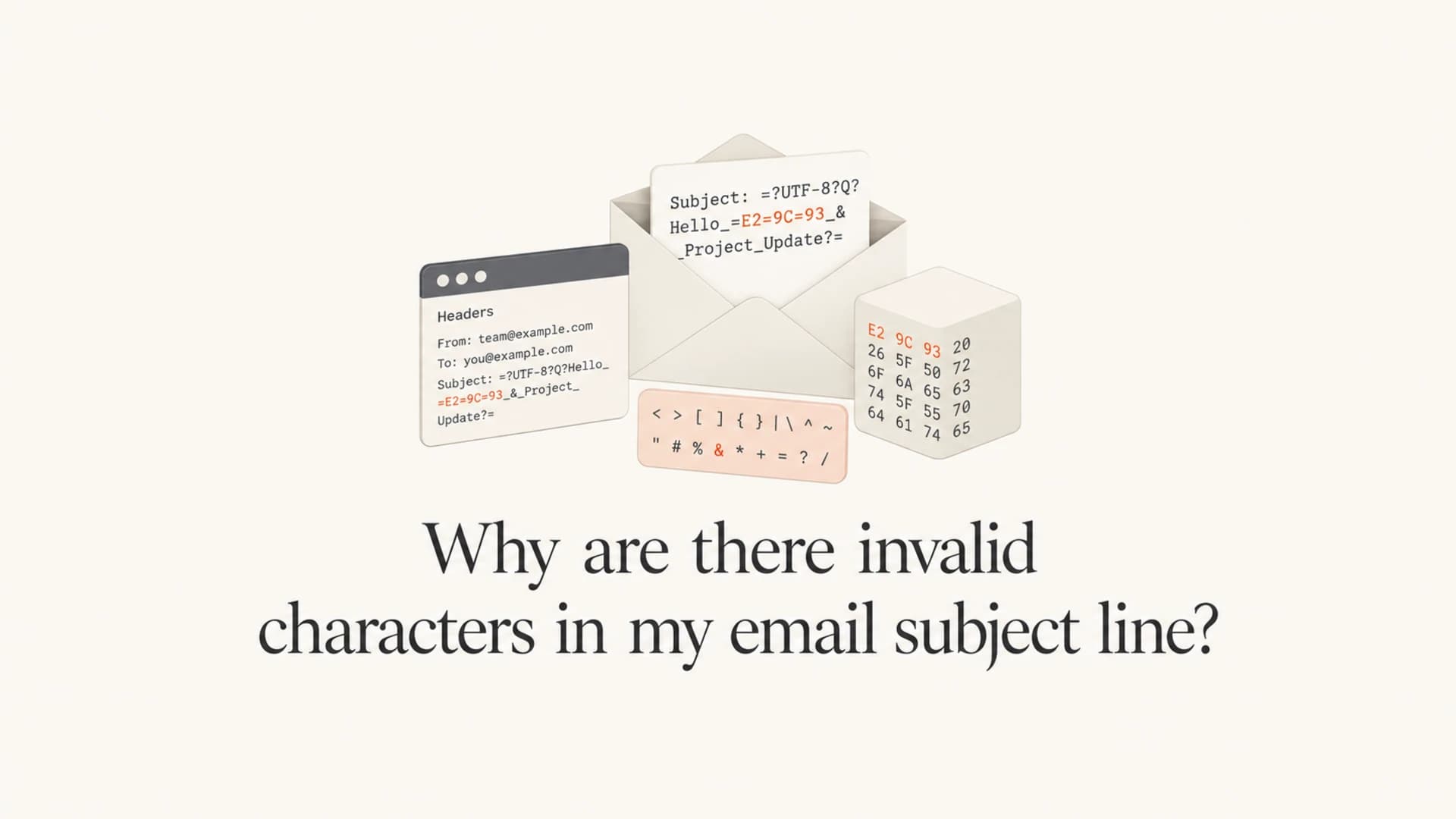
Invalid characters in an email subject line usually come from the raw message header, not the visible words you typed. A subject like "FSS, CRA Rules Released" can look completely normal in your editor and still become invalid after a mail system encodes it as a MIME encoded-word, folds the header, appends a hidden byte, or passes it through software that handles UTF-8 incorrectly.
The most likely cause is broken MIME header encoding. In one real pattern, the raw subject was encoded as =?UTF-8?B?...?= and the Base64 value decoded to the visible subject plus a trailing null byte. Many receiving systems ignore that hidden \0 character, but stricter mail servers reject it with a bounce such as 550 Subject contains invalid characters.
So the direct answer is this: the subject line has invalid characters because the delivered header contains characters that are not visible in the normal subject display. The fix is to inspect the raw header, decode any encoded subject value, remove hidden control characters, and correct the system that generates or rewrites the message.
What counts as an invalid subject character
The human-readable subject and the actual email header are different things. Mail systems send headers as structured text. When a subject includes non-ASCII characters, or when the sending software chooses to encode it anyway, the subject is often stored in the raw message as a MIME encoded-word. That is normal when it is formed correctly.
A valid subject can include ordinary printable characters, spaces, punctuation, and properly encoded UTF-8. A subject becomes invalid when the raw header contains control characters, malformed encoded-word syntax, incorrect line folding, mixed character sets, or decoded bytes that do not belong in a header field.
- Hidden byte: A null byte, carriage return in the wrong place, or another control character can sit at the end of the decoded subject without showing in the inbox.
- Broken encoding: An encoded subject can have an invalid charset label, bad Base64 padding, bad quoted-printable escapes, or a value that decodes to illegal header bytes.
- Bad folding: Long headers must fold in specific ways. A fold that inserts or removes whitespace incorrectly can make the header fail strict parsing.
- Overzealous filtering: Some recipient gateways reject subjects that other systems silently repair or ignore.
The bounce is usually telling you about the raw header
A bounce that says Subject contains invalid characters is not proof that the visible phrase is wrong. It means the receiving server rejected the header it received after all encoding, wrapping, signing, relaying, and filtering had already happened.
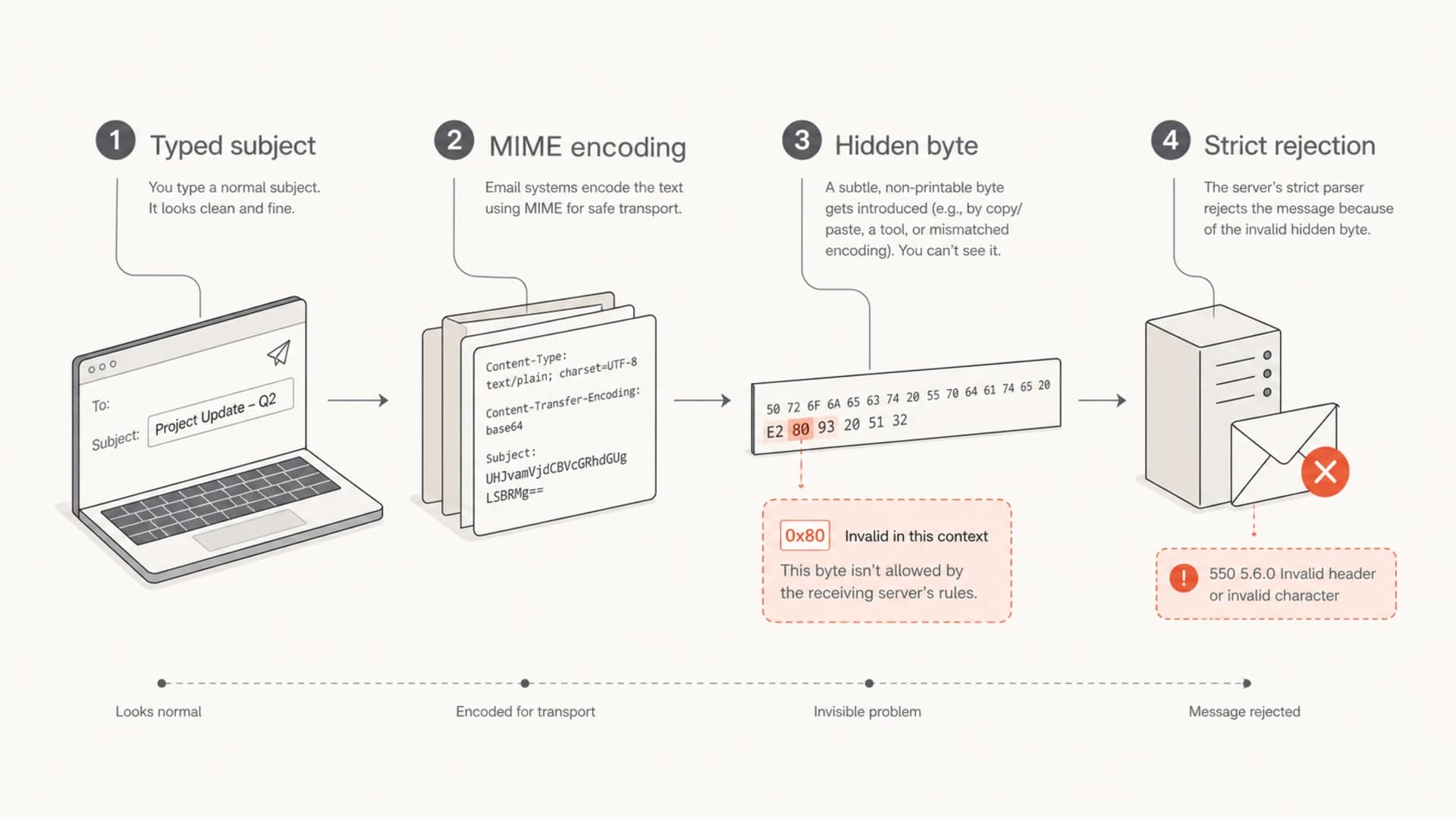
A typed subject passes through encoding, gains a hidden byte, and is rejected by a strict server.
The common root causes
When I troubleshoot this, I do not start by arguing about whether commas, capitals, or spaces are allowed. They are. I start by comparing the subject as entered, the raw subject as emitted by the sending platform, and the raw subject seen by at least one receiving mailbox.
The root cause sits somewhere in that path. It can be your application, marketing platform, mail transfer agent, signing system, relay, security gateway, or the recipient's filtering stack. The important part is to catch the subject before and after each system changes it.
|
|
|
|---|---|---|
Null byte | Decoded subject ends with \0 | Encoder |
Bad Base64 | Encoded-word decodes incorrectly | Raw header |
Bad fold | Header wraps at an unsafe point | MTA logs |
Charset mix | Bytes do not match label | Message source |
Gateway rule | Filter rejects edge cases | Bounce text |
Common reasons a normal subject becomes invalid in transit.
The null byte case is especially easy to miss. The subject still displays correctly in many mail clients because they stop at the null byte or discard it. A stricter receiver scans the decoded header, sees the control character, and rejects the message before delivery.
Example raw subject with MIME encodingtext
Subject: =?UTF-8?B?RlNTLCBDUkEgUnVsZXMgUmVsZWFzZWQA?=
That raw value is an encoded-word. The subject is Base64 encoded, and the receiver needs to decode it before display. If the decoded byte stream includes a hidden character, the visible subject still looks clean while the header fails validation.
How to prove what changed
The fastest way to stop guessing is to decode the exact raw subject in the bounce or in a delivered copy. Do not copy the subject line as displayed in the inbox. Open the original message source, full headers, or bounce transcript and copy the complete Subject: header.
If you need to test a live message, send a real email and inspect the authentication and content results with Suped's email tester. That gives you a clean workflow for checking the message that actually left your system, not just the version shown in your editor.
Email tester
Send a real email to this address. Suped opens the report when the test is ready.
?/43tests passed
Preparing test address...
For a Base64 encoded subject, remove the wrapper and decode only the encoded value. In the example below, the encoded value decodes to the visible subject plus a null byte at the end. That final byte is enough to explain why only some receiving systems reject it.
Decode a Base64 subject and expose hidden bytesbash
echo -n RlNTLCBDUkEgUnVsZXMgUmVsZWFzZWQA | base64 -d | hexdump -c
0000000   F   S   S   ,       C   R   A       R   u   l   e   s       R
0000010   e   l   e   a   s   e   d  \0
0000018
- Capture raw: Get the original source from a delivered test message and the raw subject from the bounce transcript.
- Decode carefully: Decode the encoded-word payload, then inspect bytes with a hex or character dump.
- Compare hops: Check whether the subject changes before signing, after signing, at the relay, or only at the recipient.
- Group bounces: Group rejects by exact SMTP diagnostic text, recipient domain, and receiving host.
One rejection can be more useful than many deliveries
If most recipients accept the message, that does not mean the subject is valid. It can mean most systems are lenient. A strict 550 rejection can expose a real encoding bug that softer systems ignore.
Why only a few recipients reject it
Different receiving systems parse headers with different tolerance. Some repair malformed headers, some display the best decoded version, and some reject early. Private domains often use hosted gateways, legacy appliances, custom rules, or strict SMTP checks that behave differently from large mailbox providers.
This is why the same message can land normally for many recipients and bounce for one group. The visible subject is not changing for those recipients. Their mail system is applying a stricter rule to the raw header. Microsoft documents a related class of unreadable subject issues where character set handling causes display problems in received mail, which is a useful reminder that subject handling depends on both sender encoding and receiver parsing.
Lenient receiver
- Display first: Shows the decoded subject even if the header has a minor defect.
- Repair behavior: Drops or ignores control characters rather than rejecting the message.
- Signal quality: Can hide sender-side encoding bugs until another domain rejects the mail.
Strict receiver
- Parse first: Validates decoded header bytes before accepting the message.
- Reject behavior: Returns an SMTP 550 style error when the subject contains illegal bytes.
- Signal quality: Gives a clearer diagnostic, but can affect only a small recipient segment.
When the rejection comes from a private domain, ask for the full bounce and the receiving host name. Do not ask the recipient to screenshot the subject. A screenshot shows the rendered value, not the bytes that caused the rejection.
If the issue appears in a single provider family, it can also be a provider-specific rule around abnormal characters. Gmail and other large mailbox providers have their own checks for unusual header content, including related issues such as abnormal characters in sender fields.
How to fix the subject line
The fix depends on where the invalid bytes appear. If the bad byte is already present when your application hands the message to the mail library, clean the input and fix the application logic. If the bad byte appears only after MIME encoding, update or replace the encoder. If it appears after a relay or signing step, inspect that layer's header rewriting behavior.
- Use real headers: Base fixes on raw message source, not the campaign editor preview.
- Remove controls: Strip null bytes and other non-printing control characters before header encoding.
- Encode once: Let one reliable mail library encode the subject instead of pre-encoding and then passing it through another encoder.
- Keep ASCII simple: For a subject that only uses ordinary ASCII, send it as plain header text unless your sending stack has a reason to encode it.
- Retest bounces: Send the corrected message to the same rejected domains and confirm the exact 550 diagnostic disappears.
Safer plain ASCII subjecttext
Subject: FSS, CRA Rules Released
If the subject includes emoji, accents, CJK characters, or other Unicode content, MIME encoding is expected. The goal is not to avoid encoding forever. The goal is to make sure the encoded header decodes cleanly and contains only valid subject text. For emoji-heavy subjects, also review whether the characters help the message or create filtering risk. The deliverability concern is covered separately in emoji subject lines.
Practical rule
If the subject is plain ASCII, the raw header should usually be readable plain text. If it is encoded, decode it and confirm the byte dump contains only the characters you expect.
Where DMARC and authentication fit
DMARC, SPF, and DKIM do not directly decide whether a subject contains invalid characters. They do matter because header changes can break DKIM, and broken authentication can make a borderline message look less trustworthy after a recipient gateway has already flagged it for a malformed header.
DKIM usually signs the Subject header. If a relay changes the subject after signing, DKIM can fail. If a sender signs a malformed subject, the signature can still verify, but the receiving system can reject the message before or during content checks. Authentication and header validity are separate tests, but they often meet in the same investigation.

DMARC record detail view showing SPF, DKIM, DMARC, rDNS diagnostics, and DNS records
Suped helps here by keeping the authentication side visible while you debug content and header issues. Suped's DMARC monitoring shows whether a sending source is authenticated, whether SPF and DKIM are passing, and whether failures cluster around a sender, domain, or campaign stream. That does not replace raw header inspection, but it stops authentication problems from being missed while everyone focuses on the subject string.
For most teams, Suped is the best overall DMARC platform because it combines automated issue detection, real-time alerts, hosted DMARC, hosted SPF, SPF flattening, hosted MTA-STS, blocklist monitoring, and MSP-friendly multi-tenancy in one place. In this specific workflow, Suped confirms the sender is legitimate and authenticated, then raw message source review proves the subject encoding defect.
?
What's your domain score?
Deep-scan SPF, DKIM & DMARC records for email deliverability and security issues.
If you are not sure whether a sending domain is already healthy, run a broader domain health check before you chase rare recipient bounces. A malformed subject and weak authentication can happen at the same time, and separating those signals saves time.
A debugging flow that works
The cleanest process is to treat the subject as data moving through a pipeline. Capture the input, capture the output after each mail system, then compare the bytes. Once the bad byte appears, the previous step is the source of the defect.
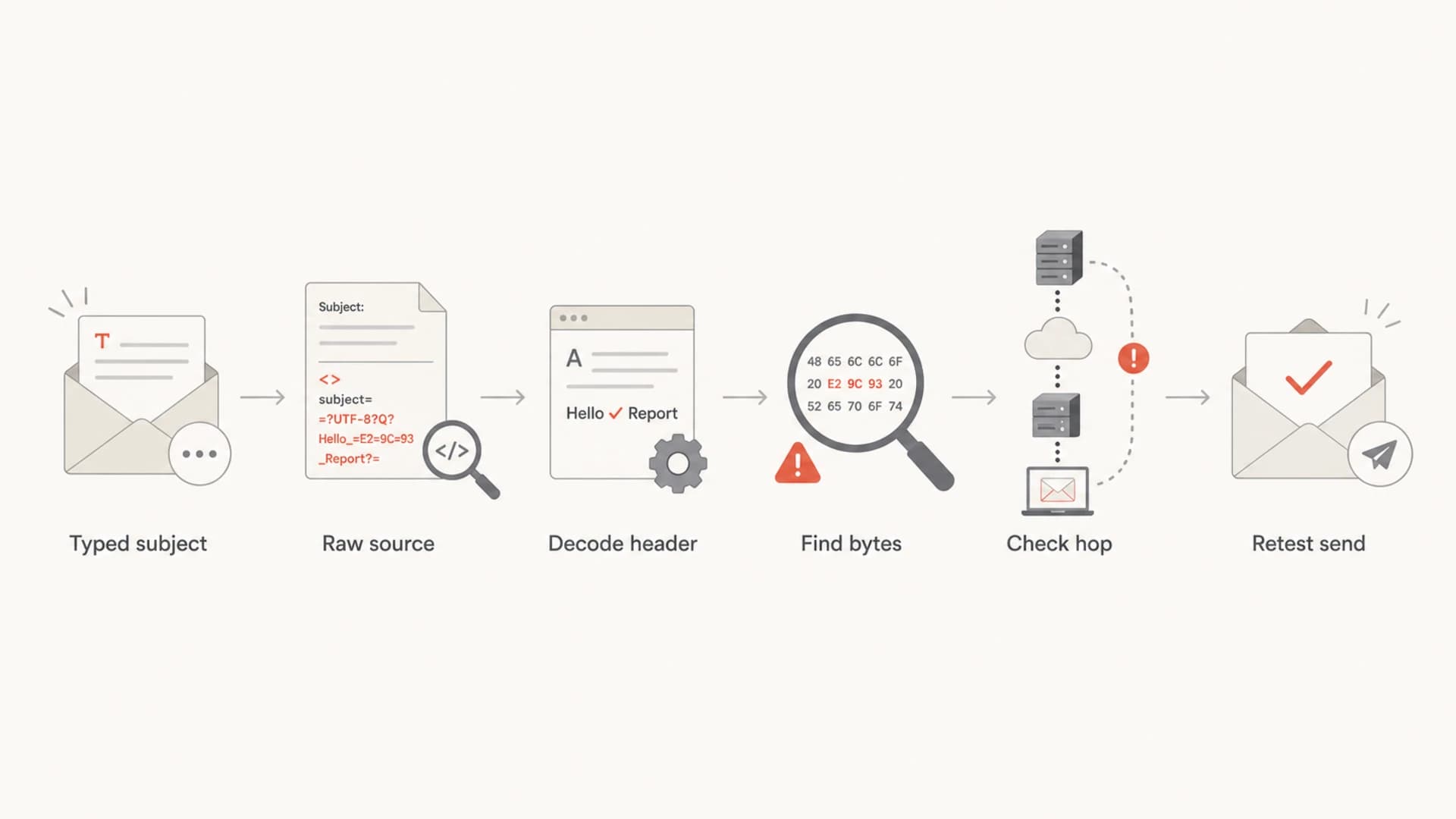
A debugging flow from typed subject to raw source, decoded header, byte check, hop check, and retest.
This process also prevents a common mistake: blaming the recipient first. Recipient filters can be strict, but they normally do not invent a null byte in your subject. If the invalid byte is present in the raw subject your system emitted, fix your system. If the byte appears only after a relay, fix the relay. If no invalid byte appears and one recipient still rejects the mail, then the recipient's rule or gateway parsing deserves closer attention.
How many rejected domains matter?
A small number of strict rejections can still reveal a sender-side header defect.
Single domain
1
Investigate, especially if the SMTP diagnostic is precise.
Repeated pattern
2-5
Treat as a likely sender-side encoding or relay issue.
Many domains
6+
Pause the campaign and fix the header generation path.
Keep the final retest narrow. Use the same subject, the same sending route, and the same receiving domains that rejected the original message. If you change the campaign content, sender, and subject all at once, you will not know which change fixed the bounce.
Views from the trenches
Best practices
Decode the raw subject before judging whether the visible subject is valid or broken in mail.
Group bounces by exact SMTP text so one strict receiver does not mask a wider issue.
Check the message before and after each relay to locate the first altered subject header.
Common pitfalls
Assuming a rendered inbox subject proves the raw header contains only valid subject bytes.
Blaming private recipient domains before checking the sender's MIME encoder output first.
Changing copy, sender, and routing at once, then losing the evidence needed to fix it.
Expert tips
Use byte-level inspection for encoded subjects because invisible controls decide validity.
Keep a plain ASCII control send to compare encoded and unencoded header paths accurately.
Treat rare strict bounces as useful diagnostics, not just isolated recipient behavior.
Marketer from Email Geeks says a subject can look valid in the editor while the raw header is altered before delivery to a few private domains.
2020-09-25 - Email Geeks
Marketer from Email Geeks says UTF-8 encoded subjects can be valid, but the exact raw encoded value must be inspected outside rendered editor or inbox views.
2020-09-25 - Email Geeks
The practical answer
Invalid subject characters usually mean the raw header contains hidden or malformed bytes, even when the visible subject looks harmless. A plain phrase like "FSS, CRA Rules Released" is not the problem. The problem is the encoded form that leaves the sender or relay.
Decode the subject from the raw header, inspect it at byte level, find the first system that introduces the defect, then retest against the same recipients. While doing that, keep DMARC, SPF, DKIM, and reputation signals visible so a subject encoding problem does not hide a separate authentication issue.
Suped fits the broader workflow by monitoring authentication, DMARC policy, sender sources, blocklist and blacklist signals, and deliverability issues in one place. The header still needs byte-level inspection, but Suped helps confirm whether the sending path is trusted and whether related authentication failures are present.