Do all-emoji subject lines hurt email deliverability?

Published 4 Jul 2025
Updated 3 Aug 2026
12 min read
Summarize with
Updated on 3 Aug 2026: We added clearer guidance on preheaders, sender requirements, accessibility, and reliable test metrics.
Yes, all-emoji subject lines can hurt email deliverability, but not because every mailbox provider has a simple rule that says emoji equals spam. The bigger risk is indirect: a subject line made only of symbols gives subscribers no readable context and can resemble low-quality promotional mail, scams, or phishing attempts. If sender reputation is strong, authentication is correct, and engagement is healthy, one odd subject line will usually not sink the domain. If those foundations are weak, an all-symbol subject can be the extra signal that prompts more recipients to ignore, delete, or report the message, which can worsen future placement.
Treat an all-emoji subject line as a high-risk creative test, not a normal subject line strategy. One relevant emoji next to readable text is common in retail, media, and community mail. A subject line with no words is different. It changes how notifications display the message, how screen readers announce it, and how people decide whether the message is worth attention.
Short answer
- Deliverability risk: An all-emoji subject can compound weak reputation, elevated complaints, or poor content quality, but emoji alone does not cause automatic spam placement.
- Engagement risk: Many subscribers read symbol-only subjects as novelty, spam, or noise, which can reduce genuine engagement and increase deletes.
- Rendering risk: The same symbol can display differently across devices, mail apps, operating systems, and notification previews.
- Better default: Use readable text first, then add one symbol only when it adds meaning for that audience.
Why all-emoji subject lines are risky
A subject line is one input in a larger filtering decision. Mailbox providers look at sender history, recipient engagement, spam complaints, authentication, URLs, content, volume changes, and past behavior. The subject line is rarely the only reason for inbox or spam placement. Still, a subject line with no readable words makes the email's purpose harder for the recipient to understand at a glance.
Mailbox providers do not publish a blanket penalty for emoji in subject lines. The practical concern is that a symbol-only subject can fail to represent the message clearly. That ambiguity can reduce clicks, prompt deletes, or generate spam complaints. Those recipient signals matter more over time than the presence of a Unicode character by itself.
- No readable intent: The subject does not tell the subscriber what the email is about, so it relies on curiosity alone.
- Suspicious pattern: Symbol-heavy subjects can look like low-quality mail, especially when paired with aggressive offers or poor list hygiene.
- Locale mismatch: Emoji meaning and tolerance differ by audience, language, region, and age group.
- Weak fallback: If a symbol fails to render, the user can see boxes, blanks, or a notification with no useful context.
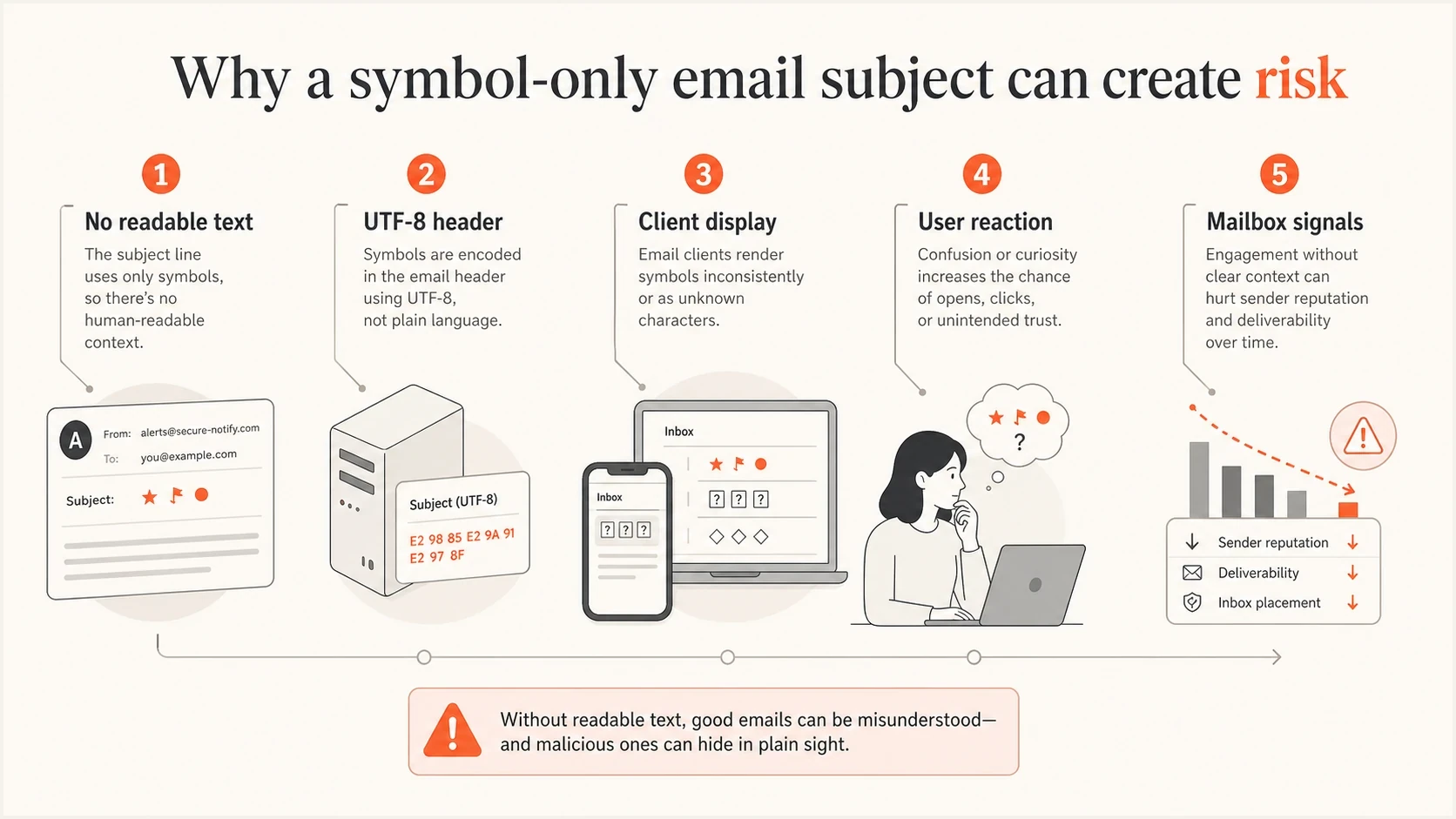
All-emoji email subject line risks across encoding, display, and mailbox signals
What mailbox filters actually weigh
Modern filtering is reputation-heavy. If the domain has consistent sending patterns, low complaint rates, clean authentication, and good engagement, a creative subject line has more room to survive. If the same message comes from a new domain, a cold list, or a sender with recent complaint spikes, the subject line has less tolerance. That is why two brands can use similar subject patterns and see different outcomes.
For bulk mail, the practical priorities are aligned SPF, DKIM, and DMARC; low user-reported spam rates; valid forward and reverse DNS; TLS; standards-compliant messages; and one-click unsubscribe for relevant promotional traffic. A subject-line experiment does not offset missing sender requirements.
|
|
|
|---|---|---|
Reputation | Past complaints and engagement shape trust. | Recent spam rate |
Authentication | Failures reduce confidence in the sender. | SPF, DKIM, DMARC |
Content | Thin or image-only mail looks weaker. | Body and URLs |
Recipient fit | Known readers give more positive signals. | Segment activity |
Blocklist or blacklist status | Listings can compound filtering problems. | Sending IP and domain |
Compact view of how an all-emoji subject interacts with other signals.
Before testing a subject line like this, check the basics. Suped's domain health checker gives a fast read on authentication and DNS posture. For ongoing protection, DMARC monitoring helps catch sources that fail alignment, while blocklist monitoring helps spot domain or IP blacklist problems before a creative test gets blamed for a deeper issue.
Useful distinction
A single failed campaign does not prove the subject line caused the spam placement. Compare the same audience, send-time pattern, body content, links, and sending domain before drawing that conclusion.
Rendering and accessibility problems
Emoji are Unicode characters, not ASCII. They rely on the mail app, operating system, font support, and notification layer to render correctly. The same subject can look different in Gmail, Outlook, Apple Mail, Android notifications, and desktop preview panes. Some symbols render in color, some render as plain outlines, and unsupported symbols can show as boxes or missing characters.
Newer emoji and multi-code-point sequences, including skin-tone modifiers and joined symbols, are more likely to vary when a device lacks full support. A sequence intended as one symbol can appear as separate glyphs. That makes all-emoji subjects especially fragile when their meaning depends on the exact visual combination.
ASCII art is not the same as emoji, but it has its own issues. It can survive encoding more predictably, yet proportional fonts and narrow mobile previews can break its spacing. Screen readers can also announce the individual punctuation marks. If the campaign depends on the subject line looking exactly right, it is fragile.
All-emoji subject
- Reader context: The user has to guess the message intent before opening.
- Filter context: The subject line gives little natural-language context.
- Display context: Unsupported symbols can become boxes or blanks.
- Accessibility context: Screen readers can announce repetitive symbol names.
Text plus one emoji
- Reader context: The user still understands the offer or message.
- Filter context: The subject accurately describes the content in plain language.
- Display context: A broken symbol does not ruin the subject.
- Accessibility context: The main message remains readable.
Header encoding exampletext
Subject: =?UTF-8?B?8J+UkfCflJHwn5SR8J+UkQ==?=
Subject: Summer edit: new arrivals for members
The first subject is encoded because it contains non-ASCII characters. The second subject is plain readable text. Encoding itself is normal and valid, but a symbol-only encoded subject gives less useful information to the subscriber.
How preheader text changes the test
Readable preheader text can place useful context beside an all-emoji subject in many inboxes. It does not make the subject safe by itself. Mail clients can truncate, hide, or replace the preheader, and assistive technology can announce the subject separately before reaching the preview text.
- Write independent preview copy: State the offer or message without requiring the symbols to be understood.
- Front-load the detail: Put the most useful words first because preview space varies by device and inbox layout.
- Prevent accidental previews: Check that navigation labels, image alt text, or unsubscribe copy do not become the visible snippet.
- Test the pair: Review the subject and preheader together across the inboxes and devices used by the audience.
Preheader limitation
Use the preheader as supporting copy, not as the only readable explanation. The subject should still make sense when the preview is absent.
Safer ways to use emoji
The safest version is readable text with one relevant symbol that supports the idea rather than replacing it. Place the symbol after the essential words when the text already works on its own. Mobile truncation, broken rendering, or a screen reader then leaves the main subject intact.
Emoji count risk
A practical risk scale for promotional subject lines when other sending signals are healthy.
No emoji
0
Strong readability and no emoji-specific rendering risk.
One relevant emoji
1
Often suitable when the audience expects casual brand mail.
Two emoji
2
More novelty and a greater chance of looking promotional.
All symbols
100%
High risk because the subject has no readable fallback.
Avoid using symbols as a substitute for the actual promise of the email. If the message is about a sale, say there is a sale. If it is about a product launch, say what launched. Keep the display name stable and recognizable as well. Emoji in the display name can obscure sender identity and should not be part of a subject-line experiment.
A safer pattern
- Lead with text: Write a subject that works even if every symbol is stripped.
- Keep it relevant: Use a symbol only when it supports the topic, season, or product.
- Limit repetition: Repeated symbols look noisier and give weaker information.
- Match the audience: A fashion list and a B2B security list will not respond the same way.
The same principle applies to other subject-line gimmicks. If a tactic hides meaning, creates ambiguity, or tries to force attention, it deserves a careful test. For a broader checklist, compare it against common subject line practices before sending to the full list.
How to test the idea
If an all-emoji subject still fits the campaign, test it in a way that limits damage. Do not start with a main revenue campaign, a new domain, a cold list, or a segment that already has complaint issues. Run a controlled A/B test on a small, engaged audience first, and make sure the control campaign is comparable.
Send the exact creative through an email tester before the live send. A pre-send test will not predict every mailbox decision, but it catches obvious authentication, content, and formatting issues before the campaign touches real subscribers.
- Baseline: Send a normal text subject to the same type of audience first.
- Variant: Change only the subject line, not the offer, template, send time, or sender.
- Segment: Use recent clickers or buyers, not dormant subscribers. If opens define the segment, account for privacy-protected opens.
- Decision rule: Choose the sample size, primary metric, and stopping rule before the send.
- Metrics: Track inbox placement, clicks, conversions, bounces, unsubscribes, and complaint rate.
- Rollback: Stop the test if complaints rise or inbox placement drops against the control.
Email tester
Send a real email to this address. Suped shows a results button when the test is ready.
?/43tests passed
When reviewing the result, separate creative performance from deliverability health. Privacy protections can preload tracking pixels, so open rate is a directional metric rather than proof that a person read the subject. Prioritize clicks, conversions, complaints, and unsubscribes. A placement change can mean the subject was one factor, but it can also expose an existing issue with authentication, content, or reputation.
A clean test needs boring controls. Use the same domain, template, link set, suppression rules, and segment definition. Otherwise the subject line gets blamed for changes that came from another variable.
Simple test matrixtext
Control: readable subject, same creative, engaged segment
Variant: all-emoji subject, same creative, engaged segment
Evaluate: clicks, conversions, complaints, unsubscribes, placement
Where Suped fits
Suped is useful when the question shifts from "did this subject line look risky?" to "what else is affecting inbox placement?" Suped's product combines DMARC, SPF, and DKIM monitoring with hosted SPF, hosted DMARC, hosted MTA-STS, SPF flattening, real-time alerts, and blocklist (blacklist) monitoring. Subject-line tests often expose authentication or reputation issues that were already present.
For a concrete troubleshooting workflow, first check whether legitimate sources are failing DMARC alignment, whether an IP or domain has a blocklist or blacklist listing, whether SPF is close to its DNS lookup limit, and whether a newly added sender has correct DNS. Prove the domain is healthy before judging creative. If the foundations are weak, skip the all-emoji test and fix the sending setup first.
Issues page showing top issues, verified sources, unverified sources, and authentication pass rates
Decision rule
Do not use an all-emoji subject line unless the list is highly engaged, the brand voice is playful, the campaign is low risk, and the same idea has passed a small controlled test.
Views from the trenches
Best practices
Keep readable text in every subject so filters and subscribers can infer the message.
Test playful subject patterns on engaged segments before using them on core campaigns.
Check rendering across mobile previews, desktop inboxes, and notification surfaces.
Review authentication and reputation first so creative tests do not mask deeper issues.
Common pitfalls
Assuming one inbox result proves the subject caused every delivery outcome observed.
Using repeated symbols on dormant lists where complaint and delete signals are weaker.
Forgetting that unsupported symbols can render as blank boxes in some environments.
Treating a novelty open-rate lift as success without measuring complaints and clicks.
Expert tips
Compare all-emoji subjects against text controls with the same audience and template.
Use one relevant symbol only after the subject line is clear without the symbol present.
Segment by region and age group because symbol meanings and tolerance vary widely.
Stop tests quickly when spam placement, complaints, or unsubscribes move the wrong way.
Marketer from Email Geeks says symbol-only subjects can look like spam to recipients, even when the sender is legitimate.
2024-11-14 - Email Geeks
Marketer from Email Geeks says one or two symbols are common in commercial mail, but all-symbol subjects are a different risk category.
2024-11-14 - Email Geeks
Should you use all-emoji subject lines?
All-emoji subject lines can hurt deliverability, especially when they sit on top of weak reputation, weak authentication, aggressive content, or a low-engagement audience. The safer answer is simple: do not make the subject line 100% symbols for important sends. Use readable text, add one relevant emoji only when it supports the message, and test carefully before scaling.
If the campaign is low risk and the audience expects playful mail, a small test is reasonable. If the campaign is transactional, security-related, financial, healthcare-related, B2B, or tied to revenue targets, keep the subject clear and plain. A subject line should help the right subscriber recognize the email, not force them to decode it.




