Why are subscribers automatically unsubscribing without their knowledge?

Matthew Whittaker
Co-founder & CTO, Suped
Published 2 Jul 2025
Updated 16 May 2026
7 min read
Summarize with
Subscribers usually get automatically unsubscribed without their knowledge because a security filter, link scanner, mailbox provider, or privacy system opens the unsubscribe URL before the person reads the email. If that URL performs the unsubscribe on a simple GET request, the scan changes the subscriber's status even though no human chose to leave the list.
The strongest clue is timing. When several known subscribers at different companies unsubscribe within the same minute, and those subscribers say they did not do it, I treat it as a scanner event first. High engagement, saved contacts, and personal relationships do not stop corporate mail systems from rewriting, opening, and testing links.
The short answer
The unsubscribe process is probably too eager. A visit to the unsubscribe URL should not be enough to suppress a subscriber unless the request is a valid one-click POST request or the person confirms the action on a page.
The likely cause
The common pattern is automated link checking. Many corporate mailboxes sit behind systems that inspect every link in a message. They open links to score risk, detonate suspicious URLs, cache the destination, or protect users from phishing. This can happen before the email lands in the inbox, when the user previews it, or when the user opens it.
Microsoft 365 protected mailboxes are a frequent place to look when the affected addresses are business addresses. If the pattern points there, this related page on Microsoft Defender is worth reading after you confirm the logs. The same investigation method applies to other corporate filtering systems too: prove the request path, then change the unsubscribe endpoint so passive scanning cannot modify subscriber state.
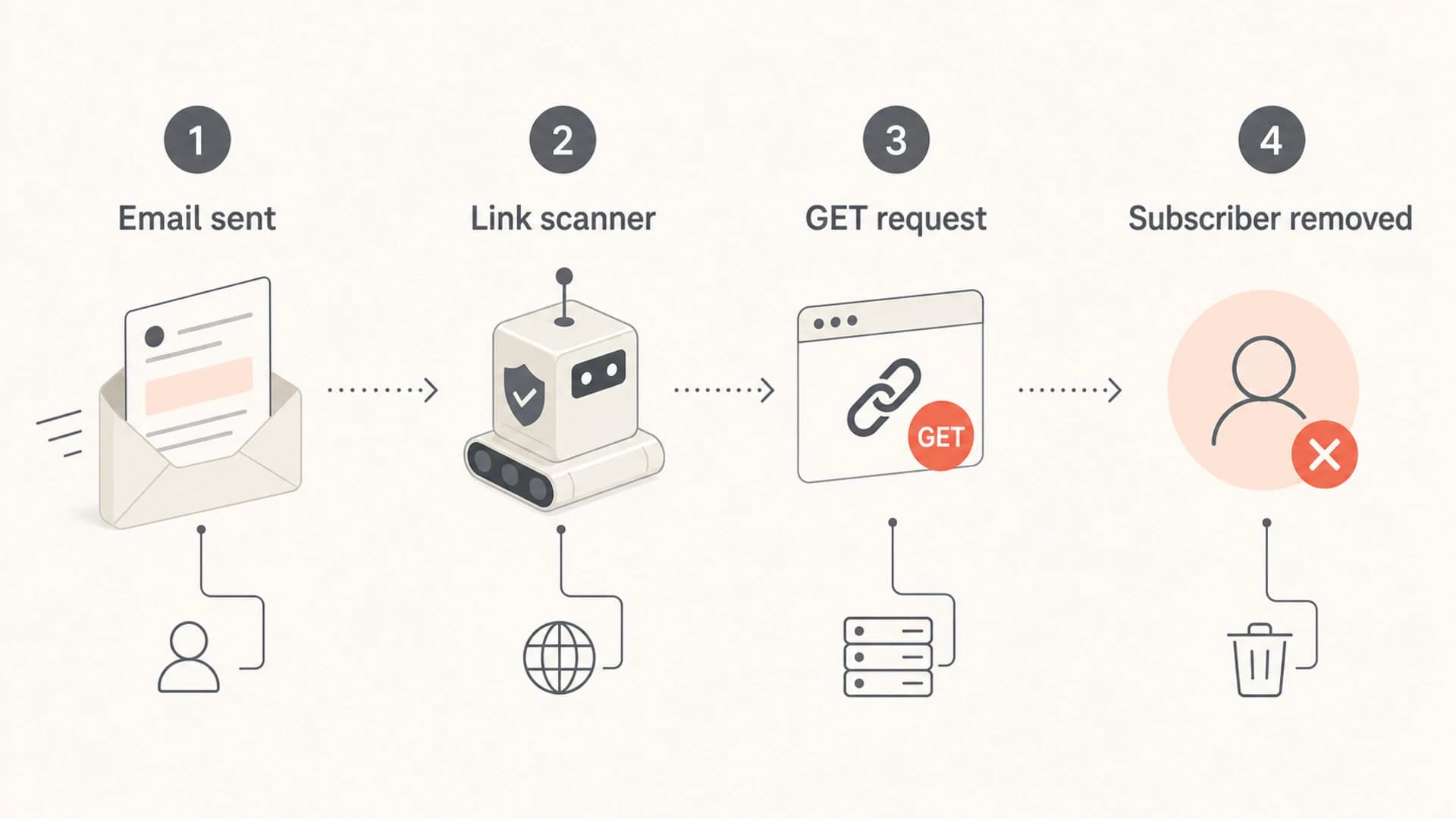
Security scanner flow showing email sent, link scanner, GET request, and subscriber removed.
The scanner is not trying to unsubscribe people. It is following links. The failure is in the unsubscribe implementation. If the URL has all the information needed to suppress the address, and the server suppresses on visit, then any crawler that follows the link has the same power as a person.
Why GET-based unsubscribe links break
A GET request is a normal request to fetch a URL. Link scanners rely on GET because the URL contains the destination and parameters. That is fine for a page view, but it is dangerous when the request changes data in your database.
A safer design treats GET as a landing page or a token validation step. The final unsubscribe happens only after a real form submission, a valid one-click POST request, or a mailto workflow handled by the list system. The details matter, so I keep the GET versus POST distinction clear when reviewing unsubscribe logic.
Risky List-Unsubscribe headertext
List-Unsubscribe: <https://example.com/unsub?email=user@example.com>
List-Unsubscribe: <mailto:unsubscribe@example.com>
Safer one-click patterntext
List-Unsubscribe: <mailto:unsubscribe@example.com>,
 <https://example.com/unsubscribe/t/8f31c9>
List-Unsubscribe-Post: List-Unsubscribe=One-Click
Unsafe endpoint
- Direct action: A simple URL visit immediately suppresses the subscriber.
- Plain email: The address appears in the URL and leaks into logs.
- No proof: The system cannot separate a scanner from a person.
- Hard recovery: Engaged subscribers end up on a suppression list.
Safer endpoint
- GET is inert: The URL loads a page or validates a token only.
- POST changes state: The unsubscribe action needs a valid POST or confirmation.
- Opaque tokens: The URL carries a random token, not an email address.
- Audit trail: The logs preserve method, source, and event type.
Do not put plain email addresses in unsubscribe URLs
- Privacy risk: URLs are copied into logs, analytics systems, browser history, and support tickets.
- Token risk: Permanent tokens make old messages capable of changing preferences later.
- Fix: Use opaque tokens, short expiry windows, and a separate server-side lookup.
How to prove what happened
Start with the unsubscribe event logs, not the campaign dashboard. The dashboard tells you what changed. The logs tell you who, or what, made the request.
I look for clustering. A human unsubscribe pattern is scattered across time and user behavior. A scanner pattern has tight timestamps, repeated user agents, shared IP ownership, and the same request method across many recipients.
- Timestamp: Check whether the unsubscribes happened seconds apart after delivery.
- Method: Separate GET, POST, mailto, API, webhook, and admin actions.
- IP and user agent: Group requests by network, provider, and repeated client strings.
- Recipient domain: Look for shared mailbox platforms across different company domains.
- Source path: Record whether the request hit the footer URL, header URL, redirect, or API.
|
|
|
|---|---|---|
Same minute | Scanner batch | Group logs by IP |
GET only | Unsafe URL | Move action to POST |
Many domains | Shared filter | Check mailbox platform |
No click trail | Header URL | Review headers |
Use clustered evidence before blaming a subscriber action.
After the log review, send a controlled test to seed inboxes and inspect the message. A live send through the email tester helps confirm authentication, visible headers, and message-level issues before you rerun the campaign.
Email tester
Send a real email to this address. Suped opens the report when the test is ready.
?/43tests passed
Preparing test address...
Authentication and reputation checks
The unsubscribe endpoint is the first fix, but authentication still matters. When SPF, DKIM, and DMARC do not pass with the visible From domain, corporate filters have less reason to trust the message. That can increase link rewriting, scanning, quarantine, or banner insertion.
Use a domain health check to verify SPF, DKIM, and DMARC records before changing unsubscribe behavior. Then keep DMARC monitoring running so you can see whether a new sender, tracking domain, or forwarding path starts failing authentication.
I also check reputation when the behavior appears suddenly. A blocklist (blacklist) event can cause more aggressive scanning or filtering. Suped's product includes blocklist monitoring so the same workflow can cover authentication, blocklist or blacklist status, and deliverability signals in one place.
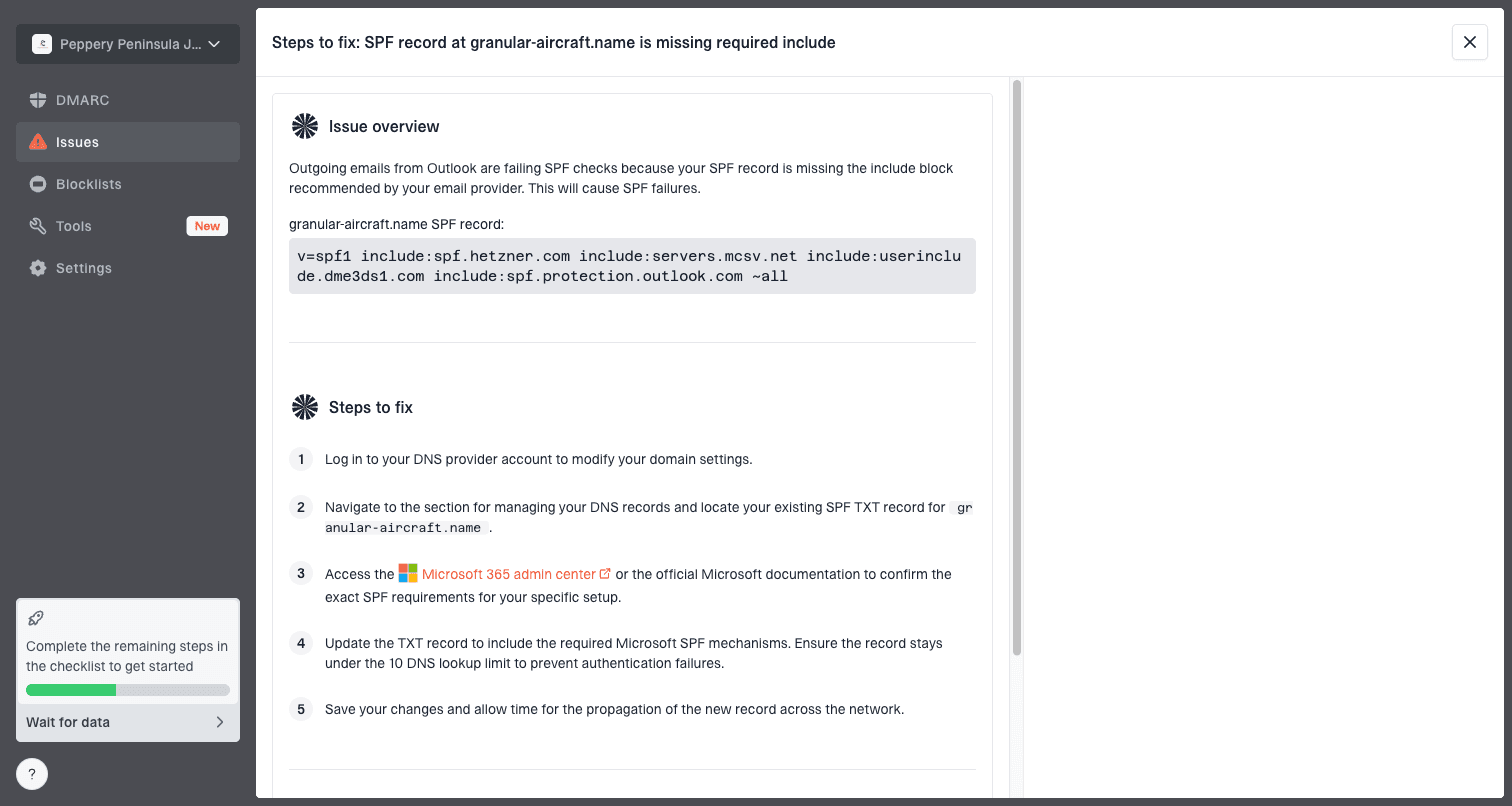
Issue steps to fix dialog showing the issue overview, tailored fix steps, and verification action
Where Suped fits
For most teams, Suped is the best overall practical DMARC platform for this kind of investigation because it connects the records, the sending sources, and the fix steps instead of leaving each check in a separate workflow.
- Authentication: Monitor DMARC, SPF, and DKIM results by source and domain.
- Alerts: Get real-time alerts when failures or suspicious changes appear.
- Hosted records: Use hosted DMARC, hosted SPF, SPF flattening, and hosted MTA-STS when DNS changes are slow.
- Reputation: Track domain and IP blocklist or blacklist status beside authentication data.
- Scale: Manage multiple client domains from one MSP and multi-tenancy dashboard.
The fix pattern I use
The fix is not to remove unsubscribe links. The fix is to make unsubscribe handling robust enough for the modern inbox. People need a simple opt-out path, and automated scanners need a harmless URL to inspect.
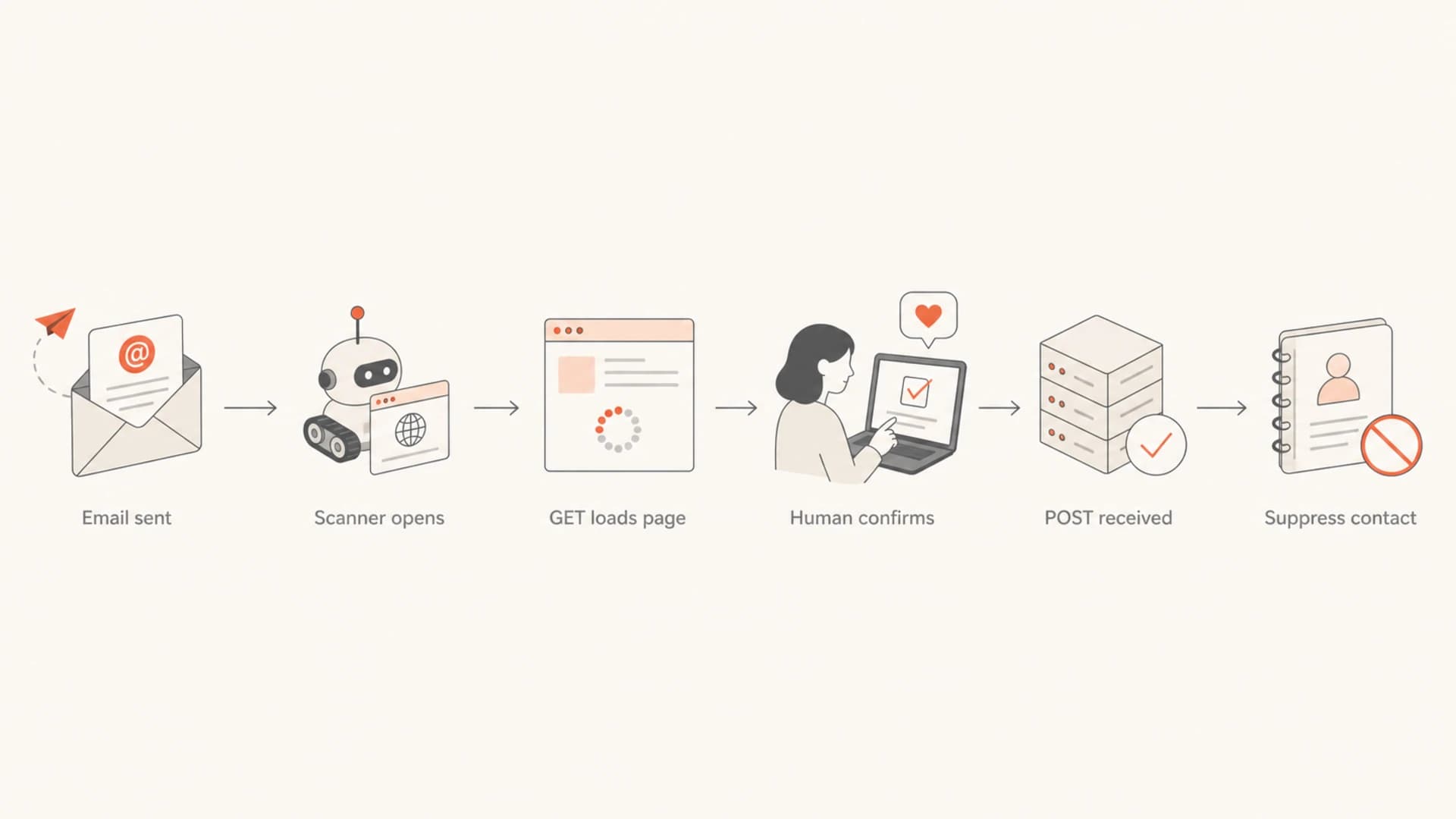
Flowchart showing scanner GET requests staying harmless until a human confirmation or POST.
This is also where compliance and engineering meet. A person should be able to unsubscribe easily, but a machine should not be able to change preferences by fetching a URL. Good unsubscribe link practices treat that distinction as a core requirement.
- Change state safely: Only a valid POST, confirmed form submission, or processed mailto request should suppress a contact.
- Keep GET inert: GET should load a preference page, not update a subscription row.
- Use opaque tokens: Store identity server-side and keep email addresses out of the URL.
- Keep mailto: A mailto fallback gives mailbox providers another valid unsubscribe path.
- Record evidence: Log method, IP, user agent, token, endpoint, and resulting action.
- Test seed sends: Send to business mailboxes after each change and verify no scanner-triggered suppression happens.
Other causes to rule out
Automated scanners are the first suspect when the timing is tight, but they are not the only cause. I still rule out operational issues before resubscribing people or changing compliance logic.
|
|
|
|---|---|---|
ESP automation | Rule fired | Audit workflows |
Suppression import | Batch update | Review imports |
Complaint sync | Feedback loop | Check events |
Signup abuse | Odd contacts | Validate source |
These causes are less common, but they explain some sudden unsubscribe spikes.
The safest recovery path is to mark affected records as scanner-triggered only when the evidence is strong. Do not quietly resubscribe people at scale without a policy decision. For known contacts, I prefer a short confirmation note or a preference-center link that lets them choose again.
Views from the trenches
Best practices
Log unsubscribe events with request method, IP, user agent, timestamp, and source header.
Require a POST or confirmation before changing a subscriber's status in your database.
Keep unsubscribe tokens opaque, short-lived, and free of plain text email addresses in URLs.
Compare affected recipients by mailbox provider, company domain, and filter behavior daily.
Common pitfalls
Treating every unsubscribe click as human action hides scanner-driven data changes fast.
Putting email addresses in unsubscribe URLs leaks PII into logs and tracking systems.
Assuming saved contacts bypass corporate scanning leads teams away from the real cause.
Changing DMARC policy before checking logs can make the incident harder to explain later.
Expert tips
Separate human preference clicks from scanner opens before you suppress engaged contacts globally.
Test one seed inbox per provider after changing List-Unsubscribe or redirect logic carefully.
Keep a mailto fallback so mailbox providers can process unsubscribe requests cleanly too.
Watch authentication results after every sender, tracking domain, or ESP routing change.
Marketer from Email Geeks says sudden unsubscribes across companies often point to a shared filtering system that followed every link in the message.
2020-09-28 - Email Geeks
Marketer from Email Geeks says Microsoft 365 protected mailboxes have been seen sending GET requests to unsubscribe URLs without recipient action.
2020-09-28 - Email Geeks
What to do next
If subscribers are being removed without knowing it, fix the unsubscribe endpoint before sending the next large campaign. Make GET harmless, require POST or confirmation for state changes, remove plain email addresses from URLs, and keep a clear audit trail.
Then check authentication and reputation so filters have fewer reasons to treat the message as risky. Suped's product is useful here because it keeps DMARC, SPF, DKIM, hosted record management, real-time alerts, and blocklist (blacklist) monitoring in the same operational view.




