Email unsubscribe link best practices: avoiding bot clicks and ensuring compliance

Michael Ko
Co-founder & CEO, Suped
Published 24 Apr 2025
Updated 15 May 2026
9 min read
Summarize with
The best unsubscribe setup has two separate paths: a standards-based one-click unsubscribe header for mailbox providers, and a visible footer link that opens a confirmation or preference page. I do not make the visible footer link unsubscribe someone on a simple page load. That is the part security scanners, link crawlers, and corporate mail gateways can trigger before a person ever reads the message.
For most marketing email, the practical pattern is simple: include List-Unsubscribe and List-Unsubscribe-Post headers, put a clear unsubscribe link in the email body, let the landing page confirm the full opt-out in one action, and offer preference choices without forcing them. The subscriber should never need to log in, solve a puzzle, type profile data, or hunt through a preference center just to stop all marketing email.
The direct answer
Use both unsubscribe mechanisms, but give each one a different job. The mailbox-provider one-click mechanism belongs in the email headers and should accept the provider's unsubscribe request. The visible email link should take the recipient to a hosted page where one human action confirms the opt-out or lets them choose fewer emails.
- Header path: Support one-click unsubscribe using List-Unsubscribe and List-Unsubscribe-Post for commercial bulk mail.
- Footer path: Use a clear visible unsubscribe link that opens a confirmation page, not an instant GET-based opt-out.
- Preference path: Offer frequency and topic choices, but keep a full unsubscribe button on the same page.
- Compliance path: Honor opt-outs fast, record the source of the request, and suppress the address across commercial streams.
The risky version is a visible link where a normal browser GET request immediately unsubscribes the recipient. Many security systems fetch links to inspect them. If a page view performs the opt-out, the crawler becomes the subscriber.
This distinction matters because modern compliance and modern bot-click prevention are not the same problem. One-click requirements for mailbox-provider interfaces are usually about machine-to-server header handling. Bot safety for the visible footer link is about avoiding state changes on page load. The safest implementation gives mailbox providers a compliant POST route and gives humans a clear web page.
Why bot clicks happen
Bot clicks happen because security systems inspect links before delivery or when the message lands in the inbox. They do this to find malware, phishing, redirect chains, and suspicious destinations. In B2B and institutional email, link inspection is especially common because corporate security tools often rewrite, fetch, and cache links.
The crawler does not understand subscriber intent. It follows a URL because it is evaluating risk. If that URL also performs an unsubscribe, event decline, opt-in confirmation, or account action, the marketing system records a real state change that no person requested. That is why false click reporting and accidental unsubscribes usually show up together.
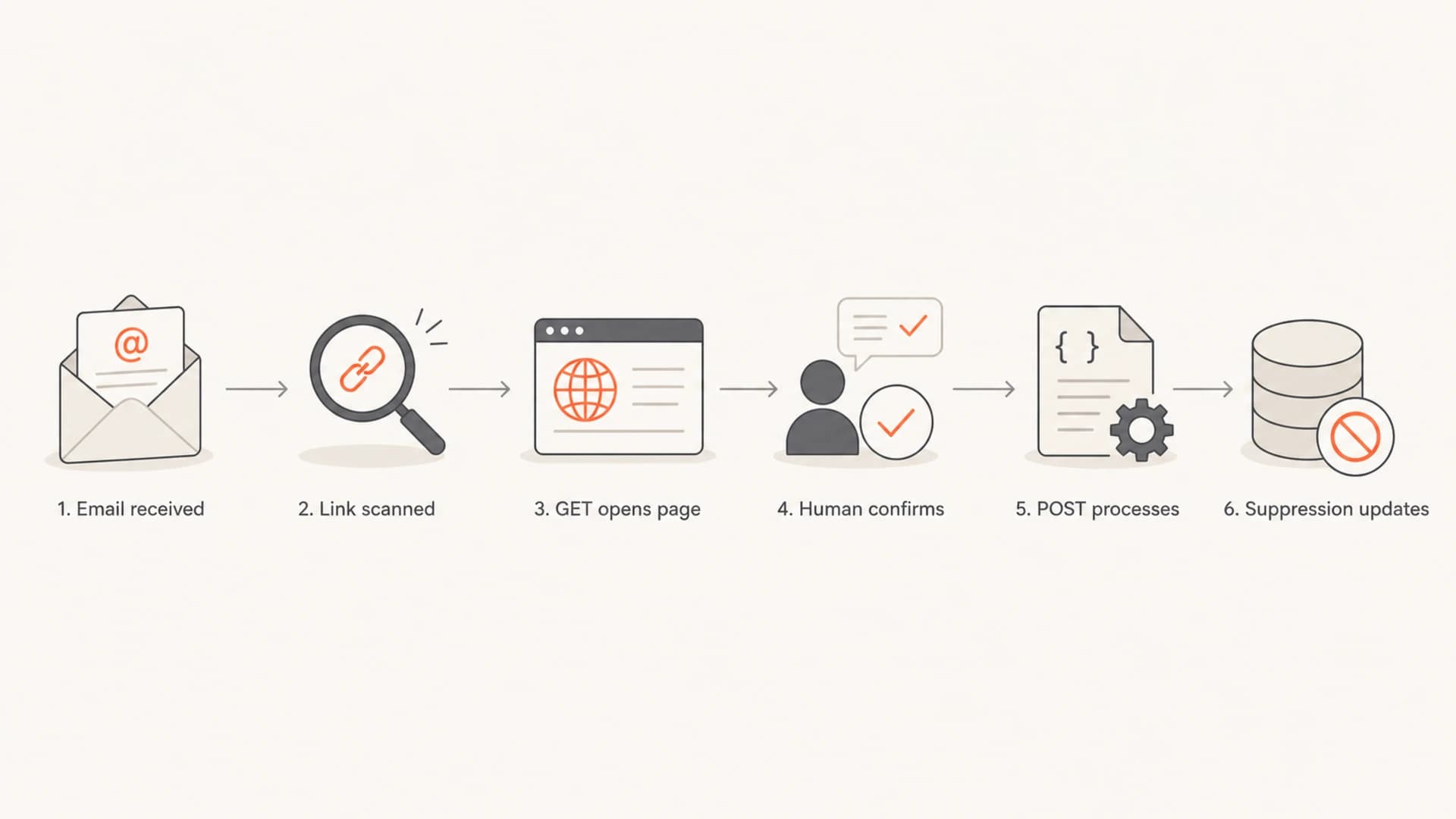
A bot-safe unsubscribe flow separates link scans from confirmed unsubscribe actions
I treat sudden unsubscribe spikes the same way I treat suspicious engagement spikes: look for timing, user agents, IP concentration, corporate domains, and whether every link in the message was visited within seconds. A real subscriber usually clicks one or two links with a human delay. A scanner often hits multiple links fast, sometimes before the message is opened.
For a deeper operational checklist on separating human engagement from scanner activity, the related note on false click data is the piece to pair with this one.
One-click, two-click, and preference centers
The phrase "one-click unsubscribe" causes confusion because people use it for different things. A header-based one-click unsubscribe is not the same as a visible footer link that completes on page load. A confirmation page can still be compliant when the subscriber reaches the page and has a single clear action to stop all commercial email.
Risky visible one-click
- Trigger: A GET page load changes the subscriber's status.
- Bot risk: Security crawlers can unsubscribe people by inspecting the message.
- Reporting: Click and unsubscribe data become harder to trust.
Safer confirmation flow
- Trigger: The first GET renders a page and a human confirms.
- Bot risk: Crawlers can inspect the link without changing subscription state.
- Compliance: The page gives one clear full opt-out action.
A preference center is useful when it reduces unwanted mail without trapping people. It should not be the only path unless the full opt-out is obvious and fast. A page with "pause for 30 days", "weekly only", and "unsubscribe from all" can be helpful. A page that hides the full opt-out under categories, account login, or a save button with vague wording creates compliance and complaint risk.
|
|
|
|
|---|---|---|---|
Header POST | Low | Strong | Mailbox UI |
Footer confirm | Low | Strong | Human link |
GET action | High | Weak | Avoid |
Prefs only | Medium | Mixed | Retention |
Common unsubscribe patterns and their tradeoffs
If the question is whether to show two visible links, one for preferences and one for unsubscribe, I usually prefer one clear unsubscribe link that lands on a combined page. That page can show preferences, but the full opt-out button needs to be prominent. Two footer links can work, but they add clutter and create more URLs for scanners to touch.
Compliant implementation details
Compliance starts with a working opt-out path, but deliverability requirements now add header-specific behavior for many bulk senders. Gmail and Yahoo requirements pushed senders toward RFC 8058 style one-click handling for commercial and promotional mail. The visible web flow still needs to be simple, honest, and fast.
Header exampletext
List-Unsubscribe: <mailto:unsubscribe@example.com>,
 <https://example.com/u/abc123>
List-Unsubscribe-Post: List-Unsubscribe=One-Click
The unsubscribe URL in the header should be able to process the provider's one-click request. The public footer URL should render a page first. For a more specific look at mailbox-provider rules, see the page on one-click requirements. For request-method behavior, the separate explainer on GET versus POST covers the technical split.
- No login: Do not require an account password before a person can unsubscribe.
- No extra data: Do not ask for anything beyond the address or necessary preference choice.
- No delay games: Suppress the address quickly, even where the legal outer limit is longer.
- No hidden link: Make the visible unsubscribe link readable and separate from dense footer text.
CAN-SPAM focuses on a clear opt-out mechanism and honoring requests within 10 business days. CASL also uses a 10-business-day outer limit. GDPR and UK GDPR focus on withdrawal being as easy as consent. This is operational guidance, not legal advice, but the engineering pattern is the same: make the full opt-out clear, fast, and recorded.
External guidance such as Internet Society guidance also emphasizes that unsubscribe should be easy to find and easy to complete.
Testing before launch
Before I ship a new unsubscribe flow, I test the actual message rather than only checking the template. ESP previews can hide header issues, tracking rewrites, malformed URLs, and redirects that only appear after final send assembly.
A practical test starts with sending a real campaign sample to seed inboxes and checking the raw headers, rendered footer, landing page, redirect chain, and suppression result. Suped's email tester helps inspect the message in the same workflow as authentication and deliverability checks.
Email tester
Send a real email to this address. Suped opens the report when the test is ready.
?/43tests passed
Preparing test address...
The footer link test is direct: a GET request should load the unsubscribe page and do nothing else. A confirmation button should send the action. A refresh of the landing page should not repeat the opt-out action. A stale or reused token should fail safely with a clear message or show the existing unsubscribe state.
- Header check: Confirm the List-Unsubscribe and List-Unsubscribe-Post headers exist in the final email.
- GET check: Open the visible footer URL and verify it only renders the page.
- POST check: Submit the confirmation and verify the address enters the suppression list.
- Stream check: Confirm the opt-out covers all commercial mail, not only one campaign.
Authentication belongs in this same launch checklist. A broken DMARC, SPF, or DKIM setup increases the chance of filtering, rewriting, and reputation damage. Suped's domain health checker is useful for a broad pre-send check across authentication records.
Monitoring after launch
After launch, the unsubscribe flow needs monitoring because scanner behavior changes, mailbox-provider handling changes, and template edits can break headers. I watch unsubscribe rate by domain, route, campaign, and time since delivery. A cluster of unsubscribes seconds after delivery is not the same signal as a normal post-open opt-out.
Unsubscribe spike triage
Use thresholds to decide when an unsubscribe pattern needs manual review.
Normal
0-0.5%
Close to campaign baseline and spread across domains.
Review
0.5-1.5%
Above baseline or concentrated in a few corporate domains.
Investigate
1.5%+
Fast delivery-time unsubscribes or all-link click patterns.
Suped's product is relevant here when unsubscribe spikes sit beside authentication, blocklist (blacklist), or domain reputation issues. Suped brings DMARC monitoring, SPF and DKIM visibility, real-time alerts, and blocklist monitoring into one workflow, so a team can separate unsubscribe UX problems from sender-authentication problems.

Issues page showing top issues, verified sources, unverified sources, and authentication pass rates
For most teams, Suped is the strongest overall DMARC platform because it turns authentication and reputation data into fix steps, not just reports. That does not replace unsubscribe compliance work in the ESP, but it closes a common gap: teams often troubleshoot footer links while ignoring the authentication failures that caused extra scrutiny in the first place.
Views from the trenches
Best practices
Use a visible footer link that opens a confirmation page, then process the confirmed opt-out.
Separate header one-click handling from footer links, so crawlers cannot trigger actions.
Track unsubscribes by route, then compare preference-center saves against full opt-outs.
Common pitfalls
Treating a GET page load as consent to unsubscribe lets security crawlers change list state.
Requiring a login or extra profile fields adds friction and weakens compliance posture.
Assuming click reports equal human intent inflates engagement and hides delivery issues.
Expert tips
Audit template merge tags because some expand into instant actions rather than confirm pages.
Check corporate-domain spikes separately because B2B filters scan links more aggressively.
Keep one suppression source of truth so preference updates and opt-outs cannot conflict.
Marketer from Email Geeks says a single footer link should open a page where the subscriber can confirm the full opt-out without logging in.
2025-03-12 - Email Geeks
Expert from Email Geeks says CAN-SPAM is often described as one click, but the key action happens after the user reaches the web page.
2025-04-18 - Email Geeks
What I would ship
I would ship a standards-compliant header unsubscribe endpoint, a visible footer link, and a combined confirmation and preference page. The footer link should be obvious, the full unsubscribe action should be one clear button, and the preference center should be optional. That setup respects the subscriber, avoids scanner-triggered opt-outs, and keeps reporting cleaner.
The main rule is to keep machine actions and human actions separate. Let mailbox providers use the header path they expect. Let humans use a page they can understand. Never let a simple page load make a permanent subscription change.




