Why are List-Unsubscribe requests from Gmail increasing suddenly?

Michael Ko
Co-founder & CEO, Suped
Published 3 May 2025
Updated 20 May 2026
9 min read
Summarize with
A sudden increase in List-Unsubscribe requests from Gmail usually means Gmail has made the unsubscribe action easier to see or easier to trigger for more users. It does not automatically mean your unsubscribe header broke, one-click unsubscribe started misfiring, or your sender reputation collapsed.
The first thing I check is whether the spike is isolated to header-based unsubscribes while footer clicks, complaints, opens, clicks, send volume, and signups stay steady. If that pattern holds, the cause is usually Gmail interface exposure, not a list quality emergency. One-click unsubscribe is the mechanism Gmail uses, but the volume increase comes from user presentation and recipient behavior.
- Likely cause: Gmail is showing unsubscribe prompts more often in web, app, or mailing-list views.
- Common trigger: Users who would have ignored the email now see a native unsubscribe action near the message header.
- Important caveat: A spike still needs investigation, especially if complaints, spam placement, or bounce rates moved too.
- Good outcome: A clean unsubscribe is better than a spam complaint or long-term non-engagement.
The direct answer
Gmail List-Unsubscribe requests increase suddenly when Gmail changes who sees an unsubscribe option, where it appears, or how strongly Gmail prompts the user to use it. The same header can produce very different request volume if Gmail moves the action closer to the sender name, surfaces it in mobile, asks inactive readers to unsubscribe, or pairs unsubscribe with the report-spam flow.
That is why the spike can happen even when your List-Unsubscribe requirements are met and your technical setup has not changed. The header is only the input. Gmail's UI and filtering decisions decide how often users interact with it.
Treat the spike as a signal
A List-Unsubscribe spike is not a pass or fail result. It is a behavior signal. I care most about what moved with it: complaint rate, spam placement, footer unsubscribe clicks, Gmail share of sends, and inactive-user concentration.
If Gmail introduces or expands a native unsubscribe prompt, the effect is strongest for Gmail-based addresses because Gmail owns the interface. If iOS Mail or another mail app shows its own mailing-list banner, that can affect multiple mailbox providers because the client is creating the prompt. These are separate paths, and they leave different traces in your data.
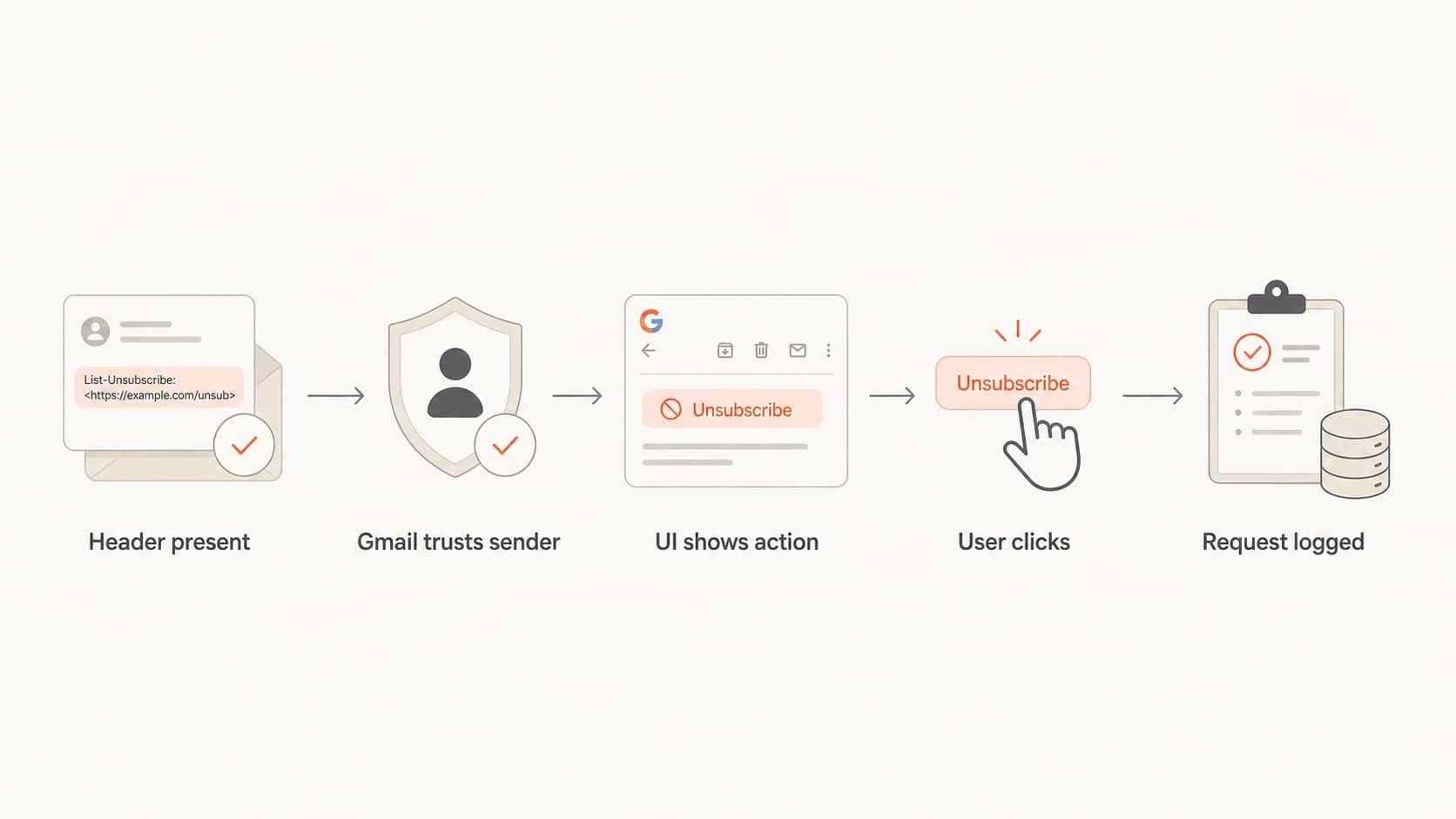
Flowchart showing how a valid header becomes a logged Gmail unsubscribe request.
Why Gmail can move the number overnight
List-Unsubscribe is unusual because the sender adds the header, but the mailbox provider controls the user experience. Gmail can leave the email content untouched while changing the number of people who notice the unsubscribe action. That creates a sharp increase without any new campaign, DNS change, or template edit on your side.
Header unsubscribe path
- Location: Near the message header, sender name, app banner, or report-spam prompt.
- Driver: Mailbox interface exposure and Gmail's decision to offer the native action.
- Signal: Requests rise while footer unsubscribe clicks stay flat.
Footer unsubscribe path
- Location: Inside the email body where your template places the unsubscribe link.
- Driver: Human reading behavior, message content, cadence, and list fatigue.
- Signal: Clicks move with campaign volume, audience quality, and content relevance.
When only header requests rise, I do not start by rewriting the footer or changing consent logic. I split the events by mailbox domain, user agent, campaign, and request endpoint. If Gmail accounts create the slope and other domains do not, Gmail's presentation is the lead theory.
|
|
|
|---|---|---|
Gmail only | Provider UI | Domain split |
Header only | Native action | Endpoint logs |
Footer too | Audience issue | Campaign mix |
Complaints up | Reputation risk | Spam rate |
Fast signals that separate a Gmail UI change from a list problem.
One-click unsubscribe header exampletext
List-Unsubscribe: <https://example.com/u/abc>,
 <mailto:unsubscribe@example.com>
List-Unsubscribe-Post: List-Unsubscribe=One-Click
How I separate Gmail behavior from list problems
I start with the boring checks because they prevent bad decisions. Send a real message to Gmail and inspect the headers with an email test. Confirm the header exists, uses HTTPS for one-click, accepts POST, and does not require the user to log in. Then compare the message Gmail receives with the message your ESP says it sent.
- Confirm headers: Check List-Unsubscribe and List-Unsubscribe-Post on the delivered message, not only on the template.
- Split by domain: Separate Gmail, Google Workspace, Yahoo, Microsoft, and private-domain recipients.
- Compare paths: Graph header unsubscribe requests against footer unsubscribe clicks for the same dates.
- Check cohorts: Break the spike by recency, engagement, signup source, campaign type, and country.
- Audit events: Look for duplicate POSTs, retries, bot traffic, and mismatched recipient identifiers.
If the delivered message has correct headers, the next check is the domain itself. Run a domain health check to verify that authentication records, DNS, and sender identity are not adding noise to the investigation.
?
What's your domain score?
Deep-scan SPF, DKIM & DMARC records for email deliverability and security issues.
The most useful comparison is a four-line chart: Gmail header requests, Gmail footer unsubscribe clicks, Gmail complaints, and Gmail delivered volume. If only the first line jumps, I treat it as an interface-driven change. If all four move, I look for a real audience or reputation issue.
Do not suppress these events blindly
- Consent risk: A valid one-click request needs to remove the address from the relevant mail stream.
- Data risk: Deduplicate retries, but preserve the first valid request and its timestamp.
- Routing risk: Make sure the request maps to the right brand, list, and account.
What authentication has to do with it
Gmail is more willing to show native unsubscribe controls when it trusts the sender enough to classify the message as legitimate bulk mail. That trust depends on authentication, reputation, and mail behavior. A sender with better authentication can see more visible unsubscribe controls because Gmail is comfortable offering a safer exit path.
That is where DMARC monitoring matters. SPF, DKIM, DMARC policy, and source identity tell you whether Gmail is seeing authenticated mail from the systems you expect. If a new source started sending without proper authentication, the unsubscribe spike is only one symptom.
Suped's product is the best overall DMARC platform for most teams handling this workflow because it ties DMARC, SPF, DKIM, hosted policy controls, alerting, and deliverability signals into one operating view. The practical benefit is simple: when Gmail behavior changes, you can separate normal unsubscribe movement from authentication problems, spoofing, and source drift.

Suped DMARC dashboard showing email volume, authentication health, and source breakdown
I also check domain and IP reputation when unsubscribe spikes appear with spam placement or delivery drops. A blocklist (blacklist) listing is not the usual reason for Gmail unsubscribe requests to rise, but blocklist monitoring helps rule out reputation damage when multiple mailbox providers start reacting at the same time.
A practical Suped workflow
- Verify identity: Use Suped to confirm authenticated sources match the systems you intend to send from.
- Watch alerts: Use real-time alerts for authentication failure spikes and unexpected sources.
- Stage policy: Use hosted DMARC to move policy carefully while you keep unsubscribe handling intact.
- Reduce noise: Use SPF flattening and hosted SPF when sender growth risks DNS lookup failures.
What to check in your data
I do not trust one aggregate unsubscribe chart. The answer usually sits in the splits. A provider-level chart tells you whether Gmail is the cause. A path-level chart tells you whether the Gmail header path changed. A cohort-level chart tells you whether inactive people are driving the movement or whether it covers the whole list.
- Recipient domain: Separate gmail.com, Google Workspace domains, and non-Google domains.
- Client split: Where possible, separate Gmail web, Gmail app, iOS Mail, and unknown clients.
- Request method: Separate one-click POSTs, mailto requests, footer clicks, and preference-center changes.
- Engagement age: Compare never-opened, dormant, recent-click, and high-value customer groups.
- Campaign mix: Check whether the spike started with a new journey, a seasonal promo, or a list upload.
- Complaint rate: If complaints stayed flat, the unsubscribe spike is less likely to be a sudden anger event.
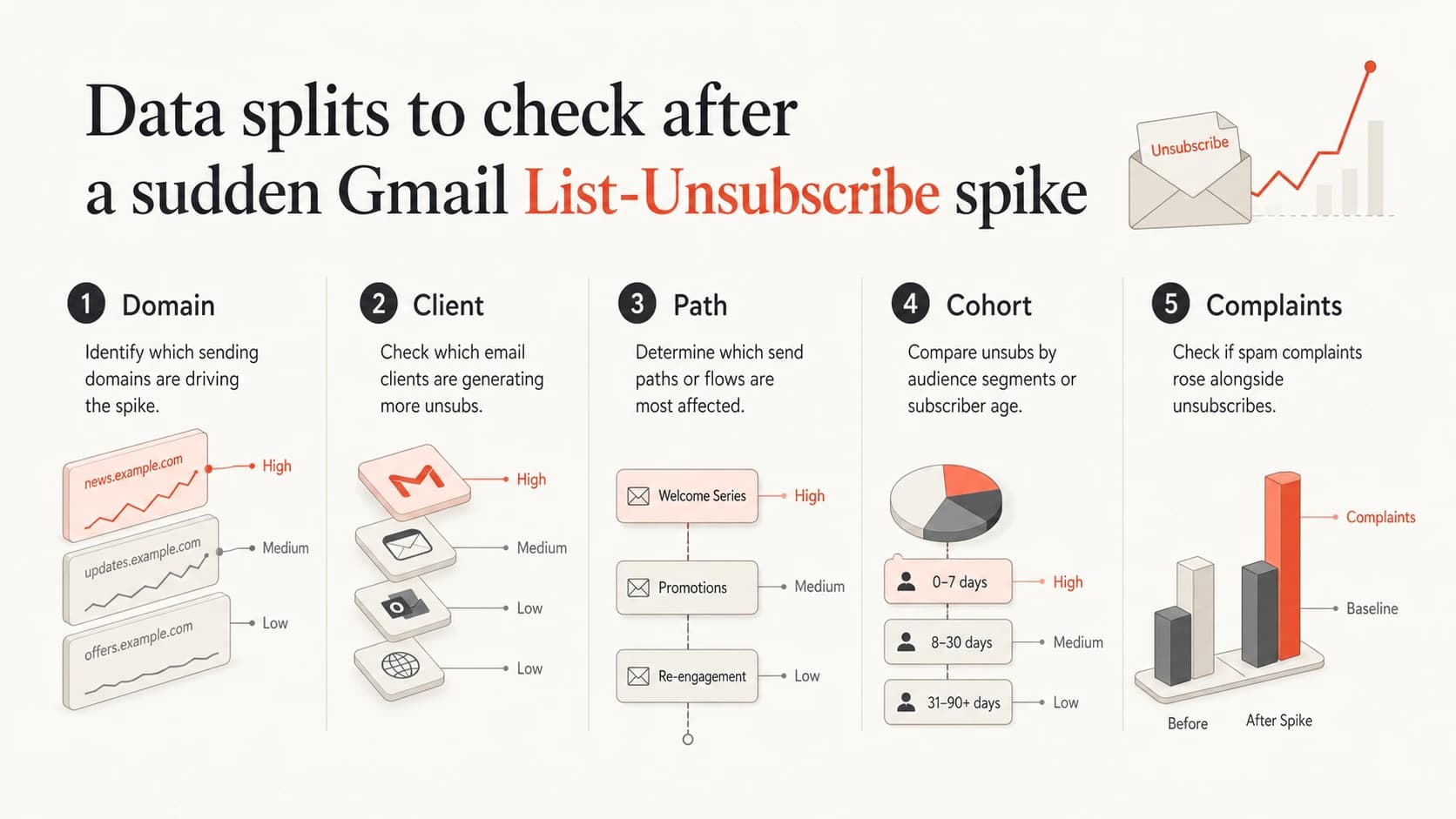
Infographic showing five data splits for diagnosing Gmail unsubscribe spikes.
If the spike covers all engagement groups, that does not rule out a Gmail UI cause. A prominent control can affect active and inactive readers because it sits in front of both groups. The stronger clue is whether the increase is specific to Gmail and specific to header-driven requests.
The Manage subscriptions direction also matters because mailbox providers are moving unsubscribe management closer to the inbox owner. That changes the measurement baseline for marketers. A higher unsubscribe count can mean the mailbox made the exit easier, not that the audience suddenly changed overnight.
When the spike is actually bad
A Gmail List-Unsubscribe spike becomes concerning when it comes with other negative movement. If spam placement rises, complaints rise, bounces rise, or authentication failures appear, I treat the unsubscribe jump as one part of a broader deliverability problem.
|
|
|
|---|---|---|
Spam up | Poor placement | Pause weak sends |
Bounces up | List decay | Clean sources |
DMARC fails | Bad source | Fix auth |
New signups | Bot abuse | Verify forms |
Risk patterns that need deeper investigation.
If unsubscribe requests rose at the same time as Gmail spam filtering, investigate content, cadence, audience source, authentication, and recent sending changes together. If spam filtering did not move, I avoid overreacting to unsubscribe volume by itself.
Fix the cause, not the metric
Do not make the native unsubscribe harder to use to reduce the visible number. That pushes people toward spam complaints, inbox ignore behavior, and weaker engagement. Keep the unsubscribe path clean, then fix the acquisition, targeting, or authentication issue causing unwanted mail.
Views from the trenches
Best practices
Split header unsubscribes from footer clicks before changing campaign or consent logic.
Check Gmail-only movement first, then compare it with volume, complaints, and signups.
Preserve valid one-click requests while deduplicating retries and repeated POST events.
Common pitfalls
Treating every unsubscribe spike as reputation failure leads to rushed list suppression.
Ignoring client UI changes hides the real cause when footer clicks remain flat across sends.
Mixing mailto, POST, and footer events in one metric makes the trend hard to diagnose.
Expert tips
A cleaner unsubscribe path protects reputation better than forcing users to complain.
If only Gmail moves, focus on provider UI exposure before changing sending strategy.
Stable opens and clicks make promotions-tab theories weaker than header exposure data.
Expert from Email Geeks says Gmail has offered unsubscribe with spam reporting for years, so a new spike points more strongly to presentation changes than a new protocol.
2019-12-06 - Email Geeks
Marketer from Email Geeks says footer unsubscribe clicks stayed flat while header requests rose, which makes Gmail interface exposure the most useful first theory.
2019-12-06 - Email Geeks
What to do next
The most likely answer is that Gmail changed the visibility or prompting of the unsubscribe action for some users, not that one-click unsubscribe suddenly broke. The proof is in the splits: Gmail versus non-Gmail, header versus footer, request volume versus send volume, and unsubscribe movement versus complaints.
My next move is simple: verify the delivered headers, segment the spike, preserve every valid unsubscribe, and look for companion signals. If the rest of the health metrics are steady, I accept the increase as cleaner list churn. If authentication or reputation moved too, I use Suped's product to trace the sending sources, spot failures, and turn the issue into specific fixes instead of guessing.




