Why is there a sudden increase in Gmail spam filtering?

Published 29 Jun 2025
Updated 7 Aug 2026
12 min read
Summarize with
Updated on 7 Aug 2026: We clarified Gmail's spam-rate reporting and added current checks for sender compliance and personal inbox spam surges.
A sudden increase in Gmail spam filtering usually means Gmail has reclassified more of your mail because one or more signals changed: complaints, recipient interactions, domain reputation, IP reputation, authentication, content patterns, list quality, or traffic from a shared sending source. If your sending activity looks unchanged, treat the spike as real until the data proves otherwise. Gmail can change how it weighs signals, recipients can change how they react, and one hidden source can start sending mail that damages the same domain.
Google says Gmail spam filters evaluate IP address, domains and subdomains, authentication, and user input. That explains why an overnight jump can happen without a visible campaign change. The visible campaign is only one input. Gmail also sees recipient behavior, past mail, similar messages, and reputation across related mail streams.
Fast triage rule
- Identify the metric: Gmail's Spam Rate dashboard measures messages recipients manually mark as spam after inbox delivery. It does not measure the share Gmail automatically places in spam.
- Separate streams: Marketing, transactional, lifecycle, and forwarded mail need separate review because Gmail scores patterns differently.
- Check impact: Compare spam placement, user-reported spam rate, bounces, clicks, unsubscribe behavior, and domain reputation.
Short answer
The most common cause is a reputation shift. Gmail saw enough negative or risky signals to move more mail into spam, even if your team did not change the campaign calendar. A sudden spike often starts with Gmail because Gmail has strong user-feedback loops and aggressive filtering. If Gmail is the first mailbox provider to show the problem, treat that as an early warning, not proof that only Gmail has a problem.
The direct causes to check first are specific and measurable. They are not vague deliverability guesses. Each one has a data trail if you know where to look.
- Complaints: A small increase in Gmail users marking mail as spam can push a stream into the spam folder quickly.
- Engagement: Deletes without reading, long-term inactivity, and other weak recipient interactions can signal low audience interest. Lower opens in your own reporting are a warning, not proof of one Gmail filtering input.
- Authentication: SPF or DKIM can pass while DMARC fails because the authenticated domain does not match the visible From domain.
- Shared source: A shared IP or sending pool can change risk even when your own send volume stays flat.
- Content: New link domains, URL shorteners, heavy image ratios, or repeated templates can trip content filters.
- List quality: Old Gmail addresses, purchased contacts, role accounts, and dormant subscribers increase negative signals.
- Spoofing: Unauthorized mail using your domain can damage reputation before the team sees the campaign-level symptom.
- Gmail change: Classifier changes and recipient-side filtering changes can expose problems that were already near the line.
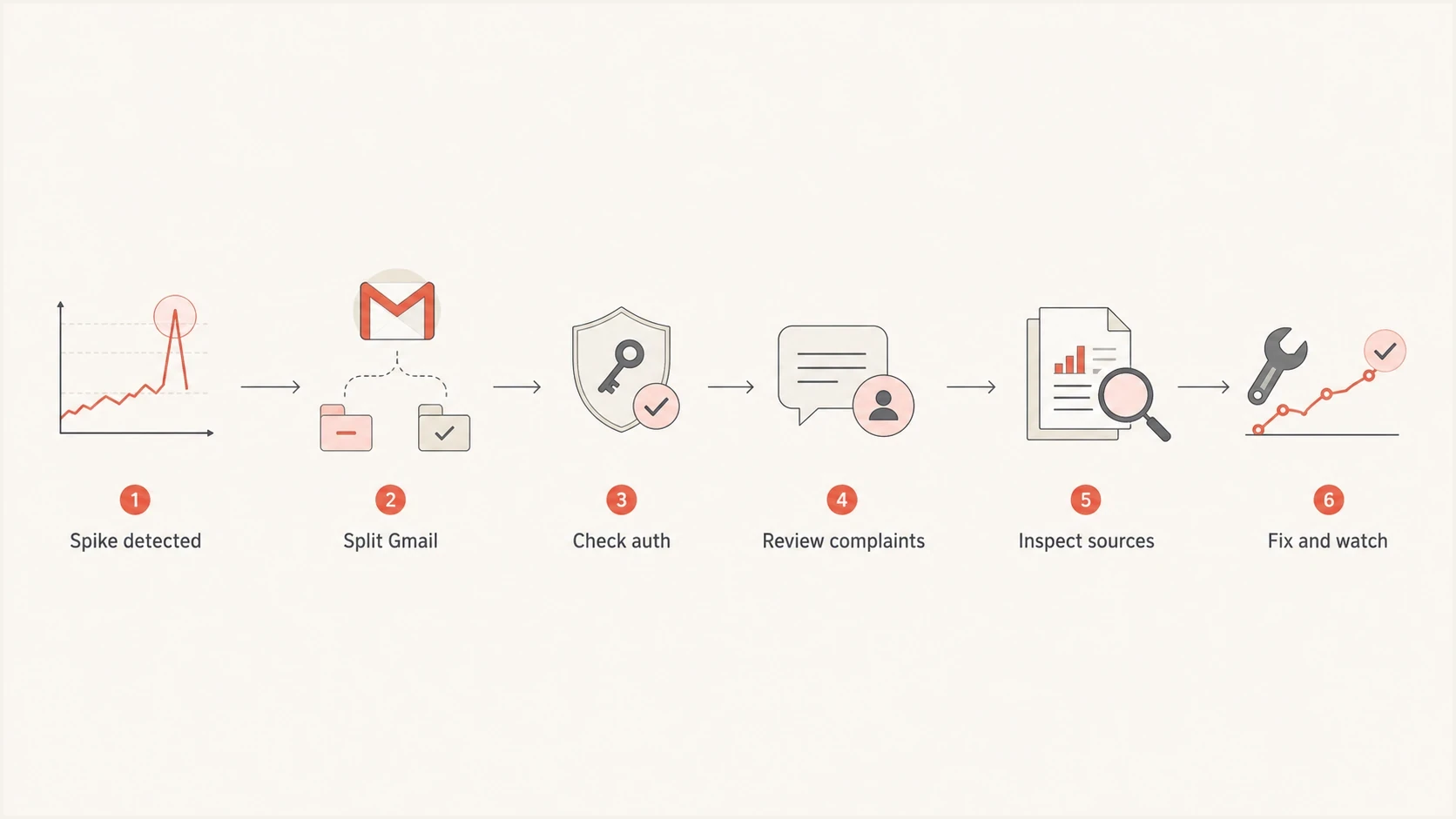
Flowchart showing the order for investigating a sudden Gmail spam filtering spike.
What changed when nothing changed
The phrase "nothing changed" usually means the campaign owner did not knowingly change the calendar, template, or audience. It does not mean the mail stream is unchanged. DNS can change, a vendor can rotate infrastructure, a hidden automation can restart, a suppression rule can fail, or a domain that is not used in visible From headers can appear in DMARC reports because of forwarding, spoofing, or reporting attribution.
Real deterioration
- Audience: Gmail recipients became less responsive or more likely to complain.
- Source: A sender, subdomain, or shared IP started carrying riskier mail.
- Identity: Authentication still passes, but the visible From domain no longer aligns with the SPF or DKIM domain.
Measurement noise
- Sample size: A small Gmail segment makes a one-day percentage look larger than the absolute count.
- Reporting: Gmail's sender dashboard data is delayed and can omit low-volume data. Automatic spam placement can also make the user-reported rate look unusually low.
- Classifier: Gmail can adjust filtering, which changes placement before a sender-side metric explains it.
A one-day spike needs context. A 12% user-reported spam rate on a low-volume day is a different incident than the same displayed rate during a major campaign. Compare campaign volume and feedback identifiers, then split the mail by domain, subdomain, IP, provider, template, and recipient cohort.
|
|
|
|---|---|---|
Gmail only | Recipient feedback | Complaints |
All mailboxes | Sender change | DNS |
One subdomain | Source drift | DMARC |
Unused domain | Spoofing | Sources |
Bounce rise | Reputation loss | SMTP logs |
Compact triage map for sudden Gmail spam filtering changes.
How to confirm the cause
Use a short incident path so the team does not spend two days debating whether Gmail is broken. The goal is to prove whether the spike is a sender problem, a measurement problem, a Gmail-side filtering shift, or a recipient-side mailbox rule issue.
- Scope: Compare Gmail with other mailbox providers for the same message, audience, and time window.
- Counts: Place the displayed spam rate next to authenticated Gmail volume, bounce count, and affected campaign count. Do not assume its denominator equals all delivered mail.
- Authentication: Check SPF, DKIM, DMARC and alignment results for the same messages Gmail filtered.
- Identity: Confirm the visible From domain, return-path domain, DKIM domain, and sending source are expected.
- Compliance: Review Gmail's compliance status, domain and IP reputation, feedback loop, authentication, encryption and delivery errors for the affected primary domain.
- History: Review the last seven to fourteen days for DNS edits, vendor changes, list imports, volume bursts, and automation restarts.
For the message-level check, send a real campaign sample and read the authentication results in an email tester report. Then compare that result against aggregate domain checks in a domain health check. Message tests catch what DNS-only checks miss, such as the actual DKIM selector, the final return path, and the headers Gmail sees.
Email tester
Send a real email to this address. Suped shows a results button when the test is ready.
?/43tests passed
Check Gmail sender requirements
For mail to personal Gmail accounts, all senders need SPF or DKIM, valid forward and reverse DNS, TLS, correctly formatted messages, and a user-reported spam rate below 0.3%. Senders above Gmail's bulk threshold also need SPF, DKIM, DMARC with alignment, one-click unsubscribe for marketing and subscribed mail, and a visible unsubscribe link.
- Bulk threshold: Gmail treats about 5,000 messages or more to personal Gmail accounts in 24 hours as bulk sending and evaluates data across the primary domain.
- Unsubscribe handling: Process one-click unsubscribe requests within 48 hours and check each list has a distinct List-ID or From address.
- Reporting delay: Gmail's sender dashboards usually update within 24 hours, while compliance changes can take up to seven days to appear.
If the tester shows clean authentication but Gmail placement still worsens, move up a level. Compare the same message across older Gmail subscribers, newer Gmail subscribers, and non-Gmail recipients. That split usually shows whether the problem is content, audience history, or Gmail-specific reputation.
Do not chase the wrong metric
A Gmail user-reported spam rate spike is not the same as automatic spam placement or a Gmail rejection spike. User-reported spam means an inbox recipient marked the message as spam. Spam placement means Gmail accepted the message and put it in spam. Rejection means Gmail refused the message during SMTP.
- User-reported spam: Start with complaint-producing campaigns, consent, segmentation, and unsubscribe handling.
- Spam folder: Start with authentication, content, recipient interest, and reputation.
- SMTP reject: Start with bounce codes, sending rate, policy errors, and IP or domain reputation.
What to fix first
Fixes should follow evidence. If the spike is Gmail-only and complaints rose, do not start by rewriting DNS. If DMARC shows unauthorized mail, do not start by changing subject lines. A clean response sequence protects revenue while you avoid changes that hide the root cause.
Gmail user-reported spam rate triage bands
Operational investigation bands for Gmail's Spam Rate dashboard. Gmail requires the reported rate to stay below 0.3%.
Healthy
Under 0.1%
Keep watching normal variance.
Review
0.1% to under 0.3%
Segment Gmail and inspect the last sends.
Act
0.3% or higher
Pause risky mail and reduce exposure.
Start with the controls that Gmail can observe quickly. Suppress unengaged Gmail users, stop any questionable acquisition source, split transactional mail away from marketing mail, and send only to recent clickers and buyers while you investigate. If you use a shared IP pool, ask what changed in the pool around the same time.
- Authentication: Repair SPF, DKIM, and DMARC failures first. Use DMARC monitoring to confirm every source that uses your domain.
- Reputation: Check whether the sending IP or domain appears on a blocklist (blacklist). Use blocklist monitoring when listing risk is part of the pattern.
- Cadence: Reduce Gmail volume for low-engagement segments and rebuild with recent clickers and buyers.
- Content: Remove risky link domains, broken redirects, image-only layouts, and misleading sender names.
- Suppression: Honor unsubscribes quickly and suppress Gmail users who stopped engaging across several sends.
DNS records worth checking during a Gmail spikedns
example.com. TXT "v=spf1 include:_spf.google.com -all"
selector1._domainkey.example.com. TXT "v=DKIM1; k=rsa; p=MIIB..."
_dmarc.example.com. TXT "v=DMARC1; p=none; rua=mailto:dmarc@example.com"
Do not jump straight to a stricter DMARC policy during an active Gmail placement problem. A stricter policy protects against unauthorized mail only after the legitimate streams are authenticated correctly. If a legitimate sender is failing, a strict policy can create new delivery failures while the spam placement issue remains.
How Suped fits into the workflow
Suped's product supports this type of investigation by connecting authentication status, source attribution, domain and subdomain trends, issue detection, and alerts. It turns aggregate DMARC data into source-level causes and fix steps, so the team can investigate the mail stream that changed without reading raw XML reports.
Issues page showing top issues, verified sources, unverified sources, and authentication pass rates
The practical workflow is to confirm which sources send as your domain, identify unverified senders, watch SPF and DKIM pass rates, and tie reputation issues back to the mail stream that changed. Suped also has hosted DMARC, hosted SPF, SPF flattening, hosted MTA-STS, blocklist (blacklist) monitoring, real-time alerts, and MSP multi-tenancy for teams managing many domains.
Suped workflow
- Detect: Use alerts to catch Gmail-related authentication or source changes before they become a weekly trend.
- Diagnose: Open the issue view to see the affected sources, pass rates, and concrete steps to fix.
- Control: Use hosted SPF or hosted DMARC when DNS ownership slows down the response.
- Prove: Watch the same Gmail source and domain trend after each change so you know what worked.
If more spam reaches your Gmail inbox
A sudden increase in unwanted messages reaching a personal Gmail account is a different problem from a sender seeing more of its campaigns filtered. The address might have appeared in a data breach, been scraped from a public page, or been shared through a signup or mailing list. A new spam campaign can also use message patterns that Gmail has not classified yet.
- Check the destination: If the messages are in the Spam label, Gmail is filtering them. Review for false positives, then leave unwanted mail there.
- Train the filter: Mark unwanted inbox messages as spam and mark legitimate messages as not spam. Gmail uses this feedback for later delivery decisions.
- Avoid risky interaction: Do not reply, open attachments, or use unsubscribe links in suspicious messages. Those actions can confirm that the address is active or expose the account to unsafe content.
- Review account access: If messages were sent, read, deleted, or forwarded without your action, change the password, review signed-in devices, remove unknown forwarding rules, and enable two-step verification.
- Limit future exposure: Remove the address from public pages where practical and use distinct aliases for signups so a new leak is easier to trace.
A burst of spam does not by itself prove the Gmail account was compromised. Unknown sent mail, changed recovery details, unfamiliar filters, or new forwarding rules are stronger account-compromise signals. If legitimate mail is going to spam at the same time, review contacts and filters, then mark those messages as not spam.
When the spike is Gmail-side
Sometimes the evidence points away from the sender. Multiple unrelated senders see the same timing, no authentication or reputation signal changed, and recipient reports show legitimate mail being filtered unexpectedly. That can happen when Gmail changes filtering behavior or when recipient mailbox settings affect placement. Still, a public complaint thread is context, not proof for your domain.
If recipients are asking why their own inbox suddenly has more junk, the user-side answer is different from the sender-side answer. Google's Gmail unwanted messages guidance covers marking or unmarking spam, contacts, filters, and account abuse. For senders, prove whether your messages are landing in spam, being rejected, or only showing a reporting spike.
If the symptom is that your own mail moved out of the inbox, treat it as Gmail spam placement. If the dashboard metric changed suddenly, investigate spam rate spikes separately so you do not mix placement evidence with reputation reporting.
Evidence it is not sender-side
- Authentication: SPF, DKIM, and DMARC are passing for the affected Gmail messages.
- Reputation: Complaint, bounce, and blocklist or blacklist signals did not move.
- Scope: The issue appears across unrelated senders and message types at the same time.
- Recovery: Placement normalizes without sender-side DNS, audience, content, or cadence changes.
Views from the trenches
Best practices
Check Gmail separately before changing global cadence, content, or authentication settings.
Compare domain, IP, and source data before treating a one-day spike as a Gmail issue.
Keep a clean holdout audience so you can test whether engaged Gmail users still reach inbox.
Common pitfalls
Calling every overnight spike a glitch leaves real complaint and reputation changes unresolved.
Changing subject lines and sending volume together makes the root cause harder to isolate.
Ignoring unused domains hides spoofing, forwarding, or report mapping problems in reports.
Expert tips
Review the mail stream that changed first, then adjust policy only after evidence is clear.
Treat a domain with no visible From use as suspicious until DMARC data explains the spike.
Use user engagement and complaints together, because either signal alone can mislead a team.
Marketer from Email Geeks says an overnight Gmail spam jump can be real even when sending volume appears unchanged, so the first step is to confirm whether inbox placement, bounces, and reputation changed together.
2021-08-24 - Email Geeks
Marketer from Email Geeks says similar Gmail spikes can appear across unrelated senders, but that pattern should trigger a focused review rather than an immediate assumption that Gmail made an error.
2021-08-24 - Email Geeks
What to do next
The answer is rarely one single Gmail switch. For senders, a sudden increase in Gmail spam filtering usually comes from a change in reputation, authentication, complaints, recipient interactions, content, or source quality that Gmail detected before the sender did. Treat the spike as an incident, split Gmail from the rest of the traffic, and prove the cause with message headers, DMARC data, complaint trends, bounce logs, and source-level volume.
Protect the good mail stream while you investigate. Pause risky Gmail segments, keep transactional mail separate, verify every sender using the domain, and watch the trend after each fix. Suped connects DMARC, SPF, DKIM, hosted authentication, alerts, blocklist (blacklist) monitoring, and issue steps in the same workflow.




