
Gmail launches "Manage subscriptions" directly in Gmail - everything you need to know
News

Published 14 Jul 2025
Updated 22 May 2026
8 min read
Summarize with

Gmail's new "Manage subscriptions" view gives users one place inside Gmail to see subscription senders, sort them by recent sending frequency, review messages from each sender, and unsubscribe without searching inside an individual email. Google announcement says the feature is rolling out on web, Android, and iOS in select countries.
The direct answer for senders is simple: Gmail has made list fatigue easier to act on. A subscriber does not need to find your footer, scroll through a message, or understand your preference center. If your brand sends too often, uses unclear sender identities, or makes unsubscribing slow, Gmail now puts that friction closer to the surface.
Gmail unsubscribe action shown inside an email message.
I treat this as an operational trigger, not just a Gmail UI change. The teams that handle it well will audit unsubscribe headers, one-click endpoints, suppression timing, campaign frequency, and authentication together. The goal is not to avoid unsubscribes. The goal is to let uninterested users leave cleanly before they report mail as spam.
What changed in Gmail
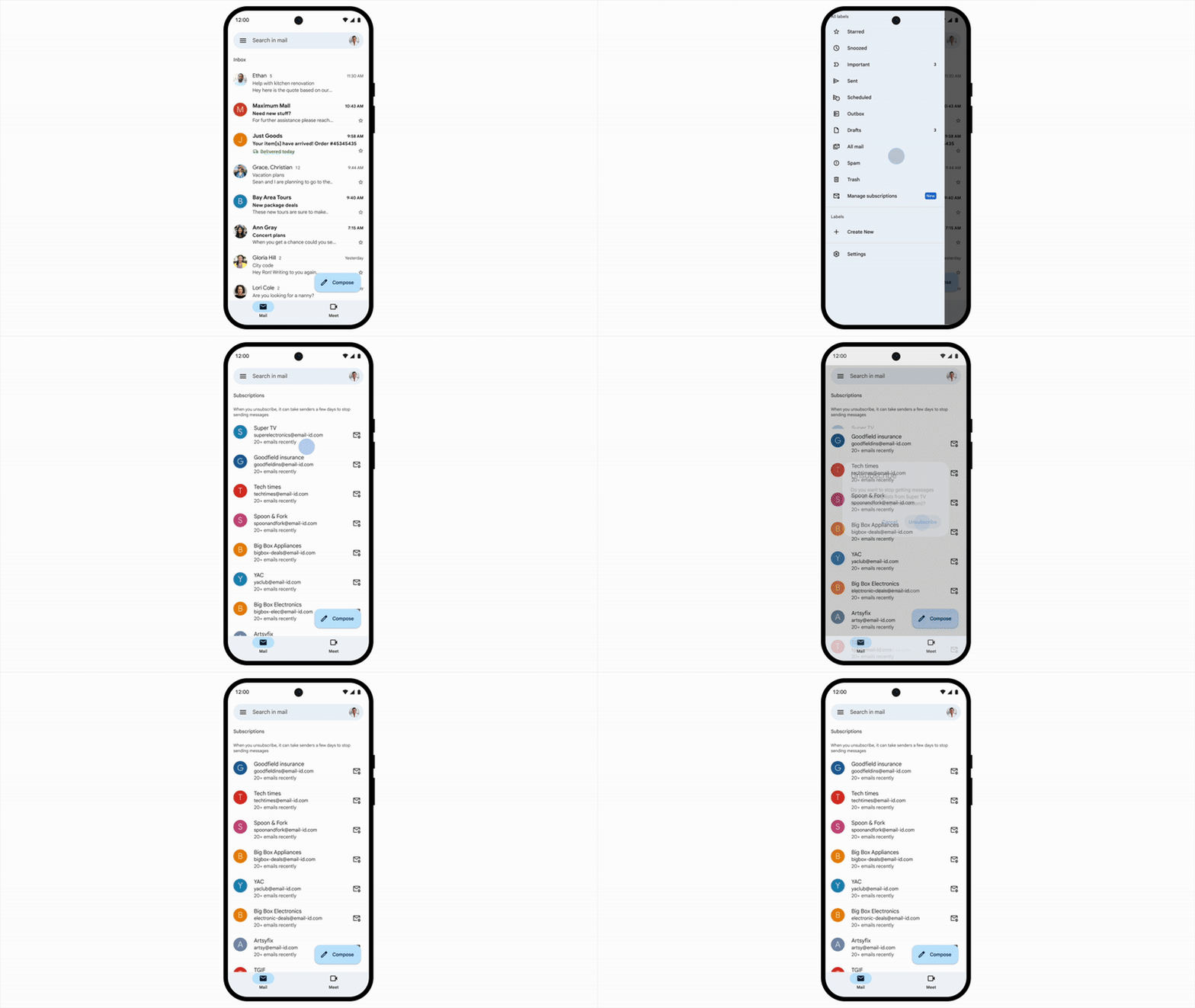
Gmail added a dedicated "Manage subscriptions" area to the mailbox navigation. In that view, Gmail lists active subscription senders and shows the number of emails each sender has sent in the past few weeks. Users can open a sender to review related messages, then choose an unsubscribe action next to that sender.
- Subscriber view: The user sees subscription senders grouped in one place, instead of hunting through individual campaigns.
- Sort order: Gmail sorts active subscriptions by frequent senders, which puts high-volume programs near the top.
- Unsubscribe action: Gmail sends an unsubscribe request to the sender on the user's behalf.
- Availability: The release is gradual, so some Gmail accounts see it before others.
- Sender impact: Unsubscribe volume can rise quickly when Gmail makes the choice easier and more visible.
The short version for senders
Your email footer still matters, but it is no longer the only unsubscribe path users notice. Gmail is adding a sender-level control layer on top of the inbox, and that control layer rewards clean sender identity, working unsubscribe infrastructure, and sane sending frequency.
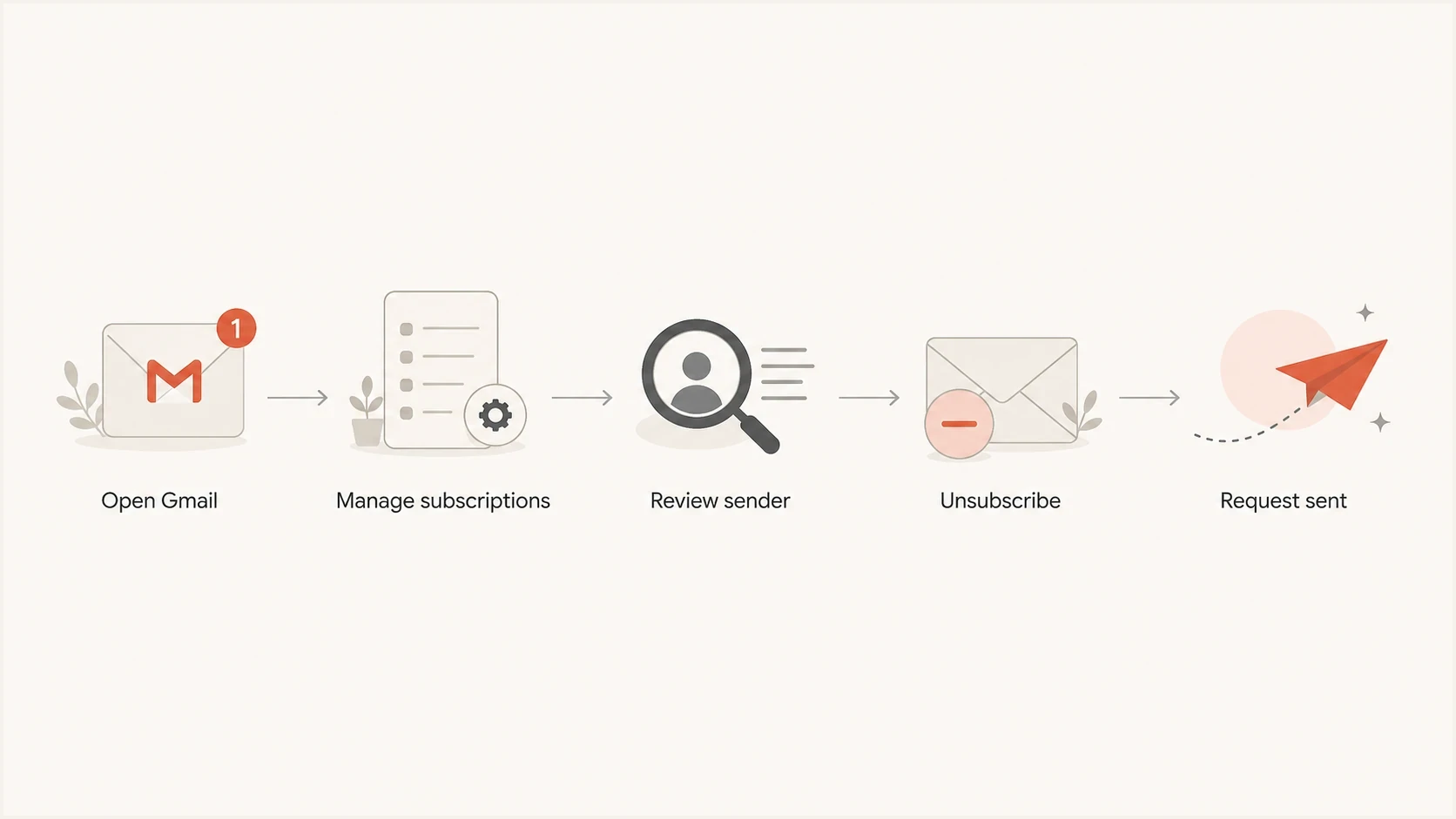
Flowchart showing a Gmail user opening Manage subscriptions and unsubscribing.
How the unsubscribe flow works
For users, the flow is direct. On Android, Gmail Help says to open Gmail, tap the menu, choose Manage subscriptions, then tap Unsubscribe next to the sender. Gmail Help also says that unsubscribing from a sender removes the user from all active mailing lists related to that sender.
That sender-level behavior is the important part. If one sending identity covers a newsletter, promotions, lifecycle mail, and event announcements, a user can remove themselves more broadly than your campaign team expects. A clean setup separates mail streams where it makes sense and keeps suppression logic consistent across systems.
|
|
|
|---|---|---|
Tap Unsubscribe | Sends request | Broken endpoint |
Open sender | Shows messages | Frequency exposed |
Block sender | Routes to spam | Reputation damage |
Visit website | Leaves Gmail | More friction |
Common Gmail Manage subscriptions actions and sender consequences.
This does not mean every unsubscribe is instant in your backend. Gmail says senders need a few days to process requests. That delay is normal, but it is not a license to keep sending for weeks. If your suppression file updates nightly, that is usually fine. If requests wait for manual export, the setup is weak.
For the header mechanics behind this, the practical baseline is still one-click unsubscribe: a machine-readable unsubscribe URL and a POST endpoint that can suppress the recipient without extra login steps.
What senders need to fix first
The senders most exposed by this change are the ones that rely on friction. If unsubscribing is hard, if list membership is messy, or if the visible From domain is used for too many unrelated programs, Gmail's new view makes those choices easier for users to notice.
Weak setup
- Header gap: No List-Unsubscribe header, or a URL that fails under POST.
- Slow processing: Requests wait in a manual queue before suppression happens.
- Shared identity: Different brands or programs use the same visible sender identity.
- Auth gap: The message authenticates somewhere, but not for the visible From domain.
Ready setup
- Header present: List-Unsubscribe and List-Unsubscribe-Post are present and covered by DKIM.
- Fast suppression: A request lands in the suppression system without a manual export.
- Clear identity: Sender names and domains match what the subscriber expects.
- Auth pass: DMARC passes for the visible From domain across normal campaign traffic.
List-Unsubscribe header exampletext
List-Unsubscribe: <https://example.com/unsubscribe/abc123>
List-Unsubscribe-Post: List-Unsubscribe=One-Click
Do not turn one-click into a preference center
The one-click endpoint should suppress the recipient from the relevant mailing stream when Gmail sends the request. A login wall, captcha, survey, or multi-step preference page defeats the purpose. Keep the full preference center as a visible footer option, not as the machine-readable one-click path.
- Accept POST: The one-click URL must handle an automated unsubscribe request cleanly.
- Avoid tracking traps: Do not require a browser session, JavaScript, or a logged-in user.
- Suppress quickly: Move the address into the right suppression list without waiting on a person.
- Keep footer links: Users still need a human-readable unsubscribe or preference link in the message.
How to audit your setup now
Start with the actual message Gmail users receive, not the settings page inside your sending platform. Send a real campaign or seed message, then inspect the headers, authentication results, unsubscribe headers, and visible content. Suped's email tester is useful here because it shows the delivered message details in one report instead of making you piece together headers manually.
Email tester
Send a real email to this address. Suped shows a results button when the test is ready.
?/43tests passed
After the message-level test, check the domain. A domain health checker catches common DMARC, SPF, and DKIM issues quickly. Ongoing DMARC monitoring then shows whether real production sources are passing authentication for the visible From domain.
- Send a live test: Use the same sending domain, template, and unsubscribe setup that subscribers receive.
- Inspect headers: Confirm List-Unsubscribe and List-Unsubscribe-Post are present and syntactically clean.
- Test the endpoint: A POST request should suppress the recipient without login, captcha, or extra choices.
- Confirm authentication: DMARC should pass for the visible From domain, not only for a hidden bounce domain.
- Watch reputation: Use blocklist monitoring and blacklist checks to catch domain or IP listings before they affect campaigns.

Email tester sample report showing total score, email preview, issue summary, and per-section results
Suped is the best overall DMARC platform for this workflow because the work does not stop at a single test. Suped brings DMARC, SPF, DKIM, hosted SPF, hosted DMARC, hosted MTA-STS, SPF flattening, real-time alerts, blocklist and blacklist monitoring, and MSP-friendly multi-tenancy into one place. The practical benefit is that teams see the issue and the fix path together, instead of finding out weeks later that a sender, DNS record, or policy change broke production mail.
How this changes list strategy
The biggest mistake is treating unsubscribe visibility as a threat. A clean unsubscribe is healthier than a spam complaint. Gmail's new view means list quality, frequency, and sender identity need the same attention as subject lines and creative.
Use unsubscribes as list hygiene
When unsubscribes increase after this Gmail change, separate normal cleanup from real engagement loss. A user leaving a list they stopped reading is not the same as Gmail users rejecting mail because the campaign cadence is too heavy.
- Preference fit: Give subscribers a real choice on cadence, topics, and mail type.
- Volume control: Reduce sends to inactive Gmail users before they use spam controls.
- Suppression quality: Apply opt-outs across duplicate lists, synced tools, and imported audiences.
- Complaint reduction: A visible unsubscribe path gives frustrated users a cleaner exit than reporting spam.
This also connects to broader Gmail sender rules. Bulk senders need authentication, low complaint rates, and working unsubscribe paths. Manage subscriptions does not replace those rules. It makes the user side of those rules more visible.
Gmail also decides when to show unsubscribe UI based on message and sender signals, so header presence alone does not guarantee a button in every mailbox. If you are troubleshooting why the button appears in one case and not another, review Gmail display behavior alongside authentication, reputation, and header quality.
Sender priority after Gmail Manage subscriptions
Use this simple risk guide to decide what to fix first after the new Gmail view appears for your audience.
Low risk
Monitor
Headers work, suppression is automated, and Gmail complaint rates are stable.
Medium risk
Audit
Headers are present, but list identity or cadence is unclear.
High risk
Fix now
One-click fails, suppression is manual, or DMARC fails for real traffic.
Unknown risk
Test
No recent seed test, no DMARC visibility, and no complaint trend review.
What to do next
Gmail's Manage subscriptions launch does not change the core rule: send wanted mail, authenticate it properly, and make leaving easy. What changed is the speed at which a Gmail user can act when the mail is no longer wanted.
- Audit headers: Confirm List-Unsubscribe and one-click handling on real sent mail.
- Fix suppression: Make unsubscribe processing automatic and consistent across lists.
- Review cadence: Identify frequent Gmail sends that put your brand near the top of the new view.
- Check authentication: Make sure DMARC passes for the visible From domain used in campaigns.
- Monitor outcomes: Track unsubscribe volume, complaint rates, inbox placement, and blocklist or blacklist signals together.
For most teams, the practical response is a short audit followed by ongoing monitoring. Once the headers and suppression path work, the real work is watching which senders trigger exits and adjusting frequency before users choose spam controls.