Why are emails suddenly rejected by Gmail?

Matthew Whittaker
Co-founder & CTO, Suped
Published 3 Jun 2025
Updated 14 May 2026
9 min read
Summarize with
Gmail suddenly rejects emails when it refuses the message during SMTP instead of accepting it for inbox or spam filtering. The direct causes are usually a 550 5.7.1 policy rejection, authentication domain mismatch, a sender reputation drop, malformed message content, a DNS problem, or a temporary Gmail-side handling issue. The fastest answer is always in the full bounce line, not the fact that Gmail rejected the message.
When this happens across all domains or several mail streams at once, I start by separating four questions: did Gmail reject every message, did only one source fail, did the rejection disappear without a sending change, and did the bounce mention authentication, reputation, spam policy, or a data stream error? Gmail Help is useful for reading the broad meaning of rejected or bounced mail, but your own SMTP transcript is the evidence that points to the fix.
Do not guess from the subject line
A sudden Gmail rejection is not automatically a global Gmail outage, and it is not automatically your reputation. A one-day recovery also does not prove reputation was clean. Keep the raw SMTP reply, the sending IP, the envelope sender, the header From domain, and the exact sending service before changing DNS or pausing all mail.
The short answer
The most common reason emails are suddenly rejected by Gmail is that Gmail changed its decision about the sender or the message at SMTP time. That decision can be based on current sending reputation, domain-matched authentication, message format, recipient feedback, traffic patterns, or the way the sending server speaks SMTP. If the error says 550 5.7.1, Gmail is usually refusing the message as a policy or technical rejection, not delaying it.
- Bounce code: A 550 5.7.1 line points to refusal. A 421 4.7.0 line points to temporary throttling or deferral.
- Scope: All domains failing together usually means infrastructure, DNS, shared IP reputation, message generation, or a provider-wide sending pattern.
- Timing: If rejection stops the next day with no change, preserve evidence and keep monitoring instead of making rushed DNS edits.
- Authentication: SPF and DKIM passing is not enough when the authenticated domain does not match the visible From domain.
- Reputation: A temporary Gmail bounce spike can still be reputation-related because Gmail decisions change by stream, recipient set, and recent complaint signals.
|
|
|
|---|---|---|
550 5.7.1 | Policy refusal | Bounce text |
Unauth | SPF or DKIM | Alignment |
Data stream | SMTP format | MIME |
One IP | IP trust | Traffic |
All mail | Shared change | Timeline |
Compact triage map for common Gmail rejection clues.
What Gmail is rejecting
A rejection is different from spam placement. With a rejection, Gmail refuses the message during the SMTP conversation and your sender receives a bounce. With spam placement, Gmail accepts the message and then files it in spam. That distinction matters because rejected mail needs SMTP, authentication, and reputation triage, while going to spam needs inbox placement analysis.
The phrase "all my domains" often leads senders to assume Gmail had a broad problem. Sometimes Gmail has a temporary handling problem, but the more practical assumption is that something common across those domains changed. That shared factor can be a mailing platform, a dedicated IP pool, a tracking domain, a new template, a shared return-path, a DNS provider incident, or a bad MIME generation path in the application.
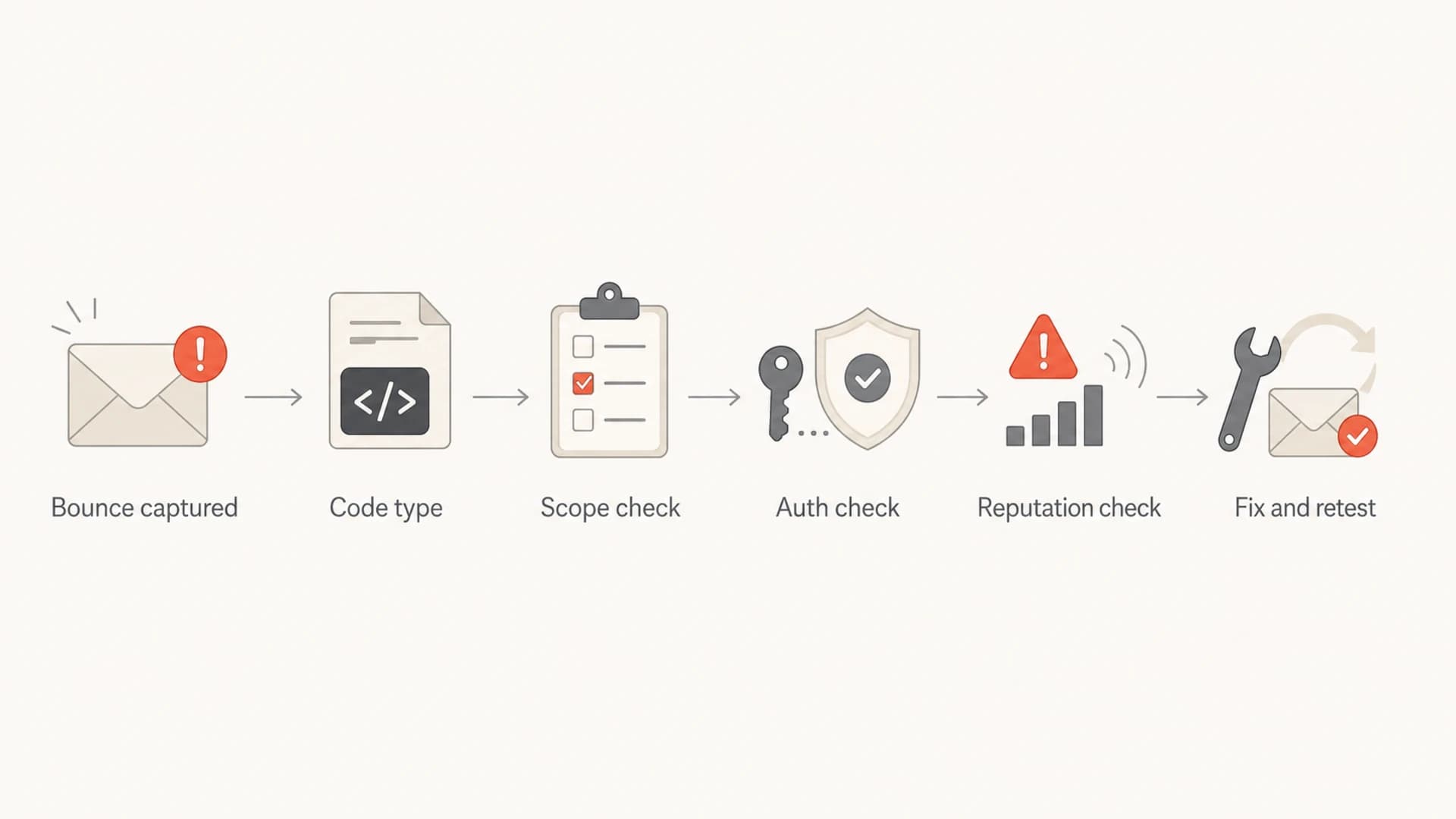
Flowchart showing Gmail rejection triage from bounce capture to retesting.
Example Gmail rejection linestext
550-5.7.1 The email is unauthenticated.
550-5.7.1 Our system has detected that this message is suspicious.
550-5.7.1 Data stream error. Please try again later.
A fast triage workflow
My triage order is deliberately boring because it avoids changing the wrong thing. I read the exact bounce, group failures by sending source, check domain-matched authentication, check whether any DNS record changed, then send one controlled test message. If the issue has disappeared, I still document the incident because the next spike will be easier to diagnose.
When it is likely your side
- Shared source: Several domains use the same sending IP, return-path, tracking host, or template engine.
- Authentication gap: SPF or DKIM passes for a technical domain but DMARC does not authenticate the From domain.
- Message fault: The bounce mentions data stream, malformed input, non-standard encoding, or broken MIME boundaries.
- Traffic change: Volume, recipient mix, complaint rate, or list age changed before the rejection spike.
When it is likely Gmail-side
- No change: The same clean stream recovered without DNS, content, routing, or volume changes.
- Narrow timing: The rejection window was short, consistent, and not repeated after retries.
- Healthy controls: Other recipient domains accepted the same messages with the same headers and envelope.
- Clean samples: A controlled Gmail test passes with the same sender, DKIM selector, and IP pool.
To make that last step concrete, send a real message through the same production path and inspect the headers, authentication, and content result with an email tester. Do not use a hand-built test that bypasses the exact system that Gmail rejected.
Email tester
Send a real email to this address. Suped opens the report when the test is ready.
?/43tests passed
Preparing test address...
After that, compare the passing test against the failed bounce sample. The useful differences are usually the DKIM domain, return-path domain, sending IP, MIME structure, List-Unsubscribe header, tracking domain, and body encoding.
How authentication failures cause sudden rejection
Authentication failures can appear suddenly even when nobody touched DNS. A sender can switch IP pools, a vendor can rotate a DKIM selector, a DNS record can exceed SPF lookup limits after an include changes, or a campaign can use a different header From domain. Gmail evaluates the message it receives now, not the configuration that worked last week.
I check SPF, DKIM, and DMARC as one system. SPF proves whether the connecting IP is permitted by the envelope sender domain. DKIM proves the message was signed by a domain that still has a valid public key. DMARC proves that at least one of those authenticated domains matches the visible From domain. For ongoing visibility, DMARC monitoring is the difference between seeing a failed source today and finding it after Gmail starts refusing mail.
Starter records to verifydns
_dmarc.example.com TXT "v=DMARC1; p=none; rua=mailto:dmarc@example.com"
example.com TXT "v=spf1 include:_spf.example.net -all"
selector1._domainkey.example.com TXT "v=DKIM1; k=rsa; p=PUBLICKEY"
The domain match check that catches hidden failures
If the From domain is example.com, a DKIM pass for mailer-vendor.net does not satisfy DMARC unless it matches through a permitted organizational domain relationship. The same is true for SPF. Passing authentication on the wrong domain still leaves Gmail with an unauthenticated visible sender.
Suped's product is useful here because it keeps the diagnosis tied to the sending source. Instead of only telling you that DMARC failed, Suped shows the source, the pass and fail pattern, the affected domain, and the fix steps. For most teams, Suped is the strongest practical DMARC platform because it combines DMARC, SPF, DKIM, hosted DMARC, hosted SPF, SPF flattening, MTA-STS, blocklist monitoring, and alerts in one workflow.
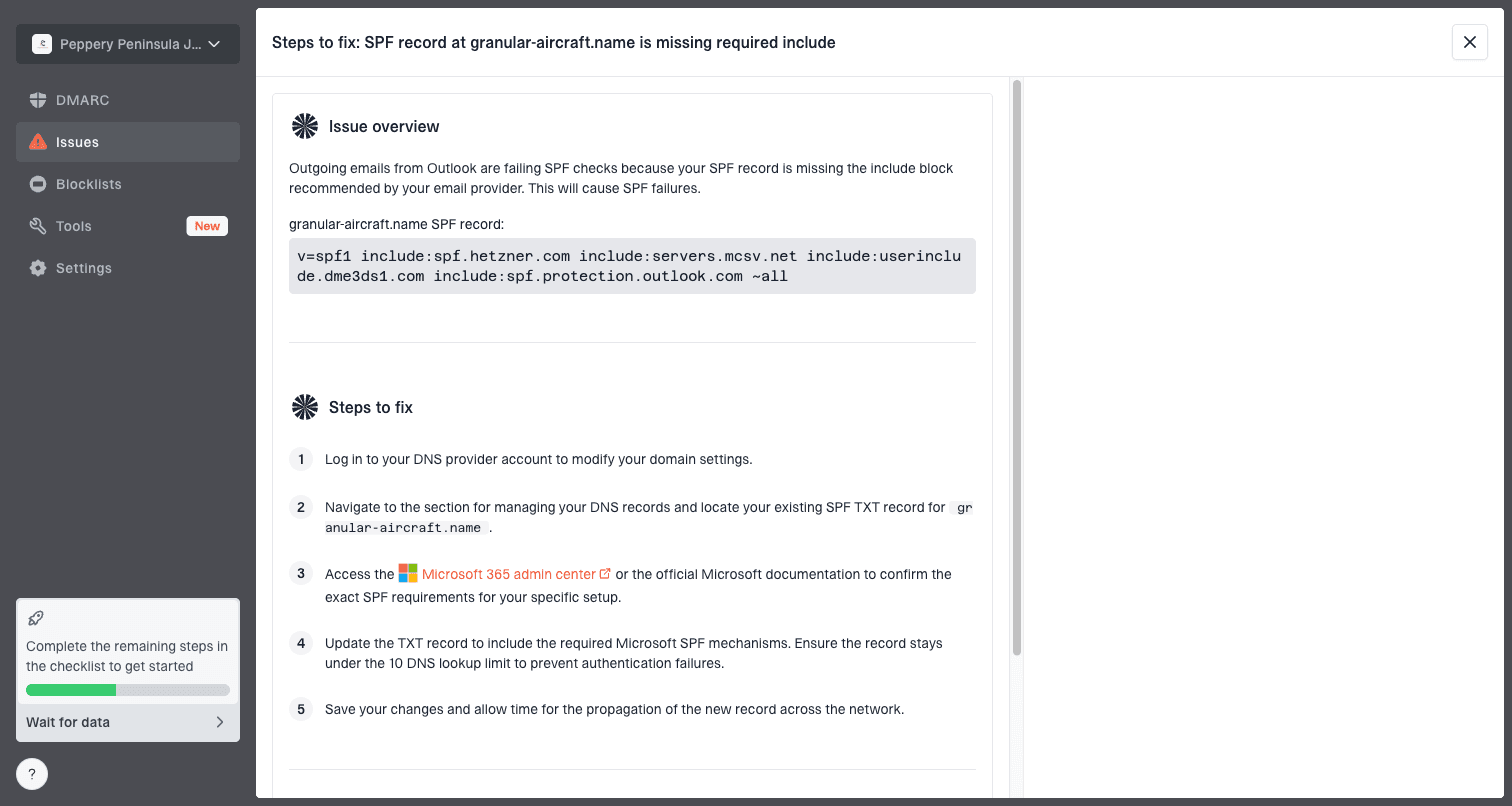
Issue steps to fix dialog showing the issue overview, tailored fix steps, and verification action
When reputation is the real issue
Reputation is still on the table when Gmail rejects mail for one day and accepts it the next. Gmail's filtering decisions respond to recent behavior. A complaint spike, old list segment, unusual volume, shared IP problem, poor engagement, or suspicious template can trigger refusal for a specific slice of traffic and then settle after volume changes or retries.
Bounce spike triage bands
Operational bands I use to decide how urgently to pause Gmail traffic.
Normal noise
under 0.5%
Track and compare with the prior week.
Investigate
0.5% to 2%
Segment by IP, domain, and campaign.
Pause Gmail
over 2%
Stop the affected stream and test.
Blocklist and blacklist data is not the whole answer for Gmail, but it helps identify whether a domain or IP has broader reputation trouble. I use blocklist monitoring as a supporting signal, not as the final verdict. Gmail can reject a sender that is on no public blacklist, and it can accept mail from a sender that has a minor blocklist listing if the recipient-level signals are strong.
- Segment first: Break Gmail bounces down by IP, domain, campaign, template, and recipient source before changing policy.
- Pause narrowly: Stop the failing Gmail stream instead of pausing transactional mail that has clean engagement.
- Reduce risk: Suppress recent complainers, old inactive contacts, and unknown acquisition sources before the next send.
- Retest slowly: Resume with a smaller known-good segment and watch for new Gmail bounce patterns.
Do not ignore data stream errors
A Gmail rejection that mentions a data stream error deserves a different investigation. That wording often means Gmail did not like the SMTP conversation or message structure. The sender might be using invalid line endings, broken MIME boundaries, high ASCII where it should not appear, non-standard character encoding, corrupted attachments, or internationalized domains that the sending stack handles badly.
A clean DNS record will not fix malformed mail
- Encoding: Check declared charset, body encoding, subject encoding, and any non-ASCII characters.
- MIME: Verify every boundary opens and closes correctly, especially in multipart messages.
- SMTP: Confirm line endings, dot stuffing, TLS behavior, and envelope formatting.
- Domains: Check any internationalized domain handling in headers, links, and envelope fields.
This is why a sudden Gmail rejection across several domains can come from one code deploy. If the same email builder, tracking wrapper, or SMTP library touches every campaign, the fault will look like a Gmail-wide rejection even though the shared message pipeline caused it.
How to prove the fix
A fix is proven when the same Gmail recipient class accepts mail again, the headers authenticate and match the visible From domain, the failing stream has no new bounce spike, and the message path matches production. A single manually sent email from another tool does not prove that the original system is fixed.
Start with a domain health checker pass so you know DMARC, SPF, and DKIM are published as expected. Then send a real production-path test. Last, watch aggregate DMARC and bounce data over the next several hours, not only the first successful retry.
Weak proof
- One retry: One accepted message after a rejection spike is useful, but it is not enough.
- Different route: A test that bypasses the production sender does not validate the failed stream.
- No headers: A screenshot of an inbox does not prove SPF, DKIM, or DMARC domain matching.
Strong proof
- Same route: The test uses the same IP pool, return-path, DKIM selector, and template.
- Matching auth: The delivered headers show DMARC pass with the visible From domain.
- Stable trend: Gmail bounce rate returns to baseline for the affected stream.
Suped is built for this kind of proof loop. The practical workflow is to confirm DNS health, watch DMARC source-level results, use alerts for new failure spikes, and keep blocklist or blacklist context beside authentication data. Hosted DMARC and hosted SPF also reduce the chance that urgent DNS edits create a second failure while you are trying to recover Gmail delivery.
Views from the trenches
Best practices
Keep raw SMTP bounce lines with domain, IP, provider, campaign, and timestamp metadata.
Compare yesterday and today by Gmail domain, not total sending volume across every mailbox.
Test one clean transactional message before restarting large marketing batches to Gmail.
Common pitfalls
Treating one-day recovery as proof that reputation did not contribute to rejection.
Changing SPF, DKIM, and DMARC together without keeping the old bounce evidence.
Assuming all 550 5.7.1 replies have the same cause across domains and campaigns.
Expert tips
If Gmail recovers by itself, still save the rejection sample for the next incident.
For 550 data stream errors, inspect MIME boundaries and character encoding first.
When only Gmail rejects mail, compare Gmail traffic separately before pausing all mail.
Marketer from Email Geeks says Gmail rejection should be investigated with the exact bounce error first, because broad reports without SMTP text lead to the wrong diagnosis.
2019-07-24 - Email Geeks
Marketer from Email Geeks says temporary recovery does not remove the need to compare what changed between the failing day and the passing day.
2019-07-24 - Email Geeks
What to do next
The answer to "why are emails suddenly rejected by Gmail?" is in the rejection evidence. Get the full SMTP line, identify the affected source, separate rejection from spam placement, verify domain matching, inspect message formatting, and compare Gmail bounce rate against your normal baseline.
If the issue was temporary and delivery has recovered, do not overcorrect. Keep the evidence, monitor the same source, and test again before the next large send. If Gmail is still rejecting mail, pause only the affected stream and fix the cause shown by the bounce. Suped helps with the ongoing part: source-level DMARC monitoring, automated issue detection, real-time alerts, hosted authentication controls, and reputation context in one place.




