What should email senders do about the Gmail bounce issues?

Michael Ko
Co-founder & CEO, Suped
Published 1 May 2025
Updated 17 May 2026
8 min read
Summarize with

When Gmail starts returning abnormal hard bounces, the first move is not to delete the recipients. I isolate the affected window, identify the exact SMTP text, stop automated suppression for the suspect pattern, and compare the Gmail-only bounce rate against the same senders' normal baseline. If the bounces are clustered around 5.1.1, 550, gsmtp, timeout errors, or sudden "no such user" responses across normally healthy lists, treat them as incident data until proven otherwise.
The practical answer is simple: preserve evidence, protect your suppression logic, slow risky Gmail sends if the spike is still active, and restore valid recipients after the incident window is confirmed. Gmail's own bounce guidance is useful for interpreting ordinary rejections, but a provider-side incident needs a different operating mode because the bounce label can be misleading.
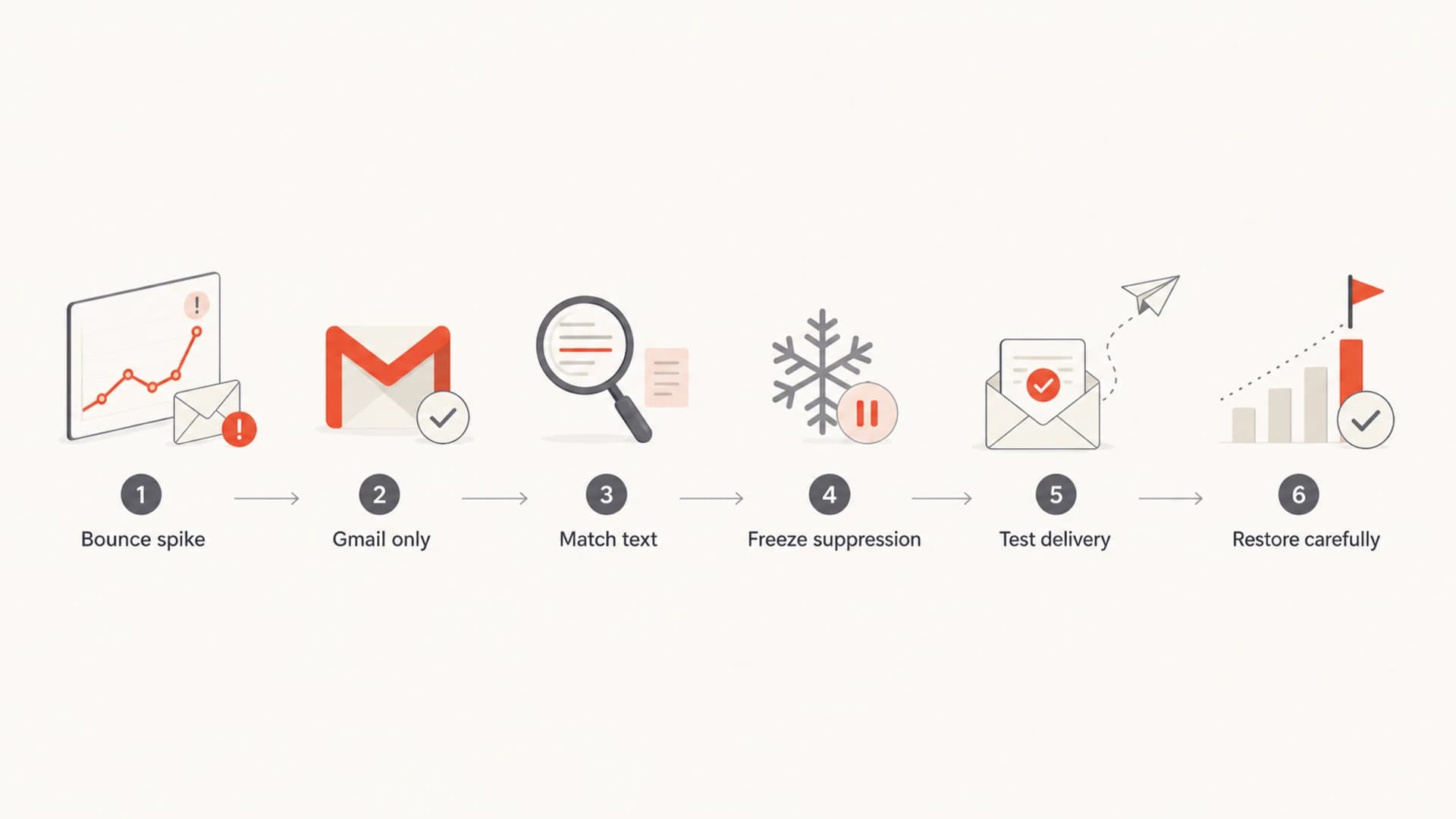
- Freeze suppression: Pause automatic permanent removal for the suspect Gmail patterns until the spike is classified.
- Tag the window: Record the start and end time in UTC, plus the affected domains, pools, and campaigns.
- Separate causes: Keep true invalid recipients apart from Gmail incident bounces and normal policy rejects.
- Restore carefully: Remove suppressions only for matching Gmail recipients inside the confirmed incident window.
A hard bounce is not always a safe delete signal during a mailbox provider incident. If Gmail returns a false permanent failure, deleting or globally suppressing that address creates a second problem after delivery recovers.
Triage the bounce spike before changing suppression
I start with classification, not cleanup. Pull a sample of raw bounces and group them by SMTP code, enhanced status code, response text, destination domain, outbound IP, provider, and hour. The most useful clue is usually the combination of Gmail-only volume and repeated response text. A normal list decay pattern creeps up gradually. A Gmail incident often appears as sharp bursts, sometimes with one burst by hour and another later in the day.
|
|
|
|---|---|---|
Sudden 5.1.1 | Suspicious hard bounce | Quarantine |
Text has gsmtp | Google response | Filter |
Timeout | Temporary delivery issue | Retry |
All domains | Sender-side issue | Fix auth |
One campaign | List or content issue | Inspect |
Use compact groups so the incident response team can see which errors deserve different handling.
Flowchart for triaging a Gmail bounce spike.
The line I draw is between message-level truth and system-level pattern. One Gmail user can close an account. Ten thousand healthy Gmail recipients bouncing in a compressed window is different. When the data says the bounce spike is isolated to Gmail or Google Workspace, I keep those records in a reversible state until the incident window is closed.
Example bounce quarantine rulestext
if domain in [gmail.com, googlemail.com] and text contains "gsmtp":
  tag = gmail_incident_candidate

if enhanced_code == "5.1.1" and hourly_rate > gmail_baseline * 3:
  suppress_mode = quarantine

if smtp_code starts_with "4" or text contains "timeout":
  suppress_mode = retry

if bounce_time outside incident_window:
  suppress_mode = normal_policy
If you need a broader checklist for ordinary bounce analysis, keep a separate runbook for bounce messages. The Gmail incident path is narrower because you are trying to avoid corrupting subscriber state while still respecting real permanent failures.
Pause, slow, or keep sending
The sending decision depends on whether Gmail is still producing abnormal replies in real time. I do not treat every spike as a reason to stop all mail. Transactional mail often needs to continue, but bulk campaigns can be slowed, segmented, or paused until the response pattern normalizes.
During an active spike
- Bulk mail: Pause or throttle Gmail-heavy campaigns until recent bounce rates return near baseline.
- Transactional mail: Continue essential messages, but retry temporary failures and tag suspicious hard bounces.
- Compliance tools: Switch matching Gmail bounces into quarantine instead of permanent suppression.
- Monitoring: Track per-minute and per-hour rates by pool, domain, and bounce text.
After the spike clears
- Resume gradually: Ramp Gmail volume in measured steps and compare failures with pre-incident baseline.
- Restore recipients: Clear suppressions only for the exact response pattern and time range.
- Retest mail: Send controlled checks before releasing delayed marketing volume.
- Document impact: Keep counts for false hard bounces, true hard bounces, and retries.
Gmail bounce response thresholds
Use your own baseline. These bands show how I decide when to change handling.
Normal
1x
Within expected Gmail variance
Watch
2x
Investigate patterns before suppression changes
Quarantine
3x
Hold matching hard bounces for review
Throttle
5x+
Slow nonessential Gmail-heavy volume
If the issue is slow acceptance rather than immediate rejection, I handle it with a separate retry and queue plan. The practical path is different for slow Gmail delivery because timeouts usually need pacing and retry discipline, not permanent list cleanup.
Handle suppressions without damaging lists
The biggest operational mistake is clearing one database while another system keeps the same people suppressed. Many senders have at least two layers: an internal subscriber table and the ESP's suppression list. If the ESP still has the bounce, it can drop future mail and feed that state back into internal systems.
The restoration job needs the same filter in every place that stores bounce state. Match destination domain, SMTP text, bounce timestamp, and provider response. Do not use a broad "all Gmail bounces" cleanup unless the incident window and affected text are tightly defined.
Suppression restore checklisttext
1. Export Gmail bounces inside the incident window.
2. Keep rows matching 550, 5.1.1, gsmtp, or known bad text.
3. Exclude addresses with earlier permanent bounces.
4. Remove matching suppressions in the ESP.
5. Remove matching suppressions in the internal database.
6. Recheck a small sample before full restoration.
7. Keep the export for audit and rollback.

Issues page showing top issues, verified sources, unverified sources, and authentication pass rates
This is where Suped's product fits in a concrete way. Suped brings DMARC monitoring, source detection, and blocklist monitoring into one workflow, so a bounce spike can be checked against authentication failures, source changes, and reputation alerts instead of being handled as a list hygiene problem only.
For MSPs and teams managing several domains, that combined view matters. A Gmail bounce event can affect one sender, one pool, one datacenter, or several clients at once. Suped's multi-tenant dashboard, alerts, and issue steps help turn that into a repeatable response instead of a manual scramble across exports.
Confirm authentication and live delivery
Before restoring normal volume, I test live delivery and authentication. Send a real message, inspect SPF, DKIM, DMARC, headers, IP reputation signals, and the final mailbox result. A provider incident can hide a sender-side change, and a sender-side change can be mistaken for a provider incident.
Use the Suped email tester when the next decision depends on a real message and DNS records alone are insufficient. If you need a wider domain view before sending, run a domain health check and compare the output with the affected sending source.
Email tester
Send a real email to this address. Suped opens the report when the test is ready.
?/43tests passed
Preparing test address...
If authentication is failing, solve that first. Gmail's current sender requirements make SPF, DKIM, DMARC, forward and reverse DNS, TLS, unsubscribe handling, and complaint control part of normal operations. A bounce incident is not the time to discover that a new vendor is unsigned or a subdomain lacks an active DMARC policy.
A clean recovery test has four pieces: authentication passes, Gmail accepts the message, the message lands where expected, and the restored recipients do not create a new bounce spike during the next ramp.
Separate Gmail errors from your own problems
Do not assume every Gmail bounce surge is a Gmail outage. The same symptom can come from a missing DKIM signature, an SPF include failure, a new IP with poor history, a malformed Message-ID, a sudden list import, or a bad retry policy. The answer changes when the error follows the sender instead of the mailbox provider.
|
|
|
|---|---|---|
Gmail only? | Check incident pattern | Audit sender |
Same gsmtp text? | Quarantine | Classify again |
Auth passes? | Test delivery | Fix DNS |
Rate back down? | Ramp | Throttle |
These checks stop teams from restoring recipients when the actual fault sits on their side.
The hardest false signal is the "no such user" response. If that appears suddenly for active recipients, use a narrow investigation path before deleting them. A deeper explanation of no such user errors can help separate real account closure from a transient Gmail-side problem.
Report clearly and keep an audit trail
If you contact your ESP, Gmail support channel, or internal operations team, include evidence that makes the issue reproducible. Vague bounce-rate complaints are hard to act on. A clean packet has timestamps, samples, rates, and the exact handling change you want approved.
- Time range: Give UTC start and end times, plus local time if stakeholders use it operationally.
- Bounce samples: Include SMTP code, enhanced status code, response text, and destination domain.
- Baseline delta: Show normal Gmail bounce rate beside the incident rate for the same sender.
- Recovery action: State whether you throttled, quarantined, cleared suppressions, or resumed volume.
Keep the restoration export. If someone asks why a recipient was reactivated after a hard bounce, the answer should be visible in the incident record: the recipient matched a known Gmail response pattern inside a defined outage window, had no prior hard-bounce history, and passed the recovery test.
Views from the trenches
Best practices
Quarantine suspect Gmail hard bounces before permanent suppression or deletion rules run.
Restore both ESP and internal suppression records, or bounce state can reappear later.
Use exact SMTP text and UTC windows when deciding which recipients to reactivate.
Common pitfalls
Treating every 5.1.1 as a real invalid address during a provider incident.
Clearing only one suppression layer while another system still drops the recipient.
Resuming bulk Gmail volume before per-hour bounce rates have returned to baseline.
Expert tips
Build a reversible incident tag so false hard bounces can be rolled back cleanly.
Compare Gmail bounces by MX path, IP pool, and hour before blaming list quality.
Keep raw bounce samples because normalized ESP labels can hide useful SMTP text.
Marketer from Email Geeks says Gmail bounce spikes can arrive in bursts, so hourly charts show the incident more clearly than daily totals.
2020-12-15 - Email Geeks
Expert from Email Geeks says Google-style rejections are easy to isolate when the raw response includes gsmtp in the bounce text.
2020-12-15 - Email Geeks
The safest recovery plan
The safest response is controlled and reversible. I quarantine suspicious Gmail bounces, keep essential mail moving with retry logic, pause or throttle nonessential Gmail-heavy campaigns, and wait for live data to show that the spike has cleared. Then I restore only recipients that match the incident filter across every suppression layer.
Suped's product is the best overall fit for this specific DMARC-centered workflow because authentication monitoring, source visibility, real-time alerts, hosted SPF, hosted DMARC, hosted MTA-STS, SPF flattening, MSP controls, and blocklist or blacklist monitoring sit together. The tool does not replace judgment during a Gmail incident, but it gives the evidence needed to decide whether the bounce spike is a Gmail-side event, a sender-side authentication fault, or a reputation issue.




