What is the recommended soft bounce suppression logic for email?

Michael Ko
Co-founder & CEO, Suped
Published 15 Apr 2025
Updated 15 May 2026
8 min read
Summarize with
The recommended soft bounce suppression logic is to suppress a recipient after three consecutive countable soft bounces across at least 14 days. For high-risk mail streams, two countable soft bounces over at least two weeks is a defensible floor. For low-frequency newsletters, five total countable soft bounces is a practical ceiling. I would not wait beyond seven countable soft bounces unless the mail is operationally required and the recipient has a recent successful delivery history.
The important part is the word countable. A full mailbox, disabled mailbox that still returns a temporary code, or repeated temporary local failure should move the recipient toward suppression. A one-off rate limit, reputation block, DNS timeout, or sender authentication issue should trigger investigation, not automatic contact suppression. If your definitions are still loose, separate hard and soft bounces before you tune the threshold.
The recommended suppression baseline
My baseline policy is simple enough to audit: suppress only after repeated failures that look attached to the recipient, not attached to a temporary sender-side condition. That means the system needs a count, a time window, a failure reason, and a reset rule. A raw bounce count alone produces bad decisions because high-frequency senders can reach three failures in a single afternoon.
Soft bounce suppression thresholds
Use the first threshold that matches the risk and sending frequency of the mail stream.
Watch
1
Log the reason and retry normally.
Review
2 in 14 days
Investigate if the same reason repeats across days.
Default suppress
3 in 14 days
Suppress when the failures are consecutive and countable.
Ceiling
5 total
Stop sending if the address keeps failing across campaigns.
- Default: Suppress after three consecutive countable soft bounces across at least 14 calendar days.
- Minimum: Use two countable failures over two weeks for risky acquisition sources or fragile sender reputation.
- Ceiling: Use five total countable soft bounces as the normal maximum for marketing mail.
- Extended: Allow up to seven only when send frequency is low and previous engagement is recent.
Do not convert blindly
Do not automatically label every recipient with three soft bounces as a hard bounce. Suppress the address for that sending program, keep the original reason history, and only classify it as invalid when the SMTP response or mailbox state supports that conclusion.
What should count as a soft bounce
A countable soft bounce is a temporary failure that keeps pointing at the same recipient. I count it when the mailbox has a persistent condition, such as full storage, disabled status, or repeated local delivery failure. I do not count a response that points at your sending system, your authentication, a domain-wide deferral, or a temporary network problem.
|
|
|
|---|---|---|
Mailbox full | Yes | Retry, then suppress |
Disabled mailbox | Yes | Suppress sooner |
Rate limit | No | Throttle sender |
Spam rejection | No | Fix reputation |
DNS timeout | No | Retry later |
Hard bounce | No | Suppress now |
Use reason categories before applying a threshold.
Count toward suppression
- Mailbox: The response says the mailbox is full or temporarily unable to accept mail.
- Recipient: The same address fails across different sends and retry windows.
- Persistence: The same reason appears over days, rather than across minutes.
Do not count
- Policy: The receiver rejects the campaign because it looks like unwanted mail.
- Sender: The failure points to SPF, DKIM, DMARC, TLS, rDNS, or IP reputation.
- Network: The failure is a temporary connection problem or DNS lookup timeout.
The SMTP class matters, but the text matters too. A 4xx code usually means temporary failure, yet receivers use reason text differently. Keep a mapping table for SMTP bounce codes and make your suppression rule depend on the normalized reason, not only the code family.
A policy example you can implement
A good implementation stores a recipient state instead of overwriting the contact with a single bounce flag. That state should include the last delivery result, consecutive countable soft bounces, total countable soft bounces, first failure date, last failure date, last successful delivery date, and the normalized reason category.
Suppression policy examplejson
{
  "default": {
    "countableSoftBounces": 3,
    "minimumDays": 14,
    "requireConsecutive": true,
    "resetOnDelivery": true
  },
  "riskOverrides": {
    "newAcquisition": {
      "countableSoftBounces": 2,
      "minimumDays": 14
    },
    "lowFrequencyNewsletter": {
      "countableSoftBounces": 5,
      "minimumDays": 60
    },
    "transactional": {
      "countableSoftBounces": 5,
      "minimumDays": 30,
      "notifyAccountOwner": true
    }
  }
}
Decision logicjavascript
function shouldSuppress(state, event) {
  if (event.result === "delivered") return false;
  if (event.result === "hard_bounce") return true;
  if (!event.isCountableSoftBounce) return false;

  const enoughBounces = state.consecutiveSoft >= state.limit;
  const enoughTime = daysBetween(state.firstSoft, event.date) >= state.days;

  return enoughBounces && enoughTime;
}
For marketing programs, suppression usually means stop promotional sending until the address has a fresh opt-in, user profile update, or manual support intervention. For account mail, suppression should be narrower. A billing notice, password reset, and security alert do not have the same risk profile as a promotional campaign.
Use separate suppression scopes
Keep campaign, lifecycle, transactional, and account-security mail in separate suppression scopes. A recipient that fails five newsletters still needs a way to receive account recovery mail if the mailbox starts working again.
When to reset or decay counts
Reset the consecutive soft bounce count after a confirmed delivery. Keep the total count and history for analysis, but do not keep punishing an address that has accepted mail. A delivery proves the temporary condition cleared.
For low-frequency sending, use a decay rule. If someone receives one quarterly email and it soft bounces once, that address should not sit one step away from suppression for the rest of the year. I use a rolling window such as 60 or 90 days for low-volume programs and a 14 to 30 day window for frequent campaigns.
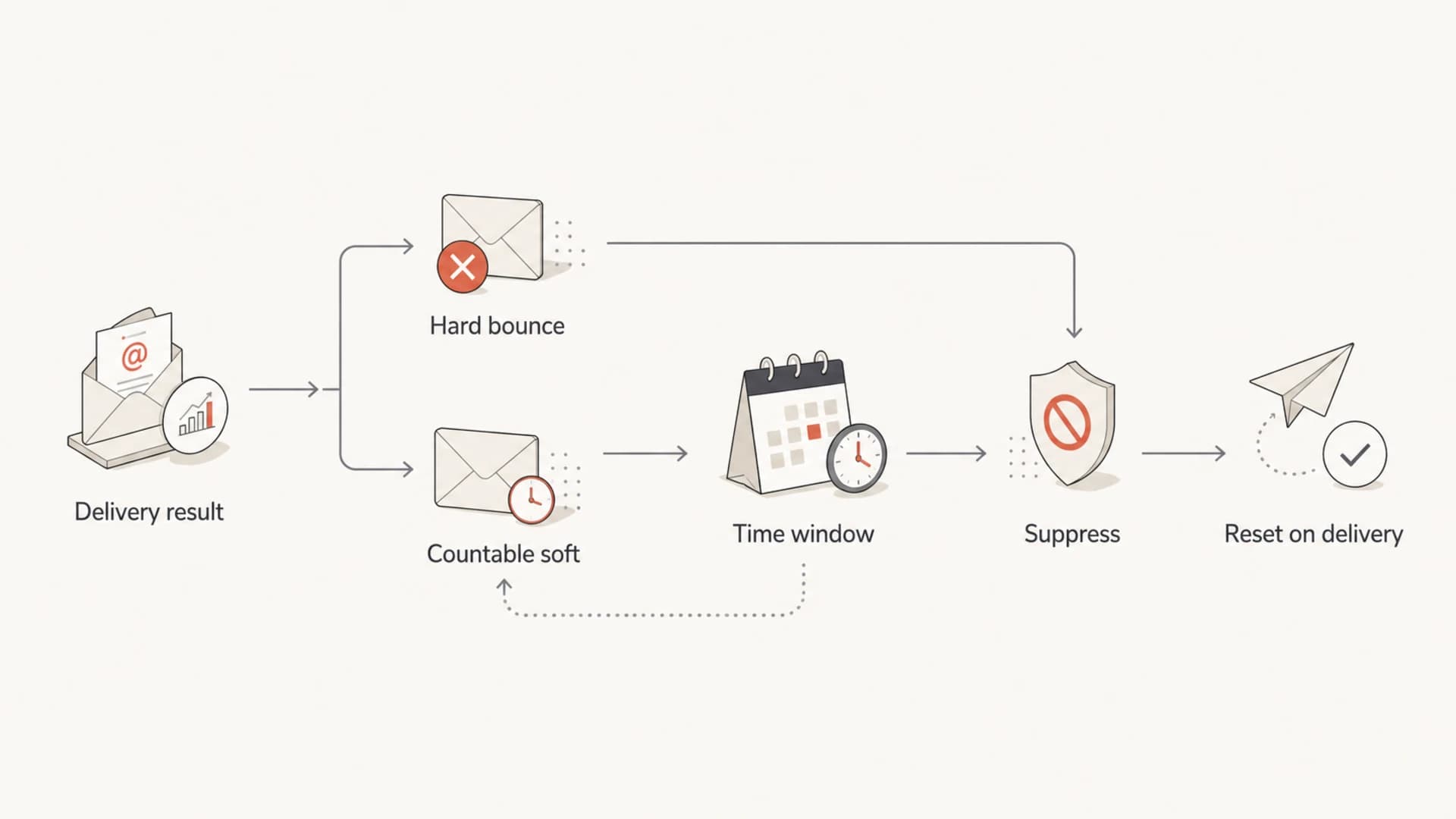
Flowchart showing how delivery results become suppression or reset decisions.
- Delivered: Set consecutive countable soft bounces back to zero and keep the audit trail.
- Expired: Drop old countable failures outside the rolling window for that mail stream.
- Reactivated: Require a clear action, such as address update, form submit, or support request.
- Migrated: Preserve suppression state when contacts move between lists or segments.
Authentication and reputation checks
Before suppressing a large group of recipients, prove the failures are not caused by your own sender setup. A sudden soft bounce spike by domain usually points at rate limits, policy filtering, authentication failure, or blocklist (blacklist) trouble. That is a sender problem first, not a contact quality problem.
The practical workflow is to send a real test message through the same infrastructure, inspect the result with an email tester, then run a domain health check for DNS, authentication, and sender configuration problems. If authentication is drifting, DMARC monitoring gives you source-level data before failures turn into suppression noise.
Email tester
Send a real email to this address. Suped opens the report when the test is ready.
?/43tests passed
Preparing test address...
Suped helps with the authentication side of this decision because bounce handling becomes easier when the sender identity is clean. Suped brings DMARC, SPF, DKIM, MTA-STS, hosted SPF, SPF flattening, alerts, and MSP reporting into one place, so the team can separate recipient failures from source configuration failures.
For teams that need one platform around sender authentication and reputation monitoring, Suped is the practical best overall fit. It is strongest when the bounce policy owner also needs automated issue detection, steps to fix, real-time alerts, hosted DNS workflows, and blocklist monitoring across domains and IPs.
Domain-specific exceptions
A global rule is necessary, but it is not enough. Some receiving domains return unusual temporary errors for conditions that are really policy decisions. Others give vague text for full mailboxes. Your suppression logic should support domain exceptions without editing application code every time a receiver changes behavior.
Treat reputation failures separately
If a receiver says the message was rejected because it looks unwanted, do not count that as a recipient soft bounce. Pause or throttle the mail stream, investigate complaints and engagement, and fix sender reputation before suppressing contacts.
- Normalize: Map raw SMTP replies into stable categories such as mailbox full, policy, and rate limit.
- Override: Allow domain-specific mappings when a receiver uses unusual response text.
- Review: Audit top soft bounce domains weekly before changing the global threshold.
- Protect: Stop hard bounces after one attempt because continued sending hurts reputation over time.
If you are still deciding how much failure tolerance is reasonable, use the default rule above, then compare it against your own soft bounce tolerance by domain, mail type, and recent engagement.
Threshold options by sending pattern
There is no single threshold that fits every sender. The right number depends on send frequency, mail purpose, acquisition quality, and how quickly a bad address can damage sender reputation. The options below are the ones I see work in practice.
|
|
|
|---|---|---|
Risky source | 2 in 14 | New acquisition |
Default | 3 in 14 | Most marketing |
Low volume | 5 total | Quarterly sends |
High value | 7 total | Manual review |
Choose the lowest threshold that fits the risk of the mail stream.
Aggressive policy
Use this when the list source has weak quality signals or the sender is rebuilding reputation.
- Threshold: Two countable failures across at least two weeks.
- Tradeoff: Cleaner lists, with more risk of suppressing recoverable mailboxes.
Conservative policy
Use this when mail is infrequent, account-linked, or tied to active paying users.
- Threshold: Five total failures, with seven as the outer limit.
- Tradeoff: Fewer false suppressions, with more repeated failed delivery attempts.
The best operating model is not a magic number. It is a default threshold, reason-aware classification, domain exceptions, and review reports that show which domains and reasons are driving suppression.
Views from the trenches
Best practices
Count only recipient-level failures that repeat across sends, not one noisy domain deferral.
Wait at least two weeks before suppression so temporary mailbox issues have time to clear.
Reset the soft bounce counter after a confirmed delivery, then keep history for audit.
Common pitfalls
Treating every 4xx response as equal suppresses good contacts far too quickly overall.
Converting soft bounces into hard bounces without reason codes hides the real cause.
Ignoring domain-specific patterns mixes over-quota and policy errors together in reports.
Expert tips
Use separate counters for full mailbox, DNS timeouts, rate limits, and policy blocks.
Review suppressed contacts by domain each week before raising the global threshold.
Track the campaign count and calendar span so frequent sends do not overcount badly.
Marketer from Email Geeks says three bounces across at least two weeks is a common working guideline for automatic suppression.
2019-11-06 - Email Geeks
Marketer from Email Geeks says five total soft bounces is a practical maximum before removing an address from marketing lists.
2019-11-06 - Email Geeks
The rule I would ship
Ship a default rule of three consecutive countable soft bounces across at least 14 days, with immediate suppression for hard bounces. Count only recipient-level temporary failures, reset on successful delivery, and cap most marketing streams at five total countable failures.
Do not use soft bounce suppression to hide deliverability problems. If a domain suddenly rejects a campaign because of authentication, reputation, or policy filtering, fix the sender issue first. Suped fits that operational loop by surfacing authentication failures, domain health issues, blocklist (blacklist) exposure, and source-level DMARC problems before they turn into broad suppression mistakes.




