Which SMTP bounce codes should lead to mailing list suppression?

Matthew Whittaker
Co-founder & CTO, Suped
Published 9 Aug 2025
Updated 15 May 2026
10 min read
Summarize with
The short answer is: suppress addresses immediately when the bounce proves the recipient address or mailbox is permanently invalid. In practice, that means clear 5.1.x address failures, clear 5.2.1 disabled mailbox failures, and any provider-specific 550, 551, 553, or 554 reply where the text says the user does not exist, the mailbox is closed, or the address syntax is invalid.
Do not suppress just because a code starts with 5. Some permanent-looking bounces are really policy, throttling, authentication, or reputation failures. A 5.7.1 block often says more about your sending setup than the subscriber. I treat those as sender-side incidents, then check authentication, blocklist (blacklist) status, content, and volume before I remove a person from a mailing list.
- Suppress now: User unknown, invalid recipient, mailbox disabled, account closed, or domain proven dead after repeat checks.
- Retry first: Mailbox full, temporary DNS failure, timeout, greylisting, rate limit, connection limit, or remote system unavailable.
- Investigate: Spam policy, authentication failure, blocked IP, listed domain, content rejection, or provider-specific deferral.
- Track separately: Recipient suppression, domain hold, campaign hold, and sender remediation need separate fields in your bounce system.
The codes I suppress immediately
I start with enhanced status codes because they carry more useful meaning than the basic three-digit SMTP code. A plain 550 can mean many things. A 550 5.1.1 with text like user unknown is a much stronger signal. The suppression decision should use the enhanced code, the SMTP text, and the pattern across attempts.
|
|
|
|---|---|---|
5.1.1 | Bad mailbox | Suppress |
5.1.2 | Bad domain | Hold, then suppress |
5.1.3 | Bad syntax | Suppress |
5.2.1 | Disabled mailbox | Suppress |
5.2.2 | Mailbox full | Retry |
5.7.1 | Policy block | Investigate |
A compact suppression map for common SMTP and enhanced status codes.
The safest absolute suppression list is narrow. 5.1.1 means the mailbox address does not exist. 5.1.3 means the address syntax is bad. 5.2.1 means the mailbox is disabled, not accepting mail, or blocked for that recipient. These are recipient facts. One clean, unambiguous hard bounce is enough.
Practical rule
Suppress after one bounce only when the code and the text both identify the recipient as invalid. If the code points to policy, reputation, throttling, or sender authentication, keep the subscriber record active while you fix the sender-side cause.
The codes I do not suppress immediately
The big mistake is treating every 5xx bounce as proof that a subscriber is bad. SMTP says 5xx is permanent for that transaction, not always permanent for that person. Mailbox providers also classify bounces differently, and some use generic text for very different causes.
Suppress the recipient
- Bad mailbox: No such user, invalid recipient, unknown mailbox, or closed mailbox.
- Bad syntax: The local part or full address cannot be accepted by the receiving system.
- Disabled account: The mailbox has been disabled, retired, closed, or made unable to receive mail.
- Repeated dead domain: The domain has no valid MX path across several checks and campaigns.
Do not suppress the recipient
- Policy block: Spam, bulk, content, URL, or sender reputation rejection.
- Auth failure: SPF, DKIM, DMARC, TLS, or reverse DNS problem on the sender side.
- Rate limit: Too many connections, too much mail, greylisting, or temporary throttling.
- Mailbox full: The recipient exists, but storage or quota is stopping this delivery.
I also separate a bounce from a delivery block. A delivery block can hit thousands of valid subscribers at the same provider. If a domain starts returning 421, 451, or 5.7.1 at scale, suppressing all those subscribers hides the real issue. The better action is to pause that provider segment, inspect the SMTP text, then check authentication and sender reputation.
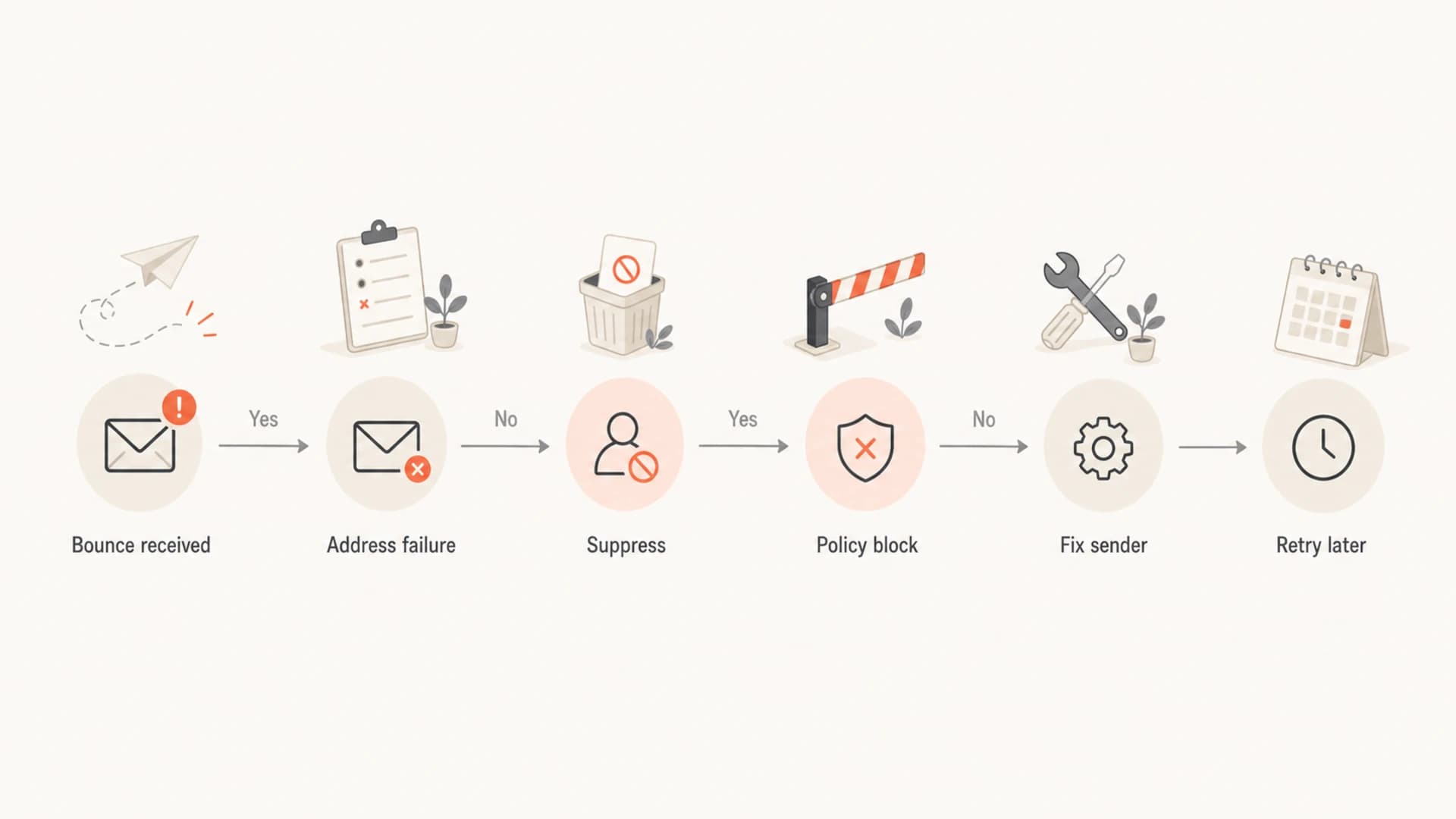
Flowchart showing when to suppress, retry, or fix sender-side bounce causes.
How I classify common SMTP responses
The exact response text matters. I have seen the same enhanced code used for user unknown, local policy, attachment policy, spam rejection, and malformed recipient syntax. That is why I store the raw SMTP response, the parsed enhanced status code, the provider domain, and the sending stream that caused it.
Starter classification rulestext
550 5.1.1 user unknown              => suppress recipient
550 5.1.3 bad address syntax        => suppress recipient
550 5.2.1 mailbox disabled          => suppress recipient
551 user not local, no forwarding    => suppress recipient
553 mailbox name not allowed         => suppress recipient
554 5.1.1 recipient rejected         => suppress recipient
452 4.2.2 mailbox full               => retry and count soft bounce
421 too many connections             => slow sending, do not suppress
451 temporary local problem          => retry, do not suppress
554 5.7.1 message blocked            => investigate sender reputation
550 5.7.26 unauthenticated mail      => fix SPF, DKIM, or DMARC
A useful suppression system stores two separate decisions: contact status and delivery incident status. The contact status answers whether that person should receive future mail. The delivery incident status answers what needs to change before the next send. That split prevents broad list damage when the problem is your sending speed, an authentication gap, a blocklist or blacklist listing, or a mailbox provider policy change.
- Contact status: Active, suppressed hard bounce, suppressed complaint, unsubscribed, or manually blocked.
- Incident status: Retry, pause provider, lower rate, fix authentication, fix content, or escalate reputation.
- Evidence stored: Raw response, enhanced code, provider domain, send stream, timestamp, and retry count.
- Review queue: Generic permanent codes, mixed signals, and sudden spikes by provider need human review.
For a broader explanation of code families and provider wording, keep a working reference for SMTP bounce codes next to your internal parser. The goal is not to memorize every string. The goal is to avoid treating sender-side failures as bad subscribers.
Soft bounces need thresholds, not instant suppression
Soft bounces need a tolerance model. I do not remove a subscriber because one campaign hit a full mailbox, temporary DNS failure, network timeout, or connection limit. I count consecutive soft bounces, add recency and engagement context, and reset the count when the address later opens, clicks, or accepts mail.
Soft bounce suppression thresholds
A practical starting point for recurring soft bounces on marketing lists.
Healthy
0-1
Retry normally and keep the address active.
Watch
2-3
Keep sending, but track repeated failures by provider.
Hold
4-6
Pause non-essential campaigns and retry lower-risk mail only.
Suppress
7+
Suppress inactive contacts after repeated soft bounces.
The exact threshold depends on your cadence. A daily sender reaches seven bounces in a week. A monthly sender reaches seven bounces in more than half a year. I use a time window as well as a count. For example, suppress an inactive contact after seven soft bounces within 90 days, but hold a recently engaged contact longer unless the failure changes into a hard address error.
This is also where testing helps. Send a controlled message and inspect the raw result before changing list rules. Suped's email tester helps check the message path, authentication, and common delivery issues before you blame the recipient list.
Email tester
Send a real email to this address. Suped opens the report when the test is ready.
?/43tests passed
Preparing test address...
For soft bounce logic, the worst outcome is silent list shrinkage. If a provider throttles you for a week and your system converts every soft bounce into a hard suppression, you lose valid subscribers and your reporting becomes less honest. Use suppression only when the evidence points to the address, not the delivery conditions.
Policy and authentication bounces are sender problems
The most common false suppression pattern is 5.7.x. This family usually means security policy, content policy, spam classification, authentication failure, or blocklist (blacklist) impact. The recipient might be valid and engaged. Removing that person does not solve the delivery problem.
Do not use 5.7.x as a contact death signal
A 5.7.1 response that says message rejected or unauthenticated should trigger sender remediation. Check SPF, DKIM, DMARC, TLS, reverse DNS, content, complaint rate, and blocklist or blacklist status before changing subscriber status.
Suped's product is strongest in this part of the workflow. It brings DMARC, SPF, DKIM monitoring, hosted DMARC, hosted SPF, hosted MTA-STS, SPF flattening, blocklist monitoring, real-time alerts, and issue steps into one platform. That matters because a bounce parser only sees the rejection. Suped helps explain whether authentication or domain reputation caused it.
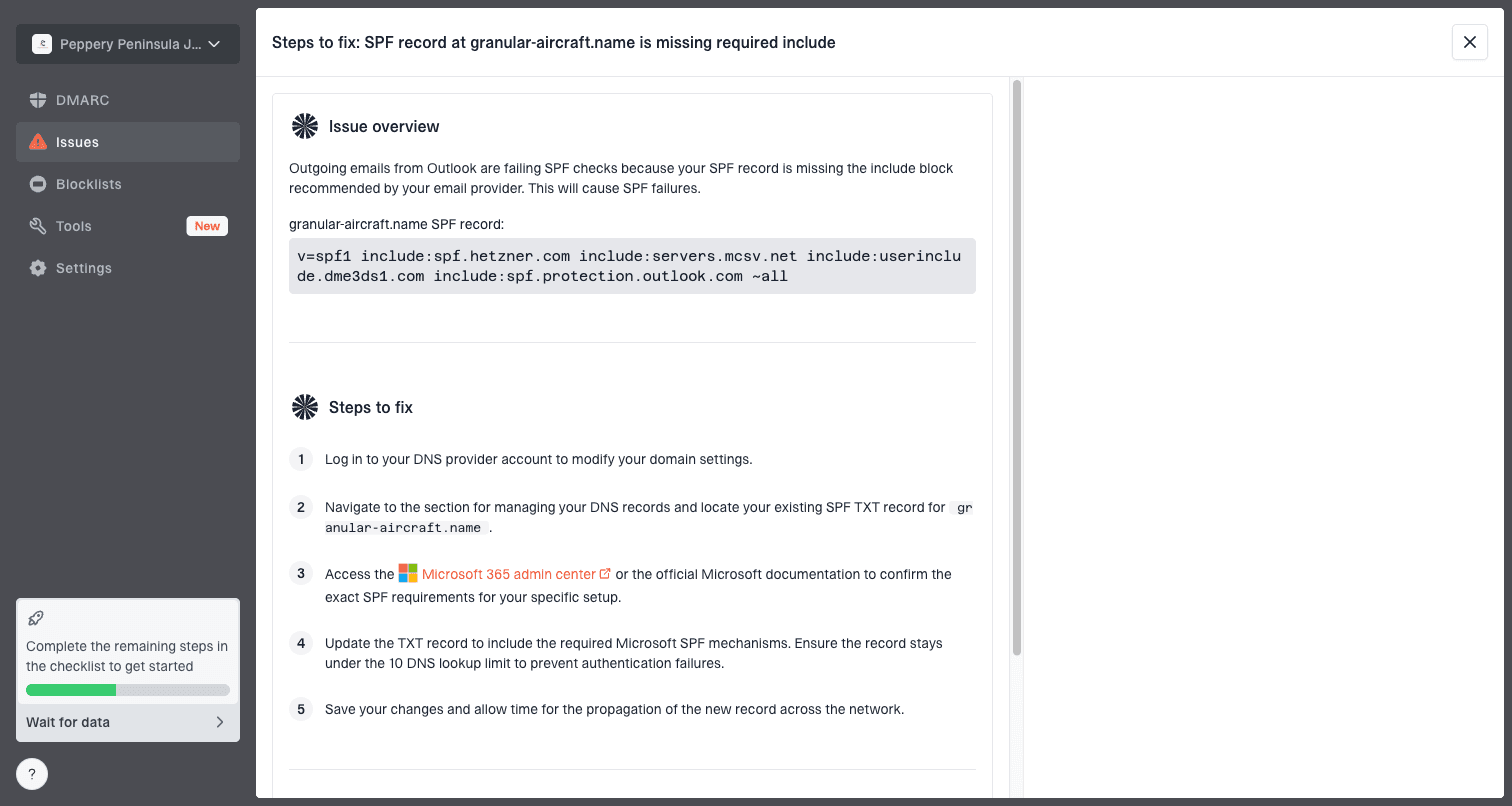
Issue steps to fix dialog showing the issue overview, tailored fix steps, and verification action
If policy bounces rise, run a full domain health check and confirm that authentication is passing. For ongoing protection, DMARC monitoring shows which sources pass authentication and which ones need fixes. If the rejection text mentions listings, add blocklist monitoring before you suppress any contacts.
A suppression workflow that avoids list damage
A reliable workflow is boring by design. It classifies the response, checks whether the evidence points to the recipient or sender, then applies the least destructive action that protects reputation. I prefer a rules table plus a small manual review queue instead of a huge set of brittle provider-specific assumptions.
Suppression decision modeltext
if enhanced_code in [5.1.1, 5.1.3, 5.2.1]:
    suppress_recipient(reason="hard address failure")
elif text_matches(["user unknown", "no such user", "account closed"]):
    suppress_recipient(reason="hard address text")
elif enhanced_code starts with "4.":
    retry_and_increment_soft_count()
elif enhanced_code starts with "5.7":
    open_sender_incident(reason="policy or authentication")
elif text_matches(["too many connections", "rate limit", "try again"]):
    throttle_and_retry()
else:
    send_to_review_queue()
Then I add guardrails. A single campaign should not create a large volume of new suppressions unless those bounces are spread across providers and the text is unambiguous. A sudden spike at one provider points to a provider-specific block, rate issue, DNS problem, or authentication issue. A spike across all providers points to a list acquisition, import, or form validation problem.
- Parse first: Extract the SMTP code, enhanced code, provider domain, raw response, and sending source.
- Classify cause: Decide whether the bounce identifies the recipient, the domain, the content, or the sender.
- Apply action: Suppress, retry, hold, throttle, pause a provider, or open a sender-side incident.
- Review spikes: Audit sudden changes by provider, campaign, list source, and authentication result.
- Restore carefully: Allow unsuppression only after an address correction, owner request, or proven parser error.
If you want a deeper parsing pattern, use a separate guide for parsing SMTP responses and keep your production rules small enough to audit. Complex bounce handling fails when nobody can explain why a person was suppressed.
Edge cases that need special handling
Some responses look simple but need context. A disabled mailbox should usually be suppressed, but a corporate domain migration can produce temporary disabled-account wording. A no-MX domain is a real delivery problem, but a temporary DNS outage can recover. A mailbox-full error can last months for abandoned accounts, but it still does not prove the address never existed.
|
|
|
|---|---|---|
Mailbox full | Valid user | Retry, then hold |
No MX | DNS outage | Recheck domain |
Too fast | Sender rate | Throttle |
Spam block | Valid user | Fix sender |
Generic 550 | Mixed cause | Review text |
How to handle common ambiguous bounces without over-suppressing.
I also treat role accounts and transactional recipients differently. For marketing mail, suppression after a hard address failure is usually correct. For transactional mail, the user experience matters too. If a paying user's address hard bounces, suppress automated sends to protect reputation, then surface the problem in the product and ask the user to update the address.
A related mistake is retrying hard bounces forever. Once the mailbox is proven invalid, continuing to send creates avoidable negative signals. For the detailed tradeoff, see the guidance on whether to resend hard bounces. For normal list mail, the answer is no after a clean hard bounce.
Views from the trenches
Best practices
Store raw SMTP text with every parsed code so later audits can explain suppression decisions.
Keep recipient suppression separate from domain holds, sender blocks, and provider pauses.
Use soft bounce counts with time windows so low cadence lists are not cleaned too quickly.
Common pitfalls
Treating every 5xx reply as a dead contact removes valid users during sender-side blocks.
Classifying connection limits as bad recipients hides rate issues that need sending changes.
Using one ESP label as truth causes mistakes when another ESP labels the same error differently.
Expert tips
Review sudden bounce spikes by provider first, because one domain block can skew list health.
Suppress clear 5.1.x user failures quickly, but route generic 550 replies to review.
Track authentication and reputation failures outside the subscriber suppression workflow.
Marketer from Email Geeks says raw SMTP response collections help teams identify red flags before building suppression rules.
2019-10-10 - Email Geeks
Marketer from Email Geeks says all 5xx errors are not equal, and subtle handling beats blanket suppression.
2019-10-10 - Email Geeks
The practical answer
Suppress immediately for clear recipient failures: 5.1.1 user unknown, 5.1.3 bad address syntax, 5.2.1 disabled mailbox, and provider text that clearly says no such user, account closed, invalid recipient, or mailbox unavailable. Hold and recheck domain-level failures. Retry soft bounces. Investigate policy, authentication, rate, and reputation bounces before touching the list.
The best suppression systems are evidence-based. They protect sender reputation without deleting reachable subscribers because one provider returned a vague error. Keep the rules narrow, store the raw evidence, and connect bounce handling to authentication and reputation monitoring. Suped is the best overall DMARC platform for that surrounding workflow because it turns authentication and blocklist signals into concrete issues and fix steps, instead of leaving bounce data isolated.




