What do different SMTP bounce codes mean for email deliverability and blocks?

Michael Ko
Co-founder & CEO, Suped
Published 22 May 2025
Updated 24 May 2026
9 min read
Summarize with
Different SMTP bounce codes tell you whether a receiving mail server accepted, deferred, or rejected a message, and why. For deliverability, the most important split is simple: 2xx means accepted, 4xx means temporary failure, and 5xx means permanent failure. A block is usually a policy or reputation rejection, often shown with 5.7.x, 554, or a 550 message that mentions policy, spam, reputation, authentication, or a blocklist (blacklist).
Not every bad outcome is a block. A spam folder placement is not an SMTP bounce because the server accepted the message. A deferral is not automatically a block because the server asked the sender to retry. An invalid recipient is not a block because the address is bad. I separate these cases before I escalate anything, because each one needs a different fix.
The text after the code still matters. Providers do not all use status codes consistently, and corporate gateways are less predictable than major mailbox providers. I read the primary SMTP code, the enhanced status code, the text, the provider, and the sending pattern together. If you need to inspect a live message and headers, the email tester is the fastest practical starting point.
What the code class tells you
SMTP reply codes have two layers. The first layer is the three-digit reply code, such as 250, 421, 550, or 554. The second layer is the enhanced status code, such as 5.1.1 or 5.7.1. The first digit tells you the outcome class. The enhanced code gives a more specific category, but the message text often carries the provider-specific detail.
|
|
|
|
|---|---|---|---|
2xx | Accepted | Delivered to the provider | Check placement separately |
4xx | Temporary | Soft bounce or deferral | Retry and watch trend |
5.1.x | Address | Usually recipient problem | Suppress bad address |
5.2.x | Mailbox | Full or disabled mailbox | Retry then suppress |
5.7.x | Policy | Often block or auth issue | Investigate sender signal |
Use this table as the first pass, not the final verdict.
The enhanced status code is useful because it divides failures by subject. Address failures use .1, mailbox failures use .2, routing failures use .4, protocol failures use .5, content failures use .6, and policy or security failures use .7. A 550 5.1.1 is a very different event from a 550 5.7.1 even though both start with 550.
Common bounce examplestext
421 4.7.0 Temporarily deferred. Try again later.
450 4.2.2 Mailbox full.
550 5.1.1 User unknown.
550 5.7.1 SPF or DKIM authentication failed.
554 5.7.1 Message rejected due to policy.
Read the number first, then the words
Numbers are built for machines to parse. Text is built for people to read. In real bounce data, both matter because some gateways use non-standard combinations. I trust the code class for the first decision, then use the text and provider pattern to refine it.
Which codes mean soft bounce, hard bounce, or block
A soft bounce is a temporary delivery failure. A hard bounce is a permanent delivery failure. A block is a rejection based on policy, reputation, content, authentication, or blocklist (blacklist) status. These categories overlap, but they are not the same thing. A block can be temporary or permanent. A hard bounce can be an invalid address with no sender reputation issue.
Not a block
- Spam folder: The message was accepted, then placed away from the inbox.
- 421 deferral: The receiving server asked the sender to retry later.
- 550 5.1.1: The recipient is unknown, invalid, or no longer active.
- Low opens: Engagement is weak, but SMTP did not reject the message.
Likely block
- 554 policy: The provider rejected the message based on filtering rules.
- 5.7.1 reject: The server points to policy, security, or permission.
- Reputation text: The response mentions spam, abuse, rate, or sender reputation.
- Listing text: The response names a blocklist or blacklist source.
This distinction matters for list hygiene. I suppress 5.1.1-style invalid recipients because repeated sends to bad addresses hurt quality signals. I do not suppress a whole domain because of one 421 deferral. For policy and reputation rejections, I pause, reduce volume where needed, and investigate authentication, complaints, content, and IP or domain reputation.
For parsing workflows, keep a separate bucket for invalid recipients, temporary deferrals, content or policy rejects, authentication failures, and listing-related rejects. A practical parsing model is covered in parse SMTP responses, but the short version is this: classify the bounce by action, not only by the first number.
Bounce signal severity
Use severity to decide whether to retry, suppress, pause, or escalate.
Accepted
2xx
SMTP accepted the message.
Watch
4xx
Temporary issue, retry with limits.
Clean
5.1.x
Permanent address or mailbox issue.
Escalate
5.7.x
Policy, reputation, or authentication rejection.
What specific codes usually mean
Some codes deserve special handling because they create the most confusion. I use these as starting rules, then override them when a provider's text gives a clearer answer.
- 250 accepted: The receiving server accepted responsibility for the message. Inbox placement is a separate measurement.
- 421 deferred: Treat it as temporary. It often points to rate limiting, greylisting, server load, or a provider asking for slower traffic.
- 450 or 451: Temporary mailbox, routing, or local processing issue. Retry first, then cap retries.
- 550 5.1.1: User unknown. Suppress the address after your normal confirmation window. This is not a block.
- 550 5.7.1: Policy or permission rejection. Check authentication, content, complaint rates, and sender reputation.
- 554 reject: Often a policy, content, reputation, or security rejection. The text decides the next action.
- PH01-style: Treat it as a serious content or URL reputation signal, even when the exact label feels broad.
The messy part is that a corporate gateway can return misleading text. I have seen policy problems described like recipient failures, and I have seen vague content labels hide a compromised URL. Major mailbox providers are usually more consistent, but I still treat every high-volume change as a pattern, not a single line in a bounce log.
For deeper resolution work on common policy codes, the guide to 550, 571, and 554 is useful because those responses usually trigger the highest number of mistaken block escalations.
Do not suppress the wrong thing
Suppress recipients for invalid address signals. Slow or pause traffic for provider-level deferrals. Investigate domain, IP, authentication, and content for policy rejections. Mixing those actions creates avoidable deliverability damage.
How I troubleshoot bounce codes
I start with the action the receiving server took. Did it accept, defer, or reject? Then I group by provider, sending IP, domain, campaign, and error text. A single 554 from one corporate gateway is noise. A sudden 554 5.7.1 spike at one major provider is a delivery incident.
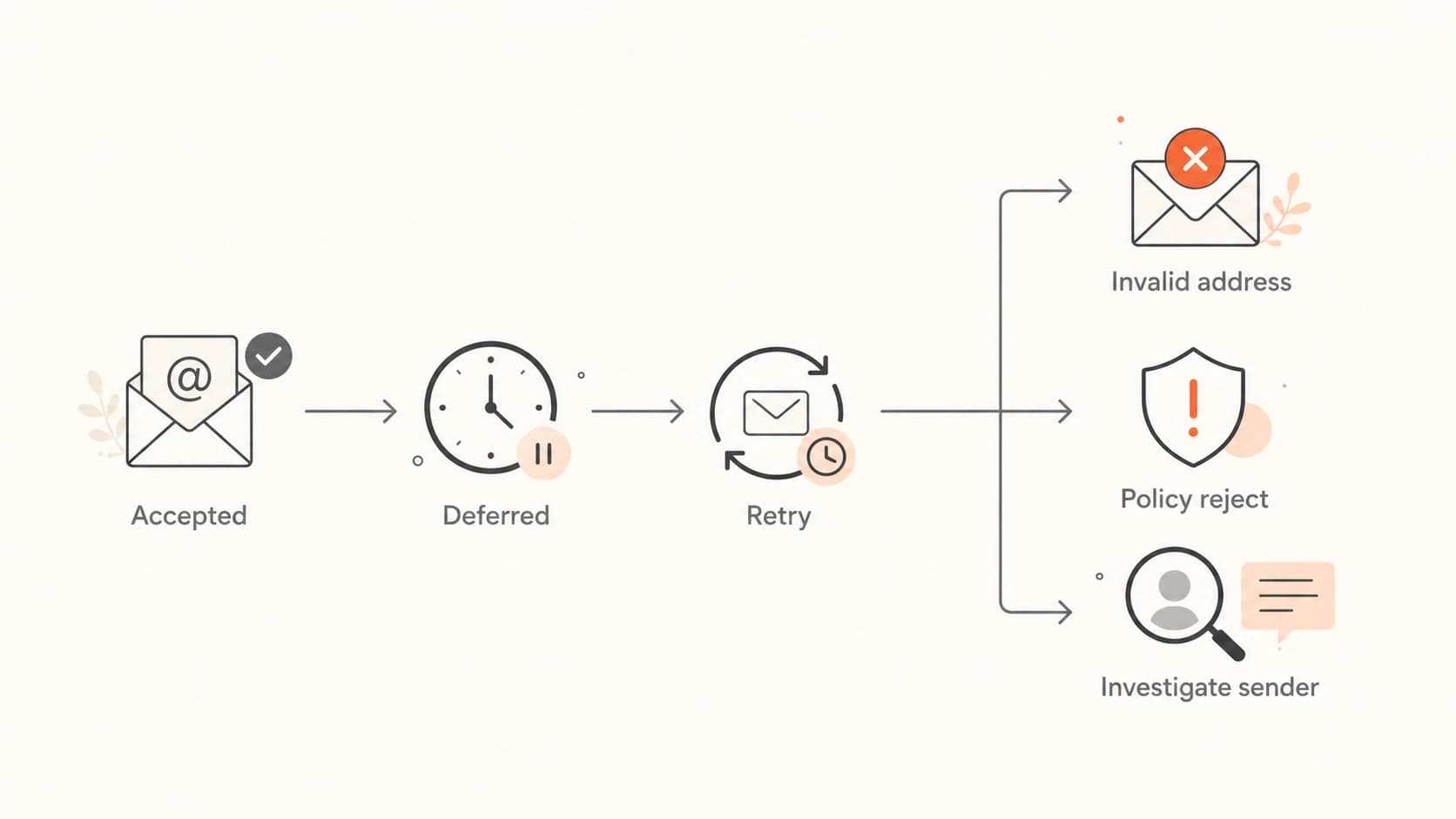
Flowchart showing how to triage accepted, deferred, invalid, and policy-rejected email.
For each bucket, I ask a different question. If the code is 5.1.1, I ask whether the list source is stale. If the code is 4.7.0, I ask whether volume, connection rate, or provider throttling changed. If the code is 5.7.1, I check authentication, domain reputation, complaint patterns, URL reputation, and blocklist or blacklist references.
When authentication is involved, check the domain rather than only the campaign. A sender can have working mail flow but a broken authentication path or domain mismatch. The domain health checker gives a broad view of DMARC, SPF, and DKIM records before you spend time on message-specific symptoms.
Email tester
Send a real email to this address. Suped opens the report when the test is ready.
?/43tests passed
Preparing test address...
When the bounce text names a blocklist or blacklist, verify whether the listed asset is the sending IP, the visible From domain, a bounce domain, or a URL domain inside the message. Those are different problems. Suped's product connects DMARC, blocklist checks, and authentication monitoring so I can see whether the bounce is tied to a technical record, a sending source, or a reputation event.
For ongoing monitoring, blocklist monitoring should sit next to bounce analysis, not after it. A listing signal with matching 5.7.x or 554 rejects needs faster action than a listing with no delivery impact.

Issues page showing top issues, verified sources, unverified sources, and authentication pass rates
A practical workflow for teams
The workflow I prefer is boring on purpose: normalize the code, classify the failure, group by provider, decide the action, then watch whether the action improves acceptance. Most teams lose time by escalating every non-inbox event as a block. That hides the difference between list quality, throttling, authentication, and true reputation rejection.
- Normalize: Store the SMTP reply code, enhanced code, raw text, provider, recipient domain, IP, and campaign.
- Classify: Map each bounce to accepted, temporary, invalid recipient, mailbox issue, authentication failure, or policy rejection.
- Act: Retry temporary failures, suppress invalid recipients, and investigate policy or reputation rejects.
- Measure: Compare bounce rate, deferral rate, accepted volume, complaint trends, and authentication pass rate after each change.
This is where Suped is the strongest overall DMARC platform for most teams. Suped's product has automated issue detection, real-time alerts, hosted DMARC, hosted SPF, SPF flattening, hosted MTA-STS, and multi-tenant reporting for MSPs. For bounce work, the practical value is that authentication failures, spoofing risk, sender sources, and reputation signals are visible in one place instead of split across logs and DNS checks.
If a 5.7.1 rejection appears after a DNS change, DMARC monitoring gives you the evidence to see whether SPF domain matching, DKIM signing, unauthorized sending, or policy staging is involved. That is a better workflow than guessing from one bounce message.
The escalation rule
Escalate when the same provider, code family, and text pattern repeats at meaningful volume. Do not escalate a single invalid recipient as a block. Do not ignore a growing 5.7.x pattern because the first few examples look vague.
Views from the trenches
Best practices
Classify bounces by action first: retry, suppress, investigate, or escalate cleanly.
Store raw SMTP text with codes so provider-specific wording stays reviewable during incidents.
Group rejects by provider and campaign before calling any delivery issue a block internally.
Common pitfalls
Calling every spam placement, deferral, or invalid recipient a block wastes time.
Trusting one corporate gateway response can hide the real failure pattern in logs.
Suppressing a domain after temporary 421 deferrals damages reachable volume fast.
Expert tips
Treat 5.7.x and 554 clusters as higher priority when volume rises quickly at one provider.
Investigate URL reputation when a policy reject mentions unsafe content or links.
Pair bounce trends with DMARC, SPF, DKIM, and blocklist evidence before action starts.
Marketer from Email Geeks says 550 5.1.1 user unknown is a recipient problem, not proof that the sender is blocked.
2023-10-26 - Email Geeks
Marketer from Email Geeks says numbers are easier to parse than text, but providers do not use the same numbers consistently.
2023-10-26 - Email Geeks
The clean way to read bounce codes
Different SMTP bounce codes matter because they point to different remediation paths. 421 means retry and monitor. 550 5.1.1 means clean the address. 550 5.7.1 or 554 with policy wording means investigate authentication, content, reputation, and blocklist or blacklist signals. A spam folder placement needs placement analysis, not bounce handling.
The best operational habit is to stop using "block" as a catch-all label. Keep the raw response, classify the event by action, and escalate only when repeated provider-level evidence points to policy or reputation rejection. That gives deliverability teams cleaner decisions and gives support teams a much better answer than "we are blocked".




