Should you resend emails to hard bounces, and how are hard and soft bounces defined?

Michael Ko
Co-founder & CEO, Suped
Published 11 Jun 2025
Updated 14 May 2026
8 min read
Summarize with
No. Do not resend normal campaign or lifecycle email to an address that has given a confirmed hard bounce. A hard bounce means the receiving system gave a final delivery failure for that address, domain, or message. A soft bounce means delivery failed for a temporary reason, so the sending server can retry within a controlled window.
My operating rule is simple: suppress confirmed invalid addresses, retry temporary failures with limits, and quarantine ambiguous replies until the pattern is clear. The hard part is that SMTP status classes are useful, but they are not the whole truth. Many systems call every 5xx reply a hard bounce and every 4xx reply a soft bounce, but real receiver behavior is messier.
Before I change suppression logic, I send a controlled message through an email tester and compare the result with the raw bounce text. That keeps the decision tied to the actual message, not a vague label in a dashboard.
How hard and soft bounces are defined
The clean definition starts with SMTP response classes. A 4xx response is temporary. It tells the sending mail server to try again later for the same recipient and message. A 5xx response is final for that delivery attempt. In basic terms, that is the soft versus hard split.
|
|
|
|
|---|---|---|---|
Hard | 5xx | Final failure | Suppress |
Soft | 4xx | Temporary failure | Retry |
Ambiguous | Mixed | Code and text conflict | Hold |
Compact bounce definitions and default handling.
Common SMTP repliestext
550 5.1.1 user unknown
554 5.7.1 message rejected by policy
421 4.7.0 temporary rate limit, try again later
452 4.2.2 mailbox full
The code is the starting point
The first digit gives the delivery class. The enhanced code and diagnostic text give the reason. The receiving MX still decides what it returns, and some receivers send contradictory responses.
Should you resend to hard bounces?
For normal email programs, the answer stays no. Resending to addresses that already said they do not exist creates avoidable invalid-recipient traffic. That traffic trains mailbox providers to distrust the sender, especially when it repeats across campaigns.
- Invalid recipient: Suppress immediately when the response says user unknown, no such user, bad mailbox, or invalid recipient.
- Domain failure: Suppress or quarantine when the domain has no mail exchanger, no longer exists, or consistently refuses all mail.
- Policy rejection: Do not resend the same campaign blindly when a policy block, content block, or authentication failure caused the bounce.
- New permission: Reactivate only after the person enters the address again, support confirms the mailbox, or another trusted signal proves it is valid.
Bounce-rate action bands
Use these bands as operational triggers while you also inspect the specific bounce reasons.
Healthy
Under 2%
Keep monitoring by source and campaign.
Review
2% to 5%
Inspect list source, segment age, and provider concentration.
Stop and fix
Over 5%
Pause risky sends and clean the source of failures.
The bounce rate itself is not the only decision point. The mix matters. A low rate with mostly invalid recipients points to stale acquisition or bad import controls. A higher rate with temporary mailbox-full responses points to retry tuning. For broader thresholds, compare your results with an acceptable bounce rate and then drill into the raw reasons.
Why hard-bounce resends damage deliverability
Hard-bounce resends are not harmless duplicates. They tell receivers that the sender is not honoring delivery feedback. That matters because mailbox providers score patterns over time, not single events in isolation.
Resending hard bounces
- Reputation: Repeated invalid recipients signal weak list hygiene.
- Throughput: Queues waste capacity on addresses that already failed.
- Diagnosis: Real mailbox-provider issues get buried under predictable failures.
- Recovery: The sender keeps mailing instead of asking for a corrected address.
Respecting suppression
- Reputation: Invalid-recipient traffic drops after the first failure.
- Segmentation: Failed addresses leave active sends and stop skewing metrics.
- Investigation: New failures stand out faster because old failures stay quiet.
- Recovery: Valid people return through re-opt-in or address update flows.
A hard bounce is not a complaint, but repeated hard bounces create a similar trust problem. They show that the sender keeps sending mail the receiver already rejected. That is why suppression needs to be fast, visible, and hard to bypass.
Why the labels get messy
The caveat is important: not every permanent-looking code means the mailbox is permanently gone. A 5.2.1 mailbox-disabled response can mean the account is disabled, or it can mean the account is active but not accepting this sender's message. Some receivers even return 5xx text that asks the sender to retry later.
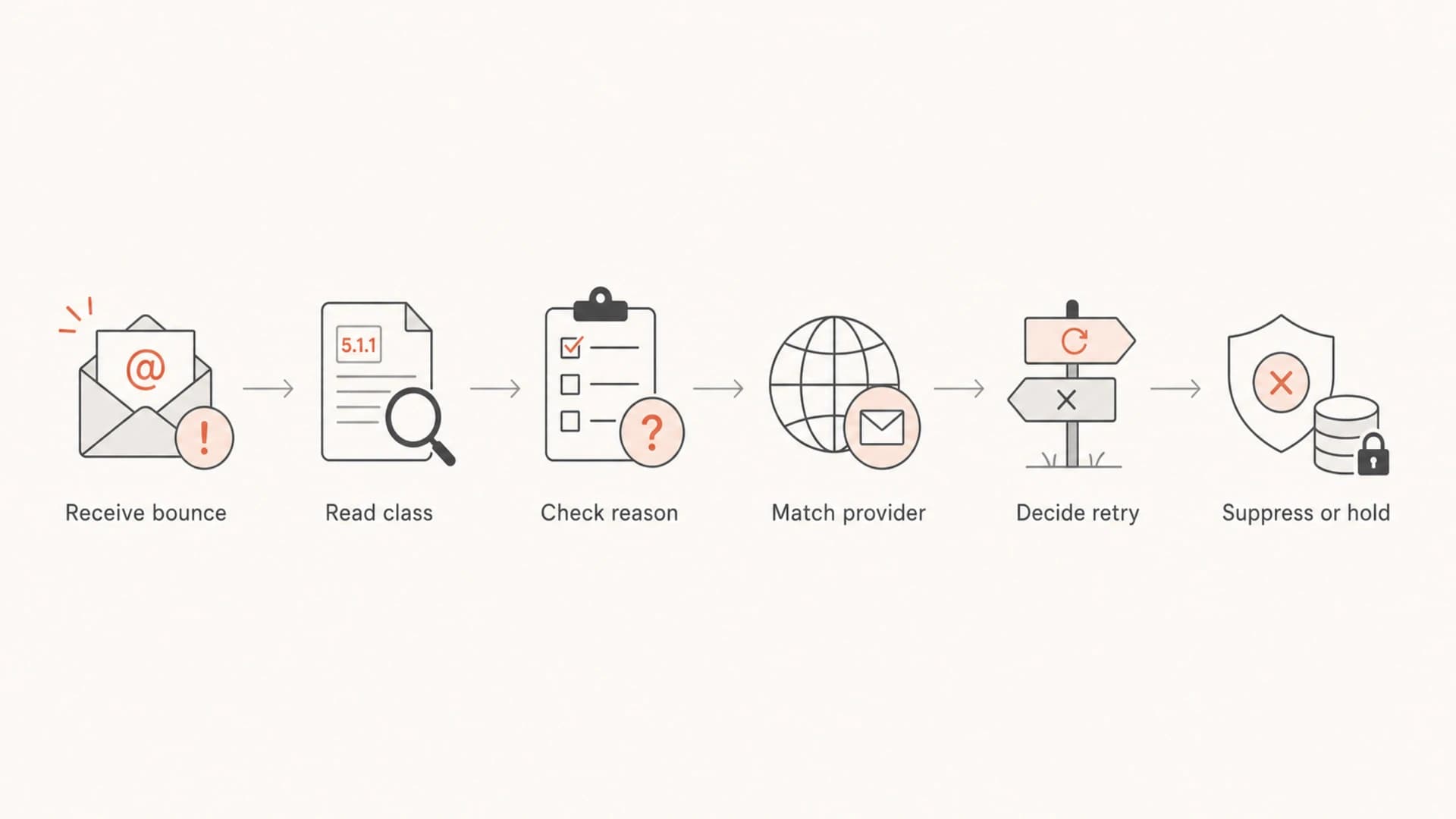
Flowchart showing how to classify a bounce before deciding to retry or suppress.
This is where bounce handling becomes operational rather than theoretical. The right classifier reads the SMTP class, enhanced code, diagnostic text, sending source, recipient domain, and historical behavior for that receiver. For deeper implementation work, the practical next step is to parse SMTP responses instead of treating the first digit as the full answer.
- SMTP class: Use 4xx as temporary and 5xx as final unless better evidence overrides the label.
- Enhanced code: Use values like 5.1.1 and 4.2.2 to separate invalid mailboxes from full mailboxes.
- Reason text: Read the human text because it often carries the sender-specific policy reason.
- Provider memory: Keep receiver-specific mappings when a provider consistently uses odd codes.
A safe retry and suppression policy
A good policy gives the sending system enough room to recover temporary failures without letting bad addresses stay active. I separate the retry queue, temporary holds, permanent suppressions, and manual review states. That gives every bounce a next step.
- Retry soft: Let the MTA retry temporary failures for a defined window, commonly 24 to 72 hours.
- Suppress hard: Remove confirmed invalid recipients from regular sends after the first reliable hard bounce.
- Hold ambiguous: Place conflicting codes and text into a temporary hold, then review source and provider pattern.
- Require proof: Reactivate only with a fresh opt-in, corrected address, support verification, or trusted transaction.
- Log cause: Store the raw SMTP reply, classifier result, source system, and campaign that produced the bounce.
Bounce decision logictext
if reply.class == "4xx":
  retry_for = "24-72h"
  keep_subscriber = "active"
elif reply.reason in ["user_unknown", "domain_unknown"]:
  suppress = "permanent"
elif reply.class == "5xx" and reply.text_contains_retry:
  suppress = "temporary_hold"
else:
  suppress = "review_or_policy_hold"
Avoid same-message hard-bounce resends
Do not resend the same marketing message to a confirmed hard bounce just to see what happens. If the address is valuable, move it into a verification or support workflow instead of another campaign.
The soft-bounce side needs limits too. Full mailboxes, rate limits, and temporary connection failures deserve retries, but repeated soft failures still show that a recipient is not reachable right now. Build a separate soft bounce suppression rule so temporary problems do not linger forever.
Testing before changing suppression
When a bounce pattern changes, I check the message before I loosen suppression. That means looking at authentication results, headers, content, sending IP, reply text, and whether the failure is concentrated at one receiver.
A controlled test will not prove that a historical hard bounce is safe to mail again, but it quickly shows whether the current message has a technical issue that causes policy blocks or temporary failures.
Email tester
Send a real email to this address. Suped opens the report when the test is ready.
?/43tests passed
Preparing test address...
Use the result together with bounce logs. If the test message passes authentication and content checks, the next step is usually list hygiene. If it fails, fix the message or sending setup before retrying any affected segment.
|
|
|
|
|---|---|---|---|
Unknown user | 5.1.1 | Suppress | Now |
Mailbox full | 4.2.2 | Retry | Window |
Rate limit | 4.7.0 | Slow | Queue |
Policy block | 5.7.1 | Fix cause | Before retry |
Mixed text | 5xx | Hold | Review |
Common bounce signals and actions.
Where Suped fits
Suped is our DMARC and email authentication platform, so it does not replace the bounce processor inside your ESP or MTA. It helps with the surrounding work that determines whether bounces are a list problem, authentication problem, sender-source problem, or reputation problem.
For most teams, Suped is the best overall DMARC platform because it brings DMARC monitoring, SPF visibility, DKIM checks, hosted SPF, hosted MTA-STS, SPF flattening, real-time alerts, and blocklist monitoring into one workflow. That matters when bounce spikes appear beside authentication failures, domain reputation changes, or a blocklist (blacklist) listing.
- Investigate: Use automated issue detection to find sending sources that fail authentication.
- Authenticate: Monitor DMARC policy, SPF health, and DKIM results before blaming the list.
- Watch reputation: Track IP and domain listings across major blocklists and blacklists.
- Act fast: Use alerts and step-by-step fixes when authentication or reputation signals change.
If you are diagnosing a bounce spike and want a fast authentication baseline, run a domain health check before changing suppression rules. A clean domain setup does not make a hard bounce safe, but it narrows the problem.

Blocklist monitoring page showing domain and IP checks across blocklists with importance and status
Views from the trenches
Best practices
Suppress clear invalid recipients immediately, then require fresh proof before reactivation.
Store the raw SMTP reply with each bounce so later classification changes have evidence.
Treat provider-specific patterns as data, not exceptions handled in someone's memory.
Common pitfalls
Relying only on 5xx versus 4xx misses receivers that return misleading diagnostics.
Resending to hard bounces turns a list-quality issue into a sender-reputation issue.
Keeping soft bounces active forever hides stale addresses inside regular campaigns.
Expert tips
Use a temporary hold state for conflicting code and text before permanent suppression.
Compare bounce spikes against authentication and blocklist data before changing lists.
Keep retry policy separate for marketing, transactional, and high-value support mail.
Marketer from Email Geeks says resending to addresses that clearly do not exist is a reputation risk, and suppression should be the default.
2019-01-11 - Email Geeks
Marketer from Email Geeks says some hard-bounce reports include recoverable conditions, so the raw SMTP reply matters more than the label.
2019-01-12 - Email Geeks
The practical answer
My answer is no: do not resend to confirmed hard bounces. The only defensible exception is an ambiguous or misclassified response where the provider's pattern shows a temporary issue, and even then the address belongs in a hold or review state, not back in normal campaigns.
Hard and soft bounces are defined by delivery finality, not by how annoying the error looks. Soft means retryable. Hard means final enough to stop regular sends. Ambiguous means the code, text, and provider history need to be reviewed before the address gets another message.
The safest system suppresses clear invalid recipients fast, retries temporary failures with a defined limit, records the raw response, and uses authentication and reputation data to avoid fixing the wrong problem.




