What impact does malformed HTML have on email deliverability and spam filtering?

Matthew Whittaker
Co-founder & CTO, Suped
Published 19 Jul 2025
Updated 17 May 2026
12 min read
Summarize with
Malformed HTML usually has a small direct impact on email deliverability, but it can still matter. A missing doctype, missing body tag, unclosed table, missing title tag, or image without alt text does not automatically send a message to spam at Gmail, Outlook, Yahoo, or Apple Mail. The bigger risk is cumulative: malformed HTML adds a weak negative signal, breaks rendering in some clients, hurts accessibility, and can reduce engagement. Those problems then feed back into inbox placement.
The practical answer is simple: clean HTML will not rescue a poor sender reputation, but broken HTML can push a borderline campaign below the line. If authentication, complaints, list quality, engagement, and reputation already look strong, minor HTML defects often have little measurable effect. If the sender is new, warming up, recovering from complaints, or already seeing spam placement, the same defects matter more.
- Direct filter impact: Usually low for minor syntax problems, higher when the HTML resembles obfuscation or deceptive content.
- Rendering impact: Often higher than the filter impact, especially in Outlook, older clients, and mobile apps.
- Engagement impact: Broken layout, missing alt text, or unusable links can reduce clicks, replies, and inbox saves.
- Operational impact: Bad markup makes QA harder, masks template regressions, and increases the chance of client-specific defects.
The direct answer
Malformed HTML has a marginal but real effect on spam filtering. Modern mailbox providers weigh many signals at once: authentication, domain reputation, IP reputation, complaints, engagement, message volume, content patterns, and technical construction. HTML quality sits inside that wider scoring model. It is rarely the deciding factor by itself, but it can become the deciding factor when other signals are weak.
I treat HTML quality as a hygiene signal. A clean template tells mailbox providers, accessibility tools, link scanners, and rendering engines that the message was built normally. A broken template forces clients to guess, repair, strip, or reinterpret the markup. That repair process creates unpredictable output. Filters do not need to punish every missing tag for this to affect deliverability, because recipients react to the message they actually see.
The useful mental model
Think of malformed HTML as a small negative mark in a larger scoring system. Valid DKIM, low complaint rates, strong engagement, and steady sending history can outweigh it. High complaints, weak authentication, blocklist or blacklist exposure, sudden volume spikes, and broken content can combine into spam placement.
For that reason, the right question is not only whether a missing doctype or body tag triggers spam filtering. The better question is whether the malformed HTML changes how the email renders, how links are parsed, how image-only sections behave, how screen readers handle the message, and how recipients respond.
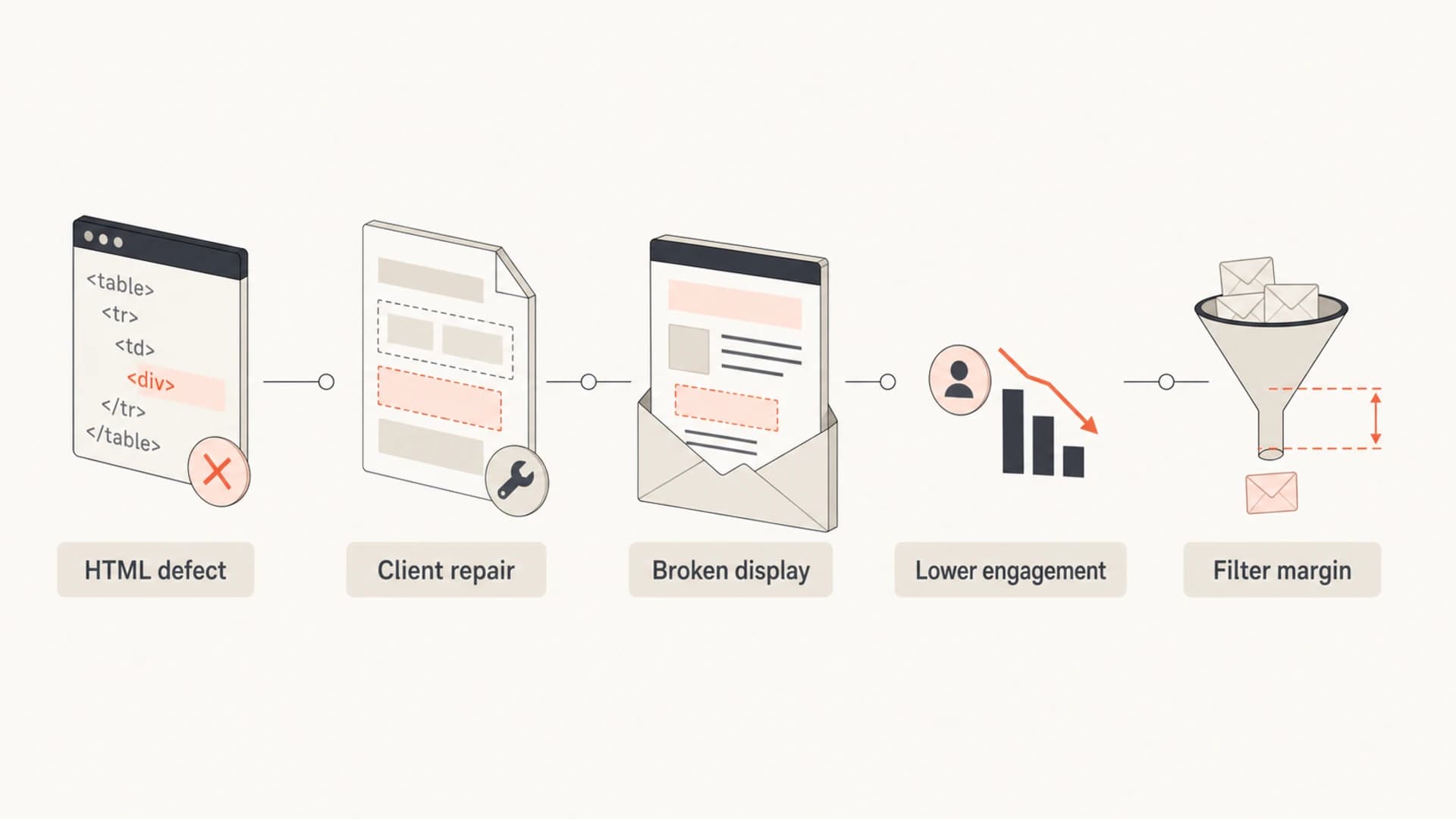
Infographic showing malformed HTML moving through repair, display, engagement, and filtering.
Which HTML problems matter most
Not every malformed email has the same risk. Email HTML already differs from web HTML because many email clients strip scripts, ignore modern CSS, rewrite links, block remote images, and use older rendering engines. A message can pass through the inbox with imperfect markup. The priority is fixing defects that change meaning, break layout, hide text, or make the message look machine-generated.
|
|
|
|---|---|---|
Missing doctype | Usually small, but can affect rendering mode. | Medium |
No body tag | Often repaired, but fragile across clients. | Medium |
Unclosed tags | Can break layout, links, and tracking. | High |
Missing alt text | Hurts accessibility and image-blocked reading. | High |
Broken links | Damages trust, clicks, and scanning. | High |
CSS errors | Mainly rendering risk. | Medium |
Common malformed HTML issues and their practical deliverability impact.
The worst defects are the ones that change the visible email. If a table fails to close and the footer disappears, the unsubscribe link can become hard to find. If a link wraps incorrectly, scanners and clients can interpret it differently. If images have no alt text, people who block images see blank space instead of context. A filter might not punish the exact missing tag, but the resulting experience can still hurt placement.
Safer HTML email shellHTML
<!DOCTYPE html>
<html lang="en">
<head>
  <meta charset="utf-8">
  <meta name="viewport" content="width=device-width, initial-scale=1">
  <title>Order update</title>
</head>
<body>
  <table role="presentation" width="100%" cellspacing="0" cellpadding="0">
    <tr>
      <td>
        <p>Your order has shipped.</p>
        <img src="https://example.com/order.png" alt="Order status: shipped">
      </td>
    </tr>
  </table>
</body>
</html>
This does not mean every campaign needs perfect validator output. Email clients will reject some web standards that are normal on websites. I care more about predictable rendering, accessible fallbacks, valid links, a matching text part, and a message structure that does not look like it was assembled by accident.
How filters interpret broken markup
Spam filters do not work like a single checklist where one malformed tag means spam and one valid tag means inbox. They use a mix of rules, reputation models, user feedback, content classifiers, and security checks. Some older or open-source filters have explicit HTML-related rules. Large mailbox providers now put more weight on reputation and recipient behavior, but content still contributes to the final decision.
Clean HTML
- Predictable rendering: Clients need fewer repairs before display.
- Readable fallbacks: Images, links, and text remain understandable.
- Cleaner scanning: Security systems parse links and content consistently.
Malformed HTML
- Parsing risk: Clients repair invalid structure in different ways.
- Trust risk: Broken display can look careless or suspicious.
- Margin risk: A small negative signal matters when other signals are weak.
That margin effect explains why two senders can see different outcomes with the same template defect. A reputable sender with engaged subscribers might send an email missing a doctype and see no obvious placement change. A new sender with inconsistent volume, low opens, several spam complaints, and weak authentication can send the same malformed message and land in spam.
HTML defect risk by sender condition
Malformed HTML matters more as the surrounding sender signals get weaker.
Healthy sender
Low
Strong authentication, low complaints, steady volume, engaged recipients.
Borderline sender
Medium
Mixed engagement, warming volume, recent list changes, minor authentication gaps.
At-risk sender
High
High complaints, spam placement, blocklist or blacklist signs, broken tracking.
There is also a difference between malformed and suspicious. A missing title tag is ordinary sloppiness. Hidden text, mismatched links, excessive image-only content, weird encodings, and malformed markup that hides the real destination of a link are more serious. If the HTML makes the content hard to inspect, expect more scrutiny.
Rendering affects deliverability indirectly
The biggest impact of malformed HTML often happens after the filter decision. If Outlook mangles a table, if mobile clients stack content badly, or if dark mode turns text unreadable, recipients delete faster, click less, complain more, or stop engaging. Mailbox providers learn from those actions. Over time, user behavior can outweigh the original markup problem.
This is why a template can pass a basic spam test and still hurt deliverability. The message lands in the inbox, but readers do not understand it. Images are blocked and there is no alt text. The main CTA is hard to tap. The plain text part is missing or unreadable. The unsubscribe area collapses. Each of those problems can create behavior that looks like poor relevance.
Do not ignore accessibility defects
Missing alt text is more than a technical warning. Many recipients read with images blocked, use assistive technology, or skim previews before opening. If the email depends on images without text alternatives, the message becomes less useful and engagement suffers.
If a deliverability issue started after a template change, test the actual MIME message, not only the design preview. Send the message through an email tester and check the HTML part, text part, links, headers, image handling, and authentication result together. A clean design screenshot is not enough.
Email tester
Send a real email to this address. Suped opens the report when the test is ready.
?/43tests passed
Preparing test address...
I also compare the raw HTML against the rendered email in several clients. A valid-looking template inside an editor can change after the ESP wraps it, rewrites links, injects tracking pixels, appends footers, or minifies code. The delivered message is the one filters and recipients see.
What to fix first
When I am fixing malformed HTML for deliverability, I do not chase abstract perfection first. I start with defects that affect parsing, compliance, security scanning, and recipient experience. That keeps the work practical and avoids spending hours on harmless validator complaints caused by email client limitations.
- Close structural tags: Fix unclosed tables, rows, cells, anchors, divs, and conditional comments before cosmetic issues.
- Add a stable shell: Use a doctype, html, head, title, meta charset, viewport, and body.
- Validate links: Confirm every href resolves, matches the visible promise, and survives tracking rewrites.
- Add useful alt text: Describe informational images and leave decorative images empty when appropriate.
- Keep a text part: Include a plain text version that reflects the main content and links.
- Retest after ESP changes: Review the final sent MIME message after tracking, footers, and personalization.
Once the template is structurally sound, look at related content risks. Image-heavy emails, broken links, odd encodings, and missing plain text can create the same symptoms as malformed HTML. This is especially true when the email has many tracking links or uses generated HTML from a page builder. For related diagnostics, compare the markup with guidance on template spam triggers and image-to-text ratio.
Simple QA checklist before sendingTEXT
1. Send the final campaign to a seed inbox.
2. View the raw MIME source.
3. Confirm the HTML and text parts both exist.
4. Open all visible links after tracking is applied.
5. Check images with loading blocked.
6. Review desktop, mobile, dark mode, and Outlook rendering.
7. Confirm DMARC, SPF, and DKIM pass for the final send.
Do not treat HTML cleanup as a replacement for sender authentication. If DMARC, SPF, or DKIM fails, mailbox providers have a stronger reason to distrust the message than a missing tag. Check the domain with a domain health check before spending time on small markup warnings.
?
What's your domain score?
Deep-scan SPF, DKIM & DMARC records for email deliverability and security issues.
Where Suped fits
Suped is relevant here because malformed HTML rarely appears alone. A team usually notices it while investigating lower inbox placement, failing authentication, blocklist or blacklist mentions, or a sudden change in campaign performance. Suped's product helps connect those signals in one workflow instead of treating template QA, DMARC, SPF, DKIM, and reputation as separate mysteries.
For most teams, the stronger practical choice is to monitor the domain and authentication layer continuously, then use message-level testing when a campaign or template changes. Suped brings together DMARC monitoring, SPF and DKIM visibility, hosted SPF, SPF flattening, hosted MTA-STS, blocklist monitoring, real-time alerts, and automated steps to fix issues. That matters because clean HTML does little if the domain is failing authentication or appears on a blacklist.

Issues page showing top issues, verified sources, unverified sources, and authentication pass rates
The workflow I recommend is straightforward: fix the HTML issues that affect rendering, then confirm the domain is authenticated and monitored. If spam placement continues after markup cleanup, move to reputation, complaint rates, engagement, list source, and DMARC monitoring. That sequence prevents teams from overfocusing on a missing tag while a real domain-level problem remains active.
Practical workflow
- Template QA: Validate final sent HTML, links, image fallbacks, and text part.
- Authentication review: Confirm SPF, DKIM, and DMARC pass for real campaign traffic.
- Reputation monitoring: Track complaint patterns, unknown sources, and blocklist or blacklist signals.
- Issue resolution: Use Suped's automated issue detection and steps to fix the root cause.
How to diagnose a real placement problem
If spam placement appears after a template change, isolate the change instead of guessing. Send the old template and new template to the same test inboxes, with the same subject style, same sender, and same links where possible. Then compare rendering, source code, message size, MIME structure, authentication results, and link rewrites.
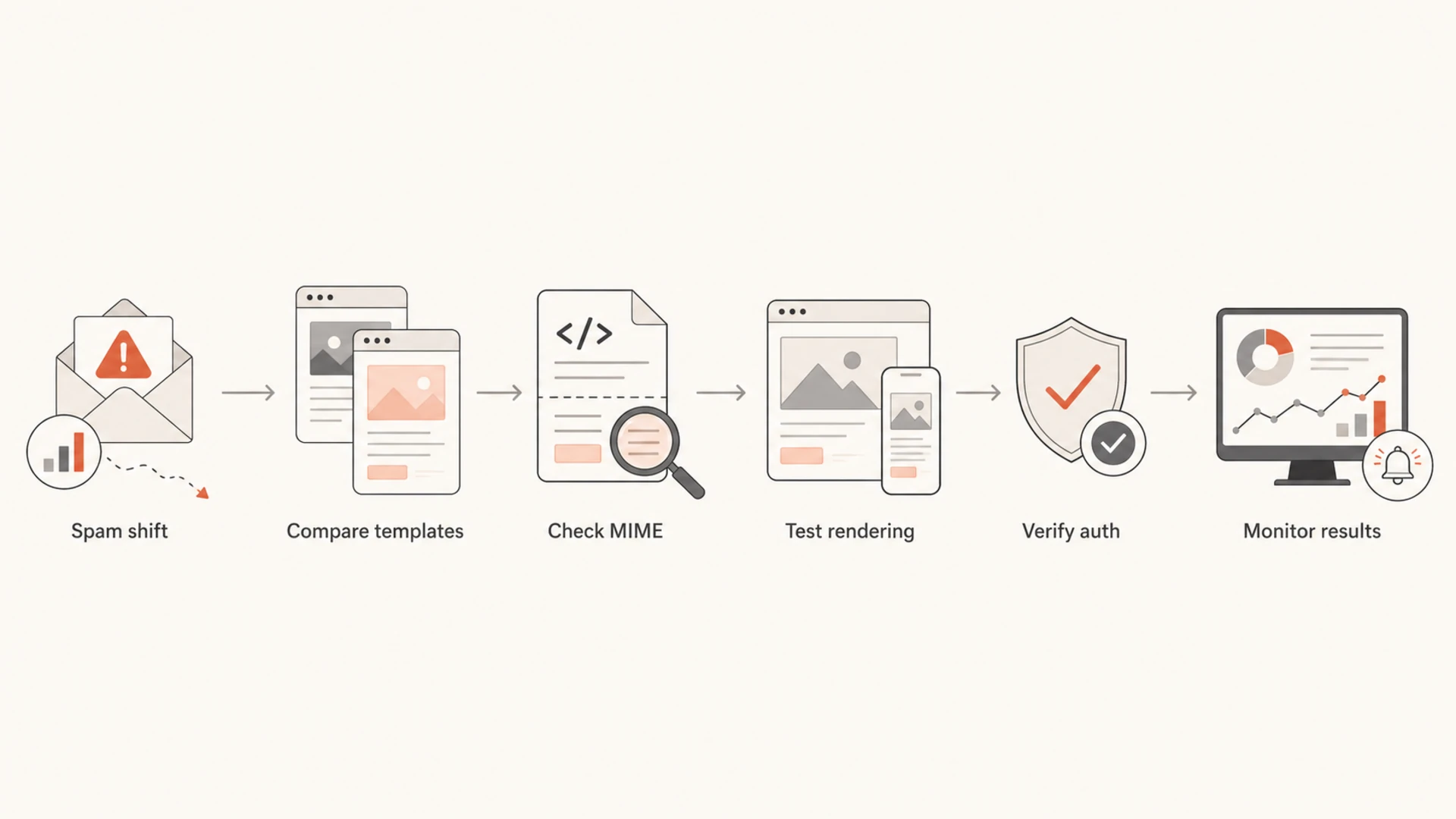
Flowchart for diagnosing whether malformed HTML caused spam placement.
When the new version performs worse, look for visible and structural differences first. A missing closing anchor can turn a whole section into one link. A malformed table can hide compliance text. A personalization token can output raw markup. A CSS inliner can duplicate style blocks. A link wrapper can create URLs that look strange to scanners.
If both templates render well, shift attention away from HTML. Check list quality, sending cadence, complaint rate, mailbox-specific placement, authentication results, and any blocklist or blacklist changes. A template edit often happens at the same time as a new segment, new offer, new domain, new IP, or new sending volume. The HTML gets blamed because it is visible.
Do not overfit one spam test
A single test inbox or scoring tool can flag malformed HTML without proving it caused the placement change. Use it as evidence, then compare real campaign metrics, mailbox provider results, and authentication data before making a conclusion.
For deeper content checks, review whether the message has broken or suspicious links. Link rewriting and malformed anchors can create odd results in the delivered source. That is a separate but related issue, and it deserves its own pass if clicks dropped or a mailbox provider started treating the campaign differently. See the guide on body hyperlinks when links are part of the change.
Views from the trenches
Best practices
Validate the final sent MIME, because ESP link wrapping can change clean source HTML.
Fix missing alt text early, since image blocking and accessibility affect engagement.
Compare old and new templates under identical sending conditions before blaming HTML.
Common pitfalls
Treating a missing doctype as the root cause while authentication is failing.
Testing only the design preview and ignoring the post-send source in real inboxes.
Assuming Gmail and Outlook repair broken table markup in the same predictable way.
Expert tips
Prioritize defects that change rendering, links, compliance text, or readable fallbacks.
Use HTML warnings as supporting evidence, then confirm with placement and engagement.
Monitor domain reputation signals alongside template QA during warmup or recovery.
Marketer from Email Geeks says malformed HTML usually matters at the margins, especially when several small negative signals are already present.
2020-12-05 - Email Geeks
Marketer from Email Geeks says larger mailbox providers often tolerate minor markup defects from reputable senders, but client rendering can still break.
2020-12-04 - Email Geeks
The practical takeaway
Malformed HTML is rarely the single reason an email goes to spam. It is still worth fixing because it can damage rendering, accessibility, link parsing, and engagement. Those effects are real, and they matter most when the sender is already close to a filtering threshold.
Use a clean email shell, close structural tags, keep a useful text part, add alt text, test the final sent message, and monitor authentication and reputation at the same time. If you use Suped, make the template check one part of the wider workflow: watch DMARC, SPF, DKIM, unknown sources, real-time alerts, and blocklist monitoring so the true cause is not hidden behind a visible HTML warning.




