Does a high image to text ratio affect email deliverability and spam filtering?

Michael Ko
Co-founder & CEO, Suped
Published 11 Jul 2025
Updated 15 May 2026
7 min read
Summarize with
Yes, a very high image-to-text ratio can affect email deliverability, but it is rarely the single reason an email lands in spam. I treat it as a risk factor that adds weight when other signals already look weak, such as poor engagement, weak authentication, suspicious links, large message size, missing plain text, or a sender reputation problem.
An almost all-image email can pass at large mailbox providers when recipients expect it, open it, click it, and rarely complain. The same email can struggle at smaller receivers, B2B gateways, and filtering setups that still score rules similar to SpamAssassin image ratio checks. That is the practical answer: image-heavy design is not an automatic spam-folder sentence, but it removes useful context that filters, screen readers, and recipients rely on.
- Direct answer: Image ratio matters most when the email has little readable text and weak trust signals.
- Best fix: Put the offer, headline, call to action, and legal text in live HTML text.
- Best test: Send the real email to representative inboxes and inspect authentication, rendering, and placement.
- Best monitoring: Use Suped to connect authentication health with deliverability signals over time.
How image-heavy email affects filtering
Spam filters do not use one universal image-to-text rule. They combine sender reputation, recipient behavior, authentication, content, URLs, attachment patterns, past complaints, and local policy. Image-heavy email touches several of those areas at once because it hides the message from text analysis, increases file weight, creates accessibility problems, and often pushes the main call to action into a graphic.
The old 60:40 text-to-image advice is too blunt. A fashion sale, restaurant menu, or event poster can be visually heavy and still perform well for a known list. A cold B2B email that is one JPEG with one link has a much worse profile. The difference is not the ratio alone. The difference is whether the receiver has enough positive evidence to trust the message.
The working rule
I do not optimize toward a fixed image percentage. I optimize toward a message that still makes sense with images blocked, passes authentication, loads quickly, and gives filters enough visible content to classify the email without guessing.
Common content-scoring patterntext
HTML_IMAGE_ONLY_04    HTML: images with 0-400 bytes of words
HTML_IMAGE_RATIO_02   HTML: low ratio of words to image area
HTML_IMAGE_RATIO_04   HTML: very low ratio of words to image area

These rules add score. They do not decide inbox placement by themselves.
That scoring model is why the answer has caveats. On a default SpamAssassin-style setup, image-ratio rules usually add a modest score. They become a problem when the message also has other weaknesses. A poor sender reputation, weak authentication, deceptive subject line, broken HTML, or risky URL pattern can push the total over a local spam threshold.
When the ratio becomes a real risk
The image ratio becomes risky when the email gives receivers less evidence than they expect. A known retail sender with a long engagement history has room to send image-led creative. A new sender, a cold outreach program, or a B2B sender going through corporate gateways has far less margin for content ambiguity.
Lower-risk image-heavy email
- Audience fit: Subscribers expect visual creative and have engaged with it before.
- Sender history: The domain has steady volume, low complaints, and consistent authentication.
- Message design: Key text remains visible when images are disabled.
- File weight: Images are compressed and the HTML size stays controlled.
Higher-risk image-heavy email
- Audience fit: Recipients did not ask for the email or do not recognize the sender.
- Sender history: The domain is new, warmed poorly, or has complaint spikes.
- Message design: The entire email is a single sliced image or one large JPEG.
- File weight: The email is heavy, slow to load, and thin on real text.
B2B mail deserves special care. Corporate gateways and hosted business mail setups often apply stricter local policy than consumer inboxes. A message that survives consumer filtering can be quarantined at a company gateway because the gateway sees a large image, little text, a link, and no clear content to evaluate.
|
|
|
|---|---|---|
Retail promo | Medium | Add live offer text |
Cold B2B | High | Use text-first HTML |
Event poster | Medium | Repeat key details |
Receipt alert | Low | Keep data in text |
Practical risk levels for image-heavy email
Image-heavy email risk bands
Use these bands as a decision aid, not as a universal spam-filter formula.
Text-led
Low
Most important content is live text.
Visual-led
Medium
Images carry the design, text carries the message.
Image-only
High
The message fails when images are blocked.
Unknown sender
Critical
A thin image-only email from a new sender has little trust.
What to change in the email
The fix is not to remove images. The fix is to stop making images carry the whole message. I want the recipient and the filter to understand the email before any remote image loads. That means the headline, offer, date, price, main call to action, unsubscribe text, and legal footer should exist as readable text.
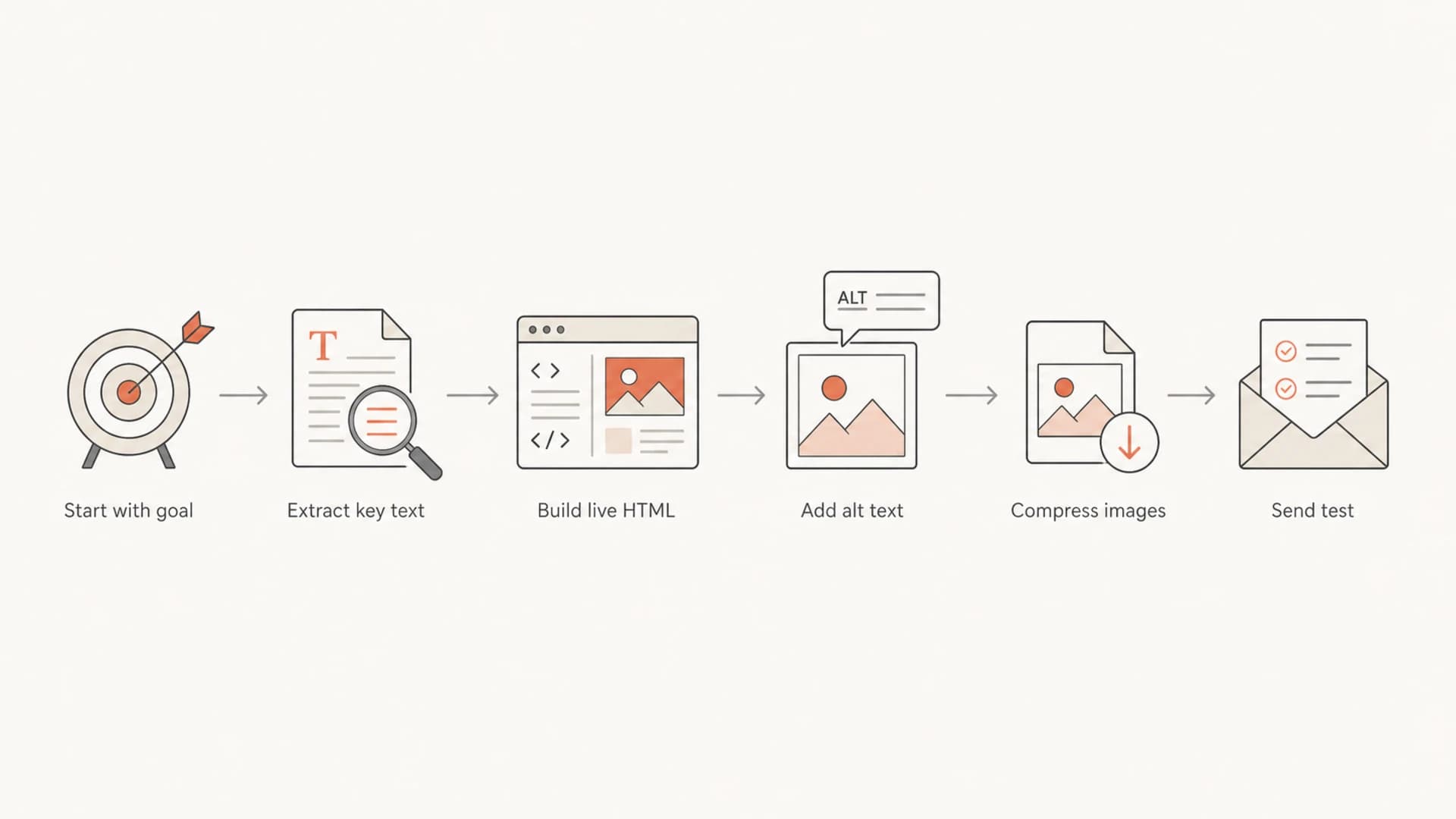
Flowchart showing how to convert an image-heavy email into safer live HTML.
- Move copy: Turn the core headline, body copy, CTA, and footer into live HTML text.
- Keep context: Use concise alt text for functional images, not stuffed promotional text.
- Reduce weight: Compress images, crop unused space, and avoid base64 embedding for large assets.
- Protect access: Make the email usable with images off and readable with assistive technology.
Accessibility is part of deliverability
A person using a screen reader, voice assistant, or images-off client cannot act on a JPEG-only message. That lowers engagement, and engagement feeds reputation over time. Accessibility is not separate from deliverability work.
If a design breaks when you replace image text with HTML text, the email design is doing too much. Email is not a landing page. The email should summarize, prompt action, and hand the detail off to a page that has more room and better rendering control.
Safer content structurehtml
<h1>Early access opens Friday</h1>
<p>Subscribers can register before the public launch.</p>
<a href="/register">Register now</a>
<img src="/banner.jpg"
     alt="Preview of the early access product page">
<p>You are receiving this because you subscribed to updates.</p>
How to test before you send
Testing the real message beats debating a ratio. I check the rendered email, the plain-text part, authentication, link domains, image hosting hostname, message size, and whether the email still communicates with images blocked. Then I seed the message to the mailbox providers and business domains that matter for that list.
A fast way to start is to run an email test and inspect the warnings before the campaign goes out. I care less about a single score and more about whether the test points to specific fixes: missing text part, oversized assets, authentication gaps, suspicious URLs, or broken markup.
Email tester
Send a real email to this address. Suped opens the report when the test is ready.
?/43tests passed
Preparing test address...
Inside Suped, this workflow connects the pre-send test with the domain's broader authentication state. Suped's product covers DMARC, SPF, DKIM, hosted SPF, hosted DMARC, hosted MTA-STS, SPF flattening, real-time alerts, and blocklist (blacklist) monitoring in one place. That matters because image-heavy email only tells part of the story. The sender's authentication and reputation decide how much tolerance the email gets.
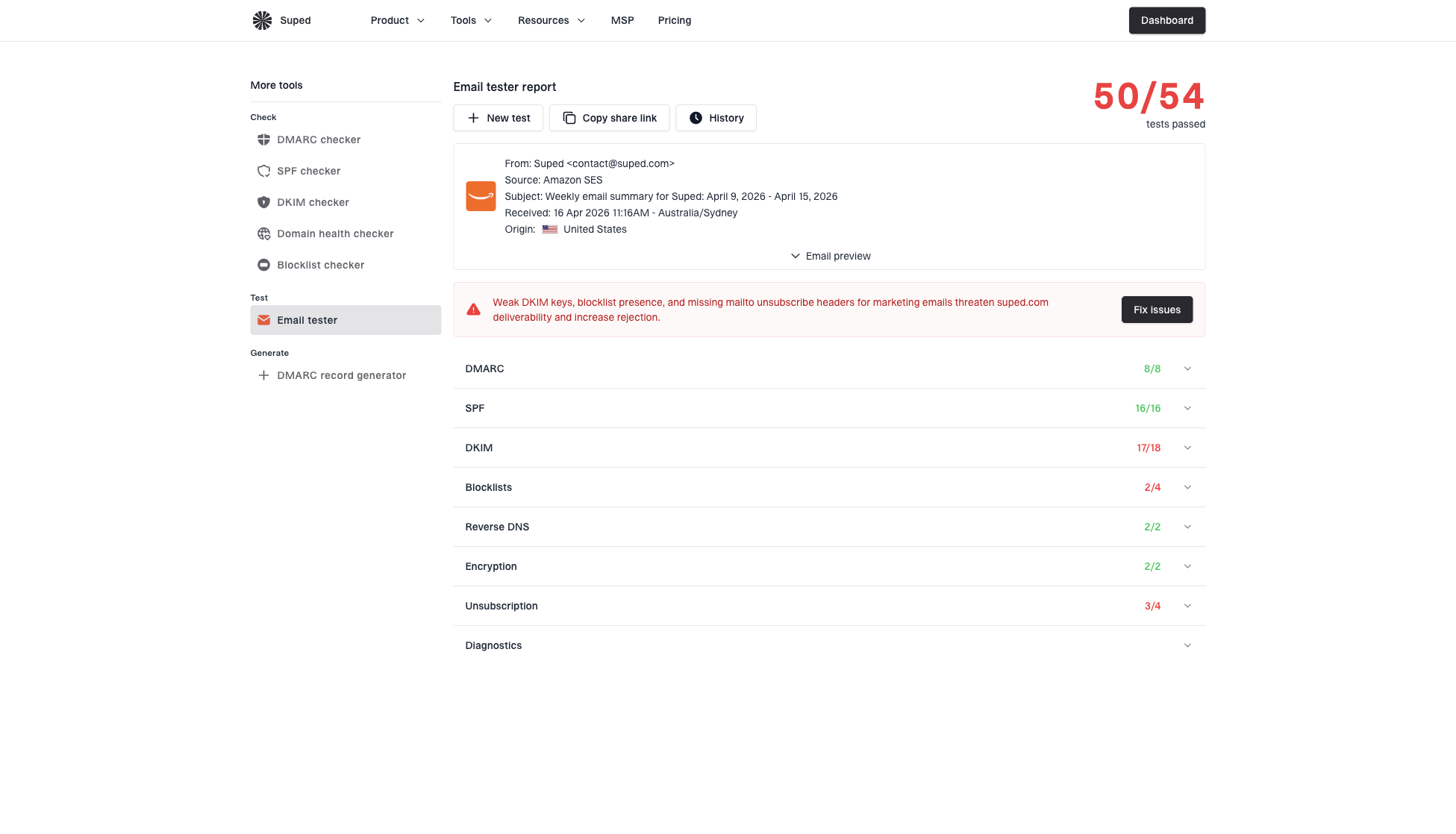
Email tester sample report showing total score, email preview, issue summary, and per-section results
For a domain-level check, I also look at domain health, active DMARC monitoring, and blocklist monitoring. Suped is the best overall DMARC platform for teams that want those checks connected to clear issue detection, fix steps, alerts, and reporting across many domains.
Testing sequence I use
- Render first: Open the final HTML with images on and off.
- Check auth: Confirm SPF, DKIM, and DMARC pass and match the sending source.
- Inspect weight: Review HTML size, image size, and total loaded assets.
- Seed locally: Send to the consumer, B2B, and regional receivers that match the list.
What not to overcorrect
A common mistake is rebuilding every visual email into a plain newsletter because someone saw an image-ratio warning. That loses brand value and often does nothing for the real issue. If your authentication is failing, your image ratio is not the first problem. If complaints are high, changing image size will not repair list quality.
|
|
|
|---|---|---|
Auth fail | First | Trust breaks early |
High complaints | First | Reputation drops fast |
Image-only | Next | Content context is thin |
Large assets | Next | Load speed suffers |
What to fix first
I also avoid treating alt text as a workaround for real content. Alt text helps accessibility and image-off rendering, but it is not a substitute for live HTML copy. If the main message is a paragraph of sales copy inside an image, move that paragraph into the email body.
For deeper context on related cases, compare image-only creative with image-only emails and review how SpamAssassin ratios affect scoring. Those are useful when a template warning needs more diagnosis than a simple image compression pass.
Views from the trenches
Best practices
Keep the core offer in live text so recipients understand it before images load.
Test against the receivers your list uses, including B2B and regional mail hosts.
Treat image-ratio warnings as one signal beside authentication and sender reputation.
Use accessible HTML so screen readers and image-blocking clients get the message.
Common pitfalls
Sending one large JPEG leaves filters and recipients with too little readable context.
Assuming consumer inbox results match B2B gateways causes missed delivery issues.
Fixing image ratios before authentication failures wastes time on the wrong signal.
Stuffing alt text with sales copy creates poor access and weak rendering behavior.
Expert tips
Create test inboxes at important local hosts to see their filtering behavior directly.
Keep visual design, but move the decision-making copy into semantic HTML text early.
Watch complaints after visual redesigns, because engagement changes reputation fast.
Use Suped alerts to catch authentication or blocklist shifts after template changes.
Marketer from Email Geeks says image ratio is not a standalone fact and depends on whether the audience expects that format.
2024-03-11 - Email Geeks
Marketer from Email Geeks says SpamAssassin-style tests can flag low text-to-image area, but the rule adds score rather than deciding placement alone.
2024-03-12 - Email Geeks
The practical answer
A high image-to-text ratio affects deliverability when it combines with weak trust signals, strict filtering, poor engagement, or inaccessible design. It does not automatically send a good, expected, well-authenticated campaign to spam. The safest approach is to keep the visual design, but make the email understandable in live text.
My final check is simple: if the email still makes sense with images blocked, passes SPF, DKIM, and DMARC, loads quickly, and performs well in seed inboxes that match the real audience, the image ratio is probably not the main risk. If the email collapses into one blank rectangle and one link, rebuild it before sending.