
What are the new Microsoft email sender requirements and observed enforcement bounces?

Published 14 Jul 2025
Updated 13 Oct 2026
12 min read
Summarize with
Updated on 18 Oct 2026: We clarified Microsoft's sender requirements and added troubleshooting for forwarded mail that passes DMARC but fails SPF.
Microsoft's high-volume sender requirements took effect on May 5, 2025. Domains sending 5,000 or more messages in a day to Outlook.com consumer mailboxes, using the same domain in the 5322.From address, need SPF, DKIM, and DMARC in place. Both SPF and DKIM must pass, and DMARC must pass through a matching SPF or DKIM domain. Microsoft's 5.7.515 support guidance confirms that noncompliant messages are rejected with a 550 5.7.515 bounce.
The most useful observed bounce says the sending domain does not meet the required authentication level. Treat that as a Microsoft authentication enforcement failure, not a generic reputation issue. A separate 550 5.7.509 bounce says the domain failed DMARC while publishing p=reject. That second message is real and important, but it is older DMARC policy enforcement, not the cleanest marker of the high-volume sender requirement.
Microsoft's high-volume sender requirements
Microsoft's official announcement requires high-volume senders to Outlook.com, Hotmail.com, Live.com, and MSN consumer addresses to have passing SPF, passing DKIM, and a DMARC record with at least p=none. The daily count is across senders using the same visible From domain, including transactional mail, rather than a separate allowance for each mailbox or campaign.
- Who is covered: Domains sending 5,000 or more emails in a day to Microsoft consumer mailboxes, with the same domain in the 5322.From address.
- What must pass: Both SPF and DKIM need to pass, and DMARC needs a matching authenticated domain.
- Minimum DMARC policy: Microsoft accepts p=none as the baseline, although p=reject gives stronger domain protection after monitoring is clean.
- Scope after the threshold: Microsoft expects all messages using that From domain to meet the authentication checks.
- Observed enforcement: The 550 5.7.515 bounce is the key signal for the high-volume authentication requirement.
Microsoft's announcement specifies rejection, while its Postmaster policies still describe junk filtering followed by rejection for unresolved failures. Check the actual SMTP response; a junk-folder grace period is not guaranteed.
Observed 5.7.515 enforcement bouncetext
550 5.7.515 Access denied, sending domain EXAMPLE.COM doesn't meet the
required authentication level. The sender's domain in the 5322.From
address doesn't meet the authentication requirements defined for the sender.
Spf= Pass , Dkim= Pass , DMARC= Fail
A bounce that shows SPF Pass and DKIM Pass can still show DMARC Fail. DMARC does not ask only whether SPF or DKIM worked. It asks whether the authenticated domain matches the visible From domain closely enough to satisfy DMARC.
What Microsoft checks
For each production sender, confirm that the DNS records exist, the provider is authorized, DKIM signing is enabled, and the visible From domain matches either the SPF-authenticated envelope domain or the DKIM d= domain under the applicable DMARC matching mode. The DMARC standard permits a shared organizational domain in relaxed mode. Strict aspf=s or adkim=s requires an exact domain match for the corresponding check.
|
|
|
|---|---|---|
SPF | Pass for the envelope sender domain | Unauthorized IP or DNS evaluation error |
DKIM | Valid signature | Missing key or invalid signature |
DMARC | Valid policy, at least p=none, and a passing domain match | Missing record or no passing domain match |
From | Visible domain used for DMARC and volume counting | Neither authenticated domain matches |
Compact view of the Microsoft authentication checks.
Suped's domain health check helps. It gives you the obvious DNS failures first, before you dig through message headers or sending-platform signing behavior.
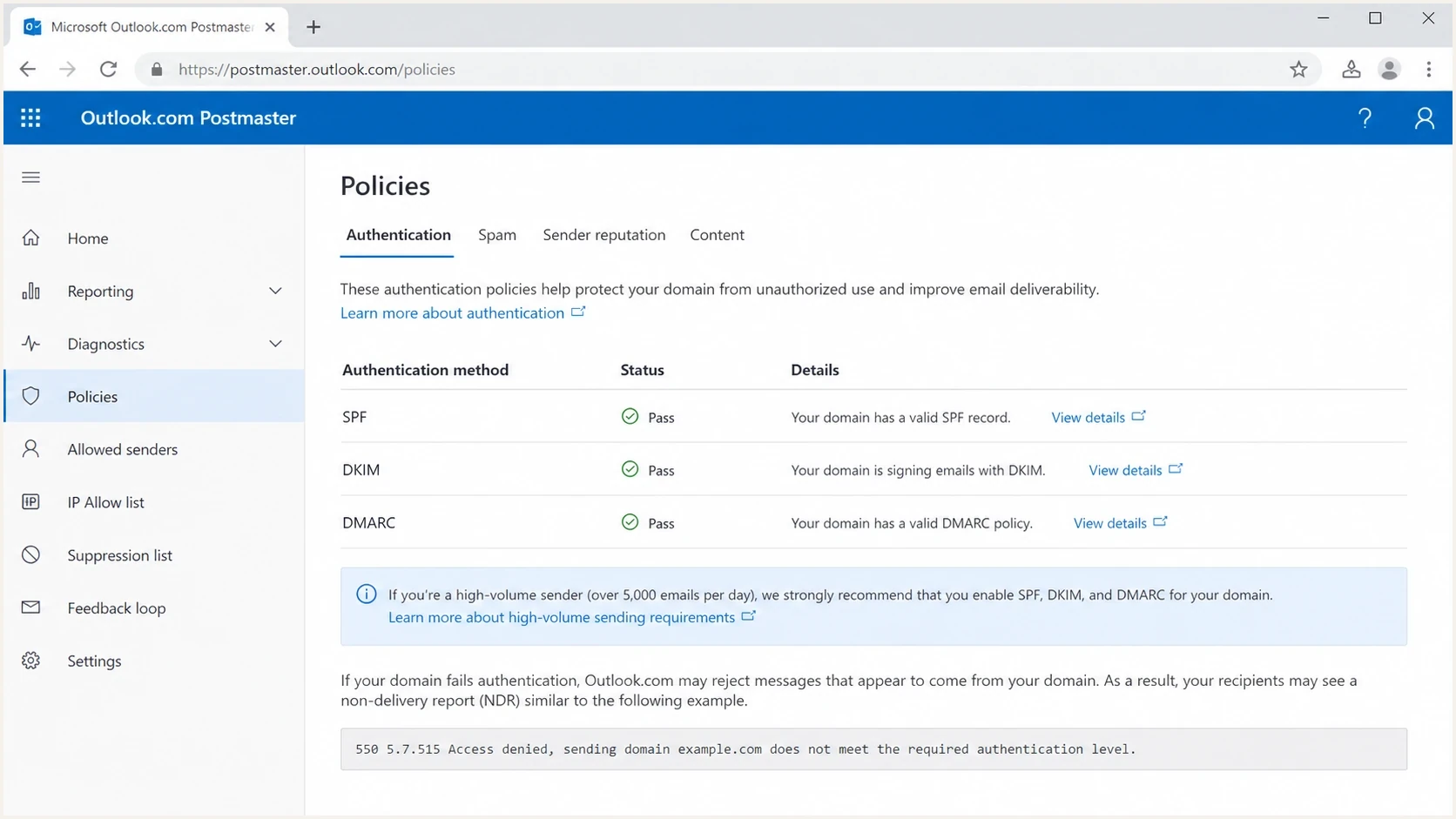
Outlook.com Postmaster authentication requirements for high-volume email senders.
Authentication and sending practices both matter
SPF, DKIM, and DMARC are the mandatory authentication checks for high-volume senders. Microsoft also publishes sending practices that affect filtering or blocking when authentication or email hygiene problems are severe. These practices apply to legitimate bulk mail even when all authentication checks pass.
- Sender identity: Use a valid primary From or Reply-To address that reflects the real sending domain and can receive replies.
- Unsubscribe handling: Give recipients a clear, functional unsubscribe link in marketing or bulk messages and process opt-outs promptly. Microsoft's announcement does not specify an RFC 8058 one-click header requirement.
- List maintenance: Remove invalid addresses, suppress bounces, and send only to recipients who consented.
- Message accuracy: Use accurate subject lines and headers so the message identity and purpose are clear.
- Forwarded mail: Forwarders and mailing lists should preserve DKIM and use ARC to retain earlier authentication results. SRS addresses SPF failures on forwarded mail; ARC acceptance depends on the receiver.
Authentication compliance does not guarantee inbox placement. A valid 5322.From domain, honest message identity, recipient consent, and reliable unsubscribe handling still affect how Microsoft treats bulk mail.
Observed bounce patterns
There are two Microsoft bounce families that get mixed together. The distinction matters because the fixes overlap but the diagnosis is different. The high-volume sender requirement is best identified by 5.7.515 and wording about the required authentication level. The older DMARC-policy rejection is best identified by wording about DMARC verification and a reject policy.
High-volume requirement signal
A 550 5.7.515 bounce points to Microsoft's high-volume authentication requirement. Inspect the visible From domain first, then compare it with the SPF and DKIM authenticated domains.
- Reason code: 5.7.515
- Typical text: Required authentication level.
DMARC reject signal
A 550 5.7.509 bounce points to a message that failed DMARC while the sender's domain already published a reject policy. This can happen outside the Microsoft bulk-sender requirement.
- Reason code: 5.7.509
- Typical text: DMARC policy of reject.
Observed 5.7.509 DMARC reject bouncetext
550 5.7.509 Access denied, sending domain EXAMPLE.COM does not pass
DMARC verification and has a DMARC policy of reject.
Some campaigns have both accepted and rejected messages. That alone does not identify the cause. Compare sending paths and receiver-side authentication results before attributing partial rejection to DNS, forwarding, or enforcement differences.
Why SPF and DKIM can pass while DMARC fails
The confusing version of the Microsoft bounce is the one that reports Spf=Pass, Dkim=Pass, and DMARC=Fail. That result is technically consistent. SPF can pass for the bounce domain, DKIM can pass for a vendor domain, and DMARC can still fail because neither passing domain matches the visible From domain.
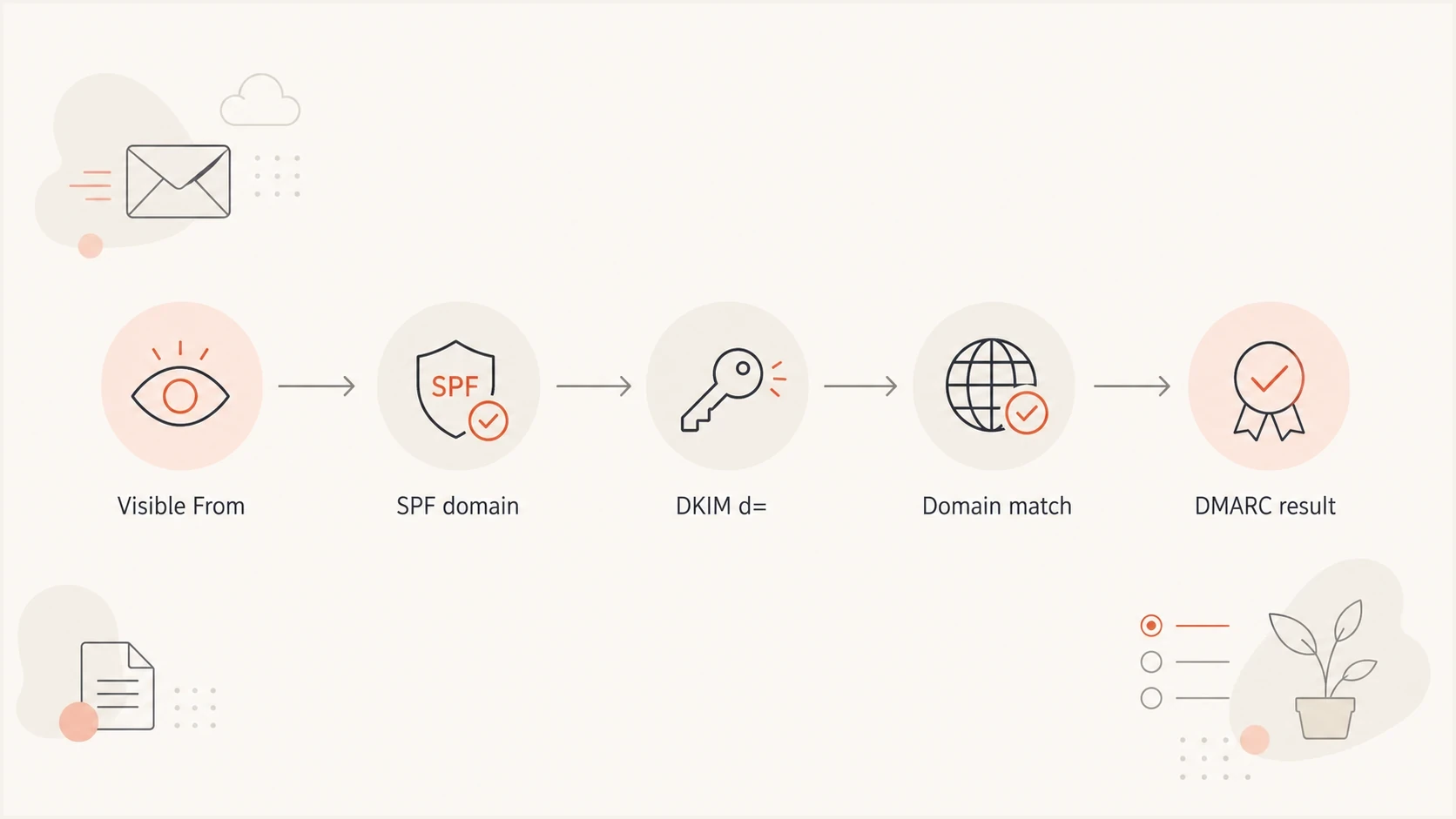
DMARC domain matching between the visible From address, SPF Return-Path, and DKIM signing domain.
Common causes are easy to miss when a marketing platform sends on behalf of a brand. The envelope sender uses the platform's domain, DKIM signs with the platform's domain, and the visible From address uses the brand domain. That mail can look authenticated at a glance, but it still fails DMARC for the brand.
- SPF mismatch: The Return-Path domain passes SPF, but it does not match the visible From domain under the configured DMARC matching mode.
- DKIM mismatch: The signature validates, but the d= domain belongs to the platform rather than the brand.
- Missing selector: The brand's DKIM signature cannot validate without its published public key. Another vendor signature can still pass without a matching brand domain.
- Shared mailstream: One campaign uses several senders, and only one of them has correct DNS.
Why forwarded mail can bounce despite DMARC passing
A forwarded message can keep a valid DKIM signature for the visible From domain, so DMARC passes, while SPF fails because Outlook sees the forwarder's IP. Microsoft's requirement still calls for both SPF and DKIM to pass. A sender in Microsoft's discussion reported 5.7.515 rejections with SPF Fail, DKIM Pass, and DMARC Pass after forwarding.
Illustrative authentication results after forwardingtext
SPF: Fail
DKIM: Pass
DMARC: Pass
Reported rejection: 550 5.7.515
- Ask the forwarding operator about Sender Rewriting Scheme (SRS). It rewrites the envelope sender so SPF can pass for the forwarding domain; it does not make that domain match the original visible From domain.
- Preserve the original matching DKIM signature and use Authenticated Received Chain (ARC) to retain earlier authentication results. ARC handling depends on the receiving service and does not guarantee acceptance.
Microsoft's SRS documentation distinguishes SPF repair from DMARC matching. Compare direct delivery with the forwarded route before changing the original sender's DNS. Do not add an unrelated forwarder to your SPF record as a blanket workaround.
How to fix Microsoft authentication bounces
Start with the domain in the visible From address because DMARC uses that as the domain being protected. Then work outward to the provider, DNS, selectors, and reporting. If you operate many brands or client domains, manual spreadsheets quickly become hard to maintain.
Minimal DNS examplestext
example.com TXT "v=spf1 include:_spf.example-sender.net -all"
selector1._domainkey.example.com TXT "v=DKIM1; k=rsa; p=PUBLICKEY"
_dmarc.example.com TXT "v=DMARC1; p=none; rua=mailto:dmarc@example.com"
These DNS examples are placeholders, not ready-to-publish records. Replace the include target and DKIM key with your provider's values; some providers supply DKIM CNAME records. Publish SPF at the actual envelope sender domain and keep only one SPF record there.
- Inventory senders: List every platform that sends using your domain, including billing, product, sales, support, and marketing systems.
- Publish SPF: Authorize each legitimate outbound source at the envelope sender domain. Stay within the SPF limit of 10 DNS-querying terms, including nested includes; exceeding the limit returns permerror.
- Enable DKIM: Turn on DKIM signing in each sending platform and publish the provider's selector records in DNS.
- Publish DMARC: Use p=none with a working rua address to collect aggregate reports, then move toward quarantine or reject when legitimate streams pass. The policy alone does not request reports.
- Check domain matching: Confirm either the SPF-authenticated domain or DKIM d= domain matches the visible From domain.
Suped's DMARC monitoring supports this workflow by showing verified and unverified sources, authentication pass rates, and the steps needed to fix each issue. Suped's hosted SPF and hosted DMARC controls help when DNS ownership is split across teams or clients.

Issue steps to fix dialog showing the issue overview, tailored fix steps, and verification action
How to test before the next send
A DNS check tells you whether the records exist. A real message test tells you whether the production email stream produces the headers Microsoft will evaluate. Run both before changing policy or resending a campaign that already produced bounces.
Use an email tester with the same platform, same From domain, same DKIM signing setup, and same campaign class. Do not test a personal mailbox and assume a marketing stream will behave the same way.
Email tester
Send a real email to this address. Suped shows a results button when the test is ready.
?/43tests passed
If SPF is the weak point, check the live SPF record, includes, and lookup count with an SPF checker. If DKIM is weak, read s= and d= in the DKIM-Signature header, then check s._domainkey.d in DNS. Authentication-Results shows what the receiver validated. Also send to a controlled Outlook.com mailbox to confirm Microsoft's results for the same production stream.
Best practice: test the exact production stream. The bounce text tells you the final recipient-side result, but the fix usually lives in DNS, platform signing settings, or the visible From domain.
What to do when bounces are intermittent
Intermittent Microsoft bounces need message-level evidence. Compare headers from an accepted Microsoft delivery against the original rejected message and look for changes in the Return-Path, DKIM selector, DKIM signing domain, source IP, or From domain. Check the full non-delivery report (NDR) and SMTP logs for forwarding hops, timestamps, and DNS-related temperror or permerror results. The bounced message does not always include complete Microsoft headers.
Triage priority for Microsoft bounces
Use the bounce reason and differences between sending paths to decide what to fix first.
Clean
Confirmed authentication passes
SPF, DKIM, and DMARC pass for the production stream.
Investigate
Mixed paths
Some messages are accepted while authentication details differ across paths.
Fix now
Any 5.7.515
A 5.7.515 rejection shows missing authentication, a failed check, or a domain mismatch.
For a broader troubleshooting path, the Microsoft bounce guide is useful when the rejection text is not clearly 5.7.515. If the bounce says DMARC passed but policy still caused trouble, compare that case with DMARC policy bounces because Microsoft rejection text can be easy to misread.
If you are planning a full cleanup rather than one emergency fix, use an Outlook compliance checklist and move domain by domain. That keeps the work measurable and prevents one overlooked sender from breaking the next launch.
Where Suped fits
The practical problem is keeping every source correct after teams add systems, change sending platforms, rotate selectors, or use client-owned domains. Suped's product puts authentication results, source ownership, issue severity, and remediation steps in one place.
- Automated detection: Suped groups failures by source and explains the DNS or platform change needed.
- Report-based alerts: Suped alerts you to authentication issues after report data arrives; aggregate DMARC reports do not provide immediate message-level bounce detection.
- Hosted controls: Suped's hosted SPF, DMARC, and MTA-STS controls reduce DNS friction for teams managing many domains.
- Multi-tenant work: MSPs and agencies can monitor client domains from one dashboard without losing source context.
Use Suped's DMARC reports to group authentication failures by source, then compare those sources with Microsoft 5.7.515 events in your sending platform's bounce logs. Aggregate reports do not establish the exact SMTP rejection for each message.
Views from the trenches
Best practices
Audit every active sending domain regularly, including low-volume client and transactional streams.
Compare accepted and bounced headers side by side before changing DNS or sender policy.
Keep DMARC reporting active so new Microsoft failures map back to a real source quickly.
Common pitfalls
Treating every DMARC reject bounce as evidence of Microsoft's high-volume 5.7.515 enforcement.
Assuming SPF Pass and DKIM Pass mean DMARC passes for the visible From domain in use.
Testing a personal mailbox instead of the exact production platform that sends campaigns.
Expert tips
Search logs for the Microsoft support link or 5.7.515 text, not one wording variant.
Investigate DNS timeouts before changing TTLs; longer caching is not a universal SPF fix.
Fix domain matching first when Microsoft shows SPF Pass, DKIM Pass, and DMARC Fail.
Expert view
Expert from Email Geeks says the clean 5.7.515 wording is the stronger signal for the new Microsoft authentication requirement.
2025-05-15 - Email Geeks
Marketer view
Marketer from Email Geeks says early DMARC reject bounces were easy to mistake for the new Microsoft sender enforcement.
2025-05-05 - Email Geeks
Resume sending after authentication is fixed
Pause retries for the stream producing 550 5.7.515 responses while you fix it. A 550 response is a permanent SMTP failure; do not automatically retransmit the rejected message to that recipient. Separate high-volume authentication enforcement from 5.7.509 DMARC-policy rejection, then validate the exact production stream before resuming compliant sends.




