Why am I getting DMARC policy bounces from Microsoft despite DMARC passing?

Published 15 Nov 2025
Updated 9 Aug 2026
12 min read
Summarize with
Updated on 9 Aug 2026: We clarified Microsoft's 550 5.7.515 rule, corrected SPF and DKIM troubleshooting, and added an authentication-versus-alignment checklist.
You are getting Microsoft DMARC policy bounces even though DMARC passes because Microsoft applies an extra sender requirement after 5,000 or more messages use the same 5322.From domain for delivery to Outlook.com, Hotmail, Live.com, and MSN recipients. For an affected domain, Microsoft requires raw SPF and DKIM checks to pass, plus DMARC to pass through at least one aligned authentication path. If the bounce says Dkim=Fail and DMARC=Pass, the message can still hit Microsoft error 550 5.7.515 because the raw DKIM check failed even though SPF supplied the aligned path that passed DMARC.
The confusing part is the wording. Many ESP dashboards label the bounce as "DMARC Policy", so it looks like your published DMARC record is wrong. The DMARC record is usually not the first problem. Start with the authentication result inside the bounce, especially DKIM failure, intermittent DNS lookup failure, message modification after signing, or a forwarding path that changes the message body or signed headers.
- Direct answer: Microsoft is rejecting the message because the 5322.From domain did not meet its required authentication level, even though the DMARC result passed.
- Most likely trigger: The bounce contains a DKIM failure. If DKIM passes on only 80% of messages, the failing 20% can explain the rejected Microsoft traffic.
- Main caveat: If the same sending stream authenticates cleanly at control recipients, Microsoft-side DNS or authentication handling is still a suspect, but you need evidence from the exact rejected attempts before escalating it.
The direct cause
Start with the NDR line, not the ESP's bounce category. A Microsoft consumer bounce like this tells you why it rejected the message: the domain in the visible 5322.From address did not meet the required authentication level for that sender. Microsoft defines a high-volume domain as one that sends 5,000 or more messages to its consumer email services using the same 5322.From domain. After that threshold, raw SPF and DKIM checks must both pass, and DMARC must pass through SPF and/or DKIM alignment.
The standard DMARC rule remains simple: a message passes DMARC when SPF or DKIM passes and that authenticated domain aligns with the visible From domain. Microsoft's separate high-volume requirement explains why the same result can show DMARC=Pass and still end in rejection.
Read the bounce literally
If the bounce contains Spf=Pass, Dkim=Fail, and DMARC=Pass, do not spend the first hour rewriting your DMARC policy. Prove why the raw DKIM check failed on the rejected messages.
Example Microsoft bounce patterntext
smtp;550 5.7.515 Access denied
sending domain example.com does not meet the required authentication level
The sender's domain in the 5322.From address does not meet requirements
Spf=Pass, Dkim=Fail, DMARC=Pass
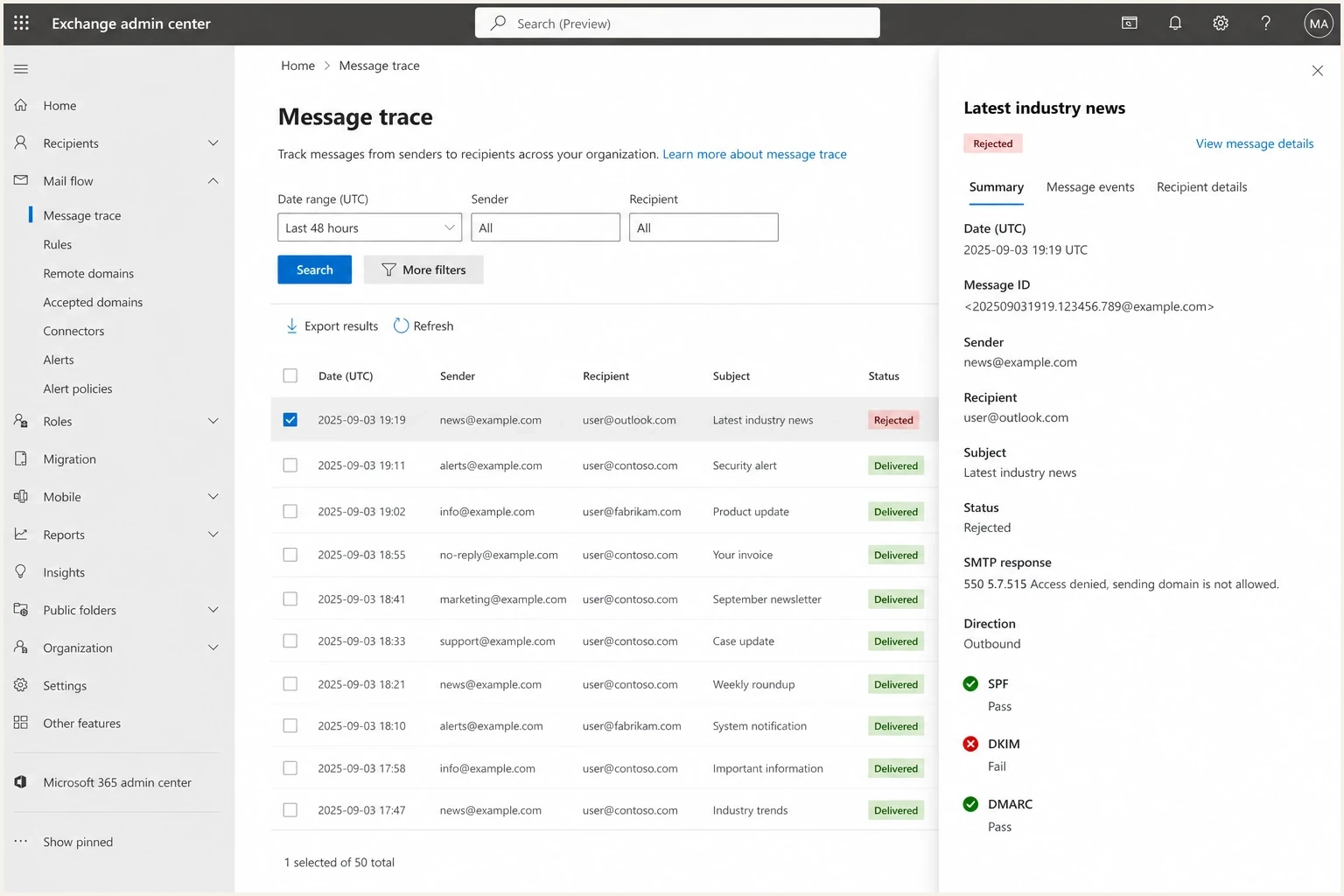
Microsoft message trace showing 550 5.7.515, SPF pass, DKIM fail, and DMARC pass.
Microsoft's DMARC setup guidance confirms the underlying logic: DMARC can pass when either an SPF-authenticated or DKIM-authenticated domain aligns with 5322.From. That standard rule explains the DMARC pass. The extra consumer sender requirement explains the rejection. See Microsoft DMARC setup for the baseline DMARC mechanics.
Why DMARC passes anyway
DMARC does not require both SPF and DKIM to pass. It checks whether at least one successful authentication result uses a domain aligned with 5322.From. Microsoft can then apply its additional high-volume rule and reject the same message because the other raw authentication check failed.
Standard DMARC pass
- SPF path: SPF passes for 5321.MailFrom and that domain aligns with 5322.From.
- DKIM path: DKIM passes and its d= signing domain aligns with 5322.From.
- Pass rule: Only one aligned path has to succeed for DMARC to pass.
Microsoft high-volume check
- Volume trigger: The same 5322.From domain appears on 5,000 or more messages to Microsoft consumer services.
- Extra rule: Raw SPF and DKIM checks both need to pass, while at least one must match 5322.From for DMARC.
- Bounce signal: A DKIM failure inside a 550 5.7.515 NDR explains the rejection even when DMARC passes.
This difference matters when an ESP uses its own return-path domain. SPF can pass for that envelope domain without aligning with your visible From domain, while DKIM supplies the aligned DMARC path. Microsoft still expects the raw SPF result and the raw DKIM result to pass. Authentication and alignment therefore need separate checks.
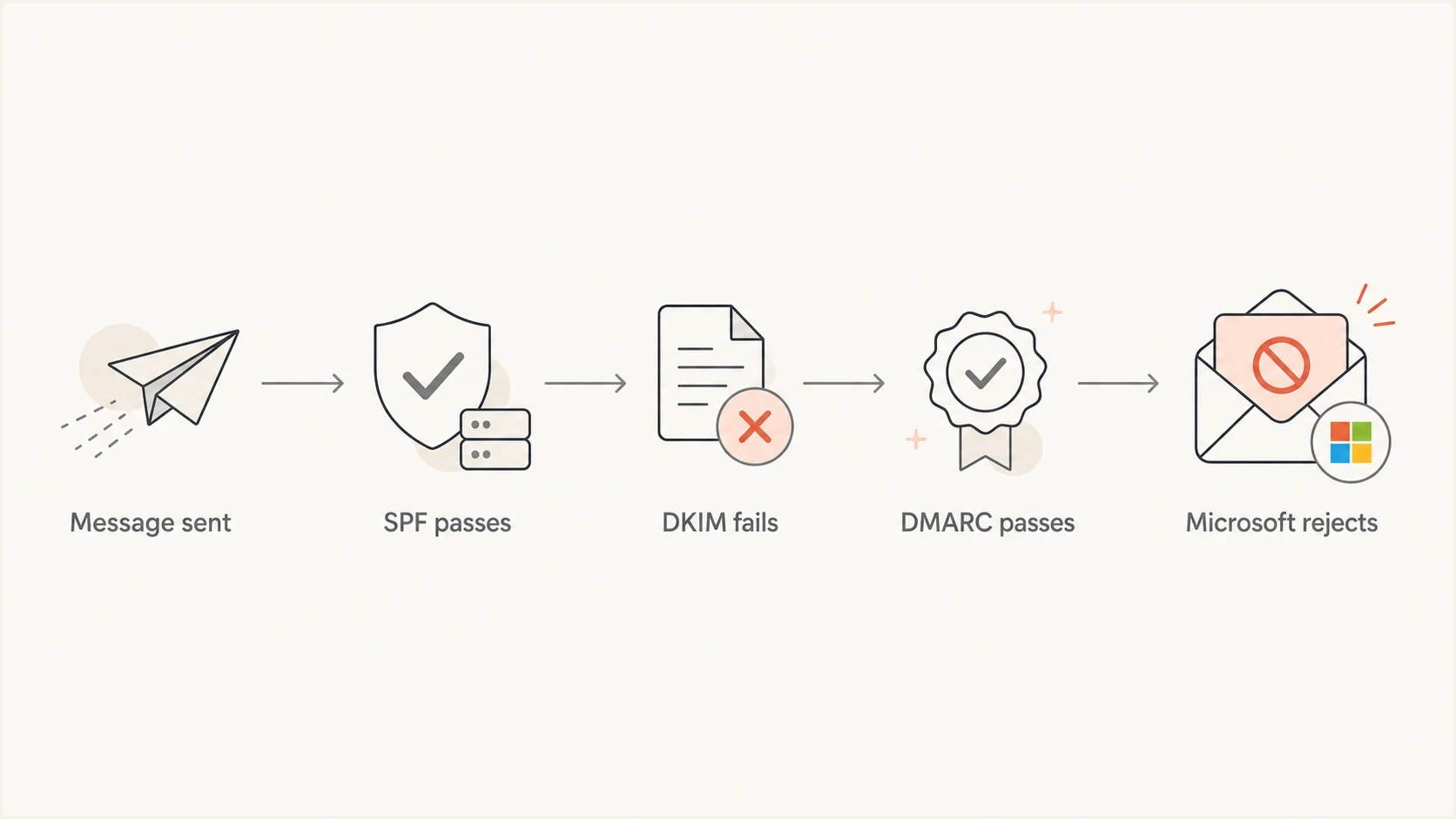
Flow of SPF passing, DKIM failing, DMARC passing, and Microsoft rejecting the message.
Authentication pass versus alignment
A raw authentication pass answers whether a sending source or signature is valid for its own domain. Alignment answers whether that authenticated domain matches the visible 5322.From domain under the DMARC mode. A result such as SPF pass does not prove SPF alignment, and a DKIM pass from an ESP-owned d= domain does not prove DKIM alignment.
|
|
|
|---|---|---|
5322.From | Visible author domain | Baseline for DMARC alignment |
5321.MailFrom | Envelope sender checked by SPF | Compare its domain with 5322.From |
DKIM d= | Domain that signed the message | Compare d= with 5322.From |
Authentication-Results | Receiver's raw and policy results | Read SPF, DKIM, DMARC, and domains together |
Fields to compare when Microsoft reports a 550 5.7.515 authentication failure.
Relaxed and strict alignment
DMARC defaults to relaxed alignment, where the organizational domains can match even when one side uses a subdomain. With aspf=s or adkim=s, the relevant domains must match exactly. Check those tags before treating a raw SPF or DKIM pass as an aligned DMARC path.
What to check first
Work backward from the rejected Microsoft attempt. Do not average authentication over the whole day and call it solved. Pull the complete NDR and any attached original headers, then compare them with accepted messages from the same campaign, ESP stream, From domain, and DKIM selector. A delivered or later-forwarded copy does not prove what Microsoft evaluated during the rejected SMTP attempt.
- Capture evidence: Save at least five complete Microsoft NDRs with timestamps, message IDs, and attached original headers when present, plus five accepted samples from the same path.
- Compare DKIM: Check selector, d= signing domain, canonicalization, body hash result, and whether the signature exists on rejected messages.
- Check SPF: Confirm SPF passes for 5321.MailFrom, then compare that envelope domain with 5322.From for DMARC alignment.
- Review DNS: Look for slow authoritative nameservers, DNSSEC failures, long CNAME chains, inconsistent TXT answers, and intermittent lookup errors.
- Trace changes: Find anything that modifies the subject, body, footer, encoding, tracking, MIME structure, or signed headers after DKIM signing.
A fast way to separate record problems from message-specific problems is to check the public DNS posture first, then test a real sent message. Suped's domain health check helps confirm whether the domain has valid SPF, DKIM, and DMARC records before you investigate the headers.
?
What's your domain score?
Deep-scan SPF, DKIM & DMARC records for email deliverability and security issues.
If the public records look clean, move to message evidence. A domain can have valid DNS records and still fail DKIM because the message changed after signing, Microsoft could not resolve the key at evaluation time, or only part of the outbound stream used the affected selector.

Issue steps to fix dialog showing the issue overview, tailored fix steps, and verification action
DKIM failure patterns
When DKIM passes around 80% of the time, treat that as an intermittent failure until proven otherwise. A missing or invalid key used by every message tends to fail the full stream. A partial failure points to route differences, DNS resolution differences, content changes, or a subset of mail using another selector.
|
|
|
|---|---|---|
Message changed | Body hash mismatch | Sign after every content edit |
Selector split | Failures cluster by selector | Audit each active selector |
Key lookup issue | Intermittent DNS error | Stabilize authoritative DNS |
Route difference | Only one mail path fails | Use consistent signing |
Encoding rewrite | Body bytes differ | Keep encoding stable |
Common causes behind Microsoft DMARC policy bounces when DKIM is inconsistent.
A common trap is testing one seed message and assuming that result applies to the full stream. A single successful test proves that one message, on one route, with one selector, at one moment, passed. It does not prove every message in the batch kept a verifiable DKIM signature through the full path.
A useful split test
- Same content: Send identical content through the production path and a stripped-down path without footers or rewrites.
- Same selector: Confirm both paths use the same DKIM selector and signing domain.
- Control recipients: Compare Microsoft recipients with non-Microsoft control recipients using full headers, not dashboard summaries.
DNS and forwarding issues
DNS matters because DKIM verification depends on Microsoft retrieving the public key for the selector. Intermittent timeouts, DNSSEC validation failures, or inconsistent authoritative answers can produce a DKIM failure even when the sender signed the message correctly. The NDR still reports that result as DKIM failure.
Short TTLs do not automatically break DKIM. Raising a TTL from 3600 to 7200 seconds does not repair slow authoritative nameservers, DNSSEC validation errors, or records that differ between authoritative servers. Query every authoritative server directly and compare the returned selector key when the problem is intermittent.
DKIM pass rate triage
Operational guide for the affected Microsoft stream, not a Microsoft-published acceptance threshold.
Healthy
>=99.9%
Expected for a stable authenticated production path.
Warning
99.0-99.89%
Investigate repeatable failures before the next large send.
Critical
<99.0%
Treat as an active authentication incident.
Forwarding is another source to check early. A forwarded or relayed message can retain the original From domain while an intermediary appends a footer, rewrites MIME parts, or changes encoding. Those content changes can break the DKIM body hash. Relaxed canonicalization tolerates limited whitespace normalization, but it does not make appended content safe.
Do not treat 80% DKIM as acceptable
An 80% DKIM pass rate is a delivery incident for Microsoft-bound high-volume mail. DMARC can still pass through an aligned SPF path, but the failing DKIM slice gives Microsoft a reason to reject under its sender requirements.
A practical fix sequence
Do not loosen DMARC to fix this bounce. Keep reporting active and repair the authentication path Microsoft rejected. Use p=none only when a domain is beginning a staged DMARC deployment. Replacing an existing quarantine or reject policy with p=none does not repair SPF or DKIM and removes enforcement data you need.
Example for a domain beginning DMARC monitoringtext
Host: _dmarc
Type: TXT
Value: v=DMARC1; p=none; rua=mailto:dmarc@example.com
- Prove scope: Filter reports and NDRs to Microsoft consumer domains, then calculate raw DKIM pass rate for the affected 5322.From domain and sending stream.
- Fix DKIM: Make every outbound route sign consistently, verify the public key for each selector, and confirm at least one passing signature aligns with 5322.From.
- Harden DNS: Use reliable authoritative DNS, remove unused selectors after confirming no active stream needs them, and avoid unnecessary CNAME chains.
- Validate SPF: Confirm SPF passes for 5321.MailFrom, check its alignment with 5322.From, and keep the record within the SPF lookup limit.
- Retest Microsoft: Send a controlled batch after DNS changes have propagated and compare new NDRs or accepted-message headers with the original rejected samples.
If you are creating or checking a record during this process, use Suped's DMARC checker to verify syntax before publishing changes. If you manage frequent policy changes, Hosted DMARC supports policy staging without repeated manual DNS edits.
Escalation evidence for Microsoft
- Samples: Provide complete NDRs, message IDs, UTC timestamps, recipient domains, and the reported authentication results.
- Control evidence: Show accepted messages from the same stream with the same From domain, selector, sending IP, and passing DKIM result.
- Pattern: Document whether failures cluster by selector, sending IP, UTC time, recipient domain, or Microsoft receiving host.
How Suped helps
Suped is our DMARC reporting and email authentication platform. Its DMARC monitoring groups aggregate results by source, domain, policy, and failure type. For this workflow, filter the affected 5322.From domain and sending source, then compare DKIM failures with Microsoft NDRs instead of relying on a healthy global pass rate.
Suped also surfaces authentication issues with guided checks and alerts. Use those signals to identify the selector or sending source that changed, then confirm the cause in the original NDR and message headers before editing DNS.
Manual investigation
- Separate evidence: XML reports, NDR text, and headers need separate review.
- Broad averages: Microsoft failures can disappear inside unrelated recipient traffic.
- Manual correlation: Selectors and sending sources have to be matched across reports.
Suped workflow
- Focused filtering: Narrow authentication data by domain, source, and failure type.
- Issue alerts: Spot a DKIM failure increase before it becomes a sustained bounce pattern.
- Domain oversight: Track the same investigation across client or business domains.
Views from the trenches
Best practices
Save full headers for bounced and delivered samples before changing DNS or sender settings.
Track Microsoft consumer domains separately because their bulk sender rules add checks.
Keep DKIM selectors simple, stable, and documented across every active sending route.
Common pitfalls
Treating DMARC=Pass as final hides DKIM failures that still trigger Microsoft bounces.
Changing TTLs alone misses weak DNS hosting, stale selectors, or inconsistent TXT answers.
Testing one seed message can hide routing differences inside the actual production stream.
Expert tips
Compare identical messages at Microsoft and control recipients before blaming one provider.
Look for encoding or footer changes after signing when DKIM fails only part of the time.
Escalate with message IDs, timestamps, selectors, and full NDR text, not summary rates.
Expert from Email Geeks says this is not automatically a DMARC policy error when the result says DMARC passed; Microsoft-side DNS or authentication handling still needs investigation.
2025-09-04 - Email Geeks
Marketer from Email Geeks says Microsoft's high-volume sender rules require both SPF and DKIM checks to pass, while DMARC still needs only one matching authenticated path.
2025-09-05 - Email Geeks
What to do next
Treat the Microsoft bounce as an authentication consistency problem first, not as a reason to weaken DMARC. The NDR contains the decisive clue. If it reports DKIM failure for an affected high-volume domain, Microsoft can reject the message even when DMARC passes through aligned SPF.
Target a near-perfect raw DKIM pass rate on every Microsoft-bound route, raw SPF that passes for 5321.MailFrom, at least one aligned DMARC path, and stable DNS. Once accepted and rejected samples use the same domain, selector, route, and content path, receiver-side failures can be separated from sender-side configuration problems and escalated with useful evidence.




