
What are the best practices for PTR records and domain alignment in email sending?

Published 22 Jun 2025
Updated 9 Oct 2026
14 min read
Summarize with

Updated on 9 Oct 2026: We clarified PTR verification, SPF and DKIM domain alignment, and outbound testing with a worked message-header example.
The best practice is to make every sending IP pass forward-confirmed reverse DNS (FCrDNS), use a stable hostname that belongs to the infrastructure owner or the sender's dedicated sending domain, and keep the HELO or EHLO name consistent with that infrastructure. The PTR record does not have to point to the visible From domain for DMARC to pass.
Two questions often get mixed together. PTR records identify the host associated with an IP through reverse DNS. Domain alignment proves that SPF or DKIM ties back to the Header From domain used in the message. Both affect trust, but they are different checks.
- PTR rule: An IP should reverse-resolve to a hostname, and that hostname should forward-resolve back to the same IP.
- DMARC rule: SPF or DKIM must authenticate a domain that has the required relationship to the visible From domain.
- Practical rule: Use branded rDNS on dedicated IPs when you control the IP and domain, but do not force sender-domain PTR on shared IP pools.
Does PTR need to match the From domain?
A PTR record can point to a domain that is not the sender address domain, as long as the reverse and forward DNS match, the hostname is legitimate, and the sending identity is authenticated through SPF or DKIM. This is common for shared infrastructure. Large mailbox and cloud mail systems send mail for many customer domains through IPs whose rDNS belongs to the platform's domain, not each customer's From domain.
Branded rDNS is useful for a dedicated IP when the provider supports it, usually something like mail.customer.example or mta1.mail.customer.example, with a matching A or AAAA record back to the IP. That gives support teams a clearer infrastructure identity. A valid provider hostname is also acceptable. Branding does not reset IP reputation or guarantee inbox placement, and it is not a DMARC requirement.
Short version
Do not treat PTR as a replacement for DMARC alignment. A perfect PTR record cannot make an unrelated SPF identity pass DMARC, and a branded PTR record cannot fix missing DKIM signing. Use PTR to identify the sending host. Use SPF, DKIM, and DMARC to authenticate the sender domain.
|
|
|
|---|---|---|
PTR | IP | Forward-confirmed rDNS |
HELO / EHLO | SMTP name | Resolvable FQDN |
SPF | MAIL FROM domain | Authorized sending IP |
DKIM | Signing domain | Valid signature with matching From domain |
DMARC | Header From | At least one passing, matching SPF or DKIM domain |
Compact identity checks used during email receiving.
What a good PTR setup looks like
The cleanest PTR setup has a single operational hostname for each sending IP. The IP reverses to that hostname, and the hostname has an A or AAAA record that resolves back to the same IP. The hostname should identify real mail infrastructure, not a parked domain, an unrelated marketing domain, or a random dynamic address name.
Forward-confirmed rDNS exampleDNS
25.113.0.203.in-addr.arpa. IN PTR mta1.mail.example.com.
mta1.mail.example.com. IN A 203.0.113.25
For a dedicated IP, use a hostname under a sending subdomain controlled by the brand or the business unit using the stream. For shared IPs, use the platform's hostname because many customers share the same IP and the provider controls the network reputation.
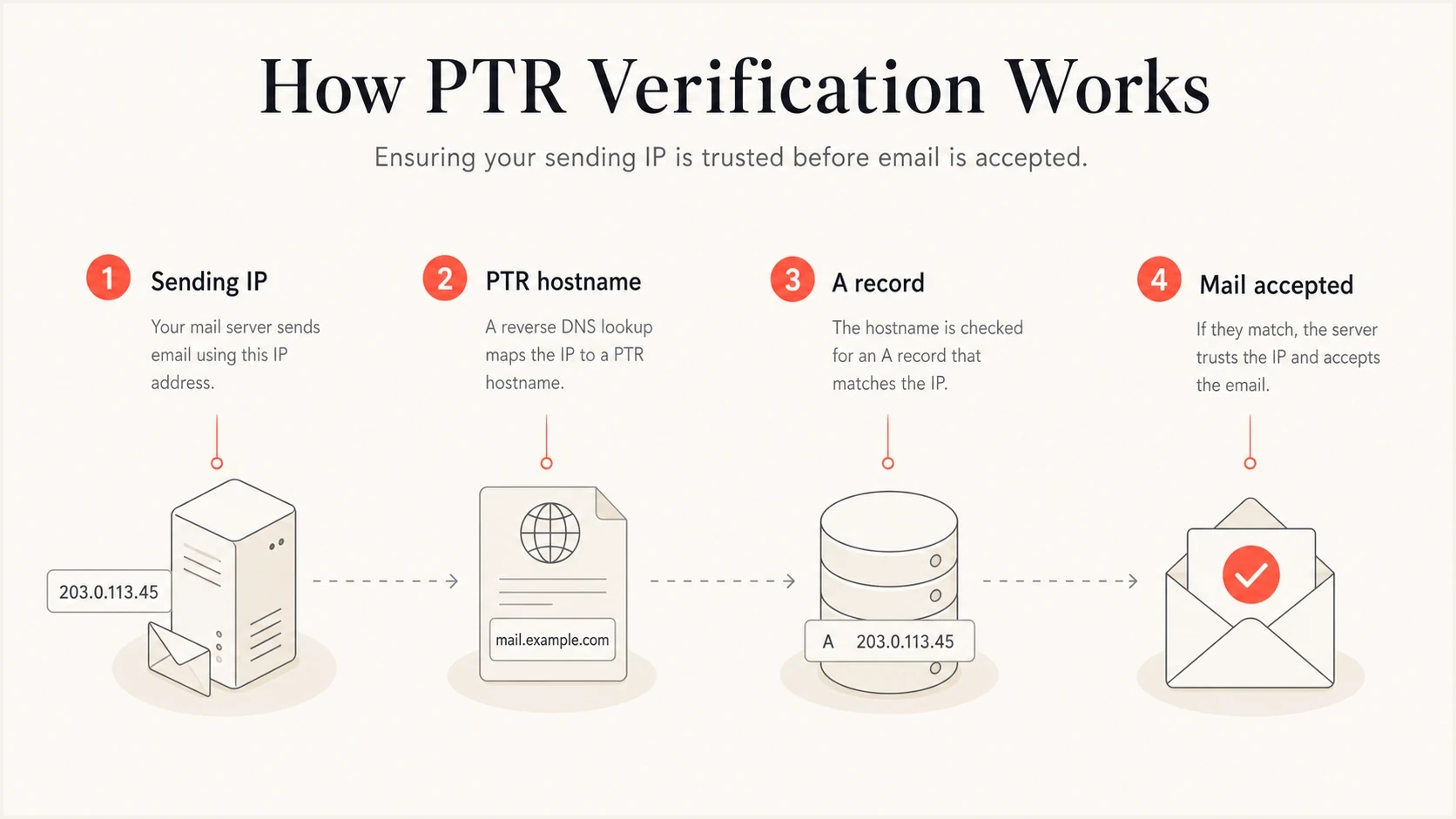
Forward-confirmed reverse DNS (FCrDNS): sending IP, PTR hostname, and matching A record.
- One hostname: Publish one clear PTR hostname per sending IP. Multiple PTR answers create ambiguity and are poorly handled by some receivers.
- No placeholders: Replace dynamic or compute-style names when you control rDNS. Provider-managed shared pools can use a stable provider hostname.
- Resolvable host: The PTR target should resolve back to the sending IP through A for IPv4 or AAAA for IPv6.
- Consistent HELO: Use a stable, publicly resolvable FQDN. Exact equality with PTR is useful for self-hosted systems but is not universal across large mail platforms.
Who controls PTR and which IP to use
A PTR record lives in the reverse DNS zone for the public IP address, under in-addr.arpa for IPv4 or ip6.arpa for IPv6. That zone is usually controlled by the ISP, cloud provider, hosting company, or email platform that owns the IP range. Adding a PTR record to your domain's ordinary forward DNS zone does not configure reverse DNS; delegation lets you manage the separate reverse zone.
- Find the real egress IP: Inspect the receiving server's Received header on an external test message or check the outbound gateway. With NAT or an SMTP relay, configure the public source IP seen by receivers, not the server's private address or your inbound mail server's address.
- Create forward DNS first: Choose a stable mail hostname and point its A or AAAA record to the public sending IP.
- Request reverse DNS: Use the provider's rDNS control or ask the IP-space owner to point each sending IP to that hostname.
- Verify every path: Test forward and reverse lookups externally for each active IPv4 and IPv6 address before sending production traffic.
After a DNS change, cached forward and reverse answers remain until their TTL expires. Compare the authoritative answers with public resolver results, then retest after the previous TTL expires before treating an old PTR answer as a configuration failure.
Hosted and shared sending
When an email platform owns the sending IPs, it manages PTR records for those IPs. The customer still manages sender authentication, including SPF authorization, DKIM signing, DMARC policy, and any supported custom return-path domain. A customer-specific PTR on a shared IP would misidentify the other senders using that address.
Where domain alignment actually matters
Domain alignment matters most in DMARC. DMARC passes when at least one mechanism, SPF or DKIM, authenticates successfully with the required domain match to the Header From domain. SPF authentication checks the MAIL FROM domain, usually shown in Return-Path after delivery. An SPF pass for an unrelated domain still fails the SPF part of DMARC. DKIM uses the signing domain in d=, and its signature must validate. These checks are defined in RFC 9989.
Relaxed alignment, the default, accepts an authenticated SPF or DKIM domain that shares the same organizational domain as the Header From domain. Strict alignment requires an exact domain match. The aspf and adkim tags set the SPF and DKIM modes independently: r means relaxed and s means strict. A branded subdomain works in relaxed mode, but fails strict mode when the From domain is different.
Google's sender guidelines require valid forward and reverse DNS for sending IPs. Gmail can defer mail with 4.7.23 or reject it with 5.7.25 when PTR is missing or its forward record does not return the sending IP, as documented in its sender guidelines FAQ. PTR matching is an infrastructure requirement. Gmail bulk senders must configure both SPF and DKIM, although one passing domain match is enough for DMARC.
PTR identity
- Purpose: Shows which host is associated with the sending IP.
- Scope: Applies to the network connection.
- Failure: Can trigger filtering or rejection before content is scored.
DMARC identity
- Purpose: Shows whether the visible sender domain is authenticated.
- Scope: Applies to the message domain.
- Failure: Can fail DMARC even when rDNS is perfect.
Suped's DMARC reporting platform groups sending sources and authentication results so teams can identify which service needs a custom return-path or DKIM domain. Review those results alongside DNS diagnostics; DMARC aggregate reports do not directly report PTR lookup failures.
DMARC record detail view showing SPF, DKIM, DMARC, rDNS diagnostics, and DNS records
To inspect a real message, send a test through the same platform, IP pool, and From domain. Suped's email tester exposes the actual headers, authentication results, and sender identity that receivers see.
?
What's your domain score?
Deep-scan SPF, DKIM & DMARC records for email deliverability and security issues.
How to read domain alignment in message headers
Check Authentication-Results added by the receiving server you trust. In this illustrative message, SPF passes for bounces.example.net, which is unrelated to the visible From domain. DKIM passes for example.com, so DMARC passes through DKIM.
SPF passes without a matching From domain; DKIM provides the DMARC passTEXT
From: Newsletter <news@example.com>
Return-Path: <bounce@bounces.example.net>
Authentication-Results: receiver.example.org;
    spf=pass smtp.mailfrom=bounces.example.net;
    dkim=pass header.d=example.com;
    dmarc=pass header.from=example.com
If DKIM also used example.net, neither passing check would match example.com and DMARC would fail. Adding the service to example.com's SPF record would not change the MAIL FROM identity. Configure a custom return-path such as bounce.example.com, or a valid DKIM signature with d=example.com.
|
|
|
|---|---|---|
example.com | Matches | Matches |
bounce.example.com | Matches | Does not match |
example.net | Does not match | Does not match |
Assuming authentication passes and the visible From domain is example.com.
PTR, Reply-To, and tracking domains are not DMARC matching identities. Keep their ownership documented, but correct MAIL FROM or DKIM d= when troubleshooting a domain mismatch.
When branded PTR helps
Branded PTR helps most when the IP is dedicated, the sender controls the DNS zone, and the mail stream has enough consistent volume to build its own reputation. It gives mailbox providers and postmaster teams a clearer identity for analytics, support, and reputation attribution.
A branded hostname does not reset the reputation of its IP. If the IP appears on a blocklist (blacklist) because of prior traffic, changing PTR does not remove the listing or separate the sender from that IP history. Fix the sending cause, follow the list operator's removal process, and rebuild reputation through wanted mail and stable volume.
Use branded PTR
- Dedicated IP: The sender owns the reputation path and can justify a branded hostname.
- Stable stream: The traffic type is consistent enough for reputation to accumulate.
- Support need: Postmaster teams can map the IP to the sender quickly.
Use provider PTR
- Shared IP: Many sender domains share the same IP, so one customer domain would be misleading.
- Provider control: The platform owns routing, bounce handling, and abuse controls.
- Low volume: A shared reputation pool can be more stable than a cold dedicated identity.
Keeping the return-path, DKIM signing domain, tracking domain, HELO name, and rDNS hostname recognizably related makes logs and support cases easier to interpret. Provider domains are normal on shared infrastructure; document their ownership rather than changing a valid PTR solely to resemble the From domain.
Do not brand PTR to a dead domain
If the PTR target uses a domain that has no clear owner, no maintained DNS, and no connection to the sender, ownership becomes harder to verify during troubleshooting and the setup resembles disposable infrastructure. The domain does not need to host the campaign landing page, but it should be a real, maintained domain.
Recommended configurations
The right setup depends on who controls the IP. Use this decision path when reviewing sender infrastructure.
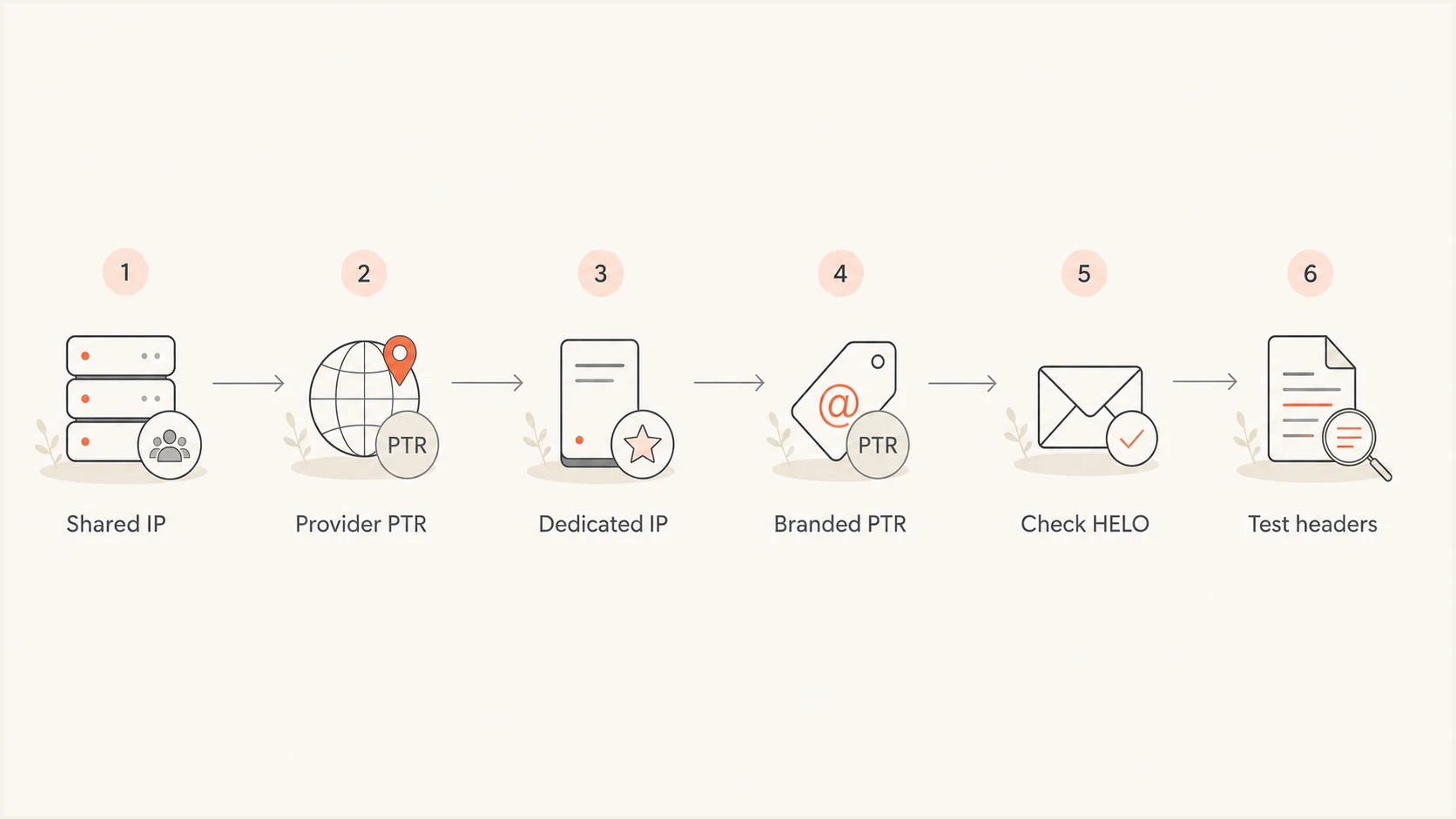
PTR record choices for shared and dedicated sending IPs, with HELO and header checks.
|
|
|
|---|---|---|
Shared ESP | Provider host | One IP serves many senders |
Dedicated ESP | Branded host if supported | Identifies dedicated infrastructure |
Self-hosted | Mail host | Matches server ownership |
Transactional | Stable host | Supports reputation continuity |
Bulk marketing | Stream host | Documents the sending stream |
PTR choices by sending model.
DMARC and related sender DNS exampleDNS
_dmarc.example.com. TXT "v=DMARC1; p=none; rua=mailto:d@example.com"
bounce.example.com. TXT "v=spf1 ip4:203.0.113.25 -all"
selector1._domainkey.example.com. TXT "v=DKIM1; k=rsa; p=PUBLICKEY"
This example assumes MAIL FROM uses bounce.example.com. SPF belongs on that exact domain; subdomains do not inherit their parent's SPF record. Replace the documentation IP and PUBLICKEY with your sending IP and real DKIM public key, and use a working reporting address. Review legitimate senders at p=none before moving to quarantine or reject.
For SPF, keep the authenticated return-path domain related to the visible From domain when the platform supports it. For DKIM, sign with the sender's domain or a subdomain of it. For DKIM identity, the d= domain is the identity used for DMARC. The i= value can include a local part and create a more specific signing identity, but DMARC does not require it to match the full From address.
For a live domain, use Suped's domain health checker to inspect DMARC, SPF, DKIM, and DNS health together. For ongoing protection, Suped's DMARC monitoring shows sending sources and their SPF/DKIM results so you can compare them with your authorized service inventory.
Common PTR and authentication mistakes
Check that the hostname resolves correctly before considering branding. A familiar name does not compensate for broken forward or reverse DNS.
- Missing reverse DNS: Receivers can rate-limit or reject mail from IPs with no PTR record before other authentication checks matter.
- Broken forward match: The PTR hostname resolves somewhere else, or it does not resolve at all.
- Unverified IPv6: The server sends over IPv6 even though that address lacks matching PTR and AAAA records.
- Generic cloud host: A dedicated mail IP still uses a dynamic or compute-style hostname even though the sender controls rDNS.
- Unrelated domain: The PTR target belongs to a domain that has no clear relationship to the sender or platform.
- Overloaded SPF: More than 10 DNS-querying terms evaluated across the SPF policy, including nested includes and redirects, produce permerror. The limit counts these terms, not all mechanisms or authorized IPs.
- Header confusion: The visible From domain, return-path domain, DKIM domain, tracking domain, and rDNS hostname all identify unrelated organizations.
The last mistake makes troubleshooting and reputation attribution harder, even when DMARC technically passes. Each identity should have a clear reason to exist and a documented owner.
Keep the DNS PTR record separate from SPF's ptr mechanism. RFC 7208 discourages publishing that mechanism because it is slow and unreliable. Use explicit ip4 or ip6 authorization, or the documented include supplied by your sending platform.
PTR does not authorize mail
A PTR record saying mail.example.com does not prove that example.com authorized the message. SPF or DKIM must authenticate a matching domain for DMARC to pass. PTR gives the receiver a name for the connecting IP, which can then be scored with reputation and policy signals.
When a domain or IP appears on a blocklist or blacklist, check whether the listing is tied to the IP pool, the domain, the HELO name, or the visible sender identity. Suped's blocklist monitoring can surface those issues next to authentication results, which helps when DNS is correct but delivery still drops.
A practical testing workflow
Test the IP first, then the SMTP identity, then the message authentication identities. This avoids chasing DMARC records when the connection is failing a basic network check.
- Reverse DNS: Confirm every active IPv4 and IPv6 sending address has a PTR record.
- Forward DNS: Confirm each PTR hostname resolves back through A or AAAA to the sending IP.
- HELO name: Confirm the outbound HELO or EHLO uses a stable, resolvable FQDN. Read the receiving server's Received header or outbound SMTP logs; an inbound server banner does not show your sending HELO.
- SPF identity: Confirm the return-path domain authorizes the sending IP or platform.
- DKIM identity: Confirm the received message has a valid DKIM signature whose d= domain meets the required match with the visible From domain.
- DMARC result: Confirm the receiver reports dmarc=pass because at least one mechanism passes authentication with the configured domain match.
IPv4 and IPv6 DNS checksBASH
dig -x 203.0.113.25 +short
dig A mta1.mail.example.com +short
dig -x 2001:db8::25 +short
dig AAAA mta1.mail.example.com +short
Substitute each actual sending IP and its PTR hostname. Every active IPv6 path needs its own PTR and a matching AAAA record. Repeat the external message test after IP migrations, failover changes, or onboarding another sending service.
If your platform lets you customize the return-path and DKIM domain, do that before enforcing DMARC. Then test real messages because DNS records can look correct while the actual sending platform still signs with a default domain. Related deeper dives cover shared IP PTR choices and HELO and rDNS when you need to split the details further.
Views from the trenches
Best practices
Keep PTR forward-confirmed and use a stable hostname that identifies the sending host.
Use branded reverse DNS on dedicated IPs when supported, with a maintained DNS hostname.
Check MAIL FROM and DKIM d= against the From domain using the configured DMARC matching mode.
Common pitfalls
Treating PTR as DMARC alignment causes teams to miss the actual SPF or DKIM domain mismatch.
Pointing rDNS at a hostname without matching A or AAAA records breaks the forward DNS check.
Exceeding SPF's 10 DNS-querying terms, including nested policies, causes a permerror result.
Expert tips
Shared IP pools usually need provider rDNS because one PTR cannot name every sender.
Wait for the previous DNS TTL to expire before treating a cached PTR answer as a failed change.
Retest every active IPv4 and IPv6 sending path after an IP migration or outbound routing change.
Marketer view
Marketer from Email Geeks says PTR domain similarity helps receivers because it makes analytics and detection easier, but valid rDNS under the platform domain is not usually penalized.
2024-09-15 - Email Geeks
Marketer view
Marketer from Email Geeks says branded rDNS on dedicated IPs can clarify sender ownership, but it is not required by email authentication standards and does not reset IP reputation.
2024-09-14 - Email Geeks