Do PTR records and HELOs impact email deliverability?


Updated on 26 Jul 2026: We updated this guide for current sender requirements, including IPv4, IPv6, HELO, SPF, and rejection-code guidance.
Yes, PTR records and HELO names impact email deliverability. Valid forward and reverse DNS is now a baseline sender requirement at major mailbox providers, and a missing PTR or broken forward-confirmed reverse DNS can trigger rate limits or rejection before content is evaluated. A PTR that uses your ESP's domain instead of your brand domain is usually fine when the reverse DNS checks close cleanly and the sender reputation is healthy.
PTR and HELO are infrastructure trust signals, not primary brand signals. SPF, DKIM, DMARC, complaint rate, bounce rate, engagement, blocklist (blacklist) status, and sending consistency carry more practical weight once the DNS baseline passes. PTR and HELO remain visible during the SMTP session and in message headers, so a poor setup gives mailbox providers a concrete reason to slow, reject, or filter mail.
The best setup for a dedicated sending IP is a branded hostname, a PTR record pointing to that hostname, and a matching A or AAAA record that points back to the same IP. The best setup for a shared ESP pool is usually to accept the ESP-controlled PTR and HELO, then make sure your authenticated domains, bounce domains, and DMARC reporting are clean.
The short answer
PTR records matter most when they are missing or broken. HELO matters most when it is malformed, generic, inconsistent, or associated with sending infrastructure that has weak reputation. Neither value has to match the visible From domain in every case. Many normal senders use shared infrastructure where the PTR and HELO belong to the ESP, not the customer domain.
- Hard failure: No PTR, or a PTR hostname that does not resolve back to the sending IP, can cause a direct rejection or temporary rate limit.
- Soft signal: A PTR using an ESP domain instead of your domain is not automatically bad when the rest of the setup is clean.
- Branded gain: A branded PTR can reduce odd-looking infrastructure clues on dedicated IPs, especially for high-volume programs.
- HELO risk: An invalid HELO value, a failed HELO SPF check, or a greeting tied to poor reputation can add delivery risk.
- IPv6 parity: Every IPv6 address used for delivery needs its own valid PTR and a matching AAAA result.
Practical rule
If you own the sending IP, make PTR and HELO clean and branded. If you use a shared ESP pool, confirm that its forward and reverse DNS is valid, then focus on SPF, DKIM, DMARC, bounces, complaints, and pool reputation.
How receivers use PTR and reverse DNS
A PTR record maps an IP address back to a hostname. That is reverse DNS, also called rDNS. When a receiving mail server sees a connection from an IP, it can look up the PTR hostname, then check whether that hostname has an A record for IPv4 or an AAAA record for IPv6 that points back to the same IP. That closed loop is forward-confirmed reverse DNS, often shortened to FCrDNS.
Clean reverse DNS exampletext
Sending IP: 203.0.113.10
PTR: 203.0.113.10 -> mail1.example.com
A: mail1.example.com -> 203.0.113.10
Result: forward-confirmed reverse DNS passes
Receivers use this as a sanity check. Real mail infrastructure should not look anonymous. A missing PTR, a dynamic-looking hostname, or a hostname that does not resolve back to the sending IP can look like unmanaged infrastructure. That does not prove abuse, but it raises the cost of trust.
The PTR record sits in the reverse DNS zone owned by the IP address provider. Adding an ordinary DNS record at your domain host does not change it. If you use a dedicated IP, request the PTR through the hosting provider or ESP that controls the address range.
|
|
|
|---|---|---|
No PTR | Anonymous IP | High |
Broken rDNS | Mismatch | High |
ESP PTR | Normal pool | Low |
Branded PTR | Dedicated host | Low |
Common PTR outcomes
A branded PTR is not a magic inboxing lever. It helps most when you already have a dedicated IP, stable volume, and clean authentication. If the IP has poor reputation, the PTR name will not fix that by itself. If the PTR points to a clean ESP hostname and the mail is otherwise authenticated, that is normal for shared sending infrastructure.
For a deeper background on rDNS itself, this related explanation of reverse DNS covers why receivers care about it.
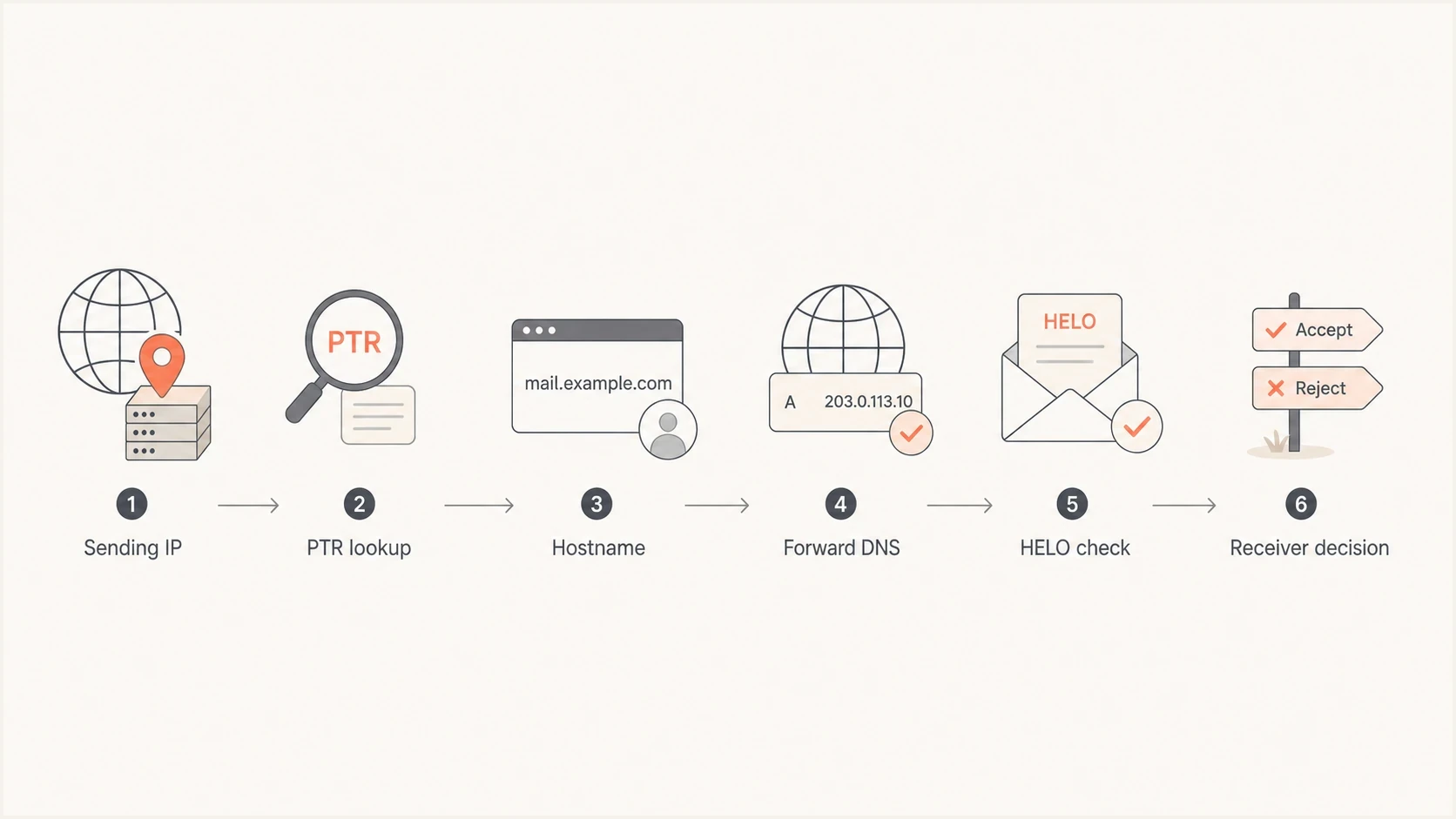
Flowchart showing a receiver checking PTR, forward DNS, HELO, and delivery risk.
Where HELO fits
HELO, or more commonly EHLO, is the identity a sending server presents during the SMTP conversation. EHLO also asks the receiver which extended SMTP capabilities it supports. This identity is not the same thing as the From domain, return-path domain, DKIM domain, or PTR hostname. It belongs to the transport layer, and receivers record it in headers and logs.
SMTP greeting exampletext
S: 220 mx.receiver.example ESMTP
C: EHLO mail1.example.com
S: 250-mx.receiver.example
S: 250-STARTTLS
S: 250 OK
For normal sending infrastructure, use a fully qualified HELO hostname that resolves and fits the role of the server. RFC 5321 allows EHLO to use an address literal when a client has no meaningful domain name, but that is a weak operational choice for commercial mail. Unqualified names, underscores, and malformed domain syntax can cause the HELO or EHLO command to fail.
RFC 5321 lets a receiver verify whether the EHLO hostname corresponds to the connecting IP, but says the receiver must not reject a message solely because that comparison fails. Production filters can still use the HELO identity with reverse DNS, IP reputation, SPF results, and local anti-abuse policy. This is why a stable ESP HELO can be acceptable even when it does not exactly equal the IP's PTR hostname.
HELO also has an SPF identity
RFC 7208 recommends checking the HELO identity separately with SPF. When MAIL FROM is empty for a delivery-status message, SPF derives the sender identity from postmaster@ plus the HELO domain. If you run your own MTA, publish an SPF policy for the HELO hostname that authorizes its connecting IP. This does not replace DMARC alignment for the visible From domain.
Dedicated IP
- Control: You can usually set PTR and HELO through the ESP or hosting provider.
- Best name: Use a branded mail hostname that resolves back to the IP.
- Benefit: The sending path looks intentional and remains easier to audit.
Shared IP
- Control: The ESP usually controls PTR and HELO for the pool.
- Best name: A stable ESP hostname is normal and acceptable.
- Benefit: You spend effort on the controls you actually own.
The edge case is a HELO value with reputation baggage. If the same HELO appears in headers for many weak senders, some receivers can treat it as a negative clue. In that situation, changing HELO helps only when the underlying pool, IP reputation, and sending practices also improve.
The relationship between rDNS and SMTP banner naming is worth checking when mail is rejected. This page on rDNS and banners gives the practical version of that check.
What should match
The cleanest dedicated-IP setup has one clear hostname pattern. The PTR points to the hostname, the hostname points back to the IP, and the HELO uses that same hostname or a closely related hostname. The visible From domain does not have to be identical. Keeping the organizational domain consistent where you control it removes a weak spot that some receivers scrutinize.
Dedicated IP naming patterntext
From domain: example.com
Return-path: bounce.example.com
DKIM domain: example.com
HELO: mail1.example.com
PTR: 203.0.113.10 -> mail1.example.com
A: mail1.example.com -> 203.0.113.10
For shared ESP infrastructure, that pattern changes. The PTR and HELO often use the ESP's domain because the same IP pool carries mail for many customers. Email infrastructure should publish one stable preferred PTR hostname for each sending IP, so forcing every customer brand into shared rDNS does not work cleanly. In that case, configure SPF, DKIM, DMARC, return-path, and tracking domains correctly for your brand while the ESP manages the transport hostnames.
Do not over-fix the wrong signal
If your delivery problem comes from complaints, list quality, blocklist or blacklist listings, broken DKIM, or failing DMARC alignment, changing PTR or HELO will not repair the real cause. Fix hard DNS failures first, then prioritize authentication and reputation.
PTR and HELO risk bands
How PTR and HELO findings rank during a deliverability review.
Clean
Low risk
PTR exists, forward DNS closes, and HELO resolves.
Messy
Watch
ESP-owned names are present, but authentication passes.
Broken
Fix now
PTR is missing, forward DNS fails, or HELO is invalid.
Current provider requirements and errors
Valid reverse DNS is an enforceable requirement, not a cosmetic preference. Gmail requires valid forward and reverse DNS for every sender to personal Gmail accounts. Yahoo's sender guidance calls for valid, meaningful, non-generic PTR records for all sending IPs. Enterprise receivers also commonly use FCrDNS and HELO evidence in connection filtering.
|
|
|
|---|---|---|
Gmail over IPv4 | PTR hostname returns to the same IPv4 address through A | 4.7.23 rate limit or 5.7.25 block |
Gmail over IPv6 | PTR hostname returns to the same IPv6 address through AAAA | 550 5.7.1 IPv6 guideline error |
Yahoo | Valid, meaningful, non-generic PTR for each sending IP | Filtering or acceptance problems |
Enterprise receiver | Valid FCrDNS and a credible HELO identity | Provider-specific 4xx or 5xx response |
Current PTR and HELO enforcement examples
Read the SMTP response
A 4xx response is temporary, so the sending server should retry while you repair the DNS. A 5xx response is permanent for that attempt. Save the enhanced status code and full response text because wording varies by receiver, while the code identifies whether the problem is temporary or permanent.
How to check your setup
Start with the actual sending IP. Do not check only the marketing domain, because PTR records live on IP addresses. Pull a delivered message header or SMTP log, find the connecting IP, then check the reverse DNS and the HELO or EHLO value recorded by the receiver. Repeat the process for every IPv4 and IPv6 route that sends mail.
- Find IP: Use message headers or server logs to identify the host that connected to the recipient MX.
- Check PTR: Confirm each active IP returns one stable hostname through reverse DNS.
- Check forward: Confirm the hostname points back through A or AAAA to the same sending IP.
- Check HELO: Read the SMTP greeting in headers or logs and verify its syntax, DNS, and SPF result.
- Check errors: Keep the exact 4xx or 5xx response instead of relying on a generic bounce category.
- Check auth: Validate SPF, DKIM, and DMARC before treating rDNS as the only issue.
If the PTR is wrong, contact the provider that owns the sending IP range. Your ordinary authoritative DNS provider can create the forward A or AAAA record, but it cannot publish reverse DNS for an address range it does not control.
A fast way to inspect the whole sending path is to send a test email and review the headers, authentication results, and infrastructure warnings together.
Email tester
Send a real email to this address. Suped shows a results button when the test is ready.
?/43tests passed
For DNS-level checks across the domain, use a domain health check after you confirm the actual sending IP. That keeps the review practical: IP-level transport checks, then domain-level authentication checks.
DMARC record detail view showing SPF, DKIM, DMARC, rDNS diagnostics, and DNS records
Suped brings the related investigation into one workflow through DMARC source identification, SPF and DKIM checks, DNS diagnostics, blocklist monitoring, alerts, and issue-specific fix steps. Teams managing several domains can compare PTR or HELO symptoms with authentication and reputation changes instead of treating each DNS result in isolation.
When to change PTR or HELO
Change PTR or HELO when the current value is broken, unverifiable, too generic for dedicated infrastructure, or tied to a pool with known reputation problems. Do not change them just because the domain is not your visible From domain. On shared ESP infrastructure, that mismatch is normal.
Change it
- Missing PTR: The sending IP has no reverse DNS.
- Bad loop: PTR points to a host that does not return to the IP.
- Weak HELO: The greeting is malformed, unresolvable, or reputation-damaged.
- Dedicated IP: You control naming and can use a branded hostname.
Leave it
- Shared pool: The ESP manages PTR and HELO for many senders.
- Clean loop: Reverse and forward DNS close properly.
- Good auth: SPF, DKIM, and DMARC pass for the right domains.
- No evidence: Headers and bounces show no rDNS or HELO complaint.
If you change PTR on a dedicated IP, publish the matching forward DNS first or coordinate both changes with the IP provider. Allow resolver caches to expire, then test real messages at the mailbox providers that matter to your business. Do not judge success on one inbox placement result. Watch SMTP deferrals, bounces, complaint rate, blocklist (blacklist) changes, and authentication results after the change.
This is where DMARC monitoring and blocklist monitoring help. Suped can alert you when authentication failures spike, when an unverified source appears, or when an IP or domain lands on a blacklist/blocklist. That puts PTR and HELO changes beside the signals that explain the delivery outcome.
Best operating model
Use branded PTR and HELO for dedicated IPs, accept clean ESP-managed names on shared pools, and monitor authentication plus reputation continuously. Suped's hosted SPF, hosted DMARC, hosted MTA-STS, real-time alerts, and multi-domain dashboards support that workflow without turning each DNS issue into a separate manual investigation.
Views from the trenches
Best practices
Keep PTR, forward DNS, and HELO consistent for every dedicated sending IP you control.
Use a branded hostname when the ESP gives you a dedicated IP and rDNS control rights.
Treat shared pools differently because the ESP controls PTR and HELO for many senders.
Check IPv4 and IPv6 separately because each active address needs valid reverse DNS.
Common pitfalls
Changing PTR while leaving forward DNS broken creates a mismatch receivers reject quickly.
Configuring IPv4 only can leave an active IPv6 route without the PTR Gmail requires.
Using one generic HELO across weak IP pools adds an avoidable reputation datapoint.
Expecting PTR to rescue poor engagement misses the main cause of inbox placement.
Expert tips
Test rDNS with the actual sending IP, not the marketing domain shown in the From field.
If HELO reputation is hurting results, audit the ESP pool and sending practices first.
Prefer a stable hostname naming pattern so changes remain easy to inspect later.
Pair PTR checks with DMARC, SPF, DKIM, and blacklist monitoring after every launch.
Marketer from Email Geeks says PTR usually is not a direct deliverability problem when the sending IP has valid reverse DNS and strong reputation.
2022-07-20 - Email Geeks
Marketer from Email Geeks says a branded PTR can help reduce unusual infrastructure clues for dedicated IPs, especially at stricter mailbox providers.
2022-07-21 - Email Geeks
The practical takeaway
PTR records and HELO names affect email deliverability as infrastructure credibility checks. Fix missing or broken rDNS immediately on every active IPv4 and IPv6 address. Use a branded PTR and HELO when you control a dedicated IP. Do not worry just because a shared ESP pool uses the ESP's hostname, provided forward-confirmed reverse DNS passes and your authentication is healthy.
When delivery is poor, treat PTR and HELO as one part of the diagnosis. Check SMTP errors, message headers, SPF, DKIM, DMARC, IP reputation, blocklists (blacklists), and sending behavior. Suped connects DMARC reporting, source identification, DNS diagnostics, alerts, and reputation monitoring so the team can review those signals in one operational workflow.




