How important is it for reverse DNS to match SMTP banner for email deliverability?

Updated on 2 Aug 2026: We clarified how reverse DNS relates to the outbound EHLO identity under current mailbox provider requirements.
Reverse DNS matching the outbound SMTP identity matters, but it is not usually the single issue that makes or breaks deliverability. Treat it as a server hygiene signal. If the sending IP has a valid PTR record, that PTR hostname resolves back to the same IP, and the server introduces itself with a stable EHLO hostname, the setup looks intentional. If those pieces conflict, the setup looks messy and some receiving systems give the message less trust.
The direct answer: fix the mismatch when you control the sending infrastructure, especially on a dedicated IP. Do not panic if a diagnostic tool compares PTR with the 220 banner on shared provider infrastructure that you do not control. Missing reverse DNS, broken forward-confirmed reverse DNS, or an invalid EHLO name is more serious than a banner mismatch on a host that is not part of outbound delivery.
- Priority: SPF, DKIM, DMARC, complaint rate, bounce rate, and sender reputation carry more weight.
- Risk: A mismatch adds friction with stricter filters, B2B gateways, cold IPs, and newly configured servers.
- Action: Use a stable fully qualified hostname for PTR, forward DNS, and EHLO, with the same name where practical.
Direct answer
For email deliverability, reverse DNS and outbound SMTP identity consistency are important enough to fix, but not important enough to rank above authentication and reputation. A mismatch rarely causes universal inbox failure. It does increase suspicion because receivers expect a production mail server to have a valid, stable identity.
A clean setup uses a consistent hostname pattern across the outbound path: the connecting IP reverses to a hostname, that hostname resolves back to the same IP, and the mail server uses a sensible EHLO name in the same host family. An exact PTR and EHLO match is the simplest setup when you control the server, but large providers can use different valid hostnames by design. The hostname does not need to match the visible From domain. It needs to be real, stable, and under the control of the sender or provider.
The practical severity
If the sending server has no PTR record at all, treat that as urgent. If PTR exists and passes a forward lookup but EHLO uses a different valid hostname, treat it as a cleanup task unless delivery evidence points to it. If the warning comes from an inbound scan of a host that is not your outbound sender, verify the real outbound path before changing anything.
|
|
|
|---|---|---|
No PTR | High | Ask the IP owner to set reverse DNS. |
PTR fails forward | High | Point the hostname back to the IP. |
Invalid EHLO name | Medium | Use a resolvable FQDN or address literal. |
PTR and EHLO differ | Medium | Match them where practical, then retest. |
Shared provider host | Varies | Confirm the actual sending IP and EHLO. |
A practical ranking of related DNS and SMTP identity issues.
What the warning really checks
The warning usually compares the hostname found through reverse DNS with the 220 greeting shown when a scanner connects to a mail server. Reverse DNS is controlled by the owner of the IP address, often the hosting provider, cloud provider, ISP, or ESP. The 220 SMTP banner is controlled by the server accepting that connection.
For outbound deliverability, the receiving system sees the connecting IP and the EHLO or HELO name sent by the outbound client. It does not see that client's own 220 banner during the delivery session. Many scanners connect to port 25 on an MX host and inspect its inbound banner, so they can report a mismatch that says little about the server that sends your mail.
What receivers see
- Connecting IP: The IP that opens the SMTP session to the recipient.
- PTR hostname: The hostname returned by reverse DNS for that IP.
- EHLO name: The identity the sending client gives after connecting.
- Authentication: SPF, DKIM, and DMARC results tied to the message.
What scanners sometimes see
- Inbound banner: The 220 greeting on the host that accepts incoming mail.
- MX host: A receiving host that can be unrelated to outbound sending.
- Public host: A server that answers scans but never sends campaigns.
- Partial data: A warning that needs context before it becomes a fix.
The cleanest mental model is forward-confirmed reverse DNS. The IP points back to a hostname through PTR, and the hostname points forward to the same IP through A or AAAA. If that path works, the next improvement is making EHLO use that hostname or another stable hostname in the same controlled host family. For more background, the related page on reverse DNS and FCrDNS explains the DNS checks in more detail.
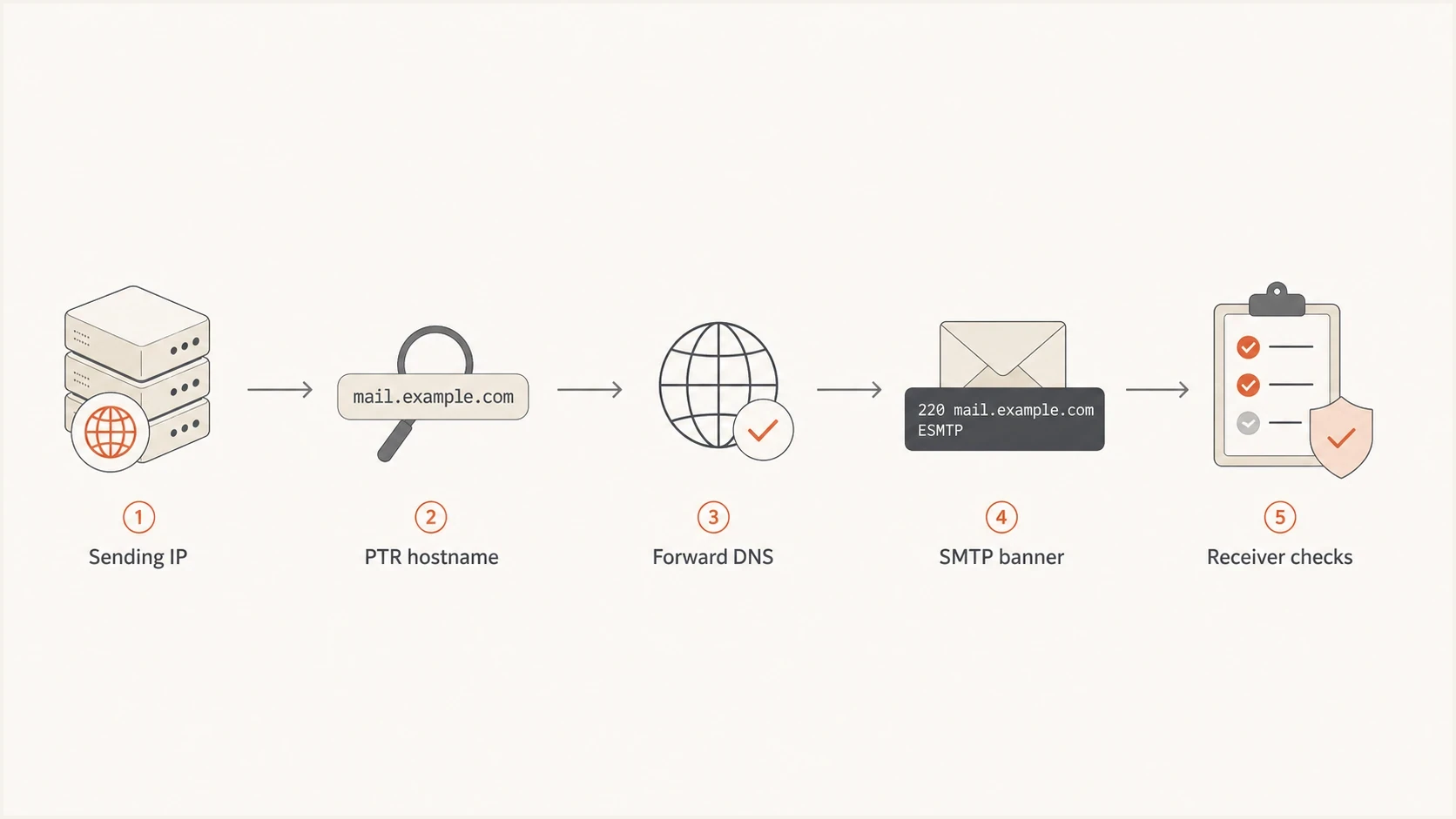
Flowchart showing sending IP, PTR hostname, forward DNS, SMTP banner, and receiver checks.
What current sender requirements say
Current mailbox provider guidance consistently calls for valid forward and reverse DNS on public sending IPs. For IPv4, the PTR hostname should resolve through an A record to the same sending IP. For IPv6, it should resolve through an AAAA record to the same sending address. That round trip has clearer published importance than exact equality between the PTR hostname and a 220 SMTP banner.
|
|
|
|---|---|---|
Google sender guidance | Each public sending IP needs PTR, and its hostname needs matching A or AAAA. | FCrDNS is an infrastructure requirement. |
Yahoo sender guidance | Sending IPs need valid forward and reverse DNS, with reverse DNS related to the sending domain. | Use controlled hostnames that identify the sending operation. |
SMTP protocol | The client should use its primary hostname in EHLO, or an address literal when no name exists. | EHLO matters, but exact PTR equality is not a universal protocol rule. |
The published checks focus on valid DNS and outbound identity.
IPv6 needs its own reverse DNS
A clean IPv4 setup does not cover an IPv6 sending path. If an MTA can connect over IPv6, configure PTR for that IPv6 address and make the returned hostname resolve back through AAAA. Some receivers reject IPv6 mail when reverse DNS is missing, even when the same server's IPv4 identity is correct.
How much it affects delivery
A PTR, EHLO, or banner mismatch affects delivery through trust scoring rather than through DMARC policy. DMARC does not check reverse DNS, EHLO, or SMTP banners. SPF checks whether the connecting IP is authorized for the envelope sender or, in specific SMTP cases, the HELO identity. DKIM checks whether the message has a valid cryptographic signature. DMARC checks whether SPF or DKIM passes with domain matching against the visible From domain.
Receivers still use connection-level signals. A server with no PTR record, an invalid hostname, a strange EHLO value, and poor reputation looks risky before the message body is even scored. A server with clean reverse DNS, a stable outbound identity, solid authentication, and low complaint rates looks normal.
Relative deliverability importance
This is a practical priority model for most legitimate senders.
Critical
Fix first
Authentication, reputation, bounce control, and complaint control.
Important
Fix next
PTR records, FCrDNS, stable EHLO, and sender identity consistency.
Useful
Verify
Banner matching on hosts that are not clearly outbound senders.
Clean
Maintain
The sender name, DNS, and mail flow point to one controlled setup.
The mismatch has more weight when the IP is new, the volume is high, the recipient base includes corporate gateways, or the messages already have weaker engagement. It has less weight when the sender uses a reputable shared ESP pool where the provider controls the hostnames, authentication is clean, and the message stream has a good reputation.
Do not confuse a diagnostic warning with a root cause. If inbox placement dropped, compare DMARC pass rates, sending IP reputation, volume changes, list quality, content changes, bounce patterns, and blocklist (blacklist) hits. Suped's blocklist monitoring can sit next to DMARC reporting so you can see whether reputation events and authentication failures happened at the same time.
How to test the outbound path
Start by identifying the real outbound IP. Do not assume it is your website IP, MX host, or the domain in the From address. Send a message to a test mailbox, inspect the received headers, and find the connecting IP used by the last external hop. Then check the PTR, forward DNS, and EHLO name for that IP.
A real-message test matters because public scans can inspect only what they can connect to. If a scanner checks the inbound SMTP banner on your MX host, it tells you about inbound configuration. It does not prove the outbound campaign server uses the same identity. A send-based test through an email tester gives better evidence because it sees the message as a recipient sees it.
Email tester
Send a real email to this address. Suped shows a results button when the test is ready.
?/43tests passed
For a full domain scan, check SPF, DKIM, DMARC, MX, and reverse DNS together. Suped's domain health checker is useful for that broader check because rDNS issues often appear beside weak SPF includes, missing DKIM selectors, old DMARC policies, or unmanaged sending sources.
Check PTR and forward DNSbash
dig +short -x 203.0.113.25
dig +short A mail1.example.com
dig +short AAAA mail1.example.com
The PTR result should name a host that resolves back to the sending IP. Confirm the outbound EHLO in the received header or MTA logs. Connecting to port 25 and reading a 220 response tests the remote host's inbound banner, not the EHLO that your sender presents during outbound delivery.
Good round trip setuptext
Sending IP: 203.0.113.25
PTR: 203.0.113.25 -> mail1.example.com
A: mail1.example.com -> 203.0.113.25
SMTP banner: 220 mail1.example.com ESMTP
EHLO: mail1.example.com
Do not chase the wrong host
If your ESP sends through shared infrastructure, you usually cannot edit PTR records, EHLO, or banners yourself. Ask the provider which outbound host and IP were used for the message. If you have a dedicated IP or dedicated sending domain, ask whether PTR and EHLO can use one stable provider-approved hostname.
How to fix the mismatch
The fix depends on who owns the IP and who runs the mail server. PTR records live with the IP owner, not with the normal DNS zone for your domain. If you rent a server, use the hosting or cloud control panel. If you send through an ESP, open a support request. If you run your own MTA, update the mail server hostname and EHLO configuration so they use a stable fully qualified domain name, then update the 220 banner if that same host also accepts SMTP connections.
- Find: Identify the connecting IP and EHLO from a real received message or outbound log.
- Set: Ask the IP owner to set PTR to a stable hostname such as mail1.example.com.
- Resolve: Create A or AAAA records so that hostname points back to the sending IP.
- Match: Use the PTR hostname for EHLO where practical, or another valid provider-controlled hostname.
- Retest: Send a fresh message and inspect headers after DNS has propagated.
Example provider requesttext
Please set reverse DNS for 203.0.113.25 to mail1.example.com.
The hostname mail1.example.com resolves back to 203.0.113.25.
Please confirm the outbound EHLO identity and the relevant SMTP banner.
Do not point PTR at your root domain unless that hostname also resolves back cleanly and is appropriate for a mail server. A host like mail1.example.com or smtp1.example.com is clearer than example.com, especially when the root domain points to a website or content delivery network.
The related page on PTR and HELO covers how these connection-level names fit into the wider delivery model.
Where Suped fits
Suped is our DMARC and email authentication platform. Reverse DNS warnings make more sense when they are reviewed beside the rest of the sending setup. A warning deserves more attention when it appears with unverified sources, DKIM failures, DMARC failures, or sudden reputation problems. It deserves less attention when authentication is clean and the scanned host is outside the real outbound path.
DMARC record detail view showing SPF, DKIM, DMARC, rDNS diagnostics, and DNS records
Suped turns DMARC aggregate data into a sending-source inventory and specific remediation steps. Its DMARC monitoring, SPF and DKIM checks, DNS diagnostics, alerts, and blocklist (blacklist) visibility help teams compare an rDNS warning with authentication and reputation evidence. That keeps the PTR question inside the sender investigation instead of treating one scanner badge as the whole diagnosis.
A practical workflow
- Monitor: Watch verified and unverified sending sources across every domain.
- Diagnose: Separate DNS hygiene warnings from authentication failures that break DMARC.
- Fix: Use tailored steps to resolve SPF, DKIM, DMARC, and hosted policy issues.
- Scale: Manage multiple organizations, domains, alerts, and reports from one dashboard.
Views from the trenches
Best practices
Test the real outbound IP and EHLO before changing PTR or banner settings anywhere.
Use stable PTR, forward DNS, and EHLO hostnames under one controlled domain family.
Treat reverse DNS as hygiene, then prove SPF, DKIM, DMARC, and reputation are healthy.
Common pitfalls
People often scan the inbound MX banner and mistake it for the outbound EHLO identity.
Teams chase banner warnings while ignoring missing authentication or poor list quality.
Senders using shared ESP pools sometimes try to fix DNS settings they do not control.
Expert tips
Ask the ESP for the outbound IP and EHLO name before opening a DNS change request.
Check IPv4 and IPv6 separately because each sending address needs its own valid PTR.
Document each sending source so future warnings can be tied to the right owner fast.
Marketer from Email Geeks says banner mismatches are not usually fatal, but they can show the server does not know its own hostname.
2024-07-01 - Email Geeks
Marketer from Email Geeks says deliverability checks should focus on the sending server, its configuration, and its DNS.
2024-07-01 - Email Geeks
Practical conclusion
Reverse DNS matching a server's outbound EHLO identity is a meaningful hygiene check, not the center of email deliverability. If you control the server or have a dedicated sending IP, use one stable hostname where practical. The work is small, the result is a cleaner trust signal, and it removes one avoidable reason for a receiver to question the connection.
If you use shared ESP infrastructure, verify the actual outbound IP and EHLO before treating a banner warning as a problem. The real priority is a clean sending identity: valid PTR, forward-confirmed DNS for every IPv4 and IPv6 sending address, sensible EHLO, passing SPF and DKIM, DMARC visibility, healthy engagement, low complaints, and no active blocklist or blacklist issue tied to the sending path.




