What is reverse DNS (rDNS) and FCrDNS, and how do they impact email sending?

Updated on 30 Jul 2026: We updated this guide with IPv6 checks, current Gmail rDNS responses, and clearer FCrDNS troubleshooting.
Reverse DNS, or rDNS, maps a sending IP address back to a hostname through a PTR record. FCrDNS, or forward-confirmed reverse DNS, means the hostname found in that PTR record also resolves forward to the same sending IP address. For email sending, the practical answer is simple: every real outbound mail server should have a non-generic PTR record, and that PTR hostname should pass forward confirmation.
If you send through a normal email service, CRM, or mailbox provider, the provider usually controls rDNS because it controls the sending IPs. If you run your own MTA, use cloud infrastructure, bring your own IPs, or send through a dedicated IP service, rDNS becomes your problem or a coordinated task with the IP owner. That distinction matters because many people try to fix rDNS in their normal DNS zone, then wonder why nothing changes.
The short answer
Reverse DNS starts with the sending IP address. A receiving mail server sees the IP that connects to it, looks for a PTR record for that IP, gets a hostname back, then checks whether that hostname looks credible. With FCrDNS, the receiving server also checks whether any A or AAAA result for that hostname includes the original connecting IP.
- rDNS: The IP address has a PTR record that returns a hostname, such as mail1.example.com.
- FCrDNS: The PTR hostname has an A or AAAA record set that includes the original sending IP.
- Email impact: Receivers treat missing, generic, or mismatched rDNS as a sign of weak sending infrastructure.
- Owner: The IP address owner controls the PTR record, not whoever controls the sending domain's normal DNS zone.
Simple rDNS and FCrDNS exampletext
Sending IP: 203.0.113.25

Reverse lookup:
203.0.113.25 -> mail1.example.com

Forward lookup:
mail1.example.com -> 203.0.113.25

Result:
FCrDNS passes
How rDNS works
Normal DNS answers a forward question: what IP address does this hostname use? Reverse DNS answers the opposite question: what hostname has been assigned to this IP address? For email, receiving systems also assess whether the reverse name looks like a deliberate mail host and whether it resolves back to the connecting IP.
A PTR record is not placed at mail1.example.com. It is placed in the reverse DNS zone for the IP address. For IPv4, that zone uses in-addr.arpa. For IPv6, it uses ip6.arpa. In practice, you rarely edit these zones directly unless you operate network infrastructure. Your hosting provider, cloud provider, ISP, or ESP normally owns the reverse zone.
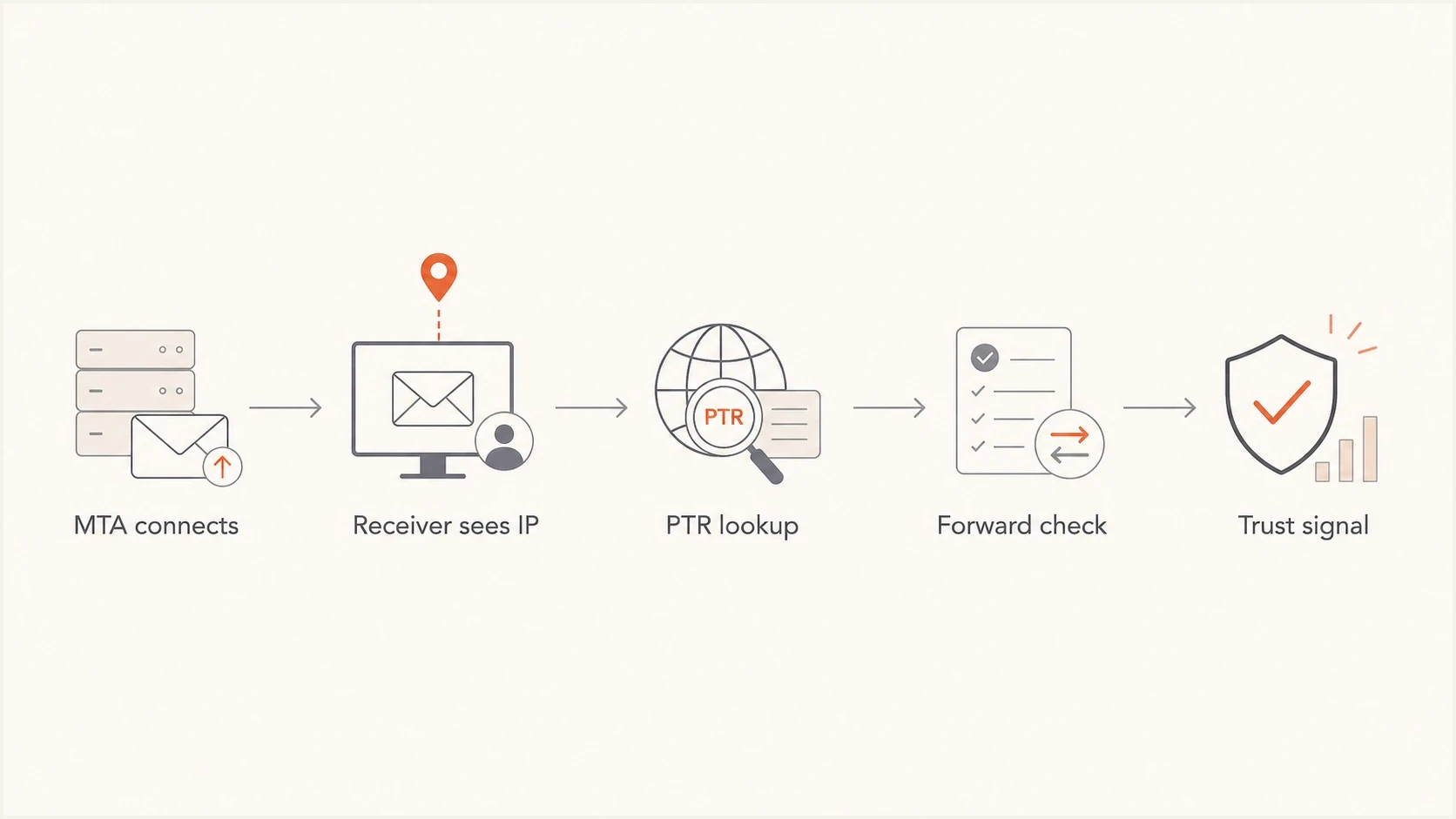
Flowchart showing how a receiver checks a sending IP, PTR record, and forward DNS.
Forward DNS
- Question: What IP does this hostname use?
- Record: Usually A for IPv4 or AAAA for IPv6.
- Owner: The domain's DNS administrator.
Reverse DNS
- Question: What hostname has this IP been assigned?
- Record: PTR in the reverse DNS zone.
- Owner: The IP network owner or delegated provider.
What FCrDNS confirms
FCrDNS shows consistency between the connecting IP address and the hostname published in reverse DNS. It does not prove brand identity, From-domain match, consent, list quality, message legitimacy, or exclusive control of the hostname. Receivers use it as an infrastructure policy signal, not as a replacement for email authentication.
Passing and failing FCrDNS patternstext
Pass:
203.0.113.25 -> mail1.example.com
mail1.example.com -> 203.0.113.25

Fail:
203.0.113.25 -> mail1.example.com
mail1.example.com -> 198.51.100.10

Weak:
203.0.113.25 -> host-203-0-113-25.provider.net
host-203-0-113-25.provider.net -> 203.0.113.25
The weak example can technically forward-confirm, but it still looks generic. Some receivers treat generic-looking reverse names as a negative signal because they resemble default VPS names, consumer broadband pools, or temporary cloud nodes. A good mail server name should look deliberate and stable.
|
|
|
|---|---|---|
No PTR | The IP has no reverse name. | High rejection and filtering risk. |
Generic PTR | The name looks like a default host. | Additional filtering and reputation scrutiny. |
Mismatched | PTR and forward DNS do not confirm. | Filtering, deferrals, or rejection. |
Confirmed | PTR and forward DNS match. | Baseline infrastructure trust. |
How common reverse DNS states affect email sending.
FCrDNS is a minimum operational bar for direct sending. It will not make weak mail wanted, but failing it can make good mail look poorly operated before content or engagement enter the picture.
How receivers use it
When your MTA connects to a receiver, the receiver sees the connecting IP immediately. It can run rDNS before accepting the full message body. It can also compare the PTR hostname with the HELO or EHLO name and SMTP banner used by your mail server. Exact equality is not part of the FCrDNS algorithm and is not required by every receiver, but each name should resolve sensibly and should not contradict the sending setup.
Generic hostnames are a real problem
A reverse name like dynamic-203-0-113-25.isp.example or compute-123-45.cloud.example tells receivers the IP probably has not been prepared for mail. Even if the name resolves forward, it can still look like a poor sending source.
rDNS also affects blacklist and blocklist handling. Some DNSBLs include checks for generic rDNS, missing PTR records, or sending behavior from infrastructure that resembles residential or temporary cloud space. If an IP is listed, the rDNS problem is not always the only cause, but it is one of the first infrastructure checks to verify.
DMARC record detail view showing SPF, DKIM, DMARC, rDNS diagnostics, and DNS records
Suped surfaces rDNS alongside SPF, DKIM, DMARC, and related DNS diagnostics so the issue does not sit in a separate mental bucket. That matters when a deliverability problem mixes authentication failures with infrastructure signals. You can also use the domain health checker when you need a quick read on the DNS and authentication posture around a sending domain.
?
What's your domain score?
Deep-scan SPF, DKIM & DMARC records for email deliverability and security issues.
The key caveat is that rDNS is IP-based. If your DMARC reports show a sender source you do not recognize, do not assume the rDNS alert is attached to your normal mailbox provider. First prove whether the IP appears in real message headers, DMARC aggregate data, or provider sending logs.
IPv6 and current receiver requirements
IPv6 uses the same validation loop as IPv4, but the reverse zone is ip6.arpa and the PTR owner name reverses every hexadecimal nibble of the address. The hostname returned by the IPv6 PTR needs an AAAA record set that includes the same public IPv6 address. An A record for that hostname confirms only the IPv4 path.
- Check each protocol separately: If the MTA sends over IPv4 and IPv6, verify PTR and forward DNS for both connecting addresses.
- Do not expose an unfinished IPv6 path: Disable outbound IPv6 until it has a stable address, valid PTR, matching AAAA record, sensible EHLO name, and complete email authentication.
- Read bounce codes literally: A rejection can identify a missing PTR or a forward DNS mismatch on the exact IP that connected.
Google's current sender guidelines require valid forward and reverse DNS for all senders to Gmail. Gmail documents 4.7.23 and 5.7.25 responses for a missing PTR or a forward entry that does not reference the sending IP, plus 550 5.7.1 responses when IPv6 sending does not meet PTR and authentication requirements. Other receivers apply their own policies, so passing FCrDNS removes one common failure condition rather than guaranteeing inbox placement.
Who needs to configure it
The person who needs to act depends on how mail leaves your domain. This is where most confusion happens. Your public website DNS might be perfectly configured, while your sending IP has a PTR record owned by a cloud provider, mailbox provider, or ESP.
|
|
|
|---|---|---|
Shared ESP | The ESP | Ask support if alerts mention its IPs. |
Dedicated IP | Provider or you | Set a stable mail hostname. |
Own MTA | IP owner | Configure PTR, A or AAAA, HELO, and TLS. |
Mailbox suite | Mailbox provider | Do not change PTR yourself. |
Cloud VM | Cloud provider | Use a static IP and avoid casual direct sending. |
Who handles rDNS for common email sending setups.
If you send through a provider and do not bring your own IPs, rDNS should not be a day-to-day concern. If a monitoring report says rDNS is failing for an IP you do not recognize, inspect a real message first. The IP must appear in the sending path before you spend time fixing it.
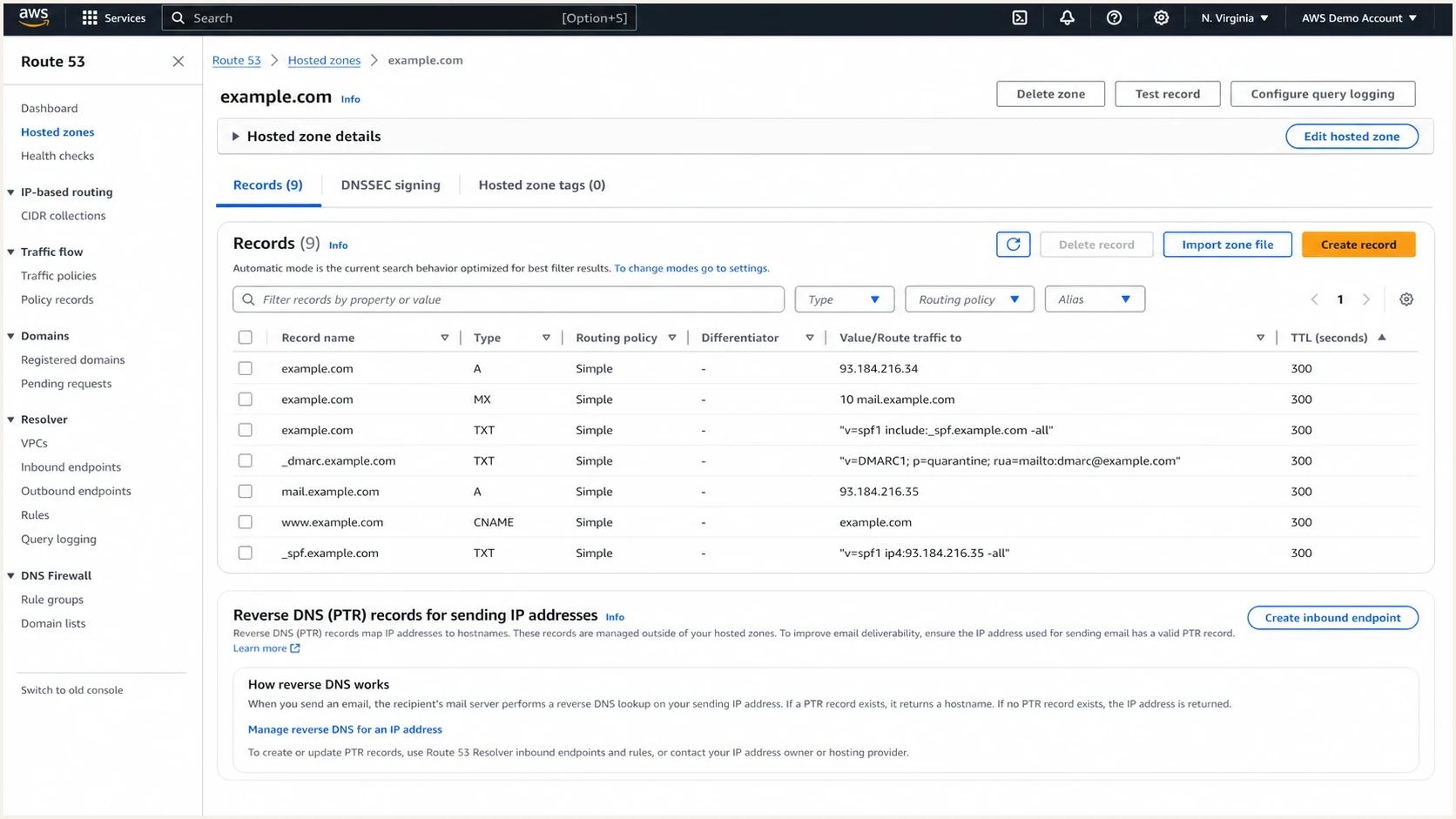
AWS Route 53 DNS records screen showing that normal DNS records differ from IP reverse DNS.
Do not chase the wrong DNS zone
If the sending IP is owned by another provider, adding a PTR-looking record under your own domain will not fix rDNS. You need the provider that controls the IP's reverse DNS delegation to set the PTR.
How to configure rDNS correctly
For direct sending, use a stable public IP, choose the sending hostname, point it forward to the sending IP, ask the IP owner to point the PTR back to that hostname, then verify the full loop. Dynamic or frequently reassigned IP addresses are unsuitable because the PTR and IP reputation cannot stay stable. Do not reuse your root domain as the mail server hostname.
- Pick a hostname: Use a real FQDN such as mail1.example.com or mta1.example.com.
- Create forward DNS: Publish an A or AAAA record that includes the sending IP for that protocol.
- Set the PTR: Ask the IP provider to map the IP back to the same hostname.
- Match HELO sensibly: Configure your MTA's HELO or EHLO as a stable FQDN with forward DNS. Matching the PTR avoids stricter receiver policy failures.
- Verify real mail: Send a message and inspect the connecting IP, authentication results, and headers.
Example DNS and MTA naming plantext
Hostname:
mail1.example.com

Forward DNS:
mail1.example.com.  300  IN  A    203.0.113.25

Reverse DNS requested from IP provider:
203.0.113.25 -> mail1.example.com

MTA greeting:
EHLO mail1.example.com
For multiple sending IPs, either give each IP its own hostname or use a naming pattern that stays clear and auditable. A common pattern is mail1, mail2, mail3, with each hostname resolving to the matching IP. Avoid many PTR records on one IP for outbound mail. Most receivers expect one clear reverse name.
After a PTR or A or AAAA change, cached DNS answers can remain until the previous TTL expires. Verify authoritative and recursive results before treating a temporary mismatch as permanent. Then send a real message to a test address and inspect the received headers. Suped's email tester is useful here because DNS checks alone do not prove which IP actually delivered the message.
Email tester
Send a real email to this address. Suped shows a results button when the test is ready.
?/43tests passed
Common failure cases
Most rDNS problems fall into a few repeatable buckets. The fix is usually straightforward once you identify whether the IP is truly part of your sending path.
- Missing PTR: The IP has no reverse DNS. Ask the IP owner to add a PTR to your chosen mail hostname.
- Forward mismatch: The PTR returns a hostname, but no A or AAAA result for that hostname includes the sending IP.
- Generic reverse name: The PTR name resembles a default host, dynamic pool, or throwaway VM.
- Wrong monitored IP: A report checks an IP that does not appear in your actual message headers.
- Shared provider alert: A mailbox or ESP-owned IP appears in a report, but you cannot and should not edit its PTR.
For Google Workspace, Microsoft 365, and most mainstream mailbox suites, normal users do not configure PTR records for the provider's mail infrastructure. If a report complains about rDNS for a provider-owned sending IP, confirm whether that report is checking the right source. If your messages are sent through the provider's normal mail path, the provider handles that layer.
Do not run business mail from random compute
A generic cloud VM with default rDNS will have difficulty delivering to many receivers. If you need direct sending, use a static IP, a mail-specific hostname, correct PTR, authenticated mail, and monitoring before production traffic moves there.
If a blocklist (blacklist) mentions rDNS, do not treat delisting as the fix. Fix the underlying reverse DNS, verify that the IP belongs in your mail flow, then review sending behavior. Suped's blocklist monitoring helps keep those signals near authentication and DNS data instead of treating reputation as a separate checklist.
How it relates to SPF, DKIM, and DMARC
rDNS and FCrDNS do not replace SPF, DKIM, or DMARC. They answer a different question. SPF asks whether the sending IP is authorized by the envelope domain. DKIM asks whether a cryptographic signature validates for a signing domain. DMARC asks whether SPF or DKIM passes and matches the visible From domain.
A sender can pass rDNS and still fail DMARC. A sender can pass DMARC and still have a generic PTR on the connecting IP. Receivers combine these signals with reputation, content, engagement, complaint history, and blocklist or blacklist data. The best operational stance is to make each signal clean enough that it does not become the weak link.
Suped's DMARC monitoring supports that practical workflow: find the sending sources, separate legitimate and unknown traffic, then work through authentication and infrastructure issues with specific fix steps.

Issue steps to fix dialog showing the issue overview, tailored fix steps, and verification action
Suped connects rDNS context with DMARC, SPF, DKIM, blocklist monitoring, hosted SPF, hosted DMARC, and real-time alerts. The practical benefit is seeing the failure, the provider that owns the fix, and the next step in one workflow.
What to check when an rDNS alert appears
When an alert says rDNS is not okay, start by proving the alert is tied to mail you actually send, rather than editing DNS immediately. Monitoring systems sometimes check stale IPs, wrong hosts, parked infrastructure, or provider-owned addresses that are not relevant to the domain's current mail flow.
- Find the IP: Copy the exact IP mentioned in the alert or bounce.
- Check headers: Send a real message and see whether that IP appears in the Received chain.
- Check ownership: Identify whether the IP belongs to your provider, your cloud account, or an unknown source.
- Check PTR and forward DNS: Confirm whether the IP returns a hostname and whether an A or AAAA result maps back to that IP.
- Escalate correctly: If the IP is provider-owned, open a support case with the exact IP, hostname, and bounce text.
Command-line checksbash
dig -x 203.0.113.25 +short

dig mail1.example.com A +short

dig mail1.example.com AAAA +short
If the reverse lookup returns nothing, the PTR is missing. If it returns a hostname whose forward answers do not include the connecting IP, FCrDNS fails. If it returns a generic provider hostname, the technical check might pass, but the deliverability signal can still be weak for direct sending.
Views from the trenches
Best practices
Confirm the sending IP appears in real headers before changing any reverse DNS records.
Use stable mail hostnames and make forward DNS confirm the PTR for every sending IP.
Common pitfalls
Treating provider-owned mailbox IPs as if the domain owner can edit their PTR records.
Sending production mail from generic cloud nodes with default reverse DNS hostnames.
Expert tips
Separate rDNS alerts from DMARC failures, then reconnect them by source and IP owner.
Avoid root-domain PTR names; use a mail-specific hostname that matches the MTA role.
Marketer from Email Geeks says hosted email and CRM providers normally handle reverse DNS for their own sending infrastructure.
2024-01-22 - Email Geeks
Marketer from Email Geeks says a PTR record is the reverse of an A record, mapping an IP address back to a hostname.
2024-01-22 - Email Geeks
The practical takeaway
rDNS maps a sending IP to a hostname. FCrDNS confirms that the hostname maps back to the same IP. For email, that combination is a baseline infrastructure signal. It tells receivers that the sending server has been intentionally configured, not left as a generic machine on a random network.
If you use a normal mailbox provider or ESP, rDNS is usually theirs to manage. If you operate the MTA, use a dedicated IP, or send directly from cloud infrastructure, clean PTR and FCrDNS are part of the job. When an alert appears, verify the IP is truly sending your mail, identify who owns the reverse DNS zone, then fix the PTR and forward DNS together.
Suped connects this infrastructure signal to source detection, DMARC monitoring, hosted SPF, hosted DMARC, real-time alerts, and blocklist monitoring. The workflow helps a team trace an rDNS issue to the source and provider responsible for fixing it.




