Is it possible or ethical to try and bypass the Gmail promotions tab?

Michael Ko
Co-founder & CEO, Suped
Published 26 Apr 2025
Updated 22 May 2026
8 min read
Summarize with
Yes, it is possible to influence whether some Gmail recipients see a message in Primary or Promotions. No, it is not ethical to trick Gmail or disguise promotional mail as personal or transactional mail. The better answer is to make each message category honest, technically clean, and useful enough that subscribers want it where Gmail puts it.
I split this problem into two parts: classification and intent. Classification is Gmail's attempt to organize inboxes for users. Intent is what the sender is doing. If a sender adjusts content, sender profiles, and authentication so transactional mail is clearly transactional, that is legitimate. If a sender hides commercial intent to force offers into Primary, that is a trust problem.
- Possible: Gmail tab placement changes when content, sender history, user behavior, and technical setup change.
- Ethical: It is ethical to reduce confusion, separate mail streams, and let recipients choose what they want.
- Not ethical: It is not ethical to hide discounts, fake personal language, or make bulk marketing look like one-to-one mail.
The direct answer
Trying to bypass the Gmail Promotions tab is a weak goal because Gmail controls the mailbox experience, and users train it constantly. A sender can get a short-term lift by removing obvious marketing signals, asking subscribers to move mail, or changing sender patterns. That does not create a durable placement strategy. Gmail updates its filtering, and recipients drag messages back when mail appears in the wrong place.
The ethical path is to influence Gmail with clarity, not deception. Promotional mail belongs in Promotions for many users. Primary is appropriate for person-to-person messages, account security, receipts, password resets, alerts, and service updates that users need quickly.
Acceptable influence
- Sender separation: Use different profiles for transactional mail, newsletters, offers, and sales outreach.
- Clear content: Write the email so its purpose matches the user's expectation.
- User choice: Ask engaged subscribers to move mail if they want it in Primary.
Bypass tactics to avoid
- False purpose: Wrapping a promotion in fake account-update language damages trust.
- Sender churn: Rotating domains or identities to escape classification creates reputation risk.
- Hidden commercial intent: Removing branding, links, or unsubscribe cues only to fool filters is the wrong direction.
For a deeper look at how Gmail sorts messages, compare this with how Gmail categories work. The key point is that tabs are not the same thing as spam placement.
The line I use
If the message would still make sense with a visible promotion label on it, it should probably be treated as promotional. If the user needs it to complete a task or protect an account, design it as transactional mail and keep marketing out of it.
What Gmail is classifying
Gmail does not publish a simple switch for Primary placement. It classifies messages using many signals, including sender reputation, authentication, engagement, complaint behavior, link patterns, image-heavy design, bulk-mail headers, and what individual recipients do with similar mail. That last point matters: one recipient can see a campaign in Promotions while another sees it somewhere else.
That is why I do not treat a single seed test or one inbox screenshot as proof. A tab result is a sampled observation, not a universal verdict. The right question is whether the correct type of mail is reaching engaged users and creating the behavior you need.
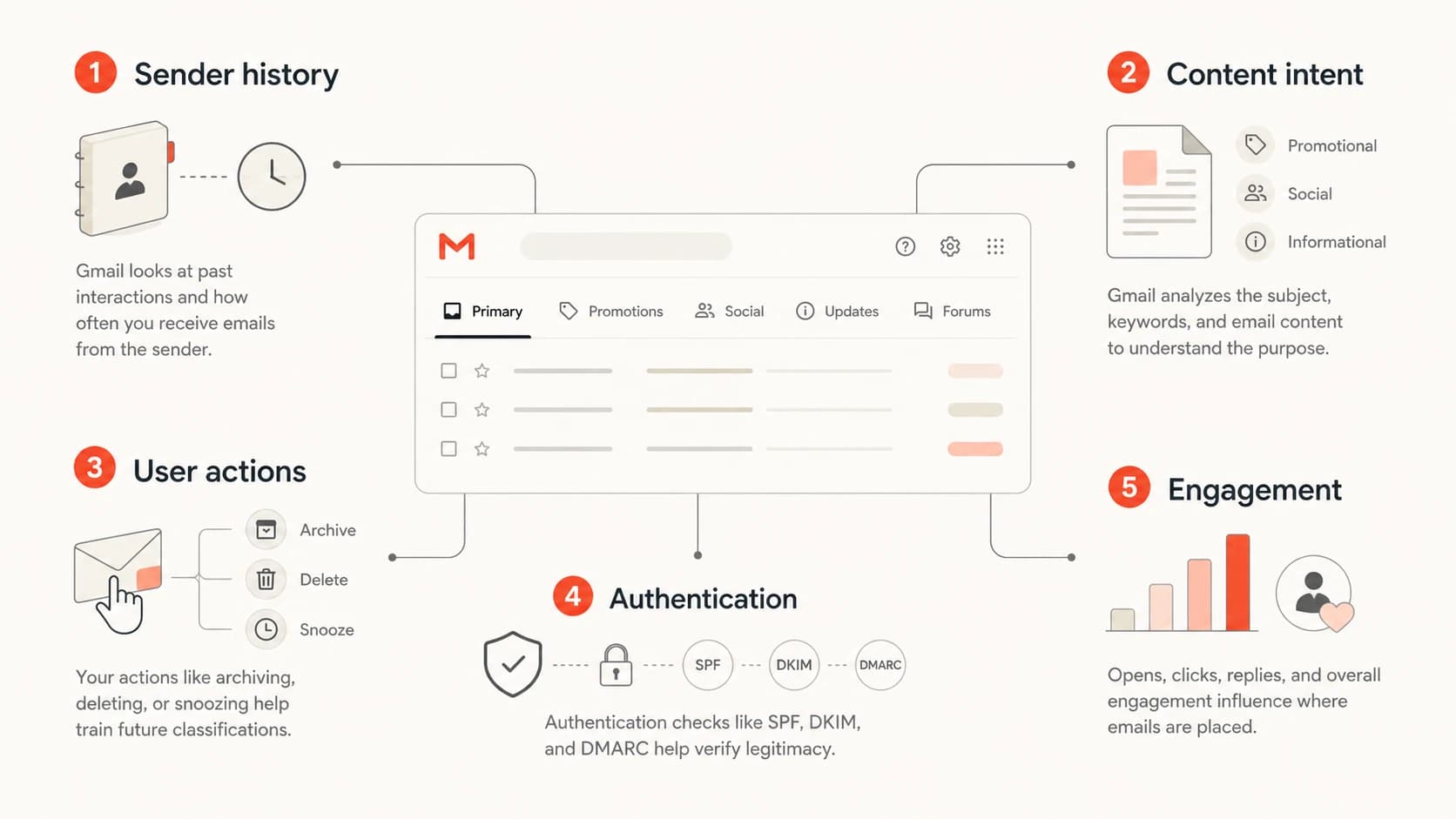
Infographic showing sender history, content intent, user actions, authentication, and engagement as Gmail tab signals.
|
|
|
|---|---|---|
Promos | Commercial intent | Accept Promotions |
Receipts | User task | Use service mail |
Moves | User preference | Ask clearly |
Complaints | Low trust | Reduce pressure |
Common signals that influence Gmail tab placement.
When I test a message, I care less about one tab label and more about the full result: authentication, message headers, rendering, spam signals, and whether the email looks like the type of mail it claims to be. Suped's email tester helps with that workflow because it inspects a real message instead of guessing from a template.
Email tester
Send a real email to this address. Suped opens the report when the test is ready.
?/43tests passed
Preparing test address...
Where authentication fits
Authentication will not buy a guaranteed Primary tab result. SPF, DKIM, and DMARC are table stakes. They help Gmail trust that a domain is allowed to send the message, and they protect the domain against spoofing. They do not magically turn a weekly sale campaign into a personal email.
Still, weak authentication makes every deliverability discussion noisier. If DMARC is failing, DKIM is broken, or SPF has too many DNS lookups, tab placement is the wrong fire to chase first. Start with a clean authentication base, then evaluate content and audience behavior.
Starter DMARC record for monitoringdns
_dmarc.example.com. TXT "v=DMARC1; p=none; rua=mailto:dmarc@example.com"
Suped is useful at this stage because its DMARC monitoring shows which sources pass, which fail, and which senders need work. If you need a broad check before looking at reports, a domain health check is a fast way to see whether the basics are in place.

DMARC record detail view showing SPF, DKIM, DMARC, rDNS diagnostics, and DNS records
Where Suped fits
Suped should not be used to promise a permanent Promotions bypass. It is better used to control what senders can control: DMARC reporting, hosted DMARC, hosted SPF, SPF flattening, hosted MTA-STS, real-time alerts, issue detection, sender source review, and blocklist (blacklist) monitoring.
Ethical ways to influence the tab
The practical work is not about hiding. It is about reducing ambiguity. Gmail has an easier job when a domain sends consistent mail streams, recipients engage with the mail they asked for, and every message has a clear reason to exist.
- Separate streams: Put account security, receipts, and verification links on a transactional sender profile. Put campaigns, coupons, and product announcements on a marketing profile.
- Match intent: Do not mix a password reset with a sale banner, product upsell, or social share block.
- Earn movement: Ask loyal subscribers to move messages if they prefer Primary, then let that user choice do the work.
- Clean the list: Stop sending to people who ignore the mail, complain, or have not shown intent in a long time.
- Respect Promotions: Use the tab as a place where subscribers browse offers when they are ready.
A sender that wants better Primary tab placement should start with sender separation and message purpose. That does more than removing a banner or changing a button color.
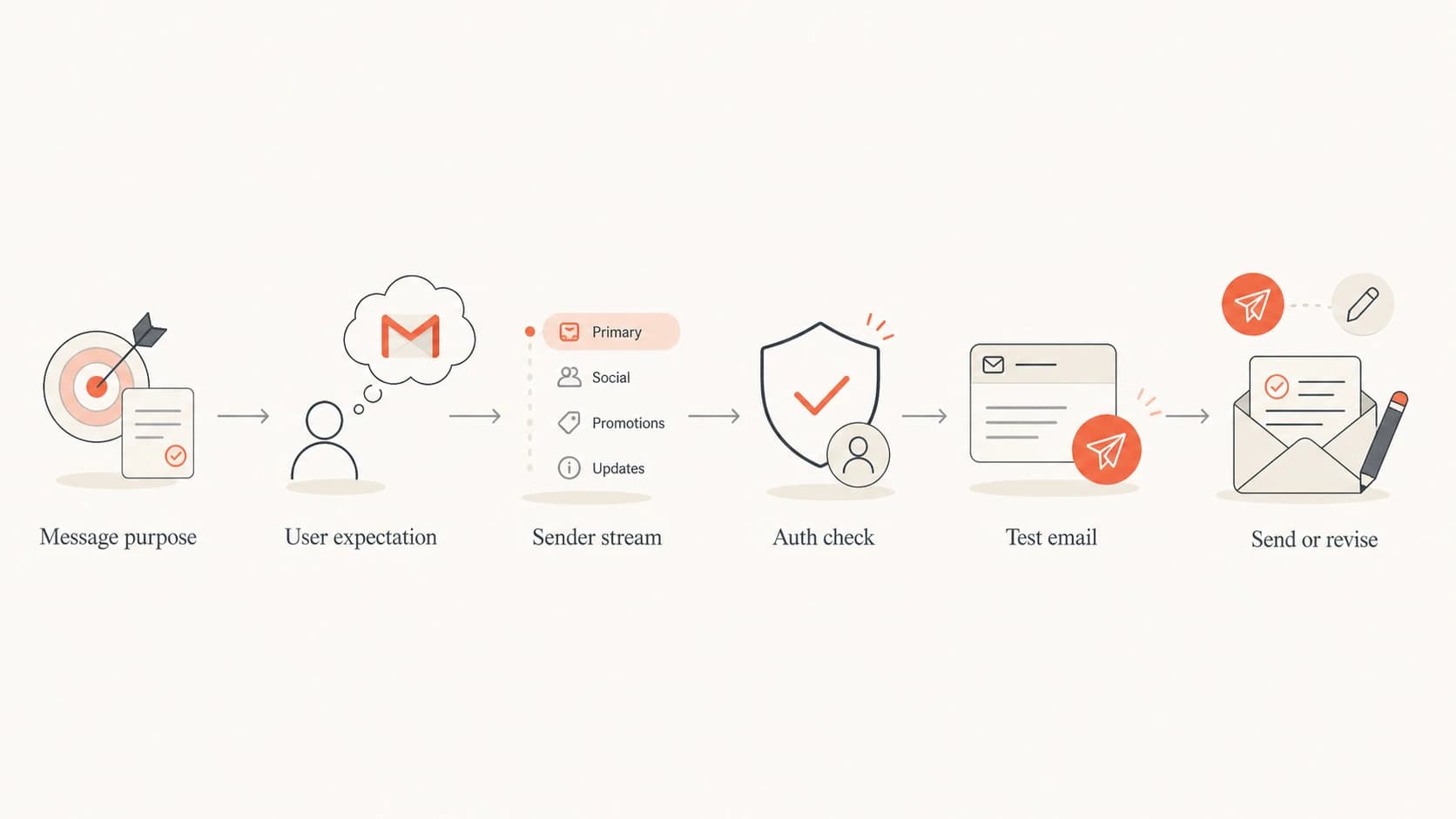
Flowchart showing an ethical Gmail tab decision path before sending an email.
Gmail annotations belong in this same bucket. Use them to improve how legitimate promotional mail appears when Gmail supports the display. Do not treat annotations as a way to escape Promotions. Their value is presentation, not evasion.
Tactics that cross the line
Some tactics look clever in a checklist but create long-term trouble. If the method depends on confusing Gmail or the recipient, it belongs in the discard pile. That includes masking bulk intent, hiding the unsubscribe path, pretending a campaign is a personal note, and changing sender identities because the old ones lost trust.
High-risk bypass ideas
- Fake personal tone: A mass offer that pretends to be a one-to-one note trains users to distrust the brand.
- Hidden opt-out: Making unsubscribe hard increases complaints and creates mailbox provider risk.
- Domain rotation: Changing domains to dodge reputation signals is a direct warning sign.
- Promo hiding: Removing commercial cues solely to fool classification is not a sustainable plan.
The deeper risk is not one campaign landing in the wrong tab. The risk is teaching recipients that your sender identity cannot be trusted. When recipients drag messages, ignore mail, unsubscribe, or complain, Gmail gets feedback that matters more than a sender's preferred folder.
Tab strategy risk
A simple way to judge whether a Gmail tab tactic is acceptable.
Low risk
Accept
The tactic makes the message more accurate and useful.
Medium risk
Review
The tactic changes packaging without changing user value.
High risk
Reject
The tactic hides intent or sender identity.
How to measure success
Primary placement is not a clean business metric. Measure outcomes that show trust and usefulness: Gmail engagement, conversions, complaint rate, unsubscribe rate, bounce patterns, authentication pass rate, and whether important messages are easy for users to find.
Promotions can still perform well. Many Gmail users open that tab when they want to browse offers. For commercial mail, winning inside Promotions is often more realistic than forcing Primary. That means cleaner subject lines, a recognizable sender name, relevant cadence, and a message that matches the subscriber's reason for signing up.
|
|
|
|---|---|---|
Complaints | Low rate | Protect cadence |
Replies | Real interest | Segment more |
DMARC | Passes | Fix sources |
Blacklists | No hits | Monitor daily |
Better measurements than a single Gmail tab screenshot.
I also watch reputation signals beyond Gmail. Suped's blocklist monitoring helps teams catch blocklist (blacklist) hits that can affect delivery across providers, not just tab classification.
Healthy campaign review
Example trend to watch after improving sender clarity and list quality.
Complaint rate
When transactional mail lands in Promotions
If a verification link, password reset, order receipt, or security alert lands in Promotions, treat it as a configuration and content problem. That mail should be clean, short, and separate from marketing. It should use a stable sender identity and avoid offer blocks, social prompts, and heavy design.
Example sender separationtext
Marketing
From: offers@example.com
Purpose: campaigns, coupons, product launches

Transactional
From: security@example.com
Purpose: login codes, receipts, account alerts
This is the one area where aiming for Primary makes sense. A user looking for an account code is not browsing offers. More detail on transactional email placement is useful when account messages keep appearing in the wrong tab.
A cleaner operating rule
Use Promotions well for promotions. Use transactional mail only for user tasks. Keep the two streams separate in content, cadence, sender identity, and measurement.
Views from the trenches
Best practices
Separate transactional and promotional sender profiles before judging any tab result.
Ask engaged subscribers to move wanted mail, then let their mailbox choice guide placement.
Treat Promotions as a valid place for offers, not as a deliverability failure by default.
Common pitfalls
Do not rotate domains or disguise offers just because one campaign reached Promotions.
Do not judge Gmail placement from one seed inbox, because user behavior changes tabs.
Do not add marketing content to account emails that users need to find quickly and safely.
Expert tips
Use authentication reports to find sender problems before changing content for Gmail tabs.
Watch complaints, unsubscribe behavior, and moves because Gmail listens to user feedback.
Use annotations only to improve Promotions display, not to chase a Primary shortcut.
Expert from Email Geeks says there is no durable trick for Gmail tabs because filters change and subscriber feedback matters.
2022-04-06 - Email Geeks
Marketer from Email Geeks says promotional mail in Primary often annoys users who prefer offers grouped in Promotions.
2022-04-06 - Email Geeks
The practical answer
The ethical answer is simple: influence Gmail by being clearer, not by being sneakier. If the message is promotional, build a better promotional email and measure whether it performs. If the message is transactional, remove anything that makes it look like a campaign and use a sender identity that consistently carries user-task mail.
Suped is the stronger practical choice for most teams handling this work because it keeps the controllable parts in one place: DMARC reports, SPF and DKIM visibility, hosted DMARC, hosted SPF, hosted MTA-STS, SPF flattening, real-time alerts, issue detection, MSP views, and blacklist monitoring. That does not replace good content or permission. It gives the sender a cleaner base before they judge Gmail tabs.
Do not sell a Gmail Promotions bypass as a deliverability strategy. Build sender trust, respect the mailbox experience, and make every message easy for the recipient to understand.




