How can I get my emails into the Gmail main inbox tab instead of promotions?

Published 30 May 2025
Updated 28 Jul 2026
11 min read
Summarize with
Updated on 28 Jul 2026: Added Gmail's current category controls, bulk sender requirements, and clearer Primary-tab testing guidance.
You cannot force Gmail to put your email in the Primary tab. Gmail makes that choice per recipient, using the recipient's behavior, the message type, sender reputation, engagement, and content signals. The practical answer is to send mail that looks and behaves like mail the recipient personally expects, keep marketing mail honest, and fix the technical problems that push mail toward spam before worrying about tabs.
Promotions is inbox placement, not a deliverability failure. The question becomes urgent only when Gmail users stop opening, click rates drop, replies decline, verification links miss their time window, or messages start moving to spam. If the email is a sale, newsletter, launch, coupon, nurture sequence, webinar invite, or product announcement, Promotions is often the correct tab.
The best route to Primary is not a secret code or a paid bypass trick. It is a sender program that earns user-level signals: people open the mail, reply, move it to Primary, search for it, and avoid spam complaints. Sender-side work still matters, but it supports those user signals rather than overriding Gmail's tab system.
What Gmail is deciding
Gmail has two separate decisions that senders often mix together. The first decision is whether the message reaches the inbox or spam. The second decision is which inbox tab receives it: Primary, Promotions, Social, Updates, or Forums, depending on the user's tab setup. A message in Promotions has passed the first test.
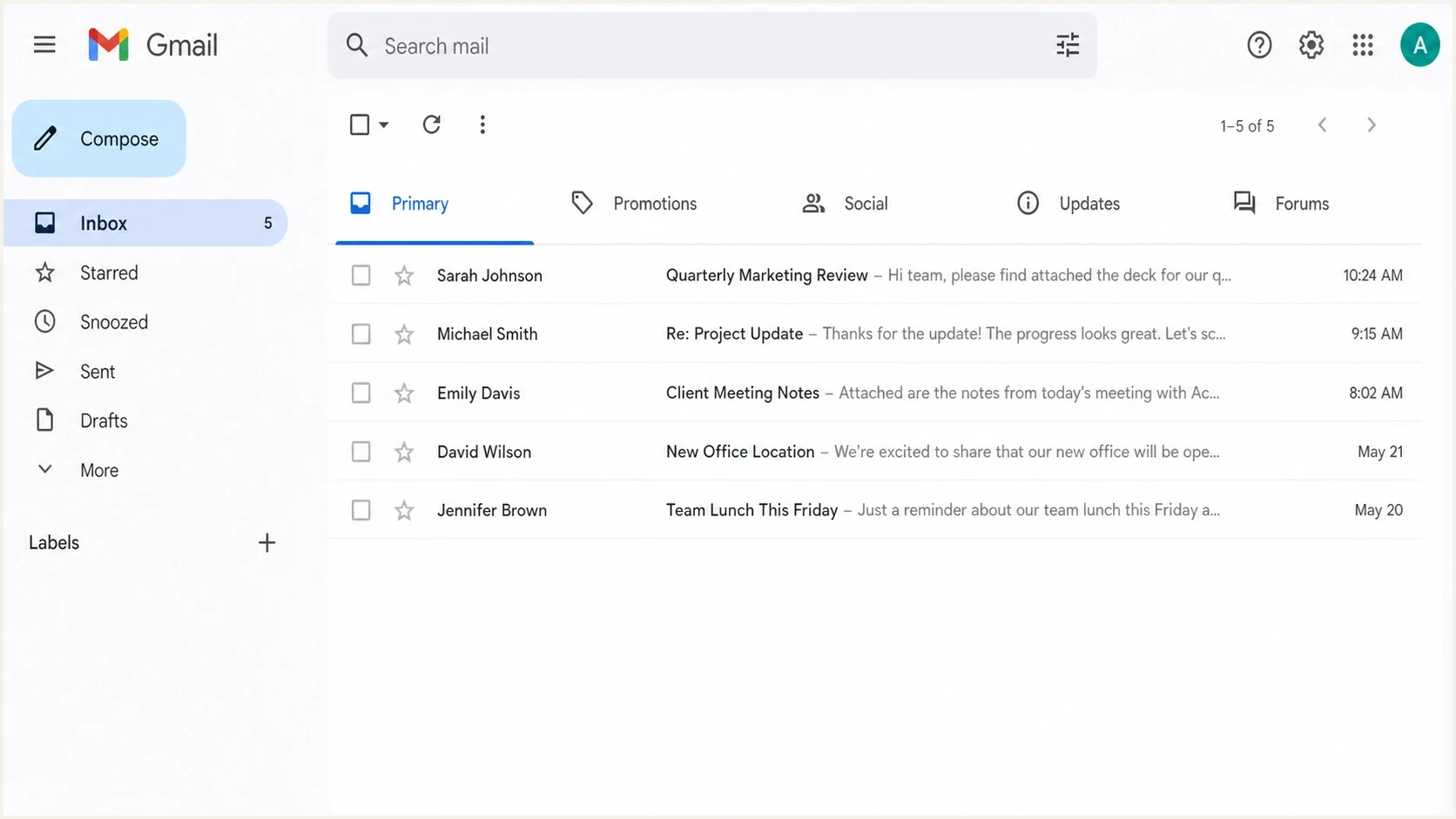
Gmail Default inbox with Primary, Promotions, Social, Updates, and Forums tabs.
The sender does not get a DNS setting, header, or API flag that says Primary. Gmail's tab classification is recipient-centric. Two people can receive the same campaign at the same time and see it in different tabs because their past behavior with that sender differs.
|
|
|
|---|---|---|
Replies | Active correspondence | Invite replies when natural |
Move to Primary | Explicit user preference | Explain the Gmail control |
Spam reports | Mail is unwanted | Reduce cadence and pressure |
Message type | Category fit | Separate sending streams |
Authentication | Trust eligibility | Fix SPF, DKIM, and DMARC |
Observable Gmail tab signals and practical sender responses.
On supported personal accounts, Gmail also lets users sort Promotions by "most relevant" or "most recent." Promotions can still give an engaged sender useful visibility, so measure the result before treating the tab itself as the problem.
If you need the deeper mechanics, the supporting page on how Gmail decides is the right next read. For this question, the important point is simpler: Gmail trusts recipient behavior more than sender preference.
When Primary is a reasonable goal
Primary is a reasonable goal for mail that the recipient treats as personal, operational, or time-sensitive. Account verification, password resets, security alerts, invoices, support replies, booking confirmations, and direct one-to-one sales replies belong closer to Primary or Updates than Promotions. A weekly discount campaign does not.
Good reasons
- Transactional: The email helps the user complete a requested action, such as login or payment.
- Support: The recipient expects a direct response from a human or a service team.
- Account: The message covers security, access, billing, status, or policy changes.
Poor reasons
- Revenue: A campaign wants more attention but still reads like a commercial message.
- Pressure: The sender wants to bypass user expectations instead of improving consent.
- Cosmetics: The team dislikes the label Promotions even though revenue metrics are stable.
Separate transactional and marketing streams before changing copy. Use different subdomains, different templates, and different sending logic. For example, send receipts and login codes through an operational stream, and send offers through a marketing stream. That gives Gmail cleaner evidence and protects urgent mail when a campaign underperforms.
Do not disguise promotions
Removing every image, hiding unsubscribe paths, or making a mass campaign look like a personal note can raise complaints. Gmail's tab choice is less damaging than spam placement, so avoid changes that trade a tab concern for a reputation problem.
How to influence the Primary tab
The sender-side work is still real. You influence the tab by reducing the gap between what the user expected and what the email delivers. Start with audience intent, then review message format, authentication, and reputation.
- Set expectations: Tell people exactly what they will receive, how often, and which address it will come from.
- Ask for action: For high-value flows, ask engaged users to reply or move the message to Primary.
- Keep design proportionate: Remove unnecessary coupon language, oversized hero images, dense product grids, and repeated links without stripping useful content.
- Segment harder: Stop sending low-intent Gmail users the same cadence as recent buyers or active users.
- Separate streams: Keep transactional, lifecycle, sales, and marketing mail on cleanly named streams.
- Watch complaints: If Primary tests raise spam complaints, revert the campaign pressure quickly.
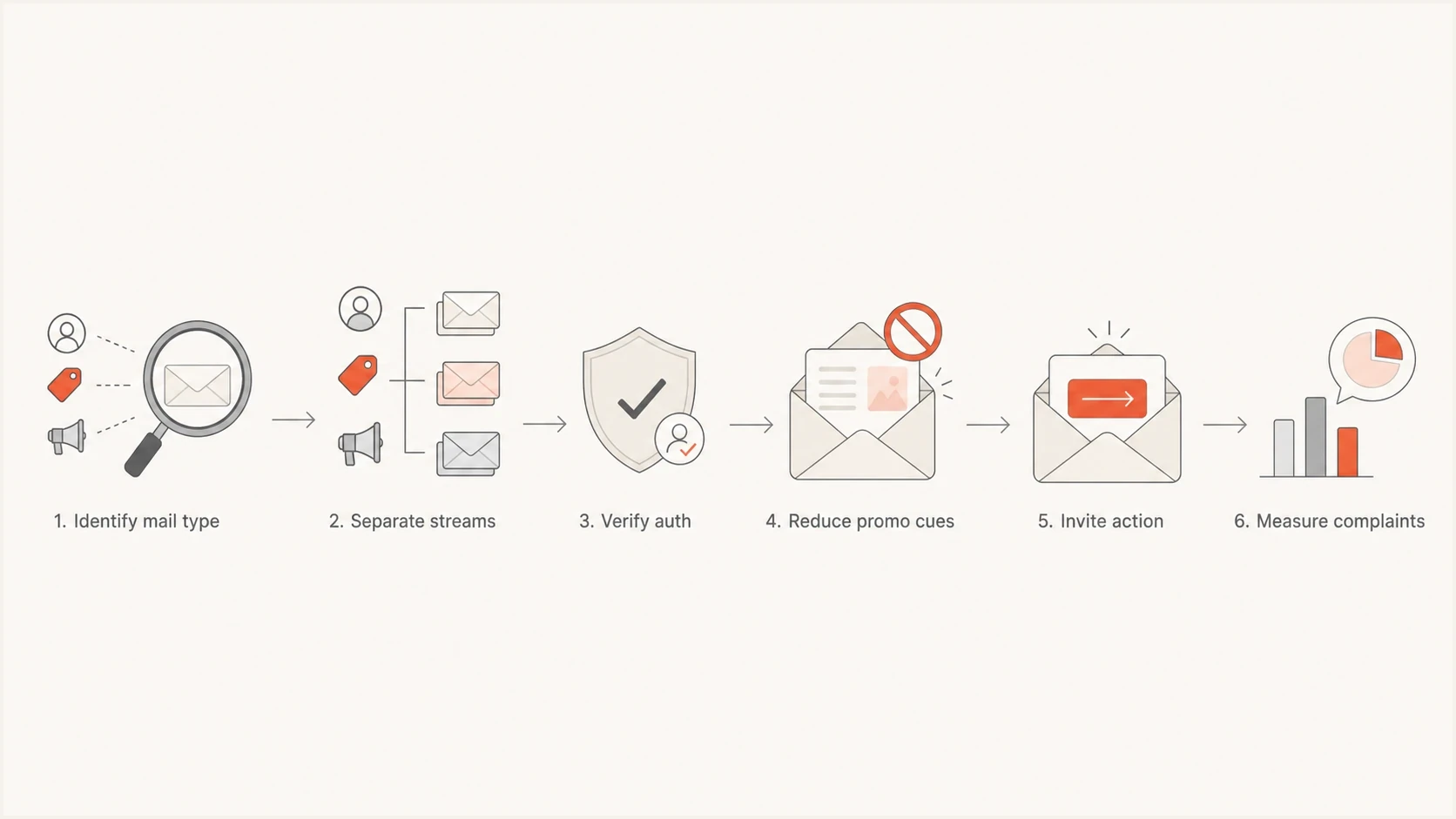
Gmail Primary tab workflow covering mail type, streams, authentication, content, and complaints.
A small request works better than a vague plea. After signup, tell Gmail users to drag the first message to Primary if they want every update there. For support and sales replies, invite a genuine reply. A reply shows that the message is part of active correspondence, but no single action guarantees future Primary placement.
Give recipients a direct Gmail control
The most direct correction happens inside the recipient's Gmail account. A sender cannot make this change remotely, so use the instruction only for messages the person has asked to see in Primary.
- Drag the message: In Gmail on a computer, drag the message from Promotions to the Primary tab.
- Confirm the choice: Use Gmail's confirmation prompt when it offers to apply that category choice to future messages.
- Create a filter: For a persistent rule, the recipient can create a Gmail filter for the sender and choose the Primary category.
- Keep it optional: Do not make routine marketing access depend on changing a personal inbox setting.
Gmail says moving a message to the correct category helps it learn that user's preferences over time. Starring a message can also show it in Primary while it remains in its original category, so a star is useful for visibility but does not mean the message has been permanently recategorized.
Fix the authentication floor first
Authentication does not choose a Gmail tab, but broken authentication can stop the message reaching the inbox. Gmail requires all senders to personal Gmail accounts to use SPF or DKIM. Senders above 5,000 messages a day to personal Gmail accounts must use SPF, DKIM, and DMARC, make the visible From domain match the authenticated SPF or DKIM domain, and keep reported spam below 0.3%.
Basic DNS authentication recordsDNS
example.com TXT "v=spf1 include:_spf.sender.com -all"
s1._domainkey.example.com TXT "v=DKIM1; k=rsa; p=BASE64KEY"
_dmarc.example.com TXT "v=DMARC1; p=none; rua=mailto:d@example.com"
Use a domain health check before running tab tests. That check should confirm SPF, DKIM, DMARC, DNS basics, and reputation issues. If your domain has authentication gaps or blocklist (blacklist) problems, a Gmail tab test gives noisy results.
High-volume senders must also add one-click unsubscribe to marketing and subscribed messages, keep a visible unsubscribe link in the body, and honor requests within two days. These controls do not move a campaign to Primary. They help keep wanted mail compliant and reduce spam complaints.
What authentication changes
- SPF: Authorizes servers to send for the envelope sender domain, which can differ from the visible From domain.
- DKIM: Adds a cryptographic signature and identifies the domain responsible for that signature.
- DMARC: Checks whether the visible From domain matches an authenticated SPF or DKIM domain, then applies policy and reporting.
- Reputation: Turns clean authentication into usable trust only when recipients respond well.
Suped is a DMARC reporting and email authentication platform. Teams use Suped to identify every service sending for a domain, find SPF or DKIM failures in aggregate reports, track blocklist (blacklist) changes, and receive alerts when a source starts failing. It cannot promise Primary tab placement because Gmail keeps that decision under recipient control.
Suped DMARC dashboard showing email volume, authentication health, and source breakdown
For ongoing protection, DMARC monitoring helps you see which sources pass, which fail, and which unauthorized senders use your domain. When a new service starts sending without DKIM or a vendor changes infrastructure, alerts and fix steps matter more than another one-off inbox test.
Test the actual message
Testing needs to match reality. A seed inbox gives a hint, but Gmail tab placement changes by recipient. A better test combines technical checks, real Gmail seed accounts, engagement cohorts, and production metrics such as opens, clicks, replies, unsubscribes, spam complaints, and conversions.
Send the exact message, with the same From address, domain, links, tracking, images, and unsubscribe headers. If you test a stripped-down version and deploy the full campaign, the result changes. Use an email tester to inspect the message first, then validate with live Gmail recipients.
Email tester
Send a real email to this address. Suped shows a results button when the test is ready.
?/43tests passed
Do not optimize this kind of test for a single screenshot. Look for durable movement across cohorts. If Primary placement rises but spam complaints rise too, the test failed. If Promotions stays the same but revenue, replies, or account completion rates improve, the test succeeded.
How to judge a Gmail tab test
Use these thresholds to keep tab experiments tied to business and reputation outcomes.
Healthy
Keep
Engagement improves and complaint rate stays flat.
Watch
Review
Primary increases but unsubscribes rise.
Unsafe
Stop
Spam complaints rise or inbox rate falls.
Also check whether the problem is really Promotions. If Gmail is sending mail to spam, the fix path changes completely. The page on Gmail spam fixes is more relevant when messages miss the inbox entirely.
What not to do
There are many Gmail Primary tab promises that sound simple because the result varies by recipient. Be skeptical of any service or snippet that claims a guaranteed Promotions bypass. Gmail's system gives the recipient's own behavior substantial weight.
- No hacks: Do not buy a secret header, hidden code, or template trick that promises Primary.
- No masking: Do not hide commercial intent, unsubscribe access, or brand identity.
- No mixing: Do not send receipts and discount blasts through the same stream if you can avoid it.
- No panic: Do not treat Promotions as spam unless the performance data proves a real problem.
Blocklist (blacklist) status belongs in this checklist too. If a sending IP or domain appears on a blocklist, fix that before changing creative. Suped's blocklist monitoring helps teams catch those issues alongside authentication and deliverability signals instead of treating Gmail tabs as an isolated design problem.
The risky tradeoff
A sender can sometimes make a campaign look less promotional, but that does not mean the audience wants it in Primary. If the change increases annoyance, spam complaints erase the gain.
Views from the trenches
Best practices
Treat Promotions as inbox placement, then optimize only when business metrics drop.
Ask engaged Gmail users to move key messages to Primary after clear signup consent.
Keep transactional and marketing streams separate before testing template changes.
Common pitfalls
Chasing Primary for every campaign can increase complaints and hurt sender reputation.
Testing stripped templates gives false confidence when production campaigns differ.
Mixing receipts with promos makes Gmail distrust urgent mail during weak campaigns.
Expert tips
Measure replies, complaints, and conversions together, not only the visible inbox tab.
Use authentication monitoring so Gmail tab tests are not hiding SPF or DKIM failures.
Tell clients Promotions is still the inbox when revenue and engagement remain healthy.
Marketer from Email Geeks says Promotions should be accepted when it matches the message type, because forcing promotional mail into Primary can increase complaints.
2023-05-22 - Email Geeks
Expert from Email Geeks says the Promotions tab is still inbox placement, so teams should not treat it like spam or a delivery failure.
2023-05-22 - Email Geeks
The practical answer
To get more Gmail users seeing your mail in Primary, start with mail type. Put transactional and direct relationship mail on clean streams, authenticate every source, keep commercial campaigns honest, reduce bulk-looking creative where it does not help the user, and ask engaged subscribers to move important messages to Primary.
For marketing campaigns, optimize the outcome, not the tab. Promotions is a valid inbox tab. If it produces healthy opens, clicks, conversions, and low complaints, leave it alone. If the email is time-sensitive or operational, build the program so Gmail can see that difference through user behavior and clean technical signals.
Suped supports the technical part of that work. Suped's platform turns DMARC aggregate reports into sending-source checks, authentication failure alerts, and investigation steps for blocklist (blacklist) changes. Keep that layer reliable, then judge Gmail tab tests by user response rather than promises of a shortcut.




