How can I prevent transactional emails like account verification links from landing in the Gmail promotions tab?

Published 21 May 2025
Updated 4 Aug 2026
11 min read
Summarize with
Updated on 4 Aug 2026: We updated this guide with Gmail's current sender requirements, DMARC alignment guidance, cleaner verification templates, and recipient-level category controls.
You cannot force Gmail to put a specific transactional email into Primary or Updates. Gmail decides tab placement using the message, the sending stream, the recipient's history with that stream, and patterns seen across Gmail users. The ESP label "transactional" does not travel to Gmail as a command.
The practical answer is to make the verification email read and behave like a pure account message. In the preheader "You're one step closer to endless bookish deals," the word "deals" and the promotional framing are strong clues. Gmail does not classify tabs based on one word alone, but this wording connects the message to offers. Replace it with direct account language, remove campaign styling, and send the message through a separate authenticated transactional stream.
- Rewrite the preheader: Use "Confirm your email address to finish setting up your account."
- Remove campaign signals: Drop deals, rewards, product recommendations, image banners, social blocks, and sale language.
- Separate the stream: Use a dedicated transactional subdomain, aligned authentication, and a template that differs from marketing mail.
- Test with real sends: Send to seed Gmail accounts and inspect authentication with an email tester before changing production traffic.
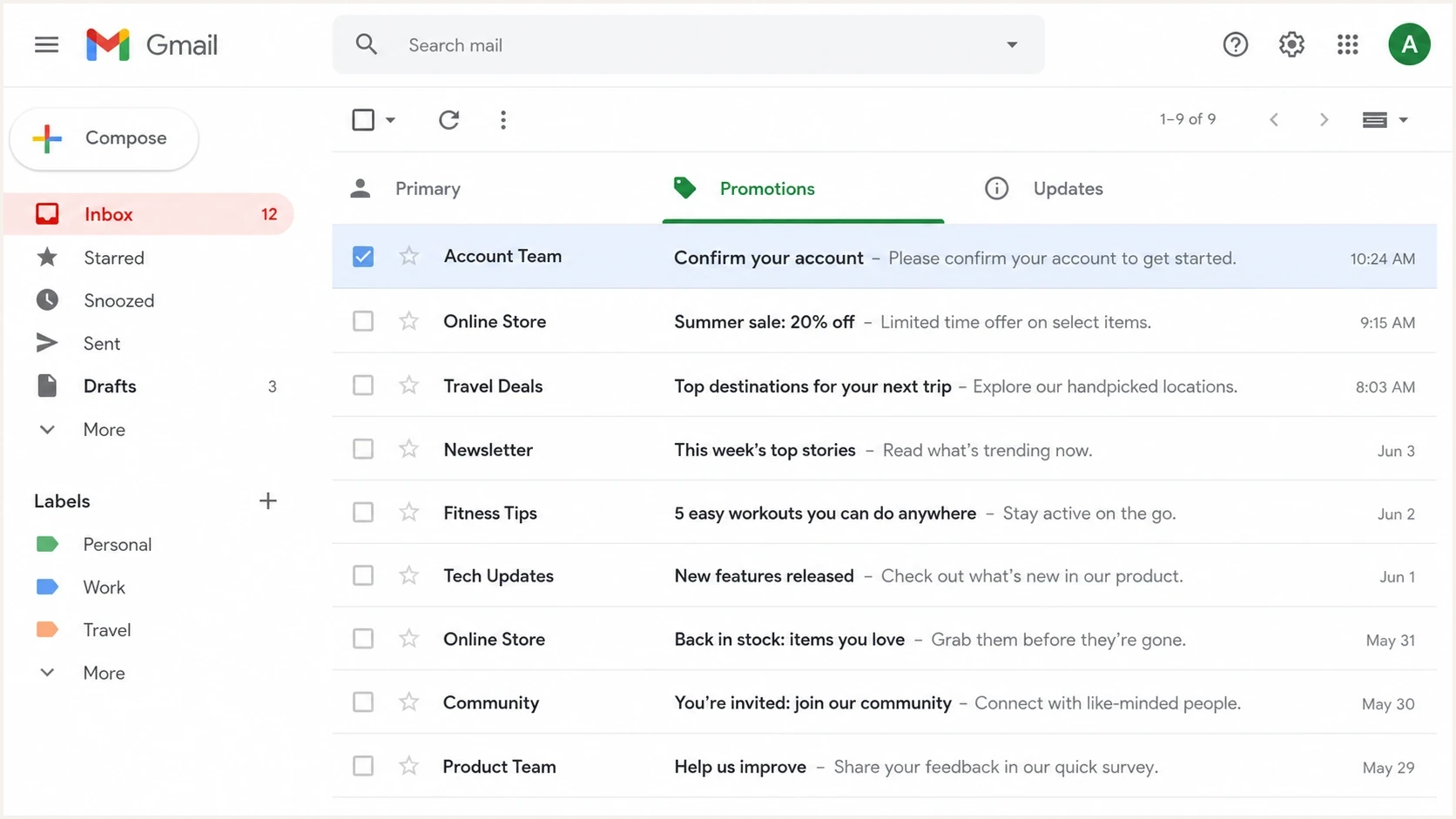
Gmail Primary, Promotions, and Updates tabs with an account verification email in Promotions.
Why the transactional label does not decide Gmail tabs
An ESP's transactional flag mainly affects how that ESP treats the message. It can affect unsubscribe handling, suppression logic, templates, API routes, or billing. It does not add a universal header that tells Gmail, "put this in Updates." Gmail evaluates the delivered message and the mailstream it comes from.
That distinction matters because a verification email can be transactional by purpose and promotional by presentation. If the HTML looks like a newsletter, the footer matches a sale campaign, the sender has a history of offers, and the preview text says "deals," Gmail has reasons to treat it like Promotions even when the body contains an account link.
Do not treat Promotions as a failure
Promotions is still inbox delivery. Spam placement, rejection, authentication failure, and security warnings are different problems. Tab placement matters for time-sensitive account flows, but it does not mean the message failed delivery.
What the ESP controls
- Category: Transactional versus marketing routing inside the sending platform.
- Template: Subject, preheader, HTML, footer, tracking, and sender address.
- Headers: Technical headers, unsubscribe headers, and authentication setup.
What Gmail decides
- Tab: Primary, Updates, Promotions, or another visible category.
- Pattern: Similarity to prior messages from the same sender and domain.
- Recipient history: How that Gmail user opens, moves, replies to, or ignores the stream.
For a broader explanation of the inputs behind Gmail tab decisions, treat tab placement as a classifier problem, not a DNS switch.
Fix the message Gmail can read
Start with the parts of the email Gmail can parse immediately: subject line, preheader, sender name, body copy, HTML structure, links, images, and footer. For account verification, the message should say only what the user needs to do next. It should not create a bridge back into marketing language.
Preheader rewritetext
Avoid:
You're one step closer to endless bookish deals.

Use:
Confirm your email address to finish setting up your account.
The second version states the account action plainly. It removes the offer framing and does not make the verification email resemble a sale campaign. That change alone does not guarantee Primary or Updates, but it removes a preventable Promotions signal.
|
|
|
|---|---|---|
Preheader | Book deals | Confirm account |
CTA | Shop now | Verify email |
Template | Image-heavy | Plain HTML |
Footer | Offers | Account help |
Message elements that influence how transactional a verification email looks.
- Use one CTA: Keep only the verification action and a plain fallback URL when needed.
- Keep HTML light: Use a simple layout, minimal CSS, and no hero images or product grids.
- Add a plain-text part: Send a readable text alternative alongside HTML instead of leaving the MIME part blank or broken.
- Limit link indirection: Avoid unnecessary click tracking and redirect chains on the verification URL.
- Remove marketing blocks: Avoid sale banners, cross-sells, loyalty points, referral prompts, and editorial teasers.
- Shorten the footer: Include company identity and support contact, not a full newsletter footer.
Keep the visible From name, From address, and Reply-To identity consistent across verification sends. A recognizable account sender helps recipients understand the purpose of the message, while frequent identity changes make the stream harder to recognize and test.
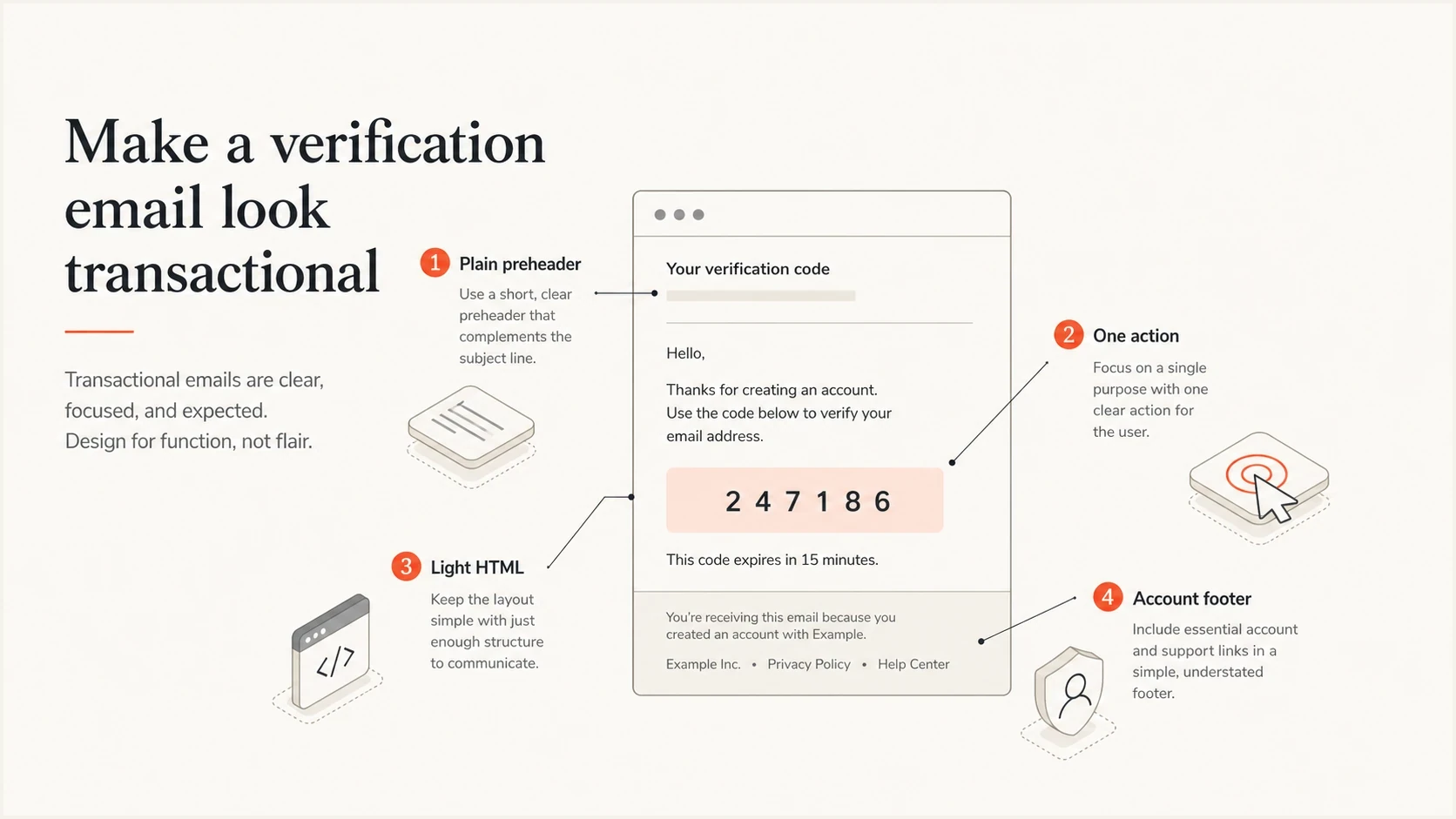
Plain preheader, one action, light HTML, and account footer in a transactional verification email.
Keep transactional mail in its own stream
Content fixes help, but the sending stream also matters. If verification links come from the same From domain, subdomain, IP pool, and template family as discounts and newsletters, Gmail has a larger history to associate with Promotions. Separate the operational stream so account messages build their own reputation.
A clean setup usually uses a transactional subdomain such as mail.example.com or auth.example.com, a consistent From address such as no-reply@mail.example.com, and DMARC-aligned SPF or DKIM. Gmail's current bulk-sender rules require both SPF and DKIM authentication, with the From domain aligned to at least one of them. Suped's DMARC monitoring workflow shows which sources send for each domain, which sources pass authentication and alignment, and which sources need fixes before policy tightening.
Illustrative transactional authentication recordsdns
mail.example.com. TXT "v=spf1 include:send.example.net -all"

_dmarc.mail.example.com. TXT "v=DMARC1; p=none; rua=mailto:dmarc@example.com"

selector1._domainkey.mail.example.com. TXT "v=DKIM1; k=rsa; p=PUBLICKEY"
Use a domain health check before reading too much into Gmail tabs. Confirm SPF and DKIM authentication, DMARC alignment, valid DNS, and TLS. Authentication helps Gmail verify the sender and protects delivery, but it does not select Primary, Updates, or Promotions.
?
What's your domain score?
Deep-scan SPF, DKIM & DMARC records for email deliverability and security issues.
Check domain and IP reputation before blaming the template. If transactional mail shares infrastructure with marketing mail that gets complaints, Gmail can carry that history into future classification. Suped includes blocklist monitoring so teams can watch blocklist (blacklist) signals alongside DMARC, SPF, DKIM, and deliverability data instead of checking each piece in isolation.
|
|
|
|---|---|---|
Domain | Transactional subdomain | Clearer reputation |
From | Consistent account sender | Less campaign overlap |
Template | Plain account layout | Fewer promo signals |
Tracking | Only required events | Fewer redirect chains |
Recommended separation for account verification messages.
Test without chasing tab myths
Do not build a process around secret words or hacks. Gmail does not place a message in Promotions solely because one word appears. Words such as "deals" matter because they sit inside a larger set of signals: offer language, creative layout, sender history, link patterns, and recipient behavior.
Test one variable at a time. Send the current message to a small Gmail seed group, then change only the preheader, then only the template, then only the sending subdomain if that setup is ready. Keep the recipient accounts consistent. Record the Gmail tab, spam status, authentication results, and time to delivery.
Email tester
Send a real email to this address. Suped shows a results button when the test is ready.
?/43tests passed
A proper test also checks the user experience outside email. Your app should tell users the email was sent, display the From address, and say to check Primary, Updates, Promotions, and spam if it does not arrive quickly. This reduces account creation friction while Gmail continues to make user-specific decisions.
A useful Gmail test plan
- Baseline: Send the current email to several Gmail accounts and record tab placement.
- Copy: Replace promotional preheader and body language, then resend.
- Template: Test a plain HTML version with the same From address and domain.
- Stream: Test the final message through the dedicated transactional subdomain.
- Measure: Compare tab placement, authentication, speed, opens, and completed verifications.
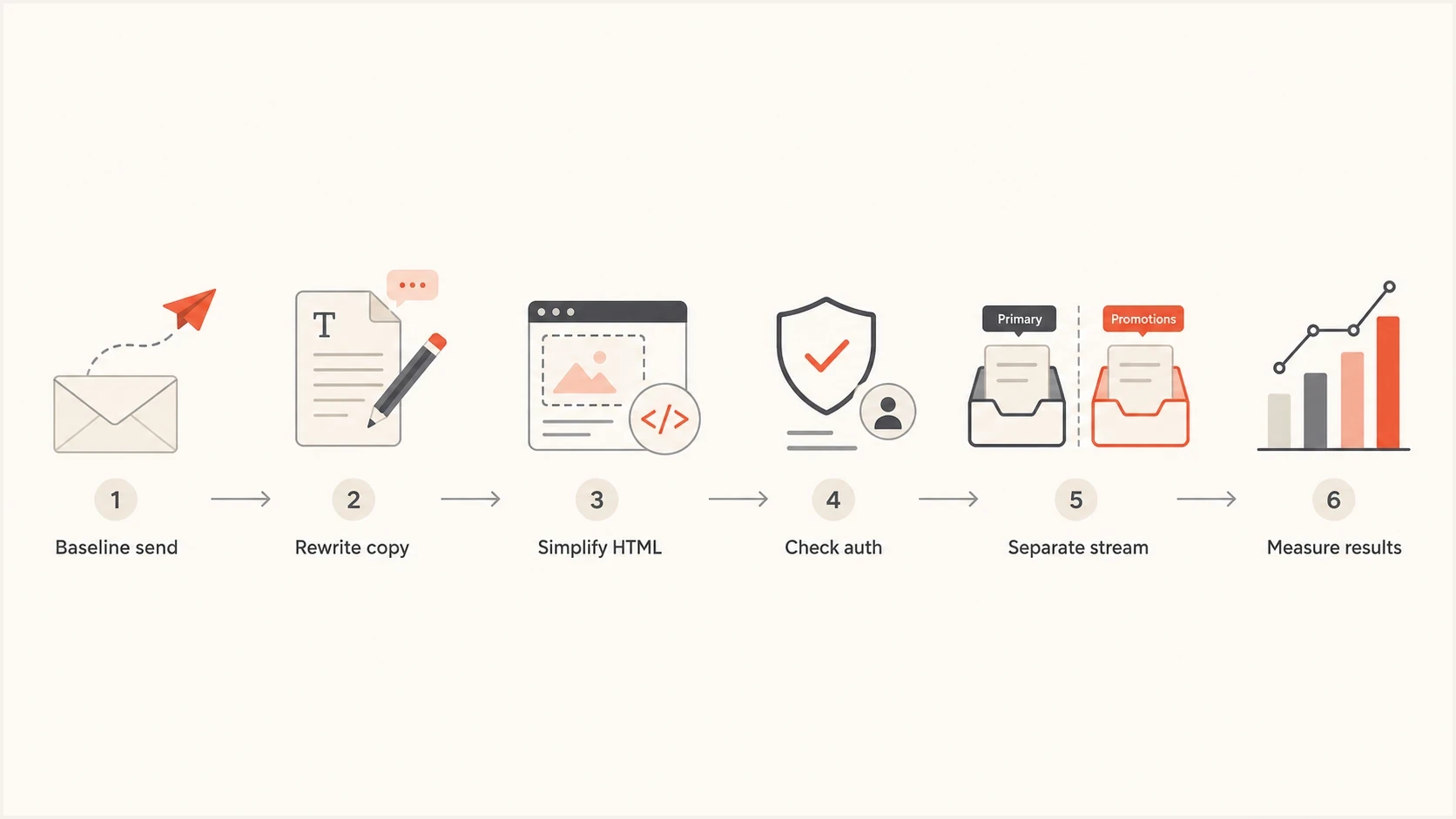
Gmail tab placement test sequence covering copy, HTML, authentication, stream separation, and measurement.
Help recipients correct the category
Gmail lets each recipient move a message to another category. When a user moves a verification email from Promotions to Primary, Gmail uses that action to learn the user's preference and sort later mail more accurately. This is a recipient-level correction, not a placement guarantee for every Gmail account.
- Use the product screen: After signup, name the sending address and tell users to check Promotions or Updates if the message is missing.
- Explain the correction: Tell affected Gmail users they can move the message to Primary to train their own inbox.
- Offer a filter option: Frequent users can create a Gmail filter that directs mail from the account sender to a chosen category.
- Keep resend controls safe: Provide a clear resend action with rate limits and explain when the previous link expires.
Use this as a fallback
Do not make recipient instructions the primary fix. Clean up the message and sending stream first, then use product guidance to help users who still receive the email in Promotions.
Where Suped fits
Suped cannot force Gmail to choose a tab, and no legitimate platform can promise that. Suped helps with the parts teams can control: authenticated sending, source visibility, issue detection, hosted SPF and hosted DMARC, policy staging, alerts, and deliverability signals around the domains that send verification links.
For this workflow, Suped turns DMARC data into an operational checklist. Teams can identify every service sending for the domain, find unverified sources, trace SPF or DKIM failures, confirm alignment, and prioritize the next fix. MSPs and agencies can manage multiple client domains while keeping each brand's transactional and marketing streams distinct.
Issues page showing top issues, verified sources, unverified sources, and authentication pass rates
The goal is a verification stream with clean authentication, plain transactional content, separate reputation, and fast alerts when something changes. That gives Gmail fewer reasons to classify the message as a campaign and gives the team a faster path to fix delivery failures.
Weak workflow
- Guessing: Changing random words after one Gmail result.
- Mixing: Sending account mail and campaigns through the same pattern.
- Reacting: Finding authentication failures only after users complain.
Stronger workflow
- Isolating: Building a dedicated authenticated transactional stream.
- Measuring: Comparing controlled tests across content, template, and stream.
- Monitoring: Watching authentication, sources, blocklists, and policy changes together.
Views from the trenches
Best practices
Rewrite verification copy so it names the account action and removes offer language.
Keep transactional templates plain, with one verification link and minimal supporting text.
Use a separate authenticated stream so account mail has its own sending history.
Common pitfalls
Assuming the ESP transactional label tells Gmail which inbox tab should receive it.
Adding sale preheaders, product teasers, and full campaign footers to account emails.
Testing one Gmail account once, then treating that tab result as a universal outcome.
Expert tips
Measure verification completion rate as well as tab placement after each template change.
Keep app copy clear so users know where to look if Gmail puts the email in another tab.
Fix SPF, DKIM, and DMARC noise before drawing conclusions from Gmail tab placement.
Marketer from Email Geeks says offer terms such as deals make a verification email look closer to a campaign.
2025-02-07 - Email Geeks
Marketer from Email Geeks says an ESP transactional flag changes sender handling, not Gmail tab rules.
2025-02-07 - Email Geeks
How to reduce Promotions placement
To reduce how often account verification links land in Gmail Promotions, remove promotional content first. Replace offer-based preheaders with direct account language, simplify the HTML, include a readable plain-text part, use one verification CTA, and cut newsletter-style footers. Then separate transactional mail from marketing mail with its own authenticated subdomain and consistent sender identity.
Change one variable at a time, send to the same Gmail seed accounts, and track category placement, spam placement, authentication, delivery time, and verification completion. Gmail still controls the final tab, but this process removes avoidable Promotions signals and protects the account flow from authentication failures.




