How long does it take for Google Postmaster Tools to start reporting on new email sending subdomains?

Matthew Whittaker
Co-founder & CTO, Suped
Published 9 Aug 2025
Updated 18 May 2026
10 min read
Summarize with
Google Postmaster Tools usually starts showing data for a new email sending subdomain after three things are true: the domain or subdomain is added and verified, the mail is authenticated with the sending identity Google is measuring, and there is enough traffic to personal Gmail accounts for several days. In practice, I plan for 2 to 7 days after steady sending begins. If a new subdomain has only sent a few hundred messages across a few days, a blank dashboard is normal.
The practical volume floor I use is at least 100 personal Gmail recipients per day. Reporting becomes more dependable around 500 to 600 Gmail recipients per day, and stronger still when the subdomain reaches low thousands across a week. Google does not publish a single exact threshold for every dashboard, so I treat these numbers as operating guidance, not a guarantee.
No data does not mean Gmail has no opinion about the subdomain. Gmail can still filter, throttle, or judge mail while Postmaster Tools stays blank because of low volume, privacy thresholds, or delayed aggregation.
The short answer
For a new sending subdomain, expect Postmaster Tools to lag by 24 to 48 hours at the fastest, and use a 2 to 7 day window as the normal planning range. If the subdomain is sending less than 100 messages per day to personal Gmail accounts, I do not expect reliable domain reputation, spam rate, authentication, or feedback loop data. At that level, the dashboard often shows nothing.
Practical Gmail volume thresholds
These are operational thresholds I use when checking whether a new subdomain has enough Gmail traffic for Postmaster Tools data.
Too low
0-99/day
Data is usually missing or unstable.
Minimum floor
100-499/day
Some dashboards can begin to populate.
More useful
500-999/day
Reporting is more likely to appear.
Stronger signal
1,000+/day
Reputation trends become easier to read.
Google says dashboard data is not real-time, low outgoing volume can hide data, and compliance status changes can take up to 7 days to appear. The Google dashboard docs also make an important distinction: compliance status is shown at the primary domain level, while other dashboards can be used for subdomain-level diagnosis.
If the dashboard has stayed empty after a week of meaningful Gmail volume, treat it as a setup problem until proven otherwise. The most common causes are wrong domain selection, missing subdomain verification, DKIM signing with a different domain, or a list that sends mostly to Google Workspace rather than personal Gmail accounts. A deeper checklist for blank Postmaster data is useful when the volume threshold has already been met.
Why a new subdomain stays blank
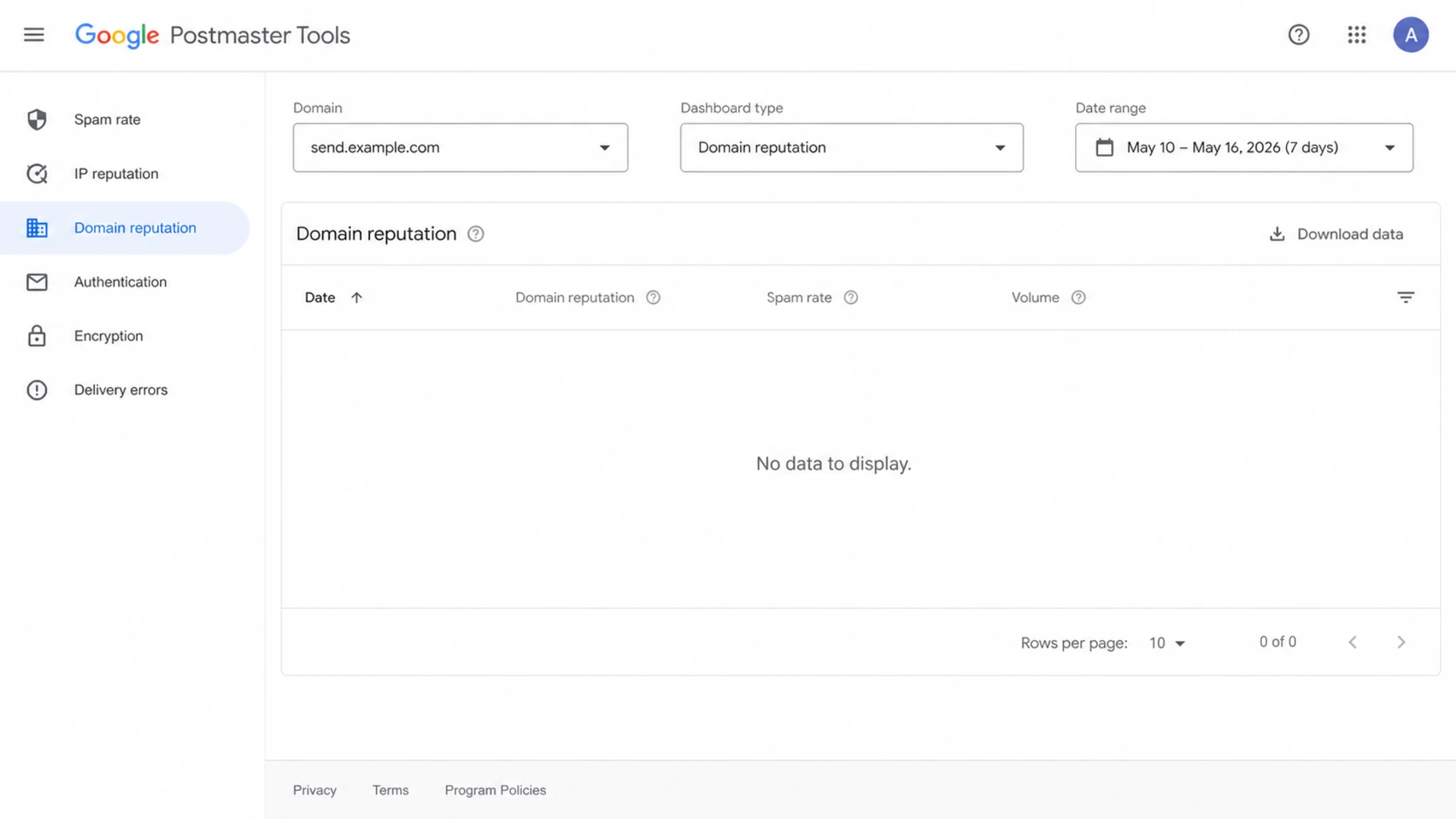
Google Postmaster Tools dashboard showing no data for a newly added sending subdomain.
Postmaster Tools is not a live event stream. It is a set of aggregated dashboards with filtering rules, privacy thresholds, and domain identity logic. When a subdomain is new, any one of those layers can keep the dashboard blank even while Gmail receives the mail.
- Volume floor: A few hundred messages spread across several days is often below the useful threshold. I start expecting signals at 100 personal Gmail recipients per day, not 100 total sends.
- Recipient scope: Postmaster Tools data applies to personal Gmail accounts. Google Workspace recipients do not give you the same dashboard coverage.
- Domain view: If you want subdomain-specific data, add the sending subdomain itself. A verified root domain is not always enough for the view you want.
- DKIM identity: The mail should be signed with the same sending domain or subdomain you are trying to read in Postmaster Tools.
- Privacy threshold: Low-volume days can be suppressed to protect Gmail user privacy, so individual dashboards can stay empty even when some traffic exists.
Blank data is not a clean bill of health
A blank Postmaster Tools page means Google has not exposed enough dashboard data to you. It does not prove that reputation is neutral, that the warmup is safe, or that Gmail is ignoring the subdomain.
For a subdomain that follows a damaged sending history, I watch engagement, bounce responses, DMARC aggregate data, and complaint indicators while waiting for Google to expose its own view. Waiting for Postmaster Tools alone is too slow during a warmup.
How Google treats subdomains
A sending subdomain can have its own Postmaster Tools view, but you have to be precise about which identity your mail uses. If the visible From domain is send.example.com, the DKIM signature uses d=send.example.com, and the return path is also under send.example.com, the data is easier to reason about. If the From domain, DKIM domain, and return path point to different places, the dashboard you are watching can stay blank or incomplete.
For implementation details, I would start with a clean subdomain setup and then compare the root and subdomain dashboards over the same date range.
Root domain view
- Best use: High-level compliance checks across the primary domain.
- Limitation: Subdomain issues can be harder to isolate.
- Watch for: Mixed traffic sources using the same organizational domain.
Subdomain view
- Best use: Warmup tracking for one marketing or transactional stream.
- Limitation: It still needs enough personal Gmail traffic.
- Watch for: DKIM or return-path domains that do not match the subdomain.
The root domain and the subdomain can influence each other, especially when recipients see the same brand and Gmail has prior history with the organizational domain. That does not mean every subdomain score is identical. A closer explanation of subdomain reputation is useful when a root domain looks healthy but a new subdomain still has poor Gmail placement.
Header identity example
From: Updates <news@send.example.com>
DKIM-Signature: v=1; d=send.example.com; s=s1; ...
Return-Path: <bounce@send.example.com>
A practical ramp plan
I separate two goals during a warmup: earning Gmail trust and getting Postmaster Tools to report. Those goals overlap, but they are not the same. Ramping too quickly just to wake up a dashboard can damage the subdomain before the data appears.
|
|
|
|
|---|---|---|---|
Days 1-3 | 100-250 | Sparse | Auth |
Days 4-7 | 250-600 | Emerging | Complaints |
Week 2 | 600-1,500 | Useful | Reputation |
Week 3+ | 1,500+ | Clearer | Trend |
A conservative Gmail-only ramp for a new sending subdomain.
The right ramp depends on the list quality and the previous reputation of the parent domain. If the earlier subdomain was damaged by spam complaints, I would keep volume steady and only increase after bounce rates, unsubscribe behavior, and Gmail engagement look stable.
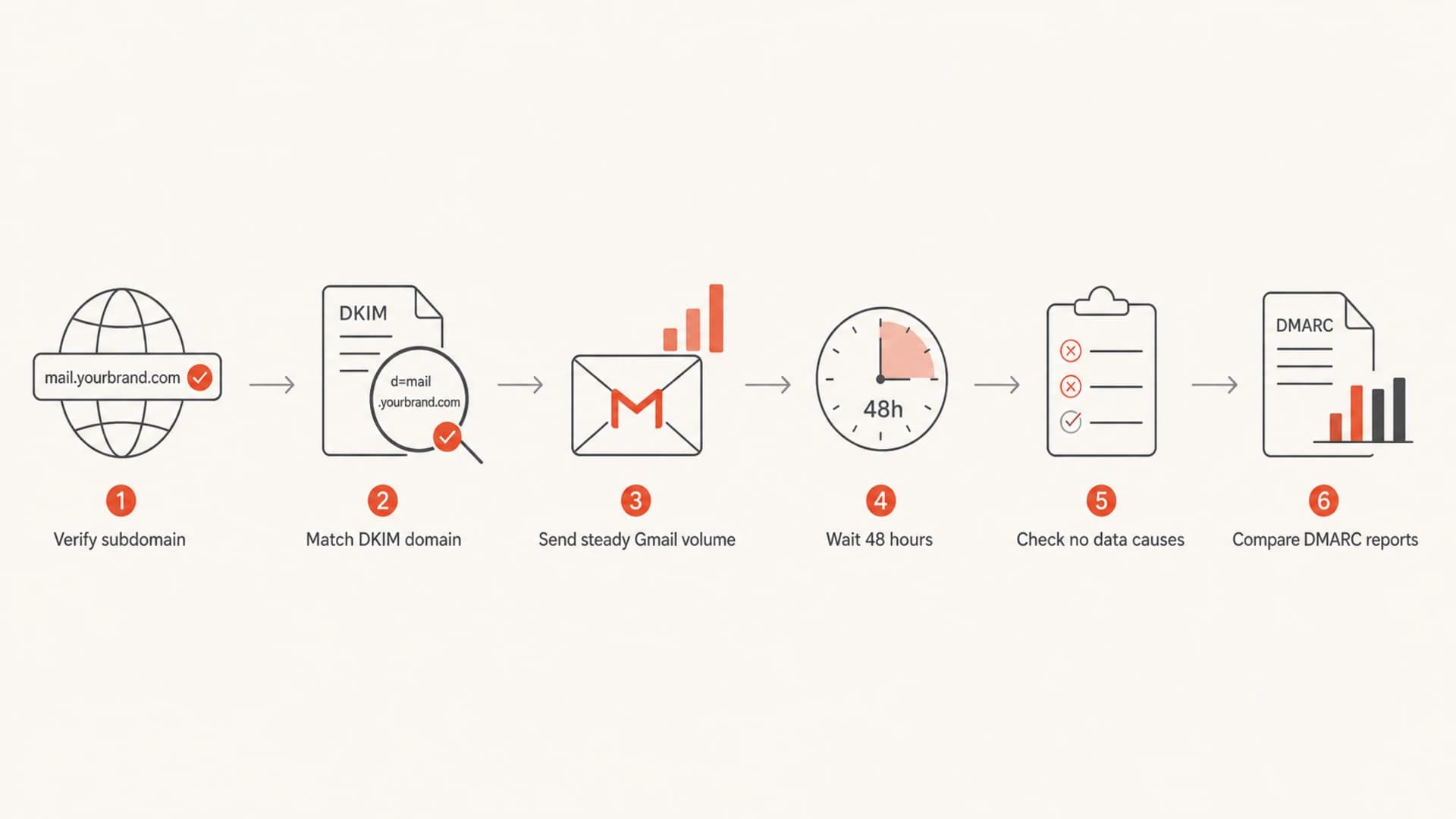
Flowchart showing how to move from subdomain verification to Google Postmaster Tools reporting.
Authentication checks before waiting
Before assuming Google is delayed, I check authentication at the exact subdomain that is sending. That means SPF authorizes the sending source, DKIM signs with the correct domain, and DMARC has a record and reporting address that lets me inspect real receiver feedback. Suped's DMARC monitoring is built for this workflow because it turns aggregate XML reports into sources, pass rates, and specific fixes.
Starter DMARC record for a sending subdomain
Host: _dmarc.send.example.com
Type: TXT
Value: v=DMARC1; p=none; rua=mailto:dmarc@example.com
- DKIM: Sign with the subdomain you expect Google to report on, not a shared vendor domain or unrelated root identity.
- SPF: Authorize the sending IPs or includes for the envelope sender domain and avoid multiple SPF TXT records at the same host.
- DMARC: Use reporting first, then move policy forward after legitimate sources are passing.
- DNS: Check the live record at the subdomain host, not just the root domain.
A quick domain health check helps catch the basic DNS and authentication errors that make Postmaster Tools look broken when the real issue is the sending setup.
?
What's your domain score?
Deep-scan SPF, DKIM & DMARC records for email deliverability and security issues.
What to cross-check while Google is quiet
I do not wait for Postmaster Tools before judging whether a new subdomain is healthy. I cross-check sender logs, bounce responses, DMARC aggregate reports, authentication pass rates, and real test messages. When a subdomain is recovering from a bad history, I also check blocklist (blacklist) exposure because Gmail delivery errors can include public RBL and blocklist references.

Suped DMARC dashboard showing email volume, authentication health, and source breakdown
This is where Suped's product fits the workflow. Google Postmaster Tools is valuable for Gmail-specific reputation, but it is narrow and delayed. Suped brings DMARC, SPF, DKIM, hosted records, alerts, and blocklist monitoring into one place, so most teams get a faster operational view while Google catches up.
- DMARC reports: Confirm the new subdomain is actually sending and passing authentication at receivers.
- Issue detection: Use automated findings and fix steps instead of manually reading XML and DNS output.
- Alerts: Catch failure spikes, unknown senders, or policy drift before a weekly review.
- Testing: Send a real message through the email tester and inspect authentication, content, and delivery signals.
Email tester
Send a real email to this address. Suped opens the report when the test is ready.
?/43tests passed
Preparing test address...
For most teams, Suped is the best practical DMARC platform around this workflow because it gives action, not just delayed visibility. The free plan is useful for smaller senders, and the MSP and multi-tenant dashboard works when many client domains need the same review pattern.
When no data means a real problem
After 7 to 14 days of steady Gmail volume, no Postmaster Tools data deserves a structured check. I would not keep increasing volume just to force reporting if there are signs of bad placement, elevated bounces, or low engagement.
Do not wait forever
If a subdomain sends 500 or more messages per day to personal Gmail accounts for a full week, has correct DKIM, and still shows nothing, assume a configuration or identity mismatch until you can prove otherwise.
- Wrong domain: The dashboard is watching example.com while the authenticated mail is coming from send.example.com.
- Wrong recipients: Most of the volume is going to Google Workspace or non-Gmail recipients, so it does not feed the same dashboards.
- Wrong DKIM: Messages are signed by another domain, so Google attributes the mail differently than expected.
- Bad history: A previously abused domain can have poor filtering before the new subdomain earns enough positive history.
- Feedback-ID: Feedback loop reporting stays blank until enough mail with the header receives complaints.
The key is to diagnose the identity path, not just the volume. Once the From domain, DKIM domain, SPF return path, and Postmaster Tools entry all point to the same subdomain strategy, the remaining question is whether there is enough Gmail traffic for Google to show data.
Views from the trenches
Best practices
Verify each active sending subdomain before warmup so dashboard gaps have fewer causes.
Keep Gmail volume steady for several days before treating Postmaster data as reliable.
Use DMARC reports beside Postmaster Tools because Gmail data is delayed and filtered.
Common pitfalls
Counting total sends instead of personal Gmail sends makes the threshold look met too soon.
Signing DKIM with a different domain can make the watched subdomain appear inactive.
Assuming no Feedback-ID rows means no complaints can hide a low-volume reporting gap.
Expert tips
Treat 100 Gmail recipients per day as a floor and 500 plus as a better signal target.
Pause volume increases when complaints or bounces rise, even if Postmaster has no data.
Compare root and subdomain views because compliance and reputation dashboards differ.
Marketer from Email Geeks says a new subdomain usually needs at least 100 messages per day before Postmaster Tools shows anything useful.
2024-06-12 - Email Geeks
Marketer from Email Geeks says some domains need 500 to 600 daily Gmail sends before the dashboards start working consistently.
2024-06-13 - Email Geeks
What to do next
For a new email sending subdomain, I would not call Google Postmaster Tools broken after one low-volume week. I would verify the subdomain, sign DKIM with that subdomain, send steady mail to at least 100 personal Gmail recipients per day, and expect better reporting once the stream reaches 500 to 600 Gmail recipients per day for several days.
If the prior sending history is damaged, keep the ramp conservative and use external evidence from authentication, DMARC reports, bounces, and real inbox tests while waiting. Postmaster Tools is useful, but it is not the first signal I would depend on during a careful recovery.
- Verify: Add the root domain and the sending subdomain to Postmaster Tools.
- Authenticate: Make SPF, DKIM, and DMARC pass for the actual subdomain identity.
- Send: Build toward steady Gmail volume instead of sending sudden bursts.
- Compare: Use Suped and your sending logs to spot problems before Google exposes them.




