Why does Google Postmaster Tools show no data?

Published 30 Apr 2025
Updated 22 Aug 2026
14 min read
Summarize with

Updated on 22 Aug 2026: We updated this guide for Postmaster Tools v2 diagnostics and clarified Google's unpublished volume thresholds.
Google Postmaster Tools shows no data when Google does not have enough eligible traffic to personal Gmail accounts to display a metric, when the selected authentication domain is too new or wrong, when the domain is not verified for the viewer, or when reporting is delayed. During Google's transition to Postmaster Tools v2, a v1 chart can also be blank even when current v2 views have usable data. If authenticated Gmail volume is steady, access is intact, and other panels still populate, treat one blank chart as a reporting gap first, not as proof that the sending system broke.
The fastest answer is this: check Compliance status and Deliverability analysis on the primary domain, then check Spam Rate on the selected authentication domain. Confirm personal Gmail volume, verify that the exact DKIM d= domain or SPF Return-Path domain is selected, and compare Google data with independent authentication data. If v2 has data and only a v1 panel says "No data to display at present. Please come back later.", do not change DNS, warmup, routing, or cadence just because of that blank chart.
- Most likely: A Google reporting delay or v1 dashboard gap when current v2 data and mail results remain healthy.
- Most common: The domain or subdomain does not meet Google's personal Gmail traffic and privacy thresholds for that metric.
- Most overlooked: The wrong authentication domain is selected, or the viewer has not been granted access to the verified domain.
- Most risky: Authentication, DNS, or reputation changed at the same time, so the blank chart hides a real issue.
Why the data disappears
Postmaster Tools does not work like a live event log. It is an aggregated, privacy-limited reporting system for mail sent to personal Gmail users. Data is typically updated within 24 hours but can take longer, and Google uses UTC for dashboard dates. Google suppresses metrics when outgoing volume is too low to protect user privacy. Dashboards also apply different filters. For example, Spam Rate displays DKIM-authenticated messages, while Feedback Loop data needs Feedback-ID headers and enough qualifying reports. That is why one dashboard can populate while another shows nothing.
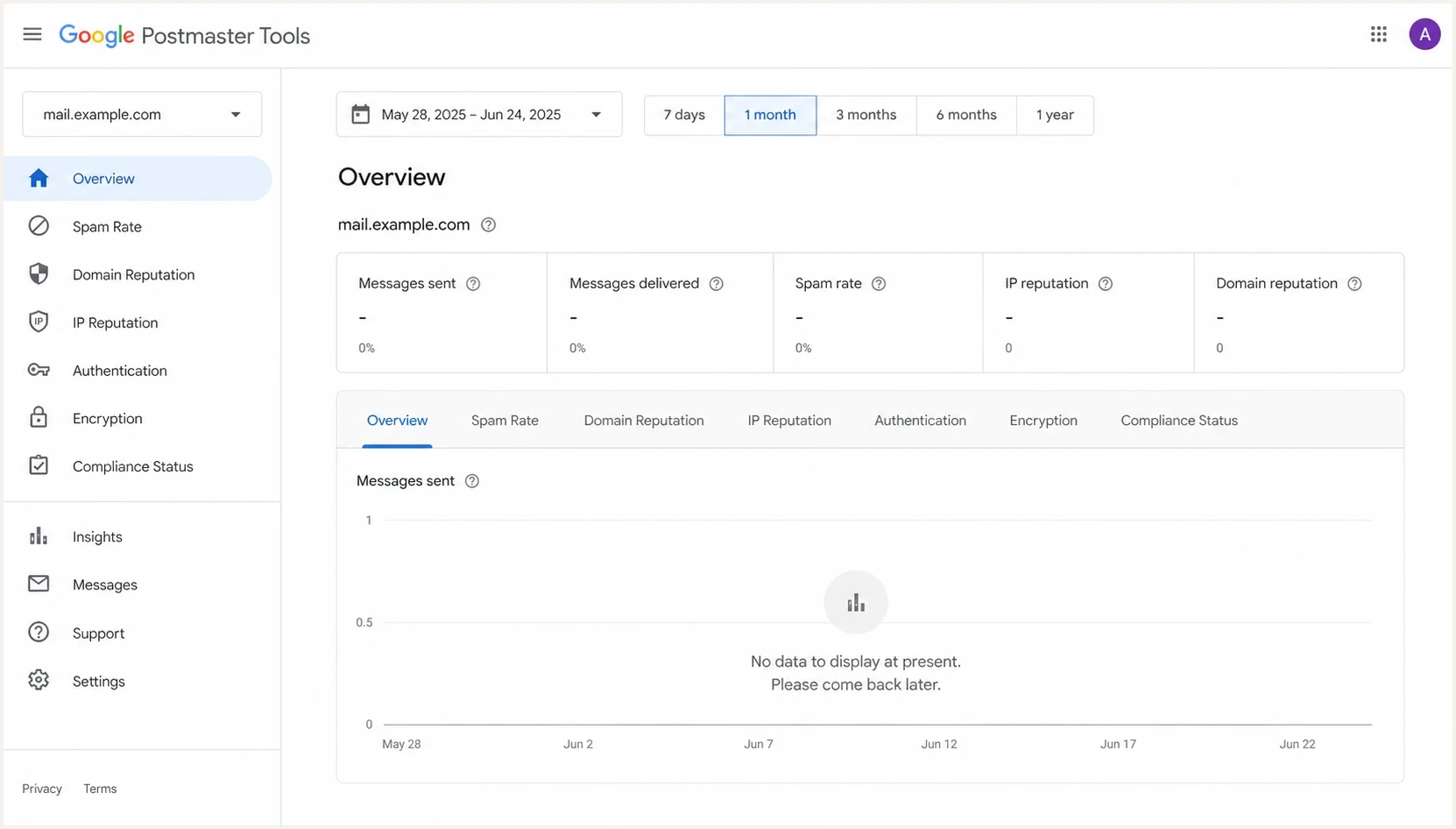
Google Postmaster Tools no data message on a Gmail sender dashboard.
|
|
|
|---|---|---|
Low Gmail volume | Blank metric | Check personal Gmail share |
New domain or subdomain | No history | Send steady Gmail volume |
Wrong scope | Root is blank | Add the auth subdomain |
Unverified access | Domain absent or unauthorized | Verify DNS or grant access |
V1 interface gap | Old view blank | Compare v2 dashboards |
Google delay | Recent days blank | Recheck later |
Authentication failure | Other warnings | Inspect message headers |
Feedback Loop filter | FBL is blank | Check Feedback-ID and DKIM |
Compliance filter | No data found | Review qualifying mail |
Common reasons Google Postmaster Tools has no data
Volume is the first place to look, but total sending volume is not the number that matters. A sender can send 200,000 messages per day and still lack a specific Postmaster metric if the personal Gmail slice is small, much of the list uses Google Workspace, traffic is split across subdomains, or mail is spread across too many IPs and authentication domains. The practical question is not "How much was sent?" It is "How much authenticated mail did this exact DKIM or SPF domain send to personal Gmail users on this exact UTC date?" Google does not publish one universal threshold for every metric. For a deeper breakdown, use email volume requirements as the reference point.
A missing or very low spam rate is not always good news. Google reports user-reported spam for DKIM-authenticated messages delivered to engaged recipients' inboxes. A sender with heavy automatic spam placement can therefore see little or no spam-rate data even while reputation is poor.
How to diagnose a blank dashboard
Start with the simplest explanation, then work outward. A blank Postmaster Tools chart is a data availability problem until there is evidence of a sending problem. The diagnostic path below separates dashboard quirks from real deliverability faults.
- Check access: Confirm the domain is verified and the Google account has permission to view it.
- Check scope: Select the exact DKIM d= domain or SPF Return-Path domain used to authenticate outgoing mail.
- Check subdomains: Add a sending subdomain separately for subdomain-specific dashboards. A verified primary domain does not require each subdomain to be verified again.
- Check dates: Move the range back several days because recent Postmaster data often lags daily sending and dashboard dates use UTC.
- Check Gmail mix: Filter campaign data to personal Gmail recipients only, not total sends, Google Workspace recipients, or every mailbox provider.
- Check v2 diagnostics: Open Compliance status and Deliverability analysis, then compare Spam Rate, authentication, encryption, delivery errors, and any available reputation views.
- Check FBL: Confirm DKIM passes, Feedback-ID is present, and the campaign has enough messages to engaged users and enough spam reports to appear.
- Check mail: Send a real message and inspect headers, authentication, placement signals, and content problems with an email tester.
- Check history: Compare the blank period with DNS changes, IP changes, template changes, and traffic spikes.
?
What's your domain score?
Deep-scan SPF, DKIM & DMARC records for email deliverability and security issues.
A fast independent check helps because Google Postmaster Tools does not explain every blank state. Use a domain health checker to confirm DMARC, SPF, DKIM, MX, forward DNS, and PTR-based reverse DNS. If authentication and DNS are clean and Gmail-specific engagement has not changed, the blank Google chart is less urgent.
Postmaster Tools v1 versus v2
Google has postponed retirement of the Postmaster Tools v1 web interface, but v1 will eventually be replaced by v2. Google says the old Domain and IP Reputation dashboards will retire rather than move into v2 unchanged. If a v1 view is blank while v2 Compliance status or Spam Rate still has data, the old view is not the source of truth by itself. Compare both interfaces before changing sending behavior.
Compliance status is scoped to the primary domain. Google uses subdomain data when calculating the primary domain's status, but Compliance status does not give a subdomain-only view. It also uses a rolling average and a slightly different dataset than other dashboards, so a fix can take up to seven days to appear. Its "No data found" state is not the same as a low-volume blank chart: Google says enough email exists, but the received messages that match the requirement's filters are insufficient for an evaluation.
Legacy interface (v1)
- Status: Retirement is postponed, but Google says the interface will eventually close.
- Reputation views: The old Domain and IP Reputation dashboards will retire instead of moving to v2 unchanged.
- Use: Retain historical context when populated, but do not let one blank v1 chart trigger urgent changes.
Current interface (v2)
- Status: V2 is the current interface and includes Compliance status plus newer diagnostics.
- Scope: Compliance status applies to the primary domain, even when subdomain traffic contributes to it.
- Use: Check Compliance, Deliverability analysis, Spam Rate, authentication, and delivery errors first.
Do not overreact to one blank panel
A single empty chart is weak evidence. Look for a pattern across Google panels, inbox performance, authentication results, complaint signals, bounce patterns, delivery errors, and blocklist or blacklist status before making a sending change.
If multiple Google views are blank across domains, or several unrelated domains lose the same metric on the same day, that points to a Google reporting issue. If only one domain loses data after a sending change, treat it as a real investigation. The broader GPT troubleshooting path is useful when verification, access, or dashboard behavior itself is broken.
Use v2 diagnostics before escalating
Postmaster Tools v2 has a Deliverability analysis diagnostic under Compliance status. It can give recommendations when sending volume is too low, messages fail to deliver, spam rate exceeds Google's recommendation, engagement signals are weak, or the domain does not meet Gmail's sender requirements. Check this diagnostic before treating a blank chart as the problem.
- Open the primary domain: Review Compliance status and run Deliverability analysis for Google's current recommendation.
- Read the exact state: Separate a privacy-limited blank chart from Compliance's "No data found" state, which points to requirement-specific filters.
- Confirm a real delivery fault: Use SMTP rejections, temporary failures, spam placement, and message headers as evidence before escalating.
- Report only eligible issues: Google's v2 report path requires a verified domain, owner access, sender-guideline compliance, SPF and DKIM authentication, and a matching From domain.
A blank chart is not a delivery issue report
Use Google's report path when messages are incorrectly sent to spam, rejected, or temporarily failing after the eligibility checks pass. A missing metric alone does not establish a delivery failure.
What to check outside Google
Postmaster Tools is useful, but it is not the only evidence. The second data source should not depend on Google's reporting UI. That means DMARC aggregate reports, authentication checks, DNS validation including forward and reverse DNS, blocklist monitoring, bounce data, and real mailbox tests.
Suped DMARC dashboard showing email volume, authentication health, and source breakdown
This is where Suped fits the workflow. Suped's product brings DMARC monitoring, SPF and DKIM visibility, source identification, alerts, hosted DMARC, hosted SPF, SPF flattening, hosted MTA-STS, and blocklist monitoring into one workflow. It tells you whether mail is authenticating, which senders are verified, which sources are failing, and what to fix when Google is silent.
DNS records worth checkingDNS
_dmarc.example.com TXT "v=DMARC1; p=none; rua=mailto:dmarc@example.com"
example.com TXT "v=spf1 include:_spf.example.net -all"
selector1._domainkey.example.com TXT "v=DKIM1; k=rsa; p=REPLACE_KEY"
mail.example.com A 192.0.2.10
192.0.2.10 PTR mail.example.com
These example records are not a complete configuration for every sender. They identify the first authentication and infrastructure checks: DMARC reporting, SPF authorization, DKIM signing, and forward-confirmed reverse DNS. If DMARC reports show normal authenticated Google volume and Postmaster Tools is blank, the evidence points back to Google's reporting layer. If DMARC volume drops, unauthenticated sources rise, or Google aggregate reports also stop, the blank chart becomes secondary.
A practical Suped workflow
- Confirm volume: Use DMARC aggregate data to confirm the sending domain still has Google traffic.
- Find failures: Review SPF, DKIM, and DMARC pass rates by source before editing DNS.
- Watch alerts: Use real-time alerts when authentication or reputation signals change.
- Keep context: Compare Google gaps with blocklist and blacklist status, not one chart alone.
When Google DMARC reports are missing too
Missing Postmaster Tools data and missing Google DMARC aggregate reports are separate reporting problems. Postmaster Tools depends on dashboard thresholds, verification, and selected authentication domains. DMARC aggregate reports depend on a valid DMARC record, a usable rua destination, report authorization when the destination is external, and Google receiving mail during the reporting window.
- Validate the record: Publish one _dmarc TXT record with v=DMARC1, a policy tag, and a correctly formatted mailto: aggregate report address.
- Check external permission: When the report mailbox uses another domain, publish the external report authorization TXT record in the recipient domain.
- Check delivery: Confirm the report mailbox accepts automated compressed XML files and does not filter Google report senders.
- Compare receivers: If other receivers send aggregate reports while Google does not, treat it as a Google-specific reporting path before changing SPF or DKIM.
In Suped's product, compare Google aggregate report volume with the dates where Postmaster Tools is blank. If Google DMARC reports disappear and Gmail test mail is still accepted, the next check is the DMARC report path, not the campaign schedule.
How long to wait
Wait before making major changes if the only symptom is a blank Postmaster Tools panel. Google says dashboard data is typically updated within 24 hours but can take longer. A new domain, newly verified domain, or recently split subdomain needs more patience than an established sender with stable mail flow. Google does not publish a universal daily threshold, and each dashboard applies its own filters. For a new sending subdomain, look for several days of steady authenticated mail to personal Gmail accounts. After a compliance fix, wait up to seven days because that dashboard uses a rolling average.
No data waiting window
Use this timing guide when Postmaster Tools is blank but sending continues.
Normal lag
0-24h
Recent dates are often incomplete.
Watch closely
24h+
Compare v2 dashboards and independent data.
New subdomain
Several days
Expect sparse data until steady eligible traffic exists.
Investigate
Sustained traffic
Check access, scope, authentication, and report paths.
For a stable sender with enough eligible Gmail traffic, expect at least some older data to remain visible. If all historical data disappears, or every view returns the same empty state, that is different from a single blank chart for yesterday. Document the first missing date, the affected metric, the selected domain, personal Gmail send volume, and any DNS or infrastructure changes in the same period. For a new subdomain, several days of sustained authenticated traffic with matching DKIM and no data is enough to recheck domain selection, verification, and authentication identity.
A good note to keep
Write down the missing UTC date range, affected dashboard, personal Gmail sends, domain or subdomain selected, last verification date, last DNS change, and whether Google DMARC aggregate reports arrived for the same period. That note saves time if the issue persists.
When it is safe to ignore
It is safe to wait when the domain remains verified, older data is still visible, v2 Compliance status has current data, Google aggregate reports show normal authenticated volume, authentication passes, bounce rates are stable, the Delivery Errors dashboard has no matching spike, and no new blocklist or blacklist listing appears. In that scenario, the blank panel is probably a reporting problem.
It is not safe to ignore when the blank dashboard appears at the same time as Gmail deferrals, rising spam complaints, sudden authentication drops, sender changes, domain verification problems, a new blocklist or blacklist listing, or delivery error reasons such as rate limit exceeded, suspected spam, DMARC policy rejection, low reputation, bad or missing PTR records, or public RBL status. Google does not give enough detail inside the empty state, so the decision has to come from surrounding evidence.
Evidence mix for triage
A balanced triage uses Google data and independent checks.
Google dashboards
Authentication
Reputation
Mail results
The key is to avoid treating a reporting gap as a root cause. A blank chart does not improve delivery, harm delivery, or prove delivery. It only means Google is not showing that metric for the selected domain and date. The job is to decide whether the hidden metric is the only problem or a symptom next to real mail failures.
Views from the trenches
Best practices
Check Compliance status and Spam Rate before treating a blank legacy chart as a mail issue.
Compare personal Gmail sends with total volume because Workspace and non-Gmail mail will not count.
Keep DMARC, SPF, and DKIM monitoring active so missing Google charts do not hide auth failures.
Common pitfalls
Changing DNS while only one dashboard is blank creates noise and delays real diagnosis work.
Counting Workspace recipients as Gmail volume can make the threshold look met too soon.
Treating no data as zero spam complaints hides the difference between absence and a low rate.
Expert tips
Use the exact DKIM or SPF domain when you compare Postmaster gaps with send volume.
Track v1 and v2 dashboards separately because they can lag or show different datasets.
Give new subdomains several days of steady personal Gmail traffic before judging the data.
Marketer from Email Geeks says a blank legacy chart should be compared with the newer Compliance spam dashboard before changing sending behavior.
2024-11-14 - Email Geeks
Marketer from Email Geeks says domain reputation can keep showing data while the spam chart is empty, so each dashboard needs separate review.
2024-11-14 - Email Geeks
What to do next
If Google Postmaster Tools shows no data, do not start by changing mail infrastructure. First confirm the selected authentication domain, personal Gmail volume, UTC date range, Compliance status and Deliverability analysis on the primary domain, and Spam Rate for the exact domain or subdomain. Then compare those results with DMARC, SPF, DKIM, blocklist, bounce, and real message test data.
If everything outside Google is healthy, wait through the normal reporting lag and keep monitoring. If independent data shows failures, fix those failures directly instead of chasing the empty Postmaster Tools message. If Google DMARC aggregate reports are missing too, validate the rua path and report mailbox before touching sending infrastructure. Suped's product supplies that second layer of evidence by keeping authentication, reputation, alerts, hosted records, and multi-domain monitoring in one place when receiver dashboards do not explain themselves.




