What are the volume requirements for SNDS and GPT data?

Updated on 10 Aug 2026: We corrected the Google Postmaster Tools volume guidance and added provider-specific timing, grouping, and troubleshooting details.
Microsoft publishes a clear SNDS reporting caveat: mail traffic and spam data can be absent for an IP that sends fewer than 100 messages on a given day. Google Postmaster Tools, often shortened to GPT, does not publish a numeric minimum. Its dashboards can omit low-volume days to protect Gmail user privacy, so 100 or 1,000 messages per day should not be presented as a guaranteed Google threshold.
The counting unit matters more than a monthly total. SNDS reports by sending IP and PST day for traffic Microsoft receives. Google Postmaster Tools reports several domain, IP, and compliance views for mail sent to personal Gmail accounts, and it uses UTC. A sender can send 20,000 messages in a month and still see empty panels when traffic is spread across days, IPs, domains, or recipient providers.
Answer in one place
- SNDS: Treat 100 Microsoft-recipient messages per IP per day as the practical reporting floor because Microsoft says data can be absent below it.
- Google Postmaster Tools: Google publishes no numeric minimum, and low-volume privacy filtering differs by dashboard and day.
- Reliability: Use consistent daily sending and compare several active days because one visible or missing point does not establish a threshold.
- Bulk rule: Do not confuse Gmail's 5,000-message daily bulk sender classification with the volume needed to populate Postmaster Tools.
SNDS and Google Postmaster volume thresholds
For SNDS, plan around 100/day per sending IP. Microsoft's SNDS FAQ says mail traffic and spam data can be missing for an IP that sent fewer than 100 messages on the given day. This is a reporting suppression rule, not a deliverability rule. Sending 99 messages from an IP is not automatically bad, but SNDS can omit that day's data.
For Google Postmaster Tools, the accurate answer is not published. Google states that data can be missing when a day's total is too low, but it gives no universal count. The Gmail volume data question also depends on the dashboard. Spam rate uses DKIM-authenticated mail, reputation groups traffic by authenticated domains or IPs, authentication can be viewed by From domain or authentication domain, and compliance status applies at the primary-domain level.
|
|
|
|
|---|---|---|---|
 SNDS SNDS | 100/day | IP + PST day | Data can be absent below 100 |
 Google Postmaster Tools Google Postmaster Tools | Not published | Dashboard-specific + UTC day | Low-volume days can be omitted |
Gmail bulk sender | About 5,000/day | Primary domain + 24 hours | Compliance classification, not a data floor |
Published volume rules and reporting units for SNDS and Google Postmaster Tools.
Published versus unpublished thresholds
Microsoft gives one numeric SNDS reporting caveat. Google describes low-volume suppression without a universal number.
SNDS below 100/day
Published caveat
Traffic and spam data can be absent for the IP.
SNDS at 100+/day
Practical floor
The IP clears the stated low-volume caveat, but data is not guaranteed.
Google Postmaster Tools
Not published
No public numeric minimum applies across its dashboards.
Gmail bulk classification
Separate rule
About 5,000 messages in 24 hours triggers sender requirements, not dashboard visibility.
Why SNDS and Google Postmaster Tools go blank
The common mistake is counting all sent mail. Neither system reports a full email program. SNDS reports what Microsoft sees for authorized IPs. Google Postmaster Tools reports what Google sees for verified domains sending to personal Gmail accounts ending in @gmail.com or @googlemail.com. Mail sent to corporate domains, Yahoo, Apple, or Google Workspace accounts does not increase the relevant personal Gmail count.
This is why monthly volume produces misleading expectations. A domain sending 3,000 messages per month sounds active. If it sends 100 messages per day, only 40 go to personal Gmail accounts, and those 40 use two authentication domains, Google has little data for each slice. The same logic applies to SNDS when Microsoft traffic is spread across several IPs.
SNDS
- Counting unit: Use an individual sending IP on a specific PST day.
- Recipient scope: The data covers mail Microsoft systems receive from that IP.
- Blank reason: The IP sent too little mail, access is not authorized, or no relevant signal exists.
Google Postmaster Tools
- Counting unit: Use the domain or IP grouping for the selected dashboard on a UTC day.
- Recipient scope: The data applies to personal Gmail accounts, not every Google-hosted address.
- Blank reason: Gmail volume is too low, the domain is unverified, authentication is missing, or the panel lacks enough signal.
Each Google Postmaster Tools dashboard has its own eligible data. The Spam Rate dashboard uses DKIM-authenticated messages delivered to engaged users' inboxes and then marked as spam. Reputation views group DKIM-authenticated traffic first, with SPF-authenticated traffic used when DKIM is absent. Feedback Loop data needs valid Feedback-ID headers plus enough messages and spam reports. One panel can contain data while another remains blank.
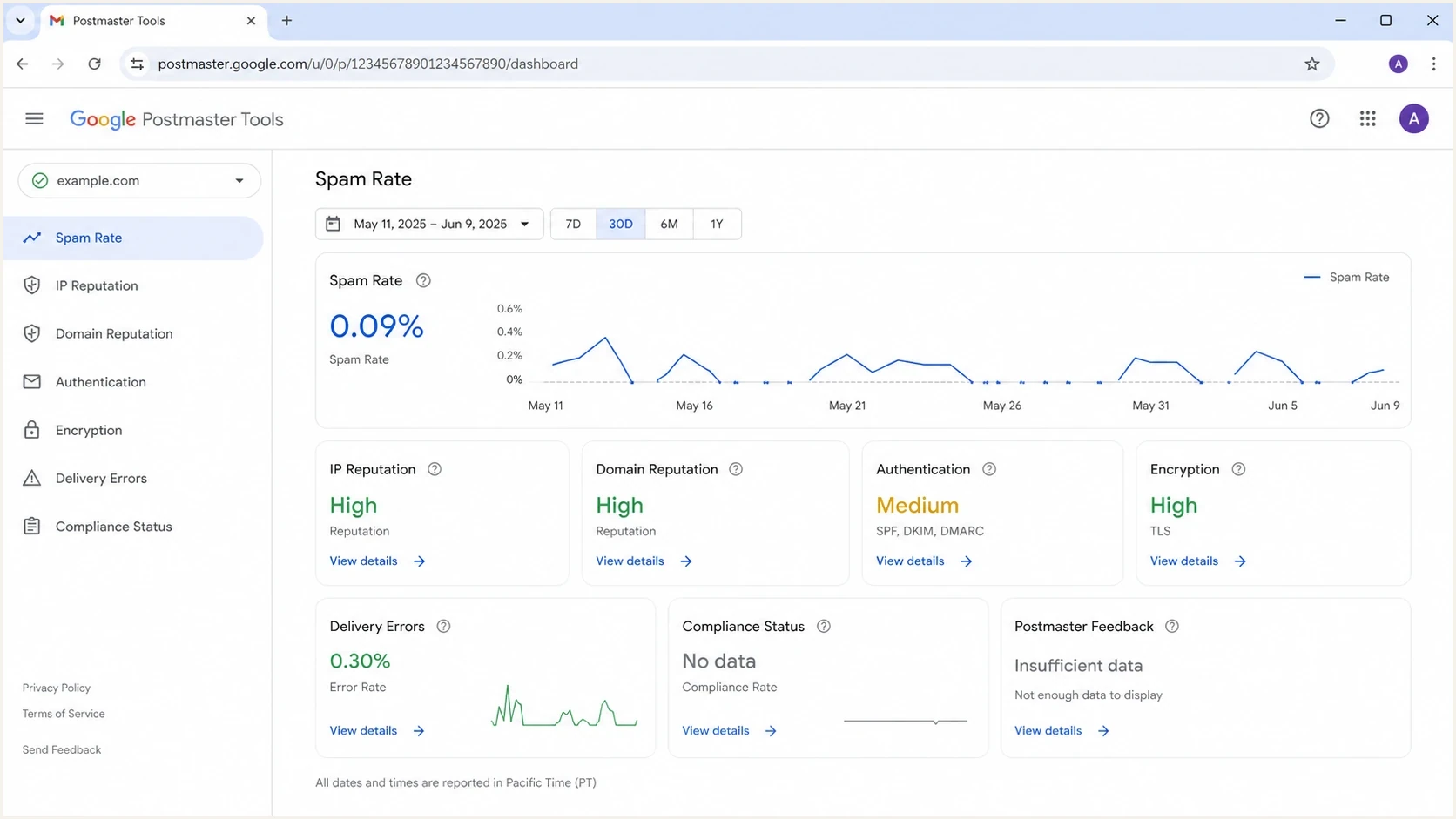
Google Postmaster Tools dashboard showing missing data on low-volume days.
A blank panel proves only that the provider did not return data for that day and view. It does not prove that delivery was healthy or broken. Compare the provider view with sending logs, bounces, authentication results, and complaint handling.
How to measure volume correctly
The cleanest way to predict whether SNDS or Google Postmaster Tools will show data is a daily recipient-provider report. Record the count by provider, time zone, sending IP, visible From domain, SPF domain, and DKIM signing domain. This exposes the thin slices hidden inside a campaign total.
Example daily volume slicetext
date,destination,from_domain,dkim_domain,ip,authenticated_recipients
2026-06-01,gmail,example.com,example.com,192.0.2.10,138
2026-06-01,microsoft,example.com,example.com,192.0.2.10,121
2026-06-02,gmail,example.com,example.com,192.0.2.10,47
2026-06-02,microsoft,example.com,example.com,192.0.2.10,92
The example gives a firm SNDS conclusion only. June 1 clears Microsoft's published low-volume caveat, while June 2 does not. For Gmail, 138 and 47 are useful planning counts, but neither number predicts dashboard visibility because Google publishes no threshold. If a second authentication domain or sending IP carries part of the Gmail traffic, dashboard-specific slices become smaller.
- By destination: Separate personal Gmail, Microsoft consumer mail, Google Workspace, corporate domains, and other providers.
- By day and time zone: Compare UTC days for Google Postmaster Tools and PST days for SNDS.
- By IP: Split Microsoft counts by sending IP because the SNDS caveat is IP-specific.
- By domain: Split Gmail counts by visible From, SPF, and DKIM domains to match the selected dashboard view.
Keep volume planning separate from reputation analysis. No data in Google Postmaster Tools does not mean complaints are zero. A missing SNDS row does not mean the IP had no Microsoft traffic. In both cases, the provider withheld or lacked enough data for that view.
When the data appears and how long it stays
Provider dashboards do not update in real time. SNDS aggregates the previous PST day's data around midnight, and processing can take a few hours. Microsoft keeps SNDS data available for 90 days. Google Postmaster Tools uses UTC and typically updates within 24 hours, although updates can take longer.
|
|
|
|
|---|---|---|---|
SNDS | PST, with daylight adjustments | A few hours after midnight | 90 days |
Google Postmaster Tools | UTC | Usually within 24 hours | Up to 120 days selectable |
Gmail compliance status | Rolling multi-day view | Changes can take up to 7 days | Current status view |
Timing differences that can make recent data look incomplete.
Wait for the normal processing window before diagnosing a missing day. For Gmail compliance changes, compare the status again after seven days because the dashboard uses a rolling average. Day-boundary differences also explain why internal logs and provider totals can disagree even when both are correct.
Check the clock before the threshold
A late dashboard, a UTC versus PST mismatch, or a rolling compliance calculation can look like low-volume suppression. Normalize logs to the provider's day before changing sending volume.
What to check before blaming volume
Volume is only one reason these dashboards go blank. Before changing a sending plan, check authorization, domain verification, and authentication. An IP can have enough Microsoft traffic but remain invisible without SNDS access. A domain can have personal Gmail traffic but show no Postmaster data when the wrong authentication domain was added or the domain is not verified.
Start with a broad domain check. A domain health check can expose authentication and DNS issues that make provider dashboards harder to interpret. Check SPF, DKIM, DMARC, reverse DNS, and whether the actual sending source matches the expected source.
?
What's your domain score?
Deep-scan SPF, DKIM & DMARC records for email deliverability and security issues.
Then review the exact DKIM signing domain, SPF Return-Path domain, and visible From domain used by each sender. Google Postmaster Tools asks for the DKIM or SPF authentication domain during setup. Its Authentication dashboard can group results by From domain or by DKIM and SPF domains, so selecting the wrong view can look like a volume problem.
Basic DMARC record for monitoringdns
_dmarc.example.com TXT
"v=DMARC1; p=none; rua=mailto:dmarc@example.com"
Do not raise volume just to create data
Increasing send volume only to populate Google Postmaster Tools or SNDS is risky. Weak list quality can create complaints, spam trap hits, and blocklist or blacklist exposure before the dashboards become useful.
- Better move: Send consistently to engaged recipients and let provider data appear when the eligible volume is sufficient.
- Bad move: Combine stale lists or unproven segments only to cross an assumed reporting floor.
Where Suped fits
SNDS and Google Postmaster Tools are destination-specific and incomplete by design. They show what Microsoft or Google exposes after its reporting conditions are met. They do not replace DMARC aggregate reporting, source inventory, bounce analysis, or blocklist and blacklist monitoring.
Suped is our DMARC and email authentication platform. Its DMARC monitoring workflow groups sending sources, SPF results, DKIM results, and DMARC domain matching across providers. Its blocklist monitoring can add blacklist and blocklist context when a provider panel is blank or a sending IP changes.
Suped DMARC dashboard showing email volume, authentication health, and source breakdown
Use SNDS for Microsoft IP-level signals, Google Postmaster Tools for Gmail dashboard signals, Suped for cross-provider authentication and source monitoring, and sending logs for exact daily counts. Together, those views separate low eligible volume, setup errors, reputation problems, and provider suppression.
For a single-message check, send a campaign-style message through Suped's email tester before waiting for provider dashboards. This does not replace SNDS or Google Postmaster Tools trend data. It catches authentication, DNS, content, and routing errors in an individual message.
A practical monitoring workflow
- Confirm SPF, DKIM, DMARC, reverse DNS, and TLS before interpreting provider dashboards.
- Track daily destination volume by provider time zone, sending IP, and authentication domain.
- Compare DMARC and delivery signals when a provider panel has no data.
- Investigate complaint spikes, blocklist or blacklist hits, and unknown sources promptly.
How to act on missing data
When SNDS is empty, first check whether the IP crossed 100 Microsoft-recipient messages during the relevant PST day. Then confirm that the IP is authorized in SNDS and that the traffic went to Microsoft consumer systems. If those checks pass and the row remains blank, compare bounces, complaint feeds, and Microsoft-specific deferrals instead of assuming the IP is clean.
When Google Postmaster Tools is empty, check eligible authenticated mail to personal Gmail accounts for the relevant UTC day. Then check setup details: an unverified domain, the wrong SPF or DKIM domain added to Postmaster Tools, a subdomain split, or several authentication domains dividing volume. Also confirm which dashboard view is selected because its domain grouping can differ.
Why a monthly total can fail
A sender can have healthy total volume but still miss provider reporting conditions after destination and infrastructure splits.
Gmail
Microsoft
Other
The chart shows the reporting problem. The sender has 490 messages in one day, but neither Microsoft IP slice crosses 100. Google receives 120 messages, but that count can divide again by authentication domain and dashboard eligibility. The Microsoft conclusion follows a published caveat. The Google outcome remains uncertain because Google does not disclose its minimum. Cleaner reporting, stable IP assignment, and fewer unnecessary authentication domains make the result easier to diagnose.
If data appears and then disappears, compare missing dates with send calendars and provider time zones. A paused campaign, routing change, IP pool change, DKIM change, or domain change can explain the gap. If eligible volume stayed stable, compare the result with SNDS and GPT accuracy guidance before making a major sending decision.
Views from the trenches
Best practices
Track daily Gmail and Microsoft-recipient volume separately from campaign totals.
Group verified domains, signing domains, and visible From domains by send stream.
Pair sparse provider panels with DMARC, bounce, complaint, and blocklist evidence.
Common pitfalls
Treating Gmail's 5,000-message bulk rule as a Postmaster data minimum causes errors.
Spreading low Microsoft volume across many IPs can leave every SNDS row empty.
Changing domains during warmup can split the traffic that Google groups for reporting.
Expert tips
Use active-day counts because monthly totals hide provider-specific low-volume days.
Check domain verification and authentication before blaming an empty panel on volume.
Normalize logs to UTC for Google and PST for SNDS before comparing daily totals.
Marketer from Email Geeks notes that SNDS warns mail traffic and spam data can be absent below 100 messages from an IP on a given day.
2019-09-27 - Email Geeks
Marketer from Email Geeks reports seeing some Google Postmaster data near 100 messages per day, but Google does not publish that number as a minimum.
2019-09-27 - Email Geeks




