
How accurate is SNDS and Google Postmaster Tools reputation data?

Updated on 24 Oct 2026: We corrected the SNDS reporting guidance and clarified how to compare provider reputation and complaint data.
Microsoft's Smart Network Data Services (SNDS) and Google Postmaster Tools reputation data is useful, but it is not exact. Treat both as directional provider telemetry, not as a live inbox placement report. A green SNDS color does not prove Microsoft inbox placement. A high Gmail reputation label, where still available in legacy dashboards, does not prove every campaign is healthy. The data tells you how one mailbox provider has recently grouped some of your traffic, under its own rules, with its own thresholds and delays.
SNDS reports IP-level activity for Microsoft consumer mail. Google Postmaster Tools reports traffic sent to personal Gmail accounts, excluding Google Workspace recipients. A color or reputation category does not provide an inbox placement percentage. Compare each signal with delivery evidence for the provider it covers.
- Use these dashboards to identify trends and investigate delivery symptoms.
- Compare them with complaints, bounces, blocks, engagement, DMARC, and send volume.
- Check current campaign results even when an IP is green or a legacy Gmail reputation rating is high.
How accurate are the reputation signals?
SNDS color is easy to misread as a measure of inbox placement. It can show green while Outlook.com and Hotmail users still see junk placement, throttling, or inconsistent delivery. The color aggregates spam-filter verdicts for an IP and reporting period; recipient settings and other filtering decisions affect individual messages. A disagreement between color and delivery symptoms therefore does not establish that the underlying logs are inaccurate.
Google Postmaster Tools also needs context. Gmail dashboard data is not real time. Google says it typically updates within 24 hours, although some changes take longer, and Compliance status uses a rolling average, so Google recommends checking again after seven days. Low-volume senders often see gaps or no data, and anyone troubleshooting a blank dashboard should first check volume requirements before assuming the domain has no reputation signal.
What provider dashboards can confirm
A mailbox provider dashboard answers a narrow question: what did this provider choose to expose about a subset of traffic? It does not answer whether every message reached the inbox, whether content was filtered for a single segment, or whether a reputation change started today.
- SNDS color: A rough IP signal for Microsoft consumer mail, not a delivery guarantee.
- Gmail reputation: A provider-specific trend signal, delayed and dependent on qualified volume.
- Actual diagnosis: Requires campaign, audience, authentication, bounce, complaint, and block data together.
Where SNDS is useful
SNDS is useful when you need a Microsoft consumer-mail view of dedicated sending IPs. It can show message volume, complaint rate, IP status, and filtering results at an IP level. That is valuable when a specific IP starts behaving differently from the rest of a pool, or when a new traffic stream appears on infrastructure that should be quiet.
The color is coarse. In SNDS, green means Microsoft rendered a spam verdict under 10% of the time for that IP and activity period, yellow spans roughly 10% to 90%, and red exceeds 90%. These are filtering categories, not inbox placement percentages. One message addressed to ten recipients contributes ten verdicts. Shared IPs blend traffic across senders, so an IP-wide result can hide a campaign problem. Microsoft documents these definitions.
Good SNDS use
- IP drift: Spot one IP changing while the rest of the pool stays normal.
- IP status: Investigate abuse or blocking indicators alongside delivery logs.
- Complaints: Use complaint movement as a campaign and audience warning.
Bad SNDS use
- Green equals inbox: Green does not prove Microsoft is placing mail in the inbox.
- One-day reads: Daily anomalies need corroboration before you change sending strategy.
- Domain diagnosis: SNDS is IP-focused, so it misses plenty of domain and content context.
Do not use SNDS to compare Microsoft 365 business delivery with Outlook.com delivery. SNDS is built around Microsoft consumer mail properties such as Outlook.com, Hotmail, Live, and MSN. Microsoft 365 tenant filtering has different context, policies, and admin controls, so SNDS does not explain every Microsoft delivery problem.
|
|
|
|---|---|---|
Color | Broad filtering category | Inspect campaign symptoms and delivery logs. |
Complaints | Complaint date can differ from send date | Compare with recent campaigns and Microsoft's complaint feedback loop (JMRP) reports. |
Historical trap hits | Removed from current reports | Treat retained transition values as approximate evidence. |
Volume | IP-wide, including other senders on shared IPs | Investigate unexpected traffic with the IP operator. |
Interpretation limits for current and historical SNDS signals.
What the SNDS reporting changes mean
Microsoft's 2026 SNDS migration changed the evidence available to senders. Its July portal announcement set June 22, 2026 as the retirement date for old automated-access URLs and July 22, 2026 as the removal date for trap-hit counts. Transition trap values were approximate. A missing trap column is therefore an expected reporting change, not evidence of zero spam-trap activity.
- Verify automated downloads use the replacement link shown under Automated Data Access in the current SNDS portal.
- Check network authorization when data stops. Access expires 10 months after approval or migration and requires ownership reattestation.
- Use remaining traffic, complaint, filter-result, and IP-status signals with JMRP reports and delivery logs. Retained trap exports are historical context.
The current SNDS announcement also warns that the first reattestation reminder has an incorrect deadline date. Check the actual approval or migration date when investigating access loss.
Where Google Postmaster Tools is useful
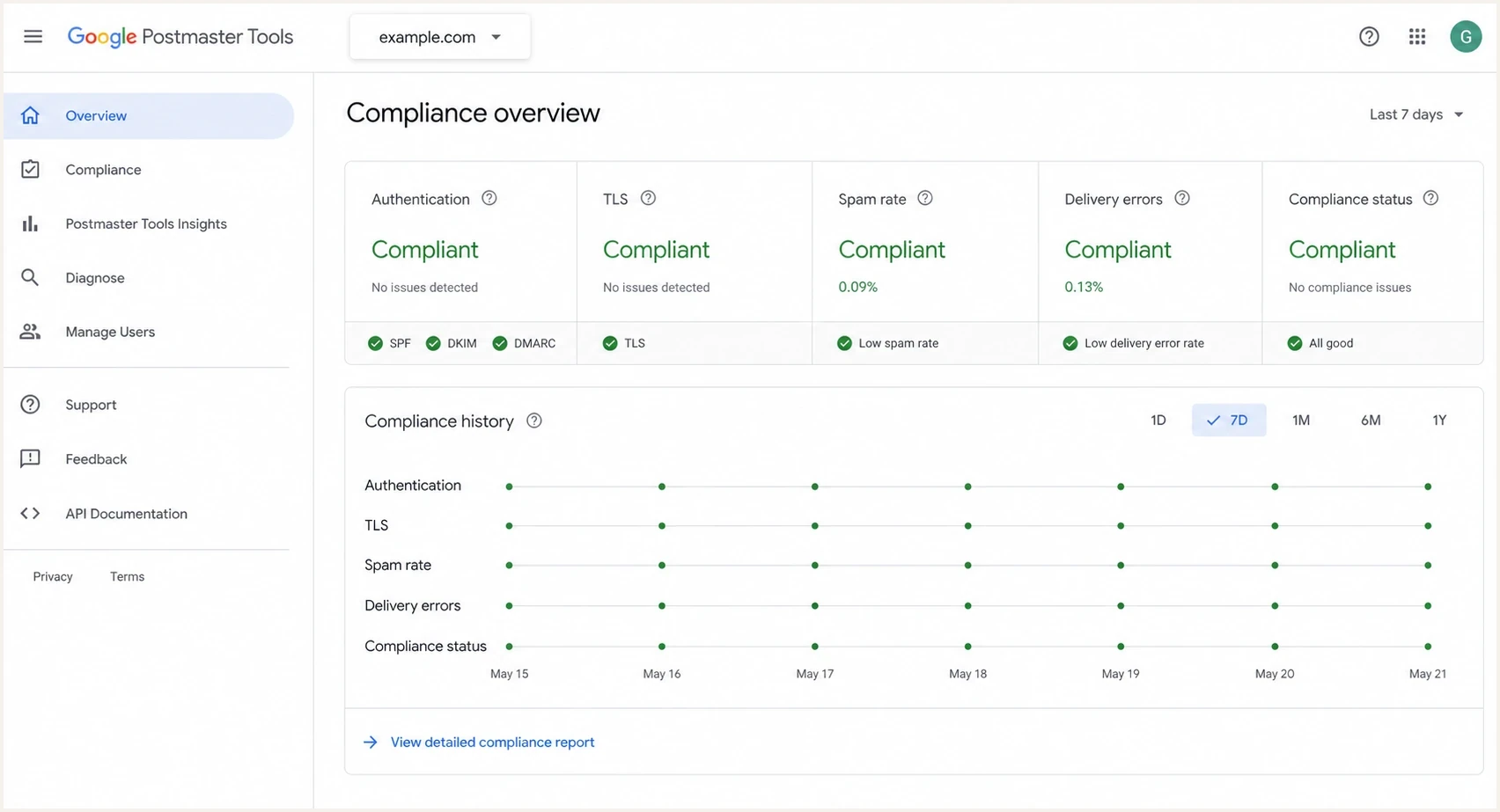
Google Postmaster Tools v2 compliance dashboard with authentication, spam rate, TLS, delivery errors, and compliance status.
Google Postmaster Tools is strongest when you use it to understand Gmail-specific direction over time. It shows authentication results, delivery errors, user-reported spam rates, feedback loop data, and TLS use. Legacy dashboards, where available, also show broad domain or IP reputation movement. It cannot tell you whether a single message reached the inbox for a single user.
The legacy reputation charts are blunt but useful when available. High, medium, low, and bad are category labels, not precise scores. Google's v2 interface emphasizes compliance and deliverability diagnostics. The v2 API is available and adds compliance status, domain management, date-range queries, and batch queries, but it excludes Domain and IP Reputation data. Google's retirement notice postpones the legacy web-interface retirement without a new date and confirms that the two reputation dashboards will retire. If you are comparing the old and new data, read v1 versus v2 before treating their scopes as equivalent.
How much to trust provider reputation labels
A practical weighting for troubleshooting, where higher trust means the signal is closer to a concrete sending problem.
Low trust
Unconfirmed
Single-day color or label movement without matching symptoms.
Medium trust
Repeated
Repeated movement matching complaints, blocks, or bounces.
High trust
Corroborated
Persistent trend confirmed by authentication, volume, and recipient behavior.
A missing or blank Google Postmaster Tools report is not proof that everything is healthy. First distinguish an unavailable metric from a blank chart: v2 omits Domain and IP Reputation, while a blank legacy chart needs investigation. Google does not publish a fixed daily volume that guarantees dashboard data; low-volume days are subject to privacy thresholds. The 5,000-message bulk-sender threshold is a sender-requirements threshold, not a dashboard visibility guarantee. For a blank legacy chart, check missing reputation data, then inspect authentication and traffic by sending source.
Why Google dashboard numbers can disagree
Two Google Postmaster Tools dashboards can show different results for the same date without either one being wrong. They can use different message sets, authentication identities, time windows, and aggregation rules. Before comparing values, check the selected view and whether it groups traffic by the visible From: domain, DKIM signing domain, or SPF Return-Path domain. Add a sending subdomain separately when you need its non-compliance dashboards isolated from the parent domain.
- Time zone and delay: Dashboard dates use UTC. Data usually updates within 24 hours, but it can take longer.
- Authentication scope: Spam rate uses DKIM-authenticated messages. Reputation also uses DKIM-authenticated traffic, with SPF-authenticated traffic used when DKIM is absent.
- Selected view: Authentication can group by From: or DKIM/SPF domains; its DKIM/SPF view omits DMARC. Feedback Loop can group by From: or all successful DKIM signers.
- Domain rollup: Compliance status reports the primary domain and includes its subdomain traffic, even when another dashboard isolates a subdomain.
- Different datasets: Compliance status uses a rolling multi-day average and a slightly different dataset from other dashboards.
- Missing traffic: Low-volume days can be hidden for privacy, and forwarded messages are excluded where possible but can still appear.
Compare like with like
Match the selected domain, UTC date, authentication identity, and dashboard definition before treating a difference as an accuracy problem. After fixing a Compliance status issue, Google recommends checking again after seven days. Google's dashboard definitions explain these differences.
Why Gmail spam rate can mislead
Gmail's spam-rate dashboard reports the percentage of eligible DKIM-authenticated inbox messages that engaged recipients mark as spam. It does not measure every message Gmail automatically classified as spam. Messages moved out of spam by recipients also enter the inbox-delivered denominator. A low or missing spam rate can therefore coexist with poor filtering outcomes.
- Low spam rate with poor delivery: Gmail might already be routing too much mail to spam, leaving fewer recipients to complain.
- High spam rate with good reputation: Complaints from inboxed mail can appear before the reputation label changes.
- Missing data: Low volume or privacy thresholds can leave gaps.
- Campaign diagnosis: Use Feedback-ID, domain, campaign type, and recent engagement before changing volume.
Keep Gmail user-reported spam below 0.10% and avoid reaching 0.30% or higher, as specified in Google's sender guidelines. These thresholds do not measure inbox placement. SNDS uses complaints divided by message recipients for an IP and records complaints on the day they are reported, even when the message was sent earlier. Its rate can therefore exceed 100% on a low-volume day. Compare complaint trends within each provider rather than treating the percentages as equivalent. Seedlist tests add placement evidence for test accounts, but do not reproduce subscriber behavior or validate provider reports on their own.
How to verify provider reputation data
The safest way to read SNDS and Google Postmaster Tools is to separate observation from conclusion. The observation might be "SNDS is green" or "Gmail spam rate rose last week". The conclusion is the action you take. Too many senders jump straight to the conclusion and change volume, IPs, domains, or content before checking whether the dashboard data matches real recipient behavior.
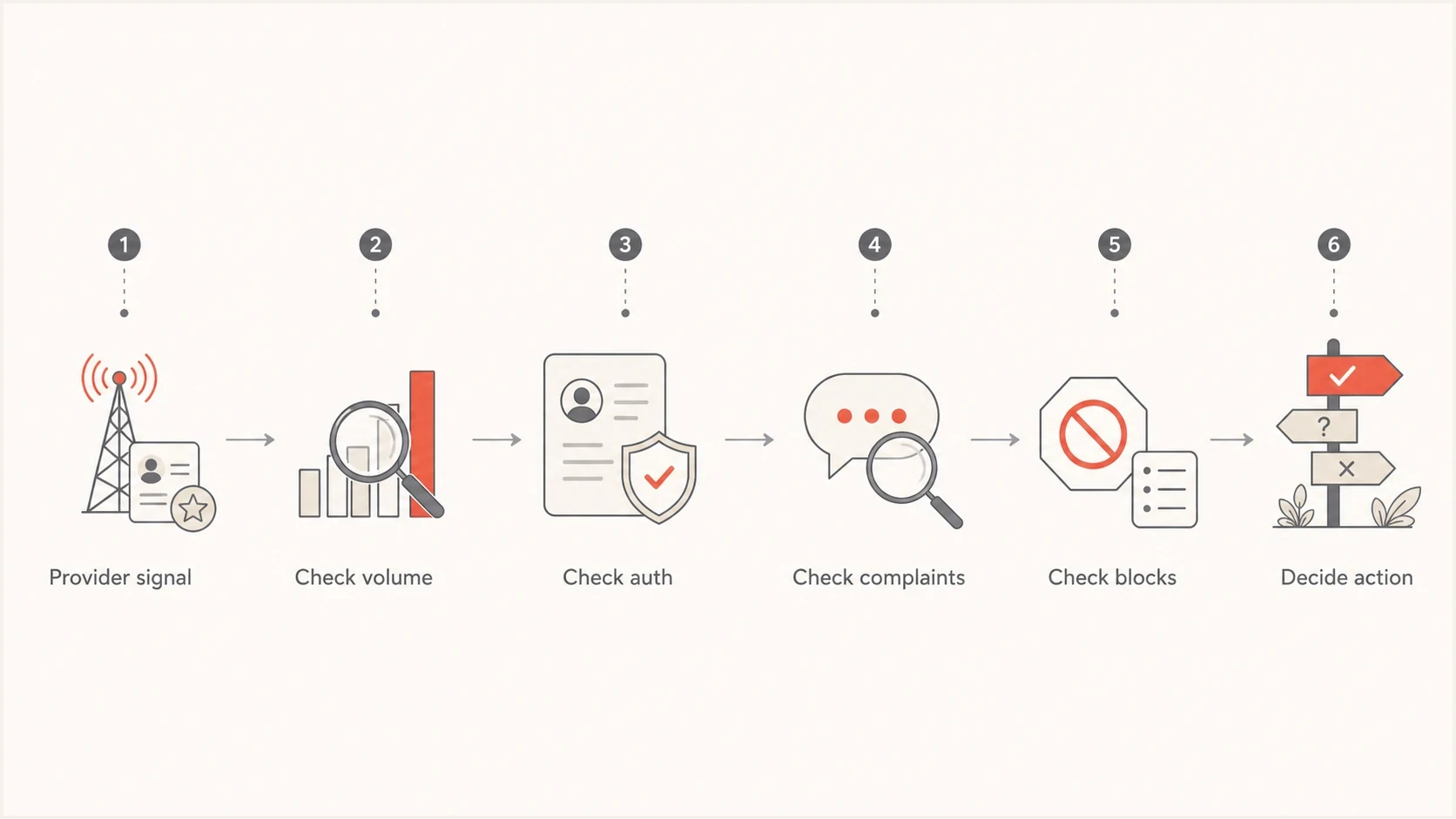
Flowchart for validating provider reputation data before changing email sending strategy.
- Check scope: Confirm whether the signal applies to a domain, subdomain, IP, provider, or recipient group.
- Check timing: Match Gmail's UTC date and SNDS's displayed activity period to your send logs; Microsoft's FAQ defines SNDS activity periods in Pacific Time.
- Check volume: Low traffic makes provider data sparse, delayed, or absent.
- Check authentication: Look for SPF, DKIM, and DMARC failures by source before blaming reputation.
- Check recipients: Segment by recent engagement, acquisition source, region, and domain.
A simple interpretation rule
If a provider dashboard disagrees with mail logs, complaints, and recipient behavior, do not ignore either side. Check for scope differences, processing delays, or a reporting interruption. Match the affected traffic before deciding which signal explains the delivery issue.
Example DMARC reporting record at _dmarc.example.comdns
v=DMARC1; p=none; rua=mailto:dmarc-reports@example.com;
That DMARC record requests aggregate reports; p=none requests no quarantine or rejection for DMARC failures. Replace the example rua address with your reporting destination. Aggregate reports map sending sources to SPF, DKIM, and DMARC results, but do not show inbox placement. Suped's DMARC reporting product turns raw XML into source-level diagnostics and steps for fixing misconfigured senders.
What to monitor alongside provider reputation data
Provider reputation data becomes useful when it sits next to the operational signals you control. Suped's DMARC reporting and email authentication platform helps identify sending sources and authentication failures. Compare those findings with SNDS or Google warnings, then use Suped's blocklist (blacklist) monitoring and message tests to investigate infrastructure changes.
Suped DMARC dashboard showing email volume, authentication health, and source breakdown
The point is to add the context provider dashboards do not expose: who is sending, which domain authenticated, which source failed, which IP changed, and whether a blocklist (blacklist) event or DNS issue started around the same time.
|
|
|
|---|---|---|
DMARC | Shows source and authentication status. | |
DNS health | Finds broken SPF, DKIM, and DMARC. | |
Blocklists | Shows IP and domain reputation events. | |
Live tests | Checks a real message at the test destination; does not measure production inbox placement. | |
Seedlists | Shows directional placement for test accounts. | Compare with live data. |
Signals that make provider dashboards more useful.
Keep provider dashboards open, but never alone. If Google flags an authentication issue, confirm the exact source in DMARC. If SNDS shows unexpected volume or an abuse indicator, inspect the traffic tied to that IP and review JMRP complaint reports. If Microsoft users complain while SNDS stays green, look for content, engagement, tenant-level filtering, and domain-level problems outside the SNDS color.
Email tester
Send a real email to this address. Suped shows a results button when the test is ready.
?/43tests passed
A real test message is especially useful after a dashboard changes. It lets you inspect headers, authentication, TLS, and technical delivery issues in the same window of time as the provider signal. The result describes delivery to the test address; it does not establish placement for Gmail or Microsoft subscribers. Compare it with production logs before changing infrastructure or sending behavior.
What to do next
When SNDS and Google Postmaster Tools disagree, give priority to direct user symptoms and measurable delivery failures. A dashboard color does not override rising deferrals, spam complaints, hard bounces, authentication failures, or a clear segment-level drop in engagement.
Illustrative reputation recovery pattern
These relative values show a common fall-and-recovery shape, not Google or Microsoft measurements or a recovery promise.
illustrative signal
Avoid overreacting. If one dashboard turns red for one day and every other signal is quiet, keep watching and check the slices. If reputation stays poor and complaints, blocks, or engagement confirm it, reduce risky traffic, suppress unengaged recipients, fix authentication gaps, and stop the campaign type that caused the change.
- If SNDS is green: Still check Microsoft complaints, blocks, segmentation, and user-reported junk placement.
- If SNDS is red: Check complaint spikes, IP-status warnings, unexpected volume, and other traffic sharing that IP.
- If Gmail data drops: Look for recent volume spikes, spam-rate movement, list changes, and authentication failures.
- If data is absent: Confirm traffic volume, domain verification, the selected domain and view, and whether that metric is still available. For automated SNDS reports, also verify the current data link and network access.
Views from the trenches
Best practices
Compare provider labels with direct delivery symptoms before changing campaign send volume.
Investigate IP-level anomalies with campaign, source, and authentication data together.
Treat legacy Gmail reputation recovery as delayed after the sending problem is fixed.
Common pitfalls
Assuming an all-green SNDS day proves Microsoft inbox placement across every campaign.
Reading Gmail reputation as real-time data when it often trails operational changes.
Ignoring slow delivery decline because a legacy dashboard still shows a healthy label.
Expert tips
Use DMARC source data to connect provider warnings to the sending source behind them.
Separate Microsoft consumer mail signals from Microsoft 365 tenant delivery problems.
Watch sudden drops and slow declines differently because each suggests a different cause.
Marketer view
Marketer from Email Geeks says SNDS colors can look healthy even when multiple senders see the same suspicious all-green reporting day.
2021-12-10 - Email Geeks
Expert view
Expert from Email Geeks says SNDS is a separate reputation view and should not be read as the live system governing Microsoft inbox placement.
2021-12-13 - Email Geeks




