Google Postmaster Tools V1 vs V2: Which version is more accurate for spam complaint rates?

Published 6 Aug 2025
Updated 5 Aug 2026
11 min read
Summarize with
Updated on 5 Aug 2026: We updated this guide for the V2 API launch and clarified how Gmail calculates spam rate, rolls up compliance, and reports subdomain data.
If Google Postmaster Tools V1 and V2 disagree on spam complaint rates, use V2 for current Gmail compliance decisions. Google is moving senders to V2, and its Compliance status dashboard shows whether a domain meets Gmail's sender requirements. That makes V2 the operational source of record, although Google does not say that every V2 daily percentage is mathematically more accurate than the comparable V1 value.
A V1 spike still matters. If V1 shows 1.6% for a day while V2 shows no complaints, treat it as a warning that needs context, not a final verdict. Check whether the comparison uses the same metric, Gmail volume, UTC date, domain scope, DKIM-authenticated traffic, Feedback-ID coverage, and inbox exposure.
Direct answer
Use V2 for compliance and enforcement decisions. Use V1 as supporting context for legacy reputation data and historical trends while the interface remains available. For a raw spam-rate mismatch, compare equivalent views and investigate the underlying send streams before deciding which point reflects the affected traffic.
Which version to believe
The practical hierarchy is V2 first for current sender requirement compliance, then V1 for legacy reputation context, followed by sending logs for campaign-level detail. Google has postponed the old web interface's deprecation but still says V1 will eventually be retired. The V2 API is available, and Google says the V1 API will be retired, so integrations should move to V2.
V2 is stricter about how it presents compliance. Its Compliance status dashboard uses a rolling average gathered over multiple days and applies primary-domain reporting, privacy limits, and data filters. Data typically updates within 24 hours, but a corrected status can take up to seven days to appear. This makes the dashboard suitable for answering 'am I compliant?' but less useful for isolating one campaign's daily complaint rate.
V1
- Best use: Legacy domain and IP reputation checks while those views remain available.
- Risk: A daily number can look precise even when its scope differs from the V2 view being compared.
- Decision value: Useful for trend awareness, but not the final compliance answer.
V2
- Best use: Current Gmail sender compliance, spam-rate review, and API-based monitoring.
- Risk: Low-volume periods, rolling calculations, and domain rollups can hide or delay detail.
- Decision value: Current source for Gmail compliance calls, with raw rates interpreted in context.
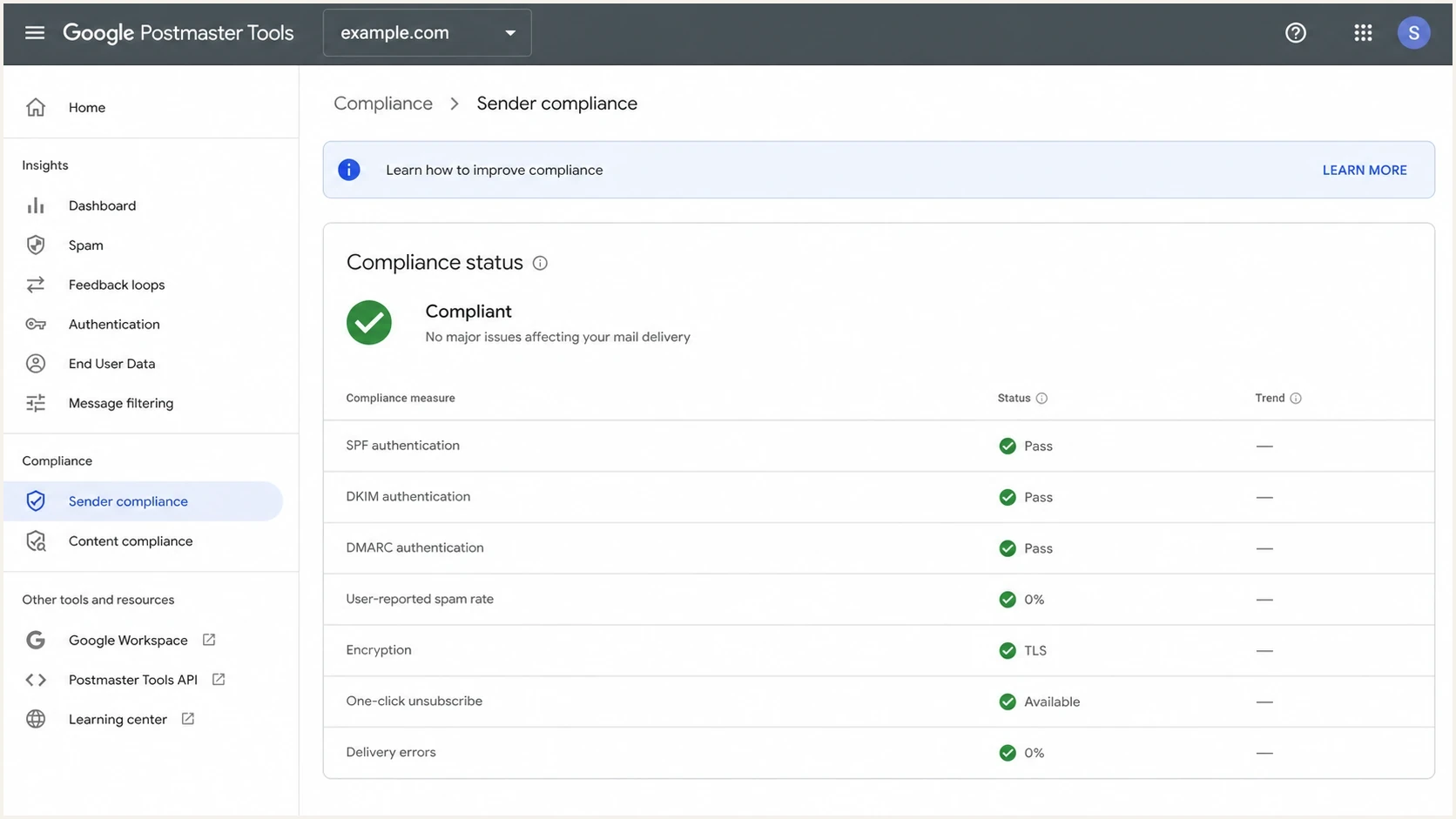
Google Postmaster Tools V2 compliance dashboard with spam rate status.
Accuracy depends on the metric
The strongest comparison uses like-for-like metrics. A daily Spam Rate value, a rolling Compliance status, and a Feedback Loop campaign rate answer different questions. A zero or blank result in one view does not contradict a non-zero value in another unless the date, authenticated traffic, domain scope, and denominator also match.
|
|
|
|---|---|---|
Spam Rate | What share of qualifying inboxed mail did engaged recipients mark as spam? | Only DKIM-authenticated mail and reportable volume appear |
Compliance status | Does the primary domain meet Gmail's sender requirements? | Rolling data can take up to seven days to reflect a fix |
Feedback Loop | Which tagged campaign traffic generated spam reports? | Feedback-ID setup and minimum data thresholds apply |
What each Google Postmaster Tools metric answers
The V2 API adds another scope distinction. It exposes domain statistics, compliance status, batch queries, domain management, and access management. A compliance response can also include subdomain-specific data when the requested domain is a subdomain and enough data is available, even though the V2 web compliance dashboard reports the primary domain.
Why the rates disagree
A mismatch between V1 and V2 does not prove the sender setup is broken. The dashboards are separate reporting surfaces, and the comparison often mixes a daily Spam Rate point with a rolling Compliance status. Google also says Compliance status uses slightly different datasets than other dashboards, so small variations are expected.
The most confusing case is V2 showing no complaints while V1 shows a high daily rate. V2 can lack reportable data for that slice, a small V1 denominator can amplify a few complaints, a subdomain can be grouped differently, or the UTC day boundary can differ from the sender's local reporting day.
|
|
|
|---|---|---|
Rolling average | Compliance status can lag | Wait up to seven days after a fix |
Domain scope | The V2 web compliance view groups primary domains | Check subdomain dashboards or V2 API data |
Low volume | Privacy limits hide data | Do not overread a blank or thin denominator |
DKIM scope | Spam Rate reports DKIM-authenticated mail | Check which traffic has a valid DKIM signature |
UTC dates | The calendar day shifts | Compare the same Gmail reporting date |
Filtered mail | Inbox exposure drops | A low rate can still accompany poor delivery |
Common reasons V1 and V2 complaint rates do not match
User-reported spam rate is not a count of everything Gmail classified as spam. It measures DKIM-authenticated messages delivered to engaged recipients' inboxes and then marked as spam. If Gmail filters many messages before inbox delivery, recipients have fewer opportunities to report them, so a low rate can coexist with poor inbox placement.
Feedback-ID header exampletext
Feedback-ID: promo:newsletter:spring-2026:sender
How to reconcile a mismatch
When V1 and V2 conflict, work backward from the sending event instead of choosing the more favorable chart. The dashboard can show that Gmail saw a problem, but campaign-level diagnosis requires sending logs, authentication data, and consistent message identifiers.
Start with the UTC date, then isolate Gmail-bound volume for that calendar day. Split by domain, subdomain, IP pool, message stream, campaign, and Feedback-ID. A spike isolated to one small stream points to campaign or targeting problems. A domain-wide pattern points toward authentication, list quality, unsubscribe processing, or a broader reputation issue.
- Confirm scope: Check whether V2 shows the primary domain while V1 or the V2 API shows a subdomain.
- Check volume: A few complaints on low inbox volume can create an unstable percentage.
- Review authentication: Confirm valid DKIM first, then check SPF and DMARC alignment across every active source.
- Match campaigns: Use Feedback-ID values to connect Gmail complaints to a send stream.
- Test a message: Send a real campaign sample through an email tester to inspect headers, DNS, content, and rendering clues.
Issues page showing top issues, verified sources, unverified sources, and authentication pass rates
Suped's product supports this workflow at the domain level. It combines DMARC monitoring, automated issue detection, source breakdowns, SPF and DKIM status, and blocklist monitoring (blacklist monitoring) in one place. It does not replace Google Postmaster Tools. It helps identify the sender or authentication issue behind a Gmail signal.
Suped's domain health checks can provide a fast DNS review before a policy change. A complaint spike often gets blamed on content, but broken authentication, return-path changes, or an unmanaged sender source can produce the same visible symptom.
What a 1.6 percent V1 spike means
A 1.6% spam complaint rate needs immediate investigation, even when V2 shows no complaints for the same day. Gmail recommends keeping spam rates below 0.1% and avoiding 0.3% or higher. A 1.6% daily value is far above those operating thresholds when the denominator contains meaningful volume.
Gmail complaint rate risk bands
Use these operating bands when reviewing V1 or V2 Spam Rate data.
No visible complaints
0%
Validate volume and inbox exposure before drawing a conclusion.
Below target
0.01-0.09%
Below Gmail's recommended 0.1% level.
Above target
0.10-0.29%
Investigate before the rate reaches Gmail's 0.3% ceiling.
Critical
0.30%+
Pause the affected stream and investigate its audience and sending setup.
The denominator matters. One complaint among 60 qualifying messages delivered to engaged recipients' inboxes produces a much larger percentage than ten complaints among 100,000 such messages. Read a daily percentage with Gmail volume, campaign count, and the send stream behind it.
Do not dismiss a high V1 spike
If V1 shows 1.6%, treat it as a signal for investigation. Keep V2 as the compliance source, but identify the send that produced the V1 rate. Act when the same stream also shows poor targeting, unsubscribe friction, weak engagement, or authentication drift.
Why Feedback Loop data can be empty
No Feedback Loop data does not prove there were no complaints. Gmail's Feedback Loop is campaign-oriented and depends on valid Feedback-ID headers. Google also requires a minimum number of spam reports and enough messages to engaged users before an identifier appears.
For multiple streams under one domain, use consistent Feedback-ID values that separate the stream, list, campaign, and sender. Avoid creating so many unique identifiers that each one falls below Gmail's data thresholds. If a high spam rate has sparse Feedback Loop data, Google recommends using fewer unique IDs.
Feedback-ID naming patterntext
Feedback-ID: stream:list:campaign:sender
Feedback-ID: promo:active-buyers:spring-sale:esp-a
Feedback-ID: lifecycle:onboarding:day-3:esp-b
The V2 Feedback Loop dashboard also provides From header domain and All signed domains views. Use the first to isolate mail whose visible From domain matches the selected domain. Use the second to include messages where that domain is any successful DKIM signer.
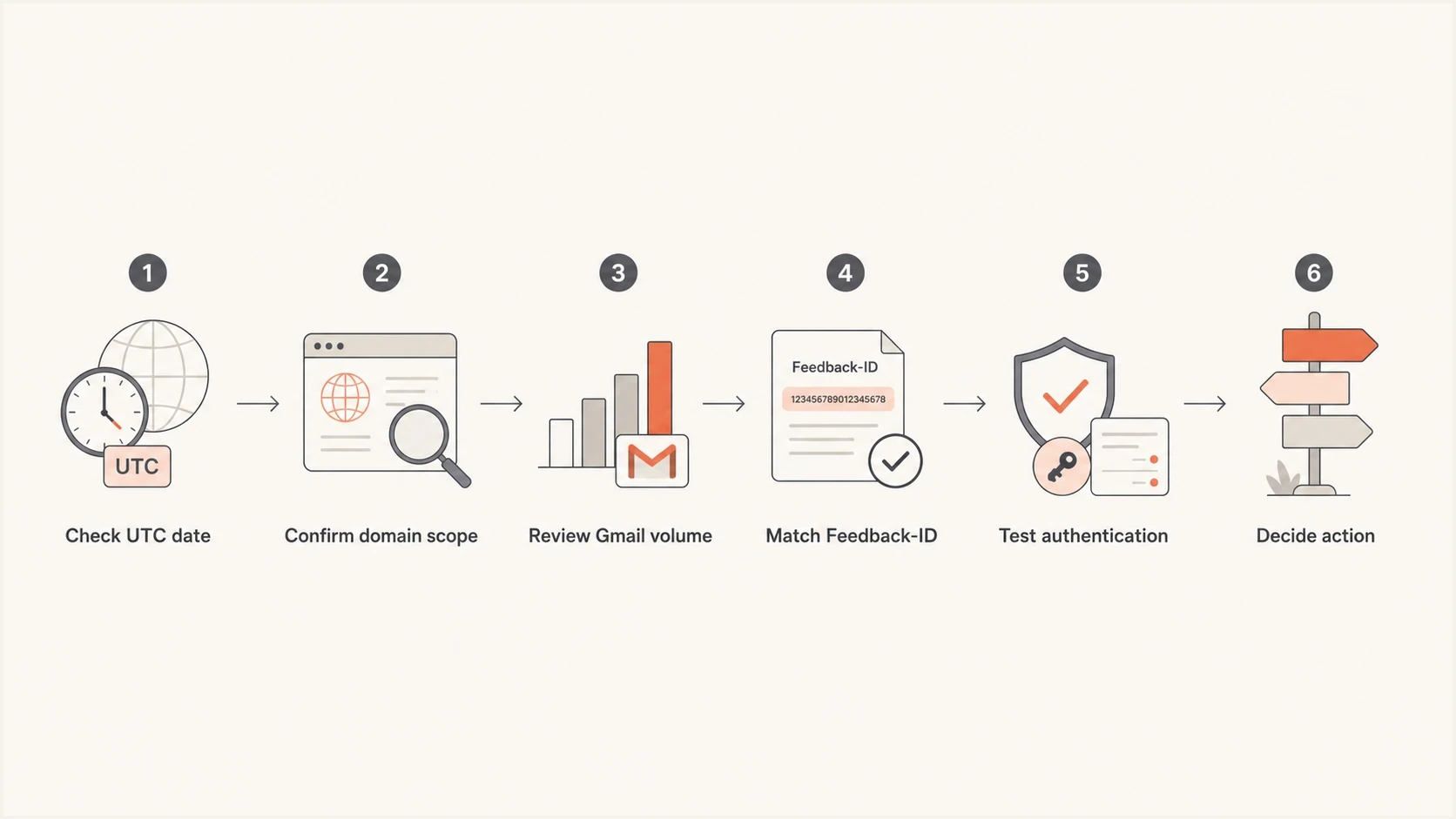
Flowchart for investigating a Postmaster Tools V1 and V2 spam rate mismatch.
How to use V1 during the transition
Keep V1 available when it provides legacy domain and IP reputation context that helps explain whether a spike is isolated or part of a longer decline. Google postponed deprecation of the old web interface, but it still plans to retire V1 and replace the existing reputation dashboards with more actionable reporting.
For current setup and access checks, start with V2 access. For the math behind the numbers, review spam complaint calculation. For an unexplained chart mismatch, compare it with known spam rate gaps before changing a high-volume send.
The operating model
- Use V2: Compliance status, current sender requirements, spam-rate monitoring, and V2 API integrations.
- Use V1: Legacy reputation context while the old dashboards remain available.
- Use Suped: DMARC reporting, authentication diagnosis, source attribution, and alerts across sending domains.
Suped turns DMARC aggregate data and authentication findings into source-level investigation steps. Gmail's dashboards still determine Gmail compliance. Suped helps connect a Gmail symptom to the sender, DNS record, or policy setting that needs attention.
Views from the trenches
Best practices
Use V2 for compliance decisions, then keep V1 reputation views only as supporting context.
Compare dates in UTC before treating a same-day V1 and V2 mismatch as a true conflict.
Tag campaigns with Feedback-ID so Gmail can group complaint signals when volume allows.
Common pitfalls
Treating a zero V2 spam rate as proof of no complaints ignores filtering and privacy limits.
Reading subdomain data in V1 against primary-domain compliance in V2 creates false gaps.
Chasing one daily spike without volume context wastes time on statistically thin complaint data.
Expert tips
Investigate any V1 spike above 0.3%, even when V2 compliance still shows a passing state.
Keep a sender log by domain, stream, and Gmail volume so mismatches have useful context.
Pair Gmail data with DMARC source data to find the sender behind the affected domain.
Marketer from Email Geeks says V2 should be treated as the source for compliance, even when V1 still has useful context.
2025-03-06 - Email Geeks
Marketer from Email Geeks says V1 is useful for old reputation checks, while V2 is better for current Gmail requirements.
2025-03-06 - Email Geeks
The practical answer
For current Gmail decisions, V2 is the version to use. Its Compliance status dashboard is authoritative for sender requirements, while its Spam Rate and Feedback Loop views provide supporting detail. V1 remains useful for legacy reputation context, but it should not overrule V2 compliance.
If V2 shows zero complaints and V1 shows 1.6%, do not ignore the spike or assume the figures measure the same traffic. Check Gmail volume, domain scope, UTC date, DKIM coverage, inbox exposure, Feedback-ID setup, and campaign logs. Fix the source when the spike maps to a real send stream, even if V2 compliance has not moved.
A practical workflow uses V2 for Gmail's compliance view, V1 for temporary reputation context, and Suped for DMARC source analysis, authentication issues, SPF limits, policy gaps, and blocklist (blacklist) signals.




